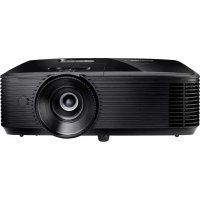
OPTOMA HD144X - Projector

HD144X - Projector OPTOMA - Free user manual and instructions

Find the device manual for free HD144X OPTOMA in PDF.

📄 4 pages English EN Download 💬 AI Question 1 questions
Notice OPTOMA HD144X - page 1
Pick your language and provide your email: we'll send you a specifically translated version.

User questions about HD144X OPTOMA

1 question about this device. Answer the ones you know or ask your own.

Ask a new question about this device

The email remains private: it is only used to notify you if someone responds to your question.

What does the red temperature indicator on the OPTOMA HD144X projector mean and how can I resolve this issue?
Frequently Asked Questions - 05/03/2026
Response Notice-Facile

The red temperature indicator on your OPTOMA HD144X projector indicates that the device has reached a high temperature and is at risk of overheating. To avoid any damage, it is important to act quickly.

What to do if the red temperature indicator lights up?

  1. Immediately turn off the projector and unplug it from the electrical outlet to avoid any risk.
  2. Allow the device to cool down for several minutes before any handling or restarting.
  3. Check the ventilation openings: ensure they are not blocked by dust, objects, or any other elements that could obstruct airflow.
  4. Clean the air filter if your model is equipped with one. A clogged filter reduces airflow and promotes overheating.
  5. Plug in and turn on the projector once it is completely cooled down and the ventilation is optimal.

If the problem persists

If the red temperature indicator continues to light up despite these precautions, it may indicate a technical problem requiring specialized intervention. It is then recommended to contact a customer service or a qualified technician for diagnosis and repair.
Respond (be the first)

Download the instructions for your Projector in PDF format for free! Find your manual HD144X - OPTOMA and take your electronic device back in hand. On this page are published all the documents necessary for the use of your device. HD144X by OPTOMA.

USER MANUAL HD144X OPTOMA

natural_image Line drawing of a projector with a circular lens and control panel (no text or symbols)

TABLE DES MATIÈRES

SÉCURITÉ .... 4

This Class B digital apparatus complies with Canadian ICES-003.

natural_image Illustration of a bundle of cables with connectors (no text or symbols)

OPTOMA HD144X - SÉCURITÉ .... 4 - 1

natural_image Diagram of a cable VGA connector with two connectors and coiled cables (no text or symbols on the diagram itself)

OPTOMA HD144X - SÉCURITÉ .... 4 - 2

text_image Technical diagram of a projector with numbered parts and directional arrows indicating assembly or positioning.
text_image Diagram illustrating the process of battery charge change and subsequent charging, showing a 2.5x increase from one to the other.
text_image Environ ± 15° Ovryo

UTILISER LE PROJECTEUR

text_image OU ON OFF User1 User2 Us Contrast

Marche

text_image OU Source Re-s Menu Volume

UTILISER LE PROJECTEUR

text_image 1080p 1920x1080 pixels

Remarque :

natural_image Illustration of a projector with internal components and a blue arrow indicating the blade (no text or symbols present)
text_image Diagram showing a projector with labeled parts and a hand holding a blade, illustrating the process of cutting or disassembly.

INFORMATIONS SUPPLÉMENTAIRES

text_image ON OFF User1 User2 User3 Brightness Contrast Mode Keystone Aspect ratio DB 3D Mute Sleep Timer Volume + Source Re-sync Menu Volume - HDMI1 HDMI2 VGA1 VGA2 Video YPbPr

www.os-worldwide.com

Canada

3178 Laurelview Ct.

Fremont, CA 94538, USA

www.optomausa.com

OPTOMA HD144X - Canada - 1

888-289-6786

OPTOMA HD144X - Canada - 2

510-897-8601

OPTOMA HD144X - Canada - 3

services@optoma.com

Taiwan

12F., No.213, Sec. 3, Beixin Rd.,

Xindian Dist., New Taipei City 231,

Taiwan, R.O.C.

+886-2-8911-8600

+886-2-8911-6550

services@optoma.com.tw

www.optoma.com.tw asia.optoma.com

Amérique Latine

3178 Laurelview Ct.

Fremont, CA 94538, USA

www.optomausa.com

OPTOMA HD144X - Amérique Latine - 1

888-289-6786

OPTOMA HD144X - Amérique Latine - 2

510-897-8601

OPTOMA HD144X - Amérique Latine - 3

services@optoma.com

Hong Kong

Unit A, 27/F Dragon Centre,

79 Wing Hong Street, +852-2396-8968

Cheung Sha Wan, +852-2370-1222

Kowloon, Hong Kong www.optoma.com.hk

Europe

Unit 1, Network 41, Bourne End Mills

Hemel Hempstead, Herts,

HP1 2UJ, United Kingdom

www.optoma.eu

service@tsc-europe.com

Chine

5F, No. 1205, Kaixuan Rd., +86-21-62947376

Changning District +86-21-62947375

Shanghai, 200052, China www.optoma.com.cn

Benelux BV

Randstad 22-123

1316 BW Almere

The Netherlands

www.optoma.nl

OPTOMA HD144X - Benelux BV - 1

+31 (0) 36 820 0252

OPTOMA HD144X - Benelux BV - 2

+31 (0) 36 548 9052

France

Bâtiment E

81-83 avenue Edouard Vaillant

92100 Boulogne Billancourt, France

OPTOMA HD144X - France - 1

+33 1 41 46 12 20

OPTOMA HD144X - France - 2

+33 1 41 46 94 35

OPTOMA HD144X - France - 3

savoptoma@optoma.fr

Espagne

C/ José Hierro,36 Of. 1C

28522 Rivas VaciaMadrid,

Spain

OPTOMA HD144X - Espagne - 1

+34 91 499 06 06

OPTOMA HD144X - Espagne - 2

+34 91 670 08 32

Allemagne

Wiesenstrasse 21 W

D40549 Düsseldorf,

Germany

OPTOMA HD144X - Allemagne - 1

+49 (0) 211 506 6670

OPTOMA HD144X - Allemagne - 2

+49 (0) 211 506 66799

OPTOMA HD144X - Allemagne - 3

info@optoma.de

Scandinavie

Lerpeveien 25

3040 Drammen +47 32 98 89 99

Norway

OPTOMA HD144X - Scandinavie - 1

+47 32 98 89 90

OPTOMA HD144X - Scandinavie - 2

info@optoma.no

PO.BOX 9515

3038 Drammen

Norway

Corée

WOOMI TECH.CO.,LTD.

4F, Minu Bldg.33-14, Kangnam-Ku,

Seoul,135-815, KOREA

korea.optoma.com

OPTOMA HD144X - Corée - 1

+82+2+34430004

OPTOMA HD144X - Corée - 2

+82+2+34430005

Manual assistant
Powered by Anthropic
Waiting for your message
Product information

Brand : OPTOMA

Model : HD144X

Category : Projector
