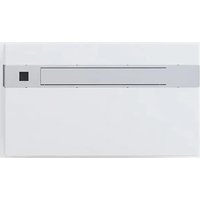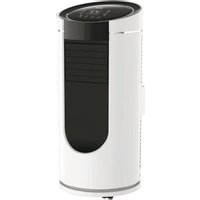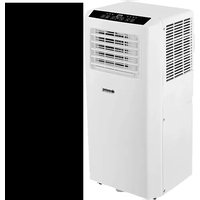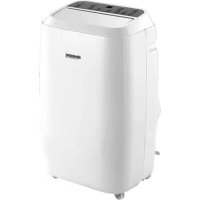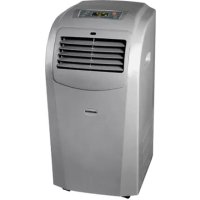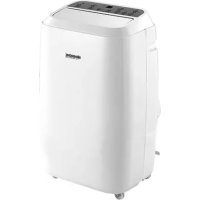
Fresco 140 - Air Conditioning Sonnenkönig - Free user manual and instructions
Find the device manual for free Fresco 140 Sonnenkönig in PDF.



| Product type | Mobile monoblock air conditioner |
| Brand | Sonnenkönig |
| Model | Fresco 140 |
| Dimensions (W x H x D) | 440 x 715 x 355 mm |
| Weight | Approx. 20 kg |
| Power supply | AC 220-240 V, 50 Hz |
| Power consumption | Not specified in the manual |
| Refrigerant | R290, 210 g |
| Cooling capacity | Not specified in the manual |
| Operating modes | Auto, Cool, Dehum, Fan, Sleep, Timer, Swing |
| Temperature range | 16 °C to 31 °C (in Cool mode) |
| Built-in Wi-Fi | Yes, compatible with the Sonnenkönig Smart Remote app |
| Remote control | Yes, included |
| Exhaust hose diameter | 150 mm, length 1500 mm |
| Filter maintenance | Clean every 2 weeks with a neutral detergent |
| Water tank | Manual drainage via bottom plug; overflow alarm |
| Safety | Gas leak protection, automatic stop on overflow, child safety |
| Warranty | 24 months |
| Included accessories | Exhaust hose, fittings, remote control, installation guide |
Frequently Asked Questions - Fresco 140 Sonnenkönig
User questions about Fresco 140 Sonnenkönig
0 question about this device. Answer the ones you know or ask your own.
Ask a new question about this device
Download the instructions for your Air Conditioning in PDF format for free! Find your manual Fresco 140 - Sonnenkönig and take your electronic device back in hand. On this page are published all the documents necessary for the use of your device. Fresco 140 by Sonnenkönig.
USER MANUAL Fresco 140 Sonnenkönig
natural_image
White industrial air purifier with control panel and wheels (no visible text or symbols)Inhaltsverzeichnis
natural_image
Line drawing of a rectangular industrial machine with cooling fins and wheels (no text or symbols)VORDERE ANSICHT
text_image
Back Register Switzerland +41 > Mobile number(E-mail) Newtext_image
+1 (530) 968-4304 [attention] Verification code: 168755 This code is for reg... Verification Co... Hybrid (36) Please import password Confirmtext_image
Back Add Device AP Mode Power on the device and confirm that indicator light rapidly blinks How to make indicator rapidly blink Confirm indicator rapidly blinktext_image
Cancel Enter Wi-Fi password Wi-Fi / Wi... Change network Confirm This app is supported only on 240% AI-in (changes)text_image
Cancel Connecting now 3% Make sure your phone and device... • Searching for device • Regularizing devices to the cloud • Installing your devicetext_image
Vorige CP 150 WIFI Indoor Temp/20°C 17°C Mode Show Next Window Set Temp ONnatural_image
Close-up of a hand pressing down on a white electronic device with buttons and display (no visible text or symbols)text_image
Close-up of a hand interacting with a device control panel showing icons and labels in Chinesenatural_image
Line drawing of a wall-mounted air conditioner unit connected to a monitor (no text or symbols)Abb. 5
natural_image
Line drawing of a simple air conditioner unit next to a large cabinet (no text or symbols)Abb. 5 A
natural_image
Line drawing of an air conditioner unit with ductwork and fan (no text or symbols)Abb. 6
natural_image
Technical line drawing of an air conditioner unit with coiled tubing and mounting bracket (no text or symbols)Abb. 7
Festnetz 14 Cent/Minute
natural_image
White industrial air purifier with control panel and wheels (no visible text or symbols)Table des matières
natural_image
Line drawing of a portable industrial machine with cooling unit and side-mounted fan (no text or symbols)III.1
VUE AVANT
VUE ARRIÈRE
Panneau de commande
natural_image
Line drawing of a rectangular electronic device with two wheels and a top lid (no text or symbols)Roulette
text_image
Switzerland +41 > Mobile number@t-mail Nexttext_image
+1 (530) 968-4304 [attention] Verification code: 168755 This code is for reg... Verification Co... ###158! Please import password Confirmtext_image
Back Add Device AP Mode Power on the device and confirm that Indicator light rapidly blinks How to make indicator rapidly blink Confirm indicator rapidly blinktext_image
Cancel Enter Wi-Fi password Wi-Fi / Wi... Change network Confirm This app is transferred only on 2.4GHz Wi-Fi passwordtext_image
Cancel Connecting now 3% Make sure your phone and device... • Searching for devices • Registering devices to their trust • Inserting your devicesnatural_image
Close-up of a hand interacting with a wall-mounted electronic device (no visible text or symbols)text_image
Close-up of a hand interacting with a device control panel showing buttons and display iconsnatural_image
Technical line drawings of industrial air ducts and wiring components (no text or symbols)111.7
Modifications techniques
Festnetz 14 Cent/Minute
natural_image
White industrial air purifier with control panel and wheels (no visible text or symbols)Indice
natural_image
Line drawing of a portable industrial machine with cooling unit and side-mounted fan (no text or symbols)VISTA FRONTALE
natural_image
Line drawing of a rectangular appliance with a lid and two wheels at the base (no text or symbols)Ruote
VISTA POSTERIORE
text_image
Back Register Switzerland +41 > Mobile number(E-mail) Nexttext_image
+1 (530) 968-4304 [attention] Verification code: 168755 This code is for reg... Verification Co... ###/u (530) Please Input password Confinstext_image
Back Add Device AP Mode Power on the device and confirm that indicator light rapidly blinks How to make indicator rapidly blink Confirm indicator rapidly blinktext_image
Cancel Enter Wi-Fi password Wi-Fi: Wi... Change network Confirm File app is supported only on 2.40% Wi-Fi channels q w e r t y u i o p a s d f g h j k l z x c v b n mtext_image
Cancel Connecting now 3% Make sure your phone and device... • Searching full device • Registering device to the phone • Installing your devicenatural_image
Line drawing of a wall-mounted air conditioner unit connected to a front panel (no text or symbols)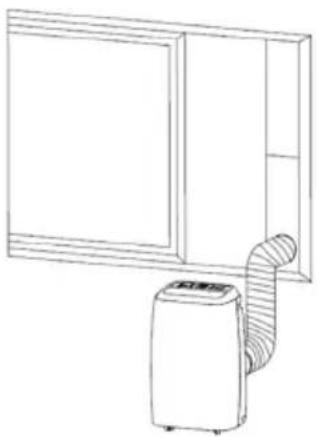
natural_image
Line drawing of a simple kitchen appliance with a coiled air tube and a door (no text or symbols)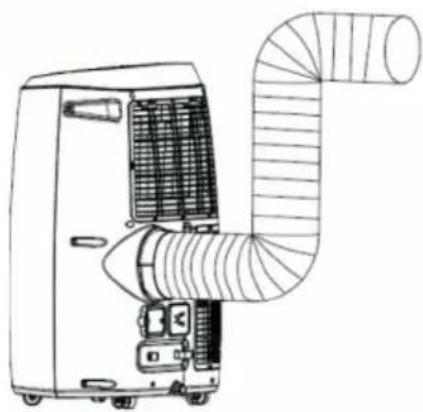
natural_image
Line drawing of an air conditioner unit with ductwork and ventilation slots (no text or symbols)Fig. 6 Fig. 5 A Fig. 5
natural_image
Technical line drawing of an air conditioner unit with coiled tubing and mounting bracket (no text or symbols)Fig. 7
IT
Festnetz 14 Cent/Minute
natural_image
White industrial air purifier with control panel and wheels (no visible text or symbols)EN
Table of Contents
1 Safety Instructions....61
2 Parts description 64
3 Accessories....64
4 Display panel, remote control and WIFI....65
5 Operating Instructions....65
6 Maintenance.... 69
7 Troubleshooting....72
8 Warranty / Disposal / Technical change 74
1. SAFETY INSTRUCTIONS
Please read before first commissioning the safety instructions carefully and observe the safety instructions to prevent damage due to misuse, improper operation, and improper environmental conditions to be avoided. Keep these for later reference.
EN
Check the device after removing the packaging for damage. Do not put the unit in case of suspected corruption in operation and consult a specialist. The recyclable packaging material must not be stored or disposed accessible for young children, but must be disposed of properly. This appliance is only for the purpose for which was explicitly developed. Any other use is regarded as improper and therefore dangerous. The supplier is liable for damage to persons and / or property damage due to an improper or incorrect use.
This appliance can be used by children aged from 8 years and above and persons with reduced physical, sensory or mental capabilities or lack of experience and knowledge if they have been given supervision or instruction concerning use of the appliance in a safe way and understand the hazards involved. Children shall not play with the appliance. Cleaning and user maintenance shall not be made by children without supervision. Please make sure to place the device on a suitable and waterproof surfaces, so that spilled liquids can not cause harm.
Repairs to electrical appliances must only be carried out by trained personnel only. Improperly performed repairs and alterations to the equipment can have dangerous consequences for the user according to what the warranty will be rejected.
VERY IMPORTANT! Wait at least 12 hours after unpacking the device before using it! Please do not install or use your mobile air conditioner before you have carefully read this manual. Please keep this instruction manual for possible warranty claims and for future reference.
WARNING:
- The device shall be stored in a room without continuously operating ignition sources (for example: open flames, an operating gas appliance or an operating electric heater).
- Do not pierce or burn the device.
- Be aware that refrigerants may be odourless.
Specific information regarding appliances with R290 refrigerant gas:
– Thoroughly read all the warnings.
- When defrosting and cleaning the device, do not use any tools other than those recommended by the manufacturing company.
- The device must be placed in an area without any continuously operating sources of ignition (for example: open flames, gas or electrical appliances in operation).
- Do not pierce or burn the device.
- This device contains 210g (see rating label on the back of the unit) of R290 refrigerant gas.
– R290 is a refrigerant gas that complies with the European directives on the environment. Do not puncture any part of the refrigerant circuit.
- If the device is installed, operated or stored in a non-ventilated area, the room must be designed to prevent the accumulation of leaking refrigerant as it poses a risk of fire or explosion if the refrigerant is ignited by electric heaters, stoves or other sources of ignition.
- The device must be stored in such a way as to prevent mechanical failure.
– Individuals who operate or work on the refrigerant circuit must have the appropriate certification issued by an accredited organisation that ensures competence in handling refrigerants according to a specific
evaluation recognised by the associations in the industry.
- Repairs must be performed based on the recommendation from the manufacturing company. Maintenance and repairs that require the assistance of other qualified personnel must be performed under the supervision of an individual specified in the use of flammable refrigerants.
Safety Awareness:
- Do not use the device on a socket which is under repair or not installed properly.
- Do not use the device in the following situations:
A: Near sources of fire.
B: In an area where oil is likely to splash.
C: In an area exposed to direct sunlight.
D: In an area where water is likely to splash.
E: Near a bath, a shower or a swimming pool.
- Never insert your fingers, sticks or similar objects into the air outlet. Take special care with and warn children of these dangers.
- Keep the unit upright during transport and storage so the compressor remains properly positioned.
- Before cleaning the air conditioner, always turn off or disconnect the power supply.
- When moving the air conditioner, always turn it off first, disconnect the power supply and move it slowly.
- To avoid a fire hazard, do not cover the air conditioner.
- All the sockets for the air conditioner must comply with the local electric safety requirements. If necessary, please check the requirements.
- Young children should be supervised to ensure that they do not play with the device.
- If the power cord is damaged, it must be replaced by the manufacturer, its service agent or similarly qualified persons in order to avoid a hazard.
- This appliance can be used by children aged 8 years and above and persons with reduced physical, sensory or mental capabilities or lack of experience and knowledge if they have been given supervision or instruction concerning use of the appliance in a safe way and understand the hazards involved. Children shall not play with the appliance. Cleaning and user maintenance shall not be made by children without supervision.
- The appliance shall be installed in accordance with national wiring regulations.
- Details of type and rating of fuses: T, 250V AC, 2A.
- To prevent possible harm to the environment or human health from uncontrolled waste disposal, recycle it responsibly to promote the sustainable reuse of material resources. To return your used device, please use the return and collection systems or contact the retailer where the product was purchased. They can take this product for environmental safe recycling.
- GWP: R290: 3
- Contact an authorised service technician for repair or maintenance of this device.
- Do not pull, deform or modify the power cord or immerse it in water. Pulling or misuse of the power cord can result in damage to the device and cause electrical shock.
- Compliance with national gas regulations shall be observed.
- Keep ventilation openings clear of any obstruction.
- Any person involved in working on or accessing a refrigerant circuit should hold a current valid certificate from an industry-accredited assessment authority, which authorises their competence to handle refrigerants safely in accordance with an assessment specification recognised by the industry.
- Servicing shall only be performed as recommended by the manufacturer of the device. Maintenance and repair requiring the assistance of other skilled personnel shall be carried out under the supervision of the person competent in the use of flammable refrigerants.
- Do not operate or stop the device by inserting or pulling out the power plug, as it may cause electric shock or fire due to heat generation.
- Unplug the device if strange sounds, smell, or smoke come from it.
Notes:
- If any parts are damaged, please contact the dealer or a designated repair shop.
– In case of any damage, please turn off the air switch, disconnect the power supply and contact the dealer or a designated repair shop. - The power cord must always be firmly grounded.
- To avoid any hazard resulting from a damaged power cord, please turn off the air switch and disconnect the power supply. It must be replaced by the dealer or a designated repair shop.
EN
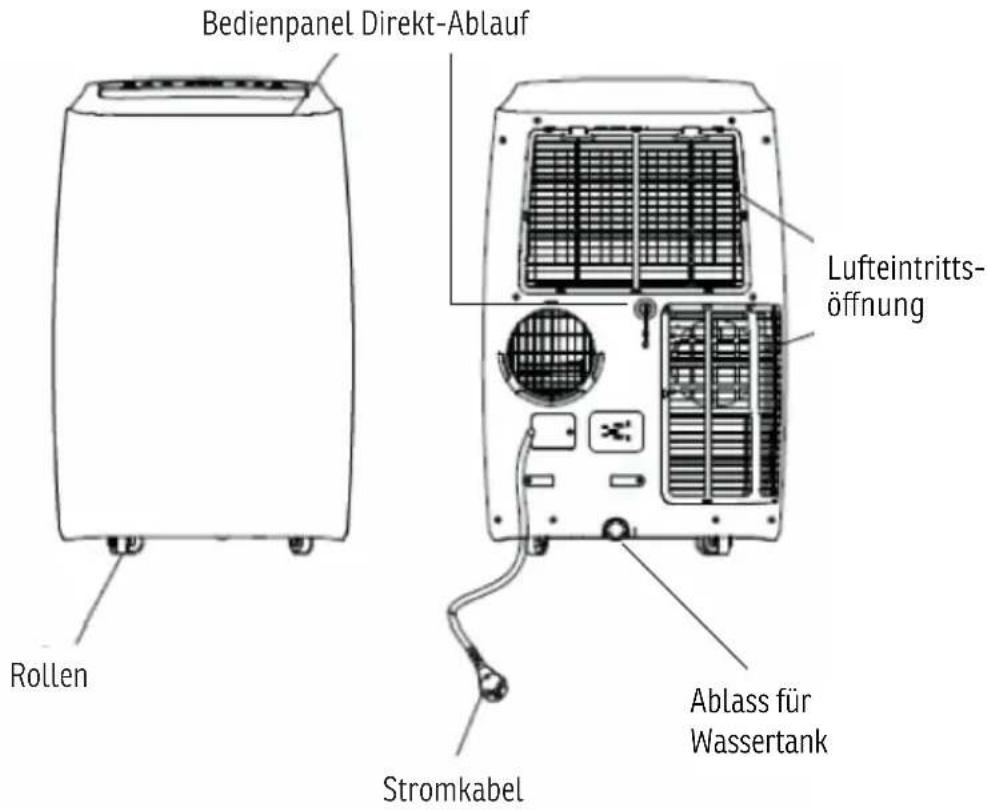
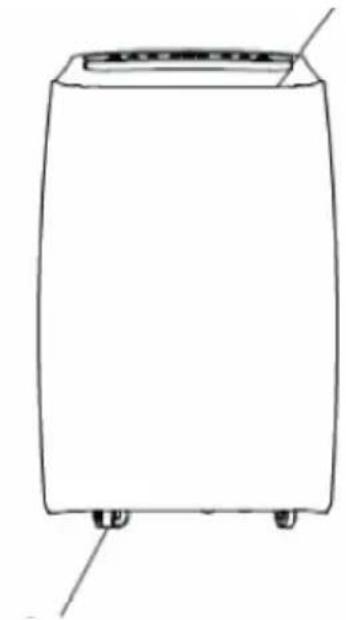
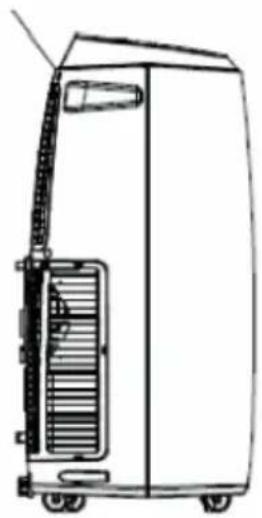
2. PARTS DESCRIPTION
SIDE VIEW
EN
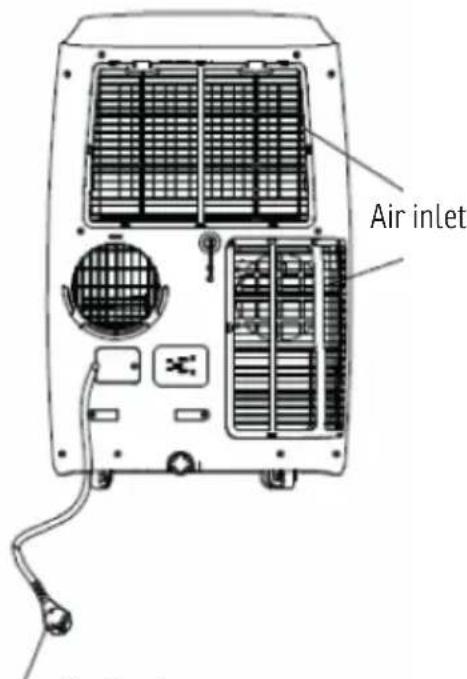
Rear cover
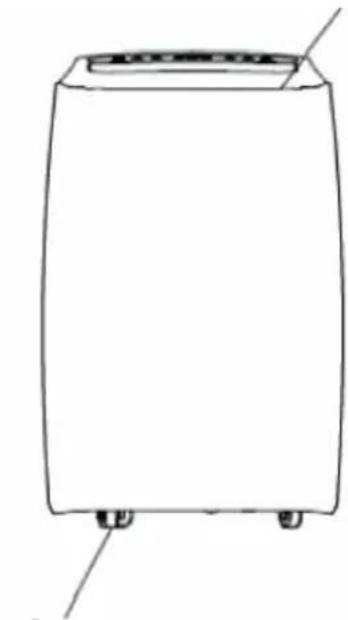
FRONT VIEW
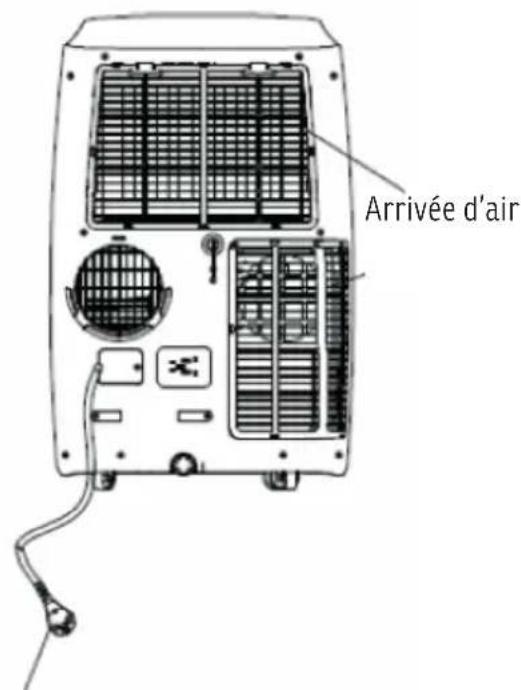
REAR VIEW
Operation Panel
natural_image
Line drawing of a portable industrial machine with cooling unit and side panel (no text or symbols)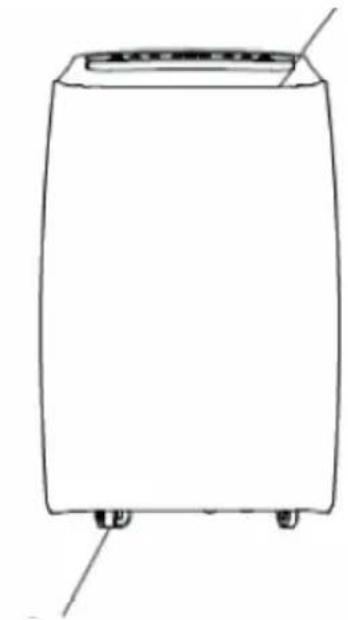
natural_image
Line drawing of a rectangular electronic device with two mounting feet and a lid (no text or symbols)Castor
text_image
Air inletPower lineFig. 1
3. ACCESSORIES
| Accessories Description | Dimension | |
 | Main air conditioner unit 440*715*335 mm | 470*764*370 mm |
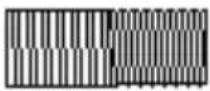 | Hot-air exhaust hose length: 1500 mm | diameter: 150 mm |
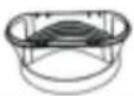 | hose connector (window side) | diameter: 150 mm |
 | hose connector (air conditioner side) | diameter: 150 mm |
 | remote control 100*45 mm |
Fig. 2
4. DISPLAY PANEL, REMOTE CONTROL AND WIFI
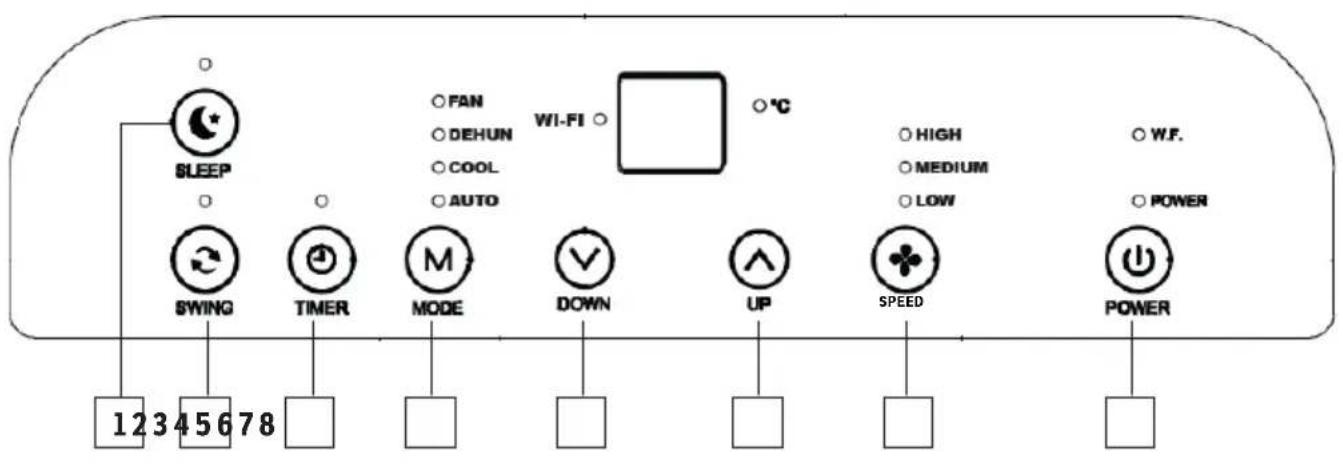
text_image
SLEEP SWING TIMER MODE DOWN UP SPEED POWER 12345678 FAN DEHUN COOL AUTO WI-FI °C HIGH MEDIUM LOW W.F. POWERFig.3
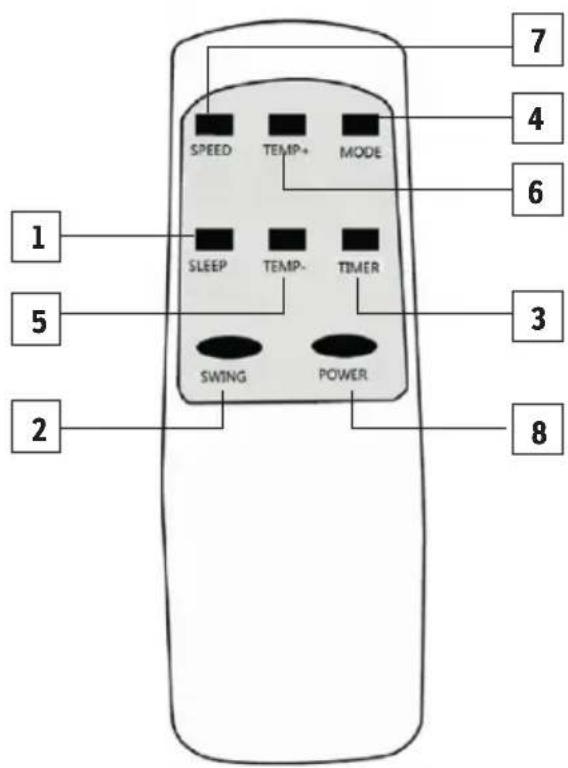
text_image
1 5 2 SPEED TEMP+ MODE SLEEP TEMP- TIMER SWING POWER 7 4 6 3 8Fig. 4
1 Sleep : Night operation key
2 Swing : Oscillazion key
3 Timer : Hour programming
4 Mode : Selection of the mode
5 Down : Selector of Temperature and timer down
6 Up : Selector of Temperature and timer up
7 Speed : Speed selector
8 Power
Setting up the WLAN control on your smartphone
Please proceed as follows to remotely control your device via WLAN
Important: The device has no heating mode, even if it is displayed as a button in the uniform APP.
text_image
SONNENKÖNIG OF SWITZERLAND® EN SMART REMOTE-
Start the Play Store (Android) or App Store (Apple) on your smartphone and search for the «SMART REMOTE APP» from SONNENKÖNIG. Download the app.
-
The app will be installed on your smartphone.
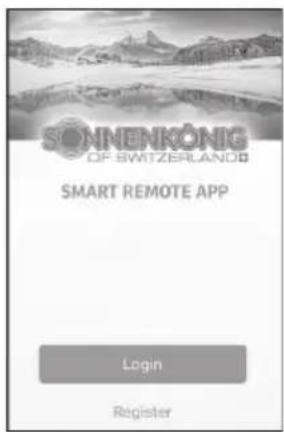
text_image
SONNENKÖNIG OF SWITZERLAND SMART REMOTE APP Login Register- Open the app and choose «Register».
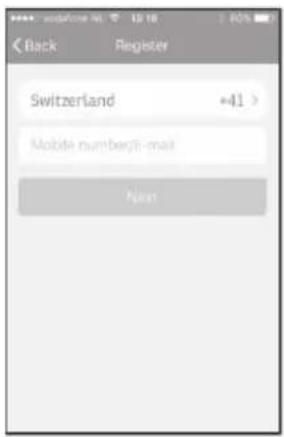
text_image
Back Register Switzerland +41 > Mobile number(E-mail) Next- Enter your mobile phone number, the country code has already been entered.
MAKE SURE THAT THE SMARTPHONE YOU WANT TO USE TO CONTROL YOUR DEVICE AND THE DEVICE ARE CONNECTED TO THE SAME WIRELESS MODEM.
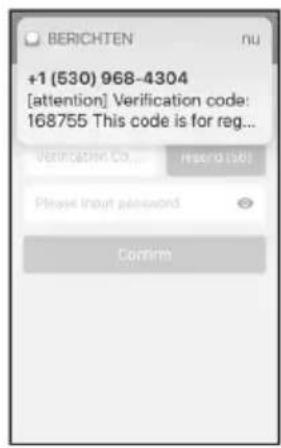
text_image
+1 (530) 968-4304 [attention] Verification code: 168755 This code is for reg... Verification Co... Hybrid [58] Please import password Confirm- You will receive the so-called «Verification Code» by SMS. Enter the code and the password within 60 seconds and select «Confir rm» to confirm the registration.
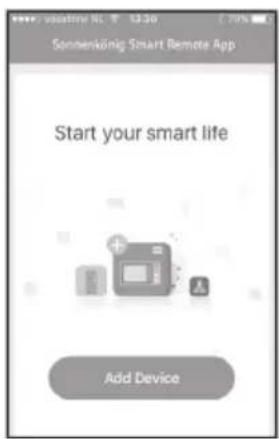
text_image
Sonsenkönig Smart Remote App Start your smart life Add Device- In order to use our app, your device must be added to the app once. Select «Add Device».
text_image
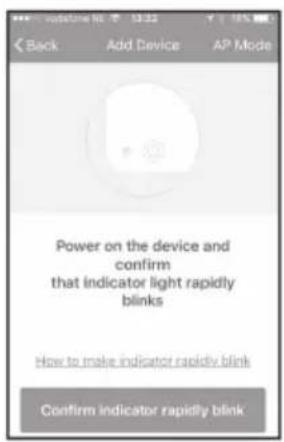
Back Add Device AP Mode Power on the device and confirm that indicator light rapidly blinks How to make indicator rapidly blink Confirm indicator rapidly blink- As soon as the light on the device fl ashes quickly, select in the app: «Confir rm Indicator rapidly blinks». If the device has already been connected to the WIFI modem, the WIFI light will not blink automatically.
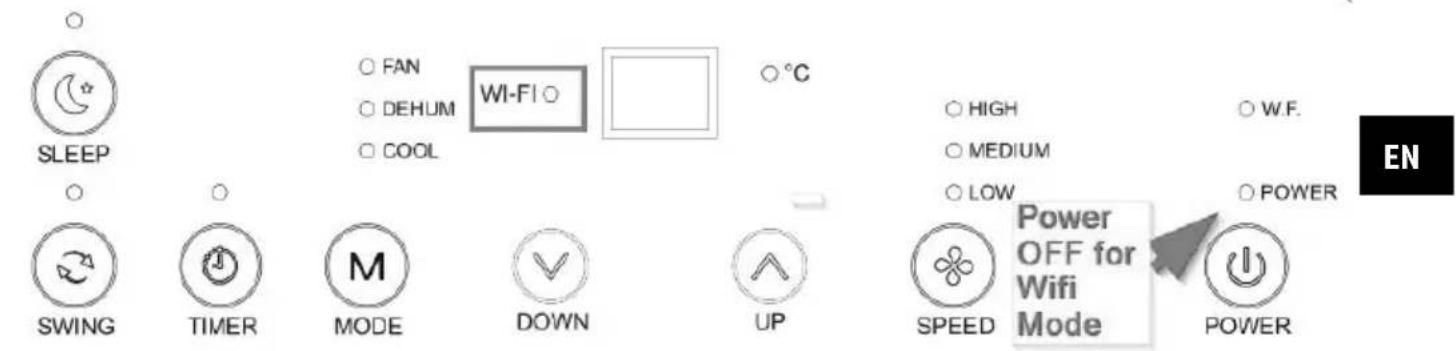
To reset the unit and quickly flash the WIFI lamp again: Press the SLEEP button for 5 seconds and the WIFI lamp will flash rapidly.
THE WIFI MODE CAN ONLY BE SET WHEN THE POWER ON INDICATOR IS IN OFF/STANDBY MODE.
text_image
SLEEP FAN DEHUM COOL WI-FI °C SWING TIMER MODE DOWN UP HIGH MEDIUM LOW POWER SPEED Power OFF for Wifi Mode POWER EN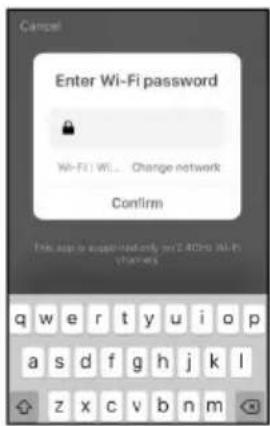
text_image
Campal Enter Wi-Fi password Wi-Fi Wi... Change network Confirm This app is supplied only on 2.40% Wi-Fi channels- Enter the correct WLAN password.
text_image
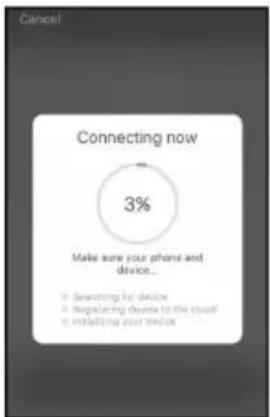
Cancel Connecting now 3% Make sure your phone and device... • Searching by device • Registering device to the cloud • Installing your device- A connection is established between the app and the device. If this fails, press the WIFI button on the device for 5 seconds to reset.
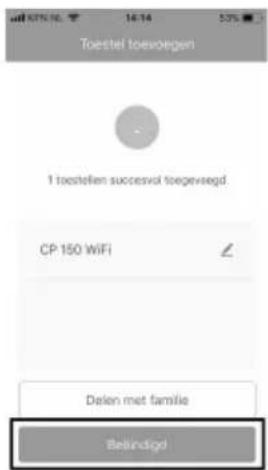
- Select «Done» if the connection was successfully established. If no connection has been established, follow the instructions on the app.
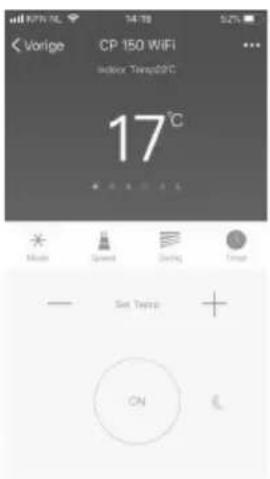
text_image
Vorige CP 150 WIFI Indoor Temp@20°C 17°C Mode Speed Clearing Image Set Temp ON- The operation screen of the device appears.
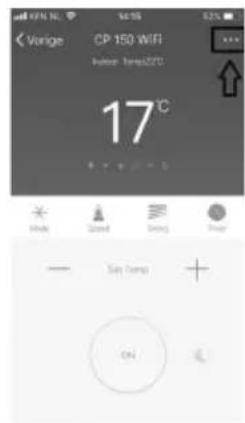
text_image
Vorige CP 150 WiFi Before 10:30:20℃ 17°C OK Cancel Reset Help — Set comps + ON- Select «...» at the top right of the operation screen and then select «Modify Device Name» to give your device a logical name so that you know which device it is. Your device and smartphone are now set up to be remotely controlled via WLAN.
Setting up the WLAN function on the air conditioner
Please proceed as follows to activate your device for WLAN remote control:
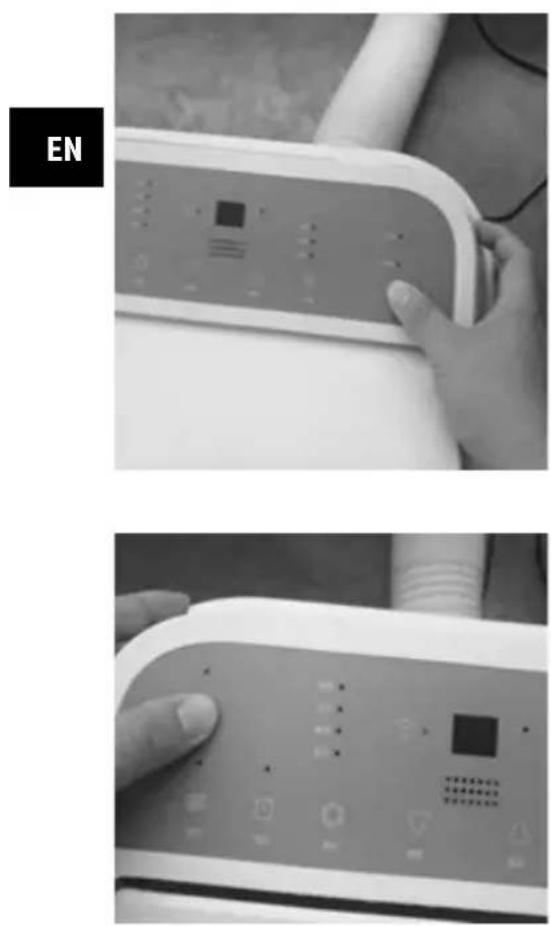
Connect the air conditioner to the power supply and press the Power button to start up the device.
Press and hold the Power button for 5-10 seconds, then press the SLEEP button until you hear a tone and see the WiFi light blink rapidly.
The WLAN function of your device is now activated.
5. OPERATING INSTRUCTIONS
Before starting to operate the device
– Find a place where there is a power supply nearby.
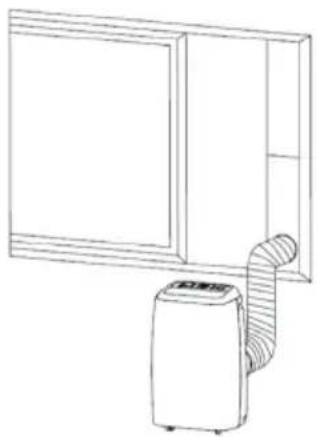
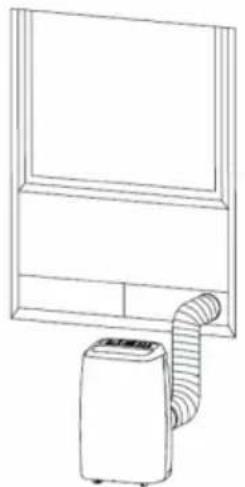
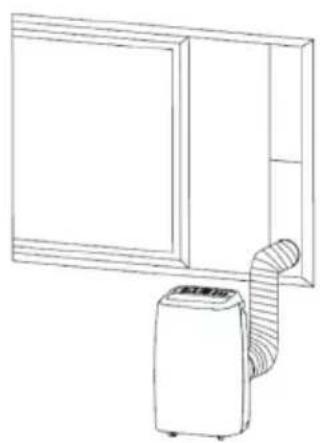
— Install the exhaust hose as shown in Fig. 5 and Fig. 5 A and adjust the window position well.
EN
natural_image
Line drawing of a portable air conditioner unit connected to a front panel (no text or symbols)Fig. 5 Fig. 6 Fig. 5 A
natural_image
Line drawing of a simple kitchen appliance with a door and air conditioner unit (no text or symbols)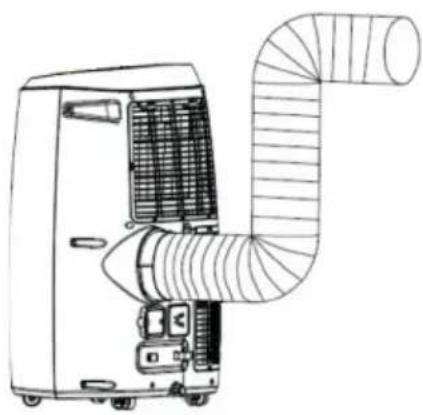
natural_image
Line drawing of an air conditioner unit with ductwork and ventilation duct (no text or symbols)- Insert the power plug into a grounded AC220-240V/50Hz socket.
- As shown in Fig. 6, connect the drain hose well (only applicable for using a heating model).
- The dehumidifi er/air conditioner shall be installed on a fl at surface and with empty space all around. Do not block the air outlet, and make sure the distance around the device is at least 30 cm.
Exhaust hose installation
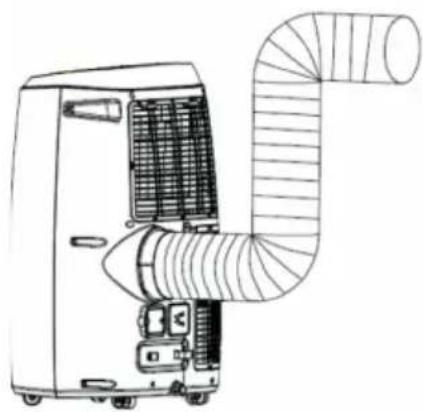
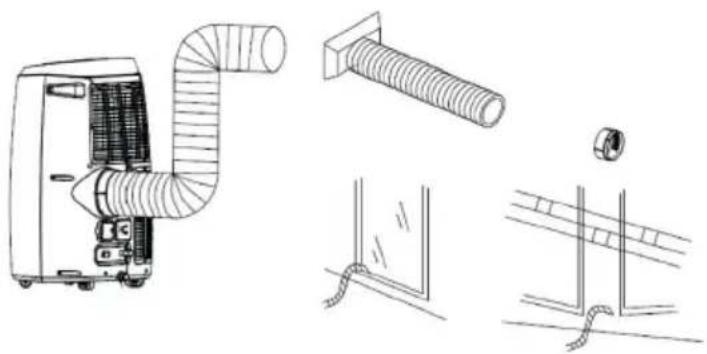
- Twist both ends of the exhaust hose into the square fi xing clip and the fl at fi xing clip.
- Insert the square fixing clip into the openings on the back of the air conditioner (Fig. 7)
- Put the other end of the exhaust hose near the window sill.
natural_image
Technical line drawings of air ducts and components (no text or symbols)Fig. 7
Operating temperature range
| Maximum cooling Minimum cooling | ||
| DB/WB (°C) 35/24 18/12 |
EN
Caution for cooling and dehumidifying operations:
- When using the cooling and dehumidifying functions, wait for at least 3 minutes between each ON/OFF.
- Make sure the power supply meets the requirements.
- Ensure the socket is suitable for AC.
- Do not share one socket with other appliances.
- Ensure the power supply is AC220-240V, 50Hz
Auto mode
The device is WLAN capable and all the automatic functions can be individually configured via the APP.
Cooling operation
- Press the «Mode» button (4) fino a quando il simbolo «Cool» si appears.
- Press the button „Up“ (6) or „Down“ (5) to select a desired room temperature
• (16 °C - 31 °C). - Press the «speed» (7) button to select the wind speed.
Dehumidifying operation
- Press the «Mode» (4) button until the "Dehum" icon appears.
• The selected temperature is automatically set to the current room temperature minus 2^ C ( 16^ C – 31^ C). - The fan motor is automatically set to low wind speed.
Fan operation
- Press the «Mode» button (4) until the «Fan» icon appears.
- Press the «Speed» (7) button to select the wind speed.
Timer operation
- When the air conditioner is running, press the «Timer» button to select a time between 0-24 h via the + and - temperature buttons.
- Your selected time is shown on the display by slowly blinking.
- Confirm your time setting by pressing the «Timer» button again.
- The remaining time is now shown on the display.
- To cancel the function press the «Timer» button once and your selected time is deleted.
Swing (air flow)
- After turning on the machine, press the «Swing» (2) key and the air vents will continuously swing up and down. When this button is pressed again, the movement will stop and the air vents will remain in that position.
Sleep control function
- When in cooling mode, press the «Sleep» (1) key to set the temperature. It will increase by 1°C after an hour and at most it will increase by 2°C after 2 hours.
- Press the «Sleep» (1) key again can to cancel the setting.
Drainage
- It is the alarm function if the water tank inside is filled up. The water tank in the air conditioner has a water level safety switch which controls the water level. When the water level reaches a certain height, the "Water full" indicator lamp will light up. (If the water pump is damaged and the water tank is full, please remove the rubber block at the bottom of the device and all the water will drain out.
6. MAINTENANCE
Caution
- Before cleaning, make sure to disconnect the device from any electrical outlet.
- Do not use gasoline or other chemicals to clean the device.
- Do not wash the device directly.
- If the air conditioner is damaged, please contact the dealer or repair shop.
Air filter
- If the air filter becomes clogged with dust/dirt, it should be cleaned once every two weeks
- Disassembly: Open the air inlet grille and take out the air filter.
- Cleaning: Clean the air filter with a neutral detergent in lukewarm (40°C) water and dry it up in the shadow.
- Assembly: Put the air filter back into the inlet grille, place the components back as they were before.
Cleaning the surface of the air-conditioner
- First clean the surface with a neutral detergent and a wet cloth, then wipe it with a dry cloth.
7. TROUBLESHOOTING
| PROBLEM POSSIBLE CAUSE SUGGESTED SOLUTION | ||
| Unit does not start when pressing the on/off button. | Water full indicator lamp blinks and water tank is full. | Dump the water out of the water tank. |
| Room temperature is lower than the set temperature (cooling mode). | Reset the temperature. | |
| Not cool enough. The doors or windows are not closed. | Make sure all the windows and doors are closed. | |
| There are heat sources inside the room. | ||
| Remove the heat sources if possible. | ||
| Exhaust air hose is not connected or blocked. | ||
| Connect or clean the exhaust air hose. | ||
| Temperature setting is too high. Reset the temperature. | ||
| Air inlet is blocked. Clean the air inlet. | ||
| Noise The ground is not level or not flat enough. | Place the unit on a flat, level ground if possible. | |
| The sound comes from the flowing of the refrigerant inside the air conditioner. | This is normal. | |
| Code E0 Room temperature sensor failed. Replace the room temperature sensor (the device can also work without a replacement). | ||
| Code E2 Water tank full. Please empty the water tank. | ||
EN
8. WARRANTY / DISPOSAL / TECHNICAL CHANGE
Warranty
The Products are controlled just before delivery. If despite a lack of your product, try trustfully your seller. Please bring your receipt, as this is to be submitted for each warranty. The guarantee period is 24 months from date of purchase.
Disposal
The device must be disposed of properly. The device can be distributed free of charge for disposal at each dealer.
Technical changes
We reserve the right to modify the price, the design and the technical features
Please save the packaging materials of the unit
CE declaration of conformity
This device complies with the following standards
EN 55014-1:2017
EN 55014-2:2015
EN 60335-1:2012/AC:2014
EN 60335-2-40:2003 + A11:2004 + A12:2005 + A1:2006 + Cor.:2006 + A2:2009
+ Cor.:2010 + A13:2012 + A13:2012/AC:2013
EN 61000-3-2:2014
EN 61000-3-3:2013
EN 62233:2008
2014/30/EU
2014/35/EU
DISPOSAL INSTRUCTIONS FOR THE ELECTRICAL PART OF THE PRODUCT
In accordance with Article 26 of the Decree-Law of 14 March 2014 implementing Directive 2012/19/EC and the Law of 4 March 2014 implementing Directive 2011/65/EC on the reduction of the use of hazardous substances in electrical and electronic equipment and on waste management.
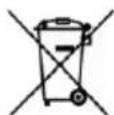
The crossed-out dustbin symbol on the machine or packaging indicates that the waste generated at the end of its useful life must be collected separately from other waste. The user must therefore take the device to the appropriate collection points at the end of its service life. Sort electronic and electrical waste or send the purchase of new, equivalent devices back to the dealer in a one-to-one process. L'adeguata separate collection for subsequent commissioning of the equipment to be recycled, treatment and environmentally sound disposal, helps to avoid possible adverse effects on the environment and health and promote the reuse and/or recycling of the materials to which they belong. composed the equipment. Misuse of this product by the user will result in the application of the administrative penalties provided for in the applicable legislation. Batteries contained in the device must be disposed of separately in the appropriate containers for the collection of used batteries.
DISPOSAL OF BATTERIES AND ACCUMULATORS
In accordance with Legislative Decree 188 of 20 November 2008 implementing Directive 2006/66/EC on batteries, accumulators and related waste, the symbol of the crossed-out waste bin on the battery indicates that it is prohibited to dispose of used batteries in household waste.
Batteries and batteries contain substances that are highly polluting for the environment. The user is obliged to dispose of used batteries at collection points in the municipality or in appropriate containers. The service is free. In this way, legal requirements will be respected and the environment will be protected. The symbols identifying hazardous materials that may be present in batteries and accumulators are as follows: Hg= Mercury, Cd= Cadmium, Pb= Lead.
Company
Armin Schmid
Festnetz 14 Cent/Minute