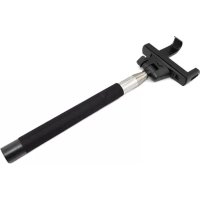
Shutter Pal - Camera remote ION - Free user manual and instructions
Find the device manual for free Shutter Pal ION in PDF.


| Product Type | Camera Remote Control |
| Brand | ION |
| Model | Shutter Pal |
| Dimensions (approx.) | 5 x 3 x 1.5 cm |
| Weight (approx.) | 20 g |
| Power Supply | Rechargeable lithium-ion battery via micro-USB |
| Charging Time | Approximately 1 hour |
| Bluetooth Range | Up to 10 m (with Bluetooth 4.0) |
| Compatibility | iOS and Android smartphones with Bluetooth |
| Main Functions | Photo shutter, video capture |
| Material | ABS Plastic |
| Color | Black |
| LED Indicators | Flashing blue (pairing/standby), solid blue (photo), flashing red (low battery), solid red (charging) |
| Included Accessories | Smartphone clip, clip adapter, micro-USB cable, quick start guide |
| Standby Mode | Automatic after 5 minutes of inactivity |
| Bluetooth Pairing | Hold photo button for 2 seconds, 40-second window |
| Safety Instructions | Do not disassemble, use only recommended accessories, do not use in rain |
| Care and Cleaning | Clean with a soft, dry cloth, avoid abrasive products |
| Spare Parts and Repairability | No user-serviceable parts, contact customer service for repair |
| General Information | Warranty and system requirements: see ionaudio.com |
Frequently Asked Questions - Shutter Pal ION
User questions about Shutter Pal ION
0 question about this device. Answer the ones you know or ask your own.
Ask a new question about this device
Download the instructions for your Camera remote in PDF format for free! Find your manual Shutter Pal - ION and take your electronic device back in hand. On this page are published all the documents necessary for the use of your device. Shutter Pal by ION.
USER MANUAL Shutter Pal ION
For the latest information about ION products (system requirements, compatibility information, etc.) and product registration, visit ionaudio.com.
For safety and warranty information, see ionaudio.com/warranty.
Safety Information
- Only use attachments/accessories specified by the manufacturer.
- Do not dismantle the monopod.
- Do not use or charge under high temperatures.
- Not for use in rain or wet locations. Use only in dry locations.
Charging Shutter Pal
If you are not able to establish a Bluetooth connection or Shutter Pal does not power on, the battery may require recharging.
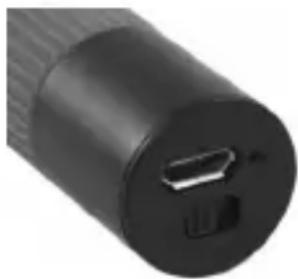
Use the included micro-USB cable to connect Shutter Pal to (A) a USB power adapter (not included) connected to a power outlet or (B) your computer (powered on) for approximately 1 hour.
Items not listed in the Box Contents section are sold separately.
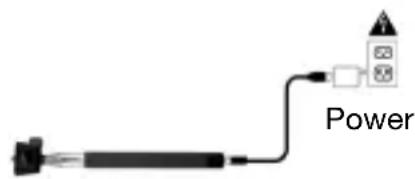
(A)
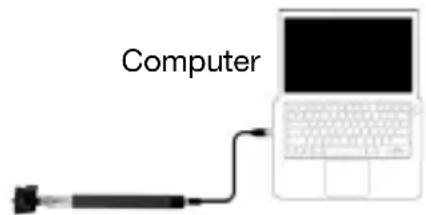
(B)
Quick Setup
After pairing your smartphone to Shutter Pal and launching your smartphone's default camera app, follow these steps to connect the monopod to your smartphone.
- Insert your smartphone into the smartphone clamp. Use the included insert if you have a smaller size smartphone.
- Connect the smartphone clamp to the monopod screw and tighten using the rotary wheel.
- Adjust the position of the mount and tighten using the side knob.
- Adjust the size of the monopod.
- Press the Camera button on Shutter Pal to take your photo.
Note: The included smartphone clamp can be used as a mini stand for your smartphone when detached from the monopod. In this situation the monopod becomes a remote trigger for your smartphone.
Note: If Shutter Pal is powered on and not used for 5 minutes, it will go to low-power mode (sleep). To wake up Shutter Pal, press the Camera button on Shutter Pal.
Note: Using your smartphone's default video app, you can use Shutter Pal to capture video over crowds at concerts or in difficult to reach places.

Pairing Shutter Pal With Your Smartphone
- Turn on your smartphone.
- Power on Shutter Pal.
- Hold the Camera button on Shutter Pal for 2 seconds to go into Bluetooth pairing mode.
Note: Once in pairing mode you will have 40 seconds to connect to your Bluetooth smartphone or you will need to restart the power of Shutter Pal and go into pairing mode again.
- Navigate to your Bluetooth smartphone's settings menu, find Shutter Pal, and connect.
Note: After connecting, your smartphone may ask you to choose an option to use for the volume button, such as volume control or image capture.
- To disconnect pairing, navigate to Shutter Pal in your Bluetooth smartphone's settings and select Unpair or turn off Bluetooth on your smartphone.
- To pair a new smartphone to Shutter Pal, repeat Steps 3 and 4.
Note: Maximum range will be achieved when using smartphones with Bluetooth 4.0.
Shutter Pal LED Activity
Blinking Blue LED = Bluetooth pairing mode or awakened from low-power (sleep) mode
Single Blue LED Flash = Taking a photo
Blinking Red LED = Battery is low and needs to be recharged
Solid Red LED = Battery is charging (LED turns off after charging is completed)
Troubleshooting
If you are not able to type on your smartphone keyboard: Unpair from Shutter Pal on your smartphone or turn the power off on Shutter Pal. Keyboard typing will not work when paired with Shutter Pal.
If you are not able to unpair from Shutter Pal: Unpair from your smartphone's Bluetooth settings or turn off Bluetooth on your smartphone.
If Shutter Pal is working intermittently or not pairing: Turn off nearby Bluetooth smartphones, such as Bluetooth keyboards, which may be conflicting with your smartphone.
If your smartphone's default camera app doesn't work with Shutter Pal: Try one of many third-party camera apps that will work with Shutter Pal.
If Shutter Pal keeps changing your smartphone's volume: Make sure your camera app is open and in the forefront.
Assistance technique
ionaudio.com/warranty.
Sicherheitshinweise
Technical Specifications
| Supported Bluetooth Profile | A2DP |
| Bluetooth Range | Over 10 meters (over 30 feet) |
| Battery | Battery type: 45 mAH polymer lithium Battery life: Up to 100 hours in standby mode (or up to approximately 500 photos) Recharge time: 1 hour |
| Power | Power adapter sold separately. You may use your smartphone's 10W or 5W USB power adapter. |
| Length of Monopod Extension | 23.5 cm - 100.5 cm (9.25" - 39.56") |
| Max Load Capacity | 0.5 kg (1.1 lbs.) |
| Weight | 0.17 kg (0.37 lbs.) |
Specifications are subject to change without notice.
- Bluetooth range is affected by walls, obstructions, and movement. For optimal performance, place the product in the center of the room so it is unobstructed by walls, furniture, etc.
** Battery life may vary based on temperature, age, and usage of product.
Trademarks and Licenses
ION Audio is a trademark of ION Audio, LLC, registered in the U.S. and other countries.
The Bluetooth word mark and logos are owned by the Bluetooth SIG, Inc. and any use of such marks by ION Audio is under license.
All other product or company names are trademarks or registered trademarks of their respective owners.
ionaudio.com
Brand : ION
Model : Shutter Pal
Category : Camera remote