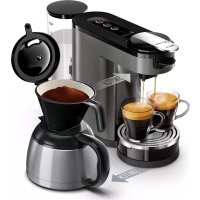
Senseo Switch Premium HD6596 - Coffee maker PHILIPS - Free user manual and instructions
Find the device manual for free Senseo Switch Premium HD6596 PHILIPS in PDF.


| Brand | Philips |
| Model | Senseo Switch Premium HD6596 |
| Product type | Combined coffee maker (filter and pods) |
| Water tank capacity | Approximately 1 liter (removable) |
| Coffee type | Ground coffee (filter) and SENSEO pods |
| Number of cups | Up to 7 cups (filter coffee); 1 or 2 cups (pods) |
| Power | 1400 W |
| Voltage | 220-240 V, 50-60 Hz |
| Main functions | Filter coffee, single or double pod coffee, strong coffee, specialty coffee (cappuccino, hot chocolate) |
| Thermal carafe | Yes, included |
| Cleaning | Removable parts dishwasher-safe (except water tank and thermal carafe) |
| Descaling | CALC indicator, procedure with citric acid, recommended descaling agent SENSEO HD7012/HD7011 |
| Safety | Automatic shut-off, overheating protection, use by children aged 8 and above under supervision |
| Material | Plastic and metal |
| Color | Black/silver |
| Included accessories | Pod holders (1 cup and 2 cups), thermal carafe, measuring spoon, filter holder, paper filters |
| Repairability | Spare parts available, authorized Philips service |
| Registration | www.philips.com/welcome |
Frequently Asked Questions - Senseo Switch Premium HD6596 PHILIPS
User questions about Senseo Switch Premium HD6596 PHILIPS
0 question about this device. Answer the ones you know or ask your own.
Ask a new question about this device
Download the instructions for your Coffee maker in PDF format for free! Find your manual Senseo Switch Premium HD6596 - PHILIPS and take your electronic device back in hand. On this page are published all the documents necessary for the use of your device. Senseo Switch Premium HD6596 by PHILIPS.
USER MANUAL Senseo Switch Premium HD6596 PHILIPS
Congratulations on your purchase and welcome to Philips! To fully benefit from the support that Philips offers, register your product at www.philips.com/welcome.
Clean cold water
Use clean cold water every day. If you have not used the coffee machine for one day, you have to flush it with clean cold water before you use it again. To flush the machine, fill the water reservoir with clean cold water, place a bowl (with a capacity of at least 1500ml ) or 2 cups under the coffee spout and press the 2-cup button a few times to brew hot water until the water reservoir is empty.
Fresh filter coffee
To brew a jug of delicious coffee use good-quality pre-ground coffee. Always use a paper filter size 102.
You can brew up to 7 cups of coffee in the jug.
Fresh coffee pods
Use good-quality fresh coffee pods in this machine for a full, round taste. To keep the pods fresh longer, store them in a storage container.
Intensity select
- For one small cup of strong short coffee, double press the 1-cup button (Fig. 2).
- For two cups of strong short coffee, double press the 2-cup button (Fig. 3).
Important
Read this user manual carefully before you use the machine and save it for future reference.
Danger
- Never immerse the machine in water or any other liquid.
Warning
- Check if the voltage indicated on the bottom of the machine corresponds to the local mains voltage before you connect the machine.
- Connect the machine to an earthed wall socket.
- If the mains cord is damaged, you must have it replaced by Philips, a service center authorized by Philips or similarly qualified persons in order to avoid a hazard.
-
Do not use the machine if the plug, the mains cord or the machine itself is damaged.
-
This machine can be used by children aged from 8 years and above and by persons with reduced physical, sensory or mental capabilities or lack of experience and knowledge if they have been given supervision or instruction concerning use of the machine in a safe way and if they understand the hazards involved.
- Cleaning and user maintenance shall not be made by children unless they are older than 8 and supervised.
- Keep the machine, its accessories and its cord out of the reach of children aged less than 8 years.
- Children shall not play with the machine.
Caution
- Always return the machine to a service center authorized by Philips for examination or repair. Do not attempt to repair the machine yourself, otherwise your warranty becomes invalid.
- After unpacking the machine, never put your SENSEO® machine on its side. Always keep it in upright position, also during transport.
- Never put normal ground coffee or use torn pods in the machine, as this causes it to become blocked.
- Do not use the machine in combination with a transformer, as this could cause hazardous situations.
- Do not use the machine in combination with a transformer, as this could cause hazardous situations.
- Always put the machine on a flat and stable surface.
- Do not place the machine on a hotplate or directly next to a hot oven, heater or similar source of heat.
- Never let the machine operate unattended.
- Do not use the machine at altitudes higher than 2200 meters above sea level.
-
Never pour any other liquid than clean cold water into the water reservoir.
-
Never flush the machine or let it brew coffee when the spout is not in place.
- Flush the coffee machine with fresh water before you use it for the first time. This causes the system to fill with water, which is essential for the machine to work properly.
- Do not use the machine in combination with water softeners based on sodium exchange.
- Descale your machine regularly. The machine indicates when descending is needed. Not doing this will make your machine stop working properly. In this case, repair is not covered by your warranty.
- Never use a descaling agent based on mineral acids such as sulphuric acid, hydrochloric acid, sulphamic acid and acetic acid (e.g. vinegar). These descaling agents may damage your coffee machine.
- The machine is intended for normal household use only. It is not intended for use in environments such as staff kitchens of shops, offices, farms or other work environments, nor is it intended to be used by clients in hotels, motels, bed and breakfast and other residential environments.
- Do not disassemble the insulated jug.
- Never immerse the insulated jug in water or any other liquid, as this could cause water to enter between the walls of the jug.
- When the insulated jug is filled with coffee, keep it in upright position to prevent leakage.
- The insulated jug is not dishwasher-proof.
- During brewing and until the light stops blinking, the filter holder is filled with hot coffee.
Electromagnetic fields
This Philips machine complies with all applicable standards and regulations regarding exposure to electromagnetic fields.
General description
11-cup pod holder
2 2-cup pod holder
3 Distribution disk
4 Collector ring
5 Drip tray
6 CALC light
7 Jug button
82-cup button
91-cup button
10 Water reservoir lid
11 Water reservoir
12 Filter holder lid
13 Filter holder
14 Insulated jug lid
15 Insulated jug
16 Measuring spoon
First use
The machine starts an automatic flushing cycle when you switch it on for the first time, no matter which button you press.
1 Put the plug in an earthed wall socket.
2 Remove the water reservoir from the machine and remove the lid from the water reservoir (Fig. 4).
3 Clean the water reservoir thoroughly in hot water, if necessary with some washing-up liquid.
4 Fill the water reservoir with clean cold water up to the MAX indication (Fig. 5).
5 Put the lid back onto the water reservoir and put the water reservoir back onto the machine (Fig. 6).
6 Place the 1-cup pod holder in the coffee machine. Close the lid and make sure it is properly locked (Fig. 7).
7 Remove the drip tray from the platform and put a bowl (with a capacity of at least 1.5 liters) or the jug under the coffee outflow (Fig. 8).
8 Press one of the buttons on the control panel. The jug button, 2-cup button and 1-cup button flash in sequence (Fig. 9).
9 The flushing cycle starts. During the flushing cycle the system fills itself with water from the water reservoir. The machine produces more noise than during a regular brewing cycle.
10 The machine switches off when the water tank is empty (Fig. 10).
11 After the first flushing cycle, clean the collector ring and the pod holders with hot water and some washing-up liquid or in the dishwasher.
Brewing a jug of drip-filter coffee
1 Open the lid of the machine (Fig. 11).
2 Remove the pod holder, if present (Fig. 12).
3 Remove the drip tray, if present.
4 Fill the water reservoir with clean cold water up to the level required for the number of cups of coffee you wish to brew and put the water reservoir back onto the machine (Fig. 13).
5 Rinse the insulated jug with hot tap water to preheat it.
Tip: To obtain the tastiest and hottest coffee, brew at least half a jug of coffee.
6 Place the filter holder on top of the insulated jug (Fig. 14).
7 Open the lid of the filter holder.
8 Put a paper filter size 102 in the filter holder. Make sure that you fold the sealed edges to ensure that the paper filter stays upright during brewing (Fig. 15).
9 Use the measuring spoon to put the required amount of pre-ground coffee in the filter (Fig. 16).
Tip: Use one measuring spoon of pre-ground coffee for each cup. Use a heaped measuring spoon for strong coffee and a level measuring spoon for mild coffee.
10 Close the lid of the filter holder.
11 Slide the insulated jug on the platform of the machine (Fig. 17).
12 Press the jug button to start the brewing process (Fig. 18).
- The light in the jug button starts flashing and the brewing process starts. (Fig. 19)
Note: If the jug button and the CALC light start flashing alternately during heating up and brewing (Fig. 20), you need to descale the machine (see 'Dscaling the machine').
- When all the water from the water reservoir has passed through the filter, the light in the jug button goes out and the machine switches off automatically.
13 You can now remove the insulated jug from the machine (Fig. 21).
14 Remove the filter holder from the insulated jug (Fig. 22).
Tip: You can place the filter holder on the drip tray to prevent coffee from leaking onto your worktop while you pour out coffee from the jug (Fig. 23).
15 Place the jug lid on the insulated jug and turn it to the keep-warm position (closed lock symbol) (Fig. 24).
16 Push the lever of the jug lid to pour coffee into one or more cups (Fig. 25).
Brewing pod coffee
Brewing one cup of pod coffee
1 Fill the water reservoir with clean cold water up to the MAX indication and put it back onto the machine (Fig. 5).
Note: The MIN indication on the water reservoir indicates the minimum amount of water required for brewing pod coffee. Always fill the water reservoir beyond the MIN level.
2 Put the plug in an earthed wall socket.
3 Open the lid of the machine by moving the lever upwards (Fig. 11).
4 Place the drip tray on the platform of the machine (Fig. 26).
5 Place one pod in the 1-cup pod holder with the convex side pointing downwards (Fig. 27).
Note: Make sure that the pod holder is clean and the sieve in the center is not clogged, e.g. with loose coffee grounds.
Note: Make sure that the coffee in the pod is distributed evenly and press the pod lightly into the pod holder.
6 Place the 1-cup pod holder in the machine and close the lid (Fig. 7).
7 Place a cup on the drip tray (Fig. 28).
8 Press the 1-cup button to brew coffee. (Fig. 29)
- The button starts flashing and the machine starts heating up (Fig. 30).
Note: If the 1-cup button and CALC light start flashing alternately during heating up and brewing (Fig. 31), you need to descale the machine (see 'Dscaling procedure').
- When the heating-up process is finished, the machine starts brewing coffee (Fig. 32). After brewing, the machine switches off automatically.
Tip: Double press the 1-cup button (Fig. 2) to brew a strong short cup of coffee.
9 Remove the coffee pod after use by lifting the pod holder out of the machine and emptying it (Fig. 33).
Caution: Be careful when you do this, for there may still be some hot water/coffee on the coffee pod(s).
Caution: Never put normal ground coffee or use torn pods in the machine, as this causes it to become blocked.
Brewing two cups of pod coffee
1 To brew two cups of pod coffee, place the deeper 2-cup pod holder in the machine. Place two pods in the 2-cup pod holder (Fig. 34).
2 Press the 2-cup button to brew coffee (Fig. 35).
- The button starts flashing and the machine starts heating up (Fig. 36).
Note: If the 2-cup button and the CALC light start flashing alternately during heating up and brewing (Fig. 37), you need to descale the machine (see 'Dscaling the machine').
- When the heating-up process is finished, the machine starts brewing coffee (Fig. 38). After brewing, the machine switches off automatically.
Tip: Double press the 2-cup button (Fig. 3) for two cups of strong short coffee.
3 Remove the coffee pods after use by lifting the pod holder out of the machine and emptying it (Fig. 33).
Brewing special coffees
1 To brew a special coffee, place a cappuccino pod, a hot chocolate pod or another special coffee pod in the 2-cup pod holder.
2 Place a cup under the coffee spout.
3 Press the 1-cup button to brew your special coffee.
Cleaning the machine
Never immerse the machine in water or any other liquid.
Never clean the machine by flushing it with the lid open.
Cleaning the coffee machine
Warning: Always unplug the machine before you clean it.
1 Clean the outside of the machine with a moist cloth.
2 To prevent clogging, clean the pod holders regularly with hot water, some washing-up liquid and a washing-up brush. If you have used the 2-cup pod holder to brew cappuccino or hot chocolate, make sure to clean it thoroughly immediately after use to remove any milk residues.
Note: You can disassemble the pod holders for more thorough cleaning (Fig. 39).
12 English
3 Clean the collector ring, the pod holders, the drip tray, the water reservoir and the water reservoir lid in hot water, if necessary with some washing-up liquid. All detachable parts except for the water reservoir and the insulated jug can also be cleaned in the dishwasher (Fig. 40).
4 Clean the water distribution disk with a moist cloth. Be careful when you do this. Make sure that the rubber sealing ring does not get stuck under the edge of the water distribution disk. If it does, the coffee machine starts to leak.
Cleaning the insulated jug
Warning: Do not immerse the insulated jug in water or any other liquid and do not clean it in the dishwasher as this will damage the jug.
1 To remove the jug lid, turn the lid anticlockwise to 'open' position and remove it (Fig. 41).
2 Clean the inside of the insulated jug with a soft brush, hot water and some washing-up liquid (Fig. 42).
Tip: To remove stubborn brown deposits, fill the jug with hot water and add a spoonful of baking soda. Let the baking soda do its work for some time.
3 After cleaning, rinse the insulated jug with fresh, hot water (Fig. 43).
Note: You can clean the jug lid in the dishwasher.
Flushing the coffee machine
If you have not used the coffee machine for one day, flush it with clean cold water before you use it again. Flush the machine in the following way:
1 Fill the water reservoir with clean cold water up to the MAX indication and put it back onto the machine.
2 Put the 1-cup pod holder or the 2-cup pod holder in the machine without pod(s).
3 Put a bowl (with a capacity of at least 1.5 liters) or the jug under the coffee spout to collect the water.
4 Press the 2-cup button, wait until the machine has heated up and brewed an amount of hot water. Then press the 2-cup button several times until the water reservoir is empty.
Dscaling the machine
When to descale
Scale builds up inside the machine during use. It is essential to descale the machine when the CALC light starts flashing during heating up or brewing (Fig. 31).
Why to descale
Your reasons to descale:
- It prolongs the life of your coffee machine
- It ensures maximum cup volume
- It ensures maximum coffee temperature
- The machine produces less sound during brewing
- It prevents malfunctioning
If the descending procedure is not performed correctly, scale residue remains behind in the machine. This causes scale to build up more quickly and may cause permanent and irreparable damage to the machine.
Use the correct descaler
Only citric acid-based descalers are suitable for descending the machine. This type of descaler descases the machine without damaging it. For the correct amount, see under 'Dscaling procedure' below. Each descending mixture can be used only once. Use a new descending mixture each time. We advise you to use the special SENSEO® Descaler (HD7012/HD7011). Read the instruction leaflet in the package. For more information on why it is important to descale, how to descale or which descaler to use, visit our website at www.philips.com/dscale-senseo.
Warning: Never use a descaler based on mineral acids such as sulphuric acid, hydrochloric acid, sulphamic acid and acetic acid (e.g. vinegar). These descalers may damage your coffee machine.
Dscaling procedure
The descending procedure consists of two descending cycles and two flushing cycles. Do not interrupt the descending cycles and do not switch off the machine before you have performed the two flushing cycles.
1 Fill the water reservoir with clean cold water up to the MAX indication and pour the water into a bowl (Fig. 44).
2 Mix 50 grams of citric acid with the water in the bowl. Stir until the powder has dissolved (Fig. 45).
3 Fill the water reservoir with the descending mixture and place it back on the machine (Fig. 47).
4 Remove the drip tray. Put a bowl with a capacity of at least 1.5 liters under the spout to collect the descending mixture (Fig. 8).
5 Place the 1-cup pod holder with a used coffee pod in it in the coffee machine. Close the lid and make sure it is properly locked.
Note: Always put a used coffee pod in the pod holder when you descale the machine. This pod serves as a 'filter' to prevent the sieve or hole in the pod holder from getting clogged with scale residue.
Warning: Make sure that the lid is closed properly and the lid lever is locked before you start descending the machine.
6 Press the 1-cup button and the 2-cup button simultaneously.
7 During the descending cycle, the water comes out of the machine at intervals. The CALC light, jug button, 2-cup button and 1-cup button flash slowly in sequence (Fig. 46).
8 When the water reservoir is empty, the 1-cup button and CALC light start to flash quickly alternately (Fig. 31).
9 Empty the bowl and place it back. Remove the used pod and the 1-cup pod holder. Place the 2-cup pod holder with one used pod in the machine. Close the lid.
10 Fill the water reservoir with clean cold water up to the MAX indication and pour the water into a bowl (Fig. 44).
11 Mix 50 grams of citric acid with the water in the bowl. Stir until the powder has dissolved (Fig. 45).
12 Fill the water reservoir with the descending mixture and place it back on the machine (Fig. 47). Then press the 1-cup button to start the second descending cycle.
13 When the 1-cup button and the CALC light start to flash quickly alternately (Fig. 31), remove the used pod from the 2-cup pod holder. Clean the water reservoir by rinsing it thoroughly with cold clean tap water a few times (Fig. 48).
14 Fill the water reservoir with clean cold water up to the MAX indication and put it back onto the machine.
15 Press the 1-cup button. The CALC light, jug button, 2-cup button and 1-cup button flash slowly in sequence (Fig. 46). During the flushing cycle, the water comes out of the machine at intervals.
16 When all the water in the water reservoir has been used up, the 1-cup button and CALC light start to flash quickly alternately (Fig. 31).
17 Repeat steps 13 and 14.
- When all the water in the water reservoir has been used up, the machine switches off and all the lights go out to indicate that the descaling procedure has ended.
Ordering accessories
To buy accessories or spare parts, visit www.shop.philips.com/service or go to your Philips dealer. You can also contact the Philips Consumer Care Center in your country (see the international warranty leaflet for contact details).
Warranty and support
If you need information or support, please visit www.philips.com/support or read the international warranty leaflet.
Recycling
- This symbol means that this product shall not be disposed of with normal household waste (2012/19/EU) (Fig. 49).
- Follow your country's rules for the separate collection of electrical and electronic products. Correct disposal helps prevent negative consequences for the environment and human health.
Troubleshooting
This chapter summarizes the most common problems you could encounter with the appliance. If you are unable to solve the problem with the information below, visit www.philips.com/support for a list of frequently asked questions or contact the Consumer Care Center in your country.
| Problem | Possible cause Solution | |
| My coffee cup overflows with cold coffee | You did not flush the machine before first use. | Flush the machine before first use.When the machine has emptied a complete water reservoir, you can start to make a new coffee. |
| The light in the button you pressed flashes slowly. | The machine is heating up. If heating up takes longer than two minutes, contact the Philips Consumer Care Center in your country. | |
| When you are brewing drip filter coffee, the light flashes slowly during brewing. | The brewing cycle last approximately 90 seconds, wait until the brewing cycle has finished. | |
Problem Possible cause Solution
| The light in the button you pressed flashes quickly. | There is not enough water in the water reservoir. | Fill the water reservoir. |
| The float in the water reservoir is stuck. | Empty the water reservoir and shake it a few times to release the float. Clean the water reservoir with hot water and some washing-up liquid or in the dishwasher. If this does not help, descale the machine (see chapter 'Descaling'). | |
| The CALC light flashes when the machine is heating up or brewing coffee. | You need to descale the machine. | Perform the descaling procedure as described in chapter 'Descaling'. |
| I cannot close the lid properly. | Perhaps a used coffee pod is sticking to the water distribution disk. | If this is the case, remove the used pod. |
| The coffee machine produces less pod coffee than before. | Perhaps the sieve in the center of the pod holder is clogged. | If the sieve is clogged, use a washing-brush to unclog the sieve. If you cannot unclog it properly with the washing-up brush, put the pod holder in the machine and descale the machine. Descale the machine (see chapter 'Descaling'). |
| You may have double pressed the 1-cup or 2-cup button. | If you double press the 1-cup or 2-cup button within 3 seconds, the machine brews one or two cups of short strong coffee. | |
| The temperature of the coffee decreases quickly. | You use the wrong type of cups. | Use thin-walled cups. Thin-walled cups absorb less heat from the coffee than thick-walled cups. |
| The cups are cold. Rinse the cups with hot water. You can preheat the coffee machine and cup by brewing a cup of hot water first without placing a coffee pod in the pod holder. | ||
| You have added cold milk to the coffee. | Do not use cold milk straight from the refrigerator. | |
| The filter coffee is not hot enough. | You have not brewed a full jug. | Coffee stays hot longer if you brew a full jug of coffee to ensure that that the coffee has the right temperature. |
| You have not removed the pod holder. | If you do not remove te pod holder, this can lead to a longer brewing time. | |
| You have not preheated the insulated jug. | Rinse the insulated jug with hot tap water to preheat it. | |
Problem Possible cause Solution
| You have added cold milk to the coffee. | Do not use cold milk straight from the refrigerator. | |
| Coffee grounds end up in the insulated jug. | Your paper filter may have collapsed during brewing. | To prevent the paper filter from collapsing, fold the sealed edges. |
| The coffee is weaker than expected. | There may have been some water in the insulated jug when you started brewing filter coffee. | Always make sure that there is no water in the jug before you start brewing coffee. |
| You have not used enough pre-ground coffee. | Use one heaped measuring spoon of pre-ground coffee per cup for stronger coffee. | |
| Water leaks from the coffee machine. | You overfilled the water reservoir. | Do not fill the water reservoir beyond MAX level. |
| The sieve in the center of the pod holder may be clogged. | Check the pod holder. If the sieve is clogged, use a washing-up brush to unclog the sieve. If you cannot clean it properly with the washing-up brush, put the pod holder in the machine and descale the machine (see chapter 'Descaling'). | |
| The sealing ring may be stuck under the edge of the distribution disk. | Check if the sealing ring is stuck under the edge of the distribution disk. If it is, pull it out from under the distribution disk carefully. | |
| You forgot to place the collector ring. | If you forget to place the collector ring, water comes out of the lid of the machine instead of passing through the pod. | |
| I cannot open the lid. A vacuum has formed under the lid. | Switch of the coffee machine. Pull up the lever and wait 24 hours before you open the lid. You may need to use some force. | |
| Always make sure the pod holders are clean and the center of the sieve is not clogged to prevent a vacuum. | ||
| It takes longer than before to brew filter coffee. | You have to descale the machine. | To descale the machine, follow the instructions in chapter 'Descaling'. |
| You left a pod holder in the machine. | Remove the pod holder. | |
| There is still water left in the water tank after brewing filter coffee. | This is normal. The filter coffee brewing process does not use up all the water in the water tank. This is normal. | |
Problem Possible cause Solution
| I do not get a small cup of stronger coffee after double pressing the 1-cup or 2-cup button. | You have double pressed the button too fast or you have waited longer than 3 seconds after pressing the button for the first time. | You can get a stronger coffee if you double press the 1-cup or 2-cup button within 3 seconds. The light in the button shines less bright when the selection of stronger coffee is successful. |