MC700 - Media Converter Planet - Free user manual and instructions
Find the device manual for free MC700 Planet in PDF.


| Product Type | Media Converter |
| Brand | Planet |
| Model | MC700 |
| Dimensions (approx.) | 440 x 200 x 44 mm (1U rack format) |
| Weight (approx.) | 2 kg |
| Power Supply | 100-240 V AC, 50/60 Hz |
| Main Functions | Conversion of multimedia signals, support for multiple formats |
| Mounting | 19-inch rack installation possible |
| Operating Environment | Ambient temperature compatible with manufacturer specifications, avoid enclosed spaces without ventilation |
| Ventilation | Ensure free air circulation around the unit |
| Compliance | Class A FCC Part 15, CE (CISPR 32 Class A) |
| Usage | Professional environment (possible interference in residential) |
| Maintenance and Cleaning | Use a soft, slightly damp cloth for the exterior; do not use solvents |
| Safety | Rack grounding mandatory; do not overload circuits; do not open the unit |
| Spare Parts and Repairability | No user-serviceable parts; contact authorized support |
| General Information | Class A equipment; do not dispose of with household waste (separate WEEE collection) |
Frequently Asked Questions - MC700 Planet
User questions about MC700 Planet
0 question about this device. Answer the ones you know or ask your own.
Ask a new question about this device
Download the instructions for your Media Converter in PDF format for free! Find your manual MC700 - Planet and take your electronic device back in hand. On this page are published all the documents necessary for the use of your device. MC700 by Planet.
USER MANUAL MC700 Planet
Media Converter Chassis
MC-700/1500/1500R/1500R48
User's Manual
Table of Contents
- Package Contents 3
2.Product Features. 4 - Media Converter Chassis Front Panel 5
- LED Indicators 6
- Media Converter Chassis Rear Panel 7
- Installing the Media Converter Chassis 9
6.1 Installing Media Converter Chassis in 10-/19-inch Wire Closet Rack .......9
6.2 Installing Converters in Media Converter Chassis 11
6.3 Converter Checkpoints 11
7.Product Specifications 12
8. Customer Support 14
1. Package Contents
Before starting installing the Converter, verify the following parts in the package:
Media Converter Chassis x 1
- User's Manual x 1
- Mounting Accessory (for 10 / 19'' Chassis Shelf) x 1
Rubber Feet x 4
AC Power Cord x 1
If any of these are missing or damaged, please contact your dealer immediately; if possible, retain the carton including the original packing material, and use them again to repack the product in case there is a need to return it to us for repair.
2. Product Features
-
High-quality 10''/19'' Rack-mountable Chassis installation
Supports up to 7 or 15 hot-swappable media converters -
One fan provides an effective system cooling, and LED indicators for system and fan status (MC-700)
- Two fans provide an effective system cooling, and LED indicators for system and fan status (MC-1500/1500R/1500R48)
- The power slot on the rear panel is for redundant power with option of 100 240V AC or -48V DC supplies (MC-1500R/1500R48)
- Bay power isolation to ensure each bay is electrically isolated from each other
Supports multiple converters with 10/100/1000Mbps, copper, fiber, single/multimode ST/SC/SFP connectors - Reduces the effort of converter maintenance and management, and diagnoses the status at one time
- Cost-effective, easy to install
3. Media Converter Chassis Front Panel
Figures 3-1, 3-2 and 3-3 show the front panels of MC-700, MC-1500, MC-1500R and MC-1500R48.
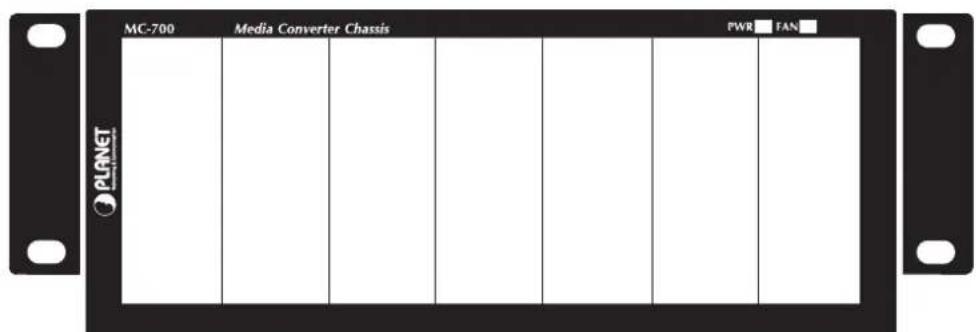
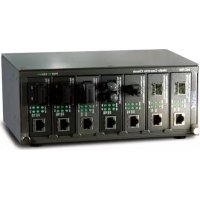
Figure 3-1: MC-700 Front Panel
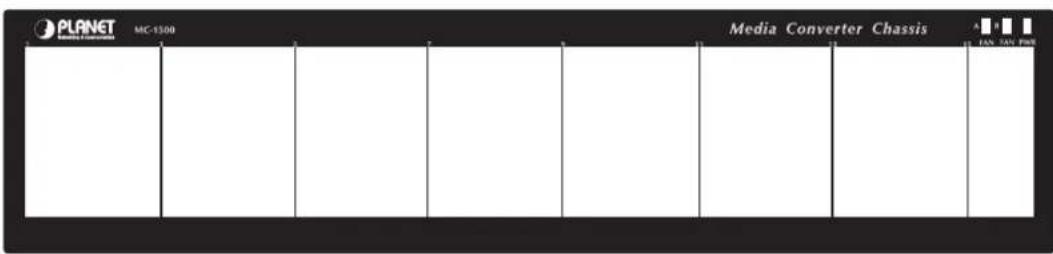
Figure 3-2: MC-1500 Front Panel
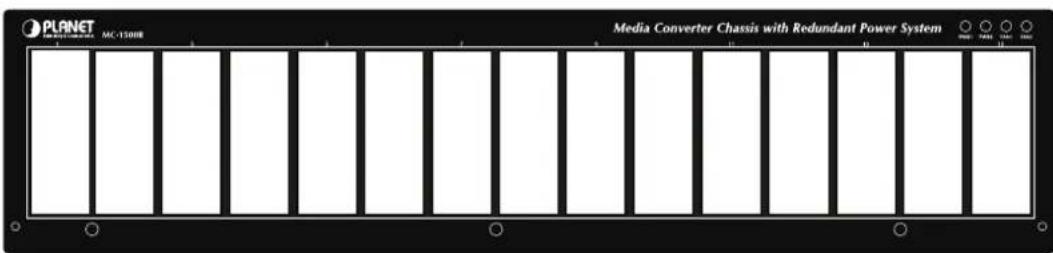
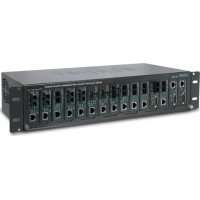
Figure 3-3: MC-1500R/1500R48 Front Panel
4. LED Indicators
MC-700
| Printing LED Status Description | ||
| PWR | ON The chassis is powered. | |
| OFF | The chassis is not powered or power fails, if the AC outlet is with 100~240V AC voltage. Please consult your local dealer if power fails. | |
| Fan | ON The fan is functional. | |
| OFF | The fan is not powered or it malfunctions if the fan LED remains off while power is on. Please consult your local dealer to replace the fan. | |
MC-1500 Series
| Printing LED Status Description | ||
| PWR | ON The chassis is powered. | |
| OFF The chassis is not powered or power fails. | ||
| Fan A/Fan B | ON The fan is functional. | |
| OFF | The fan is not powered or it malfunctions if the fan LED remains off while power is on. Please consult your local dealer to replace the fan. | |
5. Media Converter Chassis Rear Panel
Figures 5-1, 5-2 and 5-3 show the rear panels of MC-700, MC-1500 and MC-1500R/ MC-1500R48.
The rear panel of the MC-700 comes with one fan, one ON/OFF switch and a power inlet that accepts 100 240V AC, 50/60Hz power input.
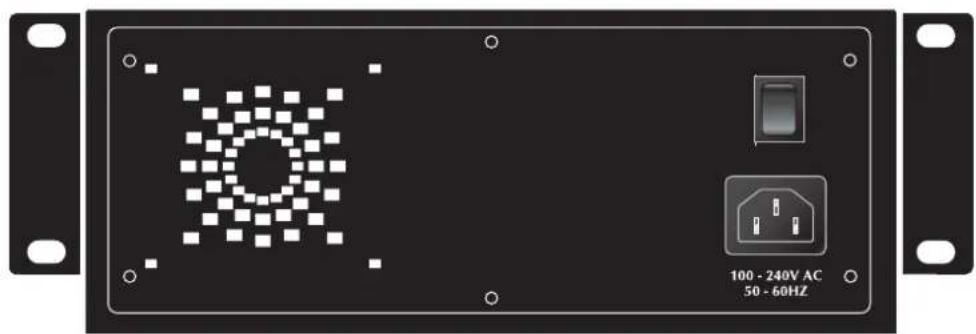
Figure 5-1: MC-700 Rear Panel
The rear panel of the MC-1500 comes with two fans, one ON/OFF switch and a power inlet that accepts 100 240V AC, 50/60Hz power input.
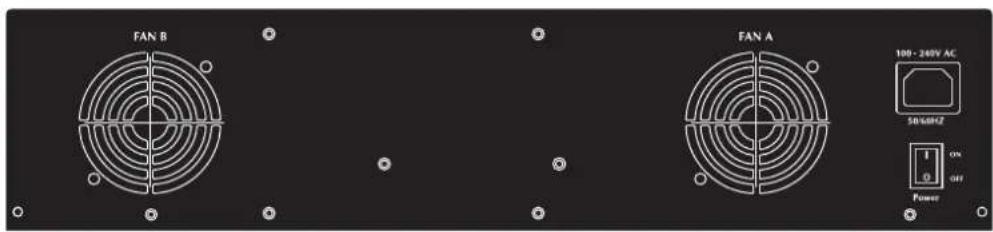
Figure 5-2: MC-1500 Rear Panel
The rear panel of the MC-1500R/1500R48.
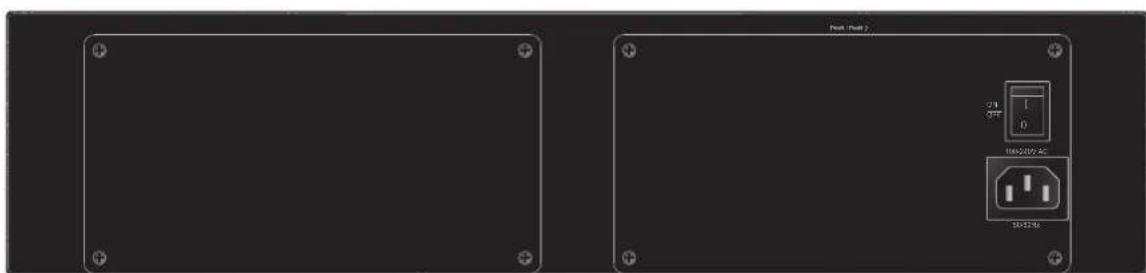
Figure 5-3: MC-1500R/1500R48 Rear Panel
| Note | 1. The MC-1500R is shipped with one 100~240V AC power supply module (MC-15RPS200). 2. The MC-1500R48 is shipped with one -48V DC power supply module (MC-15RPS48). |
| Note | Caution and shock hazard: Remove all power cords before removing top cover. Connect only to a properly earth grounded outlet. Attention et risque d'électrocution: Retirez tous les cordons d'alimentation avant de.xxretirer le capot supérieur. Branchez l'appareil uniquement sur une prise correctement reliée à la terre. |
| Power Notice | 1. The device is a power-required device, meaning, it will not work till it is powered. If your networks should be active all the time, please consider using a proper UPS (Uninterrupted Power Supply) for your device. It will prevent you from network data loss or network down-time. 2. In some areas, installing a surge suppression device may also help to protect your chassis from being damaged by unregulated surge or current to the converter or the power adapter. |
6. Installing the Media Converter Chassis
6.1 Installing Media Converter Chassis in 10-/19-inch Wire Closet Rack
Place four screws through mounting ears on each side.
Locate Converter Chassis at 10/19-inch mounting rails and screw up the front brackets.
Set Main power switch at "OFF" position before connecting the power cord.
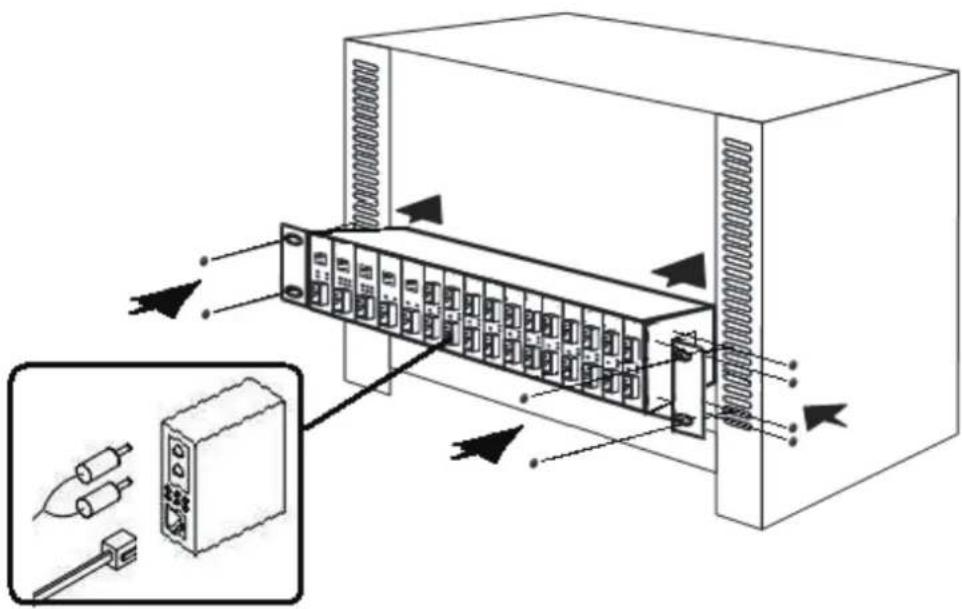
Figure 6-1: Installing Media Chassis in Wire Closet Rails
Rack Mount Instructions
A) Elevated Operating Ambient -- If installed in a closed or multi-unit rack assembly, the operating ambient temperature of the rack environment may be greater than room ambient. Therefore, consideration should be given to installing the equipment in an environment compatible with the maximum ambient temperature (Tma) specified by the manufacturer.
B) Reduced Air Flow -- Installation of the equipment in a rack should be such that the amount of air flow required for safe operation of the equip compromised.
C) Mechanical Loading -- Mounting of the equipment in the rack should be such that a hazardous condition is not achieved due to uneven mechanical loading.
D Circuit Overloading -- Consideration should be given to the connection of the equipment to the supply circuit and the effect that overloading of circuits might have on overcurrent protection and supply wiring. Appropriate consideration of equipment nameplate ratings should be used when addressing this concern.
E) Reliable Earthing -- Reliable earthing of rack-mounted equipment should be maintained. Particular attention should be given to supply connections other than direct connections to the branch circuit (e.g. use of power strips).
6.2 Installing Converters in Media Converter Chassis
Turn off the Converter Chassis power.
Verify the Media Converter is right for this Chassis and locate +5VDC power jack on converter back, carefully slide in and plug to match 10^ / 19^ Chassis slot +5V DC receptacle. Push up the picket fence to lock the converters.

Note
The slide-in Media Converters and Converter Chassis should be supplied only from PLANET; both Media Converters and Chassis are built to match each other as far as dimensions, DC power jack, and DC receptacle and power safety are concerned.
Ensure that there is no activity in the network.
Connect the media cable for network connection.
Turn on the chassis power, and the power LED and two fan LED indicators will light up.
6.3 Converter Checkpoints
| Fiber Port | Attach the fiber cable. The Tx, Rx fiber cable must be paired at both ends. | 2.5mm DC Receptacle 2.5mm +5V for each slot - - - + |
| TP Port | Attach UTP Cat. 3 or 5 cable to TP port. | DC receptacle is 2.5mm wide that conforms to and matches the Media Converter 2.5mm DC jack's central pole. Do not install any improper unit. |

Note
For safety reason, it is recommended to store the AC adapter of the converter in a known secured place. For more about converter, refer to the user guide of the converter.
7. Product Specifications
MC-700 Converter Chassis Specifications
| Dimensions 217 x 88.5 x 140 mm (W x H x D), 2U height | |
| Converter Slots 7 slots | |
| Power Input 100~240V AC, 50/60Hz | |
| Power Consumption 40 watts maximum/136BTU | |
| Power Output Per Slot +5V DC | |
| DC Plug Per Slot 2.5 mm DC receptacle | |
| LED Indication 2; Power, Fan | |
| Fan 1 | |
| Temperature/Humidity | Operating Environment 0~50 degrees C; Humidity: 5~90% non-condensing Storage Environment -40~70 degrees C; Humidity: 5~90% non-condensing |
| Emission FCC Part 15 Class A, CE | |
MC-1500 Converter Chassis Specifications
| Dimensions 440 x 103 x | 180 mm (W x H x D), 2.4U height |
| Converter Slots 15 slots | |
| Power Input 100~240V | AC, 50/60Hz |
| Power Consumption 70 | watts maximum/238BTU |
| Power Output Per Slot +5V DC | |
| DC Plug Per Slot 2.5 mm DC receptacle | |
| LED Indication 3; Power | 1, Fan A, Fan B |
| Fan 2 | |
| Temperature/Humidity | Operating Environment 0~50 degrees C; Humidity: 5~90% non-condensing Storage Environment -40~70 degrees C; Humidity: 5~90% non-condensing |
| Emission FCC Part 15 Class A, CE | |
MC-1500R/MC-1500R48 Converter Chassis Specifications
| Model MC-1500R MC-1500R48 | ||
| Dimensions | 440 x 103 x 180 mm (W x H x D), 2.4U height | |
| Converter Slots 15 slots | ||
| Power Input | 100~240V AC, 3.3A, 50-60Hz | -48V DC 2A, Range: -40V ~ -60V |
| Power Consumption | 10.7 watts/36BTU (1 x power supply, not including converters) 88.3 watts/301BTU (Full loading) | 5.3 watts/18BTU (1 x power supply, not including converters) 80 watts/272BTU (Full loading) |
| Power Output Per Slot Each slot 5V, 1A | ||
| DC Plug Per Slot 2.5 mm DC receptacle | ||
| LED Indication 4; Power | 1, Power 2, Fan A, Fan B | |
| Fan 2 | ||
| Temperature/ Humidity | Operating Environment 0~50 degrees C; Humidity: 5~90% non-condensing Storage Environment -40~70 degrees C; Humidity: 5~90% non-condensing | |
| Emission FCC Part 15 Class A, CE | ||
8. Customer Support
Thank you for purchase PLANET products. You can browse our online FAQ resource at the PLANET Web site first to check if it could solve you issue. If support information, please contact PLANET Media Converter support team.
PLANET online FAQs:
https://www.planet.com.tw/en/support/faq
Media Converter support team mail address: support@planet.com.tw
Copyright © PLANET Technology Corp. 2025.
Contents are subject to revision without prior notice.
PLANET is a registered trademark of PLANET Technology Corp.
All other trademarks belong to their respective owners.
FCC Warning
This equipment has been tested and found to comply with the regulations for a Class A digital device, pursuant to Part 15 of the FCC Rules. These limits are designed to provide reasonable protection against harmful interference when the equipment is operated in a commercial environment. This equipment generates, uses, and can radiate radio frequency energy and, if not installed and used in accordance with this user's guide, may cause harmful interference to radio communications. Operation of this equipment in a residential area is likely to cause harmful interference, in which case the user will be required to correct the interference at his own expense.
This is a Class A product. In a domestic environment, this product may cause radio interference, in which case the user may be required to take adequate measures.
This equipment is compliant with Class A of CISPR 32. In a residential environment this equipment may cause radio interference.
To avoid the potential effects on the environment and human her result of the presence of hazardous substances in electrical and electronic equipment, end users of electrical and electronic equipment should understand the meaning of the crossed-out wheeled bin symbol. Do not
dispose of WEEE as unsorted municipal waste and have to collect such WEEE separately.
Avertissement WEEE