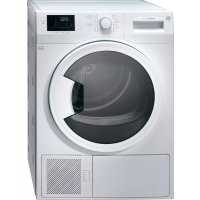
WTANTLWPl - Tumble drier V-ZUG - Free user manual and instructions
Find the device manual for free WTANTLWPl V-ZUG in PDF.



| Product Type | Condenser Dryer |
| Brand | V-ZUG |
| Model | WTANTLWPl (Adorina TL WP) |
| Maximum Load Capacity | 7 kg |
| Height (minimum / maximum) | 84.6 cm / 86.6 cm |
| Width | 59.5 cm |
| Depth | 57 cm |
| Net Weight (plastic door) | 46.5 kg |
| Net Weight (glass door) | 48.5 kg |
| Power Supply | See rating plate |
| Energy Efficiency Class | A++ |
| Annual Energy Consumption | 209 kWh |
| Control Type | Automatic |
| Condensation Efficiency | 86% |
| Sound Power Level | 65 dB(A) |
| Main Programs | Cotton, Synthetics, Jeans, Sport, Sprint, Mixed, Shirts, Baby, Delicates, Air, Timed drying |
| Special Functions | Delayed start (max 24 h), Child lock, Adjustable buzzer, Anti-crease |
| Adjustable Feet | Yes |
| Lint Filter | Washable with water |
| Condensation Water Tank | Manual emptying |
| Moisture Sensor | Yes (cleanable with vinegar) |
| Installation on Washing Machine | Possible with mounting kit (optional) |
Frequently Asked Questions - WTANTLWPl V-ZUG
User questions about WTANTLWPl V-ZUG
0 question about this device. Answer the ones you know or ask your own.
Ask a new question about this device
Download the instructions for your Tumble drier in PDF format for free! Find your manual WTANTLWPl - V-ZUG and take your electronic device back in hand. On this page are published all the documents necessary for the use of your device. WTANTLWPl by V-ZUG.
USER MANUAL WTANTLWPl V-ZUG
natural_image
Line drawing of a front-loading washing machine with lid, door, and ventilation slots (no text or symbols)Bedienungsanleitung|Moded'emploi|Istruzioniper l'uso|Operatinginstructions
Adorina TL WP
Wäschetrockner | Sèche-linge | Asciugatrice | Tumbledryer
natural_image
Simple line drawing of an open book with no text or symbols visiblenatural_image
Diagram of a washing machine with internal tissue and lid, showing no text or symbols
natural_image
Technical diagram of a mechanical device with fan and internal components (no text or symbols)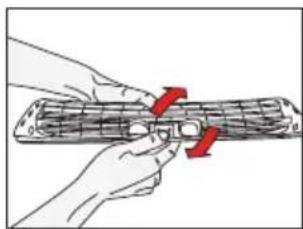
natural_image
Illustration of hands holding a tool with red arrows indicating movement or force (no text or symbols)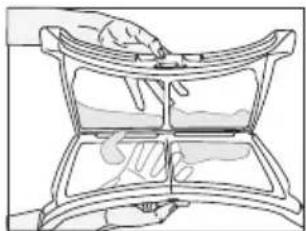
natural_image
Line drawing of a hand pressing down on a curved panel or tray (no text or symbols)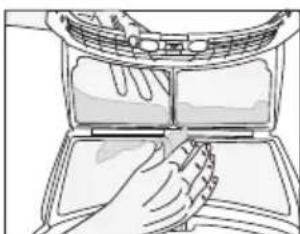
natural_image
Line drawing of a hand cleaning a car air conditioner cover (no text or symbols)natural_image
Line drawing of hands using a tool to clean or store items on a curved surface (no text or symbols)natural_image
Line drawing of hands cleaning a circular mechanical component (no text or symbols)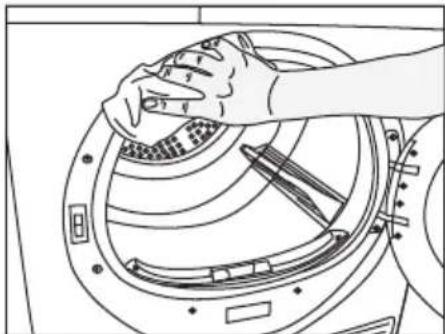
natural_image
Line drawing of a hand cleaning a circular mechanical component (no text or symbols)5.2 Sensor reinigen
natural_image
Line drawing of a hand placing a small object into a circular mechanical component (no text or symbols)natural_image
Line drawing of hands installing or adjusting a device panel on a machine (no text or symbols visible)natural_image
Line drawing of a hand holding a mechanical device with no visible text or symbolsnatural_image
Line drawing of a hand cleaning a window with a grid-patterned surface (no text or symbols)natural_image
Illustration of a hand inserting a device into a computer case (no text or symbols visible)natural_image
Illustration of a hand inserting a cable into a computer monitor case (no text or symbols visible)natural_image
Illustration of a hand pressing down on a device with a curved arrow indicating rotation (no text or symbols)natural_image
Diagram of a mechanical component with arrows indicating direction, showing internal structure and alignment (no text or symbols)natural_image
Line drawing of a hand holding an open notebook or folder (no text or symbols visible)natural_image
Diagram showing two mechanical components with arrows indicating direction of movement (no text or symbols)natural_image
Illustration of a hand holding a device with an arrow indicating rotation (no text or symbols present)natural_image
Hand inserting a component into a device panel (no text or symbols visible)natural_image
Illustration of a hand pressing down on a computer monitor with a red arrow pointing to the screen (no text or symbols)natural_image
Diagram showing a device's internal structure with a black-and-white component being inserted (no text or symbols visible)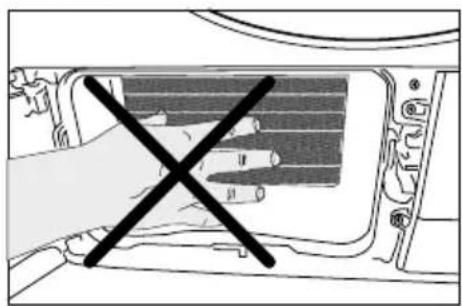
natural_image
Diagram of a device interior with a hand crossed out, showing no text or symbols
natural_image
Simple line drawing of an open book with no text or symbols visiblenatural_image
Diagram of a washing machine with internal components and ventilation duct (no text or labels)
natural_image
Grid pattern with alternating black and white squares (no text or symbols)
natural_image
Simple black-and-white icon of a flag on a pole, enclosed in a square frame (no text or symbols)natural_image
Line drawing of a hand using a tool to clean or wash material inside a device (no text or symbols)natural_image
Line drawing of hands cleaning a circular mechanical component (no text or symbols)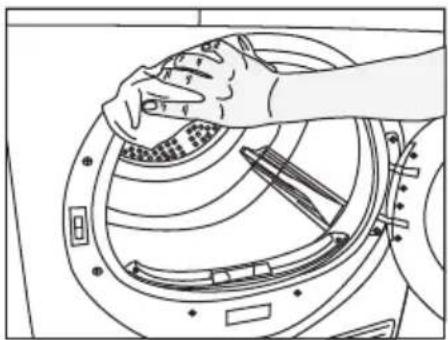
natural_image
Line drawing of hands cleaning a circular mechanical component (no text or symbols)natural_image
Line drawing of a hand placing a small object into a circular component with internal patterns (no text or symbols)natural_image
Line drawing of hands installing or adjusting a mechanical component with a clip (no text or symbols)natural_image
Line drawing of a hand holding a mechanical device with a tool inserted (no text or symbols)natural_image
Line drawing of a hand holding a textured surface next to a curved panel (no text or symbols)natural_image
Illustration of a hand inserting a component into a computer case (no text or symbols visible)natural_image
Illustration of a hand inserting a component into a device casing (no text or symbols visible)natural_image
Illustration of a hand holding a device with a scroll wheel, showing a curved arrow indicating rotation (no text or symbols present)natural_image
Diagram of a mechanical device with two arrows indicating movement or force, showing internal components (no text or symbols)natural_image
Line drawing of a hand holding a folded or open notebook device (no text or symbols visible)natural_image
Diagram showing two mechanical components with arrows indicating direction, no text or symbols presentnatural_image
Illustration of a hand holding a device with an arrow indicating rotation (no text or symbols)natural_image
Hand inserting a component into a device panel (no text or symbols visible)- Reposez la plaque de protection.
natural_image
Line drawing of a hand pressing down on a computer monitor with a red arrow indicating the button (no text or symbols)
natural_image
Diagram of a vehicle interior showing a belt drive a rectangular component with motion lines (no text or symbols)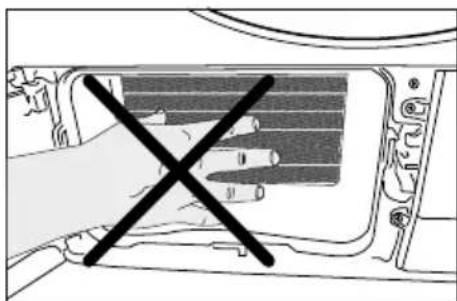
natural_image
Diagram of a hand crossed out of a device panel with no visible text or symbols
natural_image
Diagram of a washing machine with internal components and lid, showing no text or symbols
natural_image
Line drawing of a hand using a tool to clean or store items on a curved shelf (no text or symbols)natural_image
Line drawing of hands cleaning a circular mechanical component (no text or symbols)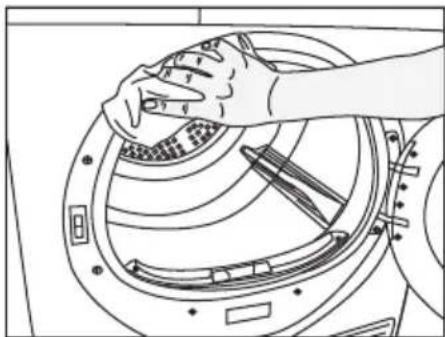
natural_image
Line drawing of a hand cleaning a circular mechanical component (no text or symbols)natural_image
Line drawing of a hand inserting a component into a circular device (no text or symbols)natural_image
Line drawing of hands installing or adjusting a mechanical component with a clip (no text or symbols)natural_image
Line drawing of a hand operating a mechanical device with a tool inserted (no text or symbols)natural_image
Line drawing of a hand holding a spray bottle over a grid-patterned surface inside a container (no text or symbols)natural_image
Line drawing of a hand inserting or adjusting a device into a computer case (no text or symbols visible)natural_image
Illustration of a hand inserting a component into a device casing (no text or symbols visible)natural_image
Illustration of a hand holding a device with a scroll, showing a black arrow indicating rotation (no text or symbols present)natural_image
Diagram of a door handle assembly with arrows indicating movement or force (no text or symbols)natural_image
Line drawing of a hand holding an open notebook or binder case (no text or symbols visible)natural_image
Diagram showing two mechanical components with arrows indicating direction (no text or symbols)natural_image
Illustration of a hand holding a device with an arrow indicating rotation (no text or symbols)natural_image
Hand inserting a component into a computer drive (no text or symbols visible)natural_image
Illustration of a hand holding a device with a red arrow pointing to it, next to a curved line (no text or symbols)
natural_image
Diagram of a car interior showing a vehicle with a belt and a textured panel, no text or symbols present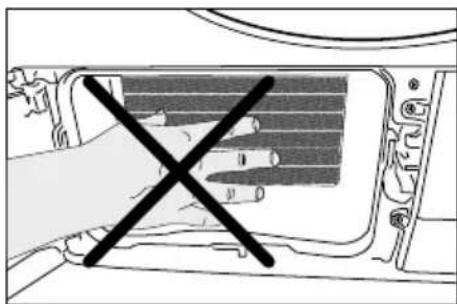
natural_image
Diagram of a hand opening a device with a black X symbol (no text or labels present)
Thank you for preferring a V-ZUG product. We hope that your product which has been manufactured with high quality and technology will give you the best results. We advise you to read through this manual and the other accompanying documentation carefully before using your product and keep it for future reference. If you transfer the product to someone else, give its manual as well.
Pay attention to all details and warnings specified in the user manual and follow the instructions given therein.
Modifications
Text, diagrams and data correspond to the technical standard of the appliance at the time these operating instructions went to press. The right to make technical modifications for the purpose of the further development of the appliances reserved.
Validity
The product family (model number) corresponds to the first alphanumerics on the identification plate. These operating instructions apply to:
| Model Type Product family | |
| Adorina TL WP WTANTLWP 12009 |
Please follow the safety precautions.
Read the instructions.
Explanation of symbols
Throughout this user manual the following symbols are used:
 | Important information or useful hints about usage. |
 | Warning for hazardous situations with regard to life and property. |
 | Warning against electric shock. |
 | Warning against hot surfaces. |
 | Warning against fire hazard. |
 | Packaging materials of the product are manufactured from recyclable materials in accordance with our National Environment Regulations. |
Do not dispose of the packaging wastes with the domestic waste or other wastes, discard them to the dedicated collection points designated by the local authorities.
1 Important instructions for safety and environment
This section contains safety instructions that will help protect from risk of personal injury or property damage. Failure to follow these instructions shall void any warranty.
1.1 General safety
- The dryer can be used by children at and above 8 years old and by persons whose physical, sensory or mental capabilities were not fully developed or who lack experience and knowledge provided that they are supervised or trained on the safe usage of the product and the risks it brings out. Children should not play with the product. Cleaning and maintenance works should not be performed by children unless they are supervised by someone.
- Children of less than 3 years should be kept away unless continuously supervised.
- Adjustable feet should not be removed. The gap between the dryer and the floor should not be reduced with materials such as carpet, wood and tape. This will cause problems with the dryer.
- Always have the installation and repairing procedures carried out by the Authorized Service. Manufacturer shall not be held liable for damages that may arise from procedures carried out by unauthorized persons.
- Never wash the dryer by spraying or pouring water onto it! There is the risk of electric shock!
Important instructions for safety and environment
1.1.1 Electrical safety

Electrical safety instructions should be followed while electrical connection is made during the installation.

The appliance must not be supplied through an external switching device, such as a timer, or connected to a circuit that is regularly switched on and off by utility.
- Connect the dryer to a grounded outlet protected by a fuse at the value specified on the type label. Have the grounding installation performed by a qualified electrician. Our company shall not be liable for any damages that will arise when the dryer is used without grounding in accordance with the local regulations.
- The voltage and allowed fuse protection is stated on the type label plate.
- The voltage specified on the type label must be equal to your mains voltage.
- Unplug the dryer when it is not in use.
- Unplug the dryer from the mains during installation, maintenance, cleaning and repair works.
- Do not touch the plug with wet hands! Never unplug by pulling on the cable, always pull out by grabbing the plug.
- Do not use extension cords, multi-plugs or adaptors to connect the dryer to power supply in order to decrease the risk of fire and electric shock.
- Power cable plug must be easily accessible after installation.
Damaged mains cable should be changed notifying the Authorized Service.
If the dryer is faulty, it must not be operated unless it is repaired by an authorized service agent! There is the risk of electric shock!
Important instructions for safety and environment
1.1.2 Product safety

Points to be taken into consideration for fire hazard:
Below specified laundry or items must not be dried in the dryer considering fire hazard.
- Unwashed laundry items
- Items soiled with oil, acetone, alcohol, fuel oil, kerosene, stain removers, turpentine, paraffin or paraffin removers must be washed in hot water with plenty of detergent before being dried in the dryer.
For this reason especially the items containing the above specified stains must be washed very well, to do this use adequate detergent and choose a high washing temperature.

Below specified laundry or items must not be dried in the dryer due to the fire hazard:
- Garments or pillows bolstered with rubber foam (latex foam), shower bonnets, water resistant textiles, materials with rubber reinforcement and rubber foam pads.
- Clothing cleaned with industrial chemicals.
Items such as lighter, match, coins, metal parts, needle etc. may damage the drum set or may lead to functional problems. Therefore check all the laundry that you will load into your dryer.
Never stop your dryer before the programme completes. If you must do this, remove all laundry quickly and lay them out to dissipate the heat.

Clothes that are washed inadequately may ignite on their own and even may ignite after drying ends.
- You must provide enough ventilation in order to prevent gases exiting from devices operating with other types of fuels including the naked flame from accumulating in the room due to the back fire effect.
Important instructions for safety and environment

Underwear that contains metal reinforcements should not be dried in the dryer. Dryer may be damaged if metal reinforcements come loose and break off during drying.

Use softeners and similar products in accordance with the instructions of their manufacturers.

Always clean the lint filter before or after each loading. Never operate the dryer without the lint filter installed.
- Never attempt to repair the dryer by yourself. Do not perform any repair or replacement procedures on the product even if you know or have the ability to perform the required procedure unless it is clearly suggested in the operating instructions or the published service manual. Otherwise, you will be putting your life and others' lives in danger.
- There must not be a lockable, sliding or hinged door that may block the opening of the loading door in the place where your dryer is to be installed.
- Install your dryer at places suitable for home use. (Bathroom, closed balcony, garage etc.)
- Make sure that pets do not enter the dryer. Check the inside of the dryer before operating it.
- Do not lean on the loading door of your dryer when it is open, otherwise it may fall over.
- The lint must not be allowed to accumulate around the tumble dryer
Important instructions for safety and environment
1.2 Mounting over a washing machine
- A fixing device should be used between the two machines when installing the dryer above a washing machine. The fitting device must be installed by the authorized service agent.
- Total weight of the washing machine and the dryer -with full load- when they are placed on top of each other reaches to approx. 180 kilograms. Place the products on a solid floor that has sufficient load carrying capacity!

Washing machine cannot be placed on the dryer. Pay attention to the above warnings during the installation on your washing machine.
| Installation Table for Washing Machine and Dryer | |||||||
| Dryer Depth | Washing Machine Depth | ||||||
| 62 cm 6 | 0 cm 54 | cm 50 cm | 49 cm | 45 cm 40 cm | |||
| 54 cm | Can be installed | Can be installed | Cannot be installed | ||||
| 60 cm Can be installed | Cannot be installed | ||||||
Important instructions for safety and environment
1.3 Intended use
- Dryer has been designed for domestic use. It is not suitable for commercial use and it must not be used out of its intended use.
- Use the dryer only for drying laundry that are marked accordingly.
- The manufacturer waives any responsibility arisen from incorrect usage or transportation.
- The service life of the dryer that you purchased is 10 years. During this period, original spare parts will be available to operate the dryer properly.
1.4 Child safety
- Packaging materials are dangerous for the children. Keep packaging materials away from children.
- Electrical products are dangerous for the children. Keep children away from the product when it is operating. Do not let them tamper with the dryer. Use the child-proof lock in order to prevent the children to tamper with the dryer.

Child-proof lock is on the control panel. (See Child lock)
- Keep loading door closed even when the dryer is not in use.
Important instructions for safety and environment
1.5 Compliance with the WEEE regulation and disposing of the waste product
This product complies with EU WEEE Directive (2012/19/EU). This product bears a classification symbol for waste electrical and electronic equipment (WEEE).
This product has been manufactured with high quality parts and materials which can be reused and are suitable for recycling. Do not dispose of the waste product with normal domestic and other
wastes at the end of its service life. Take it to the collection center for the recycling of electrical and electronic equipment. Please consult your local authorities to learn about these collection centers.
1.6 Compliance with RoHS Directive:
The product you have purchased complies with EU RoHS Directive (2011/65/EU). It does not contain harmful and prohibited materials specified in the Directive.
1.7 Package information
Packaging materials of the product are manufactured from recyclable materials in accordance with our National Environment Regulations. Do not dispose of the packaging materials together with the domestic or other wastes. Take them to the packaging material collection points designated by the local authorities.
Important instructions for safety and environment
1.8 Technical Specifications
| EN | |
| Height (Min. / Max.) 84,6 cm / 86,6 cm* | |
| Width 59,5 cm | |
| Depth 57 cm | |
| Capacity (max.) 7 kg** | |
| Net weight (plastic front door usage) 46,5 kg | |
| Net weight (glass front door usage) 48,5 kg | |
| Voltage | See type label***Rated power in |
| Model code | |
* Min. height: Height with adjustable feet are closed.
Max. height: Height with adjustable feet are opened maximum.
** Dry laundry weight before washing.
*** Type label is located behind the loading door.
 | Technical specifications of the dryer are subject to specification without notice to improve the quality of the product. |
 | Figures in this manual are schematic and may not match the product exactly. |
 | Values stated on markers on the dryer or in the other published documentation accompanying with the dryer are obtained in laboratory in accordance with the relevant standards. Depending on operational and environmental conditions of the dryer, these values may vary. |
2. Your Dryer
2.1 Package Contents
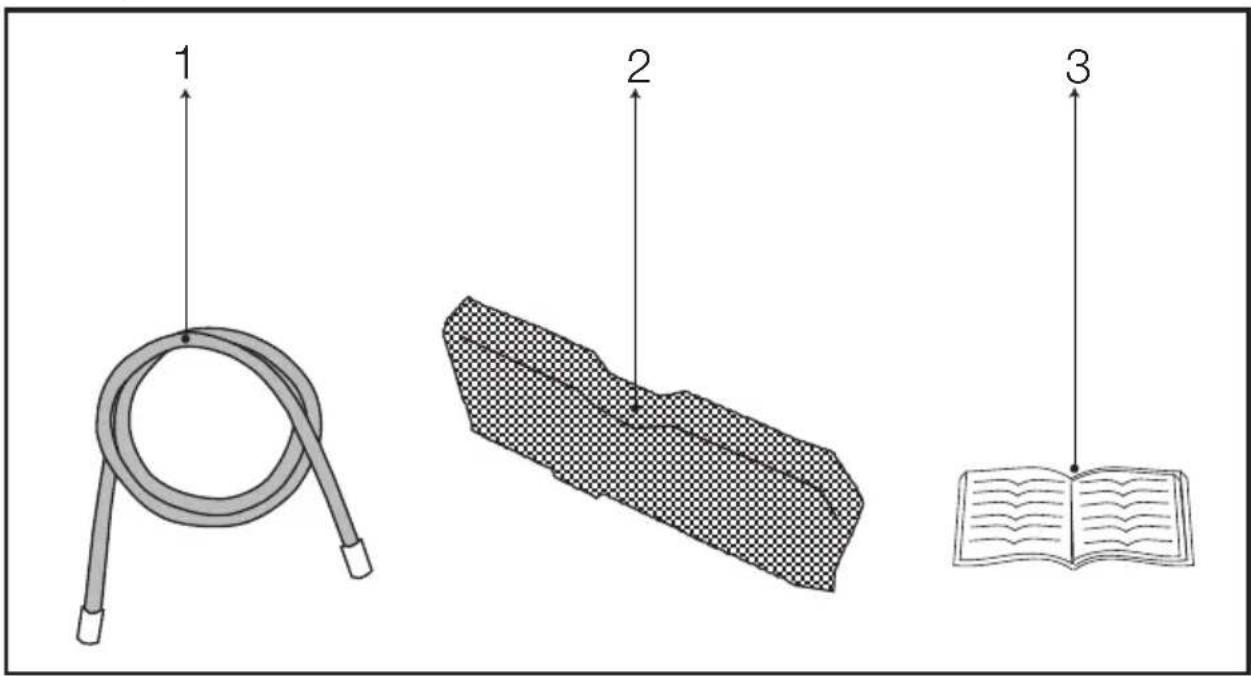
- Water drain hose *
- Filter drawer spare sponge*
- User Manual
*It can be supplied with your machine depending on its model.
3 Preparation
3.1 Laundry suitable for drying in the dryer
Always obey the instructions given on the garment tags. Dry only the laundry having a label stating that they are suitable for drying in a dryer and make sure that you select the appropriate programme.
| LAUNDRY DRYING SYMBOLS | |||||||||||
 | Drying Symbols |  Suitable for dryer Suitable for dryer |  No Iron No Iron |  Sensitive / Delicate dry Sensitive / Delicate dry |  Do not dry with dryer Do not dry with dryer |  Do not dry Do not dry | |||||
| Drying Settings | At any temperature | At high temperature | At medium temperature | At low temperature | Without heating | Hang to dry | Lay to dry | Hang wet to dry | Lay in shadow to dry | Dry-cleanable | |
| IRON | Iron - | ||||||||||
| Dry or Steam | Iron at high temperature | Iron at medium temperature | Iron at low temperature | Do not iron | Iron without steam | ||||||
| Maximum temperature | 200 °C 150 | °C 110 | °C | ||||||||
 | Drying Settings |  |  |  |  |  | [6SA3] |  |  |  |  |
| At any temperature | At high temperature | At medium temperature | At low temperature | Without heating | Hang to dry | Lay to dry | Hang wet to dry | Lay in shadow to dry | Dry-cleanable |
 | Iron - |  |  |  |  |  |
| IRON | Dry or Steam | Iron at high temperature | Iron at medium temperature | Iron at low temperature | Do not iron | Iron without steam |
| Maximum temperature | 200 °C 150 | °C 110 | °C |
3.2 Laundry not suitable for drying in the dryer

Delicate embroidered fabrics, woolen, silk garments, delicate and valuable fabrics, airtight items and tulle curtains are not suitable for machine drying.
3.3 Preparing laundry for drying
- Laundry may be tangled with each other after washing. Separate the laundry items before placing them into the dryer.
- Dry garments having metal accessories such as zippers, inside out.
- Fasten the zippers, hooks and buckles and button sheets.
3.4 Things to be done for energy saving
Following information will help you use the dryer in an ecological and energy-efficient manner.
- Spin your laundry at the highest speed possible when washing them. Thus, the drying time is shortened and energy consumption is reduced.
- Sort out the laundry depending on their type and thickness. Dry the same type of laundry together. For example thin kitchen towels and table clothes dries earlier than thick bathroom towels.
- Follow the instructions in the user manual for programme selection.
- Do not open the loading door of the machine during drying unless necessary. If you must certainly open the loading door, do not to keep it open for a long time.
- Do not add wet laundry while the dryer is in operation
- Clean the lint filter before or after each drying cycle. (See 5. Maintenance and cleaning)
Preparation
- Clean the filter drawer regularly either when the Filter Drawer Cleaning warning symbol appears or after every 5 drying cycles. (See 5. Maintenance and cleaning)
- Ventilate the room, where the dryer is located, well during drying.
3.5 Correct load capacity
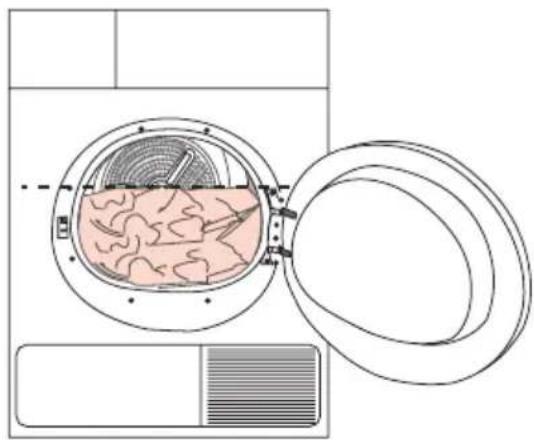
Follow the instructions in the “Programme selection and consumption table”. Do not load more than the capacity values stated in the table.
natural_image
Diagram of a washing machine with internal tissue and ventilation duct (no text or labels)
It is not recommended to load the dryer with laundry exceeding the level indicated in the figure. Drying performance will degrade when the machine is overloaded. Furthermore, dryer and the laundry can get damaged.
Following weights are given as examples.
| Laundry | Approximate weights (g)* |
| Cotton quit covers (double) 1500 | |
| Cotton quit covers (single) 1000 | |
| Bed sheets (double) 500 | |
| Bed sheets (single) 350 | |
| Large tablecloths 700 | |
| Small tablecloths 250 | |
| Tea napkins 100 | |
| Bath towels 700 | |
| Hand towels 350 | |
| Blouses 150 | |
| Cotton shirts 300 | |
| Shirts 250 | |
| Cotton dresses | 500 |
| Dresses | 350 |
| Jeans | 700 |
| Handkerchiefs (10 pieces) | 100 |
| T-Shirts | 125 |
*Dry laundry weight before washing.
4 Operating the product
4.1 Control panel
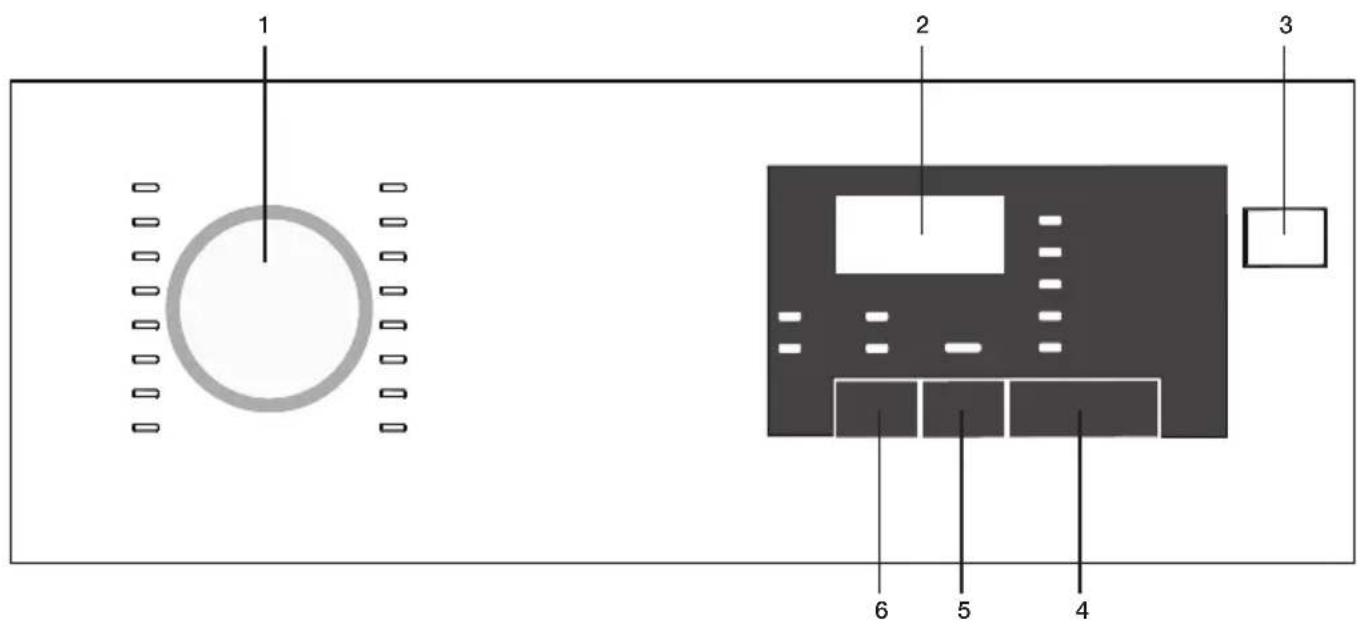
- Program selection knob
- Remaining duration indicator
- On/Off button
- Start/pause button
- Delayed start button
- Acoustic signal button
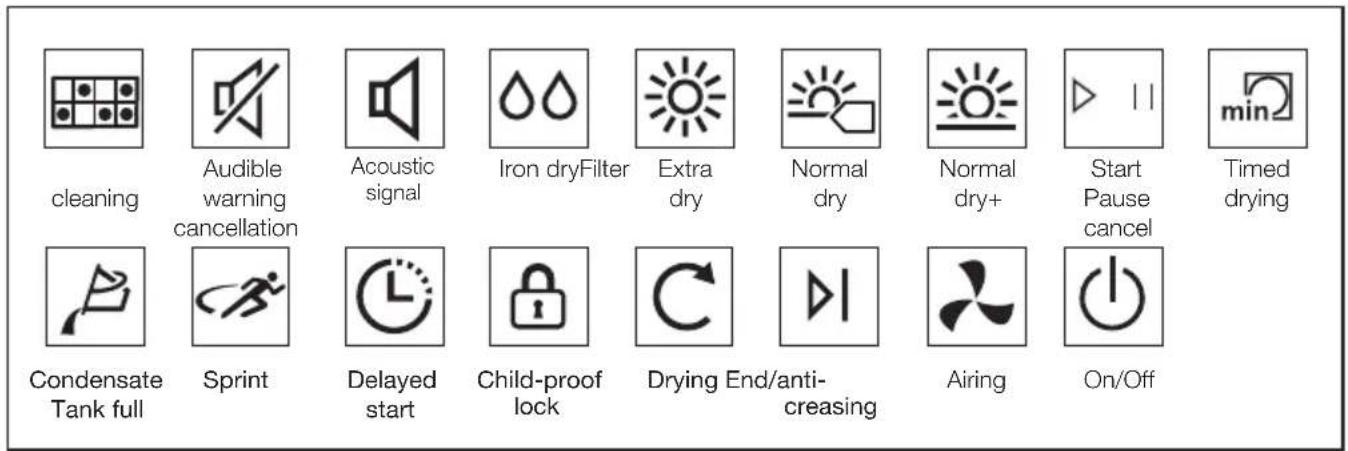
4.2 Screen symbols
Operating the product
4.3 Preparing the machine
- Plug in the machine
- Place laundry inside the machine.
- Press the On/Off button.
- When your machine turns on for the first time, it turns on with the declaration (cotton normal dry) program.

Pressing the On/Off button doesn't mean the program starts. Press the Start / Pause button to start the program.
4.4 Program selection
- Determine the appropriate program from the chart below containing the drying levels.
- Select the program you desire using the Program Selection knob.
| Extra Dry | Only cotton laundry is dried in normal temperature.Thick and multi-layered laundry (towels, sheets, jeans etc.) are dried so that they can be placed into wardrobe without ironing. |
| Normal dry | Normal laundry (tablecloths, underwear etc.) are dried so that they can be placed into wardrobe without ironing. |
| Normal dry + | Normal laundry (Ex: tablecloths, underwear) are again dried so that they can be placed into the wardrobe but more so than the normal dry option. |
| Iron Dry | Normal laundry (shirts, dresses etc) are dried ready for ironing. |

For detailed program information see. „Program selection and consumption table“..
4.5 Main programs
- Cotton
Dry durable laundry with this program. It dries in normal temperature. Recommended for use with your cotton laundry (sheets, bed covers, towels, bathrobes etc.)
- Synthetic
Dry laundry that is not very durable with this program. Recommended for use with your synthetic laundry.
4.6 Extra programs
The following extra programs are available in the machine for special conditions.

Extra programs may vary according to the specifications of your machine.

In order to receive better results from drying machine programs, your laundry should be washed with the appropriate program in your washing machine and wringed with recommended wringing revolution..
- Denim
Use to dry jeans that are wringed with high rpm in washing machine.
- Sportswear
Use to dry laundry made from synthetic, cotton or mixed fabrics.
- Sprint
You can use this program to dry cotton laundry that you had wringed in high rpm in your washing machine. It dries 1 kg of your Cotton laundry (3 shirts / 3 T-shirts) in 50 minutes.
- Mixed
Used to dry synthetic and cotton laundry that do not release colour. Used for laundry that is suitable for drying.
- Shirts
Dries shirts more delicately and thus causes less wrinkles for easy ironing.
- Baby garments
Program used for baby clothing with can be dried approval on the label.

Very little dampness might remain on the shirts after the program. It is recommended that you do not leave the shirts in the drying machine.
Operating the product
- Delicates
You can dry your delicates suitable for drying or laundry that is recommended to hand wash (silk blouses, thin underwear etc.) in low temperature.

It is recommended to dry your delicates in laundry bag to prevent wrinkles and damage. When the program ends, take your laundry out of the machine immediately and hang them to prevent wrinkles.
- Airing
It only performs ventilation for 10 minutes without blowing hot air. You can ventilate the cotton and linen clothing that has remained closed for a long duration and remove their odor.
- Timed Drying
You can select the 30 mins and 45 mins timed dry in to achieve the desired final drying level with low temperature.

On this program, the machine dries as long as the set duration, regardless of the drying level.
Operating the product
4.7 Program selection and consumption table
| EN | |||||
| Programs Capacity (kg) | Spin speed in washing machine (rpm) | Approximate amount of remaining humidity | Drying time (minutes) | ||
| Cottons / Coloreds | |||||
 | Extra dry | 7 1000 % 60 185 | |||
 | Normal dry | 7 / 3,5 1000 % 60 174 / 107 | |||
 | Iron dry | 7 1000 % 60 140 | |||
| Shirts 1.5 1200 % 60 60 | |||||
| Denim 4 1200 %50 150 | |||||
| Mixed 3.5 1200 %50 110 | |||||
| Sportswear 4 1000 %60 135 | |||||
| Sprint 1 1200 %50 50 | |||||
| Delicates | 2 | 600 | %40 | 70 | |
| Baby garments | 3 1000 % 60 80 | ||||
| Synthetics | |||||
 | Normal dry + easy care | 3.5 | 800 | % 40 70 | |
 | Iron dry + easy care | 3.5 | 800 | % 40 60 | |
| Energy consumption values | |||||
| Programs Capacity (kg) | Spin speed in washing machine (rpm) | Approximate amount of remaining humidity | Energy consumption value kWh | ||
| Cottons linen normal dry* | 7 / 3,5 | 1000 | % 60 | 1,68 / 0,98 | |
| Cottons iron dry | 7 1000 % 60 1,3 | ||||
| Synthetics normal dry | 3.5 | 800 | % 40 | 0,59 | |
| Power consumption of the off-mode for the standart cotton programme at full load, PO (W) | 0,5 | ||||
| Power consumption of the left-on mode for the standart cotton programme at full load, PL (W) | 1,0 | ||||
| Contains fluorinated greenhouse gases covered by the Kyoto Protocol. Hermetically sealed.R134a / 0,30 kg - GWP:1430 - 0,429 tCO2e | |||||
„Cotton normal dry programme“ used at full and partial load is the standard drying programme to which the information in the label and the fiche relates, that this programme is suitable for drying normal wet cotton laundry and that it is the most efficient programme in terms of energy consumption for cotton.
* : Energy Label standard program (EN 61121:2012) All the filters must be cleaned prior to test series. All the values in the table are determined according to EN 61121:2012 standard. Consumption values may vary from the values in the table depending on laundry type, wringing revolution, ambient conditions and changes in voltage.
Operating the product
4.8 Auxiliary functions Sound warning cancel
Drying machine makes sound warnings when the program is completed. If you don't want sound notifications, press the "Sound Notification" button. When you press the sound notification button it lights up, and program does not make sound notifications when completed.

You can select this function before or after the program starts.
4.9 Warning symbols

Warning symbols may vary according to the specifications of your machine.
Lint filter cleaning
When the program is completed, a warning led lights up, which indicates that the filter has to be cleaned.

If the filter cleaning led blinks, see the „Troubleshooting“ chapter.
Condensate tank
When the program is completed, a warning led lights up, which indicates that the condensate tank must be emptied. If the condensate tank fills up while the program is running, warning led starts blinking and the machine goes into stand-by. In that case empty the water in the condensate tank and start the program by pressing the Start / Pause button. Warning led turns off and the program resumes.

natural_image
Simple black-and-white graphic of a flag on a pole, enclosed in a square frame (no text or symbols)Loading door open
Start/Pause led blinks when the loading door of the drying machine is open.
4.10 Delayed Start
You can delay the end duration of the program for up to 24 hours with the delayed start function.
- Open the loading door and place your laundry.
- Select the drying program.
- Press the delayed start selection button and set the delay duration you want.
Delayed start led lights up. (End duration moves continuously when you keep pressing the button). - Press the Start / Pause button. Delayed start countdown begins. The “:” sign in the middle of the displayed delay duration blinks.

You can add or remove laundry for the duration of the delayed start. The duration displayed on the screen is the sum of the normal drying duration and the delayed start. At the end of the countdown the delayed start led turns off, drying beings and drying led lights up.
Changing the Delayed start
If you want to change the duration during the countdown:
- Cancel the program by pressing the On/Off button. Turn on the drying machine again by pressing the On/Off button. When your drying machine turns on for the first time, it turns on with the declaration (cotton normal dry) program.
- Select the program you desire using the Program Selection knob.
- Repeat the delayed start operation for the duration you want.
- Start the program by pressing the Start / Pause button.
Canceling the delayed start function
If you want to cancel the delayed start setting countdown and start the program right away:
- Cancel the program by pressing the On/Off button. Turn on the drying machine again by pressing the On/Off button. When your drying machine turns on for the first time, it turns on with the declaration (cotton normal dry) program.
- Select the program you desire using the Program Selection knob.
- Start the program by pressing the Start / Pause button.
Operating the product
4.11 Starting the program
Start the program by pressing the Start / Pause button. Start/Pause led and the Drying led light up, indicating the program started. The “:” sign in the middle of the remaining duration starts to blink.
4.12 Childproof Lock
The machine features a childproof lock which prevents the machine program flow from being affected when buttons are pressed during operation.
When the Childproof Lock is active, all buttons except for the On/Off button are deactivated.
To activate the Childproof lock, press the acoustic signal button and Delayed start button simultaneously for 3 seconds.
Te Childproof lock should be deactivated to be able to start a new program after the current program ends or to be able to interfere with the current program. Keep the same buttons pressed for 3 seconds again to deactivate the child lock.

The lock led on the screen lights up when the Childproof Lock is activated.

Childproof Lock deactivates when the machine is turned off and on again using the On/Off button.
A warning sound is heard when any button is pressed (except for On/Off button) or the Program Selection knob is turned while the child lock is active.
4.13 Changing the program after it is started
After the machine starts running, you can change the program you selected to dry your laundry with a different program.
- For example, to select Extra Dry program instead of the Iron Dryness, stop the program by pressing the Start / Pause button.
- Turn the Program Selection knob to select the Extra Dry program.
- Start the program by pressing the Start / Pause button.
Adding and removing laundry in stand-by mode
If you want to add or remove laundry after the drying program starts:
- Press the Start/Pause button to take the machine into Stand-by mode. Drying operation stops.
- Open the loading door, add or remove laundry and close the loading door.
- Start the program by pressing the Start / Pause button.

The laundry adding made after the drying operation started may cause the dried laundry inside the machine to mix with the wet laundry and the laundry to remain damp after the operation ends..

Laundry adding and removing can be repeated as much as desired during drying operation. But this process would continuously interrupt the drying operation, and so would cause the program duration to lengthen and increase energy consumption. Thus, it is recommended to add laundry before the program starts.

If a new program is selected by changing the position of the program selection knob while your machine is in stand-by mode, the running program ends.
Do not contact the inner surface of the drum when adding or removing laundry during a continuing program. The drum surface is hot.
4.14 Canceling the program
If you want to cancel the program and end the drying operation for any reason after the machine starts running, press the On/Off button.

As it will be extremely hot inside the machine when you cancel the program while the machine is in operation; run the ventilation program to cool it down.
Operating the product
4.15 Program end
When the program ends, the Final/Wrinkle Prevention, Lint Filter Cleaning and Condensate Tank Warning leds on the program follow up indicator light up. Loading door can be opened and machine becomes ready for a second run.
Press the On/Off button to turn off the machine.

In case the laundry is not removed after the program is completed, the wrinkle prevention program that lasts 2 hours start in order to prevent wrinkling of the laundry that remains inside the machine.

Clean the lint filter after each drying. (See. „Lint filter and loading door inner surface“)

Empty the condensate tank after each drying. (See. „Emptying the water tank“)
5 Maintenance and cleaning
Service life of product extends and frequently experienced problems will be reduced if it is cleaned at regular intervals.
5.1 Cleaning Lint Filter / Loading Door Inner Surface
Lint and fiber released from the laundry to the air during the drying cycle are collected in the Lint Filter.
| Such fiber and lint are generally formed during wearing and washing. | |
| Always clean the lint filter and the inner surfaces of the loading door after each drying process. | |
| You can clean the lint filter housing with a vacuum cleaner. |
To clean the lint filter:
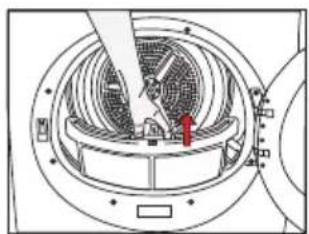
- Open the loading door.
- Remove the lint filter by pulling it up and open the lint filter.
- Clean lint, fiber, and cotton raveling by hand or with a soft piece of cloth.
- Close the lint filter and place it back into its housing.
natural_image
Technical diagram of a circular fan or vent with internal blades and a pointer, no visible text or symbols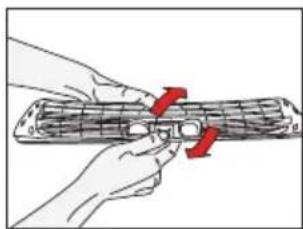
natural_image
Illustration of hands holding a cylindrical object with red arrows indicating force or movement (no text or symbols)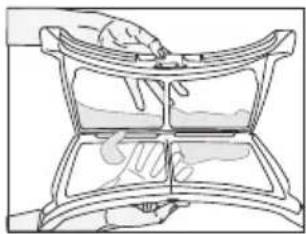
natural_image
Line drawing of a hand holding a curved object with a handle, no text or symbols present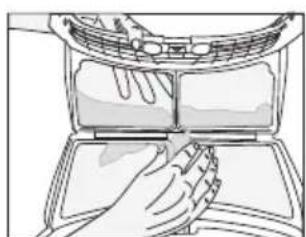
natural_image
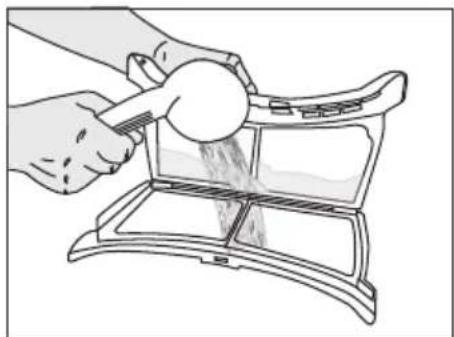
Line drawing of hands cleaning a car air conditioner cover (no text or symbols)- A layer can build up on the filter pores that can cause clogging of the filter after using the dryer for a while. Wash the lint filter with warm water to remove the layer that builds up on the lint filter surface. Dry the lint filter completely before reinstalling it.
natural_image
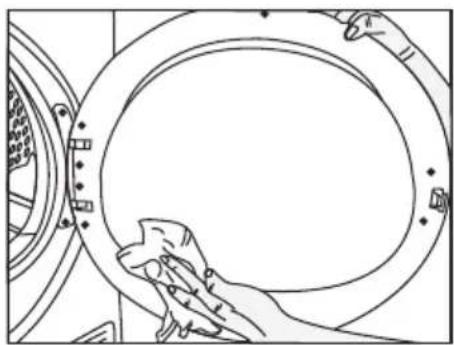
Line drawing of hands using a tool to clean or store items from a storage tray (no text or symbols)- Clean the entire inner surface of the loading door and loading door gasket with a soft damp cloth.
natural_image
Line drawing of hands cleaning a circular mechanical component (no text or symbols)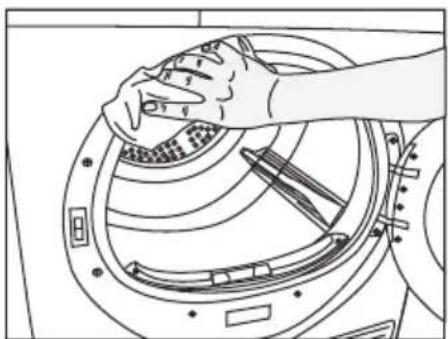
natural_image
Line drawing of hands cleaning a washing machine drum (no text or symbols)5.2 Cleaning the sensor
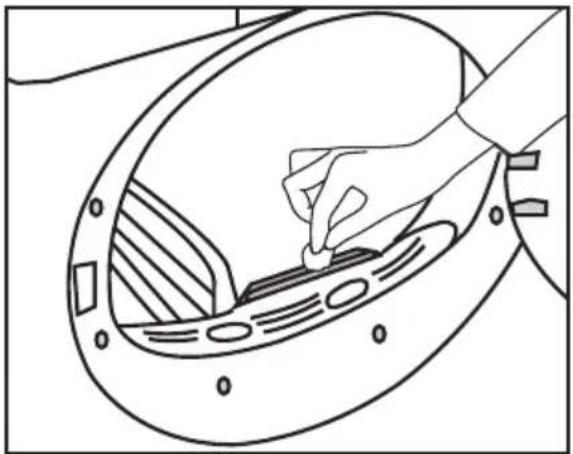
There are dampness sensors in the dryer that detect whether the laundry is dry or not.
To clean the sensors:
- Open the loading door of the dryer.
- Allow the machine to cool down if it is still hot due to the drying process.
- Wipe the metal surfaces of the sensor with a soft cloth, dampened with vinegar and dry them.
 | Clean metal surfaces of the sensors 4 times a year. |
 | Do not use metal tools when cleaning metal surfaces of the sensors. |
 | Never use solvents, cleaning agents or similar substances for cleaning due to the risk of fire and explosion! |
Maintenance and cleaning
natural_image
Line drawing of a hand using a tool to clean or adjust a circular component with no visible text or symbols5.3 Draining the condensate tank
Dampness of the laundry is removed and condensed during drying process and the water that arise accumulates in the condensate tank. Drain the condensate tank after each drying cycle.
Condensed water is not drinkable!
Never remove the condensate tank when the program is running!
If you forget to drain the condensate tank, the machine will stop during the subsequent drying cycles when the condensate tank is full and the Condensate Tank warning symbol will flash. If this is the case, drain the condensate tank and press Start / Pause button to resume the drying cycle.
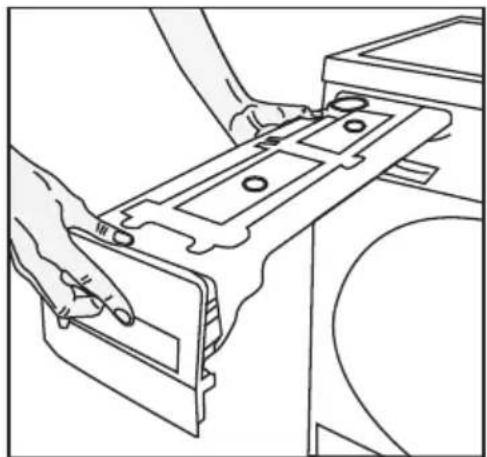
To drain the condensate tank:
Pull the drawer and remove the condensate tank carefully.
natural_image
Line drawing of hands installing or adjusting a mechanical component on a machine (no text or symbols)- Drain the water in the tank.
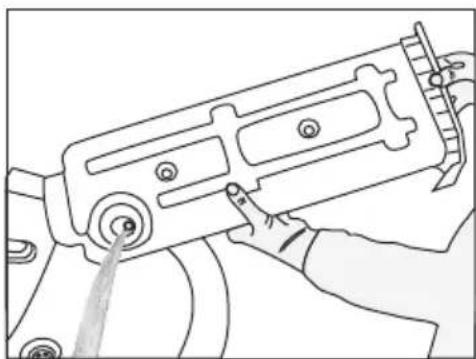
natural_image
Line drawing of a mechanical device with a hand operating it (no text or symbols)- If there is lint accumulation in the funnel of the condensate tank, clean it under running water.
- Place the condensate tank into its seat.

If the direct water draining is used as an option, there is no need to empty the condensate tank.
5.4 Cleaning the filter drawer
Lint and fiber that could not be captured by the lint filter are blocked in the filter drawer behind the kick plate. Filter Drawer Cleaning warning light will light up maximum at every 5 drying cycles as a reminder.
There is a two-level filter in the filter drawer. Te first level is the filter drawer sponge and the second level is the filter cloth.
To clean the filter drawer:
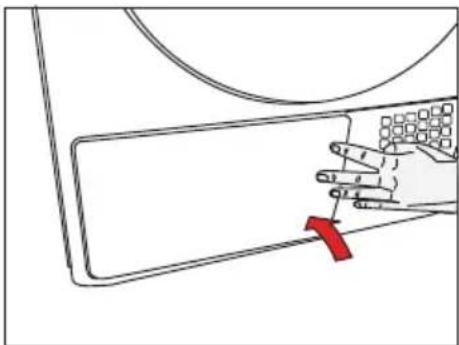
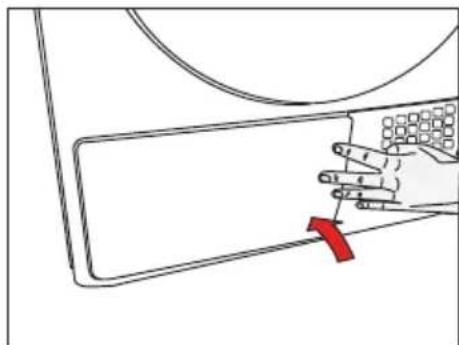
- Press the kick plate button to open the kick plate.
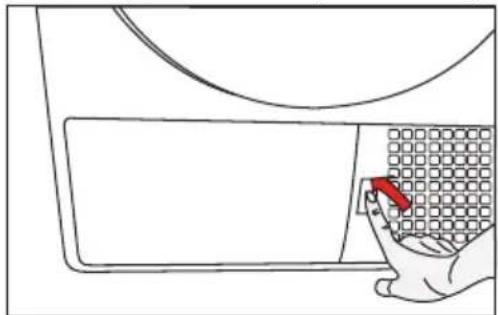
natural_image
Line drawing of a hand pressing down on a grid-patterned object inside a container (no text or symbols)- Remove the filter drawer cover by turning it in the direction of arrow.
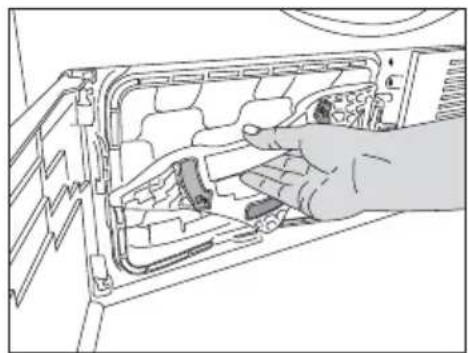
natural_image
Hand inserting a component into a computer drive casing (no text or symbols visible)Maintenance and cleaning
- Pull out the filter drawer.

natural_image
Illustration of a hand inserting a component into a device panel (no text or symbols visible)- Open the filter drawer by pressing the red button.
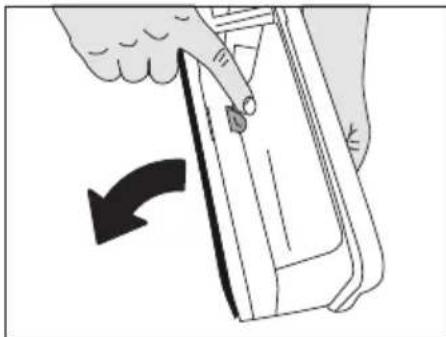
natural_image
Illustration of a hand holding a device with a scroll wheel, showing a curved arrow indicating rotation (no text or symbols present)• Take out the filter drawer sponge.
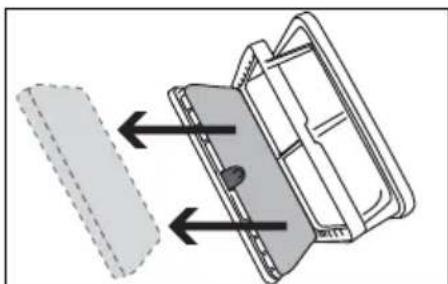
natural_image
Diagram of a mechanical component with arrows indicating direction, no text or symbols present- Clean lint, fiber, and cotton raveling on the filter cloth by hand or with a soft piece of cloth.
- When you notice a layer that may lead clogging on the filter cloth, please clean the layer by washing in warm water. Let the filter cloth dry thoroughly before installing back the filter drawer.
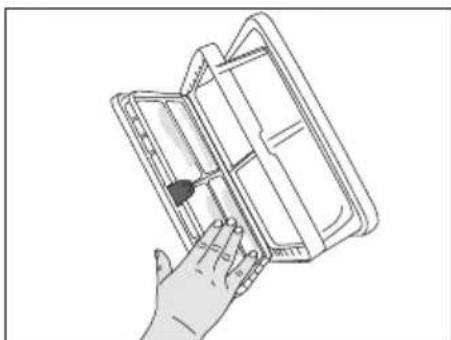
natural_image
Line drawing of a hand holding an open notebook or folder (no text or symbols visible)- Wash the filter drawer sponge by hand to remove the fiber and lint on the surface. After washing the sponge, squeeze it by hand and remove the excess water. Well-dry the sponge before storing it.

It is not necessary to clean the sponge if lint and fiber accumulation on it is not significant.
- Place the sponge back into its place.
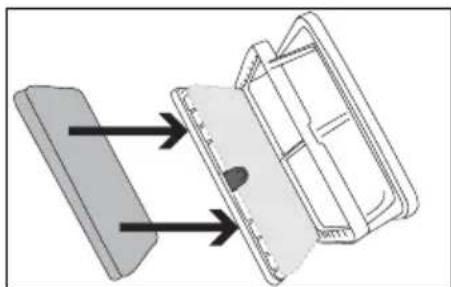
natural_image
Diagram showing two mechanical components with arrows indicating direction, no text or symbols present- Close the filter drawer as to lock the red button.
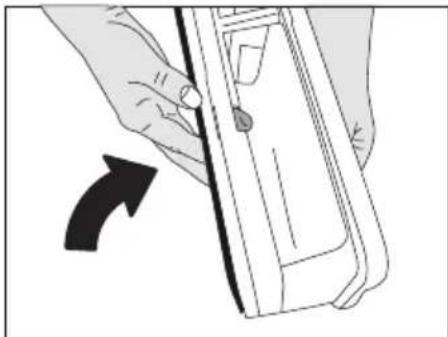
natural_image
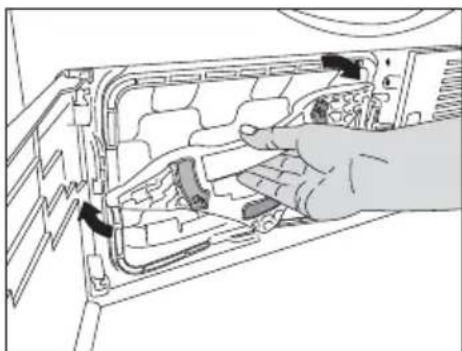
Illustration of a hand holding a device with an arrow indicating rotation (no text or symbols)- Place the filter drawer back into its place, turn the filter drawer cover in the arrow direction and close it securely.
natural_image
Hand inserting a component into a vehicle's air vent (no text or symbols visible)Maintenance and cleaning
- Close the kick plate cover.
natural_image
Illustration of a hand pressing down on a device panel with a red arrow indicating the button (no text or symbols present)
Drying without the filter drawer sponge in place will damage the machine!

A dirty lint filter and filter drawer will cause longer drying periods and higher energy consumption.
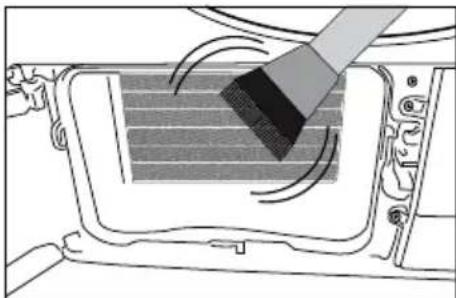
5.5 Cleaning the evaporator
Clean the lint accumulated on the fins of the evaporator located behind the filter drawer with a vacuum cleaner.
natural_image
Diagram showing a brush applying material to a panel inside a vehicle (no text or symbols visible)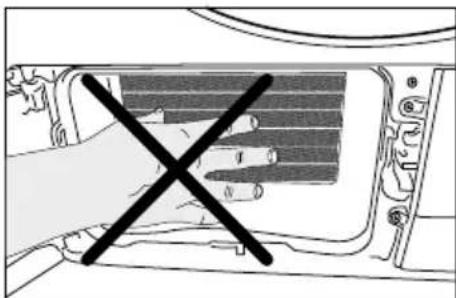
natural_image
Diagram of a hand holding a device with a black X mark, no text or symbols present
You can also clean by hand provided that you wear protective gloves. Do not attempt to clean with bare hands. Evaporator fins can harm your hand.
6 Troubleshooting

If you cannot eliminate the problem although you follow the instructions in this section, consult your dealer or the Authorized Service Agent. Never try to repair a nonfunctional product yourself.
Drying process takes too much time.
- Pores of the lint filter are clogged. >>> Wash the lint filter with warm water.
- Filter drawer is clogged. >>> Clean the sponge and the filter cloth in the filter drawer.
- Ventilation grids on the front side of the machine are blocked. >>> Remove the objects (if any) that block ventilation in front of the ventilation grids.
- Ventilation is not sufficient since the room where the machine is installed is very small. >>> Open the door and window of the room to avoid the room temperature increase too much.
- Lime deposit has built up on the dampness sensor. >>> Clean the dampness sensor.
- Excessive laundry is loaded. >>> Do not load the dryer in excess.
- Laundry is not spun sufficiently. >>> Spin your laundry at a higher speed in your washing machine.
Laundry comes out wet at the end of drying.

After drying, the hot clothes feel damper than their actual dampness level.
- It is likely that the selected programme did not suit the laundry type.>>>Checking the care labels on clothes, select appropriate programme for the laundry type or use timer programmes in addition.
- Pores of the lint filter are clogged. >>> Wash the lint filter with warm water.
• Filter drawer is clogged. >>> Clean the sponge and the filter cloth in the filter drawer. - Excessive laundry is loaded. >>> Do not load the dryer in excess.
- Laundry is not spun sufficiently. >>> Spin your laundry at a higher speed in your washing machine.
Dryer does not switch on or the programme does not start. Dryer does not start when it is set.
- It is not plugged in. >>> Make sure that the machine is plugged in.
- The loading door is ajar. >>> Make sure that the loading door is closed securely.
- Programme is not selected or the Start / Pause / Cancel button is not pressed. >>> Make sure that the programme is selected and the machine is not in Pause mode.
- Childproof Lock is activated. >>> Deactivate the Childproof Lock.
Programme is interrupted without any cause.
- Loading door is ajar. >>> Make sure that the loading door is closed securely.
• There was a power failure. >>> Press Start / Pause / Cancel button to start the programme. - Condensate tank is full. >>> Drain the condensate tank.
Laundry has shrunk, become felted or deteriorated.
- A programme suitable for the laundry type is not used. >>> Check the garment tag and select a programme suitable for the fabric type.
Drum lighting does not turn on. (On models with lamp)
- Dryer is not switched on with the On / Off button. >>> Make sure that the dryer is switched on.
- Lamp is defective. >>> Call Authorized Service Agent to have the lamp replaced.
Troubleshooting
| End/Anti-creasing symbol is on. | ||
| • Crease Guard programme is activated in order to prevent laundry that has remained in the machine from creasing. >>> Turn off the dryer and take out the laundry. | ||
| End symbol is on. | ||
| • Programme is over. Turn off the dryer and take out the laundry. | ||
| Lint Filter Cleaning symbol is on. | ||
| • Lint filter is not cleaned. >>> Clean the lint filter. | ||
| Lint Filter Cleaning symbol is flashing. | ||
| • Filter housing is clogged with lints. >>> Clean the lint filter housing.A deposit has built up on the lint filter pores that may cause clogging. >>> Wash the lint filter with warm water.Filter drawer is clogged. >>> Clean the sponge and the filter cloth in the filter drawer. | ||
| Water leaks from the loading door | ||
| • Lint has accumulated on the inner surfaces of the loading door and on the surfaces of the loading door gasket. >>> Clean the inner surfaces of the loading door and the surfaces of the loading door gasket. | ||
| Loading door opens spontaneously. | ||
| • Loading door is ajar. >>> Push the loading door to close until you hear a locking sound. | ||
| Condensate Tank warning symbol is on/flashing. | ||
| • Condensate tank is full. >>> Drain the condensate tank.Water draining hose is bent. >>> If the product is connected directly to a wastewater drain, check the water drain hose. | ||
| Filter Drawer Cleaning warning symbol is flashing. | ||
| • Filter drawer is not cleaned. >>> Clean the sponge and the filter cloth in the filter drawer. | ||
| PRODUCT FICHE | ||
| Complying Commission Delegated Regulation (EU) No 392/2012 | ||
| Supplier name or trademark | V-ZUG AG | |
| Model name | Adorina TL WP | |
| Rated capacity (kg) | 7 | |
| Type of Tumble Dryer | Air Vented | - |
| Condenser | • | |
| Energy efficiency class (1) | A++ | |
| Annual Energy Consumption (kWh) (2) | 209 | |
| Type of Control | Automatic | • |
| Non-automatic | - | |
| Energy consumption of the standard cotton programme at full load (kWh) | 1,68 | |
| Energy consumption of the standard cotton programme at partial load (kWh) | 0,98 | |
| Power consumption of the off-mode for the standart cotton programme at full load, P_0 (W) | 0,5 | |
| Power consumption of the left-on mode for the standart cotton programme at full load, P_L (W) | 1,0 | |
| The duration of the left on mode (min) | 30 | |
| Standard cotton programme (3) | ||
| Programme time of the standard cotton programme at full load, T_dry (min) | 174 | |
| Programme time of the standard cotton programme at partial load, T_dry1/2 (min) | 107 | |
| Weighted programme time of the standard cotton programme at full and partial load ( T_t ) | 136 | |
| Condensation efficiency class (4) | B | |
| Average condensation efficiency of the standard cotton programme at partial load, C_dry | 86% | |
| Average condensation efficiency of the standard cotton programme at partial load, C_dry1/2 | 86% | |
| Weighted condensation efficiency of the standard cotton programme at full load and partial load, C_t | 86% | |
| Sound power level for the standard cotton programme at full load (5) | 65 | |
| Built-in | - | |
• : Yes - : No
(1) Scale from A+++ (most efficient) to D (least efficient)
(2) Energy consumption based on 160 drying cycles of the standard cotton programme at full and partial load, and the consumption of the low-power modes. Actual energy consumption per cycle will depend on how the appliance is used.
(3) "Cotton cupboard dry programme" used at full and partial load is the standard drying programme to which the information in the label and the fiche relates, that this programme is suitable for drying normal wet cotton laundry and that it is the most efficient programme in terms of energy consumption for cotton
(4) Scale from G (lest efficient) to A (most efficient)
(5) Weighted average value — L_WA expressed in dB(A) re 1 pW
Service & Support

The «Troubleshooting» section provides valuable information for dealing with minor operating faults. This saves you the time, effort and potential cost of having to call out a service technician.
Information on the V-ZUG warranty can be found at www.vzug.com →Service →Warranty information. Please read this information carefully.
Please register your V-ZUG appliance immediately:
•online via www.vzug.com→Service→Warranty registration, or
• using the enclosed registration card.
This will allow you to take advantage of the best possible support in the event of a fault in the appliance during the warranty period. You will require the serial number (FN) and appliance designation to complete the registration process. This information can be found on the identification plate for your appliance.
My appliance information:
FN: ____ Appliance: ____
Always have this appliance information to hand when you contact V-ZUG. Thank you.
▶ Open the appliance door.
—The identification plate is located at the bottom.
Requesting repairs
You can contact your nearest V-ZUG service centre directly and free of charge on our service hotline – 0800 850 850. When requesting repairs over the phone, we will agree on an appointment for us to visit your site at your earliest convenience.
General enquiries, accessories, service agreement
V-ZUG is happy to help with your general administrative and technical enquiries, orders for accessories and spare parts, or information relating to advanced service agreements. If you would like to contact us in relation to any of the above, please call
+41 (0) 58 767 67 67 or visit www.vzug.com.
2960311063_EN/151116.1523
1006577-R03
V-ZUG AG, Industriestrasse 66, CH-6301 Zug
Tel. +41 58 767 67 67, Fax +41 58 767 61 61
- Bedienungsanleitung|Moded'emploi|Istruzioniper l'uso|Operatinginstructions
- Sensor reinigen
- Modifications
- Validity
- Please follow the safety precautions.
- Explanation of symbols
- Important instructions for safety and environment
- General safety
- Important instructions for safety and environment
- Electrical safety
- Product safety
- Points to be taken into consideration for fire hazard:
- Below specified laundry or items must not be dried in the dryer due to the fire hazard:
- Mounting over a washing machine
- Intended use
- Child safety
- Compliance with the WEEE regulation and disposing of the waste product
- Compliance with RoHS Directive:
- Package information
- Technical Specifications
- Your Dryer
- Package Contents
- Preparation
- Laundry suitable for drying in the dryer
- Laundry not suitable for drying in the dryer
- Preparing laundry for drying
- Things to be done for energy saving
- Preparation
- Correct load capacity
- Operating the product
- Screen symbols
- Operating the product
- Preparing the machine
- Program selection
- Main programs
- - Cotton
- - Synthetic
- Extra programs
- - Denim
- - Sportswear
- - Sprint
- - Mixed
- - Shirts
- - Baby garments
- - Delicates
- - Airing
- - Timed Drying
- Program selection and consumption table
- Auxiliary functions Sound warning cancel
- Warning symbols
- Lint filter cleaning
- Condensate tank
- Loading door open
- Delayed Start
- Changing the Delayed start
- Canceling the delayed start function
- Starting the program
- Childproof Lock
- Changing the program after it is started
- Adding and removing laundry in stand-by mode
- Canceling the program
- Program end
- Maintenance and cleaning
- Cleaning Lint Filter / Loading Door Inner Surface
- Cleaning the sensor
- Maintenance and cleaning
- Draining the condensate tank
- Cleaning the filter drawer
- Cleaning the evaporator
- Troubleshooting
- Drying process takes too much time.
- Laundry comes out wet at the end of drying.
- Dryer does not switch on or the programme does not start. Dryer does not start when it is set.
- Programme is interrupted without any cause.
- Laundry has shrunk, become felted or deteriorated.
- Drum lighting does not turn on. (On models with lamp)
- Troubleshooting
- • : Yes - : No
- Service & Support
- Requesting repairs
- General enquiries, accessories, service agreement
Brand : V-ZUG
Model : WTANTLWPl
Category : Tumble drier