NS15LCD - TV INSIGNIA - Free user manual and instructions
Find the device manual for free NS15LCD INSIGNIA in PDF.


| Product Type | 15-inch LCD TV |
| Brand | Insignia |
| Model | NS-15LCD |
| Screen Size | 15 inches (diagonal) |
| Maximum Resolution | 1024 × 768 pixels |
| Receiver Type | NTSC-M |
| Channel Range | Antenna 2-69, Cable 1-125 |
| Video Inputs | 1 composite, 1 component (Y Pb Pr), 1 S-Video, 1 VGA |
| Audio Inputs | 2 stereo (RCA), 1 PC audio (mini-jack) |
| Outputs | 1 headphone jack |
| Antenna Input | RF 75 ohms |
| Audio | 2 speakers, 1 W × 2 |
| Remote Control | Infrared, AAA batteries (not included) |
| Power Supply | AC adapter 100-240 V, 50/60 Hz; TV 12 V DC, 3 A |
| Power Consumption | 36 W |
| Dimensions (with stand) | 46,48 × 17,27 × 33,78 cm |
| Dimensions (without stand) | 46,48 × 7,11 × 30,73 cm |
| Weight (TV) | 4,67 kg |
| Operating Temperature | 0 to 40 °C |
| Features | Auto tuning, 181 channels, V-Chip, closed captions, multilingual OSD menu, sleep timer, screen saver |
| Maintenance | Unplug before cleaning; use a soft damp cloth (warm water); do not use solvents |
| Safety | Do not open the casing; refer repairs to a qualified technician; avoid water and humidity |
| Box Contents | TV, AC adapter, remote control, user guide |
Frequently Asked Questions - NS15LCD INSIGNIA
User questions about NS15LCD INSIGNIA
0 question about this device. Answer the ones you know or ask your own.
Ask a new question about this device
Download the instructions for your TV in PDF format for free! Find your manual NS15LCD - INSIGNIA and take your electronic device back in hand. On this page are published all the documents necessary for the use of your device. NS15LCD by INSIGNIA.
USER MANUAL NS15LCD INSIGNIA
Congratulations on your purchase of a high-quality Insignia product. Your NS-15LCD represents the state of the art in 15" LCD TV design, and is designed for reliable and trouble-free performance. For future reference, record the serial number, date of purchase, and dealer name in the spaces provided.
Model Number: NS-15LCD
Serial Number:
Date of purchase:
Dealer:
Contents
Safety information 1
Features 5
Setting up your TV 9
Using your TV 14
Specifications 24
Troubleshooting....25
Maintaining 26
Copyright. 27
Français 28
Español. 59
Safety information
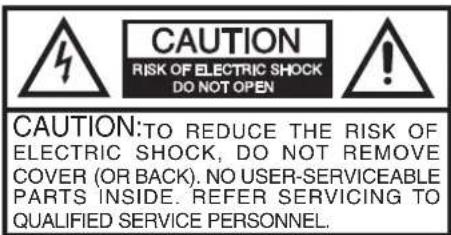

The lightning flash with arrowhead symbol, within an equilateral triangle is intended to alert the user to the presence of uninsulated dangerous voltage within the product's enclosure that may be of sufficient magnitude to constitute a risk of electric shock.

The exclamation point within an equilateral triangle is intended to alert the user to the presence of important operating and maintenance (servicing) instructions in the literature accompanying the appliance.
INSIGNIA
NS-15LCD 15" LCD TV
Important safeguards
- Read instructions—Read all the safety and operating instructions before operating your TV.
- Retain instructions—Retain the safety and operating instructions for future reference.
- Follow warnings—Follow all warnings on your TV and in the operating instructions.
- Follow instructions—Follow all operating instructions.
- Cleaning—Unplug TV from the power outlet before cleaning. Do not use liquid cleaners or aerosol cleaners. Use a damp cloth for cleaning.
- Attachments—Do not use attachments not recommended by Insignia as they may cause hazards.
- Water and moisture—Do not use your TV near water, such as near a bath tub, wash bowl, kitchen sink, or laundry tub, in a wet basement, or near a swimming pool.
- Accessories—Do not place your TV on an unstable cart, stand, tripod, bracket, or table. Your TV may fall, causing serious injury to someone, and serious damage to your TV. Use only with a cart, stand, tripod, bracket, or table recommended by Insignia, or sold with your TV.
If you mount your TV, follow Insignia's instructions and use a mounting accessory recommended by Insignia. Move a TV and cart combination with care. Quick stops, excessive force, and uneven surfaces may cause your TV and cart combination to overturn.

- Ventilation-Slots and openings in the cabinet and the back or bottom are provided for ventilation, to ensure reliable operation of your TV, and to protect it from overheating. Do not block openings. Do not place your TV on a bed, sofa, rug, or other similar surface. Your TV should never be placed near or over a radiator or heat register. Do not place your TV in a built-in installation such as a bookcase or rack unless proper ventilation is provided or instructions have been adhered to.
- Power sources—Use only the type of power source indicated on the label. If you are not sure of the type of power supplied to your home, consult your TV dealer or local power company. For TVs intended to operate from battery power, or other sources, refer to the operating instructions.
- Grounding or polarization—Your TV is equipped with a polarized alternating-current line plug (a plug having one blade wider than the other). This plug fits into the power outlet only one way. This is a safety feature. If you are unable to insert the plug fully into the outlet, try reversing the plug. If the plug still doesn't fit, contact your electrician to replace your obsolete outlet. Do not defeat the safety purpose of the polarized plug.
NS-15LCD 15" LCD TV
INSIGNIA
- Powercord protection—Route power supply cords so that they are not likely to be walked on or pinched by items placed upon or against them, paying particular attention to cords at plugs, convenience receptacles, and the point where they exit from your TV.
- Outdoor antenna grounding—If an outside antenna or cable system is connected to your TV, make sure that the antenna or cable system is grounded to provide some protection against voltage surges and built-up static charges. Article 810 of the National Electrical Code, ANSI/NFPA No. 70, provides information with respect to proper grounding of the mast and supporting structure, grounding of the lead-in wire to an antenna discharge unit, size of grounding conductors, location of antenna-discharge unit, connection to grounding electrodes, and requirements for the grounding electrode.
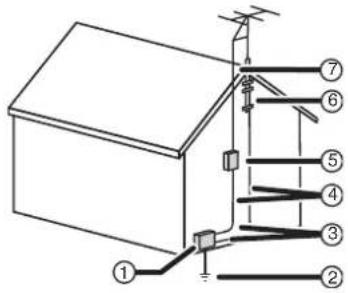
| Reference Grounding component | |
| 1 Electric service equipment | |
| 2 Power service grounding electrode system(NEC Art 250, Part H) | |
| 3 Ground clamp | |
| 4 Grounding conductors (NEC Section 810-21) | |
| 5 Antenna discharge unit (NEC Section 810-20) | |
| 6 Ground clamp | |
| 7 Antenna lead-in wire |
INSIGNIA
NS-15LCD 15" LCD TV
- Lightning—For added protection for your TV receiver during a lightning storm, or when it is left unattended and unused for long periods of time, unplug it from the power outlet and disconnect the antenna or cable system. This prevents damage to your TV from lightning and power-line surges.
- Power lines—An outside antenna system should not be located near overhead power lines or other electrical power, or where it can fall into such power lines or circuits. When installing an outside antenna system, do not touch power lines or circuits because contact with them might be fatal.
• Overloading—Do not overload power outlets and extension cords as this can result in a risk of fire or electric shock.
- Object and liquid entry—Never push objects of any kind into your TV through openings because they may touch dangerous voltage points or short out parts that could result in a fire or electric shock. Never spill liquid of any kind on your TV.
- Servicing—Do not attempt to service your TV yourself because opening or removing covers may expose you to dangerous voltage or other hazards. Refer all servicing to qualified service personnel.
- Damage requiring service—Unplug your TV from the power outlet and refer servicing to qualified service personnel under the following conditions:
- When the power supply cord or plug is damaged or frayed.
- If liquid has been spilled, or objects have fallen into your TV.
- If your TV has been exposed to rain or water.
- If your TV does not operate normally by following the operating instructions, adjust only those controls that are covered by the operating instructions, because improper adjustment of other controls may result in damage and often requires extensive work by a qualified technician to restore your TV to its normal operation.
- If your TV has been dropped or damaged in any way.
- When your TV exhibits a distinct change in performance, this indicates a need for service.
- Replacement parts—When replacement parts are required, be sure the service technician uses replacement parts specified by Insignia that have the same characteristics as the original part. Unauthorized substitutions may result in fire, electric shock, injury to persons or other hazards.
- Safety check—Upon completion of any service or repairs to your TV, ask the service technician to perform routine safety checks to determine that your TV is in correct operating condition.
- Heat—Place your TV away from heat sources such as radiators, heat registers, stoves, or other products (including amplifiers) that produce heat.
NS-15LCD 15" LCD TV
INSIGNIA
A note to the cable television system installer
This reminder is provided to call the cable television system installer's attention to Section 820 40 of the NEC which provides guidelines for proper grounding and, in particular, specifies that the cable ground shall be connected to the grounding system of the building, as close to the point of cable entry as practical.
Warning

To prevent fire or shock hazard, do not expose this appliance to rain or moisture.
Caution

To prevent electric shock do not use this polarized plug with an extension cord, receptacle or other outlet unless the blades can be fully inserted to prevent blade exposure.
Features
- 181 channels (A converter may be necessary to view scrambled cable channels.)
- Auto tuning
• One composite video input
• One component input - One S-Video input
• Two audio stereo inputs and one PC audio input
• One antenna input
• One headphone output - Closed Caption decoder—You can view specially labeled (cc) TV programs and movies with either a dialogue caption or text display added to the program.
- V-chip–Lets parents prevent their children from watching inappropriate material on TV.
- Multi-language OSD
• Support 1080i/720p/480p
• Infrared remote control
INSIGNIA™
NS-15LCD 15" LCD TV
Front and back panels
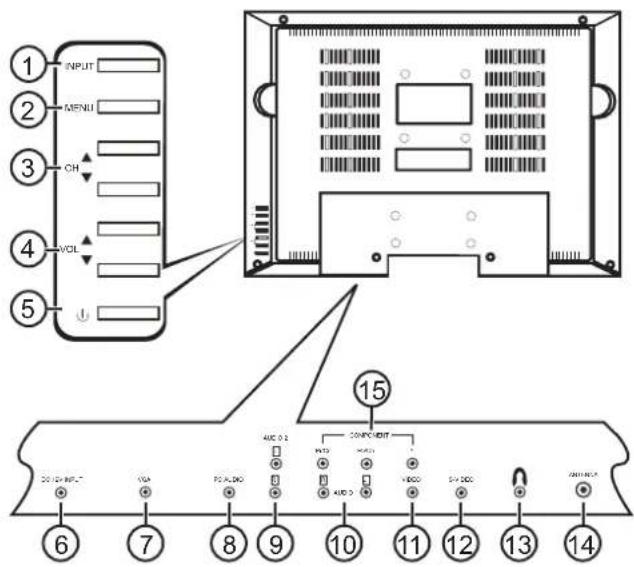
| Item | Control/connection Function | Action |
| 1 INPUT | button Press to select TV | mode (TV, AV, S-Video, Component, or VGA). |
| 2 MENU | button Press to open or exit the main setup menu. | |
| 3 CHANNEL ▲ or ▼ buttons | Press to change the channels up or down through memorized channels. | |
| 4 | V O L ▲ or ▼ buttons | UPress to adjust the volume up or down, or to change settings or move to the next menu screen. |
| 5 | POWER ⏻ button | Press to turn your TV on or off. |
| 6 DC 1 | 2V input Plug the cord from | the AC power adapter into this jack. |
| 7 VGA | port Plug the VGA output from | from your computer into this jack. |
| 8 PC | audio Plug the audio output from your computer into this jack. | |
| Item | Control/connection Function | |
| 9 Audio | 2 R and L Plug the right(red) and left (white) audio output from a DVD player into these jacks. | |
| 10 Audio | 1 R and L Plug the right(red) and left (white) audio output from a DVD player into these jacks. | |
| 11 VIDEO | Plug the Video (yellow)output from a DVD player into this jack. | |
| 12 S-VIDEO | Plug the S-Video output from a DVD player into this jack. | |
| 13 Headphone | jack Plug your headphones into this jack. | |
| 14 Antenna | Connect your antenna or CATV box output to this connector. | |
| 15 Component video jacks Plug the component video output (Pr/Cr, Pb/Cb, Y) from a DVD player into these jacks. | ||
INSIGNIA
NS-15LCD 15" LCD TV
Remote control
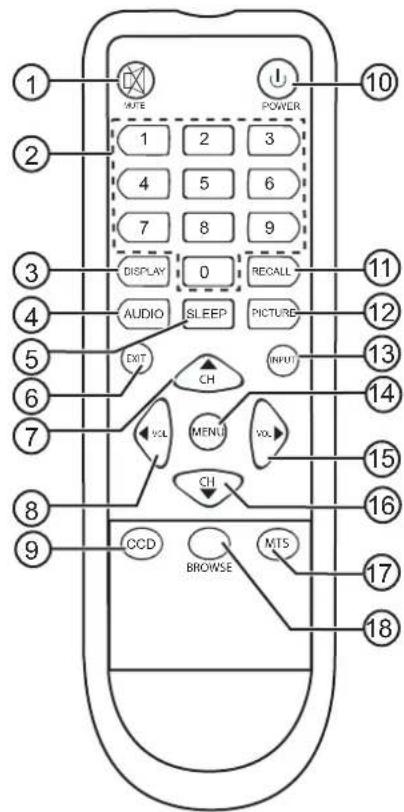
| Item Button Function | |
| 1 MUTE Press to toggle the sound off and on. | |
| 2 Numbers Press to enter a channel number or number information directly. | |
| 3 DISPLAY Press to display channel information on the screen. | |
| 4 AUDIO Press to select TV sound mode (Standard, Memory, News, or Music). | |
| 5 SLEEP Press to set the sleep timer to automatically turn off your TV at a preset time. See “Setting the OSD (on-screen display) options” on page 19. | |
| Item | Button | Function |
| 6 EXIT | Press to clear or cancel an entered setting. | |
| 7 | CH | Press to select a higher memorized channel. |
| 8 | VOL | Press to adjust the volume down, to change settings, or to navigate menus. |
| 9 CCD | Press to access Closed caption settings (opens the password screen). | |
| 10 POWER Press to turn your TV on or off. | ||
| 11 RECALL Press to change to the previous menu. | ||
| 12 PICTURE Press to select the picture mode (Standard, Memory, Soft, or Dynamic) | ||
| 13 INPUT Press to select TV mode (TV, AV, S-Video, Component, or VGA). | ||
| 14 MENU Press to open the main setup menu. | ||
| 15 | VOL | Press to adjust the volume up, to change settings, or move to the next menu screen. |
| 16 | CH | Press to select a lower memorized channel. |
| 17 MTS Press to select the type of sound signal to receive (Mono, Stereo, or SAP). | ||
| 18 BROWSE Press to browse different channels. | ||
Setting up your TV
Unpacking and setting up
Your carton should contain:
- 15" LCD TV
- User Guide
- Remote control unit
- AC power adapter
Depending on your antenna system, you may need different types of combiners (mixers) or separators (splitters). Contact your local electronics store for these items.
Carefully remove all the components from the carton and make sure that you have all the necessary components before you dispose of the carton.
INSIGNIA™
NS-15LCD 15" LCD TV
- Remove all packing materials from the individual components.
- Do not remove any labels or stickers on the back panel of your TV.
- Shield the TV from direct sunlight and keep it away from sources of intense heat.
- Avoid dusty or humid places.
- Avoid places with insufficient ventilation for proper heat dissipation. Do not block the ventilation holes at the top or bottom of the TV.
• Install the TV in a vertical position. - Avoid locations subject to strong vibration.
- Do not place the TV near strong magnetic fields.
- Avoid moving the TV to locations where temperature differences are extreme.
- Be sure to unplug the AC power adapter from the power outlet before carrying the TV.
Connecting to a power source
Use the AC power adapter provided for operation on AC power. If you cause a static discharge when touching your TV and your TV fails to function, unplug your TV from the AC outlet and plug it back in. Your TV should return to normal operation.
Caution !
This TV uses an AC power adapter that has a polarized AC plug with one wide blade and one narrow blade. The plug only fits into matching polarized power outlets. This is a safety feature to reduce the possibility of electric shock. If the plug does not fit into your power outlets, you probably have outdated, non-polarized outlets which should be changed by a qualified, licensed electrician. Do not file the wide blade on the plug or use an adapter to make the plug fit into your outlet. This defeats the safety feature and could expose you to electric shock.
Do not handle the power cord with wet hands. Do not pull on the AC power adapter cord when disconnecting it from an AC power outlet. Grasp it by the plug. If water is spilled on your TV, unplug the AC power adapter immediately and take the TV to an authorized service center for servicing.
Connecting the antenna
The antenna input impedance of this TV is 75 ohms. VHF/UHF 75 ohm coaxial cable can be connected to the antenna jack directly. If the antenna cable is a 300 ohm flat feeder cable, use a 300 ohm/75 ohm converter to connect the antenna cable to the antenna jack.
NS-15LCD 15" LCD TV
INSIGNIA
Caution

For your safety and to avoid damage to the TV, unplug the antenna cable from the ANT jack before moving it.
Note
- We recommend 75 ohm coaxial cable to eliminate interference and double image due to the unmatched input impedance of the antenna.
- The antenna/cable and power line should not be bundled together.
Connecting to a wall jack
Connect the TV to the wall-mounted antenna jack with a 75 ohm RF cable (commercially available).
Connecting to a wired antenna cable
Note
Before plugging the antenna into the ANT jack on the TV, make sure that the pin is not bent. If it is bent, straighten the pin, then plug the cable into the ANT jack of the TV.
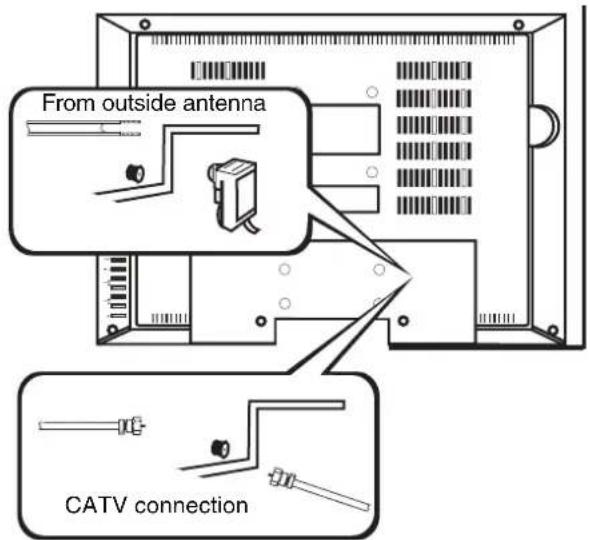
Using a cable or satellite box
If your cable service supplies you with a converter box, or if you use a satellite system, you can connect it to your TV with a 75 ohm RF cable (commercially available).
Channel selection must be made with the converter box or satellite box, so channels cannot be changed using the remote control of this TV.
INSIGNIA™
NS-15LCD 15" LCD TV
Making external connections
You can connect this TV to your audio/video equipment.
To make external connections:
• Make sure that you turn off the power to all components in the system before connecting another component.
- Refer to the owner's manuals of the equipment to be connected to the TV.
Connecting to external input
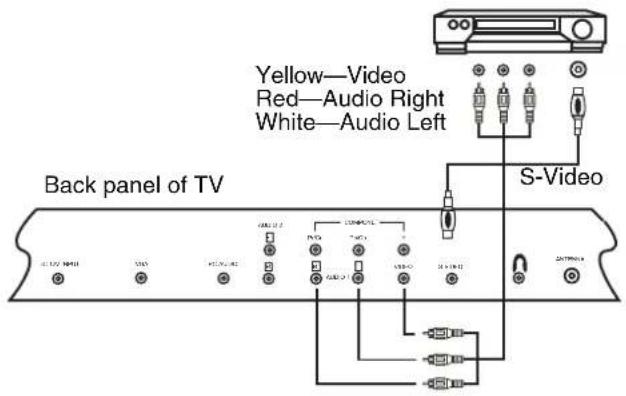
NS-15LCD 15" LCD TV
INSIGNIA
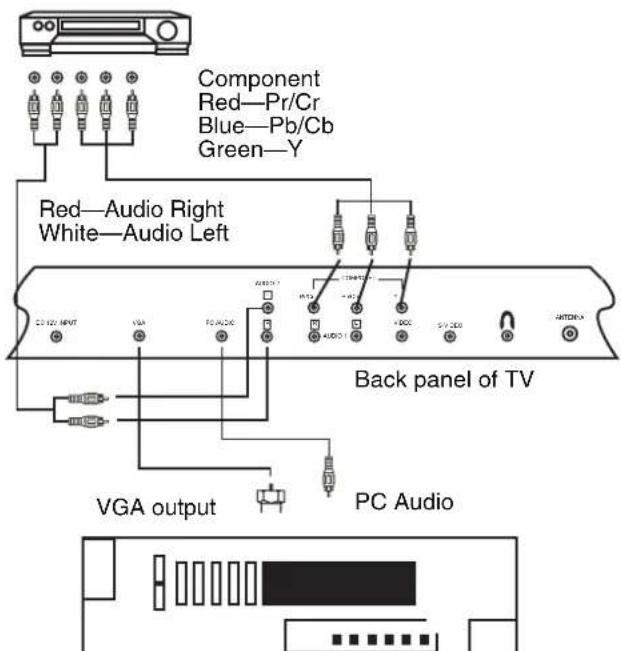
Installing the remote control batteries
The remote control requires two AAA batteries (not included). We recommend that you replace the batteries on a yearly basis, or when the operation of the remote control becomes intermittent or unsatisfactory. Replace the original batteries with new AAA batteries. Do not mix old and new batteries or different types.
To install the batteries:
1 Remove the battery compartment cover.
2 Insert two AAA batteries in the battery holder, matching the polarity indicated in the battery compartment. Reversed batteries may damage the remote.
3 Replace the battery compartment cover.
Caution

- Use only the size and type of batteries specified.
- Do not mix different types of batteries together (for example, Alkaline and Carbon-Zinc) or old batteries with fresh ones.
- If the remote is not to be used for a long period of time, remove the batteries to prevent damage or injury from possible battery leakage.
- Do not try to recharge batteries not intended to be recharged. They can overheat and rupture.
INSIGNIA™
NS-15LCD 15" LCD TV
Note
Batteries should never be thrown away or incinerated. Always dispose of batteries in accordance with your local regulations concerning chemical wastes.
Using your TV
Basic operation
To watch TV:
1 Plug the AC power adapter into a standard AC power outlet.
2 Plug the AC power adapter cord into the power connector on the TV.
3 Press POWER to turn on the TV. The power indicator light on the TV turns from red to green.
4 Press CH △ or ▽ to change the channel.
- OR -
Press the number buttons to enter the channel number directly.
5 Press VOL ◀ or ▷ to adjust the volume to the level you want.
6 Press MUTE to instantly mute the sound. Press it again to restore the previous volume level.
7 Press DISPLAY to show the current channel number on the screen.
8 Press AUDIO on the remote to access the sound mode settings, then press AUDIO repeatedly to select the setting you want from:
- Standard
- Memory
- News
- Music
These settings are also available in the Sound submenu.
9 Press PICTURE on the remote to access the picture mode settings, then press PICTURE repeatedly to select the setting you want from:
- Standard
- Memory
- Soft
• Dynamic
These settings are also available in the Picture submenu.
10 Press RECALL to go to the previous channel.
11 Press POWER again to turn off the TV.
Note
In TV, AV, S-Video, or Component mode, the TV goes into Standby mode after five minutes if there is no signal and no input. In VGA mode, the TV goes into Standby mode in 45 seconds.
NS-15LCD 15" LCD TV
INSIGNIA
To watch a cable or satellite channel:
- If the TV is connected to a cable box or satellite box, press CH ▲ or ▼ to select CH3 or CH4, according to the output channel setting of the device, then select the desired channel on that device.
To watch external input:
- When external equipment is connected to the AUDIO/VIDEO input jacks, press INPUT on the remote repeatedly to cycle through the available input sources: - TV - AV - S - V i d e o - Component - VGA
Basic setup
To set the source:
1 Press MENU. The main menu opens.
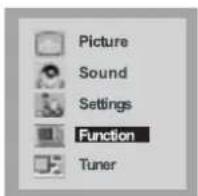
2 Press CH △/▽ to select Tuner, then press VOL ◀/▷ to open the Tunermenu. The Tunermenu opens.
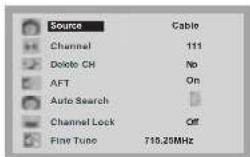
3 Press CH △/▽ to select Source, then press VOL ◀/▷ to select Cable or Air.
4 Press MENU twice to exit.
Channel setup
Your TV can memorize all available channels for both antenna and cable channels. After all available channels are memorized, press CH to scan through channels.
INSIGNIA™
NS-15LCD 15" LCD TV
To use Auto Search to set up channels:
1 Press MENU. The main menu opens.
2 Press CH △/▽ to select Tuner, then press VOL ◀/▷ to open the Tunermenu. The Tunermenu opens.
3 Press CH △/▽ to select Auto Search, then press VOL ▷ to open the Auto Search menu.
The TV auto-tunes from the lower frequencies to the higher frequencies, and all channels found are saved into memory automatically.
Notes
- When you use the TV for the first time, you must use Auto Search to memorize the available TV channels in your area.
- INPUT must be set to TV to use Auto Search.
To display the current channel:
1 Press MENU. The main menu opens.
2 Press CH △/▽ to select Tuner, then press VOL ◀/▷ to open the Tunermenu. The Tunermenu opens.
3 Press CH △/▽ to select Channel. The current channel is displayed.
To delete a channel:
1 Press the number buttons to select the channel you want to delete.
2 Press MENU. The main menu opens.
3 Press CH △/▽ to select Tuner, then press VOL ◀/▷ to open the Tunermenu. The Tunermenu opens.
4 Press CH △/▽ to select Delete CH, then press VOL ◀/▷ to select Yes.
To restore a deleted channel:
1 Press the number buttons to select the channel you want to restore.
2 Press MENU. The main menu opens.
3 Press CH △/▽ to select Tuner, then press VOL ◀/▷ to open the Tunermenu. The Tunermenu opens.
4 Press CH △/▽ to select Delete CH, then press VOL ◀/▷ to select No.
To lock out a channel:
1 Press the number buttons to select the channel you want to lock out.
2 Press MENU. The main menu opens.
3 Press CH △/▽ to select Tuner, then press VOL ◀/▷ to open the Tunermenu. The Tunermenu opens.
NS-15LCD 15" LCD TV
INSIGNIA
4 Press CH △/▽ to select Channel Lock, then press VOL ◀/▷ to select On.
5 Turn off the TV, wait five seconds, then turn it back on. The channel is locked off.
Notes
If Child Lock is set to Off, Channel Lock is not available. For additional information on parental controls, see "To make V-Chip settings:" on page 21.
To view a locked channel:
- Enter the P.Guide password you have set. (See "To make V-Chip settings:" on page 21.)
To unlock a channel:
1 Enter the P.Guide submenu, select Child Lock, then press VOL ◀/▶ to change the setting to Off. (See "To make V-Chip settings:" on page 21.) - OR - Enter the Tuner submenu, select Channel Lock, then press VOL ◀/▶ to change the setting to Off. (See "To lock out a channel:" on page 16.)
Fine tuning
You can fine-tune your TV reception if the picture or sound is not satisfactory.
To use manual fine tuning:
1 Press MENU. The main menu opens.
2 Press CH △/▽ to select Tuner, then press VOL ◀/▷ to open the Tunermenu. The Tuner menu opens.
3 Press CH △/▽ to select Fine tune, then press VOL ◀/▷ tune the TV.
If you decide to use the Fine Tune function, AFT is turned off.
To use AFT (auto frequency tuning):
1 Press MENU. The main menu opens.
2 Press CH △/▽ to select Tuner, then press VOL ◀/▷ to open the Tunermenu. The Tuner menu opens.
3 Press CH △/▽ to select AFT, then press VOL ◀/▷ to select On.
INSIGNIA
NS-15LCD 15" LCD TV
Adjusting the picture
To adjust the picture:
1 Press MENU. The main menu opens.
2 Press CH △/▽ to select Picture, then press VOL ◀/▷ to open the Picture menu. The Picture menu opens.
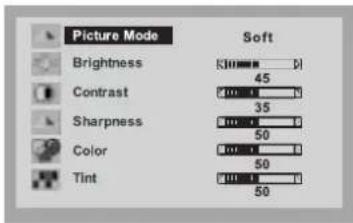
3 Press CH △/▽ to select the picture element you want to adjust, then press VOL ▶to adjust it.
| Picture option Function | |
| Brightness Adjusts the | lightness or darkness. |
| Contrast Adjusts the | balance between blacks and whites. |
| Sharpness Adjusts the | balance between soft and sharp. |
| Color Adjusts the color | balance. |
| Tint Adjusts the tint balance. | |
Adjusting the sound
To adjust the sound:
1 Press MENU. The main menu opens.
2 Press CH △/▽ to select Sound, then press VOL ◀/▷ to open the Sound menu. The Sound menu opens.
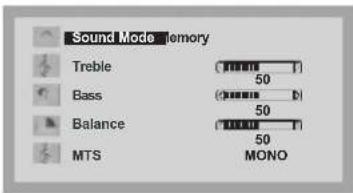
3 Press CH △/▽ to select the option to adjust, then press VOL ◀/▽ to adjust it.
NS-15LCD 15" LCD TV
INSIGNIA
| Sound option Available settings | |
| Treble (sets the loudness of the high notes) | variable |
| Bass (sets the loudness of the low notes) | variable |
| Balance (adjusts the balance between the right and left speakers) | variable |
| MTS (selects the type of sound signal) If the input signal is American BTSC, the MTS is set automatically | • M o n o• S t e r e o• SAP |
Setting the OSD (on-screen display) options
To set the OSD options:
1 Press MENU. The main menu opens.
2 Press CH △/▽ to select Settings, then press VOL ◀/▷ to open the Settings menu. The Settings menu opens.
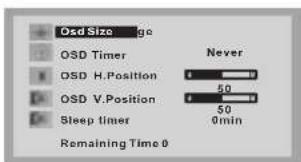
3 Press CH △/▽ to select the OSD option to set, then press VOL ◀/▷ to select the setting you want.
| OSD option Available settings | |
| OSD timer (the length of time the OSD is shown on the screen) | 5 s e c1 5 s e c3 0 s e c6 0 s e c9 0 s e cN e v e r |
| OSD H. Position (to set the horizontal position of the OSD) | variable |
| OSD V. Position (to set the vertical position of the OSD) | variable |
INSIGNIA™
NS-15LCD 15" LCD TV
| OSD option | Available settings |
| Sleep timer (to set the length of time the TV remains on from the time the setting is made) | 0 m i n .1 0 m i n .3 0 m i n .6 0 m i n .9 0 m i n .120 min. |
Notes
- You can also use the SLEEP button on the remote to set the sleep timer. After the sleep timer is set, you can see the time remaining on the screen.
- The sleep timer setting is cancelled if you turn the TV off or if there is a power failure.
Setting function options
To set function options:
1 Press MENU. The main menu opens.
2 Press CH △/▽ to select Function, then press VOL ◀/▷ to open the Function menu. The Function menu opens.
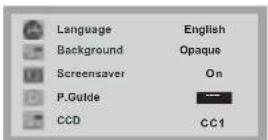
3 Press CH △/▽ to select the Function to set, then press VOL ◀/▽ to select the setting you want.
| Function Available settings | |
| Language (sets the menu language) | EnglishFrenchSpanish |
| Background (sets the opacity of the menu background) | TranslucentOpaque |
| Screensaver • On | Off |
| P.Guide (to access Parental Guidance settings) See “To make V-Chip settings:” on page 21. | Enter the password to access the V-Chip settings submenu.The default password is 1980. |
NS-15LCD 15" LCD TV
INSIGNIA
| Function Available settings | |
| CCD (selects the Close Caption mode) | T1T2T3T4CC1CC2CC3CC4Off |
To make V-Chip settings:
1 Press MENU. The main menu opens.
2 Press CH △/▽ to select Function, then press VOL ◀/▷ to open the Function menu. The Function menu opens.
3 Press CH △/▽ to select P.Guide, then use the number buttons to enter your password. The P.Guide menu opens.
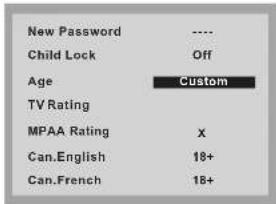
4 Press CH △/▽ to select the function you want, then press VOL ◀/▷ to select the setting you want.
| Function Available settings | |
| New Password(use to enter a new password) | Use the number buttons to enter your new password. |
| Child Lock(set to enable restricted viewing on a specific channel) (See “To lock out a channel:” on page 16 to lock a specific channel.) | On–when you set this to On, turn the TV off for 5 seconds, then back on. The Tuner submenu now requires a password.Off |
| Age(sets the age range of the parental controls you want) | OffChildYouthYoung AdultAdult onlyCustom |
INSIGNIA
NS-15LCD 15" LCD TV
| Function Available settings | |
| The following settings are only available ifAgeis set toCustom.For any other setting, the following are set to a default rating. | |
| TV Rating (opens a submenu with the choices on the right.PressCH△to select the rating you want to set.) | T V - YT V - Y 7T V - GT V - PG T V - 1 4T V - M A |
| TV Rating submenuWhen you have selected the TV Rating you want, pressVOL△ do specific types of material within that rating to block (B) or view (V).Press from B to V.PressMENUon the remote or the TV to exit. | D-Suggestive dialogFV-Fantasy violenceL-Course languageS-Sexual situationsV-Violence |
| MPAA Rating (sets the Motion Picture Association of America rating) | OffGPGPG - 1 3RNC-17X |
| Can.English (sets the Canadian English rating) | ECC8+GPG14+18+ |
| Can.French (sets the Canadian French rating) | EGG8+13+16+18+ |
Setting up in Component mode
To set up in Component mode:
1 Press MENU. The main menu opens.
2 Press CH △/▽ to select Window, then press VOL ◀/▷ to open the Window menu. The Window menu opens.
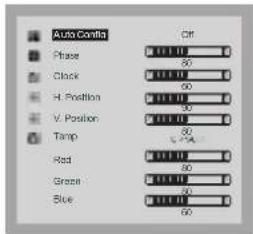
3 Press CH △/▽ to select the setting, then press VOL ◀/▷ to adjust the setting.
Note
Auto Config is not available in Component mode.
Setting up in VGA mode
The native resolution of this TV is 1024 × 768 , so your computer should be set to this resolution when you connect it to the TV. This TV only supports refresh frequencies of up to 60 Hz, so set your computer accordingly. If you set it higher, the screen may flicker.
To set up in VGA mode:
1 M E N U . The main menu opens.
2 Press CH △/▽ to select Window, then press VOL ◀/▷ to open the Window menu. The Window menu opens.
3 Press CH △/▽ to select the item you want to set, then press VOL ◀/▽ to adjust the setting.
Note
The Phase and Clock settings should be adjusted until you get a good picture.
If you experience problems when adjusting the settings, set Auto Config to Off, then reset it to On. The TV resumes its original settings.
INSIGNIA™
NS-15LCD 15" LCD TV
Specifications
| Display type Color | TFT LCD |
| Pixel type RGB stripe | |
| Active screen size | 15 inches diagonal |
| Maximum resolution | 1024 × 768 |
| Frequency range | Antenna 2-69CATV 1-125 |
| TV receiver system | NTSC-M |
| RF antenna input | 75 Ohm (unbalanced) |
| Audio output 1W × 2 | |
| Remote control Infrared, direct access (2 AAA batteries) | |
| Power source AC | 100-240 V, 50/60 Hz (adapter)DC 12 V 3A (TV) |
| Power consumption | 36 W |
| Dimensions(W × D × H) | TV with stand—18.3" × 6.8" × 13.3" (46.48 × 17.27 × 33.78 cm)TV without stand—18.3" × 2.8" × 12.1" (46.48 × 7.11 × 30.73 cm)Remote control—2.1" × 6.9" × 0.95" (5.33 × 17.53 × 2.41 cm) |
| Weight 10.3 lbs. (4.67 kg) (TV)0.18 lbs. (0.08 kg) (remote) | |
| Operating temperature | 32°F to 104°F (0°C to 40°C) |
NS-15LCD 15" LCD TV
INSIGNIA
Troubleshooting
Use the following checklist for troubleshooting if you have problems with your TV. Many problems are the result of incorrect adjustments, not TV malfunctions. See your authorized service center if problems persist. Make sure that all connections are correctly made when using with other equipment.
| Problem Solution | |
| No power • Make sure | that the AC power adapter is connected to an AC power outlet.Make sure that the power is turned on. |
| Poor picture or sound | Try another channel.Adjust the antenna.Check all wire connections. |
| No picture or sound | Try another channel.Make sure that the AC power adapter is connected to an AC power outlet.Make sure that the antenna connection is correct.Press INPUT to select TV mode, then try another TV feature. |
| No sound or poor sound | Adjust the volume control on the remote control or main TV.Press MUTE to restore the sound.Check the volume settings of equipment connected to your TV. |
| No color, or wrong colors or tints | Make sure the program is broadcasting in color. Try a different channel. If it works, then the problem could be station's broadcast signal.Make sure the antenna is correctly connected to the jack on the back of the set.If an outside antenna is being used, check for a broken wire.Adjust the Color or Tint controls. |
| Picture rolls vertically or lines or streaks appear in the picture | Try a different channel. If it works, then the problem could be station's broadcast signal.Check all wire connections.Check for local interference. |
| Picture or sound distorted, or picture blurred | Try a different channel. If it works, then the problem could be station's broadcast signal.Check your antenna direction, location, and connections. |
INSIGNIA™
NS-15LCD 15" LCD TV
| No remote control operation | Make sure that the power plug is connected to an AC outlet.Check the batteries in the remote control.Aim the remote control directly at the remote sensor. If necessary, remove all the obstacles between the sensor and the remote control.Make sure that you are within range of the TV. |
| Image not centered on the screen | Adjust the H.Position and V.Position settings (in Component or VGA modes only). |
Note
The LCD panel on this TV is manufactured to provide many years of useful life. Occasionally a few non-active pixels may appear as a fixed point of blue, green, or red. This is not to be considered a defect in the LCD screen.
Common picture problems
Snowy picture—A snowy picture is usually caused by a weak signal. Adjust the antenna or install an antenna amplifier.
Double images or "ghosts"—Double images are usually caused by reflections from tall buildings. Adjust the direction of the antenna or raise it.
Radio wave interference—Wave patterns moving on the screen are usually caused by nearby radio transmitter or shortwave receiving equipment.
High-temperature electrothermal interference—Diagonal or herringbone patterns appearing on the screen, or part of picture is missing, is probably caused by high-temperature electrothermal equipment in a nearby hospital.
Note
If your TV has one of these symptoms and you are using Cable TV, it may be due to problems with the cable company signal. Call your cable company for additional information.
Maintaining
Cleaning the cabinet
Remove the power plug before cleaning your TV. Wipe the screen and cabinet with a clean, dry, soft cloth. If additional cleaning is necessary, wipe the front panel and other exterior surfaces of the TV with a soft cloth immersed in lukewarm water and wrung dry.
Never use a solvent or alcohol. Do not spray insecticide liquid near the TV. Such chemicals may cause damage and discoloration to the exposed surfaces.
Servicing the TV
Should your TV become inoperative, do not try to correct the problem by yourself. There are no user-serviceable parts inside. Turn off the TV, unplug the power cord, and call an Authorized Service Center.
NS-15LCD 15" LCD TV
INSIGNIA
Legal notices
FCC warning—This equipment may generate or use radio frequency energy. Changes or modifications to this equipment may cause harmful interference unless the modifications are expressly approved in the owner's manual. The user could lose the authority to operate this equipment if an unauthorized change or modification is made.
FCC compliance statement
This equipment has been tested and found to comply with the limits for a Class B digital device, pursuant to Part 15 of the FCC Rules. These limits are designed to provide reasonable protection against harmful interference in a residential installation. This equipment generates, uses, and can radiate radio frequency energy and, if not installed and used in accordance with the instructions, may cause harmful interference to radio communications.
However, there is no guarantee that interference will not occur in a particular installation. Changes or modifications to this equipment may cause harmful interference unless the modifications are expressly approved in the owner's manual. The user could lose the authority to operate this equipment if an unauthorized change or modification is made. If this equipment does cause harmful interference to radio or television reception, which can be determined by turning the equipment off and on, the user is encouraged to try to correct the interference by one or more of the following measures:
- Reorient or relocate the receiving antenna.
- Increase the separation between the equipment and receiver.
- Connect the equipment into an outlet on a circuit different from that to which the receiver is connected.
- Consult the dealer or an experienced radio/TV technician for help.
This device complies with Part 15 of the FCC Rules. Operation is subject to the following two conditions:
• This device may not cause harmful interference, and
- This device must accept any interference received, including interference that may cause undesired operation.
Copyright
© 2006 Insignia. Insignia and the Insignia logo are trademarks of Best Buy Enterprise Services, Inc. Other brands and product names are trademarks or registered trademarks of their respective holders. Specifications and features are subject to change without notice or obligation.
INSIGNIA™
NS-15LCD 15" LCD TV
Bienvenue
Distributed by Insignia™ Products
7601 Penn Avenue South,
Richfield, MN USA 55423-3645
www.Insignia-Products.com
© 2006 Insignia™ Products
All rights reserved. All other products and brand names are trademarks of their respective owners
- Contents
- Safety information
- INSIGNIA
- Important safeguards
- NS-15LCD 15" LCD TV
- A note to the cable television system installer
- Warning
- Caution
- Features
- INSIGNIA™
- Setting up your TV
- Unpacking and setting up
- Connecting to a power source
- Caution !
- Connecting the antenna
- Note
- Connecting to a wall jack
- Connecting to a wired antenna cable
- Using a cable or satellite box
- Making external connections
- To make external connections:
- Connecting to external input
- Installing the remote control batteries
- To install the batteries:
- Using your TV
- Basic operation
- To watch TV:
- To watch a cable or satellite channel:
- To watch external input:
- Basic setup
- To set the source:
- Channel setup
- To use Auto Search to set up channels:
- Notes
- To display the current channel:
- To delete a channel:
- To restore a deleted channel:
- To lock out a channel:
- To view a locked channel:
- To unlock a channel:
- Fine tuning
- To use manual fine tuning:
- To use AFT (auto frequency tuning):
- Adjusting the picture
- To adjust the picture:
- Adjusting the sound
- To adjust the sound:
- Setting the OSD (on-screen display) options
- To set the OSD options:
- Setting function options
- To set function options:
- To make V-Chip settings:
- Setting up in Component mode
- To set up in Component mode:
- Setting up in VGA mode
- To set up in VGA mode:
- Troubleshooting
- Common picture problems
- Maintaining
- Cleaning the cabinet
- Servicing the TV
- Legal notices
- FCC compliance statement
- Copyright
- Bienvenue
Brand : INSIGNIA
Model : NS15LCD
Category : TV