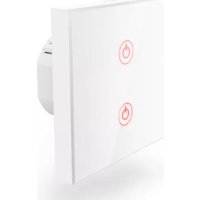
00176551 - Smart Home HAMA - Free user manual and instructions
Find the device manual for free 00176551 HAMA in PDF.


| Product type | WiFi wall switch |
| Brand | Hama |
| Model | 00176551 |
| Category | Smart home |
| Supply voltage | 230 V ~, 50 Hz |
| Maximum connection power | 1000 W |
| Frequency band | 2.4 GHz |
| Maximum transmission power | 100 mW |
| Dimensions (approx.) | 80 x 80 x 40 mm (estimation) |
| Weight | Approximately 100 g |
| Material | Tempered glass, plastic |
| Protection rating | IP20 (indoor use) |
| Installation type | Flush or surface mounting, box min. 40 mm depth |
| Main functions | Remote on/off, control via Hama Smart Home app, touch control |
| Compatibility | iOS and Android via Hama Smart Home (Solution) app |
| Maintenance and cleaning | Disconnect from mains before cleaning; use a slightly damp, lint-free cloth, no aggressive detergents |
| Safety | Installation by a qualified electrician; do not connect heating or motorized appliances; follow electrical safety instructions |
| Spare parts and repairability | No spare parts available; do not repair yourself, entrust to a qualified technician |
| Package contents | 1 WiFi wall switch, 2 screws |
| Warranty | Legal warranty; any modification voids warranty |
| General information | Indoor use only; RF exposure compliant at 20 cm distance; CE declaration of conformity available online |
Frequently Asked Questions - 00176551 HAMA
User questions about 00176551 HAMA
0 question about this device. Answer the ones you know or ask your own.
Ask a new question about this device
Download the instructions for your Smart Home in PDF format for free! Find your manual 00176551 - HAMA and take your electronic device back in hand. On this page are published all the documents necessary for the use of your device. 00176551 by HAMA.
USER MANUAL 00176551 HAMA
OperatingInstructions
Bedienungsanleitung
Moded'emploi
Instruccionesdeuso
Gebruiksaanwijzing
Istruzioniperl'uso
Instrukcjaobsługi
Használatiútmutató
Manualdeutilizare
Návodkpoužití
Návodnapoužitie
Manualdeinstruções
Bruksanvisning
LinktoApp

- This quick-reference guide contains the most important basic information, such as safety instructions and the steps necessary to operate the product.
• Thefulltext ofthe manualisavailableatthe followinginternetaddress: www.hama.com->00176551-> Downloads
- Savethemanualonyourcomputerforreference andprintitoutifpossible.
1. Explanationofwarningsymbolsandnotes
Riskofelectricshock

Thissymbolindicatesariskofelectricshockfrom touchinguninsulatedproductpartsthatmaycarry hazardousvoltage.
Warning

This symbol is used to indicate safety instructions or draw your attention to specific hazards and risks.
Note

This symbol is used to indicate additional information or important notes.
2. Explanation of symbols used on the product label

Thearticlemayonlybeconnectedby aqualifiedelectricianwhocomplies withnationalregulationsandthoseof thelocalenergysupplycompany,and whohassufficientknowledgeregarding installationlocations,fireprotection andelectricalinstallationwork.

Theproductisintendedonlyforuse insidebuildings.

Attention! Thereisariskofelectric shockoncontact.
3. Packagecontents
- 1xWiFiwallswitch
• 2xscrews
4. Safetyinstructions
Warning

- Thewallswitchispartofthebuilding installation. Duringplanningandsetup, the relevantnationalstandardsanddirectivesmust beobserved. Thedevicemayonlybeoperated ona230V50HzACvoltagenetwork.Work onthe230Vnetworkmustonlybecarried outbyanelectriciancertifiedinyourcountry. Theapplicableaccidentpreventionregulations mustbeadheredto.
• To avoid an electric shock from the device, pleased disconnect themains voltage (switch off the automatic circuit breaker). Failure to comply with the installation instructions can cause fires or other hazards. - The installation must be carried out only in conventional flush-mounted sockets with a minimum depth of 40mm.
- Whenconnectingtothedeviceterminals, note thepermissiblecablesandcablecross-sections forthis.
- Observethecircuitdiagramcarefully!
- Donotuseanyheat-generatingdevices(such aselectricblankets, coffeemachines, etc.) with thisproduct.Thereisariskoffireandinjury.
- Donotusethisproductwithanydevices thataremotorisedoranydevicesthathave arotatingcomponentorworkpiece.Thereis ariskofinjury.
• The product is intended only for use inside buildings.
- Donotattempttoserviceorrepairtheproduct yourself.Leaveanyandallserviceworkto qualifiedexperts.
- Donotcontinuetooperatethedeviceifitis visiblydamaged
- Onlyoperatewithclosedsafetycovers.
- Usetheproductonlyfortheintendedpurpose.
- Protect the product from dirt, moisture and overheating and use it indry room only.
- Donotusetheproductintheimmediatevicinity ofheaters,otherheatsourcesorindirect sunlight.
- Onlyusethearticleundermoderateclimatic conditions.
- Aswithallelectricalproducts,thisdeviceshould bekeptoutofthereachofchildren.
- Donotoperatetheproductoutsidethepower limitsgiveninthespecifications.
- Donotusetheproductinareasinwhich electronicproductsarenotpermitted.
- Donotusetheproductinadampenvironment andavoidsplashingwater.
- Donotdroptheproductanddonotexposeitto anymajorshocks.
- Donotmodifytheproductinanyway.Doingso voidsthewarranty.
- Disposeofpackagingmaterialimmediately inaccordancewiththelocallyapplicable regulations.
• The product must only be operated on as supply networks described on the type plate. - Donotbendorcrushthecable.
- Beforemounting, check that the wally you have chosen is suitable for the weight to be mounted. Als o makes sure that there are no electric, water, gas or other lines running through the wall at the mountingsite.
- Smallsplintersofglasscanleadtoinjuriesif touched. Disposeoftheproductimmediatelyif itisdamagedorsplinteredduringapplication oruse.
- Onlytouchthedamagedorsplinteredproduction undamagedareasandtheedge.
- Beverycarefulwhiledoingso,thoroughlywash yourhandsafterwardsandavoidcontactwith faceandeyes.
5. Here'showeasyitis:
Installation
- Switchofftherelevantfuse(fusebox)forthe roominwhichyouwishtoinstalltheswitch.
- Check that the wires are de-energised using a suitable measuring device (e.g. multimeter).
- ConnecttheWiFitouchwallswitchasshown below:
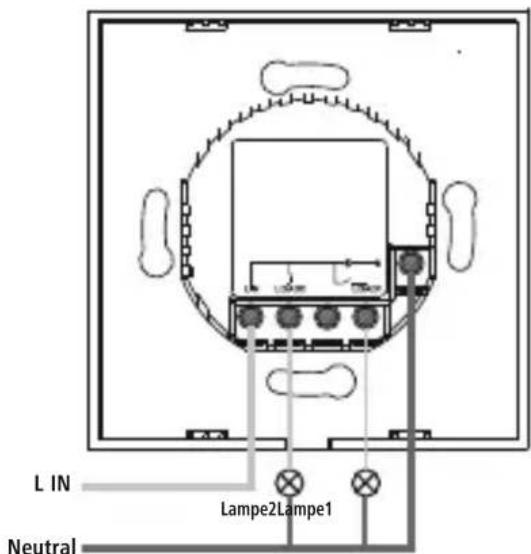
- Fittheswitchintoasuitablewallorsurface-mountedsocket.
- Replacetheglasscoverontheswitchandcheck thatithasengagedproperly.
Downloadtheapp
- DownloadtheHamaSmartHome(Solution) APPfromtheAppleAppStoreorGooglePlay Store.
- OpentheHamaSmartHome(Solution)APP.
- The first time you set the app, you need to register and create an account. If you already have an account, login with your access details.
• Followtheinstructionsintheapp.
Note

Adetaileddescriptionofthe
HamaSmartHome(Solution)App
anditsfullscopeoffunctionscanbefoundinour AppGuideat:
www.hama.com ArticleNumber Downloads
→ AppOperatingInstructions
Gettingstarted
- Afterinstallingtheswitch,theblueLEDflashes quickly.Ifitdoesnotflash,pressandholdthe buttonforapprox.6secondsuntiltheLED flashes.
- ThenfollowtheinstructionsfromtheAppGuide.
Note

Thefulloperatinginstructionscanbefoundat www.hama.com
6. Care and maintenance
Note

Disconnect the product from themains before cleaning and during prolonged period so of non-use.
- Onlycleanthisproductusingalint-free,slightly dampclothanddonotuseanyharshcleaners.
- Ensure that now waterisable to enter the product.
7.Warrantydisclaimer
HamaGmbH&CoKGassumesnoliabilityand providesnowarrantyfordamageresultingfrom improperinstallation/mounting,improperuseof theproductorfromfailuretoobservetheoperating instructionsand/orsafetynotes.
8.RFexposureinformation
This device complies with the EU requirements for limiting the exposure of the general public to electromagnetic fields by means of health protection. The device complies with RF specifications provided it is used 20 cm away from the body.
9. Declaration of conformity

HamaGmbH&CoKGhereby declaresthattheradioequipment type[00176551]isincompliance withDirective2014/53/EU.Thefull
textoftheEUdeclarationofconformityisavailable atthefollowingInternetaddress: www.hama.com->00176551->Downloads.
10.Technicaldata
| Inputvoltage230V~,50Hz | |
| Maximum connectedpower | 1000W |
| Frequencyband2.4GHz | |
| Maximumradio-frequencypower transmitted | 100mW |
AppHamaSmartHome(Solution)
- Explanationofwarningsymbolsandnotes
- Riskofelectricshock
- Warning
- Note
- Explanation of symbols used on the product label
- Packagecontents
- Safetyinstructions
- Here'showeasyitis:
- Installation
- Downloadtheapp
- HamaSmartHome(Solution)App
- Gettingstarted
- Care and maintenance
- 7.Warrantydisclaimer
- 8.RFexposureinformation
- Declaration of conformity
- 10.Technicaldata
- AppHamaSmartHome(Solution)
Brand : HAMA
Model : 00176551
Category : Smart Home