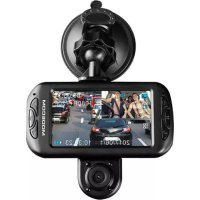
MCCC15 - Dashcam ModeCom - Free user manual and instructions
Find the device manual for free MCCC15 ModeCom in PDF.



| Product Type | Dashcam (travel recorder) dual lens |
| Brand | ModeCom |
| Model | MCCC15 (MC-CC15) |
| Video resolution (main lens) | 1080FHD (1920x1080) |
| Video resolution (dual lens) | 1080P (1440x1080), 720P (1280x720) |
| Screen | Built-in LCD |
| Lenses | Main lens + additional rotating lens |
| Loop recording | Yes (3 min / 5 min / 10 min) |
| G-sensor | Yes, adjustable sensitivity (High/Medium/Low/Off) |
| Motion detection | Yes |
| HDR | Yes (Enable/Disable) |
| Parking surveillance | Yes (parking environment monitoring mode) |
| Audio | Yes (audio recording on/off) |
| License plate | Yes, can be embedded |
| GPS | GPS input for external module (not included) |
| Storage | MicroSD card (not included) |
| Power supply | 12V car charger (cigarette lighter plug) |
| Operating temperature | -10°C to +60°C |
| Menu languages | English, Polish, German, French, Spanish, Portuguese, Czech, Slovak, Hungarian, Russian, Ukrainian |
| Care and cleaning | Clean the lens and screen with a soft, clean cloth. Do not use abrasive products. |
| Safety | Do not install in front of airbags. Do not disassemble the device (voids warranty). Keep out of reach of children. |
| Spare parts and repairability | No spare parts available. Any disassembly voids the warranty. For recycling, return the device at end of life to a WEEE collection point. |
| General information | Complies with directive 2012/19/EU (WEEE). Do not dispose of with household waste. |
Frequently Asked Questions - MCCC15 ModeCom
User questions about MCCC15 ModeCom
0 question about this device. Answer the ones you know or ask your own.
Ask a new question about this device
Download the instructions for your Dashcam in PDF format for free! Find your manual MCCC15 - ModeCom and take your electronic device back in hand. On this page are published all the documents necessary for the use of your device. MCCC15 by ModeCom.
USER MANUAL MCCC15 ModeCom
This product should be installed in a proper manner, without interfering with the driver's eyesight or the airbag deployment, otherwise it may easily cause accident and personal injury.
Do not throw the device.
Protect the device from sharp temperature change (temperature working range from: -10 C degree to +60 C degree).
Far away from strong magnetic area.
Clean soft-non-dust cloth is recommended to clean the screen and lens. It is recommended to keep the windshield ahead the device clean for better recording effect.
Only use the dedicated charger and related accessories compatible with this product.
Do not dismantle device. This result in loss warranty.
Protect against children.
REC MC-CC15 FHD TS

Car Camera
Introduction
| Vrijeme | Off/GMT-12:00/GMT-11:00/GMT-10:00/GMT-09:00/GMT-08:00/GMT-07:00/GMT-06:00/GMT-05:00/GMT-04:30/GMT-04:00/GMT-03:30/GMT-03:00/GMT-02:00/GMT-01:00/GMT+00:00/GMT+01:00/GMT+02:00/GMT+03:00/GMT+03:30/GMT+04:00/GMT+04:30/GMT+05:00/GMT+05:30/GMT+05:45/GMT+06:00/GMT+06:30/GMT+07:00/GMT+08:00/GMT+09:00/GMT+09:30/GMT+10:00/GMT+11:00/GMT+12:00/GMT+13:00 | |
| Format Micro SD Card | ||
| Zašita ekrana Off/30sec/1min/2mins | ||
| Odgoda isključivanja Off/5s/10s/30s | ||
| Tvorničke postavke Cancel/OK |
Općenito održavanje
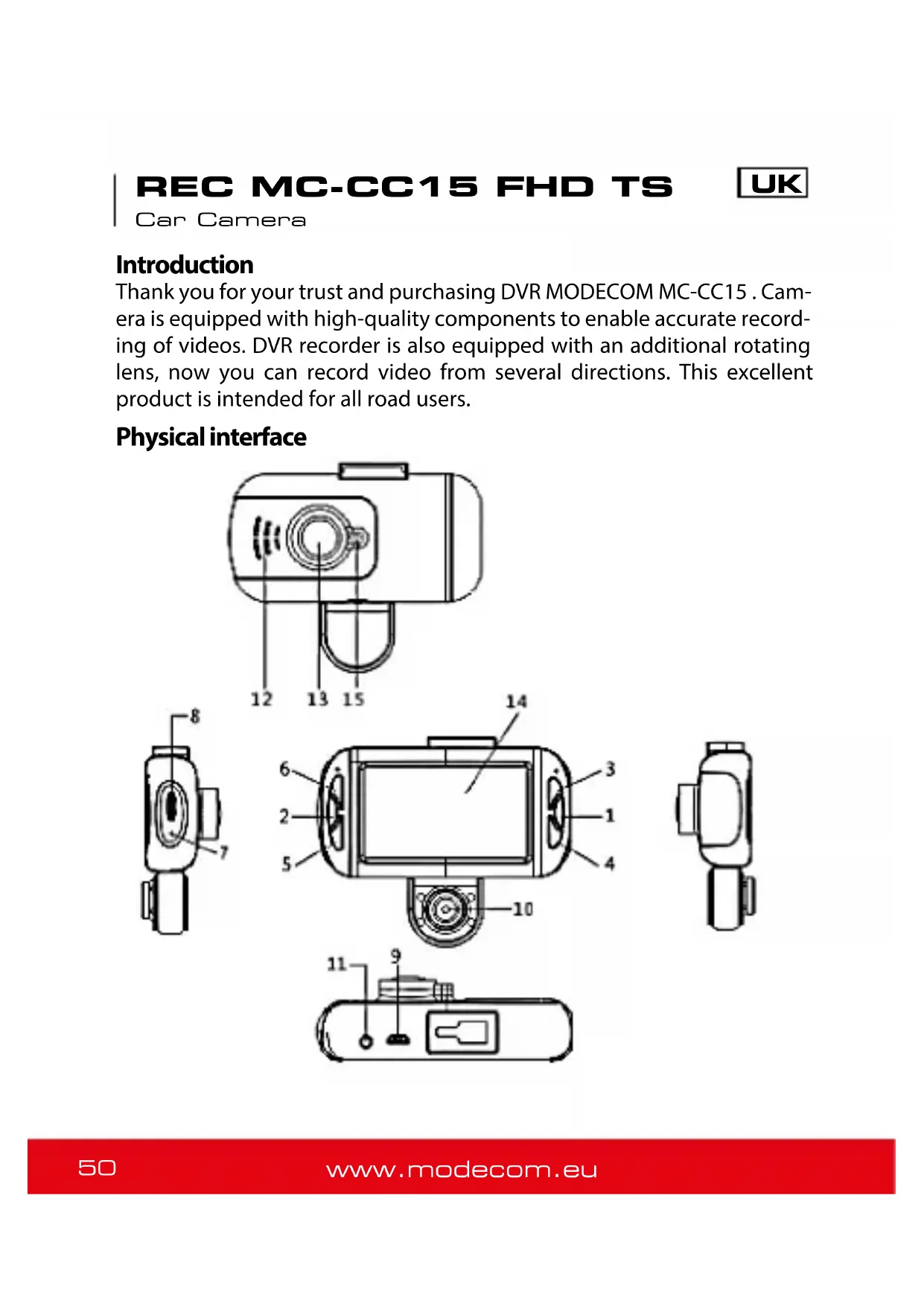
Thank you for your trust and purchasing DVR MODECOM MC-CC15. Camera is equipped with high-quality components to enable accurate recording of videos. DVR recorder is also equipped with an additional rotating lens, now you can record video from several directions. This excellent product is intended for all road users.
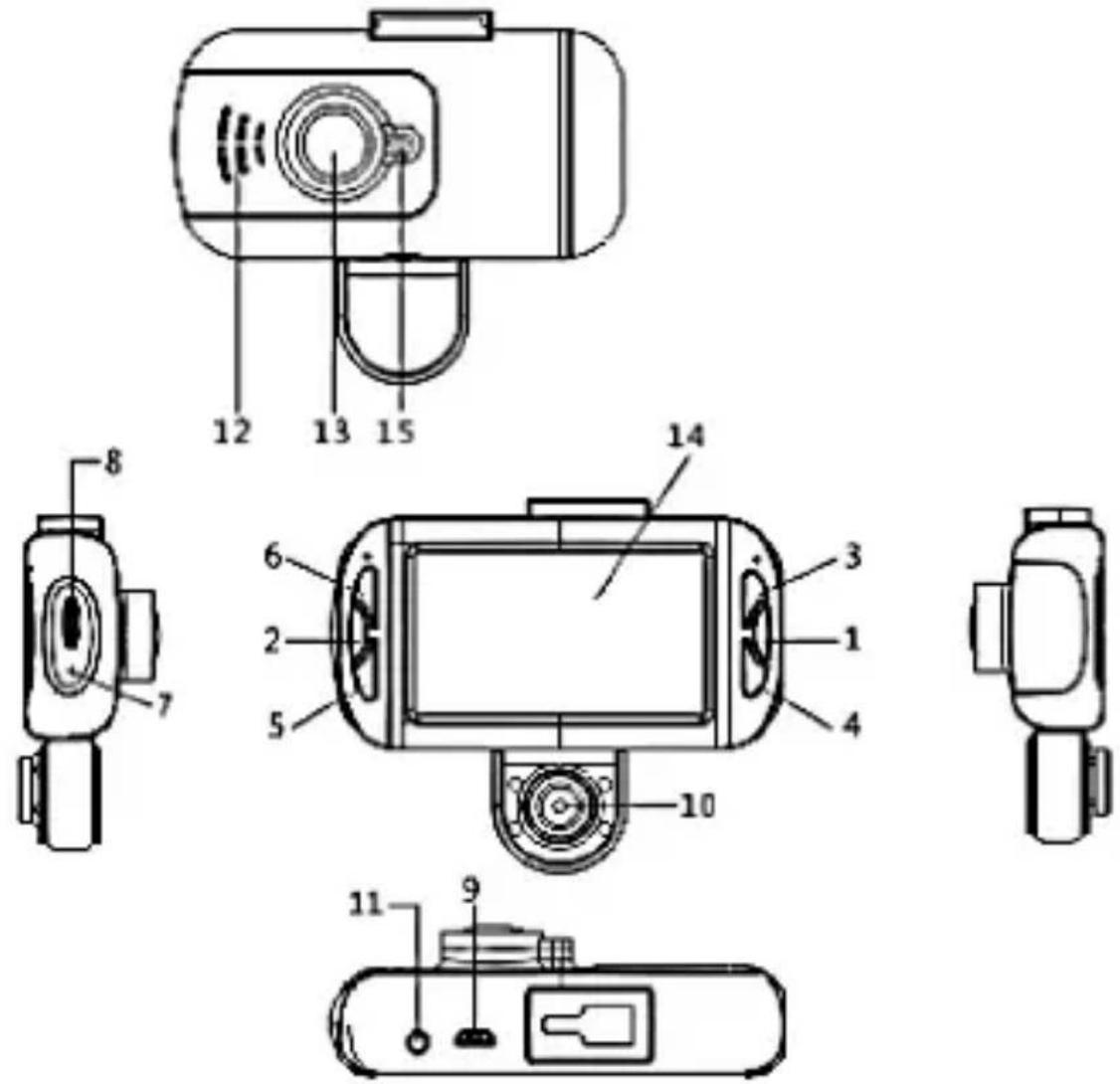
Physical interface
REC MC-CC15 FHD TS

Car Camera
- OK button 2. Menu button 3. Up button 4. Down button 5. Mode button 6. ON/OFF 7. Reset hole 8. Micro SD Card Slot 9. USB Port 10. Second lens 11. GPS port 12. Speaker 13. Main lens 14. LCD screen 15. Work indicate light
Installation:
Fix the car camera with the holder, then set it to a suitable place on the glass of car, adjust to the best angle, insert MicroSD card and connect with car charger.
Plug car charger to the lighter socket of your car and connect MC-CC15 DVR to power adapter, then camera will start recoding automatically. When you shut down your car, DVR will be automatically turned off and all recorded video will be saved.
Buttons function description:
Menu Setting
| Menu Setting | MODE Category | Sub-Category | ||
| Video | Resolution | Single Lens | 1080FHD 1920x1080 | |
| 720P 1280x720 | ||||
| WVGA 848x480 | ||||
| VGA 640x480 | ||||
| Dual Lens | 1080P 1440x1080 | |||
| 720P 1280x720 | ||||
| Dual Lens Recording | On/Off | |||
| Loop Recording Off /3mins/5mins/10mins | ||||
| Time-lapse Record | Off/100MS/200MS/500MS | |||
| HDR Off/On | ||||
| Exposure | +2.0, +5/3, +4/3, +1.0, +2/3, +1/3, +0.0,-1/3,-2/3,-1.0,-4/3,-5/3,-2.0 | |||
| Motion Detection Off/On | ||||
| Audio Off/On | ||||
| Date Stamp Off/On | ||||
| G-sensor Off/High/Medium/Low | ||||
REC MC-CC15 FHD TS

Car Camera
| Photo | License Plate | While in this mode, please press the MODE button to set the license plate number. Changing characters followed by pressing the UP/DOWN buttons. OK button is used to confirm each character. To save the number, please press Menu. | |
| Parking Monitor Off/On | |||
| Capture Mode Single | le/2sec/5sec/10sec | ||
| Resolution 12M/10 | M/8M/5M/3M/2M/1.3M/VGA | ||
| Sequence Off/On | |||
| Quality Fine/Normal | al/Economy | ||
| Sharpness Strong/Normal/Soft | |||
| White Balance | Auto/daylight/cloudy/tungsten / Fluorescent | ||
| Color Color/Black & White/Sepia | |||
| ISO Auto/100/200/400 | |||
| Exposure | +0.0, -1/3, -2/3, -1.0, -4/3, -5/3, -2.0, +2.0, +5/3, +4/3, +1.0, +2/3, +1/3 | ||
| Anti-shake Off/On | |||
| Quick Review Off/2 seconds/5seconds | |||
| Date Stamp Off, Date, Date/Time | |||
| Play | Delete Delete current/Delete all | ||
| Protect | Lock Current/Unlock Current/Lock AII/Unlock All | ||
| Slide Preview 2 seconds/5 seconds/8 seconds | |||
| System Setting | Date/time MM/DD/YY,DD/MM/YY | Y,YY/MM/DD | |
| Auto Power Off/3mins/5mins | /10mins | ||
| Beep Sound Off/On | |||
| Language | English/Polish/German/French/Spanish/Portuguese/Czech/Slovak/Hungarian/Russian/Ukrainian | ||
| Frequency 50Hz/60Hz | |||
REC MC-CC15 FHD TS

Car Camera
| Time | Off/GMT-12:00/GMT-11:00/GMT-10:00/GMT-09:00/GMT-08:00/GMT-07:00/GMT-06:00/GMT-05:00/GMT-04:30/GMT-04:00/GMT-03:30/GMT-03:00/GMT-02:00/GMT-01:00/GMT+00:00/GMT+01:00/GMT+02:00/GMT+03:00/GMT+03:30/GMT+04:00/GMT+04:30/GMT+05:00/GMT+05:30/GMT+05:45/GMT+06:00/GMT+06:30/GMT+07:00/GMT+08:00/GMT+09:00/GMT+09:30/GMT+10:00/GMT+11:00/GMT+12:00/GMT+13:00 |
| Format Micro SD Card | |
| Screen Saver Off/30sec/1min/2mins | |
| Delay Shutdown Off/5s/10s/30s | |
| Default Setting Cancel/OK |
General Maintenance
This product should be installed in a proper manner, without interfering with the driver's eyesight or the airbag deployment, otherwise it may easily cause accident and personal injury.
Do not throw the device.
Protect the device from sharp temperature change (temperature working range from: -10 C degree to +60 C degree).
Far away from strong magnetic area.
Clean soft-non-dust cloth is recommended to clean the screen and lens. It is recommended to keep the windshield ahead the device clean for better recording effect.
Only use the dedicated charger and related accessories compatible with this product.
Do not dismantle device. This result in loss warranty.
Protect against children.
CZ
This device was designed and made of high-quality reusable materials and components. If the device, its packaging, user's manual, etc. are marked with crossed waste container, it means they are subject to segregated household waste collection in compliance with the Directive 2012/19/UE of the European Parlia ment and of the Council. This marking informs that electric and electronic equipment shall not be thrown away together with household waste after it's been utilised. The user is obliged to bring the utilised equipment to electric and electronic waste collection point. Those running such collection points, including local collection points, shops or commune units, provide convenient system enabling to scrap such equipment. Appropriate waste management aids in avoiding consequences which are harmful for people and environment and result from dangerous materials used in the device, as well as improper storage and processing. Segregated household waste collection aids recycle materials and components of which the device was made. A household plays crucial role in contributing to recycling and reusing the waste equipment. This is the stage where the basics are shaped which largely influence the environment being our common good. Households are also one of the biggest users of small electrical equipment. Reasonable management at this stage aids and favours recycling. In the case of improper waste management, fixed penalties may be imposed in accordance with national legal regulations.
Brand : ModeCom
Model : MCCC15
Category : Dashcam