PC 2 - Electric kettle TEAM - Free user manual and instructions
Find the device manual for free PC 2 TEAM in PDF.



| Product type | Electric infusion tea kettle |
| Brand | Team |
| Model | PC 2 |
| Power supply | 230 V ~ 600 W |
| Minimum capacity | 0.3 liter |
| Maximum capacity | 1 liter |
| Infusion time | Approximately 7 to 12 minutes |
| Automatic shut-off | Yes, at end of infusion |
| Keep warm | Yes, intermittent cycles |
| Safety | Overheat and dry boil protection |
| Carafe material | Glass |
| Filter | Removable receptacle for tea leaves or bags |
| Cleaning | Damp cloth, sponge, soft brush |
| Descaling | With descaling product or lemon juice |
| Do not immerse in water | Yes |
| Repairability | Authorized after-sales service required |
| Country of manufacture | Not specified in the manual |
Frequently Asked Questions - PC 2 TEAM
User questions about PC 2 TEAM
0 question about this device. Answer the ones you know or ask your own.
Ask a new question about this device
Download the instructions for your Electric kettle in PDF format for free! Find your manual PC 2 - TEAM and take your electronic device back in hand. On this page are published all the documents necessary for the use of your device. PC 2 by TEAM.
USER MANUAL PC 2 TEAM
Generated by Unregistered Batch DOC TO PDF Converter 2011.3.804.1511, please register!
Copies of the I/B. Please reproduce them without any changes except under special instruction from Team International BELGIUM. The pages must be reproduced and folded in order to obtain a booklet A5 (+/- 148.5 mm width x 210 mm height). When folding, make sure you keep the good numbering when you turn the pages of the I/B. Don't change the page numbering. Keep the language integrity.

Teebereiter
Tea percolator
Théière
Theebereider
Tetera
Front cover page (first page)

Fox +32 2 359 95 50
Generated by Unregistered Batch DOC TO PDF Converter 2011.3.804.1511, please register!
Copies of the I/B. Please reproduce them without any changes except under special instruction from Team International BELGIUM. The pages must be reproduced and folded in order to obtain a booklet A5 (+/- 148.5 mm width x 210 mm height). When folding, make sure you keep the good numbering when you turn the pages of the I/B. Don't change the page numbering. Keep the language integrity.
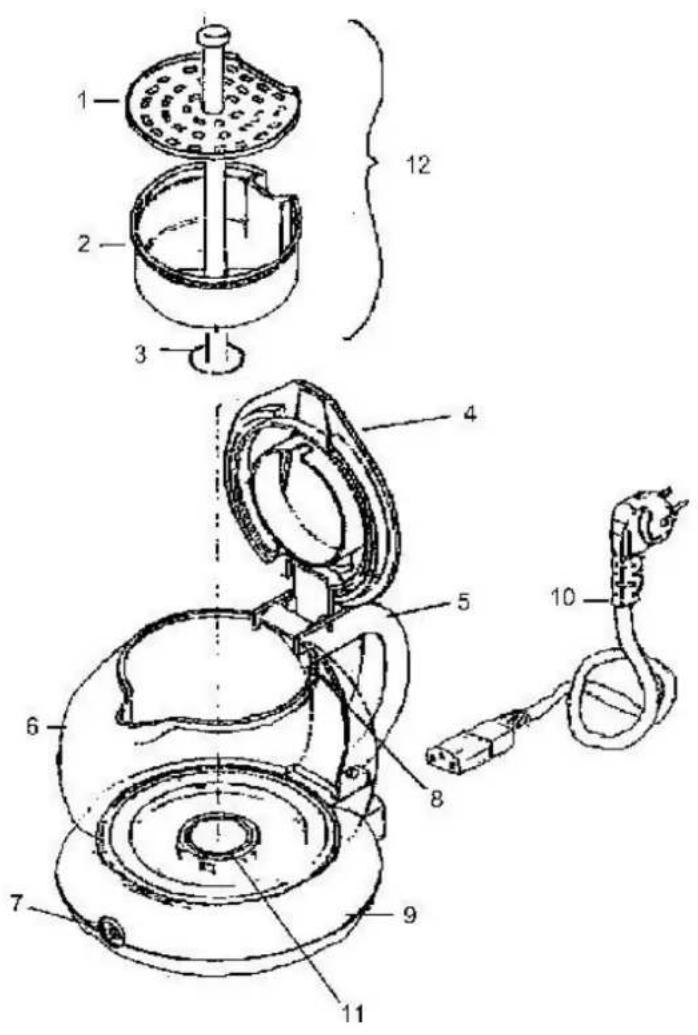
D
- Distributor plate
- Filter bowl
- Percolator tube
- Lid
- Handle
- Jug
- Power on light
- Maximum fill level
- Base
- Orange knob
- Heating element
- Brewing system
F
Generated by Unregistered Batch DOC TO PDF Converter 2011.3.804.1511, please register!
Copies of the I/B. Please reproduce them without any changes except under special instruction from Team International BELGIUM. The pages must be reproduced and folded in order to obtain a booklet A5 (+/- 148.5 mm width x 210 mm height). When folding, make sure you keep the good numbering when you turn the pages of the I/B. Don't change the page numbering. Keep the language integrity.
Generated by Unregistered Batch DOC TO PDF Converter 2011.3.804.1511, please register!
Copies of the I/B. Please reproduce them without any changes except under special instruction from Team International BELGIUM. The pages must be reproduced and folded in order to obtain a booklet A5 (+/- 148.5 mm width x 210 mm height). When folding, make sure you keep the good numbering when you turn the pages of the I/B. Don't change the page numbering. Keep the language integrity.
Generated by Unregistered Batch DOC TO PDF Converter 2011.3.804.1511, please register!
Copies of the I/B. Please reproduce them without any changes except under special instruction from Team International BELGIUM. The pages must be reproduced and folded in order to obtain a booklet A5 (+/- 148.5 mm width x 210 mm height). When folding, make sure you keep the good numbering when you turn the pages of the I/B. Don't change the page numbering. Keep the language integrity.
Generated by Unregistered Batch DOC TO PDF Converter 2011.3.804.1511, please register!
Copies of the I/B. Please reproduce them without any changes except under special instruction from Team International BELGIUM. The pages must be reproduced and folded in order to obtain a booklet A5 (+/- 148.5 mm width x 210 mm height). When folding, make sure you keep the good numbering when you turn the pages of the I/B. Don't change the page numbering. Keep the language integrity.
Generated by Unregistered Batch DOC TO PDF Converter 2011.3.804.1511, please register!
Copies of the I/B. Please reproduce them without any changes except under special instruction from Team International BELGIUM. The pages must be reproduced and folded in order to obtain a booklet A5 (+/- 148.5 mm width x 210 mm height). When folding, make sure you keep the good numbering when you turn the pages of the I/B. Don't change the page numbering. Keep the language integrity.

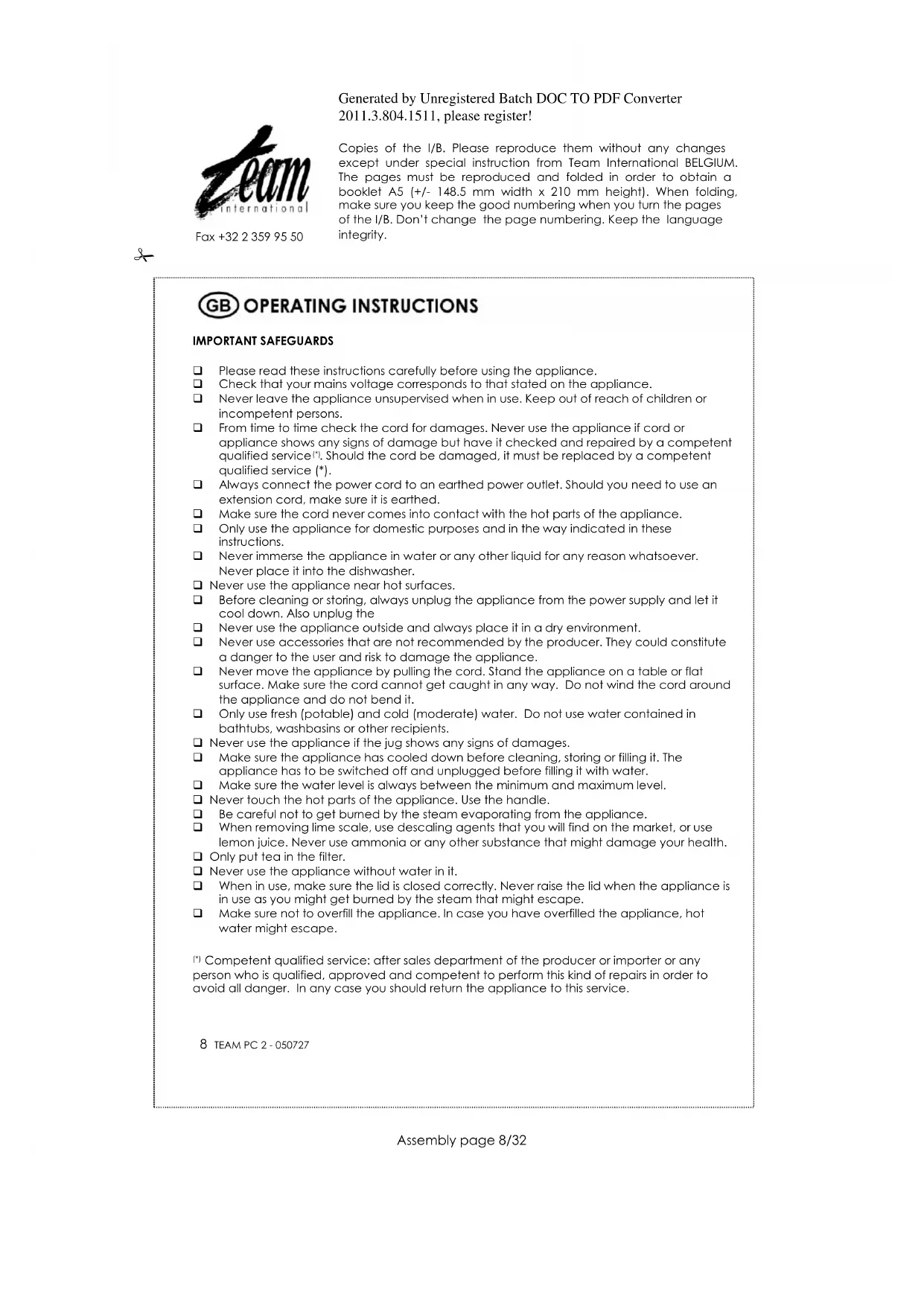
OPERATING INSTRUCTIONS
IMPORTANT SAFEGUARDS
Please read these instructions carefully before using the appliance.
Check that your mains voltage corresponds to that stated on the appliance.
Never leave the appliance unsupervised when in use. Keep out of reach of children or incompetent persons.
From time to time check the cord for damages. Never use the appliance if cord or appliance shows any signs of damage but have it checked and repaired by a competent qualified service. Should the cord be damaged, it must be replaced by a competent qualified service (^*)
Always connect the power cord to an earthed power outlet. Should you need to use an extension cord, make sure it is earthed.
Make sure the cord never comes into contact with the hot parts of the appliance.
Only use the appliance for domestic purposes and in the way indicated in these instructions.
Never immerse the appliance in water or any other liquid for any reason whatsoever. Never place it into the dishwasher.
Never use the appliance near hot surfaces.
Before cleaning or storing, always unplug the appliance from the power supply and let it cool down. Also unplug the
Never use the appliance outside and always place it in a dry environment.
Never use accessories that are not recommended by the producer. They could constitute a danger to the user and risk to damage the appliance.
Never move the appliance by pulling the cord. Stand the appliance on a table or flat surface. Make sure the cord cannot get caught in any way. Do not wind the cord around the appliance and do not bend it.
Only use fresh (potable) and cold (moderate) water. Do not use water contained in bathtubs, washbasins or other recipients.
Never use the appliance if the jug shows any signs of damages.
Make sure the appliance has cooled down before cleaning, storing or filling it. The appliance has to be switched off and unplugged before filling it with water.
Make sure the water level is always between the minimum and maximum level.
Never touch the hot parts of the appliance. Use the handle.
Be careful not to get burned by the steam evaporating from the appliance.
When removing lime scale, use descending agents that you will find on the market, or use lemon juice. Never use ammonia or any other substance that might damage your health.
Only put tea in the filter.
Never use the appliance without water in it.
When in use, make sure the lid is closed correctly. Never raise the lid when the appliance is in use as you might get burned by the steam that might escape.
Make sure not to overfill the appliance. In case you have overfilled the appliance, hot water might escape.
Competent qualified service: after sales department of the producer or importer or any person who is qualified, approved and competent to perform this kind of repairs in order to avoid all danger. In any case you should return the appliance to this service.
8 TEAM PC 2-050727

Fox +32 2 359 95 50
Generated by Unregistered Batch DOC TO PDF Converter 2011.3.804.1511, please register!
Copies of the I/B. Please reproduce them without any changes except under special instruction from Team International BELGIUM. The pages must be reproduced and folded in order to obtain a booklet A5 (+/- 148.5 mm width x 210 mm height). When folding, make sure you keep the good numbering when you turn the pages of the I/B. Don't change the page numbering. Keep the language integrity.
9 TEAM PC 2-050727

Fox +32 2 359 95 50
Generated by Unregistered Batch DOC TO PDF Converter 2011.3.804.1511, please register!
Copies of the I/B. Please reproduce them without any changes except under special instruction from Team International BELGIUM. The pages must be reproduced and folded in order to obtain a booklet A5 (+/- 148.5 mm width x 210 mm height). When folding, make sure you keep the good numbering when you turn the pages of the I/B. Don't change the page numbering. Keep the language integrity.
TECHNICAL SPECIFICATIONS
- 230V 600w Please check if the voltage indicated on the appliance corresponds to your mains voltage before using the appliance.
Minimum capacity: 0.3 litres
Maximum capacity: 1 litre
Please make sure that the water level is always situated between the minimum and maximum level.
BEFORE USE
- Read the instruction manual carefully.
- Remove the labels and packaging of the tea bags.
Before preparing tea for the first time, rinse the appliance by operating it once or twice with water but without tea.
HOW TO OPERATE
- Open the lid (4) and remove the brewing system (12) by lifting the percolator tube (3). This will allow all of the following items to be removed together: filter bowl, distributor plate and percolator tube.
- Fill the jug (6) with water to the required level, making sure that the water level is between the minimum and the maximum indication. Take care not to allow water to run over the outside of the jug, mouldings and into the electrical socket at the rear, which are protected by a seal.
- Fill the filter bowl with the desired amount of loose tea, tea bags or coffee. The quantity of tea depends on your taste and the required strength. However, do not fill above the maximum line marked inside the filter bowl. As a guide to the strength we would recommend the following quantity of tea when filled to the Max. water level (1 litre).
Tea
| Taste | quantity |
| Weak | 3 bags/3 level tea spoons |
| Medium | 4 bags/4 level tea spoons |
| Strong | 5 bags/5 level tea spoons |
- Put the distributor plate on the filter bowl and close the lid. Ensure that the percolator tube fits into the hole in the heating element and that the filter bowl and distributor plate are all fitted together correctly.
- Attach the power cord to the percolator and then plug into the power supply.
The "power on" light will now be illuminated and the brewing will begin. The brewing will take approximately 7-12 minutes. - When the brewing is completed the appliance will switch off automatically.
- Before pouring unplug from the power supply and detach the power cord. After pouring the percolator can be plugged back in the power supply to keep the drink hot. Do not switch back on if the drink level is below the 0.3 litre Min level.
If the drink is not required immediately the product will switch automatically to a hold position. This will keep the drink hot by switching the power back on for a short period every few minutes. Remember the drink will slowly evaporate and become stronger in taste the longer it is left to stand.
10 TEAM PC 2-050727

Fox +32 2 359 95 50
Generated by Unregistered Batch DOC TO PDF Converter 2011.3.804.1511, please register!
Copies of the I/B. Please reproduce them without any changes except under special instruction from Team International BELGIUM. The pages must be reproduced and folded in order to obtain a booklet A5 (+/- 148.5 mm width x 210 mm height). When folding, make sure you keep the good numbering when you turn the pages of the I/B. Don't change the page numbering. Keep the language integrity.
The tea maker is equipped with an automatic protection switch which switches off the appliance automatically in case it is switched on without water. Should this happen, unplug the appliance, let the appliance cool down, and switch it back on.
CLEANING
Always disconnect from the power supply and allow to cool down before cleaning. Take out the filter bowl and remove the percolator tube.
- Wipe the inside with a damp cloth and the plastic parts with a damp sponge.
- Clean the filter bowl with hot water and a mild detergent. To avoid the risk of electric shocks, NEVER immerse the plug, the power cord or the appliance in water or any other liquid. Never use abrasive products. The inside of the glass and the top of the heating element may be cleaned with water and a soft bristle brush. Be very careful not to scratch the black non-stick coating on top of the heating element.
- Never put the appliance in the dishwasher.
DESCALING
If you have an extremely "hard drinking water" supply, it may be necessary to descale the percolator occasionally to prevent the build up of lime on the heating element.
To do so, you can use descending products especially made for this purpose that you will find in commerce and read their instruction manual carefully. However, you can also try the following simple and safe method:
a) Fill percolator with 0.5 litres of water.
b) Add the juice of 1 fresh lemon.
c) Switch on percolator and leave for 30 minutes.
d) Allow to cool down and rinse thoroughly.
11 TEAM PC 2-050727

Fox+3223599550
Generated by Unregistered Batch DOC TO PDF Converter 2011.3.804.1511, please register!
Copies of the I/B. Please reproduce them without any changes except under special instruction from Team International BELGIUM. The pages must be reproduced and folded in order to obtain a booklet A5 (+/- 148.5 mm width x 210 mm height). When folding, make sure you keep the good numbering when you turn the pages of the I/B. Don't change the page numbering. Keep the language integrity.
FR MODE D'EMPLOI
POUR VOTRE SECURITE
Generated by Unregistered Batch DOC TO PDF Converter 2011.3.804.1511, please register!
Copies of the I/B. Please reproduce them without any changes except under special instruction from Team International BELGIUM. The pages must be reproduced and folded in order to obtain a booklet A5 (+/- 148.5 mm width x 210 mm height). When folding, make sure you keep the good numbering when you turn the pages of the I/B. Don't change the page numbering. Keep the language integrity.
Generated by Unregistered Batch DOC TO PDF Converter 2011.3.804.1511, please register!
Copies of the I/B. Please reproduce them without any changes except under special instruction from Team International BELGIUM. The pages must be reproduced and folded in order to obtain a booklet A5 (+/- 148.5 mm width x 210 mm height). When folding, make sure you keep the good numbering when you turn the pages of the I/B. Don't change the page numbering. Keep the language integrity.
Generated by Unregistered Batch DOC TO PDF Converter 2011.3.804.1511, please register!
Copies of the I/B. Please reproduce them without any changes except under special instruction from Team International BELGIUM. The pages must be reproduced and folded in order to obtain a booklet A5 (+/- 148.5 mm width x 210 mm height). When folding, make sure you keep the good numbering when you turn the pages of the I/B. Don't change the page numbering. Keep the language integrity.

GEBRUKSAANWIJZING
BELANGRIJKE VEILIGHEIDSVOORSCHRIFTEN
Generated by Unregistered Batch DOC TO PDF Converter 2011.3.804.1511, please register!
Copies of the I/B. Please reproduce them without any changes except under special instruction from Team International BELGIUM. The pages must be reproduced and folded in order to obtain a booklet A5 (+/- 148.5 mm width x 210 mm height). When folding, make sure you keep the good numbering when you turn the pages of the I/B. Don't change the page numbering. Keep the language integrity.
Generated by Unregistered Batch DOC TO PDF Converter 2011.3.804.1511, please register!
Copies of the I/B. Please reproduce them without any changes except under special instruction from Team International BELGIUM. The pages must be reproduced and folded in order to obtain a booklet A5 (+/- 148.5 mm width x 210 mm height). When folding, make sure you keep the good numbering when you turn the pages of the I/B. Don't change the page numbering. Keep the language integrity.
Generated by Unregistered Batch DOC TO PDF Converter 2011.3.804.1511, please register!
Copies of the I/B. Please reproduce them without any changes except under special instruction from Team International BELGIUM. The pages must be reproduced and folded in order to obtain a booklet A5 (+/- 148.5 mm width x 210 mm height). When folding, make sure you keep the good numbering when you turn the pages of the I/B. Don't change the page numbering. Keep the language integrity.
REINIGING
Generated by Unregistered Batch DOC TO PDF Converter 2011.3.804.1511, please register!
Copies of the I/B. Please reproduce them without any changes except under special instruction from Team International BELGIUM. The pages must be reproduced and folded in order to obtain a booklet A5 (+/- 148.5 mm width x 210 mm height). When folding, make sure you keep the good numbering when you turn the pages of the I/B. Don't change the page numbering. Keep the language integrity.

Generated by Unregistered Batch DOC TO PDF Converter 2011.3.804.1511, please register!
Copies of the I/B. Please reproduce them without any changes except under special instruction from Team International BELGIUM. The pages must be reproduced and folded in order to obtain a booklet A5 (+/- 148.5 mm width x 210 mm height). When folding, make sure you keep the good numbering when you turn the pages of the I/B. Don't change the page numbering. Keep the language integrity.
Generated by Unregistered Batch DOC TO PDF Converter 2011.3.804.1511, please register!
Copies of the I/B. Please reproduce them without any changes except under special instruction from Team International BELGIUM. The pages must be reproduced and folded in order to obtain a booklet A5 (+/- 148.5 mm width x 210 mm height). When folding, make sure you keep the good numbering when you turn the pages of the I/B. Don't change the page numbering. Keep the language integrity.
DESCALCIFICACION
Generated by Unregistered Batch DOC TO PDF Converter 2011.3.804.1511, please register!
Copies of the I/B. Please reproduce them without any changes except under special instruction from Team International BELGIUM. The pages must be reproduced and folded in order to obtain a booklet A5 (+/- 148.5 mm width x 210 mm height). When folding, make sure you keep the good numbering when you turn the pages of the I/B. Don't change the page numbering. Keep the language integrity.
P MODO DE EMPREGO
PARA A SUA SEGURANCA
Generated by Unregistered Batch DOC TO PDF Converter 2011.3.804.1511, please register!
Copies of the I/B. Please reproduce them without any changes except under special instruction from Team International BELGIUM. The pages must be reproduced and folded in order to obtain a booklet A5 (+/- 148.5 mm width x 210 mm height). When folding, make sure you keep the good numbering when you turn the pages of the I/B. Don't change the page numbering. Keep the language integrity.
ANTES DA PRIMEIRA UTILIZACAO
Generated by Unregistered Batch DOC TO PDF Converter 2011.3.804.1511, please register!
Copies of the I/B. Please reproduce them without any changes except under special instruction from Team International BELGIUM. The pages must be reproduced and folded in order to obtain a booklet A5 (+/- 148.5 mm width x 210 mm height). When folding, make sure you keep the good numbering when you turn the pages of the I/B. Don't change the page numbering. Keep the language integrity.
Generated by Unregistered Batch DOC TO PDF Converter 2011.3.804.1511, please register!
Copies of the I/B. Please reproduce them without any changes except under special instruction from Team International BELGIUM. The pages must be reproduced and folded in order to obtain a booklet A5 (+/- 148.5 mm width x 210 mm height). When folding, make sure you keep the good numbering when you turn the pages of the I/B. Don't change the page numbering. Keep the language integrity.
1ISTRUZIONI PER L'USO
AVVERTENZE
Generated by Unregistered Batch DOC TO PDF Converter 2011.3.804.1511, please register!
Copies of the I/B. Please reproduce them without any changes except under special instruction from Team International BELGIUM. The pages must be reproduced and folded in order to obtain a booklet A5 (+/- 148.5 mm width x 210 mm height). When folding, make sure you keep the good numbering when you turn the pages of the I/B. Don't change the page numbering. Keep the language integrity.
26 TEAM PC 2-050727

Fox+3223599550
Generated by Unregistered Batch DOC TO PDF Converter 2011.3.804.1511, please register!
Copies of the I/B. Please reproduce them without any changes except under special instruction from Team International BELGIUM. The pages must be reproduced and folded in order to obtain a booklet A5 (+/- 148.5 mm width x 210 mm height). When folding, make sure you keep the good numbering when you turn the pages of the I/B. Don't change the page numbering. Keep the language integrity.
PRIMA DEL PRIMO UTILIZZO
Generated by Unregistered Batch DOC TO PDF Converter 2011.3.804.1511, please register!
Copies of the I/B. Please reproduce them without any changes except under special instruction from Team International BELGIUM. The pages must be reproduced and folded in order to obtain a booklet A5 (+/- 148.5 mm width x 210 mm height). When folding, make sure you keep the good numbering when you turn the pages of the I/B. Don't change the page numbering. Keep the language integrity.
Generated by Unregistered Batch DOC TO PDF Converter 2011.3.804.1511, please register!
Copies of the I/B. Please reproduce them without any changes except under special instruction from Team International BELGIUM. The pages must be reproduced and folded in order to obtain a booklet A5 (+/- 148.5 mm width x 210 mm height). When folding, make sure you keep the good numbering when you turn the pages of the I/B. Don't change the page numbering. Keep the language integrity.
PROBLEMIDI CALCARE
Generated by Unregistered Batch DOC TO PDF Converter 2011.3.804.1511, please register!
Copies of the I/B. Please reproduce them without any changes except under special instruction from Team International BELGIUM. The pages must be reproduced and folded in order to obtain a booklet A5 (+/- 148.5 mm width x 210 mm height). When folding, make sure you keep the good numbering when you turn the pages of the I/B. Don't change the page numbering. Keep the language integrity.
30 TEAM PC 2-050727

Fox +32 2 359 95 50
Generated by Unregistered Batch DOC TO PDF Converter 2011.3.804.1511, please register!
Copies of the I/B. Please reproduce them without any changes except under special instruction from Team International BELGIUM. The pages must be reproduced and folded in order to obtain a booklet A5 (+/- 148.5 mm width x 210 mm height). When folding, make sure you keep the good numbering when you turn the pages of the I/B. Don't change the page numbering. Keep the language integrity.
31 TEAM PC 2-050727
TEAM PC 2
| Deutsch | 4 |
| English | 7 |
| François | 10 |
| Nederlands | 13 |
| Espanol | 16 |
| Português | 19 |
| Italiano | 22 |


- Teebereiter
- Tea percolator
- Théière
- Theebereider
- Tetera
- Generated by Unregistered Batch DOC TO PDF Converter 2011.3.804.1511, please register!
- D
- F
- OPERATING INSTRUCTIONS
- IMPORTANT SAFEGUARDS
- TECHNICAL SPECIFICATIONS
- BEFORE USE
- HOW TO OPERATE
- CLEANING
- DESCALING
- FR MODE D'EMPLOI
- POUR VOTRE SECURITE
- GEBRUKSAANWIJZING
- BELANGRIJKE VEILIGHEIDSVOORSCHRIFTEN
- REINIGING
- DESCALCIFICACION
- P MODO DE EMPREGO
- PARA A SUA SEGURANCA
- ANTES DA PRIMEIRA UTILIZACAO
- 1ISTRUZIONI PER L'USO
- AVVERTENZE
- PRIMA DEL PRIMO UTILIZZO
- PROBLEMIDI CALCARE
- TEAM PC 2
Brand : TEAM
Model : PC 2
Category : Electric kettle