MTSIDSPR - Irrigation timer Martha Stewart - Free user manual and instructions
Find the device manual for free MTSIDSPR Martha Stewart in PDF.



Frequently Asked Questions - MTSIDSPR Martha Stewart
User questions about MTSIDSPR Martha Stewart
0 question about this device. Answer the ones you know or ask your own.
Ask a new question about this device
Download the instructions for your Irrigation timer in PDF format for free! Find your manual MTSIDSPR - Martha Stewart and take your electronic device back in hand. On this page are published all the documents necessary for the use of your device. MTSIDSPR by Martha Stewart.
USER MANUAL MTSIDSPR Martha Stewart
- Base
- Spray nozzles (16)
- Oscillator tube
- Hose-end
- Sliding tabs
- Inlet filter
- Cleaningpin
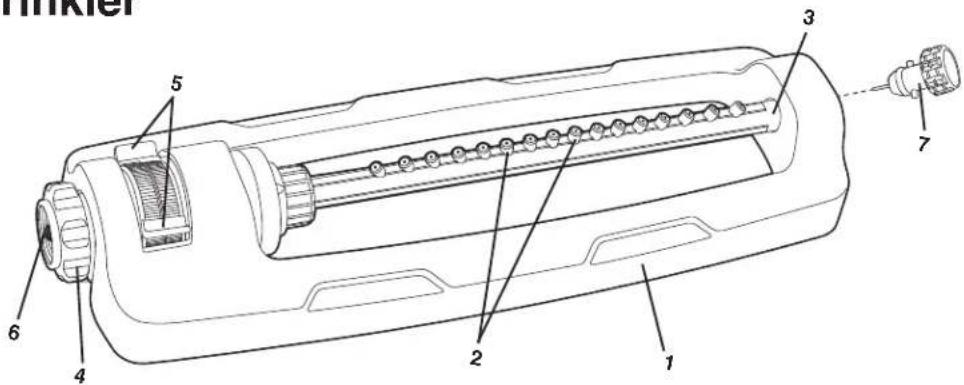
text_image
Hinkler 3 2 1 4 6 5 7Technical Data
Plastic nozzle heads......16
Adjustable range control .... Yes
Coverage Max: 3600 sq ft (335 m²)
Spray distance max ....70 ft (21 m)
Motor....Turbo drive
Net Weight....1.41 lbs (0.64 kg)
Operation
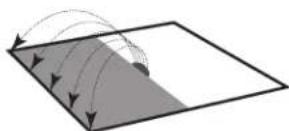
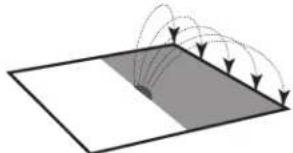
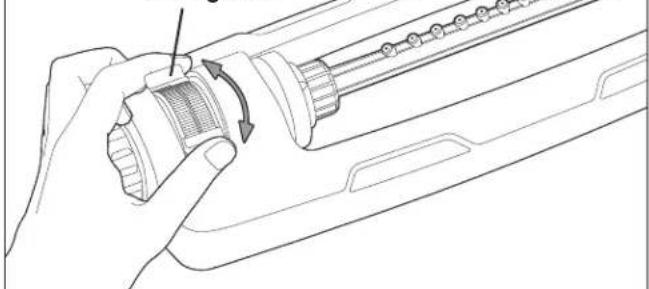
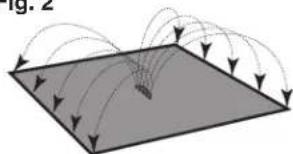
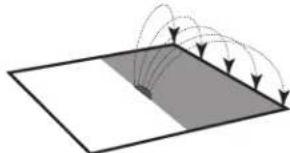
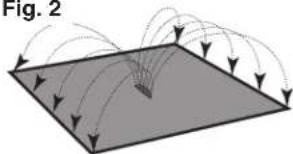
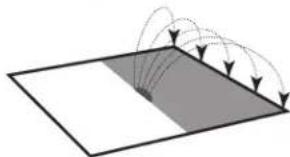
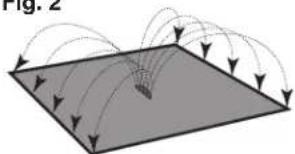
Use sliding tabs to select desired position and take advantage of the sprinkler's adjustable range control (Fig.1). Refer to (Fig. 2) to see the different sprinkler options.
Fig. 1
sliding tabs
natural_image
Line drawing of a hand holding a device with a scroll wheel and directional arrows indicating rotation (no text or symbols)Fig. 2
natural_image
Diagram showing light rays interacting with a flat surface, no text or symbols present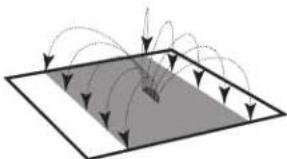
natural_image
Diagram showing directional arrows and curved lines within a rectangular boundary, no text or symbols present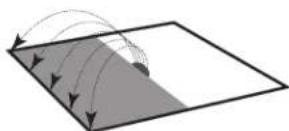
natural_image
Diagram showing light rays reflecting off a flat surface with a shaded region (no text or symbols)Watering Tips
Water only when necessary, preferably in the morning to minimize water loss through evaporation. To promote deep root growth, water deeply but as infrequently as possible. Watch water application to avoid water run-off.
Maintenance + Care
Follow the steps below if the sprinkler stops working or exhibits poor water quality due to debris or dirt build-up.
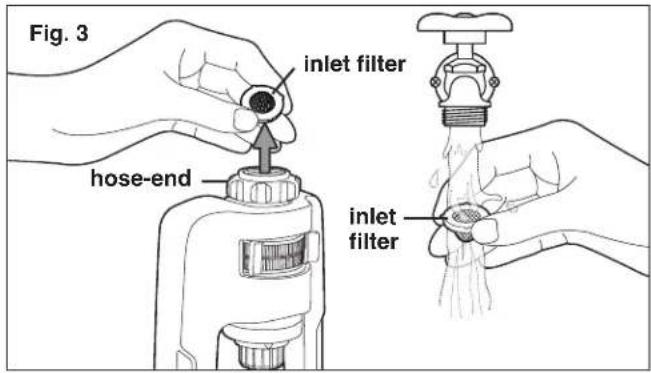
- Remove the inlet filter from the hose-end of the oscillator and run under water (Fig. 3).
text_image
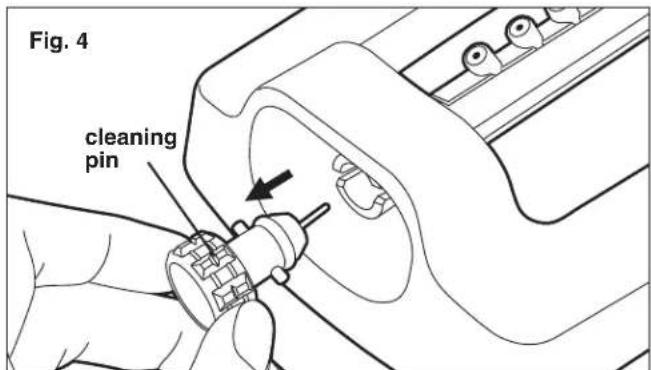
Fig. 3 inlet filter hose-end inlet filter- Remove the cleaning pin from the opposite end of the oscillator (Fig. 4).
text_image
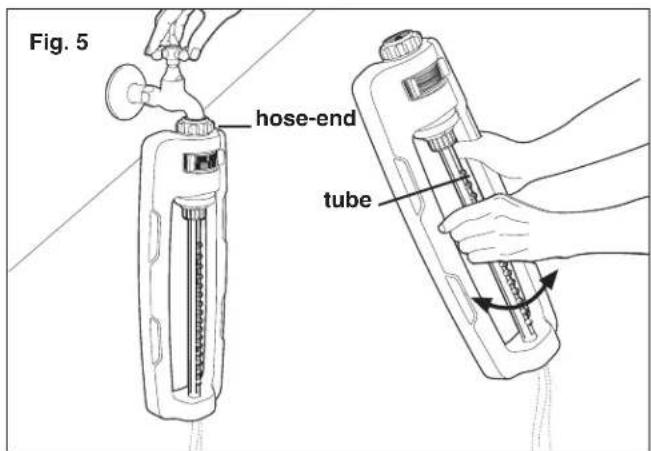
Fig. 4 cleaning pin- To flush, connect the oscillator to a spigot. Turn on the faucet and while the water continues running, spin the tube gently back and forth for few minutes. Then screw the inlet filter firmly back in place (Fig. 5)
text_image
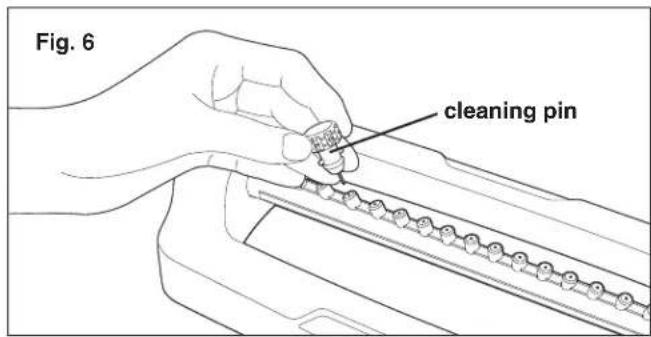
Fig. 5 hose-end tube- Use the provided cleaning pin to clear any clogs from the spray nozzles. Fit cleaning pin firmly back in place before using the sprinkler (Fig. 6).
text_image
Fig. 6 cleaning pinStorage
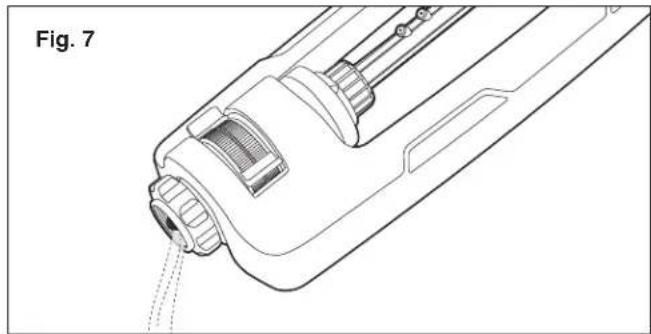
Drain the sprinkler after use. DO NOT allow water to freeze in the sprinkler (Fig. 7).
natural_image
Technical line drawing of a mechanical component with no visible text or symbolsService + Support
If your Martha Stewart® MTS-IDSPR oscillating sprinkler requires service or maintenance, please call Snow Joe® + Sun Joe® customer service at 1-866-SNOWJOE (1-866-766-9563) for assistance.
Model + Serial Numbers
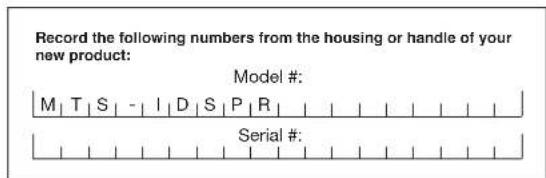
When contacting the company or arranging service from an authorized dealer, you will need to provide the model and serial numbers, which can be found on the decal located on the sprinkler. Copy these numbers into the space provided below.
text_image
Record the following numbers from the housing or handle of your new product: Model #: M | T | S | - | I | D | S | P | R | Serial #:SNOW JOE® + SUN JOE® CUSTOMER PROMISE
ABOVE ALL ELSE, Snow Joe, LLC (“Snow Joe”) is dedicated to you, our customer. We strive to make your experience as pleasant as possible. Unfortunately, there are times when a Snow Joe ^® , Sun Joe ^® , or Aqua Joe ^® product (“Product”) does not work or breaks under normal operating conditions. We think it’s important that you know what you can expect from us. That’s why we have a Limited Warranty (“Warranty”) for our Products.
OUR WARRANTY:
Snow Joe warrants new, genuine, powered and non-powered Products to be free from defects in material or workmanship when used for ordinary household use for a period of two years from the date of purchase by the original, end-user purchaser when purchased from Snow Joe or from one of Snow Joe's authorized sellers with proof of purchase. Because Snow Joe is unable to control the quality of its Products sold by unauthorized sellers, unless otherwise prohibited by law, this Warranty does not cover Products purchased from unauthorized sellers. If your Product does not work or there's an issue with a specific part that is covered by the terms of this Warranty, Snow Joe will elect to either (1) send you a free replacement part, (2) replace the Product with a new or comparable product at no charge, or (3) repair the Product. How cool is that!
This Warranty gives you specific legal rights, and you may also have other rights which vary from State to State.
PRODUCT REGISTRATION:
Snow Joe strongly encourages you to register your Product. You can register online at snowjoe.com/register, or by printing and mailing in a registration card available online from our website, or calling our Customer Service Department at 1-866-SNOWJOE (1-866-766-9563), or by e-mailing us at help@snowjoe.com. Failure to register your Product will not diminish your warranty rights. However, registering your Product will allow Snow Joe to better serve you with any of your customer service needs.
WHO CAN SEEK LIMITED WARRANTY COVERAGE:
This Warranty is extended by Snow Joe to the original purchaser and original owner of the Product.
WHAT IS NOT COVERED?
This Warranty does not apply if the Product has been used commercially or for non-household or rental applications. This Warranty also does not apply if the Product was purchased from an unauthorized seller. This Warranty also does not cover cosmetic changes that do not affect performance. Wearing parts like belts, augers, chains and tines are not covered under this Warranty, and can be purchased at snowjoe.com or by calling 1-866-SNOWJOE (1-866-766-9563).
natural_image
Line drawing of a hand holding a mechanical component with a rotating arrow indicating rotation (no text or symbols)Fig. 2
natural_image
Diagram showing airflow or particle trajectory around a rectangular plane, with arrows indicating direction (no text or symbols)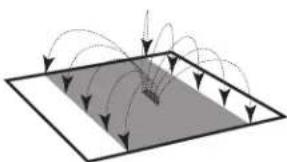
natural_image
Diagram showing curved arrows pointing toward a shaded rectangular region, no text or symbols present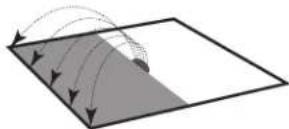
natural_image
Diagram showing light rays reflecting off a flat surface with a shaded region (no text or symbols)natural_image
Technical line drawing of a mechanical device component (no text or symbols)Servicio y soporte
natural_image
Line drawing of a hand holding a mechanical component with an arrow indicating rotation (no text or symbols)Fig. 2
natural_image
Diagram showing light rays reflecting off a flat surface with a grid of arrows (no text or symbols)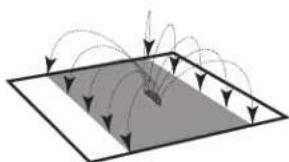
natural_image
Diagram showing light rays interacting with a shaded rectangular plane, no text or symbols present