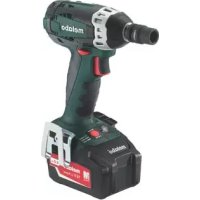
SSW 18 LTX 200 - Screwdriver METABO - Free user manual and instructions
Find the device manual for free SSW 18 LTX 200 METABO in PDF.



| Product type | Cordless screwdriver |
| Brand | Metabo |
| Model | SSW 18 LTX 200 |
| Rated voltage | 18 V |
| Battery type | Li-Ion (Cordless Alliance System CAS) |
| No-load speed | 0-2200 rpm |
| Max torque | 50 Nm |
| Chuck | 1/4" hex |
| Weight (with battery) | Approx. 1.2 kg |
| Dimensions (L x W x H) | 200 x 80 x 250 mm |
| Power supply | 18 V battery |
| Main functions | Variable speed, reverse, LED light |
| Safety | Overload protection, motor brake |
| Maintenance and cleaning | Regularly clean ventilation slots |
| Spare parts and repairability | Battery and charger available separately |
| General information | Use for screwing and drilling in wood, metal, plastic |
Frequently Asked Questions - SSW 18 LTX 200 METABO
User questions about SSW 18 LTX 200 METABO
0 question about this device. Answer the ones you know or ask your own.
Ask a new question about this device
Download the instructions for your Screwdriver in PDF format for free! Find your manual SSW 18 LTX 200 - METABO and take your electronic device back in hand. On this page are published all the documents necessary for the use of your device. SSW 18 LTX 200 by METABO.
USER MANUAL SSW 18 LTX 200 METABO
Chief Technology Officer Koki Holdings Co., Ltd.
*4) Metabowerke GmbH - Metabo-Allee 1 - 72622 Nuertingen, Germany
Original instructions
1. Declaration of Conformity
We, being solely responsible: Hereby declare that these chargers, identified by type and serial number 1), meet the requirements of all relevant directives 2) and standards 3). Technical documents for 4) - see page 3.
For UK only:
UK We as manufacturer and authorized person to compile the technical file, see *4) on page 3, hereby declare under sole responsibility that these chargers, identified by type and serial number *1) on page 3, fulfill all relevant provisions of following UK Regulations S.I. 2016/1091, S.I. 2016/1101, S.I. 2012/3032 and Designated Standards see *3) on page 3.
2. Specified Conditions of Use
Chargers are only suitable for charging original Metabo and CAS (Cordless Alliance System) battery packs.
This device is not designed for use by persons (including children) with physical, sensory or mental disabilities, or with insufficient experience and/or knowledge, unless they are supervised by a person responsible for their safety, or have received instructions on how to use the device by this person.
ASC 290 is suitable for charging Li-iron battery packs (12 V - 36 V, 1.3 Ah - 10 Ah, 3-10 cells). The device is suitable for charging electronic devices with a USB-C interface (like smartphones, MP3 players, tablets, etc.) - no data exchange
ASC 145 is suitable for charging Li-lon battery packs (12 V - 36 V, 1.3 Ah - 10 Ah, 3-10 cells).
ASC 55 is suitable for charging Li-ion battery packs (12 V - 36 V, 1.3 Ah - 10 Ah, 3-10 cells).
ASC 55 is suitable for charging NiCd battery packs (12 V, 1.7 Ah, 10 cells).
SC 36, SC 30 is suitable for charging Li-Ion battery packs (12 V - 18 V, 1.3 Ah - 10 Ah, 3-10 cells).

Never attempt to charge batteries that are not rechargeable. Danger of explosion!
The user bears sole responsibility for any damage caused by inappropriate use.
Generally accepted accident-prevention regulations and accompanying safety instructions should be observed.
3. General Safety Information

WARNING - Read the operating instructions to reduce the risk of injury.

WARNING Read all safety warnings and instructions.
Failure to follow all safety warnings and instructions may result in electric shock, fire and/or serious injury.
Keep all safety instructions and information for future reference.

Before using the charger, carefully read through and familiarise yourself with all
the enclosed safety information and the Operating Instructions.
Keep all enclosed documentation for future reference, and pass on your charger only together with this documentation.
4. Special Safety Instructions

For your own protection and for the protection of your power tool, pay attention to its text of the text that are marked in this symbol!

Danger - electrical voltage!

A slightly acidic, flammable fluid may leak from defective Li-ion battery packs!
If battery fluid leaks out and comes into contact with your skin, rinse immediately with plenty of water. If battery fluid leaks out and comes into contact with your eyes, wash them with clean water and seek medical attention immediately! Do not recharge a fully charged battery pack!

Only for use in indoor rooms.
ENGLISHen

Protect the charger from moisture.
Never allow children to use the device.
Children should be supervised to ensure that they do not play with the tool.
Keep children away from the battery charger and the working area!
Keep your battery charger out of reach of children!
Pull out the mains plug immediately if the battery charger starts to smoke or flames emerge!
Do not insert objects into the ventilation slots on the battery charger – there is a danger of electric shocks and short circuits!
Do not use faulty battery packs.
In areas with high metal dust exposure do not charge any battery packs with AIR COOLED chargers.
ASC 290: Only use the original Metabo network connection line.
5. Overview
See page 2. The illustrations are regarded as exemplary for all devices.
1 Battery pack (not in scope of delivery)
2 Sliding seat
3 Operation display
4 Warning display
5 Charge status indicator
6 USB cover
7 USB-C port *
8 LED indicator (USB-C port supplied with voltage) *
- depending on the model
6. Initial Operation

Before commissioning, check that the rated mains voltage and mains frequency stated on the type plate match your power supply.
Devices like these that generate direct current can influence simple earth leakage protection devices.
Use a type F or better, with a release current of max. 30mA

Before commissioning the charger, ensure that the air slots are free. Minimum distance to other objects is 5cm
6.1 Self-test
Plug in.
The warning display (4) and the operating indicator (3) light up one after the other for approx. 1 second and the installed fan runs for approx. 5 seconds.
7. Use
7.1 Charging battery pack
Push the battery pack completely to the stop on the sliding seat (2).



The operating indicator (3) flashes.
Note: To have the charge level displayed on Li-ion battery packs, first take the battery pack out of the charger and then press the button on the battery pack.
7.2 Conservation charge
Once the charging process has finished, the battery charger automatically switches to conservation mode.
The battery pack can remain in the battery charger and is therefore always ready for use.

The operating display (3) lights up continuously.
7.3 ASC 290 only: Charge USB device

Only connect USB devices which are compatible with the USB standard. Using
incompatible devices can lead to malfunctions, damage or injuries.
Open the cover (6) and plug a USB device with a suitable cable into the USB-C port (7). The device is charged.
The USB-C port (7) is only supplied with voltage (LED indicator (8) illuminated) if no battery pack is charged.
If a battery pack and USB device are connected at the same time, the USB charging process will start automatically after the end of the battery pack charging process.
8. Faults
8.1 Warning display (4) lights up continuously


Battery pack is not charged. Excessive/insufficient temperature. When the temperature of the battery
pack is between 0ircC and 50ircC , the charging process begins automatically.
ASC 290: Warning display (4) lights up continuously and charge status indicator (5) flashes: Charger is hot, or battery pack is cold or hot, battery pack is charged with reduced charging capacity.
8.2 Warning display (4) flashes

- Battery pack is defective. Remove the battery pack immediately from the charger.
- The battery pack was not pushed correctly onto the sliding seat (2). See chapter 7.1.
- ASC 290: Warning display (4) lights up and charge status indicator (5) is off: battery pack is not charged. charger too hot.
9. Repairs
Repairs to the charger must only be carried out by qualified electricians.
If the mains connection cable of this device is damaged, it must be replaced by the manufacturer or the Customer Service department of the manufacturer or a similarly qualified person to prevent endangering personnel and property.
If you have Metabo charges that require repairs, please contact your Metabo service centre. See www.metabo.com for addresses.
10. Environmental Protection
Observe national regulations on environmentally compatible disposal and on the recycling of disused machines, packaging and accessories.
Packaging materials must be disposed of according to their labelling in accordance with municipal guidelines. Further information can be found at www.metabo.com in the "Service" section.

Only for EU countries: never dispose of power tools in your household waste!
According to European Directive 2012/19/EU
on Waste from Electric and Electronic Equipment and implementation in national law, used power tools must be collected separately and recycled in an environmentally-friendly manner.
11. Technical Specifications
See page 3.
U = voltage ranges of the battery packs
C = battery pack capacity
IC =charging current
= charging time
USB = Voltage and max. charging current of the USB-C port
1) Example charging times for selected battery packs. Real charging times may deviate from the specifications depending on the residual capacity and the temperature of the battery pack.
Recommended ambient temperature when charging: 0ircC to 40ircC .
Subject to change in accordance with technical progress.
Device of protection class II
AC Power
Notice originale
Varning for livsfarlig elspanning!

Trasiga litiumjonbatterier kan lacka en nagot sur, brannbar vatska!
reducere risikoen for
personskader.

ADVARSEL Læs alle
8.2 Eckepty INdkaTop (4) XbInbIbIKTaIbI



- AkkymyIaTOp aKayIbI. AkkymyIaTOpIbI 6ipJeH 3aprTaftbI W KypblfDaH WbIfapbIHbI3.
- AkkymyJrTop kblnKbImaJIbI TIpeKke (2) Dypbc KblNkbITbIMaHaH.7.16enimH kappaHbI3.
ASC290: eckepTu INHnKaTOpbl (4) XbInbIbIKtan Typ XaHe 3apd DeHreinHIN
HINKaTOPbI (5) cEHdipyni: akKMyJrTOp 3apraTaNMayda, 3apraTaFbIi KypbIJFbl KaTTbI Kbl3bIn KeTTi.
9. XeHney
3apraTafbiW KpybIJfblJa KeHney KymbIcTapbIH TEK KaHa 3neKtpwi MaMaH eTKi3yi Tnic!
OcbI KypblfHbIH JeJIiIK KyaT Ka6eJI 3aKbIMdaJFaH KaFdaJa, Kayinti XaFdaJnapDbI 6oJdbIpMAY ywiH, ON eHdipywi HEmece KbI3MeT Kepcety optaBIfbHa HeMece YKcac bIikTIiIKKe Ine TynFa TapaBHaH aybIcTbPbJybl Tnic.
Metabo qinnnaIbHa XeHdeydi KaXeT eTeIH Metabo 3apraTaftbiu KypblfbcimEn 6ipre 6apbIb3. MeKeHkaJnapbl WwW.metabo.com caaTbIHda 6epinreH
10. Kopwafrn opTaHbI Kopray
PainanaHbInFaH acnantapdbI, opaybiTapdbI
XHe KepeK-kaPaKTapdbI KOpwaFAnOpTa yuH
Kayinc3 Typde KaDere XapaTy XHe KaTAt eHdey
BoBHwA YTTbIK epexeJIepdi YCTaHbIHbI3.
OpaybI MaTePnAJaapBt H TaH6aJamaHbI3
60bIHwa KOMMyHaJIbIK DInpeKTHBaJapFa CKeKc
KaJeE XapaTy KaKeT. KocbIMHa HyCKayJaapDbI
www.metabo.com Be6-caTbHaH《CepBnc》
aMafblHa KaPaHbI3.

TeKaHa EO eJepiHne: 3JIeKtpnIK KypaIbI TyPmbICTbIK KOkbicka TactMaHbI3! 3JIeKtpnIK XHe 3JIeKtpoHdbIK ecki
KpybIbInap KHe YTTbIK 3aHfA TypneHdipy
XeHiIderi 2012/19/EU eyponabIK DnpeKTNBacbHa
Caikec, naJaIaNbIIFaH 3JIeKTPNIK KypaIap
6oNEK XINHAblN, KopWafaH opta ywiH Kayinci3
KaIta eHdeyre xibepinyi Tnic.
11. TexHnKaJIbIK depeKTeP
3-6etti kapaHbI3.
U=akKymyIaTOpDbIHKepeHeynana3OHBi
C = aKKMyJnTOpDbIH KyaTbIbIfbI
IC 3apraTay torbl
t=3aprAay yaKbITbl 1)
USB = USB KocbIbIMbIbIH KepeHyi MeH MaKcImaNdbI CbIbIMdbIbIK TORbl
1)Mbican petiHde TaHdaIaNfAH aKKMyJrTOpDbIH 3apTay yaKbITbl. AkMyJrTOpDbIH KaJFaH KyaTTbIbIfbl MeH TeMnepaTypaCbHa 6aIIaNbICTbl 5bHaBbl 3apTay yaKbITbl CneuΦnKaunapDaH e3reJeNeHy MyMKIH.
3apay KeiHderi YcbHbIaTbIH KopWafaH opta TemnepaTypacb: 0ircC XeHe 40ircC apaIbIbHa.
TexHnkaJIbIK damyfa kapae3repyIMMkiH.
II KOpFaHbIC KJIacbIHdAfbI KypbJIJFbI
AHybImaJIbl TOK
Пайдалануь сюнча hyckаманьн hyкypасы
He Do3BOJMyTe DiTAM BnKOpNCTOByBaTH npncTpIi.
ДiTи NOBHHI 3HaxOHTncbПID NOCTiHMM HaTJdOM, ΜΟБ BOHn He BHKOPNCTOByBaJI npNcTpIy JIKoCTi irpaushKn.
He donyckaite ditei do 3apndHoro npnctroo /Bpo6oy 30Hy!
36epiraTe 3apAHHn npncTpiy y HeoctynHomy dIa ITeiMiCi!
При пояВи дИМу В заряДнOMу пристpoi abo noro 3aIMaHHi HeraiHo BnIMiTb BnIHy 3 pO3eTkn!
He BCTaBlaIte HiaKi npedMeTu y BeHTnlaiHi npop3n 3apJdHoro npicTpo. He6e3neKa KopoTkoTo 3amKahn a6o ypaJxehn eIekTpnuHm cTpyMOM!
He Kopnctyntecr HecnpaBHMn aKymyIaTOPHmN 6JOKam!
He 3apaKaTe aKymyIaTOpHi 6LoKn 3a DOnOMoHO 3apAHHx npnCTpoIB AIR COOLED y MiczAx 3 NiBnueHm pIBhem MeTaJIeBOrO nIly.
ASC 290: Викорисовытни ВикlioquHO opriHaJIbHn Mepeжеви Кабел Metabo.
5.Orna
ДИВ. cTOp. 2. МалнКи можуть слжHTN npNKlaDOM ДЯ BCIX MOneJen.
1 AkymyIaTOPHn6bOK (He BXoIITb Do o6craTy nOCTaBn)
2CnaIIOBe KpInJIeHHa
3 IIndnKaTOp peKmMy 3apdKaHHa
4 PonepeDkyBaIbHn iHdkaTOp
5 lHdkaTop pIBn 3apny
6 Kpnska USB-po3'Emy
7 P03'EM USB-C*
8 CbITIOIOHn iHnKaTOp (noaHa JnBJIeHHHa po3'EM USB-C)
- 3aJIeKHO BiД MoDEJI
6. BbeHnB eKcnnyataciio

Ipeed noaTkom p6oTo npekoHaTeC8, 0Bkazahi HaTexHnHi TaBnUci nplaNy Hanpyra Ta Yactota B MepeXi cnibnaAIOb 3 daHmBaWoI eJeKtpomepeXi.
PnnaH, noi6hi do zuoro, kri rehepyoTb noctiHn cTpym, MoKyTB BnIbATn Ha pOboTy 3BnuaHnx npncTroIB 3axnCHOro BiKnluChEHH. BnkOpNCTOByIte npncTpi 3axnCHOro BiKnluChEHH TIny F a60 BnIe i3 cTpymOM BiKnluChEHH MaKc. 30 mA.

IpepeBBeDeEHnB EeknlyaTaquIO 3apHOro npncTpoOp nepeKoHaTeC8 B TOMy, 00 BeHTnlauiHi OTbOpn BiDkPnti. Minimalha BiDCTaHb BiD IHnx npedMeTiHa cnlaadatn He MeHwe 5 cm!
6.1 CamojarHocTnHa
BCTaTBe BnIky Bpo3eTKy.
PonepeJkyBaJIbHn iHdNkAToP (4) Ta iHdNkAToP peKIMy 3apRJaHHa (3) cBITbCra No cep3i no np6I.1 cekHydi, B6yObaHn BeHTnilrToP npaioe 6I.5 cekHyd.
7. EKcnnyataciia
7.1 3apdhaHnAkyMylTOpHOro 6loHa
AkymyIaTOpHn 6JIOB BCTaHOBHTn Do ynpy Ha cnaIDObe KpinHeHHr (2).

IHHaTOppeHMy3apJkaHn(3)6JIIMae.
Bka3iBa. Ⅲo6 3 IiTi-iOHHMn aKymyIaTOpHMM 6bOkamn BiO6paKaBCa pBeHb 3apAky, cNoaTHky BmITb aKymyIaTOpHNI 6bOK 3 3apArdHO npCTPO, a Notim HaTNCiTB KHOJKy Ha aKymyIaTOpHOMy 6loci.
YKPAIHCbHAcuk
7.2ПлдтprmyючзарджаннayakymyЯTopa
Iicna3aBepueHH npocecy 3apdkaHH 3apdHn npctpi ABTomTuHNo nepemKaetbca Ha peKIM niTpmyuOro 3apdkaHH.
AkymyIaTOPHn6LOKMOKe 3aJIHuaTncB 3apJHOMy npIcTpoi I TaHIM YINHom 3aBXdN 6yTN FOTOBm Do pO6OTn.
100%
IIndkaTop peKIMy 3apJxHaHHa (3) rOpNTb NOCTiHo.
7.3 TijbKN ASC 290:Зардханнг npncTpoIB USB

IiD'EnHyBaTn JInIe npncTpoi USB, cymichi 3i CTaHdapToM USB. BnKOpncTaHHra 3
HecymichmnpnctpoMMOJepn3BecTN OHeCnpaBHOCTi,NOWKODKeHHa6o TpaBM.
BiKnptn KpnKky (6) i niD'EDHaTH npncTpii USB 3a DOnomorOo BiINOBiHoro Ka6eIIO do po3'emy USB-C (7).PncTpi 3apAJaKaETbcra.
Hanpyra KINBJIeHHI NOaεTbcr Ha po3'em USB-C (7) (cBITIOIOHN iHnKaTOp (8) cBiITbcr), TIlbKN KOJn aKymyIaTOpH N 6LoK He 3apAHaεTbcr.
KuO aKymyIaTOPHn 6LoK i USB-npncTpii niEHaHO OndHocHo,3apJxKaHHa USB- pNCTPOU PO3IOuHETbCra ABTomaTHNo UoH0 3aBepuHTbc3apJxKaHHaKymyIaTOPHO 6loka.
8. HecnpabHocti
8.1 PonepeJkyBaIbHn iHdNkatop (4) Ropntb noCTiHo.


AkymyIaTOpHn 6IOK He 3apdHaeTbca.
TemnepaTpya 3aHaTo BncoKa / 3aHaTo Hn3bKa.
Koln TemnepaTpya aKymyIaTOpHoro 6Ioky
cklaDae BiD 0ircC Do 50ircC , npocec 3apJxHaHHN
NoHHaEbCra ABTomatNuHO.
ASC 290: nonepedkybaIbHn iHdHaTOp (4)
CBITbcra NoCTiHo, a INdHaTOp pIBH 3apA dy (5)
6IIMa: 3apAHN npnCTpi rapAyn,
aKymyTAOPHn 6bOK XoJODHn qn rapAyn,
aKymyTAOPHn 6bOK 3apAJaTaBc 3i 3HHKeHok
NOTyKHiCTIO.
8.2 PonepeJyBaJIbHn iHdNHaTOp (4) 6JIIMaE

- AkymyJIaTOPHn6IOK NOUKOJKeHn. HeraHo BnIMt b aKymyJIaTOPHn 6Iok i3 3apArdHO rnpCTpOIO.
- AkymyJIaTOPHn 6LoK He npaBnIbHo BCTaBHeHn y rHi3Do (2).ДиВ.po3dI7.1.
ASC290:nonepedkyBaIbHni iHnKaTOp(4) 6IImaε, a iHnKaTOp pIBHa 3apAdy (5) He CBiHTbcr:akymyIaTOpHn 6Jok He 3apAJaCaETbcR, 3apAhn npncTpri 3aHaTO rapAyn.
9. PemoHT
Pemont 3apraHoro npncTpoIO NOBHeH 3diIChIOBaTnCRA TIlbKn PpOfeciHMMeIeKtpnKaMn!
U pa3i yuKoDxHn Ka6eJIO JNVBHeHH DaHOro npIaLy BuiJx 6e3neKn Heo6XiDn 3a6e3neHTn Ioro 3amHy BnO6HnKOM, faxibcem cepBicHOI cny6b n a60 iHoo Oco6oH BiDnOBiDHOI KBaJIphiKaui.
Для ремонту заюнх пистоов Metabo 3вертайесь в PeriohalbHe пedingtabHNTBO Metabo. Адеси ДИВ. на сaiti www.metabo.com.
10. 3axnct doBknla
DToPmMyTeCeHaioHaIbHnx npaBnI 6e3neHoYtNl3aui i nepepo6Kn BnKOpncTaHnxIHCTpyMeHTIB,naKyBaIbHnx MaTepiA1iB i npnila.
NakyBaJIbHI MaTepiAIn yTnIi3yUToBc BiIDNoBIdHO Do IXHbOro MapKyBaHHra 3rIINO 3 KOMyHaJIbHIMn npaBnAmn. IOnaTKOBv IHOpMaciIO MoKHa 3HaHTn Ha caTl www.metabo.com y po3diIi «Cepbic»

TilbKn dIa KpaIH EC: He yTuIi3yIte eNeKTpoIHCTpyMeHTn pa3OM 3 NObyTOBIMN BIDXoAMn! 3riDHO 3 DupeKTHBOHO EC 2012/
19/EC npo eJeKtpnHi Ta eJeKtpOnHi npncIpoT a BiNIOBIDHMN HauioHaJIbHMN HopMaMn BiIpaBObaHi eJeKtpoiHCTpyMeHTN iDIAraIoTB po3dIbHi yTHni3aui 3 MeToIO ix NpdaIbWoI ekoloruHo 6e3neuHoi nepepo6Kn.
11. Texhichi xapaKtepncnkn
ДиВ.стор. 3.
U=Ha npyra aKymyIaTOpHoro 6noky
C=EMHicTb aKymyIaTOPHO 6IoKy
IC =ctpym3apraJkaHHa1
t=Yac3apRJaHHA
USB = Hanpyra i makc. cnna cTpyMy po3'emy USB-C
1) TpmbaicTb 3apJdKaHnJaBn6paHnx
aKymyIaTOphNX 6loKIB k npKlaD. 3aJeKHO Bi,
3aIIuSKOBoi EMHOCTi Ta TEMpePaTyPi
aKymyIaTOphORO 6L0KA fAHTNHa TpmbaICTB
3apJkaHHMoKe He 36iraTnCra 3i Bk3aHIMN
3HaueHHAMn.
PeKOMeHDoBaHa TempepaTypa HABKOJIuHbOro cepeIOBua nId yac 3apJxKaHHa: BiD 0ircC do 40ircC
3aIiHaMo 3a cO6oI npaBO Ha TexHiH i 3miHn.
PpnilaKlacy3axnctyII
3MiHNH Ctpym

Bnpo6Hnk:Meta6oBepkeTm6X,
Metafo-Aler 1,72622 HoptinreH, HimeyuHa
YnoBHOBaKeHn npedCTaBHNK:
TOB "Metaabo YkpaHa", Byl. 3OpraHa,
6y.22,c.CBraToneTpibcBe,
Hnibcbka 06I., 08141, YkpaHa
auiuuiuuiuuiuuiuuiuuiuuiuuiuuiuuiuuiuuiuuiuuiuuiuuiuuiuuiuuiuuiuuiuuiuuiuuiuuiuuiuuiuuiuuiuuiuuiuuiuuiuuiuuiuuiuuiuuiuuiuuiuuiuuiuuiuuiuuiuuiuuiuuiuuiuui uuuuuuuuuuuuuuuuuuuuuuuuuuuuuuuuuuuuuuuuuuuuuuuuuuuuuuuuuuuuuuuuuuuuuuuuuuuuuuuuuuuuuuuuuuuuuuuuuuuuuuuuuuuuuuuuuuuuuuuuuuuuuuuuuuuuuuuuuuuuuuuuuuuuuuuuuuuuu uu
A.11
.6
a 30

15 5

PB CA
1
a 5 a a a a
7.
(2) aai jai xie lii ie aai iiaai yai jai jai

(3)


- Original instructions
- Declaration of Conformity
- For UK only:
- Specified Conditions of Use
- General Safety Information
- Keep all safety instructions and information for future reference.
- Special Safety Instructions
- ENGLISHen
- Overview
- Initial Operation
- Self-test
- Use
- Charging battery pack
- Conservation charge
- ASC 290 only: Charge USB device
- Faults
- Warning display (4) lights up continuously
- Warning display (4) flashes
- Repairs
- Environmental Protection
- Technical Specifications
- Notice originale
- Eckepty INdkaTop (4) XbInbIbIKTaIbI
- XeHney
- Kopwafrn opTaHbI Kopray
- TexHnKaJIbIK depeKTeP
- Пайдалануь сюнча hyckаманьн hyкypасы
- 5.Orna
- BbeHnB eKcnnyataciio
- CamojarHocTnHa
- EKcnnyataciia
- 3apdhaHnAkyMylTOpHOro 6loHa
- YKPAIHCbHAcuk
- 7.2ПлдтprmyючзарджаннayakymyЯTopa
- TijbKN ASC 290:Зардханнг npncTpoIB USB
- HecnpabHocti
- PonepeJkyBaIbHn iHdNkatop (4) Ropntb noCTiHo.
- PonepeJyBaJIbHn iHdNHaTOp (4) 6JIIMaE
- PemoHT
- 3axnct doBknla
- Texhichi xapaKtepncnkn
- A.11
- .6
- 7.
Brand : METABO
Model : SSW 18 LTX 200
Category : Screwdriver