ECM250i - Humidifier Enviracaire - Free user manual and instructions
Find the device manual for free ECM250i Enviracaire in PDF.


Frequently Asked Questions - ECM250i Enviracaire
User questions about ECM250i Enviracaire
0 question about this device. Answer the ones you know or ask your own.
Ask a new question about this device
Download the instructions for your Humidifier in PDF format for free! Find your manual ECM250i - Enviracaire and take your electronic device back in hand. On this page are published all the documents necessary for the use of your device. ECM250i by Enviracaire.
USER MANUAL ECM250i Enviracaire
natural_image
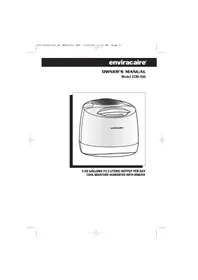
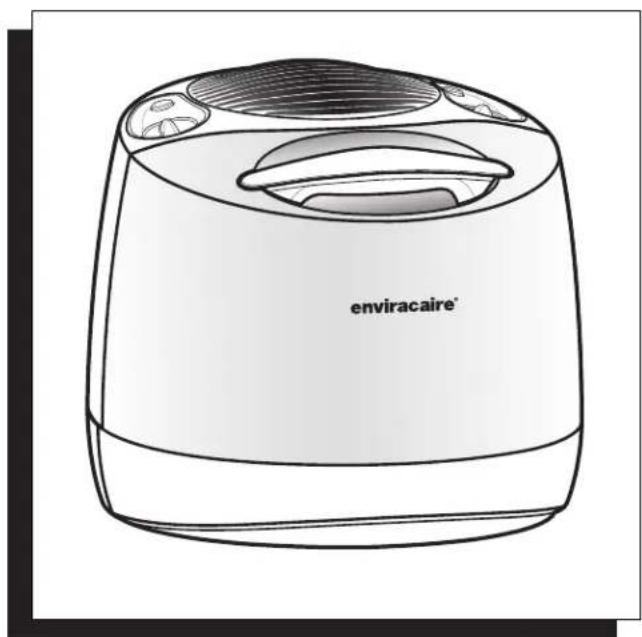
Line drawing of a portable air purifier with label 'enviracaire' (no other text or symbols)3 US GALLONS (11.3 LITERS) OUTPUT PER DAY
COOL MOISTURE HUMIDIFIER WITH IONIZER
IMPORTANT SAFETY INSTRUCTIONS
READ AND SAVE THESE SAFETY INSTRUCTIONS BEFORE USING THIS HUMIDIFIER
When using electrical appliances, basic precautions should always be followed to reduce the risk of fire, electric shock, and injury to persons, including the following:
- Always place this humidifier on a firm, flat and level surface. This humidifier may not work properly on an uneven surface.
- Place this humidifier in an area where it is not accessible to children.
- Do not place the humidifier near any heat sources such as stoves, radiators, and heaters.
- Do not use the humidifier outdoors.
- Before using the humidifier, check the power cord for any signs of damage. If the cord is found to be damaged, DO NOT USE and return the humidifier to the manufacturer under the warranty agreement for repair.
- This appliance has a polarized plug (one blade is wider than the other). To reduce the risk of shock, this plug is intended to fit only one way in a polarized outlet. If the plug does not fit securely in the outlet, reverse the plug. If it still does not fit, contact a qualified electrician. DO NOT attempt to defeat this safety feature.
- To disconnect the humidifier, first turn controls to the OFF position, then grip the plug and pull it from the wall outlet. Never pull by the cord.
- A loose fit between the AC outlet (receptacle) and plug may cause overheating and a distortion of the plug. Contact a qualified electrician to replace loose or worn outlet.
- The humidifier should always be unplugged and emptied when not in operation or while being serviced or cleaned.
- Never tilt or attempt to move the humidifier while it is operating or filled with water. UNPLUG the humidifier before moving.
- This humidifier requires regular cleaning. Refer to the CLEANING instructions provided. Never clean the humidifier in any manner other than as instructed in this manual.
- Turn the humidifier OFF if you notice moisture on the inside of your windows. For proper humidity reading use a hygrometer, which is available in many hardware and department stores, or by ordering one from the manufacturer.
INTRODUCTION
HOW DOES IT WORK?
Dry air is pulled through the humidifier and a quiet fan blows out invisible, moisture-balanced air. Unwanted minerals and bacteria from the water are trapped inside the filter. When the unit is running you will not see or feel a "mist". You will know your humidifier is putting moisture into the air as you watch the water level in your tank decrease throughout the day.
IONIZER
Ionizers release a negative charge to help clean and freshen the air. Negative ions attach to small particles, helping them settle on the ground. In addition, many people believe adding negative ions to room air can help restore the ionic balance found in nature, leading to fresher smelling air.
WHAT IS ProTec™ ANTIMICROBIAL?
Your enviracaire® filter has been designed using new ProTec™ technology which prevents surface growth and migration of mold, fungus and bacteria in the filter for its life - approximately one season. Keep in mind, depending on your water quality, mineral deposits can still clog or discolor the filter, affecting its life and that of the humidifier.
MODEL ECM-250i:
Your humidifier is made up of these five parts:
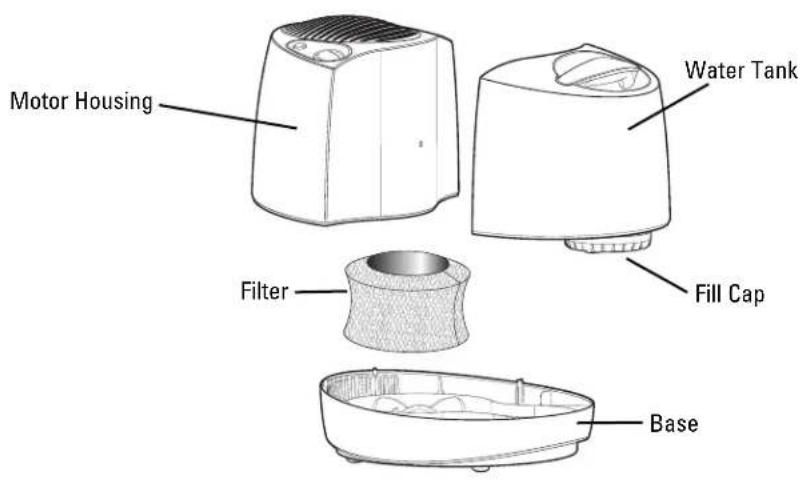
SETUP
NOTE: We recommend that the humidifier be disinfected prior to first use. Please see CLEANING instructions.
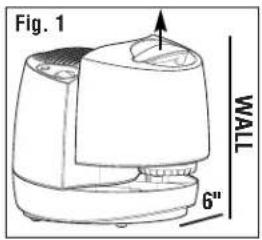
- Select a firm, level, flat location - at least six inches (15 cm) from any wall for proper air flow (Fig. 1). Place the humidifier on a water-resistant surface, as water can damage furniture and some flooring.
Kaz will not accept responsibility for property damage caused by water spillage.
FILLING
- Remove the water tank by grasping handle and pulling straight up. Set aside (Fig. 1).
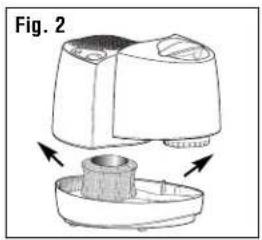
- Lift up on the motor housing to remove and set aside (Fig. 2). Remove the filter from the base before filling the unit with water. Soak filter in a sink full of cool water to help reduce mineral build up and place back in the humidifier while wet. DO NOT SQUEEZE OR WRING OUT THE FILTER. To help extend the life of your filter repeat this step each time you fill your humidifier.
- Turn the Water Tank upside down so that the Fill Cap is facing up; unscrew the Fill Cap by turning it counter-clockwise and set aside.
- Fill the Water Tank with COOL tap water (Fig. 3). Distilled water is not necessary as the water is filtered by the filter. DO NOT USE HOT WATER. Doing so may damage the humidifier.
- Replace the fill cap by turning it clockwise DO NOT OVER TIGHTEN. Turn the Water Tank right-side up.
NOTE: WHEN CARRYING THE FILLED WATER TANK PLEASE USE THE HANDLE AND PLACE YOUR OTHER HAND UNDER THE TANK FOR ADDITIONAL SUPPORT.
natural_image
Diagram of a mechanical device with two views showing internal components (no text or symbols)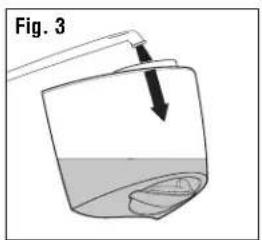
FILLING (CONT'D)
- Place the Motor Housing back into the base.
- Position the Water Tank in the humidifier and push into place. Some water will empty into the base.
- Once the filled tank has been positioned, do not attempt to move the humidifier. If it has to be moved, unplug the humidifier and remove the water tank first.

CAUTION: DO NOT POUR WATER INTO THE GRILLE ON TOP OF THE HUMIDIFIER. DOING SO MAY DAMAGE THE HUMIDIFIER OR CAUSE PERSONAL INJURY.
OPERATION
POWER

CAUTION: DO NOT PLUG IN THE HUMIDIFIER WITH WET HANDS AS AN ELECTRICAL SHOCK COULD OCCUR.
- With the power switch in the OFF position, plug the filled humidifier into a polarized 120V outlet. DO NOT FORCE THE POLARIZED PLUG INTO THE OUTLET; it will only fit one way.
MOISTURE CONTROL
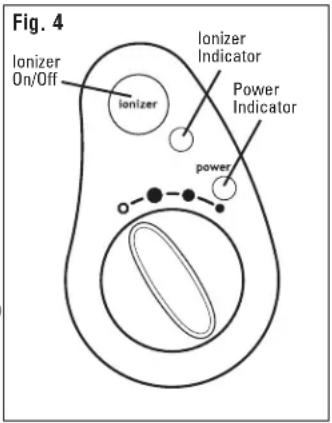
- Set the fan speed to the desired position (Fig. 4).
● HIGH: For fast humidifying
● MED: For everyday moisture control
- LOW: For quieter nighttime operation
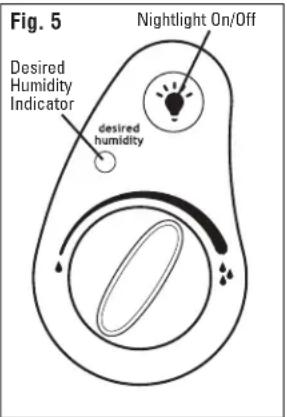
- Set the Advanced Mist™ Humidistat on HIGH, by turning the dial clockwise to the end (see Fig. 5).
Turn the humidifier OFF if the humidity level feels too moist or you notice condensation forming on the walls and/or windows.
IONIZER FEATURE
The Ionizer helps freshen the air.
- Press the lonizer button once to start; the lonizer light will illuminate. (Note: the unit must be turned on for the ionizer to function)
- To turn OFF the air-freshening Ionizer, simply press the Ionizer button again; the Ionizer light will turn off.
Note: The Ionizer automatically turns off when the Desired Humidity is reached (your Desired Humidity light will be on, see Fig. 5). It will turn back on again when your humidifier fan restarts.
FEATURES
ADVANCED MIST™ HUMIDISTAT
The Advanced Mist™ Humidistat allows you to adjust and select the humidity level to your personal preference. Your humidifier will turn on and off throughout the day and night to maintain the desired humidity level you have selected.
HOW TO SET THE HUMIDISTAT
First, run the humidifier per the operation instruction with the Humidistat knob set to its highest setting, turning the knob clockwise 🔍 to the end (Fig. 5).
- Let the humidifier run on high for a least one hour or until your room has reached a comfortable humidity level.
- At this point, slowly turn your Humidistat knob counter-clockwise until the humidifier shuts off and the Desired Humidity light comes on (Fig. 5).
- Now that your Humidistat knob is set, the humidifier will automatically turn back on when your room drops below your comfort setting and will automatically turn off again when the setting is reached.
NOTE: If the humidifier fan will not start or restart when you select a fan speed, the Advanced Mist™ Humidistat may be set too low. Turn the dial clockwise to the end. The Desired Humidity light will turn Off when the unit is producing moisture (Fig. 5). When the Desired Humidity light turns ON, you have reached optimal humidity.
NIGHTLIGHT FEATURE
The nightlight provides a soothing glow to the water tank.
- Press the Nightlight button once to start; soft light will illuminate.
- To turn off, simply press the Nightlight button again.
WEEKLY CLEANING
We recommend cleaning the humidifier once a week, more often if you have hard water, notice a build up of impurities or detect unpleasant odors.
Cleaning involves two steps SCALE REMOVAL and DISINFECTING. Be sure to perform these in the proper order to avoid harmful chemical interactions.
- First, turn off and unplug the humidifier.
- Remove the Water Tank and Motor Housing.
- Remove the filter from the Base.
• Empty any water from the Base.
NOTE: REMOVE FILTER BEFORE CLEANING.
Failure to remove filter during cleaning will destroy the filter.
STEP ONE:
SCALE REMOVAL
BASE
- Fill the Base with:
- 1 cup (8 ozs.) of undiluted white vinegar
or
- Honeywell® Humidifier Cleaner, part no. HAC-101, following bottle instructions.
-
Let solution stand for 20 minutes.
-
With the vinegar or Honeywell® Humidifier Cleaner in the Base, clean all interior surfaces with a soft cloth or brush to help remove scales.
-
Rinse the Base thoroughly with water to remove scale and cleaning solution.
STEP TWO:
DISINFECTING
WATER TANK/BASE
- Fill the Water Tank with:
• 1 teaspoon of household bleach and -
1 gallon of water Pour some of this solution into the Base.
-
Let solution stand for 20 minutes.
-
Rinse with water until the smell of bleach is gone.
NOTE: THE USE OF OTHER WATER TREATMENT PRODUCTS AND CHEMICALS MAY CAUSE DETERIORATION OF THE FILTER OR DAMAGE THE HUMIDIFIER, THEREBY HINDERING THE HUMIDIFIER'S EFFECTIVENESS.
PROLONGING THE LIFE OF THE FILTER AND MAINTAINING A CLEAN HUMIDIFIER
NOTE: DO NOT ATTEMPT TO CLEAN THE FILTER WITH ANY CHEMICAL SOLUTIONS, DOING SO WILL DAMAGE THE FILTER.
- ProTec™ antimicrobial prevents the surface growth and migration of mold, fungus, algae, and bacteria. It is normal for a filter to discolor from mineral build-up. This will vary depending on water quality.
- DO NOT clean the filter using any chemical solution.
- If your filter appears to be clogged by hard water or mineral deposits, soak it in a sink full of cool water for 10 minutes. DO NOT SQUEEZE OR WRING OUT THE FILTER. Always place filter back in the humidifier wet.
- To prevent mineral deposits use Honeywell ^ Humidifier Water Softener, part no. HAC-102, each time the Water Tank is refilled.
- Always purchase Honeywell ^ Brand filters (part no. HAC-504) as the fan motor of this humidifier and the filter are designed to function efficiently as a set. Using any other filter could damage the motor or reduce the humidifier's performance.
- Be sure to empty water from the Water Tank and Base when not in use.
END-OF-THE-SEASON CARE AND STORAGE
- Follow weekly CLEANING instructions when the humidifier will not be used for at least one week or more, or at the end of the season.
- At the end of the season, remove and throw away the filter; do not store with a used filter.
- Dry the humidifier completely before storing. DO NOT store with water inside the Base or Water Tank.
- Pack the unit in its original carton and store in a cool, dry location.
- Before next use, remember to install a new filter and clean the humidifier.
CLEANING THE ION EMISSION PINS
IONIZER CLEANING
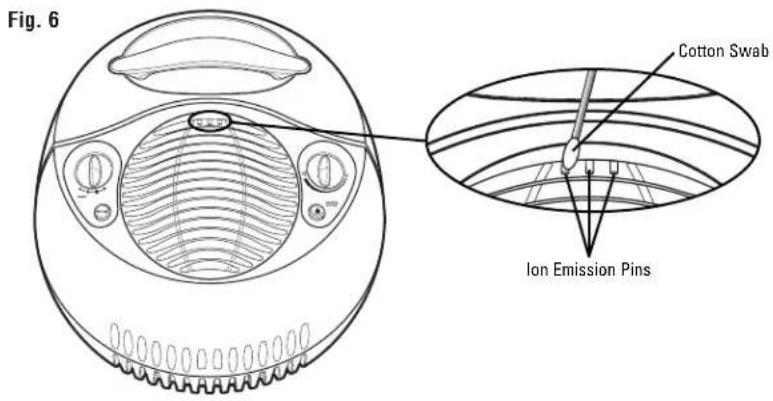
BE SURE THE POWER CORD IS DISCONNECTED FROM THE ELECTRICAL OUTLET.
Use a cotton swab moistened with isopropyl alcohol (rubbing alcohol) to clean dust accumulation from the Ion Emission Pins (Fig 6).
TROUBLE SHOOTING
Q: I hear the fan turning, but I don't see any mist. Is my humidifier operating properly?
A: Dry air is pulled through the system and a fan disperses invisible, moisture balanced air. There is no "mist" emitted. When operating normally you will feel only cool air coming from the unit. Monitor the water level in your Tank/ Base. If you notice a decrease in the Water Tank over 24 hours then the unit is operating normally.
Q: My unit has been running for several hours. I hear the fan spinning, but I do not notice the water level in the tank decreasing.
A: First, check the filter to ensure it is wet. If the pad appears dry, remove it from the Base and gently rinse under cool water. Reposition wet filter in the Base. You may also want to note the current moisture level in your home. If the humidity level is over 60% the unit will not put out much moisture as your air is already saturated.
Q: The humidifier is not running (the fan is not even spinning), but all (or some) of the lights are on.
A: If the Desired Humidity light is ON: The Advanced Mist™ Humidistat knob may be set too low. Moving the knob clockwise 🔍 to the end should restart the unit.
Q: The Advanced Mist™ Humidistat knob was set according to the manual, but the humidifier never seems to turn back on. Is something wrong?
A: The Humidistat knob may be set too low. Moving the Humidistat knob to the end clockwise should restart the unit.
Q: The Advanced Mist™ Humidistat knob was set according to the manual, but the humidifier never seems to turn off. Is something wrong?
A: The Humidistat knob may be set too high. Reset the Advanced Mist™ Humidistat knob following the instructions under FEATURES.
Q: My filter has turned light brown and rust colored. Do I need a new filter?
A: Probably not. Since your filter has been made with ProTec™ antimicrobial the change in color indicates only a mineral deposit. Soak filter in a sink full of cool water to help break up deposits. The discoloration may remain but will not affect the humidifier's performance.
ELECTRICAL RATINGS
Model ECM-250i Series are rated 0.55 Amps at 120V, 60 Hz.
NOTE: IF YOU EXPERIENCE A PROBLEM WITH YOUR HUMIDIFIER'S MOTOR HOUSING, PLEASE SEE THE WARRANTY FOR INSTRUCTIONS. PLEASE DO NOT ATTEMPT TO OPEN OR REPAIR THE HUMIDIFIER YOURSELF. DOING SO WILL VOID THE WARRANTY AND COULD CAUSE DAMAGE OR PERSONAL INJURY. IF THE PROBLEM PERSISTS, PLEASE CONTACT THE CONSUMER RELATIONS DEPARTMENT.
CONSUMER RELATIONS
Mail questions or comments to:
Kaz Home Environment
Consumer Relations Dept.
250 Turnpike Road
Southborough, MA 01772
Please be sure to specify model number.
Call us toll-free at: 1-800-332-1110
E-mail: consumerrelations@kaz.com
Or visit our website at: www.kaz.com
Purchase replacement filter part number HAC-504 for your humidifier.
LIMITED WARRANTY
ENVIRACAIRE® COOL MOISTURE HUMIDIFIER WITH IONIZER
This product has been engineered and crafted with great care for your satisfaction.
Please read all instructions before attempting to use this product. Register your product on-line at www.kaz.com or complete and return the Consumer Response Card within 7 days.
A. This 5 year limited warranty applies to repair or replacement of product found to be defective in material or workmanship. This warranty does not apply to damage resulting from commercial, abusive, unreasonable use or supplemental damage. Defects that are the result of normal wear and tear will not be considered manufacturing defects under this warranty. KAZ IS NOT LIABLE FOR INCIDENTAL OR CONSEQUENTIAL DAMAGES OF ANY NATURE. ANY IMPLIED WARRANTY, INCLUDING MERCHANTABILITY AND FITNESS FOR A PARTICULAR PURPOSE, ON THIS PRODUCT IS LIMITED IN DURATION TO THE DURATION OF THIS WARRANTY. Some jurisdictions do not allow the exclusion or limitation of incidental or consequential damages, or limitations on how long an implied warranty lasts, so the above limitations or exclusions may not apply to you. This warranty gives you specific legal rights, and you also may have other rights which vary from jurisdiction to jurisdiction. This warranty applies only to the original purchaser of this product from the original date of purchase.
B. At its option, Kaz will repair or replace this product if it is found defective in material or workmanship. Defective product should be returned directly to Kaz.
C. This warranty does not cover damage resulting from any unauthorized attempts to repair or from any use not in accordance with this manual.
NOTE: THIS WARRANTY DOES NOT COVER THE FILTER, WHOSE PERFORMANCE WILL DEPEND UPON THE CONDITION OF THE WATER USED IN THE HUMIDIFIER.
C. Return defective product to Kaz Home Environment with a brief description of the problem. Include proof of purchase and a \12 US /\ 17.50 CAN check or money order for handling, return packing and shipping charges. Please include your name, address and a daytime phone number. You must prepay shipping charges. Send to:
In the US: In Canada:
Kaz Home Environment Kaz Home Environment
ATTN: Returns Department ATTN: Returns Department
4755 Southpoint Drive 510 Bronte Street South
Memphis, TN 38118 Milton, ON L9T 2X6
U.S.A. Canada
enviracaire®
GUIDE D'UTILISATION
Modèle ECM-250i
natural_image
Line drawing of a portable air purifier with label 'enviracaire' (no other text or symbols)natural_image
Diagram of a mechanical device with two views showing internal components (no text or symbols)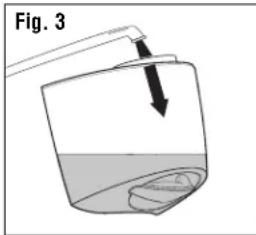
REMARQUE : POUR TRANSPORTER LE RÉSERVOIR REMPLI D'EAU, UTILISER LA POIGNÉE ET PLACER UNE MAIN SOUS LE RÉSERVOIR POUR OBTENIR UN MEILLEUR SUPPORT.
REMLISSAGE (SUITE)
Kaz Home Environment
Consumer Relations Dept.
250 Turnpike Road
Southborough, MA 01772
Kaz Home Environment Kaz Home Environment
ATTN: Returns Department ATTN: Returns Department
4755 Southpoint Drive 510 Bronte Street South
Memphis, TN 38118 Milton, ON L9T 2X6
U.S.A. Canada
enviracaire®
MANUAL DEL USUARIO
Modelo ECM-250i
natural_image
Line drawing of a portable air purifier with label 'enviracaire' (no other text or symbols)natural_image
Diagram of a kitchen appliance with a side view showing internal components and arrows indicating motion (no text or symbols)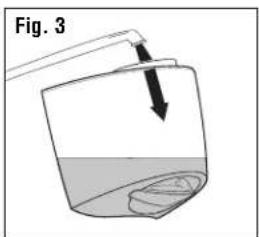
Kaz Home Environment
Consumer Relations Dept.
250 Turnpike Road
Southborough, MA 01772
Kaz Home Environment Kaz Home Environment
ATTN: Returns Department ATTN: Returns Department
4755 Southpoint Drive 510 Bronte Street South
Memphis, TN 38118 Milton, ON L9T 2X6
U.S.A. Canada