PC 900 WE3 - Coin and bill counter Pecunia - Free user manual and instructions
Find the device manual for free PC 900 WE3 Pecunia in PDF.


Frequently Asked Questions - PC 900 WE3 Pecunia
User questions about PC 900 WE3 Pecunia
0 question about this device. Answer the ones you know or ask your own.
Ask a new question about this device
Download the instructions for your Coin and bill counter in PDF format for free! Find your manual PC 900 WE3 - Pecunia and take your electronic device back in hand. On this page are published all the documents necessary for the use of your device. PC 900 WE3 by Pecunia.
USER MANUAL PC 900 WE3 Pecunia
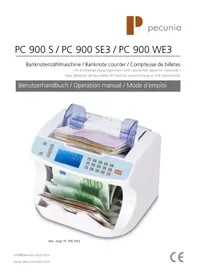
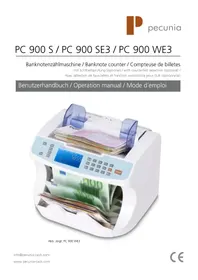
PC 900 S / PC 900 SE3 / PC 900 WE3
Banknotenzahlmaschine / Banknote counter / Compteuse de billettes
Our operation manuals are revised at regular intervals as further developments and experiences shall help our customers to make using our products more and more user-friendly. You can find the latest version of this manual at hbw cash solutions: 0049 / (0) 700 / 01 00 78 78* or www.pecunia-cash.com. The latest version is valid.
Before setting up or using the banknote counter PC 900 ...
... please pay attention to the instructions in this manual. We are required by the law to give you important advices for your security and to allude you how to avoid damages to the device and others. If you disobey this manual hbw cash solutions shall not be liable for damages.
The banknote counter PC 900 is only suitable for counting current permitted banknotes.
If other currencies are counted, the result can be falsified.
Before cleaning the device (with a wetish cloth e.g.) please be sure that the power plug is disconnected.
Do not open the machine. Hazards for the user can result if the chassis is opened and improper repairs are done. Furthermore the warranty claim expires.
Please never use a vacuum cleaner (or similar products) for cleaning the device.
Be sure that no liquids attain to the interior of the machine. Electric shocks and short-circuits can be the result.
Put the banknote counter on a level and planar surface, so that it is placed firm and safe. Otherwise problems referring the counting results can appear.
What has been delivered? 5
Short description 10
Main functions 11
Self-test 11
Counting modes 11
Number counting mode 11
Value counting mode (optional) 11
Automatic / manual start 11
Ultraviolet - detection (UVD) 11
Magnetic - detection (MGD) 11
Magnetic - code - detection (MTD) 11
Adding Selveral results (ADD) 12
Batch function (Batch) 12
Adjusting the counting speed (SPEED) 12
Dimension detection (DD) 12
Adjustment of the hopper (gap adjusting screw) 12
Adjustment of the density (DEN) 12
Data saving 12
Trouble shooting 13
Error codes 13
Errors caused by the counterfeit detection 13
Maintenance 13
Description brive 5/14
Informations generales 5
Description breve 14
What has been delivered?
Please check the scope of delivery for completeness:
Display and key panel
(Picture:PC 900 WE3)
(Image PC 900 WE3)
Kurzbeschreibung
On the control panel you can adjust the counting mode, the counterfeit detection and the counting speed.
On the display you can see:
- the condition of the device
- all messages (error codes, e.g.)
- the menu
- the counting results
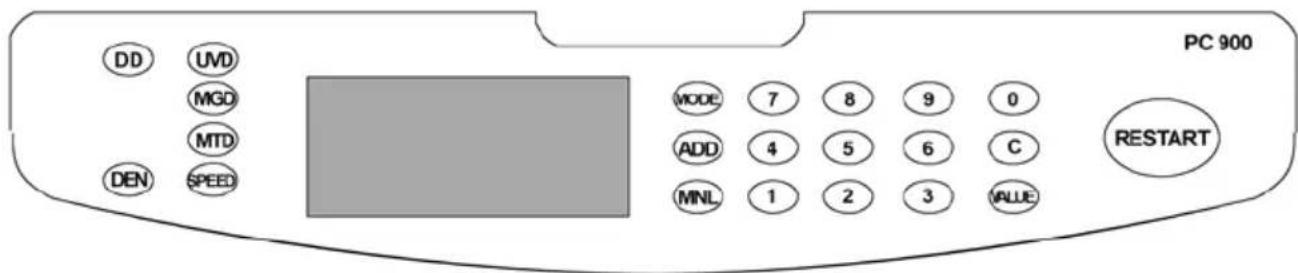
Picture: PC 900 WE3
Restart - key Start-/clearing key.
Mode - key (only WE3) To choose the counting mode.
ADD - key To activate/deactivate the addition mode.
MNL - key To activate/deactivate the manual counting start.
UVD - key (optional) For adjusting / activating / deactivating the UV counterfeit detection.
MGD - key (optional) For adjusting / activating / deactivating the magnetic
counterfeit detection.
MTD - key (only WE3) For adjusting / activating / deactivating the magnetic - code
counterfeit detection.
Speed - key For adjusting the counting speed.
DD - key For activating the size detection (high). Only possible by using
the number counting mode with slow counting speed.
DEN - Key Intensity setup.
Value - Key (only WE3) For checking the number of each single denomination.
(5€, 10€, 20€, 50€, 100€, 200€, 500€, total)
C - key For deactivating the batch function.
Keys ^ 1 - 0^ For adjusting the batch number.
Self-test
Switch ON the machine by pressing the power switch on the back. After 3 seconds, the machine will be ready for use.
Counting modes
Number counting mode (Sheets)
The device will count all banknotes on the hopper (sheets). For activating the number counting mode, please press the "Mode" - key till you can see "Sheets" in the display.
Value counting mode for Euro bills (Value) (optional)
The value of all banknotes on the hopper will be counted. You can see the result in the display (counted value) after counting the notes. By pressing the „Value“ - key, you can see the counted numbers of each single denomination (5 €, 10 €, ...). To get back to the total amount, please press the „C“ - key.
Automatic / manual counting start
The machine can start counting automatically or manual, therefore please press the „MNL“ - key. If you can see the message MNL in the display, the machine will start counting after pressing the „RESTART“ - key. If you cannot see the message MNL in the display, the machine will start counting automatically after placing banknotes on the hopper.
Ultraviolet - detection (UVD) (optional)
For activating the UV - counterfeit detection, please press the "UVD" - key. The UV - detection can be adjusted in three density levels. For Euro bills the adjustment "11" is recommended. If the machine recognizes suspect money, the counting procedure will be stopped and you can see the following message in the display "CF1". Please remove the suspected bill and count all bills again.
Magnetic - detection (MGD) (optional)
For activating the MG - counterfeit detection, please press the „MGD“ - key. The MG - detection can be adjusted in three density levels. For Euro bills the adjustment „11“ is recommended. If the machine recognizes suspect money, the counting procedure will be stopped and you can see the following message in the display „CF2“. Please remove the suspected bill and count all bills again.
Magnetic-code - detection (MTD) (only WE3) (at SE3 you only need to activate the MGD)
For activating the MT - counterfeit detection, please press the "MTD" - key. The MT - detection can be adjusted in three density levels. For Euro bills the adjustment "11" is recommended. If the machine recognizes suspect money, the counting procedure will be stopped and you can see the following message in the display "CF3". Please remove the suspected bill and count all bills again.
Adding several results (ADD)
To add several counting results, please press the "ADD" - key for activating the addition mode. If the addition mode is activated, you can see the message "AD" in the display. For deactivating the addition function again, please press the "ADD" - key again.
Batch function (Batch)
By pressing the keys 1 - 0 , you can activate the batch function and adjust the batch number. The machine will stop counting by reaching the batch number. For continue counting, please remove the notes from the stacker. For clearing the batch number and deactivating the batch funciton, please press the ^ - key.
Adjusting the counting speed (SPEED)
For setting the counting speed, please press the „SPEED“ - key. You can choose between three different counting speeds.
Information: By using the value counting mode / dimension detection, you can only adjust the speed 1^ or 11^ .
Dimension detection (DD) (banknote height) (optional)
By using the "DD" - function, the machine can recognize smaller bills in a bundle (only by height of the banknote). The machine will stop counting by recognizing a smaller bill, the message "dd" will be shown on the display. For activating / deactivating the "DD" function, please press the "DD" - key.
The adjustment "11" is recommended.
Adjustment of the hopper (gap adjusting screw)
For realising a correct counting result, it's very important to adjust the "gap adjusting screw" correctly. Please turn the screw clockwise for adjusting the gap for thicker banknotes and counterclockwise for thinner banknotes.
For Euro banknotes the adjustment 0'' is recommended.
Adjustment of density (DEN)
For setting the density, please press the „DEN“ - key.
Level 1 (1) : Thin, light printed bills.
Level 2 (11) : Middle thick and printed bills.
Level 3 (111) : Thick, dark printed bills.
For Euro banknotes the adjustment "11" is recommended.
Error codes
If an error occurs, a warning signal sounds and the machine will stop counting.
Now you can see an error code on the display. By dint of the following table, you can identify the reason and solve the problem.
| Error code Error Possible reason Lösung | |||
| DD | Dimension detection (banknote height) | A different bill was recognized in a bundle. | Remove the different bill and count all notes again. |
| EH | Damaged banknote | Damaged banknote recognized. | Remove the damaged bill and count all notes again. |
| CFx Counterfeit | (suspect) Suspected note recognized. | Remove the suspected bill and count all notes again. | |
| Ed Double note | Several notes were detected at the same time. | Remove all notes and count all notes again. Possibly adjust the „gap adjusting screw". | |
| E1D Skew banknote | A banknote was detected screw. | Remove all notes and count all notes again. Possibly adjust the „gap adjusting screw". | |
| Ex Sensor blocked | A bill or dirt is inside the machine. | Remove the bill inside the machine or refer to the support. | |
| EC Error counting | Several bills are in the machine at the same time. | Adjust the hopper gap by the white wheel on tom (towards „-“). | |
Errors caused by the counterfeit detection
Advices to avoid errors:
- Please take care about the correct adjustment of the counterfeit density.
- If the UV - bulb is unoperable (discernable at dark ambient light) replace the bulb or appeal to the technical service of hbw cash solutions.
- The sensors have to be cleaned in regular intervals to avoid disfunctions of the sensor technology. Clean the sensors only with ethyl alcohol and cotton cloths or appeal to the technical support of hbw cash solutions.

Maintenance
As the machine is exposed to wear it is advisable to clean the device professionally. hbw cash solutions offers services for that. Feel free to contact the technical support of hbw cash solutions.
As the operating mode of the machine is based upon sensor technology,
do not expose it to direct solar radiation.
hbw cash solutions can take no liability for counting and sorting out different or counterfeit notes, as well as for the value counting.
The banknotes are feeded by a roller friction system. Therefor no nails, paper clips, hairs and other small parts should reach the interior of the machine.
Before cleaning the machine the power supply has to be disconnected unconditionally!
Clean the device exclusively with a dry brush, the compressed air* cleaner B8 or the special cleaner R 605 of hbw cash solutions.
(*alternative: Compressor with dry / oil free air. Max. 4 bar)
Please never clean the device with chemical cleaner.
Improper treatment leads to loss of warranty!
Description brève
Ambient temperature 0 - 40^
Counting speed 600 banknotes / minute up to 1.600 banknotes / minute
Power consumption approx. 55 W
Consommation ca. 55 W
MaBe (B x H x T) (mm) 272 x 235 x 239
Dimensions (w x h x l) (mm) 272 x 235 x 239
Dimensions (L x H x I) (mm) 272 x 235 x 239
Subject to change without prior notice.
Please take care of some eventually existing laws for the disposal of the device after the device is used.