
Classic - Baby monitors Bébétel - Free user manual and instructions
Find the device manual for free Classic Bébétel in PDF.

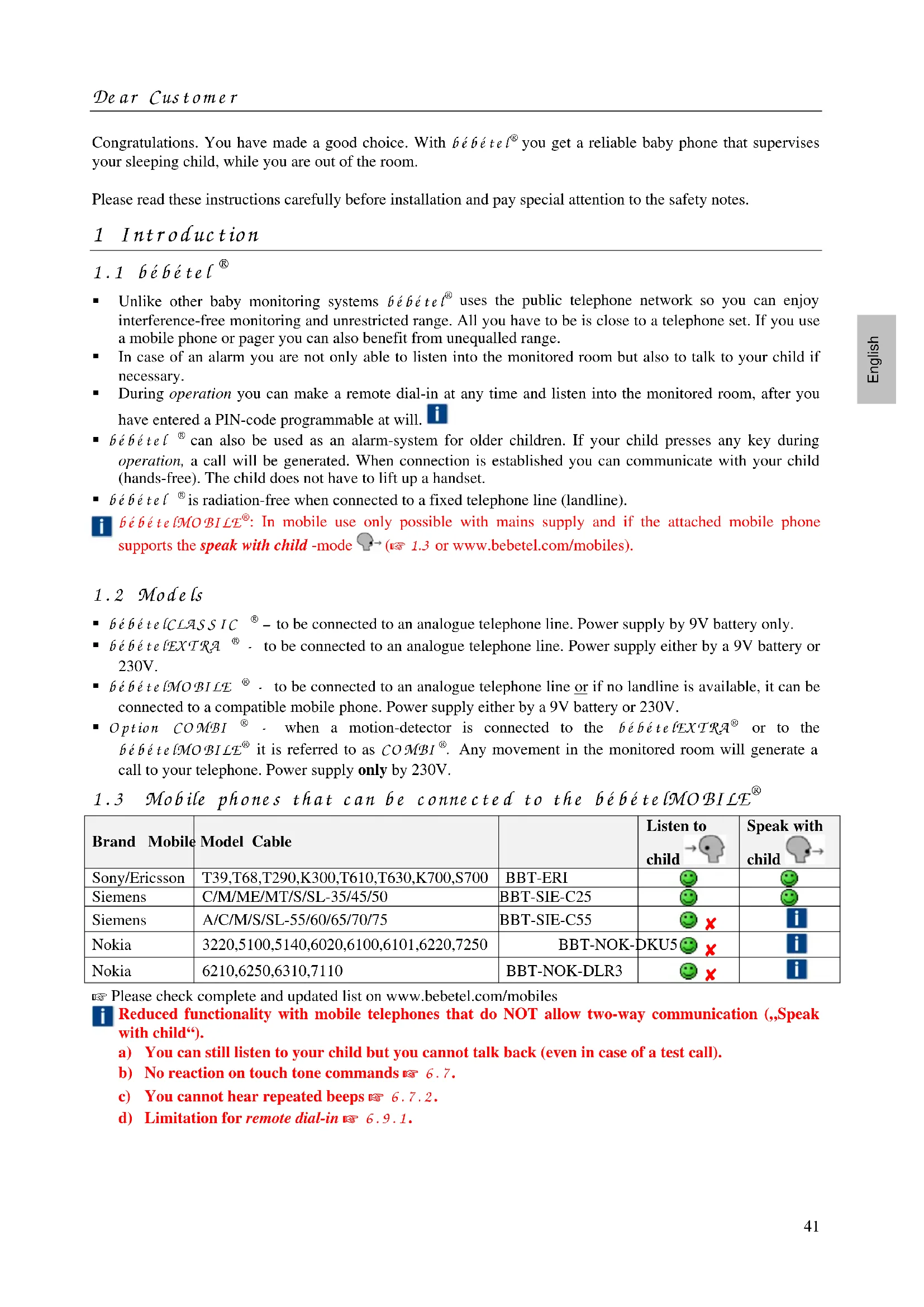


| Product type | Baby monitor via telephone network |
| Brand | Bébétel |
| Model | Classic (BBT-3) |
| Power supply | 9V battery (alkaline, average life 100 hours) |
| Dimensions (L × H × D) | 200 × 110 × 31 mm |
| Weight without battery | 320 g |
| Telephone cable length | 8 m |
| Dialing mode | DTMF (voice frequencies) |
| Warranty | 2 years parts and labor |
| Housing material | ABS |
| Main functions | Acoustic monitoring, automatic call to programmed number, hands-free conversation, test call, remote access with PIN code |
| Motion detector | Optional (COMBI) via EXT jack on EXTRA/MOBILE models, not compatible with Classic alone |
| Network compatibility | Analog telephone network, compatible with ISDN/VoIP via adapter |
| Maintenance and cleaning | Clean with a soft, slightly damp cloth (soapy water), wipe with a dry cloth. Do not use detergents. |
| Safety | Does not replace parental supervision. Always make a test call before use. Keep out of reach of children. Disconnect the telephone cable before changing the battery. |
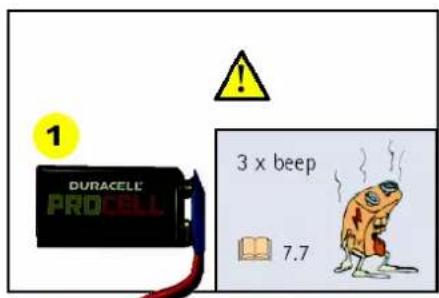
| Battery replacement | Standard 9V battery, accessible at the back. Replace as soon as three beeps sound at startup. |
| Available accessories | BBT-PIR-F motion detector, telephone extension cable, adapter for use abroad, smoke detector |
Frequently Asked Questions - Classic Bébétel
User questions about Classic Bébétel
0 question about this device. Answer the ones you know or ask your own.
Ask a new question about this device
Download the instructions for your Baby monitors in PDF format for free! Find your manual Classic - Bébétel and take your electronic device back in hand. On this page are published all the documents necessary for the use of your device. Classic by Bébétel.
USER MANUAL Classic Bébétel
2.1 Allgemeine Hinwe is e
7.6 Pieptone (Signaltone)
Alarmkontakt: Normal geschlossen (Normally closed = NC)
Contact Fermé au repos (Normally closed = NC)
8.4.4 Reglages
Chere cliente, cher client,
Contact Fermé au repos (Normally closed = NC)
Garantie 2 ans
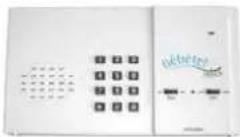
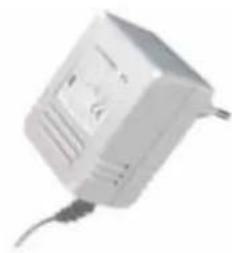
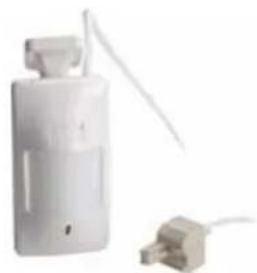
Pile 24,32
compartment 24
replacement 32
test 32
Telephone 22, 27, 36
cable 22, 25, 26, 31, 36
prise 25, 36
raccordement 22, 23, 24, 25, 26, 31, 33
- Safety instructions 42
2.1 General safety notes 42
2.2 Telephone network 42
2.3 Technical notes 42
-
Set view/Function elements 43
-
Installation 44
4.1 CLASSIC/EXTRA/MOBILE (Without motion detector) 44
4.2 COMBI extension (With motion detector) 45
- Programming 46
5.1 Program the telephone number 46
5.2 Program a PIN-code 46
- Operation 47
6.1 Preparation 47
6.2 Self test at power on 47
6.3 Waiting period 47
6.4 Test call (=direct call) 47
6.5 Monitoring mode 47
6.6 Telephone call 48
6.7 Connection 48
6.8 Call repetition/Call acknowledgement 49
6.9 Remote dial-in 49
- Frequently asked questions 49
7.1 Connection to ISDN/Internet telephone VoIP 49
7.2 Connection fee due to telephone call 50
7.3 Use with an answering machine 50
7.4 Monitoring two rooms 50
7.5 Touch tone commands 50
7.6 Signals (beeps) 50
7.7 Battery check/replacement 51
7.8 Maintenance 51
- Accessories 51
8.1 Telephone extension cord 51
8.2 Use abroad 51
8.3 Smoke detector 51
8.4 PIR-Motion detector BBT-PIR-F (COMBI) 51
- Special programming 52
9.1 Factory settings 52
9.2 Call repetitions 52
9.3 Auto answer 53
- Trouble shooting 53
10.1 Monitoring on noise 54
10.2 Motion detector (COMBI) 54
-
Warranty 54
-
Specification 55
12.1 Alarm unit BBT-3 (bebételCLASSIC) 55
12.2 Alarm unit BBT-3-EXT (bebételEXTRA®) 55
12.3 Alarm unit BBT-9-MOB (bebeteLMOBILE 55
12.4 AC-adapter BBT-DC12V-F 55
12.5 PIR motion detector BBT-PIR-F 55
- Index 56
Congratulations. You have made a good choice. With bébé tel® you get a reliable baby phone that supervises your sleeping child, while you are out of the room.
Please read these instructions carefully before installation and pay special attention to the safety notes.
1 Introduction
1.1 bébétele
- Unlike other baby monitoring systems bébé tel® uses the public telephone network so you can enjoy interference-free monitoring and unrestricted range. All you have to be is close to a telephone set. If you use a mobile phone or pager you can also benefit from unequalled range.
In case of an alarm you are not only able to listen into the monitored room but also to talk to your child if necessary. - During operation you can make a remote dial-in at any time and listen into the monitored room, after you have entered a PIN-code programmable at will.
- bébé têl® can also be used as an alarm-system for older children. If your child presses any key during operation, a call will be generated. When connection is established you can communicate with your child (hands-free). The child does not have to lift up a handset.
- bébé tel® is radiation-free when connected to a fixed telephone line (landline).
1 bébé telMOBI LÉ: In mobile use only possible with mains supply and if the attached mobile phone supports the speak with child -mode (1.3 or www.bebetel.com/mobiles).
1.2 Models
- bébé telCLAS SIC - to be connected to an analogue telephone line. Power supply by 9V battery only.
- bébé telEXTRA® - to be connected to an analogue telephone line. Power supply either by a 9V battery or 230V.
- bébé telMOBILÉ® - to be connected to an analogue telephone line or if no landline is available, it can be connected to a compatible mobile phone. Power supply either by a 9V battery or 230V.
- Option COMBI® - when a motion-detector is connected to the bébé telEXTRAR® or to the bébé telMOBILLE® it is referred to as COMBI®. Any movement in the monitored room will generate a call to your telephone. Power supply only by 230V.
1.3 Mobile phones that can be connected to the bébé telMOBI LÉ
| Brand Mobile | Model Cable | Listen to child → child → | Speak with child → | |
| Sony/Ericsson | T39,T68,T290,K300,T610,T630,K700,S700 | BBT-ERI | ||
| Siemens | C/M/ME/MT/S/SL-35/45/50 | BBT-SIE-C25 | ||
| Siemens | A/C/M/S/SL-55/60/65/70/75 | BBT-SIE-C55 | × | i |
| Nokia | 3220,5100,5140,6020,6100,6101,6220,7250 | BBT-NOK-DKU5× | i | |
| Nokia | 6210,6250,6310,7110 | BBT-NOK-DLR3 | × | i |
Please check complete and updated list on www.bebetel.com/mobiles
Reduced functionality with mobile telephones that do NOT allow two-way communication (,,Speak with child).
a) You can still listen to your child but you cannot talk back (even in case of a test call).
b) No reaction on touch tone commands 6.7.
c) You cannot hear repeated beeps 6.7.2.
d) Limitation for remote dial-in 6.9.1.
2.1 General safety notes
- bébé tel ^ is only intended to be an aid and does in no way replace a personal surveillance.
It is important that you always remain at a distance from your child that allows you to attend your child immediately if necessary.
-
Check the operability and the correct phone number each time before use by test call.
-
Regularly call bébé tel to ensure the telephone connection.
The person in charge has to be readily available:
Do not pass phone calls on the receiving phone
The call must not be answered by an answering machine or similar equipment
Ensure that you have a good reception on your mobile phone and that it remains within range if you change location
Ensure that your mobile phone is fully charged
Ensure that loud noises do not prevent you from hearing the ringer
Leitronic does not guarantee the function of your mobile phone or of the telephone connection.
- Make sure that bébé tēl ® and connecting cables are out of reach of the child.
- Do not cover the bébé têl.
2.2 Telephone network
- bébé tel ^ must be connected to an analogue telephone line. For the use with ISDN/Internet telephone VoIP 7.1.
- The voltage of this network (TVN=Telecommunication Network Voltage) is defined in directive EN41003. It is a telecommunication circuit that should not be touched.
- When using bébé telMOBILÉ® it is preferable to use the fixed landline instead of the mobile-phone connection.
- bébé tel® must be connected to the telephone line with a country specific telephoneplug.
- bébé tel® can be used in configuration with an approved pre-connected terminal equipment.
2.3 Technical notes
A 9 V-battery is located on the rear side of the device.
- Replace the 9 V-battery as soon as the acoustic warning (three beeps) is generated when bébé tel® is switched on. Disconnect the telephone cord before opening battery compartment. This is to avoid contact with dangerous telephone network voltage!
- Unit bébé telEXTRA and bébé telMOBILCE can be powered by an AC-adapter. The battery is only used for backup during mains failure.
- Do not open the device.
- Do not bring the device into contact with water.
- bébé tel® is designed to monitor noises of your child. Only with installed motion detector (COMBI®) a call will also be triggered if your child tries to leave the room without making any noise.
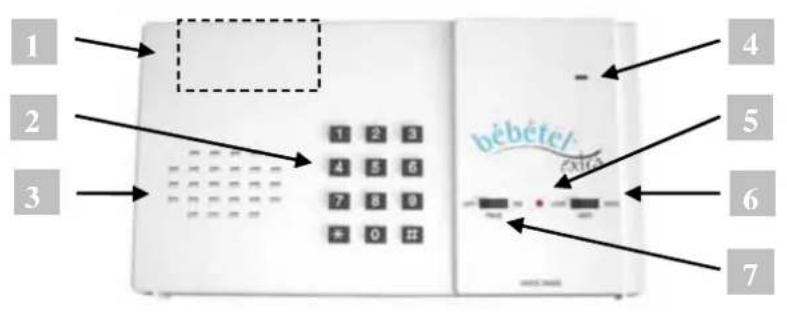
1 Battery compartment for 9 V-battery
Compartment is located on the rear side of the alarm unit. Battery replacement ≈ 7.7 .
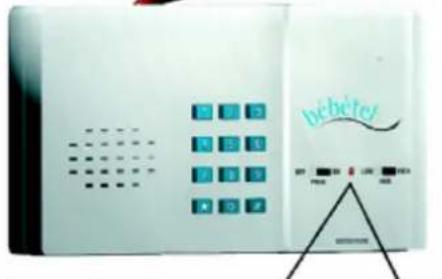
2 Keypad
The keypad is used for programming 5 and during operation 6.
bébé tel®-keys are marked with 1 2 3 4 5 6 7 8 9 * 0 # in the coming sections.
Keys of the answering telephone are marked white: 1 2 3 4 5 6 7 8 9 0
3 Loudspeaker
The loudspeaker is activated during test call and can be switched on during a telephone call if you want to talk to your child.
4 Microphone
Registers the noise level in the room.
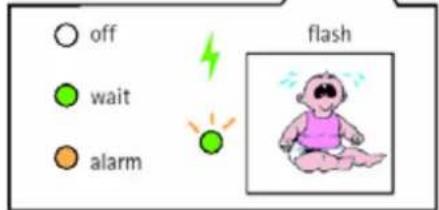
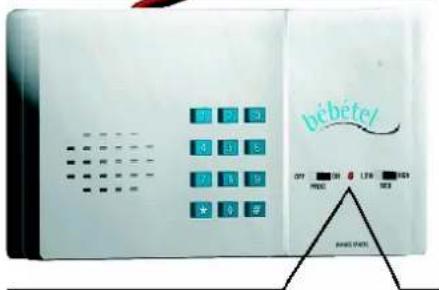
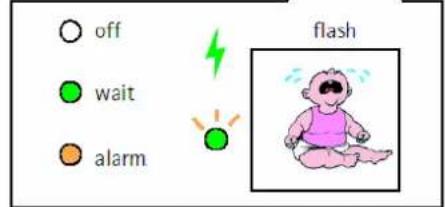
Indicator LED
| Green | Waiting period 6.3 |
| Green blinking | Monitoring mode 6.5 |
| Orange | Connection mode 6.7 |
6 Sensitivity switch
6.6.1
| HIGH | High sensitivity |
| MED | Medium sensitivity |
| LOW | Low sensitivity |
7 Function switch
| OFF | Device is turned off |
| PROG | Telephone number and/or access-code (PIN-code) can be entered |
| ON | Device is in operation mode |
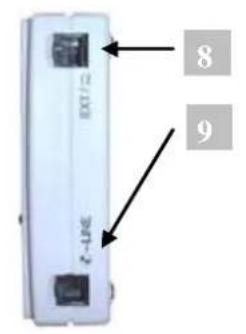
8EXT-jack (bébé têlEXTRA®/bé bé tê lMOB1L2E®only)
You can either connect a power-supply directly to this port or use a TWIN-adapter to connect the power-supply together with the motion sensor 4.2
9 -LINE Telephone jack
Plug in either landline-telephone cord or mobile-connection cable (hébé telMO BI LÉ® only) 4.
4.1 CLASSIC ^四 / ^四 / ^四 (Without motion detector)
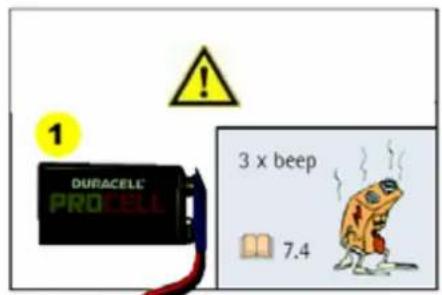
nt on rear side of device

Note: Disconnect the telephone-line before opening battery compartment. This is to avoid contact with dangerous telephone network voltage!
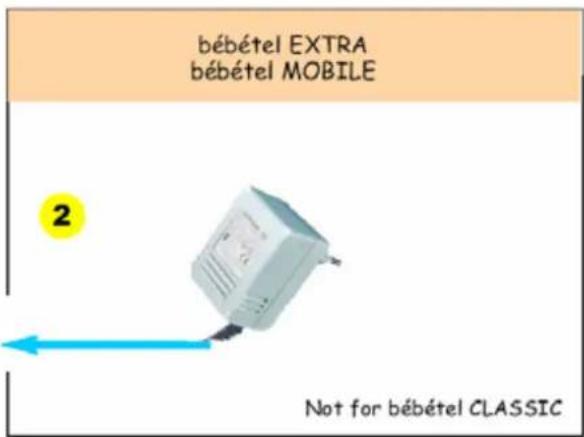
- Plug the AC-adapter into mains socket and then into the 8 EXT-jack of alarm unit (not for bébé tel(CLASSIC®).
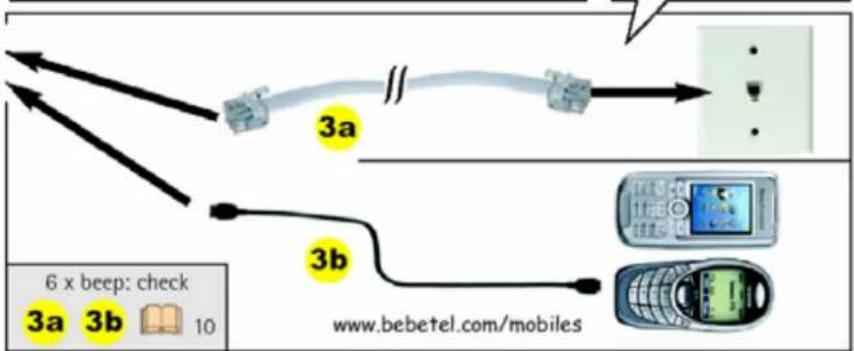
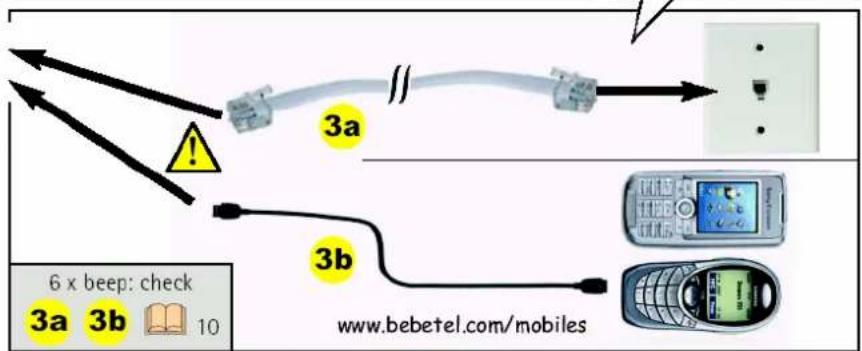
- Connect telephone line to LINE jack:

Plug-in either the landline telephone cord 3a or your mobile connection cord 3b, never both cords at the same time.
3a) Land line mode: (all models): Plug enclosed cord into C-LINE-jack and into the wall outlet:
UK: Using the delivered cord.
US/Spain/Portugal: using RJ11-cord directly.
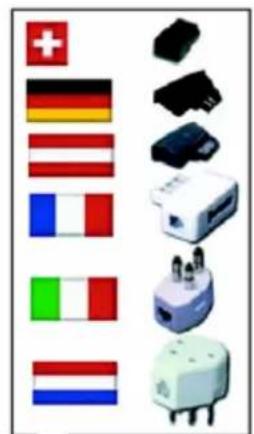
Other: using country specific telephone adapter 8.2
3b) Mobile mode with bébé telMO B1 L2 only: Connect mobile phone using the appropriate connection cable 1.3. To avoid waking up your child switch the mobile to silent mode.
- Set function switch to PROG and enter desired telephone number using keypad
- Set sensitivity switch to the desired level (LOW/MED/HIGH) 6.6.1
- Set function switch to ON be bê têl is now ready
After power on bebetel remains inactive for a waiting period of two minutes so you can leave your room without triggering a call. If you want to skip this period immediately: Press key 9 to activate monitoring mode, and test response sensitivity.
4.2 COMBI extension (With motion detector)
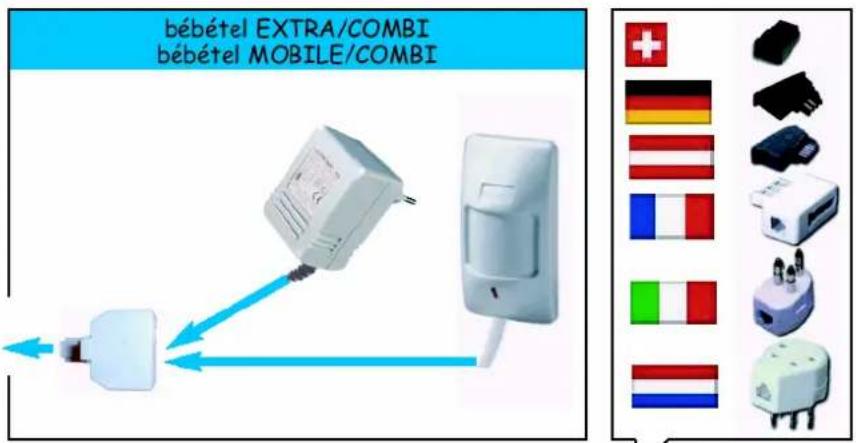
To receive a call even if the child leaves the room without making any noise, you can connect a motion detector. Connect the motion detector to 8 EXT-jack together with the AC-adapter using the TWIN-adapter (bebete IEXTRA/ bebeitelMOBILLE only).
Direct the motion detector so that it monitors only the exit of the room. 8.4
4.2.1 Safety instructions
- The function switch must be set to OFF and telephone-cord must be disconnected before wiring of AC-adapter or motion detector can be carried out.
- Only connect bébé tēl®-accessories like AC-adapter and/or motion detector to the EXT-Jack.
- Connect telephone-cord only to -LINE-jack of the alarm unit, never to the EXT-Jack.
4.2.2 Activation of motion detector
Wait at least two minutes after applying power to let the motion detector stabilise. Walk through the entire area you want to be monitored and observe the red light on the motion sensor to ensure full coverage. Adjust swivel if necessary.
5.1 Program the telephone number
- Set function switch to PROG
- Enter the telephone number where you can be reached. Each keystroke will be acknowledged by a beep. (24 digits at most)
- Set function switch to OFF
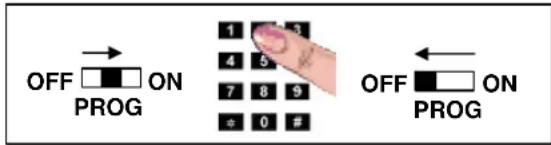
Note:
The telephone number remains stored even when be bê tel® is switched off.
Key # introduces a dialling delay of 5 seconds between two digits: e.g. when you are at a hotel and you need to dial a number, often 0 or 9, in order to get an external line. Then a delay must be added after first digit (first digit + # + telephone number). Example: 0#021 234 56 78.
If you use bébé tel abroad, you have to add the country-code to the telephone number: 0044 for , 0041 for .0047 for . Example if you are at a hotel abroad: 0#0044 21 234 56 78.
- If your private exchange uses a flash-pulse to start an internal call you can program as follows: 2 + # followed by internal telephone number. Example if you want to call extension "99": 2#99.
The key makes bebe teI hang up after 5 seconds.
If you key a wrong number set function switch to OFF and repeat steps 1 to 3.
5.2 Program a PIN-code
- Set function switch to PROG
- Press key #
- Enter PIN-code (4 to 7 digits)
- Press key #
- Enter PIN-code once again for confirmation
- Press key #
- Set function switch to OFF
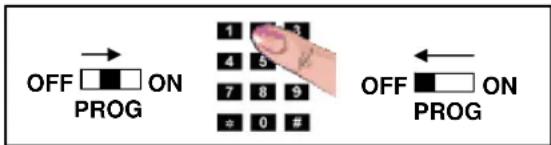
Note:
- The PIN-code remains stored even when b é b e tel^® is switched off. If PIN-code is re-entered correctly there is an acknowledgement beep at the end of input. Wrong re-entering of PIN-code will provoke two beeps. PIN-code will then not be stored so the old PIN-code remains active.
PIN-code must consist of min. 4 and max. 7 digits.
Factory setting of PIN-code is 9797. We recommend programming a personal PIN-code for safety reasons.
If you key a wrong number set function switch to OFF and repeat steps 1 to 7.
6.1 Preparation
If you want to monitor a sleeping baby please place bébé tel about 1m to 2m from your baby
Note:
- To avoid false alarms close windows and diminish other noise sources.
- Do not place your mobile on top of the bébé tê lMo BILL to avoid interference.
Monitor two rooms 7.4.
6.2 Self test at power on
When bébé tel® is switched to ON it checks battery state and telephone-line condition. If one of these tests fails the user will be informed by beeps as follows:
3 beeps: Battery is low 7.7
6 beeps: Land line mode: Idle tone not detected 10
Mobile mode: Mobile phone not detected 1.3
6.3 Waiting period
During the waiting period the indicator LED is green.
6.3.1 after power on
bec etel remains inactive for a waiting period of two minutes so you can leave your room without triggering a call.
If you want to skip this period, press Key 9 to activate monitoring mode, for example to test the response sensitivity.
6.3.2 after a successful call
bê bé tē l® remains inactive for a waiting period of two minutes to avoid frequent calls.
6.4 Test call (=direct call)
In order to check that the telephone number has been entered correctly, you should perform a test call:
- Press any key
The colour of the indicator LED changes to orange during any connection - Wait until connection is established and speak
- Terminate connection by pressing 0 or switch to off.
Note:
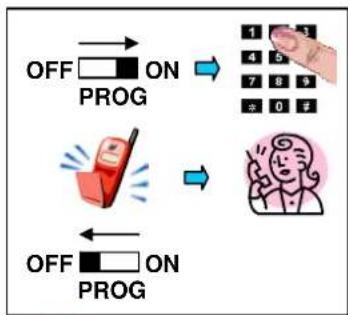
An older child can call you by pressing any key. You can then talk to one another.
- After ten minutes the connection will automatically be disconnected. You can hang up by pressing key 0 or stay connected by pressing 3 on your telephone.
6.4.1 Adjust hands-free volume
During voice connection you can increase volume by pressing key # or decrease by pressing key *. Level can be adjusted (spanning ten sound levels) and remains stored.
f bébé telMOBILÉ: In mobile use only possible with mains supply and if the attached mobile phone supports the speak with child -mode (1.3 or www.bebetel.com/mobiles).
6.5 Monitoring mode
After the waiting period be be te l^® switches to monitoring mode. In this mode, the indicator LED flashes green every four seconds and lights up when the noise level exceeds the level given by the sensitivity switch.
6.6 Telephone call
6.6.1 Call due to noise
| Position | Information |
| HIGH | High sensitivity → call after approx. 3 noises |
| MED | Medium sensitivity → call after approx. 6 noises |
| LOW | Low sensitivity → call after approx. 8 noises |

3x HIGH
6x MED
8x LOW
If during monitoring mode noise level is exceeded several times,bébé tel® will dial programmed telephone number. You can listen into the room while the loudspeaker remains silent 6.7.2.
6.6.2 Call due to motion detector activity
If b t l^ is used with motion detector (COMBI^) a call is triggered during monitoring mode
if a motion is detected
if there is a mains power failure
if the motion detector is connected or disconnected during operation
You can listen into the room while the loudspeaker remains silent 6.7.2.
6.7 Connection
The colour of the indicator LED changes to orange during telephone connection.
You can change the mode using keys of your handset (must be touch tone commands compatible!) i
| Key | → bébé tel® confirm with one beep | |
| 0 | Disconnection/Call acknowledgment | |
| 1 | Switch between listening-in and voice connection | |
| 3 | Restart connection timer for two minutes and deactivate beeps | |
| 7 | Deactivate the motion detector | |
| 9 | Activate the motion detector | |
6.7.1 Time - out
There is a timer running during listening-in and voice connection mode. Connection is kept up for two minutes in case of a telephone call, and ten minutes in case of test call (=direct call). Ten seconds before disconnection you will hear four beeps in your handset. You can restart timer by pressing 3 on your telephone. i
6.7.2 Listing in connection
Listening-in connection will be established in case of a call due to noise- or motion- activity. The cause of the telephone call will be signalled with repeated beeps (every 5 seconds) as follows: i
| Number | Cause of telephone call |
| 1 | Activation by noise |
| 2 | Activation by motion detector (no motion at the moment) |
| 3 | Activation by motion detector (motion still going on) |
| 4 | Connection time-out |
6.7.3 Voice connection
Voice connection will be established automatically during test call or by pressing 1 on your telephone during listening-in connection. During this mode bêbé tel® loudspeaker is activated and you can communicate with your child.

Voice connection must always be disconnected by pressing 0 on your telephone. Otherwise your child will be disturbed by a busy tone for a while.
f bébé tELMOBIL: In mobile use only possible with mains supply and if the attached mobile phone supports the speak with child -mode (1.3 or www.bebetel.com/mobiles).
6.8 Call repetition/Call acknowledgement
A call can be repeated until it is acknowledged by pressing 0 on your telephone. Call repetitions are programmed ≈ 9.2 .
Note:
If one calls repeatedly an answering machine exceeding costs can be generated.
- You risk to disturb someone if you have programmed a wrong telephone number.
- bébé tel ^ calls you again,if your child still cries after the waiting period of two minutes.
- If you use the motion detector we recommend setting call repetitions because it is possible that the child crosses the monitored section once only!
6.9 Remote dial-in
To verify you can call the telephone number where bébé tel® is connected. After two rings bébé tel® will answer your call and send a beep. Enter your PIN-code within 15 seconds using a touch tone telephone to monitor the room 6.7.2.
Note:
- In case of a wrong PIN-code bêbêtel® will disconnect after emitting two beep call again and enter correct PIN-code.
Factory setting of PIN-code is 9797. We recommend programming a personal PIN-code for safety reasons 5.2.
If the telephone is not able to send touch tone commands 7.5, remote dial-in is not possible.
To turn off dialling-in 9.3.
6.9.1 Limited mobile use
If the connected mobile phone does not support speak with child-mode (1.3 or www.bebetel.com/mobiles) you can listen into the room for 15 seconds before the connection will be terminated.
f bébé tELMOBIL: In mobile use only possible with mains supply and if the attached mobile phone supports the speak with child -mode (1.3 or www.bebetel.com/mobiles).
7 Frequently asked questions
On our homepage www.bebetel.com you will find:
Trouble shooting.
- User manual in different foreign languages.
7.1 Connection to ISDN or Internet telephony VoIP
hébé tē l^® is designed to connect to the analogue telephone line, but can be used with ISDN or an analogue VoIP-terminal. Connect hébé tē l^® the same way as you would connect a fax.
b e b e t e l^® has to be connected to one of the analogue ports (a/b1) or (a/b2).
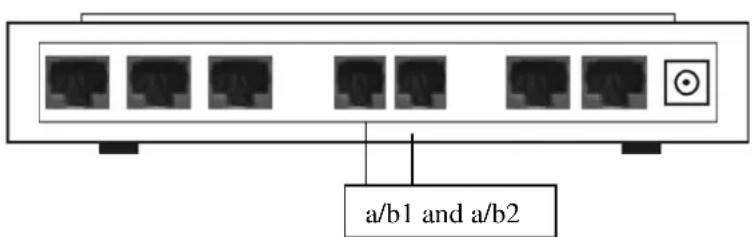
a/b1 and a/b2:
Port for analogue terminal equipment:
bêbêtel
Fax
- answering machine
Note:
- ISDN: We recommend selecting a subscriber number (MSN) for the bébé tel® other than the main-number.
- manual of your adaptor
Voice over Internet protocol (VoIP): In case of mains power failure or internet breakdown there will be no telephone connection. - If your private exchange does not support an analogue connection you probably can connect it to an analogue port of your terminal equipment (modem, telephone) or you have to buy an interface converter.
7.2 Connection fee due to telephone call
bê bê tel® only starts a call if an alarm condition is detected. Please note that you will incur costs for calls to your mobile or pager. These may vary according to certain factors such as time of day or day of the week and should therefore be confirmed by your individual service provider. Make sure that rejected calls are not diverted to an answering machine.
7.3 Use with an answering machine
The factory setting of the monitor means it will answer a call after two rings. The caller then has 15 seconds in which to enter their PIN-code. If the PIN-code is wrong, or is not entered on time,bébé tel® hangs up. If you want to use bébé tel® together with an answering machine you have to adapt the number of rings for both units (bébé tel® and answering machine). To program the number of rings for bébé tel® 9.3. For your answering machine please consult relevant manufacturer's instructions. If you adapt both units for the same number of rings, you can dial in and enter PIN-Code within 15 seconds to monitor the room. A caller who does not enter PIN-Code within 15 seconds will only hear the spoken message of your answering machine and will not know that the monitor has automatically disconnected due to PIN-code time-out.
7.4 Monitoring two rooms
Because bébé têl® is very sensitive on position HIGH it is possible to monitor two rooms next to each other. You can place the alarm-unit between the two rooms, leaving the doors open! Please check sensitivity by creating some noise activity. We recommend using the additional motion detector monitoring (COMBI®) to ensure that the child cannot leave the room unnoticed.
If the two rooms are not close enough you can always use two bêbêtel® in parallel.
7.5 Touch tone commands
If you want to use bébé tel® to its full potential, you need a touch tone telephone set at the line, where telephone call should be answered. Most of today's telephone sets send touch tone signals also known as DTMF or tone dialling. Older telephone sets use pulse dialling. If you are not sure if your telephone set uses touch tone, you may run the following check: Lift handset and dial any number if you hear dialling tones you are in possession of a touch tone telephone set. If you hear pulses you might be able to program your telephone set for touch tone or you can buy an acoustic coupler. If you do not have any touch tone device you cannot execute touch tone commands 6.7.
1 bébé telMOBI LÉ: In mobile use only possible with mains supply and if the attached mobile phone supports the speak with child -mode (1.3 or www.bebetel.com/mobiles).
7.6 Signals (beeps)
Beeps from bébé tel ⑥ loudspeaker
| Number | Message/Cause |
| 1 | Acknowledgement beep |
| 2 | Wrong re-entering of PIN-code, ringing cycle etc. |
| 3 | Battery is low |
| 6 | Dial-tone missing |
Beeps in called telephone
| Number | Message/Cause |
| 1 | Acknowledgement beep |
| 2 | PIN-code has been entered incorrectly or activation by motion detector (no motion at the moment) |
| 3 | Activation by motion detector (motion still going on) |
| 4 | Connection time-out 6.7.1 |
I bébé telMOBILÉ: In mobile use only possible with mains supply and if the attached mobile phone supports the speak with child -mode (1.3 or www.bebetel.com/mobiles).
7.7 Battery check/replacement
If b b t l^电 emits three beeps when switched on, battery must be replaced.

Note: Disconnect the telephone-line before opening battery compartment. This is to avoid contact with dangerous telephone network voltage!
- Set function switch to OFF
- Open battery compartment and remove old battery
- Insert new battery and close battery compartment
Note:
Always use faultless 9 V-batteries.
Recycle old batteries properly.
7.8 Maintenance
Set function switch to OFF and remove telephone cord. Clean bébé tel if necessary with a moistened cloth and dry it afterwards. Note: Do not use cleaning agents or solvent.
8Accessories
Below you will find a list of accessories. More items and detailed information are available on our homepage www.bebetel.com
8.1 Telephone extension cord
If enclosed cord is not long enough you can buy an extension cord.
8.2 Use abroad
bêbétel® is approved for European countries (CTR-21) and for USA/Canada (FCC). It can be used worldwide. The only requirement is an analogue phone connection. Please note that there are different telephone-adapters for different countries. We recommend buying a special traveller-adapter-set.

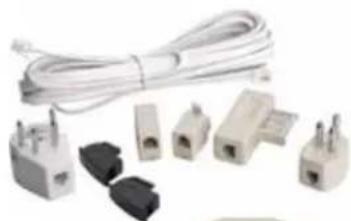
8.3 Smoke detector
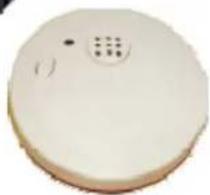
The smoke detector has an integrated alarm siren. It can be installed on the ceiling. The alarm forwarding happens indirectly by the acoustic room monitoring.
- no wiring necessary.
- stand-alone usable.
8.4PIR-Motion detectorBBT-PIR-F(COMBI)
8.4.1 Preliminary considerations
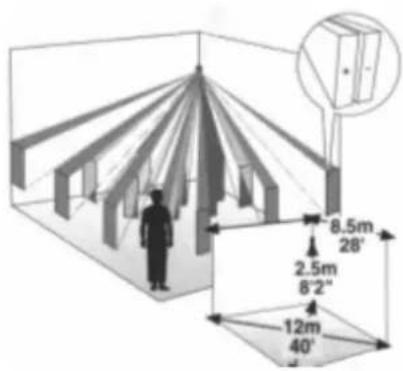
Choose the mounting location after careful consideration of the area to be protected. The motion detector should be located so that an intruder/child will cross the infrared beam pattern. If the child is sleeping within the range, a movement of the child can cause a false alarm. Figure shows the different infrared beam patterns at a typical mounting height of 2.5m .
Note:
- Do not mount detector towards direct sunlight or near to heat sources.
- Do not mount detector behind items like glass or curtains because the infrared-beam cannot penetrate them.
- Keep away pets like cats or dogs from the protected area.
8.4.2 Conne c t i o n
Plug the cable of the motion detector to the 8 EXT connector of the bébé tel® using the twin adaptor. The motion detector is powered by the AC-adaptor.
Note:
- A call will be triggered if you connect or disconnect the motion detector during operation.
8.4.3 Specification
Supply voltage 9..16 VDC
Dimension 107 × 58 × 39 ~mm (LxWxD) without swivel
Weight 75g
Cable length 8m
Detection type passive infrared (PIR)
Alarm contact normally closed
8.4.4 Adjustment
- Disconnect the motion detector before opening.
Remove the front cover by twisting a flat screwdriver in the slot between the cover and the base at the bottom of the motion detector.
8.4.4.1 WALK test
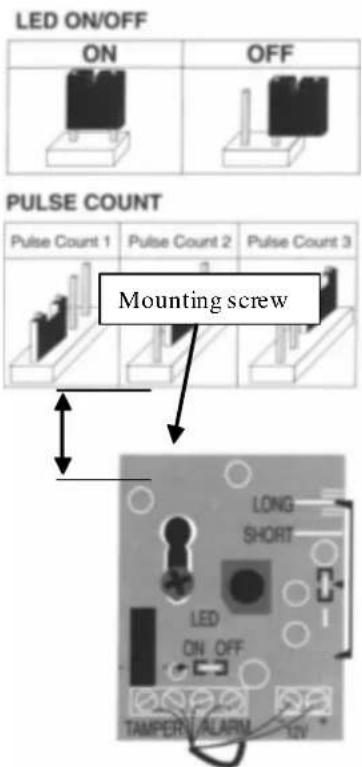
To disable LED indication, remove the LED jumper and place it on one pin only. To activate LED indication, place LED jumper over both pins.
8.4.4.2 Pulse count
You can set PULSE jumper at position 1,2 or 3 corresponding to the desired pulse count before a call will be triggered. Default = 2
8.4.4.3 Mounting height
If motion detector is not mounted at 2.5m you can adjust like this:
- Loosen the PC-Board holding screw. Slide the PC-Board so that the plastic pointer on the right side is positioned at the appropriate scale position.
for higher than 2.5m slide PC-Board up
for lower than 2.5m slide PC-Board down
- Tighten the PC-Board holding screw
- Mount front cover
- Walk through the protected area and observe the LED to ensure full coverage
9 Special programming
9.1 Factory settings
bê bê tel® can be reset to default values as follows:
- Set function switch to position OFF
- Keep 3 and # pressed simultaneously
- Set function switch to ON
- Release keys acknowledgement by a beep
- Set function switch to OFF
Note:
If there is no beep at step 4, repeat steps 1 to 4.
9.2 Call repetitions
If you want to program call repetitions you can proceed as follows:
- Set function switch to PROG
- Press
- Enter 9 7 1 3 5 3
(n see table below) - Press #
- Enter 9 7 1 3 5 3
once again for confirmation - Press #
- Set function switch to OFF
| <n> | Comment |
| 0 | hébé tel®just dials once for each condition (default value) |
| 1..9 | hébé tel®re-dials after the waiting period if a call was not acknowledged by pressing 0 on your telephone. The number of call repetitions is limited to the value of n! |
Note:
- If the number is entered correctly there will be one beep at the end of the input. Wrong re-entering will provoke two beeps. Incorrect number will not be stored so the former value remains active.
If you key a wrong number set function switch to OFF and repeat steps 1 to 7.
9.3 Auto answers
If you want to change the number of rings prior to answer, you can proceed as follows:
- Set function switch to PROG
- Press
- Enter 9 7 1 3 4 7
(n see table below) - Press #
- Enter 9 7 1 3 4 7
once again for confirmation -
Press #
-
Set function switch to OFF
| <n> | Comment |
| 2..9 | hébé têl® answers call after n rings |
| 10 | hébé têl® does not answer any incoming call |
Note:
- If the number is entered correctly there will be one beep at the end of the input. Wrong re-entering will provoke two beeps. Incorrect numbers will not be stored so the former value remains active.
If you key a wrong number set function switch to OFF and repeat steps 1 to 7. - Default value is 2 rings.
10 Trouble shooting
You can clear most faults checking the following list. If a problem cannot be resolved please check our interactive error handling on our homepage www.bebetel.com or contact Info- ① +41 (0)56 648 40 40.
| Problem Cause and/or remedy | |
| The indicator LED does not shine when switched on | Replace battery 7.7 |
| Three beeps when switched on | Battery is low replace it 7.7 |
| Six beeps when switched on | ■ bébé tel® is not connected to an analogue telephone line ■ Pin compatibility error (telephone cord<-> telephone line) ■ Telephone network is down ■ Line is busy because a parallel telephone set is in use ■ plug in telephone cord ■ check telephone cord ■ make a call with another telephone set ■ Mobile phone is not detected, not connected or not compatible with bébé telMOBILE® (1.3 or www.bebetel.com/mobiles) |
| No connection with test call dial tone not present | |
| No connection with test call dial tone present | ■ Telephone number has been wrong ■ Called subscriber does not accept call |
| No access using dialling-in functionality → call will be disconnected after PIN-code input together with two beeps | ■ Wrong PIN-code has been entered re-program PIN-code ■ Used telephone set does not support touch tone or is in the wrong mode |
| No access using dialling-in functionality in mobile use: | ■ Volume incorrect adjust connected mobile phone to medium volume ■ bébé telMOBILE®: In mobile use only possible with mains supply and if the attached mobile phone supports the speak with child -mode (1.3 or www.bebetel.com/mobiles). |
| Mode cannot be changed using touch tone commands | ■ Used telephone set does not support touch tone or is in the wrong mode for instance pulse-dialling or an ISDN-telephone ■ Mobile use: Volume incorrect adjust connected mobile phone to medium volume ■ bébé telMOBILE®: In mobile use only possible with mains supply and if the attached mobile phone supports the speak with child -mode (1.3 or www.bebetel.com/mobiles). |
10.1 Monitoring on noise
| Problem Cause and/or remedy | |
| No activation | After power on bébé tel® remains inactive for a waiting period of two minutes so you can leave your room without triggering a call. If you want to skip this period you can proceed as follow: Press key 9 and you directly change to monitoring mode, where you can test response sensitivity 6.3.A call will be triggered depending on position of sensitivity switch. As long as noise level is exceeded the indication LED shines 6.6.1. |
10.2 Motion detector (COMBI)
| Problem Cause and/or remedy | |
| WALK-test LED is on, butbébé tel® does not call | Alarm unit is still in the inactive waiting period after being switched on or after a callMotion detector is temporarily deactivated |
| WALK-test LED has been turned on, but is not light up | No voltage supplied to motion detector (⇒ check cable, TWIN-adapter, AC-adapter and mains)Voltage supply has not yet lasted for two minutes (warm up time of motion detector) |
| Call with three beeps without prior movement (WALK-test LED has been off all the time) | No voltage supplied to motion detector (⇒ check cable, TWIN-adapter, AC-adapter and mains)Motion detector has been connected or disconnected after the alarm unit had been switched on |
| Call with two or three beeps was triggered although the motion detector was temporarily deactivated | Voltage supply of motion detector interruptedFunction switch has been shifted to OFF or PROG after deactivation. |
11 Warranty
Dear Customer
Each bébé tel® is manufactured and tested according to stringent quality rules. If you have any claim, Leitronic AG will guarantee additional to warranty against your vendor, to repair device without any labour or material costs, for 2 years after date of purchase. Warranty is only given if bébé tel® has been handled according to the above instructions. Warranty will not be given under the following circumstances:
If there is no invoice or receipt with date of purchase, vendor's name and serial-No.
These documents have been changed or modified.
If serial-No on type label has been changed, cleared, removed or modified in any way.
If any repair, modification or other adaptation has been carried out by unauthorised persons or companies.
- Damage due to tampering with device.
- Damage due to external influence (Lightening, water, fire)..

Please contact us before returning a device on our INFO-Line +41 (0)56 648 40 40 or check our interactive troubleshooting pages on: www.bebetel.com. Defected units are very rare!
LEITRONIC AG
Engeloostr. 16
CH-5621 Zufikon
Switzerland Tel +41 (0)56 648 40 40 www.leitronic.ch
12.1 Alarm unit BBT-3 (bebeteLCLASSIC)
Supply voltage 9 V-battery
Typical duration of duty approx. 100 hour for alkaline (depending on number of telephone calls during use)
Material ABS
Dimension 200× 110× 31mm (LxWxH)
Weight 320g without battery
Cord length 8m
Calling method Tone dialling
Warranty 2 years
12.2 Alarm unit BBT-3-EXT (bebeteLEXTRA)
Supply voltage 9..16 VDC (through AC-adapter at EXT-jack)
Backup: 9 V-battery (Typical duration of operation: 100h for alkaline)
Material ABS
Dimension 200x110x31mm (LxWxH)
Weight 320g without battery
Cord length 8m
Calling method Tone dialling
Warranty 2 years
12.3 Alarm unit BBT-9-MOB (bébé telMOBI LEE)
Supply voltage 9..16 VDC (through AC-adapter at EXT-jack)
Backup: 9 V-battery (Typical duration of operation: 100h for alkaline)
Material ABS
Dimension 200x110x31mm (LxWxH)
Weight 320g without battery
Cord length 8m
Mobile connection cord 1.3
Calling method Tone dialling
Warranty 2 years
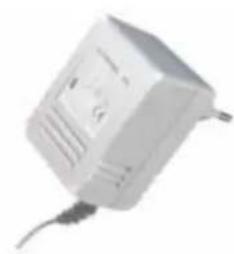
12.4 AC-adapterBBT-DC12V-F
Primary voltage 230V + - 10% /50Hz
Secondary voltage 12 VDC 6 VA
Safety label EN60950 (ICE 950)
Dimension 62× 51× 79mm (LxWxH)
Weight 320g
Cable length 3m
Warranty 2 years
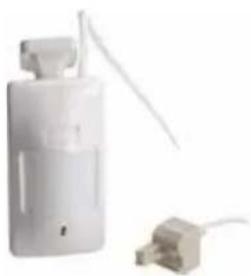
12.5PIRmotion detectorBBT-PIR F
Supply voltage 9..16 VDC (through AC-adapter)
Dimension 107× 58× 39mm (LxWxD) without swivel
Weight 75g
Cable length 8m
Detection type passive infrared (PIR)
Alarm contact normally closed
Warranty 2 years
Changes to product and performance can be made at any time without announcement.
Copyright Leitronic AG 2006 - All rights reserved
13 Inde
Access code. 46
Accessories. 45, 51
Adaptor. 51
Battery 43,51
check. 51
compartment 43
replacement. 43
Beep. 50
Call 48 repetition. 49
Calling number. 46
dialling delay 46
Check battery 51
Check call. 47
dialling-in. 49, 53
Code. 46
Commands tone-dialling. 50
Communication 48
duration. 48
listening. 48
speaking. 48
Compatibility. 41, 53
Connection. 48 listening-in.. 48
time-out. 48
voice. 48
Cord. 41, 44, 45, 51, 53
Default setting. .52 value. 52, 53
Dialling delay 46
Dialling-in 49 rings .49,53
Direct alarm. 47
DTMF. 50
Exchange 46, 49
dialling delay 46
flash-pulse. 46
Factory setting. 52
Function switch 43
Hands-free 47
Indicator LED. 43, 52
Installation. 44, 45
Key. 43
Keypad. 43
LED. 43, 52
Listening-in. 48
Loudspeaker. 43, 48, 50
Microphone 43
Mobile phone 41, 44 compatibility. 41
Mode 53
listening-in 48
monitoring 47
voice connection. 47, 48, 53
waiting period. 47
Monitoring 47
mode 47
noise level. 43, 48
waiting period. 47
Motion detector. 45, 51
Noise level 43, 48
PIN-code 46,49
programming. 46
Remote dial-in. 47, 49
Ringing cycles. 49, 53
Safety instructions. 41, 45
Sensitivity switch. 43, 48
Smoke det4ector. 51
Switch function 43 sensitivity 43, 48
Telephone. 41, 46, 53
connection 48
cord. 41, 44, 45, 51, 53
line. 41, 42, 43, 44, 45, 50, 53
plug. 44, 53
Test call. 47
Time-out. 48
Tone-dialling. 50
commands. 50
Troubleshooting. 53
Volume. 47
Waiting period 47
English
"This equipment has been approved to [Council Decision 98/482/EC - "CTR 21"] for pan-European single terminal connection to the Public Switched telephone Network (PSTN). However, due to differences between the individual PSTNs provided in different countries, the approval does not, of itself, give an unconditional assurance of successful operation on every PSTN termination point. In the event of problems, you should contact your equipment supplier in the first instance"
bébétel® - The baby phone through the telephone
EasyAlarm® - The multi-purpose alarm telephone
Deutsch
EasyAlarm® - The multi-purpose alarm telephone