SurfLink Programmer - Hi-fi system Starkey - Free user manual and instructions
Find the device manual for free SurfLink Programmer Starkey in PDF.


User questions about SurfLink Programmer Starkey
0 question about this device. Answer the ones you know or ask your own.
Ask a new question about this device
Download the instructions for your Hi-fi system in PDF format for free! Find your manual SurfLink Programmer - Starkey and take your electronic device back in hand. On this page are published all the documents necessary for the use of your device. SurfLink Programmer by Starkey.
USER MANUAL SurfLink Programmer Starkey
Installation Instructions

TABLE OF CONTENTS
Description 2
Installation 2
Operation 3
Safety Precautions 4
Regulatory & Service Information 5
Important Safety and Usage Information 6
EMC Information 10
This document contains instructions for connecting SurfLink Programmer into your laptop or desktop PC via a USB connection. SurfLink Programmer requires that Inspire® 2011 fitting software or higher is installed.
DESCRIPTION
SurfLink Programmer is a USB hearing aid programmer functioning as the interface between wireless hearing aids and computer fitting software. It consists of a USB cable and SurfLink Programmer.
Physical and Performance Characteristics:
- Indicator lights for power and data transfer activity
- SurfLink Programmer to PC connection on USB is capable of up to 480 Mbps (USB 2.0 high speed)
INSTALLATION
Screen may vary depending on the Windows version.
- Confirm that Inspire 2011 or higher is installed. (SurfLink Programmer is not supported on earlier versions of Inspire fitting software.)
-
Plug the square end of the USB cable into the back of SurfLink Programmer making sure it is inserted fully.
-
Insert the rectangular end of the USB cable into an open USB port on your PC.
- Follow the on-screen prompts in the "Add New Hardware Wizard" screens. SurfLink Programmer is designed to be "plug and play" and does not require a CD or a restart of the PC.
- Locate SurfLink Programmer at least 5 feet/1.5 meters from the patient.
OPERATION
Once installed, SurfLink Programmer is ready to use.
To use:
- Verify SurfLink Programmer is connected to the PC
- Launch Inspire 2011
- Search for SurfLink Programmer, if needed
SAFETY PRECAUTIONS
Please read the following safety precautions before using SurfLink
Programmer for the first time.
Markings and Symbols
The following markings and symbols are used in these safety precautions and/or on the device label.
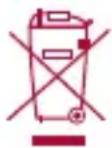
Within Europe, dispose of SurfLink Programmer according to local EU WEEE regulations.

Class II equipment

Power from USB port

Data transfer indicator
REGULATORY AND SERVICE INFORMATION
Classification
- Classification to the Medical Device Directive: Class I.
- Classification to EN 60950-1 Class II Continuous Operation.
- Any associated computer used with SurfLink Programmer must be an EN 60950 (ISO 950) approved computer.
Power Supply
- Operating Voltage: 5.0 vDC supplied from the USB port of an EN 60950 (ISO 950) approved computer.
IMPORTANT SAFETY AND USAGE INFORMATION
Storage and Shipping Conditions:
- Temperature: -20 to 70^ C, -4 to 158^ F
- Humidity: 30 - 90%
No condensation
Operating Conditions:
- Temperature: 15 - 35^ C,59 - 95^ F
- Humidity: 30 - 90%
No condensation
Avoid using SurfLink Programmer in areas subject to the following conditions:
- Extreme heat or cold
Static electricity
Large amounts of dust - Rough handling
Rough handling or dropping SurfLink Programmer can cause damage. If you think you may have damaged SurfLink Programmer, or if SurfLink Programmer is suffering an obvious malfunction, immediately unplug it from your computer and contact your authorized dealer to request servicing.
DO NOT continue to use a damaged SurfLink Programmer.
DO NOT place heavy objects on top of SurfLink Programmer.
Never insert foreign objects into the connections.
Avoid spilling liquid on SurfLink Programmer.
The exterior of SurfLink Programmer may be wiped with a damp cloth or sterile hand wipe. Never use paint thinner, benzene, cosmetics, or other volatile agents to clean the exterior of SurfLink Programmer.
Never try to take apart or modify SurfLink Programmer. Doing so creates the danger of fire and electrical shock, as well as SurfLink Programmer malfunction. There are no user-serviceable parts inside SurfLink Programmer. All services must be performed by the authorized dealer.
REgULATORy NOTICES
FCC ID: EOA-WP
IC: 6903A-WP
FCC NOTICE
This device complies with part 15 of the FCC rules and with RSS-210. Operation is subject to the following two conditions:
(1) This device may not cause harmful interference, and
(2) this device must accept any interference received, including interference that may cause undesired operation of the device.
Note: The manufacturer is not responsible for any radio or TV interference caused by unauthorized modifications to this equipment. Such modifications could void the user's authority to operate the equipment.
Hereby, Paradigm declares that SurfLink Programmer is in compliance with the essential requirements and other relevant provisions of Directive 1999/5/EC. A copy of the Declaration of Conformity can be obtained from the below addresses.
Note: This equipment has been tested and found to comply with the limits for a Class B digital device, pursuant to part 15 of the FCC Rules. These limits are designed to provide reasonable protection against harmful interference in a residential installation. This equipment generates, uses and can radiate radio frequency energy and, if not installed and used in accordance with the instructions, may cause harmful interference to radio communications. However, there is no guarantee that interference will not occur in a particular installation. If this equipment does cause harmful interference to radio or television reception, which can be determined by turning the equipment off and on, the user is encouraged to try to correct the interference by one or more of the following measures:
- Reorient or relocate the receiving antenna.
- Increase the separation between the equipment and receiver.
- Connect the equipment into an outlet on a circuit different from that to which the receiver is connected.
- Consult the dealer or an experienced radio/TV technician for help.
surfLink Programmer emc Information
All medical electrical equipment is required to provide special precautions regarding EMC and must be installed and put into service according to the EMC information provided in this manual.
Please be aware that portable and mobile RF communications equipment can affect medical electrical equipment.
The following cables are recommended for use with SurfLink Programmer: USB cable with a maximum length of 2 meters.
Warning: Use of cables other than those specified above may result in increased emissions or decreased immunity of the SurfLink Programmer.
Warning: The SurfLink Programmer should not be used adjacent to or stacked with other equipment. If stacked or adjacent use is necessary, check to make sure the SurfLink Programmer is operating normally.
Note: The performance determined to be essential performance for the SurfLink Programmer is the ability to experience a disruption in data transmission without causing a hearing aid to be unintentionally set to a volume level above 132 dB.
Transmitter/Receiver RF information
In Europe, the SurfLink Programmer operates in the 863-865 MHz band, with a 500kHz declared bandwidth, using FSK FM modulation at an effective radiated power of 3 dBm.
In the USA, the SurfLink Programmer operates in the 902-928 MHz band, with a 323kHz necessary bandwidth, using FSK FM modulation at an effective radiated power of -7 dBm.
Guidance and Manufacturer's Declaration - Emissions
The SurfLink Programmer is intended for use in the electromagnetic environment specified below. The customer or user of the SurfLink Programmer should ensure that it is used in such an environment.
Emissions Test Compliance
Electromagnetic
Environment - Guidance
| RF Emissions CISPR 11 | Group 2 | The SurfLink Programmer must emit electromagnetic energy in order to perform its intended function. Nearby electronic equipment may be affected. |
| RF Emissions CISPR 11 | Class B | The SurfLink Programmer is suitable for use in all establishments, including domestic, and those directly connected to the public low-voltage power supply network that supplies buildings used for domestic purposes. |
| Harmonics IEC 61000-3-2 | Class A | |
| Flicker IEC 61000-3-3 | Complies |
Guidance and Manufacturer's Declaration - Immunity
The SurfLink Programmer is intended for use in the electromagnetic environment specified below. The customer or user of the SurfLink Programmer should ensure that it is used in such an environment.
| Immunity Test | IEC 60601 Test Level | Compliance Level | Electromagnetic Environment – Guidance |
| ESD IEC 61000-4-2 | ±6 kV Contact ±8 kV Air +/- 6 kV Contact +/- 8 kV Air | +/- 6 kV Contact +/- 8 kV Air Note: Reset may occur at 6 kV | Floors should be wood, concrete or ceramic tile. If floors are synthetic, the r/h should be at least 30%. |
| EFT IEC 61000-4-4 | ±2 kV Mains ±1 kV I/Os | Test not applicable | Mains power quality should be that of a typical commercial or hospital environment. |
| Surge IEC 61000-4-5 | ±1 kV Differential ±2 kV Common | Test not applicable | Mains power quality should be that of a typical commercial or hospital environment. |
| Voltage Dips/Dropout IEC 61000-4-11 | >95% Dip for 0.5 Cycle 60% Dip for 5 Cycles 30% Dip for 25 Cycles >95% Dip for 5 Seconds | Test not applicable | Mains power quality should be that of a typical commercial or hospital environment. If the user of the SurfLink Programmer requires continued operation during power mains interruptions, it is recommended that the SurfLink Programmer be powered from an uninterruptible power supply or battery. |
| Power Frequency 50/60 Hz Magnetic Field IEC 61000-4-8 | 3 A/m 3 A/m Power | frequency magnetic | fields should be that of a typical commercial or hospital environment. |
Guidance and Manufacturer's Declaration - Electromagnetic Immunity
The SurfLink Programmer is intended for use in the electromagnetic environment specified below. The customer or the user of the SurfLink Programmer should assure that it is used in such an environment.
| Immunity Test | IEC 60601 Test Level | Compliance Level | Electromagnetic Environment – Guidance |
| Portable and mobile RF communications equipment should be used no closer to any part of the SurfLink Programmer, including cables, than the recommended separation distance calculated from the equation applicable to the frequency of the transmitter. | |||
| Recommended Separation Distance | |||
| Conducted RF IEC 61000-4-6 Radiated RF IEC 61000-4-3 | 3 Vrms 150 kHz to 80 MHz | 3 Vrms 150 kHz to 80 MHz | d = 1.2√P |
| Radiated RF IEC 61000-4-3 | 3 V/m 80 MHz to 2.5 GHz | 3 V/m 80 MHz to 2.5 GHz | d = 1.2√P 80 MHz to 800 MHz |
| d = 2.3√P 800 MHz to 2.5 GHz | |||
Where P is the maximum output power rating of the transmitter in watts (W) according to the transmitter manufacturer and d is the recommended separation distance in meters (m).
Field strengths from fixed RF transmitters, as determined by an electromagnetic site survey, should be less than the compliance level in each frequency range.
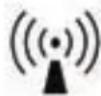
Interference may occur in the vicinity of equipment marked with the following symbol:
Note 1: At 80MHz and 800MHz , the higher frequency range applies.
Note 2: These guidelines may not apply in all situations. Electromagnetic propagation is affected by absorption and reflection from structures, objects and people.
a Field strengths from fixed transmitters, such as base stations for radio (cellular/ cordless) telephones and land mobile radios, amateur radio, AM and FM radio broadcast and TV broadcast cannot be predicted theoretically with accuracy. To assess the electromagnetic environment due to fixed RF transmitters, an electromagnetic site survey should be considered. If the measured field strength in the location in which the SurfLink Programmer is used exceeds the applicable RF compliance level above, the SurfLink Programmer should be observed to verify normal operation. If abnormal performance is observed, additional measures may be necessary, such as reorienting or relocating the SurfLink Programmer.
b Over the frequency range 150kHz to 80MHz , field strengths should be less than 3V/m .
Recommended Separation Distances Between Portable and Mobile RF Communications Equipment and the SurfLink Programmer
The SurfLink Programmer is intended for use in an electromagnetic environment in which radiated RF disturbances are controlled. The customer or the user of the SurfLink Programmer can help prevent electromagnetic interference by maintaining a minimum distance between portable and mobile RF communications equipment (transmitters) and the SurfLink Programmer as recommended below, according to the maximum output power of the communications equipment.
| Rated maximum output power of transmitter W | Separation Distance According to Frequency of Transmitter (in meters) | ||
| 150 kHz to 80 MHz d = 1.2√P | 80 MHz to 800 MHz d = 1.2√P | 800 MHz to 2.5 GHz d = 2.3√P | |
| 0.01 0.12 0.12 0.23 | |||
| 0.1 0.38 0.38 0.73 | |||
| 1 1.2 1.2 2.3 | |||
| 10 3.8 3.8 7.3 | |||
| 100 12 12 23 | |||
For transmitters rated at a maximum output power not listed above, the recommended separation distance d in meters (m) can be estimated using the equation applicable to the frequency of the transmitter, where P is the maximum output power rating of the transmitter in watts (W) according to the transmitter manufacturer.
Note 1: At 80 MHz and 800 MHz, the higher frequency range applies.
Note 2: These guidelines may not apply in all situations. Electromagnetic propagation is affected by absorption and reflection from structures, objects and people.


Paradigm, Inc.
6700 Washington Ave. South
Eden Prairie, MN USA
ecrep
Paradigm, Inc. European Headquarters
Wm. F. Austin House, Bramhall Technology Park
Pepper Road, Hazel Grove, Stockport SK7 5BX
United Kingdom

Waste from electronic equipment must be handled according to local regulations.
0673