
Dark Souls (PS3) - Game SONY - Free user manual and instructions
Find the device manual for free Dark Souls (PS3) SONY in PDF.



| Product Type | Video Game |
| Platform | PlayStation 3 |
| Game Name | Dark Souls |
| Publisher | Namco Bandai Games |
| Developer | FromSoftware |
| Genre | Action-RPG |
| Game Mode | Single-player, online multiplayer (co-op and invasion) |
| Number of Players | 1 (single-player), up to 3 (co-op) |
| Medium | Blu-ray Disc |
| Languages | English, French (manuals) |
| Rating | PEGI 16 |
| Online Features | Yes, via PlayStation Network |
| Voice Chat | Compatible with Bluetooth or USB headset (sold separately) |
| HD Output | Yes, requires HD cables and display (sold separately) |
| Save Data | On PS3 hard disk drive |
| Trophies | Yes, requires a PSN account |
| Health Warning | Risk of photosensitive seizures – read the manual |
| Disc Care | Clean with a soft, lint-free cloth from the center outward. Do not use solvents. |
| Warranty | Limited to 90 days – contact Namco Bandai customer service |
Frequently Asked Questions - Dark Souls (PS3) SONY
User questions about Dark Souls (PS3) SONY
0 question about this device. Answer the ones you know or ask your own.
Ask a new question about this device
Download the instructions for your Game in PDF format for free! Find your manual Dark Souls (PS3) - SONY and take your electronic device back in hand. On this page are published all the documents necessary for the use of your device. Dark Souls (PS3) by SONY.
USER MANUAL Dark Souls (PS3) SONY
WARNING: PHOTOSENSITIVITY/EPILEPSY/SEIZURES
A very small percentage of individuals may experience epileptic seizures or blackouts when exposed to certain light patterns or flashing lights. Exposure to certain patterns or backgrounds on a television screen or when playing video games may trigger epileptic seizures or blackouts in these individuals. These conditions may trigger previously undetected epileptic symptoms or seizures in persons who have no history of prior seizures or epilepsy. If you, or anyone in your family, has an epileptic condition or has had seizures of any kind, consult your physician before playing. IMMEDIATELY DISCONTINUE use and consult your physician before resuming gameplay if you or your child experience any of the following health problems or symptoms:
- dizziness - eye or muscle twitches - disorientation - any involuntary movement
- altered vision - loss of awareness - seizures or convulsion.
RESUME GAMEPLAY ONLY ON APPROVAL OF YOUR PHYSICIAN.
Use and handling of video games to reduce the likelihood of a seizure
- Use in a well-lit area and keep as far away as possible from the television screen.
- Avoid large screen televisions. Use the smallest television screen available.
- Avoid prolonged use of the PlayStation ^® 3 system. Take a 15-minute break during each hour of play.
- Avoid playing when you are tired or need sleep.
Stop using the system immediately if you experience any of the following symptoms: lightheadedness, nausea, or a sensation similar to motion sickness; discomfort or pain in the eyes, ears, hands, arms, or any other part of the body. If the condition persists, consult a doctor.
NOTICE:
Use caution when using the DUALSHOCK ^® 3 wireless controller motion sensor function. When using the DUALSHOCK ^® 3 wireless controller motion sensor function, be cautious of the following points. If the controller hits a person or object, this may cause accidental injury or damage. Before using, check that there is plenty of space around you. When using the controller, grip it firmly to make sure it cannot slip out of your hand. If using a controller that is connected to the PS3 ^TM system with a USB cable, make sure there is enough space for the cable so that the cable will not hit a person or object. Also, take care to avoid pulling the cable out of the PS3 ^TM system while using the controller.
WARNING TO OWNERS OF PROJECTION TELEVISIONS:
Do not connect your PS3™ system to a projection TV without first consulting the user manual for your projection TV, unless it is of the LCD type. Otherwise, it may permanently damage your TV screen.
HANDLING YOUR PS3™ FORMAT DISC:
- Do not bend it, crush it or submerge it in liquids. - Do not leave it in direct sunlight or near a radiator or other source of heat. - Be sure to take an occasional rest break during extended play. - Keep this disc clean. Always hold the disc by the edges and keep it in its protective case when not in use. Clean the disc with a lint-free, soft, dry cloth, wiping in straight lines from center to outer edge. Never use solvents or abrasive cleaners.
1 DARK SOUL\$
TABLE OF CONTENTS
GETTING STARTED 1
GAME CONTROLS 2
CREATE PROFILES 3
WHERE DEMONS RULE 4
THE WORLD OF DARKNESS 5
ONLINE GAMEPLAY....6
LIMITED WARRANTY....7
FRANÇOIS 9
NOTES 15
CREDITS 16
GETTING STARTED
NOTICES:
Video output in HD requires cables and an HD-compatible display, both sold separately.
Voice chat requires a headset, sold separately. Compatible with most Bluetooth and USB wired headsets. Some limitations apply.
PlayStation®3 system
Starting a game: Before use, carefully read the instructions supplied with the PS3™ computer entertainment system. The documentation contains information on setting up and using your system as well as important safety information.
Check that the MAIN POWER switch (located on the system rear) is turned on. Insert the Dark Souls disc with the label facing up into the disc slot. Select the icon for the software title under [Game] in the PS3™ system's home menu, and then press the ✗ button. Refer to this manual for information on using the software.
Quitting a game: During gameplay, press and hold down the PS button on the wireless controller for at least 2 seconds. Then select "Quit Game" from the screen that is displayed.
Hint
To remove a disc, touch the eject button after quitting the game.

Trophies: Earn, compare and share trophies that you earn by making specific in-game accomplishments. Trophies access requires a PlayStation® Network account.
Saved data for PS3™ format software
Saved data for PS31™ format software is saved on the system's hard disk. The data is displayed under "Saved Game Utility" in the Game menu.
GAME CONTROLS
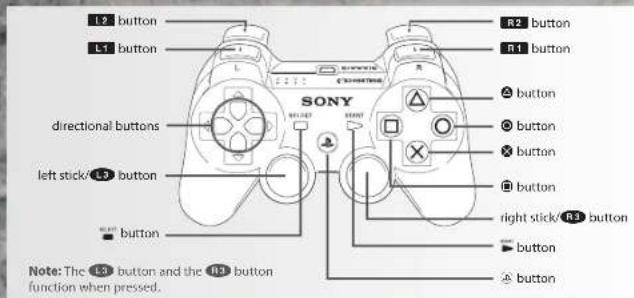
MENU CONTROL
Highlight menu item....left stick
Select highlighted menu item ....
Cancel/Return to previous menu .....
GAME CONTROLS
Move left stick
Move Camera....R3
Dash L3 + (hold)
Attack/Cast magic....R1
Strong attack R2
Guard/Dual wield
weapon action/cast magic L1
Parry/Dual wield weapon L2
Target lock/release
Backstep
Roll L3 + (lap)
Interact....
Change Equipment .....directional buttons
Use Item
Change weapon stance
Open expressions menu....
Open start menu
Navibale menu options left/right
EXPRESSIONS
Use the wireless controller's motion control to use
different gestures in the game. While holding down
the ✗ button, move your wireless controller. Press
the ■ button to open the gesture menu to set
gestures to specific motion controls
MAIN MENU
Select to begin a New Game or choose to Load Game.
NEW GAME
Start a new game.
LOAD GAME
Select a previously saved game.
NOTE: In order to play Dark Souls you need to create save data. When starting the game for the first time, a
save data is created automatically. During the save do not turn off you PS3™ system
CREATE PROFILES
Customize a character to begin your Dark Souls quest. As you customize a character, you can see any changes
to their slats on the left side of the screen. Their equipment is shown in the center of the screen. When you are
finished creating a character, select ACCEPT
Character Name: Type in a name for the character
Sex: Select the character's gender
Class: Choose the character's class. Each class has its own attacks, weaponry, and attributes. There are 10
classes from which to choose
Gift: Select a gift for the character. Gifts are special items that remain with the character throughout the game.
Physique: Determine the character's physique.
Face: Select a specific face for the character. Each face is based on the people that inhabit the world of Dark Souls.
Hair: Determine the hairstyle for the character.
Color: Choose a color for the character's hair and eyes
Physical Appearance: Select CUSTOMIZE to further adjust the character's features.
CLASSES
Choose from 10 classes, each class has its own unique abilities and statistics. Every class starts the game with
certain equipment and spells. However, as you play, you'll discover Dark Souls has non class-specific items.
Therefore, you may adjust your attributes when leveling up to meet certain basic requirements a weapon or armor
might have
Warrior. The fearless warrior is a weapon expert with high strength and dextently.
Knight: The low-ranking knight has high HP and solid armor. Knights are not easily toppled
Wanderer: The aimless wanderer has high dexterity and wields the scimitar.
Thief: The quilt-ridden thief has a high chance of critical hits and carries a Master Key.
Bandit: The savans bandit has high strength and welds a navy battle axn.
Hunter: The bow-wielding hunter can handle close-range and long-range, but is vulnerable to magic
Sorcerer: The sorcerer of Vinheim Dragon School can past soul sorceries
Pyromancer: The Great Swamp pyromancer casts fire spells and wields a hand axe.
Cleric: The cleric on Pilorimage wields a mace and casts healing miracles
Deprived: The unclothed enigma is only armed with a club and old plank shield.
WHERE DEMONS RULE
The world you are thrust into is ruled by demons. As you quest to reach your soul, you will view the following game screen.
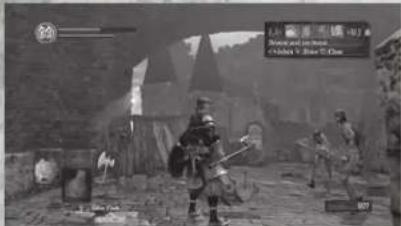
HUMANITY METER
This number represents your Humanity level
HP GAUGE
Your current HP level is displayed in the upper left. As you incur damage, the gauge depletes, and when it is empty, you die. HP is recovered when you rest at a bonfire or when you use specific items and spells.
STAMINA GAUGE
Your current stamina level is displayed under your HP gauge. Stamina depletes with each evade and/or action taken. When this gauge is empty, you cannot perform any action that uses stamina. However, stamina recovers over time.
STATUS ICON
When you are affl icted with a status effect, like poison, an Icon is displayed.
START MENU
Press the ▶ button to display the start menu. Press the L1 button and R1 button, or press the directional buttons to navigate the menu. Choose to view your inventory, check equipment, review your slats, and enter the Systems menu. Press the ⚙ button when you want to enter a specific menu. NOTE: When the start menu is open, you are still vulnerable to enemies, even if you cannot attack.
EQUIPMENT ICON
This icon displays your current equipped weapons, armor, magic, and items.
RESISTANCE GAUGE
This gauge displays how much a certain resistance has been affected. NOTE: When you are cursed, the Humanity meter displays a skull,
SOUL METER
The counter in the lower right displays the number of Souls you have.
THE WORLD OF DARKNESS
You are thrust into a world of darkness, a world of demons. It's a place where humans with the Dark Ring are sent to succumb and transform into the living dead. You are soulless at the beginning of the adventure, and in order to regain your soul, you must emerge from the abyss to reach the land of the living.
OPEN WORLD
The demon world is massive, but interconnected. Any location you see, you can explore. Some locations are more challenging to reach than others, but simply exploring the land is full lling. As you progress, you'll discover massive, vertically oriented structures, humongous landmasses, and complex dungeons, with interlinking routes and secret corridors.
BONFIRE
During your quest, you will come across bonfires. Approach the unit bonfire and press the ✗ button to light the bonfire and access its menu. Here you level up your attributes, regain Humanity, refi ll your Estus Flasks and magic count, and remove any negative effects.
DEATH
When your HP is fully depleted, you die. When this happens, all of your collected Humanity and Souls are left on the ground as a Bloodstain, and you respawn back at the last bonfire you rested at
LIVING AND THE UNDEAD
When you have Humanity, you are classified as living, but if you die and all Humanity and Souls are left as a Bloodstain, you are classified as an undead in order to become living again, return to your fallen Bloodstain and collect all lost Humanity and Souls. If you die again before returning to your Bloodstain, your previous Bloodstain disappears and a new one is left, but you remain undead. When you are undead, you can use collected Humanity and then revert back to living at bonfi res. When you are living and offer your Humanity at a bonfi re, the effects of the bonfi re forti es.
DARK SOULS
ONLINE GAMEPLAY
ONLINE FEATURES
Connecting to PlayStation® Network to access special online features.
GHOSTS
View other players playing within your vicinity. However, you cannot interact with Ghosts.
DEATH REPLAY
Touch the Bloodstains of other fallen players to view a replay of their death.
VAGRANTS
If you drop a certain item or lose a large amount of Humanity, those items and Humanity move to another player's world and form vagrant enemies.
SYNERGY
When another player is nearby and casts specific magic, the magic cast increases in power.
SHARING OF THE KINDLING OF THE BONFIRE
If you kindle the bonfi re where another player last rested, the Estus Flasks in the inventory of the player who last rested at that bonfi re increases by one.
CO-OP
In co-op, up to three players can play together. The summoner is called the host and the summoned are the clients.
HOW TO START CO-OP
The client writes a summoning sign using a specific item, and then the host finds the summoning sign and touches the sign to summon up to two other players. The host and the client(s) then play in the host's world. In order to be a host, you must be living (see LIVING AND THE UNDEAD, page 5).
CO-OP GOAL
Players team up to defeat the area boss. Co-op ends if the area boss is defeated. If all the clients are defeated, or if the host is defeated. If the area boss is defeated, then the clients receive Humanity as a reward.
INVASION
When you invade another player's world, you fight each other to survive. The invading player is the client and the invaded player is the host.
HOW TO START INVASION
The client uses a specific item to start an invasion, and then the client automatically connects to a random host's world.
INVASION GOAL
The invader's goal is to defeat the host. If successful, the invader wins and the invasion ends. The host's goal is to defeat the invader. However, if a boss battle occurs, the invasion ends. If either the host or the invader wins, he or she gains Humanity. If the invader loses, her or she loses Humanity.
LIMITED WARRANTY
Ever get stuck and just need that extra edge to beat the level?
Having problems getting your game to work properly?
Now you can get one-on-one help from NAMCO BANDAI Games America Inc. using your web browser!
Simply go to livehelp.namco.com for more details.
Live Counselors available from 9am-5pm Monday-Friday Pacific Time.
NAMCO BANDAI Games America Inc.
ATTN: Customer Service
1740 Technology Drive, Suite 600
San Jose, CA 95110
Before returning any defective materials to us, please contact us for a Return Merchandise Authorization (RMA) number. You can reach us at the address above, via e-mail at support@namcobandaigames.com or contact us at (408) 235-2222. Please note that any materials sent to us without an RMA number will be refused and returned. We highly recommend that you use a traceable and / or Insured method of shipping the materials to us.
Namco Bandai Games America Inc. Online:
www.namcobandaigames.com
Visit our Website to get information about our new titles.
LIMITED WARRANTY
NAMCO BANDAI Games America Inc. warrants to the original purchaser that this NAMCO BANDAI Games America Inc. game pack shall be free from defects in material and workmanship for a period of ninety (90) days from the date of purchase. If a defect covered by this limited warranty occurs during this 90-day limited warranty period, NAMCO BANDAI Games America Inc. will repair or replace the defective gamepack or component part, at its option, free of charge. This limited warranty does not apply if the defects have been caused by negligence, accident, unreasonable use, modification, tampering, or any other cause not related to defective material or workmanship.
LIMITATIONS ON WARRANTY
Any applicable implied warranties of merchantability and fitness for a particular purpose, are hereby limited to ninety (90) days from the date of purchase and are subject to the conditions set forth herein. In no event shall NAMCO BANDAI Games America Inc. be liable for consequential or incidental damages resulting from the possession or use of this product. The provisions of the limited warranty are valid in the United States only. Some states do not allow limitations on how long an implied warranty lasts, or exclusion of consequential or incidental damages, so the above limitation or exclusion may not apply to you. This limited warranty provides you with specific legal rights. You may have other rights which vary from state to state.
To register product online go to
WWW.NAMCOREG.COM
⚠ AVERTISSEMENT : PHOTOSENSIBILITÉ/ÉPILEPSIE/CONVULSIONS
Rouler L-3 + © (taper)
Inleragic
AU RÈGNENT DES DÉMONS
JAUGE HUMANITÉ
COMMUNICATIONS Kelly Loughlin
SENIOR PR MANAGER Job Stauffer
DIRECTOR, MEDIA STRATEGY & PLANNING. INTERACTIVE
MARKETING & CRM Clinton Wu
ASSOCIATE MEDIA MANAGER
Nick Kinling
DIRECTOR,
PARTNERSHIP &
CHANNEL MARKETING Kirby Fong
ASSOCIATE MANAGER, CHANNEL MARKETING
Justin Lucas
SENIOR MANAGER,
INTERACTIVE SERVICES
Ryan Grissom
WEB PRODUCER
Mark Templin
ASSOCIATE MANAGER
SOCIAL, MEDIA
ENGAGEMENT
Jenny Park-Chan
COMMUNITY
MANAGER
Richard "Filthie Rich" Bantegui
ASSOCIATE PRODUCER
Andrew Davis
SENIOR QA
& CUSTOMER
SUPPORT MANAGER
Tad Hirabayashi
QA MANAGER
Mike.Peterso
CQC SUPERVISOR
Damon Bernal
PROJECT
COORDINATOR
Jesse Mejia
DEPARTMENT
COORDINATOR
Tereza Siegel
CUSTOMER SUPPORT
SUPERVISOR
Jesus Barragan
QALEAD
Matt Peterson
QA ASSISTANT LEAD
David Humbert
Q A TEST TEAM
Michael Leonard,Veronica Canalez,
Gabriel Barrera, Kathleen Cooper,
Gabriel Darone, Kaveh Fata,
Raul Galvan, Cortney Garza,
Benjamin Kwok, Daniel Tuhlen,
Brett Daglis, John Padilla, Samuel Reiter, Axel Smith, Nathan Schmit
Keller, Andrew Smith, Nathan Schmidt
CQC TEST TEAM
David Moya, Greg Anderson, Matt
Warner, Yeng Vue, Brian Pfeller,
Richard Navarro
SPECIAL THANKS
Brandon Williams, Austin Keys
The Loki Library
Copyright © 2001 Andrei Alexandrescu
Permission is hereby granted, free of charge, to any person obtaining a copy of this software and associated documentation files (the "Software"), to deal in the Software without restriction, including without limitation the rights to use, copy, modify, merge, publish, distribute, sublicense, and/or sell copies of the Software, and to permit persons to whom the Software is furnished to do so, subject to the following conditions:
The above copyright notice and this permission notice shall be included in all copies or substantial portions of the Software.
THE SOFTWARE IS PROVIDED "AS IS", WITHOUT WARRANTY OF ANY KIND, EXPRESS OR IMPLIED, INCLUDING BUT NOT LIMITED TO THE WARRANTIES OF MERCHANTABILITY, FITNESS FOR A PARTICULAR PURPOSE AND NONINFRINGEMENT. IN NO EVENT SHALL THE AUTHORS OR COPYRIGHT HOLDERS BE LIABLE FOR ANY CLAIM, DAMAGES OR OTHER LIABILITY, WHETHER IN AN ACTION OF CONTRACT, TORT OR OTHERWISE, ARISING FROM OUT OF OR IN CONNECTION WITH THE SOFTWARE OR THE USE OR OTHER DEALINGS IN THE SOFTWARE.
NKF
Copyright © 1987, FUJITSU LTD. (I. Ichikawa) 2000 S. Kono, COW
Copyright © 2002-2008 Kono, Furukawa, Naruse, Mastodon
Copyright © The nkf Project. http://sourceforge.jp/projects/nkf/
zlib
zlib version 1.2.3, July 18th, 2005
Copyright © 1995-2005 Jean-Ioup Gailly and Mark Adler
Lua
Copyright © 1994-2011 Lua.org, PUC-Rio.
Permission is hereby granted, free of charge, to any person obtaining a copy of this software and associated documentation files (the "Software"), to deal in the Software without restriction, including without limitation the rights to use, copy, modify, merge, publish, distribute, sublicense, and/or sell copies of the Software, and to permit persons to whom the Software is furnished to do so, subject to the following conditions:
The above copyright notice and this permission notice shall be included in all copies or substantial portions of the Software.
THE SOFTWARE IS PROVIDED "AS IS", WITHOUT WARRANTY OF ANY KIND, EXPRESS OR IMPLIED. INCLUDING BUT NOT LIMITED TO THE WARRANTIES OF MERCHANTABILITY, FITNESS FOR A PARTICULAR PURPOSE AND NONINFRINGEMENT. IN NO EVENT SHALL, THE AUTHORS OR COPYRIGHT HOLDERS BE LIABLE FOR ANY CLAIM, DAMAGES OR OTHER LIABILITY, WHETHER IN AN ACTION OF CONTRACT, TORT OR OTHERWISE, ARISING FROM OUT OF OR IN CONNECTION WITH THE SOFTWARE OR THE USE OR OTHER DEALINGS IN THE SOFTWARE
20 DARK SOULS
Squish
Copyright © 2006 Simon Brown
si@sjbrown.co.uk
Permission is hereby granted, free of charge, to any person obtaining a copy of this software and associated documentation files (the "Software"), to deal in the Software without restriction, including without limitation the rights to use, copy, modify, merge, publish, distribute, sublicense, and/or sell copies of the Software, and to permit persons to whom the Software is furnished to do so, subject to the following conditions:
The above copyright notice and this permission notice shall be included in all copies or substantial portions of the Software.
THE SOFTWARE IS PROVIDED "AS IS", WITHOUT WARRANTY OF ANY KIND, EXPRESS OR IMPLIED, INCLUDING BUT NOT LIMITED TO THE WARRANTIES OF MERCHANTABILITY, FITNESS FOR A PARTICULAR PURPOSE AND NONINFRINGEMENT. IN NO EVENT SHALL THE AUTHORS OR COPYRIGHT HOLDERS BE LIABLE FOR ANY CLAIM, DAMAGES OR OTHER LIABILITY, WHETHER IN AN ACTION OF CONTRACT, TORT OR OTHERWISE, ARISING FROM, OUT OF OR IN CONNECTION WITH THE SOFTWARE OR THE USE OR OTHER DEALINGS IN THE SOFTWARE.
メルセンヌツイスター
A C-program for MT19937, with initialization improved 2002/2/10. Coded by Takuji Nishimura and Makoto Matsumoto. This is a faster version by taking Shawn Cokus's optimization, Matthe Bellew's simplification, Isaku Wada's real version. Before using, initialize the state by using init genrand(seed) or init by array(init key, key length).
Copyright © 1997 - 2002, Makoto Matsumoto and Takuji Nishimura. All rights reserved. Redistribution and use in source and binary forms, with or without modification, are permitted provided that the following conditions are met:
-
Redistributions of source code must retain the above copyright notice, this list of conditions and the following disclaimer.
-
Redistributions in binary form must reproduce the above copyright notice, this list of conditions and the following disclaimer in the documentation and/or other materials provided with the distribution.
-
The names of its contributors may not be used to endorse or promote products derived from this software without specific prior written permission.
THIS SOFTWARE IS PROVIDED BY THE COPYRIGHT HOLDERS AND CONTRIBUTORS "AS IS" AND ANY EXPRESS OR IMPLIED WARRANTIES, INCLUDING, BUT NOT LIMITED TO, THE IMPLIED WARRANTIES OF MERCHANTABILITY AND FITNESS FOR A PARTICULAR PURPOSE ARE DISCLAIMED. IN NO EVENT SHALL THE COPYRIGHT OWNER OR CONTRIBUTORS BE LIABLE FOR ANY DIRECT, INDIRECT, INCIDENTAL, SPECIAL, EXEMPLARY, OR CONSEQUENTIAL DAMAGES (INCLUDING, BUT NOT LIMITED TO, PROCUREMENT OF SUBSTITUTE GOODS OR SERVICES, LOSS OF USE, DATA, OR PROFITS; OR BUSINESS INTERRUPTION) HOWEVER CAUSED AND ON ANY THEORY OF LIABILITY, WHETHER IN CONTRACT, STRICT LIABILITY, OR TORT (INCLUDING NEGLIGENCE OR OTHERWISE) ARISING IN ANY WAY OUT OF THE USE OF THIS SOFTWARE. EVEN IF ADVISED OF THE POSSIBILITY OF SUCH DAMAGE.
MD5
Copyright © 1999, 2000, 2002 Aladdin Enterprises. All rights reserved.
EMOD Sound System
FMOD Sound System, copyright © Firelight Technologies Pty. Ltd., 1994-2011
havok
DARK SOULS uses Havok®
©Copyright 1999-2011 Havok.com Inc. (and its Licensors). All rights reserved.
tacegen
FaceGen from Singular Inversions Inc.
GARANTIEE LIMITÉE
DES CONSEILS MAINTENANT OFFERTS EN LIGNE!
1740 Technology Drive, Suite 600
San Jose, CA 95110
www.namcobandalgames.com


- WARNING: PHOTOSENSITIVITY/EPILEPSY/SEIZURES
- Use and handling of video games to reduce the likelihood of a seizure
- NOTICE:
- WARNING TO OWNERS OF PROJECTION TELEVISIONS:
- HANDLING YOUR PS3™ FORMAT DISC:
- TABLE OF CONTENTS
- GETTING STARTED
- NOTICES:
- PlayStation®3 system
- GAME CONTROLS
- MENU CONTROL
- EXPRESSIONS
- MAIN MENU
- NEW GAME
- LOAD GAME
- CREATE PROFILES
- CLASSES
- WHERE DEMONS RULE
- HUMANITY METER
- HP GAUGE
- STAMINA GAUGE
- STATUS ICON
- START MENU
- EQUIPMENT ICON
- RESISTANCE GAUGE
- SOUL METER
- THE WORLD OF DARKNESS
- OPEN WORLD
- BONFIRE
- DEATH
- LIVING AND THE UNDEAD
- ONLINE GAMEPLAY
- ONLINE FEATURES
- SHARING OF THE KINDLING OF THE BONFIRE
- CO-OP
- HOW TO START CO-OP
- INVASION
- HOW TO START INVASION
- INVASION GOAL
- LIMITED WARRANTY
- LIMITATIONS ON WARRANTY
- ⚠ AVERTISSEMENT : PHOTOSENSIBILITÉ/ÉPILEPSIE/CONVULSIONS
- AU RÈGNENT DES DÉMONS
- JAUGE HUMANITÉ
- DARK SOULS
- GARANTIEE LIMITÉE
- DES CONSEILS MAINTENANT OFFERTS EN LIGNE!
Brand : SONY
Model : Dark Souls (PS3)
Category : Game