HS750 - Mp3 player Hipstreet - Free user manual and instructions
Find the device manual for free HS750 Hipstreet in PDF.


| Brand | Hipstreet |
| Model | HS750 |
| Product type | Portable MP3 player |
| Interface | USB 2.0 High Speed |
| Supported audio formats | MP3, WMA |
| Power supply | Built-in rechargeable lithium-ion battery |
| Initial charge time | 3 hours |
| Normal charge time | Approximately 2 hours |
| Auto shut-off | Yes, after 30 seconds of inactivity |
| Earphones included | Yes, stereo |
| USB cable included | Yes |
| Volume control | VOL+ and VOL- buttons |
| Navigation | Previous (LAST) and Next (NEXT) buttons, long press for fast scanning |
| Belt clip | Built-in |
| System compatibility | Windows ME/2000/XP/Vista, Linux 2.4.0+, Mac 8.6+ (no driver required) |
| Care and cleaning | Dry cloth, device turned off. Do not use liquid cleaner |
| Customer service | 1-888-456-2426, support@hipstreetonline.com |
Frequently Asked Questions - HS750 Hipstreet
User questions about HS750 Hipstreet
0 question about this device. Answer the ones you know or ask your own.
Ask a new question about this device
Download the instructions for your Mp3 player in PDF format for free! Find your manual HS750 - Hipstreet and take your electronic device back in hand. On this page are published all the documents necessary for the use of your device. HS750 by Hipstreet.
USER MANUAL HS750 Hipstreet
Thank you for your purchase of this Hip Street MP3 player and we hope you enjoy using it. Please visit our website at www.hipstreetonline.com.
Please ensure that you fully read and understand the information with this instruction manual prior to using your product. It is advised that you keep this instruction manual in a safe place for future reference. We sincerely hope that this high quality product offers you endless hours of entertainment.
Important safety precautions
-
Always follow these basic safety precautions when using your player. This will reduce the risk of product damage and personal injury.
-
Do not disassemble, repair or modify the player by yourself. Refer servicing to qualified personnel.
-
Do not dispose of the player in fire to avoid explosion.
-
Keep the player away from direct sunlight or heat source.
-
Do not exp
-
Do not use the player in a rather dry environment to avoid static.
-
Never apply heavy impact on the player like dropping it or placing it on a magnet.
-
Clean only with a dry cloth. Make sure the player is turned off before cleaning. Do not use liquid cleanser.
-
Be sure to back up your files. We will not be liable for the loss of data due to improper operation, repair or other causes.
Precautions in using the earphones
-
Do not use the player with earphones while driving an automobile or riding a bicycle.
-
To avoid an accident, do not turn up the volume of the earphones too high while walking.
It's not recommended that you use the earphones at a high volume for an extended tii
cause hearing damage.
FEATURES SUMMARY
High-Speed USB 2.0 Interface
Supports MP3 and WMA
- Auto Power Off
Built-in Lithium-Ion Rechargeable Battery
ACCESSIONS
- Instruction Manual
USB Cable - Stereo Earphone
GETTING TO KNOW THE PLAYER
Appearance and Controls
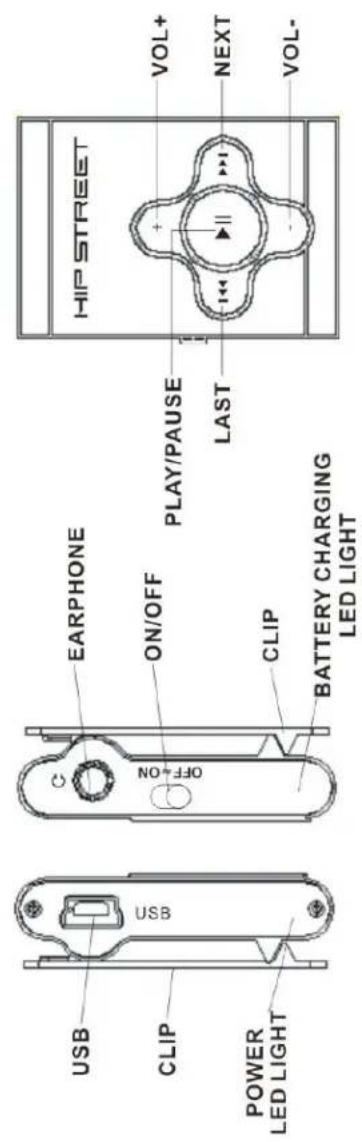
LED Indication
CHARGING THE PLAYER
| Status | LED Indication |
| Power Off LED OFF | |
| Power On LED ON STEADILY | |
| Play LED FLASHING | |
| Pause LED ON STEADILY | |
| Transferring Data LED FLASHING | |
| Battery charging LED FLASHING |
Please use the enclosed USB cable to connect the player to the computer. The LED light will start to flash. 3 hours will be required for initial charging. After the initial charge, it will take 2 hours to charge the player. Please note that the LED light will continue flashing as long as the player is charging, regardless of the charge level.
BASIC FUNCTIONS
Power ON/OFF
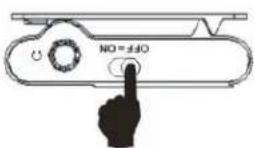
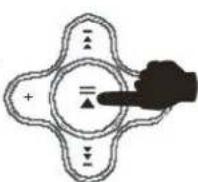
Slide the master power switch to the "on" position, press and hold the Play button for 2 seconds until the LED light turns on. To turn off the player, press and hold the Play button for 2 seconds.
Music Play
Press the Play button to start playing, press it again to pause.
Volume+/Volume-
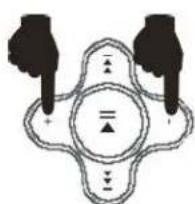
Press or hold the "+" or "-" button to turn up or down the volume during a song.
Volume+
Volume-
Previous Last/Next Song
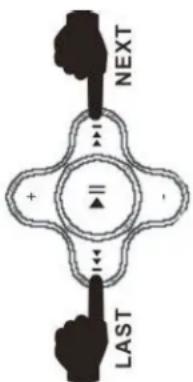
Press the Last button to select the previous song, press the Next button to select the next song.
- Rewind/Fast Forward
During play mode, press and hold the Last or Next button to rewind or fast forward.
- Storing music to MP3 player
-
Connect MP3 Player to PC via USB plug
-
Click "My Computer" to find "Removable Disk" drive
-
Drag MP3 or WMA songs from the music folder to your MP3 player (Removable Disk).
NOTICE:
To save energy, the player will turn off automatically in the Pause mode when not in use for more than 30 seconds.
INSTALLATION
1) Windows ME / Windows 2000 / Windows XP / Windows Vista Installation
For these operating systems, No driver is required because Windows has a built-in driver that will support your unit. Simply plug your device into the USB port and the computer will recognize the player. Next you will see a "Removable Disk" drive in My Computer.
2) Linux 2.4.0 + / Mac 8.6 + Installation
No driver is required for these operating systems. Simply plug the device into the
USB port and the system will automatically find it.
Need assistance? Please call us!
If you encounter any difficulties with this product, please visit our website at www. hipstreetonline.com and review our support section or call us. Our representatives are ready to help you with any questions about your product. We can guide you through connections, first-time use, or any of the features. Just give us a call or send us an email.
Customer & Technical Support: 1-888-4KOBIAN or 1-888-456-2426 Monday through Friday: 8:30am - 5:00pm EST Email: support@hipstreetonline.com
We want you to start enjoying your product right away!

HIP STREET®