
EAC210TS - Air Conditioning EDGESTAR - Free user manual and instructions
Find the device manual for free EAC210TS EDGESTAR in PDF.


| Product Type | Evaporative air cooler (evaporative cooling) |
| Brand | EDGESTAR |
| Model | EAC210TS |
| Usage | Indoor only |
| Power Supply | 110-120 V, 60 Hz |
| Main Functions | Ventilation, evaporative cooling, humidification, air purifying ionization, automatic oscillation |
| Ventilation Modes | Normal/Manual, Natural/Variable, Sleep |
| Fan Speeds | 3 (Low, Medium, High) |
| Integrated Timer | Yes, adjustable by hours (the center digit on the display indicates the hours of operation before automatic shut-off) |
| Water Tank | Large capacity (filling via dedicated door) |
| Filtration | Washable pre-filter + washable fabric water curtain |
| Included Accessories | Remote control, 2 ice packs, user manual |
| Care and Cleaning | Pre-filter: cleaning every 2 weeks to 2 months (vacuum or gentle wash). Water curtain: similar washing. Tank: clean if dirt or deposits. Unplug before any maintenance. |
| Safety | Use only on 110-120 V circuit; unplug before cleaning; do not use flammable liquids; keep fingers and objects away from the internal fan. |
| Warranty | 1 year parts and labor (90 days for labor), for the first purchaser in residential use in the United States. |
Frequently Asked Questions - EAC210TS EDGESTAR
User questions about EAC210TS EDGESTAR
0 question about this device. Answer the ones you know or ask your own.
Ask a new question about this device
Download the instructions for your Air Conditioning in PDF format for free! Find your manual EAC210TS - EDGESTAR and take your electronic device back in hand. On this page are published all the documents necessary for the use of your device. EAC210TS by EDGESTAR.
USER MANUAL EAC210TS EDGESTAR
Evaporative Air cooler - Tower Design
Owner's Manual
This owner's manual provides instructions on safe installation, use, and maintenance.
Please read it carefully and save it for reference.
Thank you Suggestions
Thank you for purchasing an EdgeStar tower air cooler. Rest assured that all EdgeStar products are designed and manufactured to the highest standards. We would like you to be able to fully utilize all features of this portable air conditioner, so please take the time to read this owner's manual in full prior to using the unit.
are a few of the features of this appliance:
- Strong airflow with a quiet motor
Air purifying ionizer function
- Auto tower oscillation function
Large water
Built-in timer
LED display
Water pump with washable fabric water curtain
- Washable pre-filter
Warnings
- Use this unit only on 110-115-120V, 60Hz electrical circuits
View the rating label on the unit for power requirements - Keep all fingers and other foreign objects clear of the internal
fan at all times - Contact EdgeStar Service for all technical support and service
at 866-319-5473
replace it - Service by licensed technicians only
- Do not use flammable liquids or gases around the unit
- Designed for indoor use only
- Disconnect the unit prior to cleaning or service
- Please do not pull the cord to unplug the unit- pull on the plug only
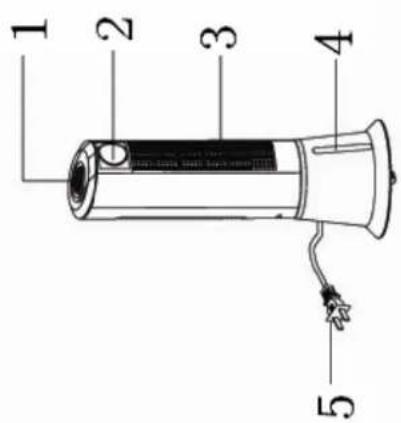
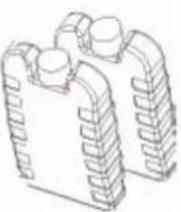
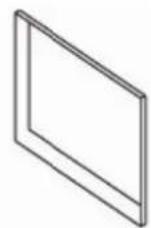
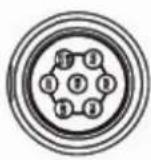
Ice packs (2)
- Owner's manual and other literature
Remote control
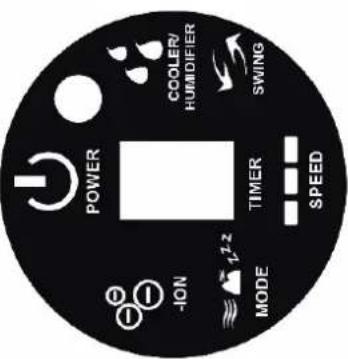
Control Panel and Display
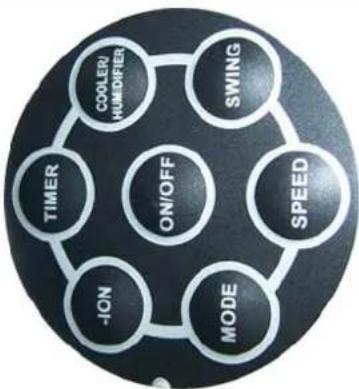
Note: the buttons on the remote control have the same functionality as those on the main control panel
ON/OFF- this button turns the unit on or off
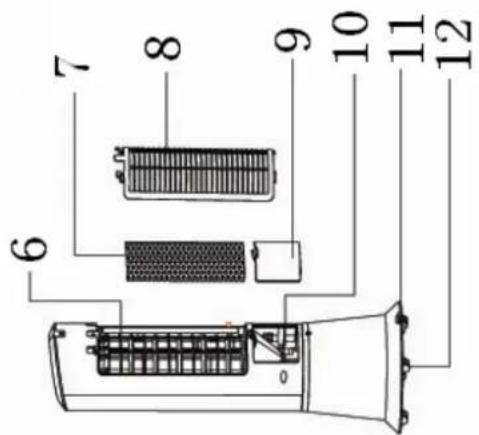
- Control panel
- Display
- Air outlet
4.Water lev
5.Powercon - Air inlet
- Fabric water curtain
- Pacific wall 9. Proflit
- Pre-filter
- Water treatment
- water por 10.W
- Water port 11. Bridge
- Drain plug
- Caster (unit has 4 casters)
| TIMER- each time this button is pressed, the digit in the middle of the display increments up by 1. The digit in the display corresponds to the amount of time (in hours) that the unit will run before shutting itself off. If you do not select a timer setting, the unit will run continuously COOLER/HUMIDIFIER- this button turns on or off the cooling function. When the "COOLER/HUMIDIFIER" light on the control panel is lit, the unit pumps water from its reservoir over the fabric water curtain. As air is drawn past this water, the endothermic effects of evaporation result in cooling SWING- this button turns on or off the oscillation function. When the unit oscillates, the base remains still and the upper part of the tower turns back and forth, directing airflow around the room SPEED- this button adjust the speed. There are three speed settings for airflow. Note that when the unit is initially turned on, it starts on medium speed and changes to low speed automatically MODE- this button toggles the airflow functions. There are three functions: ○ Normal/manual- this mode, represented by three horizontal wavy lines, allows you to manually set the airflow speed ○ Natural/variable- this mode, represented by a mountain, automatically shifts the airflow speeds between the three settings ○ Sleep- this mode, represented by "ZZZ", operates like the Normal/manual mode, but the airflow speed gradually decreases over a period of 1-2 hours, and the unit eventually turns itself off. The higher the initial airflow setting, the longer the unit runs before shutting off, and the greater the different airflow speeds the unit cycles through prior to shutting off | - - - - - - - - - - - - - - - - - - - - - - - - - - - - - - - - - - - - - - - - - - - - - - - - - - - - - - - - - - - - - - - - - - - - - - - - - - - - - - - - - - - - - - - - - - - - - - - - - - - - - Unpacking and first using the unit - Carefully open the box(es) and take the unit out. Remove all packing/plastic bags, etc. - Set the unit upright - Plug the unit in - Open the water port and fill the unit with water. Do not over-fill the unit. - Close the water port door - Turn the unit on with the ON/OFF button and select your desired settings Note: the unit includes two ice boxes. To use them, fill them with water and freeze them. Then put them into the unit's water reservoir. You may use them one at a time or concurrently. Draining the unit - If you ever need to drain the unit, first make sure the unit is in an appropriate place for drainage - Remove the drain plug from the rear of the unit - Allow the water to drain out - Reinstall the drain plug Cleaning - Pre-filter- depending on the environment, the pre-filter may require cleaning every two weeks to every two months or more. The easiest way to clean the pre-filter is to vacuum it with a brush attachment. If the pre-filter is exceptionally dirty, you may remove it from the unit (unplug the unit first) and wash it in a mild soap and water solution. Rinse it thoroughly and allow it to dry completely before reinstalling. |
- Fabric water curtain- this should also be cleaned every two weeks to every two months, again depending upon the environment. Unplug the unit, remove the pre-filter, and gently remove the fabric water curtain (it should pull off the fastening strips). Wash it in a mild soap and water solution. Rinse it thoroughly and allow it to dry completely before reinstalling.
- Water tank- if the tank becomes dirty, mildewy, or acquires hard water deposits, unplug the unit, remove the water port door and carefully clean the inside of the tank with a soft cloth and a mild soap and water solution. Rinse out the solution and drain the unit as best you can, but take care not to get any of the unit's electronics wet.
- Exterior of the unit- unplug the unit. Carefully wash it with a mild soap and water solution and a soft cloth. Dry the unit with a soft cloth.
Limited Warranty
This EdgeStar product is warranted to be free from defective workmanship and materials for the first year following the date of original purchase. Replacement parts will be supplied free of charge for the first year following the date of original purchase. Labor will be performed free of charge for the first 90 days following the date of original purchase.
WHAT IS COVERED:
This warranty applies to the original purchaser only, and only covers defects in workmanship experienced during operation of the product under normal service, maintenance, and usage conditions. This warranty applies to the purchase and use of this product in residential settings within the United States of America.
WHAT IS NOT COVERED:
The following limitations apply to the coverage of this warranty:
- Optional accessories, attachments, and appearance items are excluded from warranty coverage, as is shipping damage, and any damage caused by
Contact EdgeStar for troubleshooting assistance and warranty service authorization at 1-866-319-5473. Please have your order receipt available to confirm the date of purchase.
Once an EdgeStar authorized representative has confirmed that your product is eligible for warranty service, the product must be returned to an EdgeStar authorized repair facility.
The purchaser is solely responsible for prepaying all shipping related costs to and from the repair facility.
EdgeStar is not responsible for damage resulting from shipper mishandling or improper packaging.
THIS WARRANTY IS IN LIEU OF ANY OTHER WARRANTY, EXPRESS OR IMPLIED, INCLUDING WITHOUT LIMITATION, ANY WARRANTY OF MERCHANTABILITY OR FITNESS FOR A PARTICULAR PURPOSE. TO THE EXTENT ANY IMPLIED WARRANTY IS REQUIRED BY LAW, IT IS LIMITED IN DURATION TO THE EXPRESS WARRANTY PERIOD ABOVE. NEITHER THE MANUFACTURER NOR ITS DISTRIBUTORS SHALL BE LIABLE FOR ANY INCIDENTAL, CONSEQUENTIAL, INDIRECT, SPECIAL, OR PUNITIVE DAMAGES OF ANY NATURE, INCLUDING WITHOUT LIMITATION, LOST REVENUES OR PROFITS, OR ANY OTHER DAMAGE WHETHER BASED IN CONTRACT, TORT, OR OTHERWISE. SOME STATES DO NOT ALLOW THE EXCLUSION OF INCIDENTAL OR CONSEQUENTIAL DAMAGES, SO THE ABOVE EXCLUSION MAY NOT APPLY TO YOU. THIS WARRANTY GIVES YOU SPECIFIC LEGAL RIGHTS. YOU MAY HAVE OTHER RIGHTS THAT VARY FROM STATE TO STATE.

EdgeStar
For information on EdgeStar and to view our full line of products, please visit our website:
http://www.edgestar.com
EdgeStar Products
Box 81336
Austin, Texas 78708-1336
Toll Free: 1-866-319-5473
Brand : EDGESTAR
Model : EAC210TS
Category : Air Conditioning