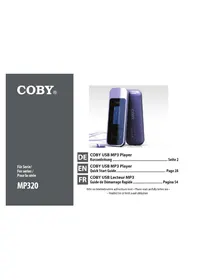
MP320 - Mp3 player COBY - Free user manual and instructions
Find the device manual for free MP320 COBY in PDF.



| Brand | Coby |
| Model | MP320 |
| Product Type | MP3 Player |
| Memory | Internal flash memory |
| Supported Audio Formats | MP3, WMA |
| Supported Tags | ID3, Windows Media |
| PC Interface | USB 2.0 Hi-speed (MSC) |
| Supported Operating Systems | Windows 7/Vista/XP, Mac OS X |
| Audio Output | 3.5 mm stereo headphone jack |
| Power | Rechargeable lithium-polymer battery |
| Battery Life | Up to 12 hours (MP3 128 kbps playback) |
| Main Functions | Music playback, FM radio, file browser, custom settings |
| Equalizer | Normal, Rock, Jazz, Classic, Pop, Bass |
| Repeat Modes | Normal, Repeat One, Repeat All, Shuffle Repeat, Preview |
| Volume Control | Volume + and - buttons |
| Display | LCD Screen |
| Included Software | Coby Media Manager (CMM) |
| Data Storage Function | Yes (removable disk mode) |
| Cleaning | Damp cloth, disconnect before cleaning |
| Safety | Do not expose to water or heat, do not open the case |
| Spare Parts | Use identical parts recommended by the manufacturer |
| Repairability | Refer to qualified technician |
| General Information | Manual available for download, technical support by phone |
Frequently Asked Questions - MP320 COBY
User questions about MP320 COBY
0 question about this device. Answer the ones you know or ask your own.
Ask a new question about this device
Download the instructions for your Mp3 player in PDF format for free! Find your manual MP320 - COBY and take your electronic device back in hand. On this page are published all the documents necessary for the use of your device. MP320 by COBY.
USER MANUAL MP320 COBY
Coby Electronics Technical Support
E-Mail cobysupport@digitest.de
Internet www.digital.de/coby-support
Congratulations on your purchase of a Coby MP3 player. This manual is designed to help you easily set up and begin using your new player right away. Please read this manual carefully and retain it for future reference.
Package Contents
Please make sure that the items shown below are included in the package. Should an item be missing, please contact the local retailer from which you purchased this product.
- MP3 player
Professional stereo earphones
Instruction manual & documentation

This package may contain plastic bags or other materials that pose a hazard to children. Be sure to safely dispose of all packing materials after opening.
Features
Plays MP3 and WMA digital music files
Easy-to-use controls—get started playing your music right away
Coby Media Manager software included
+ Mobile data storage function
USB 2.0 Hi-speed for fast file transfers

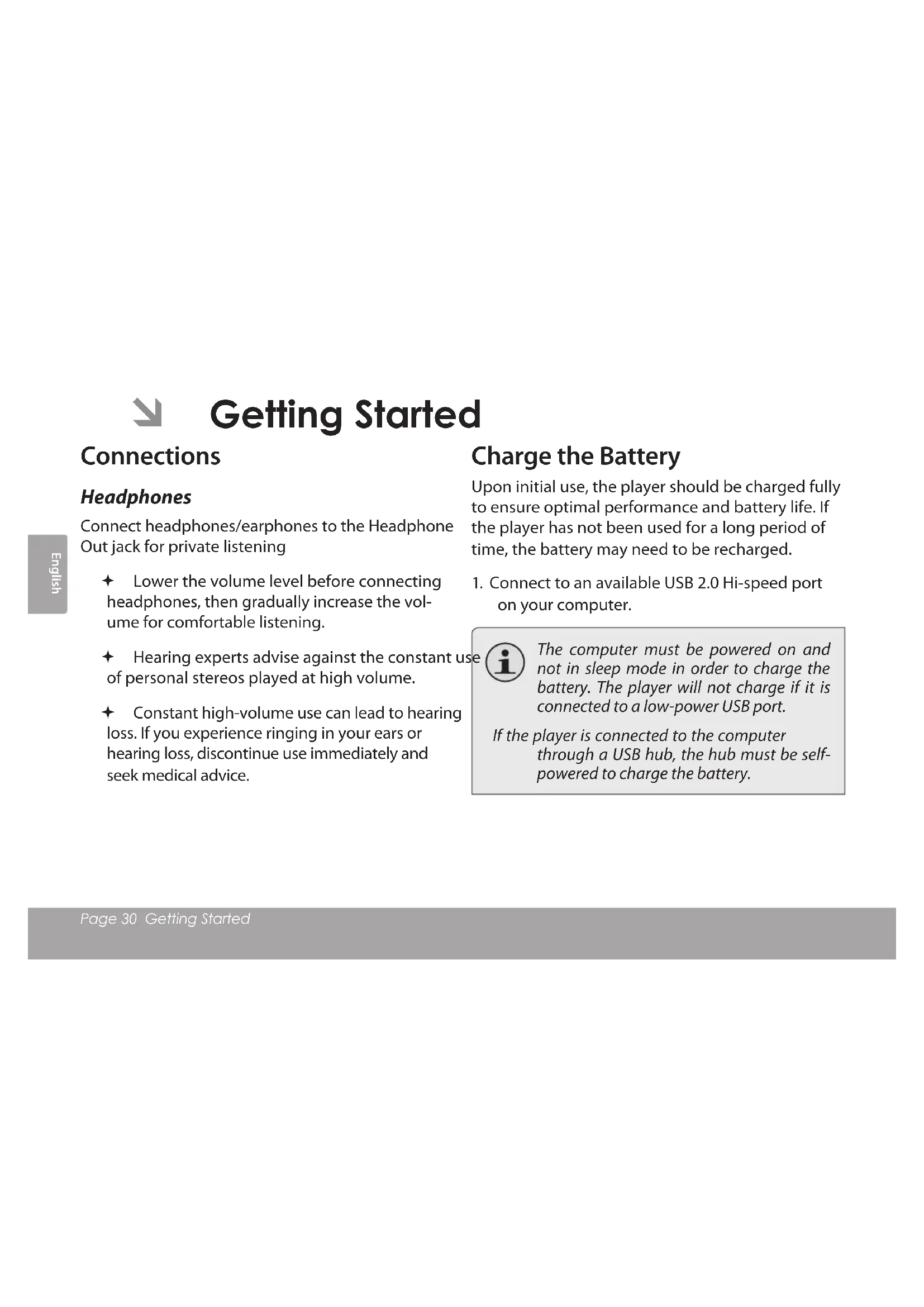
Controls at a Glance
| 1. USB Port | |
| 2. Display screen | |
| 3. Play/Pause/Stop | → |
| 4. Volume Down | - |
| 5. Volume Up | + |
| 6. Previous/Reverse | < |
| 7. Next/Forward | > |
| 8. 3.5mm Headphone Out | |
| 9. Power/Return | |
| 10. Clip | |
| 11. Reset | |

Getting Started
Connections
Headphones
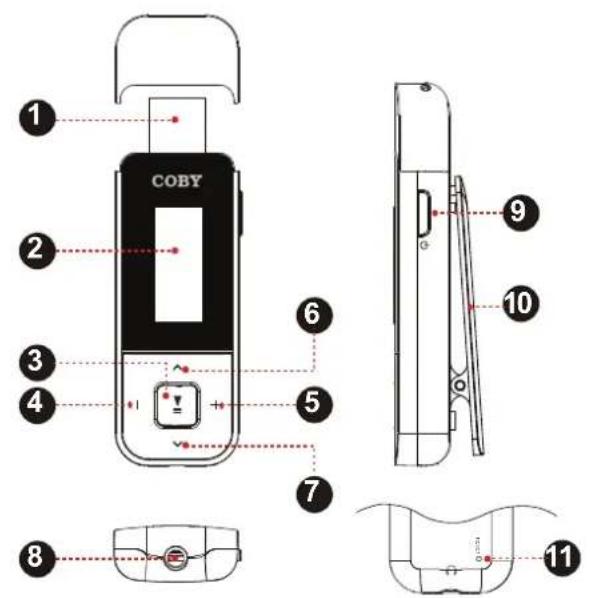
Connect headphones/earphones to the Headphone Out jack for private listening
Lower the volume level before connecting headphones, then gradually increase the volume for comfortable listening.
Hearing experts advise against the constant use of personal stereos played at high volume.
Constant high-volume use can lead to hearing loss. If you experience ringing in your ears or hearing loss, discontinue use immediately and seek medical advice.
Charge the Battery
Upon initial use, the player should be charged fully to ensure optimal performance and battery life. If the player has not been used for a long period of time, the battery may need to be recharged.
- Connect to an available USB 2.0 Hi-speed port on your computer.

The computer must be powered on and not in sleep mode in order to charge the battery. The player will not charge if it is connected to a low-power USB port.
If the player is connected to the computer through a USB hub, the hub must be self-powered to charge the battery.

The battery used in this device may present a fire or chemical burn if mistreated. Do not disassemble, incinerate, or heat the battery. Do not leave the battery in a place subject to direct sunlight, or in a car with its windows closed. Do not connect the player to a power source other than that which is indicated here or on the label as this may result in the risk of fire or electric shock.
Resetting the Player
Reset the player if it should freeze and not respond or otherwise malfunction.
- Disconnect your player if it is connected to a computer.
- Use a paper clip to gently press the
button located on the rear of the player.
Power On/Off
To turn your player on, press and Hold . The screen will display "COBY".
To turn your player off, press and hold for at least 3 seconds.

Main Menu
The Main Menu gives you access to the different function modes of your player.
To select a function mode in the Main Menu, press to highlight the mode, and then press confirm.
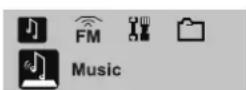
Music
Play your digital MP3 or WMA music files.
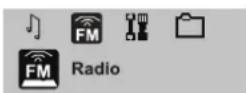
Radio
Listen to FM radio broadcasts.
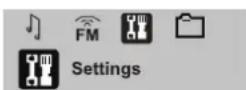
Setting
Set your player's internal options.
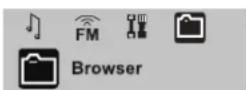
Browser
Play, view, or delete files from your player.

Music Mode
Enter Play Music mode from the Main menu to play your MP3 or WMA music files.

The player will enter Play Music mode automatically when it is turned on.

Please refer to the section "Getting Started" to learn how to get music onto your player.
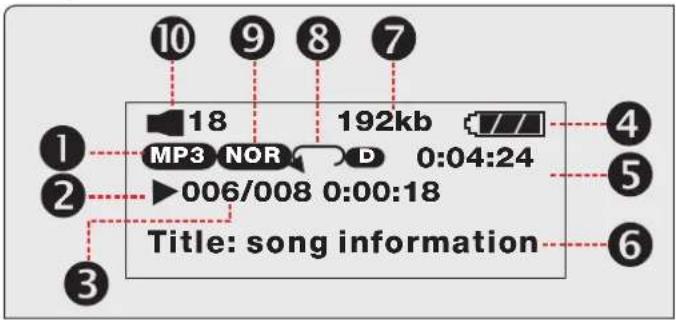
Play Music Screen
- File Type (MP3/WMA
- Playback Status Indicator (Play/Pause/Stop)
- Current track / Total tracks
- Battery Level Indicator
- Elapsed Time
- Song Title / File name
- Bitrate
- Repeat Mode Indicator
- Equalizer Indicator
- Volume Level
Play Music Controls
Use the following controls during music playback.
| KeyFunction | |
| Press | Start/Resume music playback. During playback, press to pause playback. |
| Press < | Play the previous track. |
| Press > | Play the next track. |
| Hold < | Scan in reverse quickly through the current track. |
| Hold > | Scan forward quickly through the current track. |
| Press - | Decrease the volume level. |
| Press + | Increase the volume level. |
Repeat Mode
The repeat mode options can be changed in the Settings mode menu. Please refer to the "Setting Mode" section of this manual for more information.

Browser Mode
Enter Browser mode to view, play, or delete files on your player.
You can also connect your player to a computer to easily manage your file library.
Browser Controls
A directory tree will be displayed on-screen upon entering Browser mode from the Main Menu.
Use the following controls in Browser mode.
| KeyFunction | |
| Press | If a folder is selected, the folder's contents will be displayed. If a file is selected, an option box will be displayed: • Select “Play Now” to play the selected file. • Select “Delete?” to delete the selected file, and then select “Yes” to confirm the deletion. |
| Press | Return to Main Menu. |
| KeyFunction | |
| Press > | Select the next file or folder (down). |
| Press < | Select the previous file or folder (up). |

Setting Mode
Enter SETTING mode from the Main Menu to change your player's internal option settings.
To select an option, press or . To confirm and enter, press
To exit the Setting Menu, p
| ItemDescription | |
| Equalizer | Set a digital equalizer preset. The options are Normal, Pop, Rock, Classical, Jazz, and Bass. |
| Repeat Mode | Set a Repeat Mode option. The options are No Repeat, one, DirNormal, DirRep, All, RandomAll, Normal, Repeat One, Repeat All, Shuffle Repeat, Dir Normal, Dir All Repeat, Dir Shuffle Repeat. |
| Contrast Set the contrast level of the display. | |
| Backlight | Set the backlight option to change the duration of time (in seconds) that the backlight will remain on after a key press. A setting of "Always On" will keep the backlight on continuously. |
| ItemDescription | |
| Power Set | Set the Power Set option to change the duration of time (in minutes) that the player will remain on when it is idle. A setting of “Disable” will turn this power saving feature off. |
| Language Set the | Language that the menus appear in. |
| Version View your | player’s firmware information. |
| Info | View your player’s memory information. |

Install Coby Media Manager
Please install and use the "Coby Media Manager" (CMM) software provided on the player. Using the CMM software is the easiest way to:
Transfer (sync) media files to the player
Convert video and audio files to a format compatible with your player
Keep your player's software up to date
Browse and play your media library on your computer.

Coby Media Manager requires a computer with Microsoft Windows 7/Vista/XP or Macintosh OS X, 100MB hard disk space available, and a USB 1.1 port (USB 2.0 recommended for high speed transfers).
Microsoft Windows
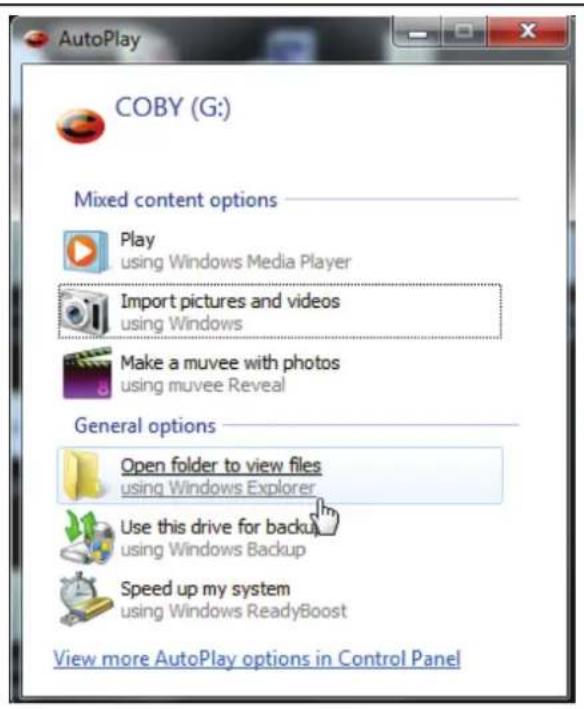
- Connect the player to a computer with the USB cable provided. Windows will display an "Autplay" screen. Click "Open device to view files using Windows Explorer".
- Double-click the player icon to view the files stored on the player.
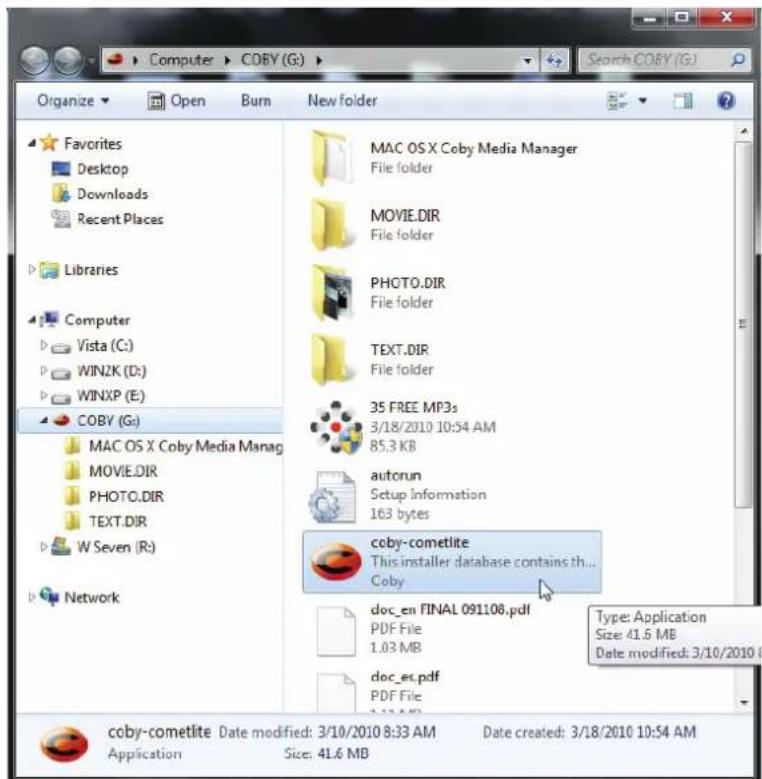
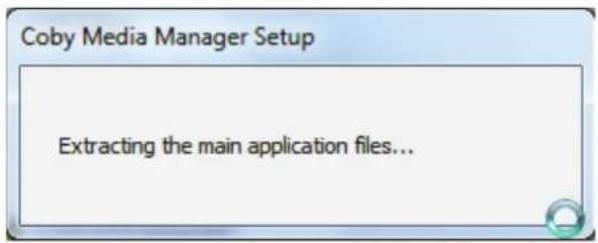
- Find and double-click the file "coby-cometlite" and then wait for the system to extract the main application files.
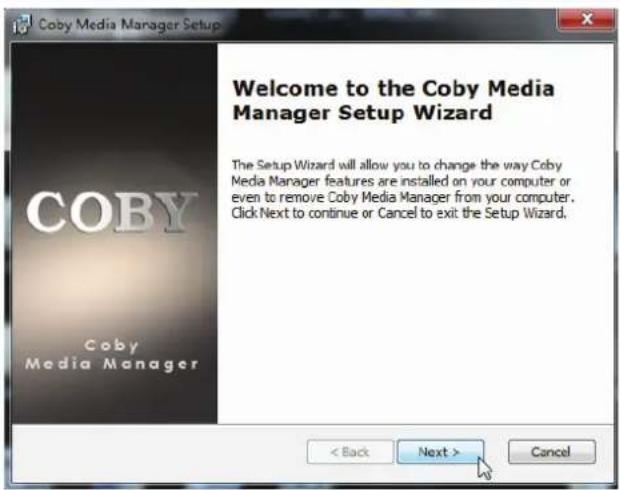
- The setup wizard will launch automatically once the files have been extracted. Follow the on-screen instructions to complete the installation process.
Macintosh OS X
- Connect the player to a computer with the USB cable provided.
- Open a finder window. Click on the 'Removable Disk" icon located on the left side of the finder window to view the files stored on the player.
- Open the "MAC OS X Coby Media Manager" folder to view its contents. Find and then double-click the file "coby-mediator manager.dmg".
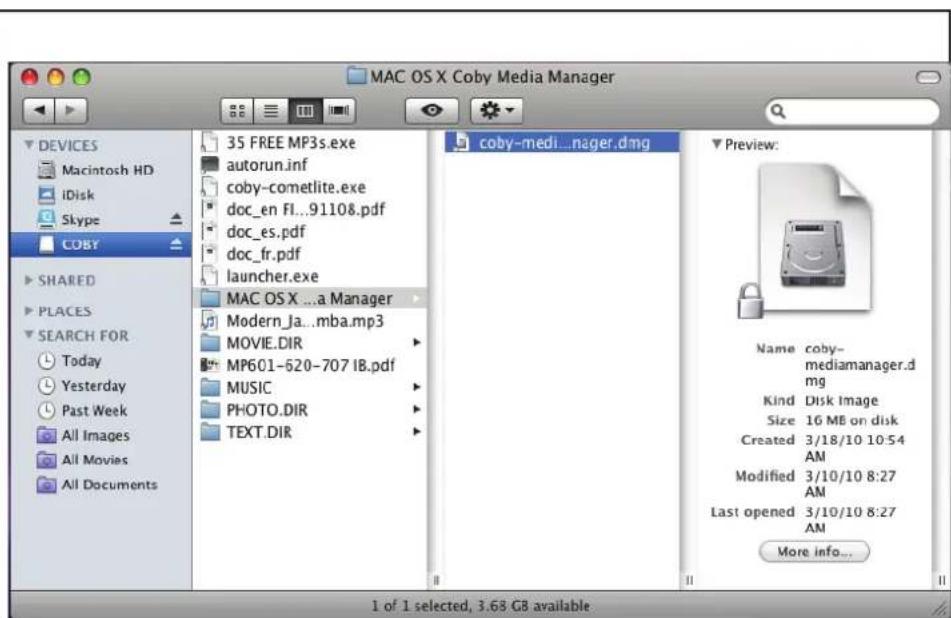
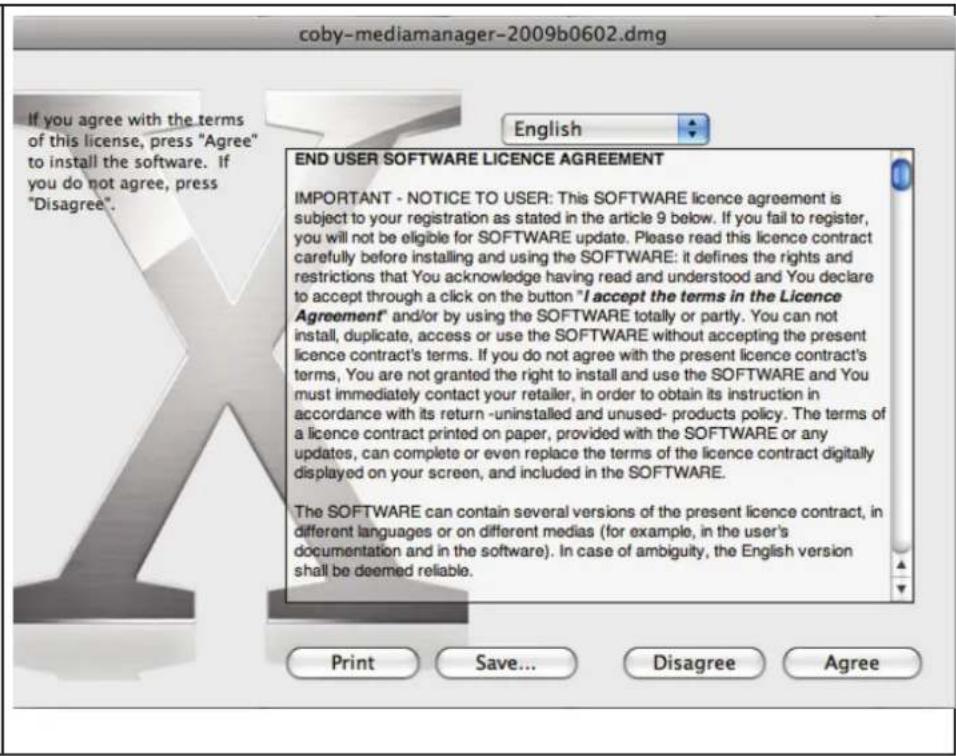
- The setup wizard will launch. Follow the on-screen instructions to complete the installation process.

Transfer Media to the Player
Use CMM to transfer media from a computer to the player.

The instruction manual for CMM can be found on your player. You may need to download and install the free Acrobat PDF reader from Adobe at www.adobe.com/go/getreader/ in order to view the instruction manual.
- Connect the player to the computer with the USB cable provided.
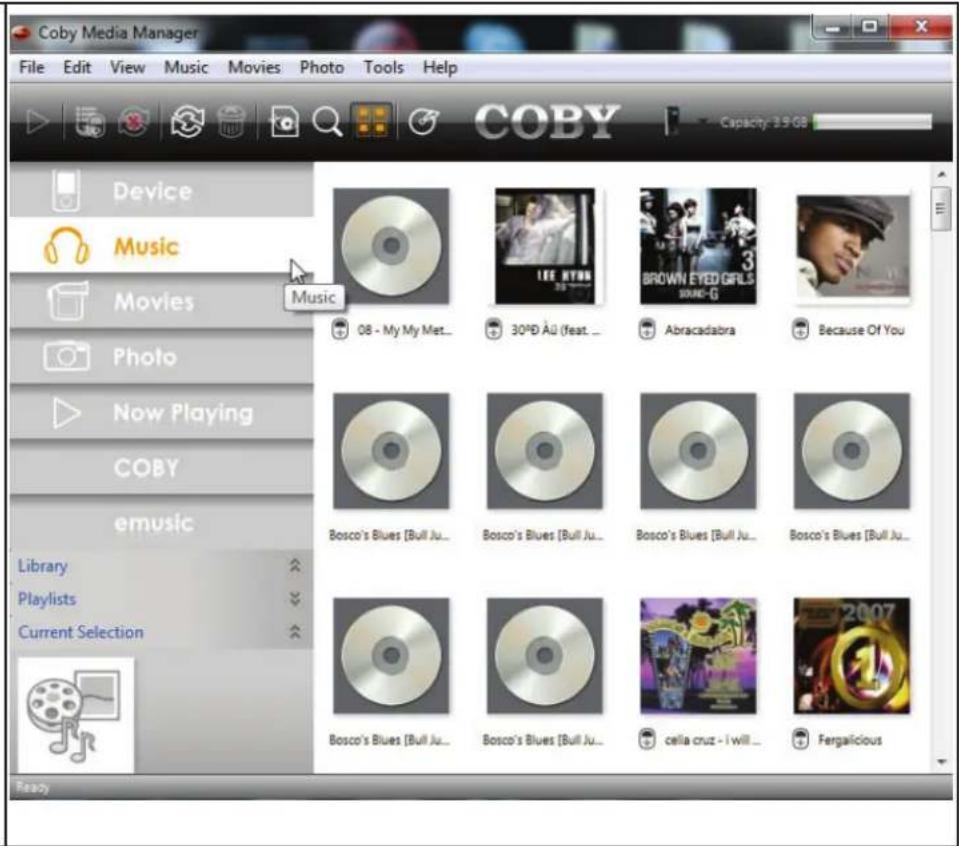
- Start the CMM program.

Coby Media Manager
- To find music, movies, and photos on the computer, click on the Music, Movies, or Photo tabs located in the left panel.
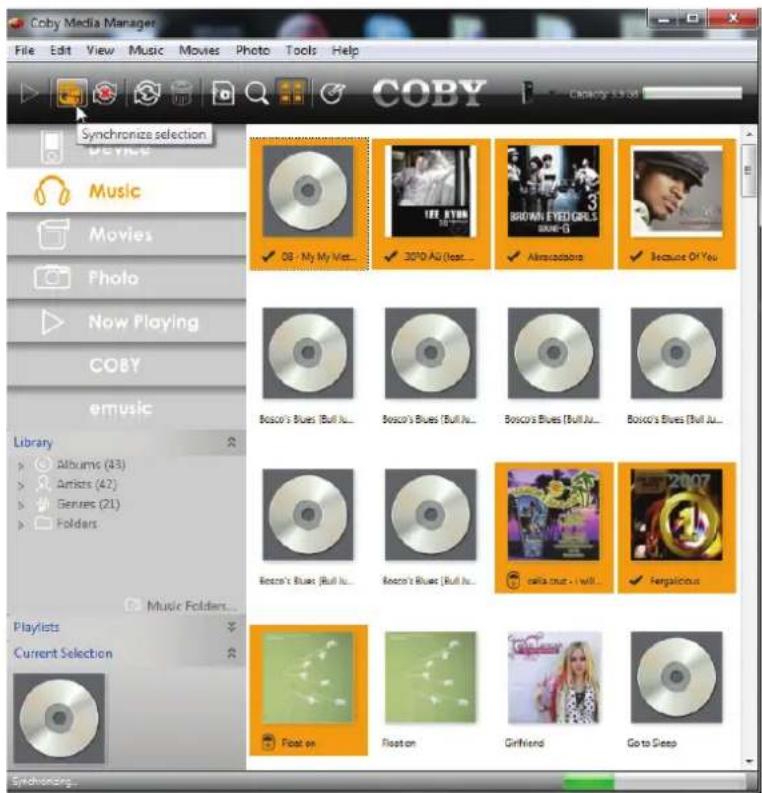
- Click to select the files that you want to synchronize, then click the "Synchronize selection" button located at the top of the screen.
Tip
In Windows, hold "Ctrl" or "Shift" on the keyboard while clicking with the mouse to select multiple files.
In Mac OS X, hold "Command" or "Shift" while clicking with the mouse to select multiple files.

Specifications
Please visit www.cobygermany.de for the latest product information. Design, specifications, and manual are subject to change without notice.
| Memory Integrated | Flash Memory |
| Audio Formats MP3, | WMA |
| Song Info Sup-port | ID3, Windows Media |
| PC Interface USB 2.0 | Hi-speed (MSC) |
| OS Support Windows | 7/Vista/XP Macintosh OS X |
| Audio Output 3.5mm | Stereo Headphone |
| Power Rechargeable | Li-poly battery |
| Music Play Time 12 | hours* |
- Music play time is an estimated value based on playing an MP3 encoded at 128 kbps. Actual play time may vary depending on encoding method used and other factors.

Troubleshooting & Support
If you have a problem with this device, please check our website at www.digitaltest.de/coby-support for Frequently Asked Questions (FAQ) and product updates. If these resources do not resolve the problem, please contact Technical Support.
Coby Electronics Technical Support
E-Mail cobysupport@digitest.de
Internet www.digital.de/coby-support
Hotline Monday to Friday:9:00-17:00
Germany 0800-1010345
Austria 0800-022562
Switzerland 0800-001622
UK 0800-6121667
France 0800-940123
The player does not turn on.
Ensure that the player is fully charged. Try charging the player 2~3 hours.
Reset the player (use a paper clip to gently press the Reset button on the rear of the player) and try again.
Ensure that the player's memory capacity is not full.
There is no sound during playback.
Check the volume level.
Ensure that the headphones are attached securely to the player.
The buttons do not work.
Reset the player (use a paper clip to gently press the Reset button on the rear of the player) and try again.
I cannot transfer files to the player.
Ensure that your computer is running a supported operating system.
Ensure that the USB port is securely attached to the computer.
If you have connected the player through a USB hub, try connecting the player directly to your computer.
the sound quality of the music is poor.
Try playing the file on your computer. If the sound quality is still poor, try downloading the file again or re-encoding the file yourself.
Ensure that the bit rate of the file is not too low. The higher the bit rate of the file, the better it will sound. The minimum recommended bitrate is 128kbps for MP3s and 96kbps for WMAs.
Try lowering the volume of the player.
Ensure that the headphones are attached securely to the player.
The player will not play my music file.
Ensure that the file is in a compatible format.
The file may be copy-protected and you no longer have authorization to play this file. If you feel this is in error, please contact the service from which you downloaded the file.
The player has malfunctioned.
Try resetting your player (remove and replace the battery).

Safety Notices

CAUTION
WARNING: SHOCK HAZARD. DO NOT OPEN. AVIS: RISQUE DE CHOC ELECTRIQUE. NE PAS OUVRIR

CAUTION: TO REDUCE THE RISK OF FIRE AND ELECTRIC SHOCK, DO NOT REMOVE THE COVER (OR BACK) OF THE UNIT. REFER SERVICING ONLY TO QUALIFIED SERVICE PERSONNEL.

The lightning flash with arrowhead symbol within an equilateral triangle is intended to alert the user to the presence of uninsulated "dangerous voltage" within the product's enclosure that may be of sufficient magnitude to constitute a risk of electric shock.

The exclamation point within an equilateral triangle is intended to alert the user to the presence of important operation and servicing instructions in the literature accompanying the appliance.

For recycling or disposal information about this product, please contact your local authorities or the Electronics Industries Alliance: www.eiae.org.
For Customer Use:
Enter below the serial number that is located on the rear of the unit. Retain this information for future reference.
Model No.
Serial No.
WARNING: To prevent fire or shock hazard, do not expose this device to rain or moisture. Dangerous high voltage is present inside the enclosure. Do not open the cabinet.
Protect your hearing: Hearing experts advise against the constant use of personal stereos played at high volume. Constant exposure to high volumes can lead to hearing loss. If you should experience ringing in the ears or hearing loss, discontinue use and seek medical advice.
Note: If the product suddenly has no response or powers off, an electrostatic discharge may be the cause. In this circumstance, please follow the procedures below for recovery:
- Remove the battery and wait 3 seconds.
- Replace the battery and turn the unit on again.
FCC Statement:
This device complies with Part 15 of the FCC Rules. Operation is subject to the following two conditions:
(1) This device may not cause harmful interference, and
(2) This device must accept any interference received, including interference that may cause undesired operation.
Note: This equipment has been tested and found to comply with the limits for Class B digital devices, pursuant to Part 15 of the FCC rules. These limits are designed to provide reasonable protection against harmful interference in a residential installation. This equipment generates, uses and can radiate radio frequency energy and, if not installed and used in accordance with the instructions, may cause harmful interference to radio communications. However, there is no guarantee that interference will not occur in a particular installation. If this equipment does cause harmful interference to radio or television reception, which can be determined by turning the equipment off and on, the user is encouraged to try to correct the interference by one or more of the following measures:
- Reorient or relocate the receiving antenna.
- Increase the separation between the equipment and receiver.
- Connect the equipment into an outlet on a circuit different from that to which the receiver is connected.
- Consult the dealer or an experienced radio/TV technician for help
Use of shielded cable is required to comply with Class B limits in Subpart B of Part 15 of the FCC rules.
Do not make any changes or modifications to the equipment unless otherwise specified in the manual. If such changes or modifications should be made, you could be required to stop operation of the equipment.
CE Certification:
This unit passed the CE certification

CE Declaration of Conformity:
The declaration of conformity for this product can be found in the download section of the individual product on www.cobygermany.de to download.
Important Safety Instructions
- Read Instructions: All the safety and operating instructions should be read before the product is operated.
- Retain Instructions: The safety and operating instructions should be retained for future reference.
- HeedWarnings: All warnings on the product and in the operating instructions should be adhered to.
- Follow Instructions: All operating and usage instructions should be followed.
- Cleaning: Unplug this product from the wall outlet before cleaning. Do not use liquid cleaners or aerosol cleaners. Use a damp cloth for cleaning.
- Attachments: Use only attachments recommended by the manufacturer. Use of other attachments may be hazardous.
- Water and Moisture: Do not use this product near water (e.g., near a bath tub, washbowl, kitchen sink, laundry tub, in wet basements, or near a swimming pool and the like).
- Ventilation: Slots and openings in the cabinet are provided for ventilation to ensure reliable operation of the product and to protect it from overheating. These openings should never be blocked by placing the product on a bed, sofa, rug, or other similar surface. This product should not be placed in a built-in installation such as a bookcase or rack unless proper ventila
tion is provided or the manufacturer instructions have been adhered to.
- Power Sources: This product should be operated only from the type of power source indicated on the rating label. If you are not sure of the type of power supply to your home, consult your product dealer or local power company. For products intended to operate from battery power or other sources, refer to the operating instructions.
- Overloading: Do not overload wall outlets, extension cords, or integral convenience receptacles as this can result in a risk of fire or electric shock.
- Object and Liquid Entry: Never push objects of any kind into this product through openings as they may touch dangerous voltage points or shout-out parts that could result in a fire or electric shock. Never spill liquid of any kind on the product.
- Servicing: Do not attempt to service this product yourself as opening or removing covers may expose you to dangerous voltage or other hazards. Refer all servicing to qualified service personnel.
- Damage Requiring Service: Unplug this product from the wall outlet and refer servicing to qualified service personnel under the following conditions: a) when the power-supply or plug is damaged; b) if liquid has been spilled or if objects have fallen into the product; c) if the product has been exposed to rain or water; d) if
the product does not operate normally by following the operating instructions. Adjust only those controls that are covered by the operating instructions as improper adjustment of other controls may result in damage and will often require extensive work by a qualified technician to restore the product to its normal operation; e) if the product has been dropped or damaged in any way; f) when the product exhibits a distinct change in performance—this indicates a need for service.
- Replacement Parts: When replacement parts are required, be sure that your service technician has used replacement parts specified by the manufacturer or have the same characteristics as the original part. Unauthorized substitutions may result in fire, electric shock, or other hazards.
- Safety Check: Upon completion of any service or repairs to this product, ask the service technician to perform safety checks to ensure that the product is in proper operating condition.
- Heat: The product should be situated away from heat sources such as radiators, heat registers, stoves, or other products (including amplifiers) that produce heat.
Legal and Trademark Notices
Coby is a registered trademark of Coby Electronics Corporation. All other trademarks and logos are property of their respective owners unless indicated otherwise.

Merci
Adresse Coby Electronics Technical Support
Courriel cobysupport@digitest.de
Web www.digital.de/coby-support
Telephone Du lundi au vendredi: 9:00 - 17:00
Coby is a registered trademark of Coby Electronics Corporation. Printed in China.
- COBY ELECTRONICS TECHNICAL SUPPORT
- PACKAGE CONTENTS
- FEATURES
- CONTROLS AT A GLANCE
- GETTING STARTED
- CONNECTIONS
- HEADPHONES
- CHARGE THE BATTERY
- RESETTING THE PLAYER
- POWER ON/OFF
- MAIN MENU
- MUSIC
- RADIO
- SETTING
- BROWSER
- MUSIC MODE
- PLAY MUSIC CONTROLS
- REPEAT MODE
- BROWSER MODE
- BROWSER CONTROLS
- SETTING MODE
- INSTALL COBY MEDIA MANAGER
- MICROSOFT WINDOWS
- MACINTOSH OS X
- TRANSFER MEDIA TO THE PLAYER
- TIP
- SPECIFICATIONS
- TROUBLESHOOTING & SUPPORT
- THE PLAYER DOES NOT TURN ON
- THERE IS NO SOUND DURING PLAYBACK
- THE BUTTONS DO NOT WORK
- I CANNOT TRANSFER FILES TO THE PLAYER
- THE SOUND QUALITY OF THE MUSIC IS POOR
- THE PLAYER WILL NOT PLAY MY MUSIC FILE
- THE PLAYER HAS MALFUNCTIONED
- SAFETY NOTICES
- CAUTION
- FOR CUSTOMER USE
- FCC STATEMENT
- CE CERTIFICATION
- IMPORTANT SAFETY INSTRUCTIONS
- LEGAL AND TRADEMARK NOTICES
- MERCI
- ADRESSE COBY ELECTRONICS TECHNICAL SUPPORT
Brand : COBY
Model : MP320
Category : Mp3 player