Aeron - Office chair HermanMiller - Free user manual and instructions
Find the device manual for free Aeron HermanMiller in PDF.



| Product type | Ergonomic office chair |
| Brand | Herman Miller |
| Model | Aeron |
| Seat and back material | Pellicle suspension (stretched mesh) |
| Frame | Aluminum |
| Seat height | Approximately 38 to 51 cm (adjustable) |
| Seat width | Approximately 50 cm |
| Seat depth | Approximately 40 cm |
| Backrest height | Approximately 50 cm |
| Weight | Approximately 18 kg |
| Available adjustments | Seat height, tilt tension, forward tilt, tilt limiter, armrest height, armrest angle, lumbar support thickness and height, PostureFit support, footrest height |
| Tilt tension | Adjustable via rotary knob |
| Tilt limiter | Lockable in forward or horizontal position |
| Armrests | Height-adjustable and pivoting |
| Lumbar support | Adjustable in height and thickness (removable reversible cushion) |
| PostureFit | Adjustable sacral support (engage/disengage) |
| Footrest | Optional, height adjustable |
| Care and cleaning | Clean the Pellicle suspension with a damp cloth and mild soap. Do not use abrasive products. |
| Safety | Five-star base for stability. Regularly check the tightness of screws. |
| Spare parts and repairability | Parts available through authorized Herman Miller dealers. Repair possible by a qualified technician. |
| Warranty | Manufacturer's 12-year warranty (subject to conditions) |
Frequently Asked Questions - Aeron HermanMiller
User questions about Aeron HermanMiller
0 question about this device. Answer the ones you know or ask your own.
Ask a new question about this device
Download the instructions for your Office chair in PDF format for free! Find your manual Aeron - HermanMiller and take your electronic device back in hand. On this page are published all the documents necessary for the use of your device. Aeron by HermanMiller.
USER MANUAL Aeron HermanMiller
Paddle-shaped lever on right side
HSINON3
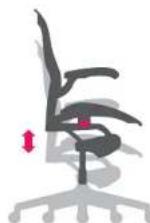
To raise: While lifting your weight off chair, pull lever up.
To lower: While seated, pull lever up.
Adjust to fit height of worksurface or keyboard, if possible. Feet should rest flat on floor or footrest. Avoid dangling legs, which puts pressure on and restricts blood flow in the back of thighs.
Kinemat® Tilt Tension
Long stem on right side with knob
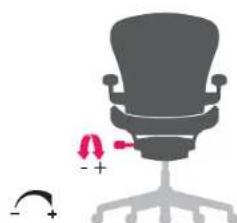
To increase tension: While seated, turn knob forward (clockwise, toward + sign).
To decrease tension: While seated, turn knob backward (anti-clockwise, toward - sign).
Depending on desired tilt resistance, a number of turns may be required.
Increased tilt tension provides more stability and back support while reclining. Too much resistance makes the chair feel stiff. Depending on weight and preference, different people will require different levels of tilt resistance.
Arm Height
Lever on base of arm support
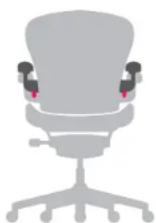
To raise or lower arm: While seated, lift lever to unlock. Grasp base of arm support and raise or lower to desired height. Lower lever to lock.
Arm Angle
End of each arm
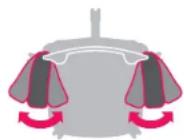
To swing arms in or out: While seated, grasp end of chair arm and move it left or right.
Adjust height of each chair arm so your arms are supported. This helps take weight off your shoulders.
Adjusting arm angle can help support different types of work and shifts in posture. Swing chair arms inward for support while keyboarding. Swing arm out to support use of computer mouse.
Forward Tilt
Front lever on left side
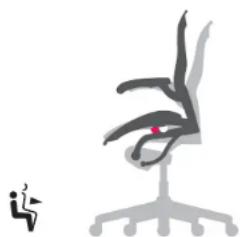
To position chair forward: Lean back and pull lever all the way up. Lean forward.
To resume horizontal position: While seated, push lever all the way down. Lean back.
Normally, forward tilt position is used with increased chair height. This relaxes the bend of your waist, knees, and ankles. To support back, set tilt limiter after assuming forward position.
Tilt Limiter
Rear lever on left side
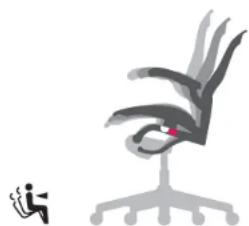
To limit tilt range: Recline as far as you like. Move lever up to define limit of recline. You can still move forward. Readjust as necessary.
To release tilt limiter: Lean forward, press lever down.
If you want to sit in an upright position, set the tilt limiter when the seat is in a horizontal or forward position.
Lumbar Depth
Thick pad on back of chair
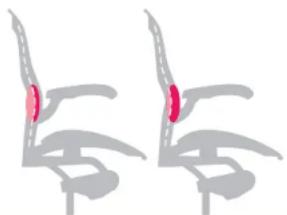
To adjust depth: Lift lumbar support pad out of its track in back of chair. Flip it over; replace. One side of support pad is thicker than the other side.
Lumbar Height
Thick pad on back of chair
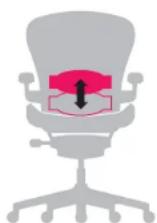
To adjust height: While seated, reach behind chair with both hands to grasp lumbar support pad. Raise or lower to desired position within adjustment track.
Switch between thick and thin sides to determine desired amount of support.
Typically, placement is just above your belt line.
PostureFit Adjustment
Knob on right side of chair

To engage: While seated, turn knob forward (clockwise) until it stops. Then turn knob backward (counterclockwise) until you find the support that feels right for you.
To disengage: While seated, turn knob backward (counterclockwise).
Note: Set PostureFit with tilt limiter engaged in forward position to achieve the best fit for you.
Fine-Tune™ Footring Height
Long stem on left side with knob
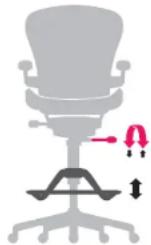
To raise: While seated, lift your feet off the footing, turn knob forward.
To lower: While seated, lift your feet off the footring, turn knob backward.
Before making this adjustment you should be seated as far back in the chair as possible. Then adjust PostureFit so that it comfortably supports the natural alignment of your spine and provides lower back comfort.
Adjust footring height so your feet rest flat on the footing, with your body comfortably supported by breathable Pellicle® suspension. A void dangling legs, which puts pressure on the back of thighs and restricts blood flow.
For more information about our products and services, please visit us at www.HermanMiller.com
Hauteur d'assise
Instructions on this card show all possible adjustments. Not all Aeron chairs are equipped with all adjustments.
2007Herman Miller, Inc., Zeeland, Michigan Printed in U.S.A. Part No. 170042-8
HermannMiller, Acron, Kinmat, Pellicle, and Posturefit are among the registered trademarks of Hermann Miller, Inc.
"Fire-Tune is among the trademarks of Herman Miller, Inc.