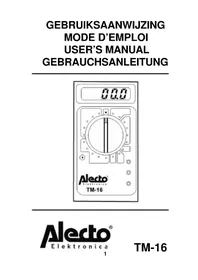
TM16 - Multimeter ALECTO - Free user manual and instructions
Find the device manual for free TM16 ALECTO in PDF.


| Product Type | Digital Multimeter |
| Brand | Alecto |
| Model | TM16 |
| Power Supply | 1 9V battery (type 6LR61) |
| Display | 3 1/2 digit LCD display (1999) |
| DC Voltage Ranges | 200 mV, 2 V, 20 V, 200 V, 500 V |
| AC Voltage Ranges | 200 V, 500 V |
| DC Current Range | 200 µA, 2 mA, 20 mA, 200 mA, 10 A |
| Resistance Range | 200 Ω, 2 kΩ, 20 kΩ, 200 kΩ, 2 MΩ, 20 MΩ |
| Diode Test | Yes, threshold voltage measurement |
| Transistor Test | Yes, hFe gain measurement (NPN/PNP) |
| Overrange Indication | Display shows '1' |
| Electrical Protection | Fuse 250 V/0.2 A on mA range |
| Safety Standards | LVD: EN 61010-1, EN 61010-2-31; EMC: EN 55011-3, EN 50082-1 |
| Dimensions (approx.) | 150 x 70 x 30 mm |
| Weight | Approximately 250 g |
| Maintenance | Clean with a dry cloth |
| Included Accessories | Test leads, 9V battery |
| Battery Replacement | Yes, accessible from the back |
| Fuse Replacement | Fuse 250 V/0.2 A |
Frequently Asked Questions - TM16 ALECTO
User questions about TM16 ALECTO
0 question about this device. Answer the ones you know or ask your own.
Ask a new question about this device
Download the instructions for your Multimeter in PDF format for free! Find your manual TM16 - ALECTO and take your electronic device back in hand. On this page are published all the documents necessary for the use of your device. TM16 by ALECTO.
USER MANUAL TM16 ALECTO
TENSION CONTINUE/TENSION ALTERNATIVE:
An overload will be displayed by a '1' on the display. Increase the range.
A negative voltage or current will be displayed by a minus (-) sign in front of the actual read-out.
AC & DC VOLTAGE:
Exercise extreme care when measuring voltages which are over 48 volt.
- Select the desired V = (direct voltage) or V (alternating voltage) range. If the magnitude is unknown, always start at the highest range and reduce until a satisfactory reading is obtained.
- Connect the red test lead to the V / Ω / mA input jack and the black test lead to the COM jack.
- Connect the test leads to the device or circuit being measured and read the measured value from the display.
When one of the ranges 500 V(DC) or 500 V(AC) is selected, the display shows HV to indicate extra precautions due to the High Voltage.
DC CURRENT:
Current is being measured by making an interruption in the circuit and by positioning the test leads at those places.
Always switch off power to the device under test prior to make an interruption and never remove the test leads before the power of the device is switched off again.
Be aware of the high switch-on current of some devices like transformers, motors, coils etc.
- Select one of the A = ranges. If the magnitude is unknown, always start at the highest range and reduce until a satisfactory reading is obtained.
- Connect the red test lead to the V / Ω / mA input jack for current measurements up to 200 mA and connect the black test lead to the COM input jack.
- Open the circuit to be measured and connect the test leads in series with the load in which the current is to be measured.
- Read the current value on the display.
- For currents up to 10A DC, select the 10A range and connect the red test-lead to the 10ADC input bus
RESISTANCE:
To measure resistance, the TM-16 measures the voltage over the resistance when a known current flows through it after which it calculates the resistance; therefor it is important to make measurements only with the power switched OFF.
To reduce measuring errors, caused by parallel resistors, it is advisable to remove the resistor from the circuit and not to touch the metal part of the test leads and/or resistor.
- Connect the red test lead to the V / Ω /mA input jack and the black test lead to the COM jack.
- Set the rotary/function switch on the desired Ω range.
- Connect the test leads to the resistor.
- The display shows the resistance.
DIODE:
When testing a diode, the LCD readout will show 1... (overload) when the diode is in back-direction; when the diode is in conductive-direction, than the meter readout will show the forward voltage.
The same rules as described by "RESISTANCE" are applicable during diode measurements.
- Set the selector switch to
- Connect the red test lead to the V / Ω /mA input jack and the black test lead to the COM jack.
- Connect the test leads to the diode.
Be aware that the meter only shows whether the diode conducts or blocks; there is no indication concerning the quality of the diode.
TRANSISTOR hFe MEASUREMENT:
- Set the selector switch to hFe.
- Insert the transistor in the transistorsocket on the TM-16 using the correct connections for E(mitter), C(收集) and B(ase) and for NPN or PNP versions
- Read the hFe (beta or DC current gain) in the display.
BATTERY / FUSE REPLACEMENT
An almost empty battery is indicated by a battery-low warning on the display. A defective fuse is noticeable by a constant readout of 000 (or '1' in case a resistance range is selected).
- Before attempting to replace the battery or fuse, disconnect the test leads from any energized circuit to avoid shock hazard.
- Remove the two screws in the bottom of the case and remove the plastic cover.
3A. Battery: replace the battery for a fresh 9V battery, preferably an alkaline version.
3B. Fuse: replace the fuse for a 250 Volt / 0.2 A/ F execution. - Replace the plastic cover and close the TM-16.
Remark: Never throw away empty batteries but hand them over to your local depot for chemical waste.

- Always check the selected range prior to connect the testleads to the measuring-object.
- If the measuring magnitude is unknown, select the highest range.
- Never select another range with the testleads connected to the measuring-object, always remove the test leads first from the circuit being measured.
- Carefully inspect the test leads. If damaged, discard and replace.
In order to prevent damage to the unit, never fail to keep the maximum tolerable voltage and current, especially for the 10 A current range. - Be careful when measuring voltages over 48 Volt and never use this tester in wet surroundings.
- When not in use, switch the TM-16 to the OFF position. This will save battery power.
- If the display readout gets weak, replace the battery.
LVD: The TM-16 complies with EN 61010-1 and EN 61010-2-31 as published in the LVD directive 73/23/EEC and 93/68/EEC.
EMC: The TM-16 complies with EN 55011-3.1991 and EN 50082-1.1992 as published in the EMC directive 89/336/EEC
(D)
ALLGEMEINES
| Technical specifications | ||
| 3 digit LCD displayauto polarizationauto zero-setting | overrange protection (display: 1)fusaprotection (0,2A)battery: 9V | |
| DC voltage: | ||
| range | resolution | accuracy |
| 200mV | 100μV | |
| 2V | 1mV | ±0.5% of rdg ± 2 digits |
| 20V | 10mV | |
| 200V | 100mV | |
| 500V | 1V | ±0.8% of rdg ± 2 digits |
| Input impedance: 1MOhm on all rangesOverload protection: DC or AC peak 500V | ||
| AC voltage: | ||
| range | resolution | accuracy |
| 200V | 100mV | |
| 500V | 1V | ±1.2% of rdg ± 2 digits |
| Frequency range: 45Hz - 400Hz | ||
| Overload protection: AC 500V | ||
| Indication: Average value (rms or sine wave) | ||
| DC current | ||
| range | resolution | accuracy |
| 200μA | 100mA | |
| 2000μA | 1μA | ±1% of rdg ± 2 digits |
| 20mA | 10μA | |
| 200mA | 100μA | ±1.2% of rdg ± 2 digits |
| 10A | 10mA | ±2% of rdg ± 2 digits |
| Overload protection: 0,2A/250V fused10A range not fused | ||
| Resistance: | ||
| range | resolution | accuracy |
| 2000hm | 0,10hm | |
| 20000hm | 10hm | ±0.8% of rdg ± 2 digits |
| 20KOhm | 100hm | |
| 200KOhm | 1000hm | |
| 2MOhm | 1KOhm | ±1% of rdg ± 2 digits |
| Overload protection: 250VDC or AC rms (less than 10 sec)Maximum open circuit voltage: 2,8V | ||
| Transistor: | ||
| Vce appr. 2.8V, to appr. 10μA, display show appr. hFe 0-1000 | ||
| Diode | ||
| Testing voltage appr. 2.4V, current 1.5 mA | ||
| working temperature: 0 - 40°C(for best accuracy: 23 ± 5°C) | storing temperature: -15 - 50°Cworking humidity: < 75% | |
| size: 150mm x 70mm x 24mm | weight: 150gr (include battery) | |
Brand : ALECTO
Model : TM16
Category : Multimeter