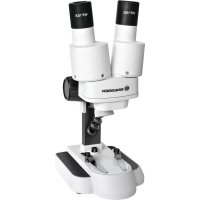
Biolux ICD 20x Stereo - Microscope BRESSER - Free user manual and instructions
Find the device manual for free Biolux ICD 20x Stereo BRESSER in PDF.



| Product type | Stereo microscope |
| Brand | Bresser |
| Model | Biolux ICD 20x Stereo |
| Category | Microscope |
| Magnification | 20x fixed |
| Observation type | Binocular |
| Illumination | Integrated LED |
| Power supply | 4 AA batteries (not included) |
| Focus | Via focusing wheel |
| Object stage | With clip and bicolor object plate (black/white) |
| Object plate | Removable, white side for light objects, black side for dark objects |
| Eyepieces | Included, mounted on adjustable binocular tubes |
| Lens cleaning | Soft lint-free cloth, possibly moistened with eyeglass cleaner |
| Exterior cleaning | Dry cloth, no cleaning liquid |
| Child safety | Do not leave children unsupervised - risk of injury and choking |
| Operating temperature | Do not expose to high temperatures |
| Warranty | 2 years, extendable online registration |
| Compliance | EU directive (2002/96/EC, 2006/66/EC) |
| Disposal | Do not dispose with household waste - follow WEEE and battery regulations |
| Approximate weight | 0.5 kg |
| Color | White and black |
| Included accessories | Eyepieces, cleaning cloth, carrying case |
| Repairability | Do not disassemble - contact retailer or customer service |
Frequently Asked Questions - Biolux ICD 20x Stereo BRESSER
User questions about Biolux ICD 20x Stereo BRESSER
0 question about this device. Answer the ones you know or ask your own.
Ask a new question about this device
Download the instructions for your Microscope in PDF format for free! Find your manual Biolux ICD 20x Stereo - BRESSER and take your electronic device back in hand. On this page are published all the documents necessary for the use of your device. Biolux ICD 20x Stereo by BRESSER.
USER MANUAL Biolux ICD 20x Stereo BRESSER
Media about this product
You can download further media (manuals, technical information, videos, etc) from the BRESSER website* over the following QR code/weblink.
Infos produit
RISK of bodily injury!
Aids with sharp edges and tips are sometimes used with this device. Please store the device and all of its accessories and aids out of the reach of children. There is a risk of INJURY.
This device contains electronic components that are powered by either a mains connection or batteries. Never leave a child unsupervised with this device. The device should only be used as per these instructions otherwise there is a serious RISK of ELECTRICAL SHOCK.
Batteries should be kept out of children's reach. When inserting batteries please ensure the polarity is correct. Leaking or damaged batteries can cause injury if they come into contact with the skin. If you need to handle such batteries please wear suitable safety gloves.
Children should only use this device under supervision. Keep packaging materials (plastic bags, rubber bands, etc.) away from children. There is a risk of SUFFOCATION.
FIRE-/ DANGER OF EXPLOSION!
Do not expose the device to high temperatures. Use only the recommended batteries. Do not short-circuit the device or batteries, or throw them into a fire. Excessive heat or improper handling could trigger a short-circuit, a fire or an explosion.
RISK of material damage
Never take the device apart. Please consult your dealer if there are any defects. The dealer will contact our service centre and send the device in for repair if needed.
DISPOSAL
Dispose of the packaging materials properly, according to their
type (paper, cardboard, etc). Contact your local waste disposal service or environmental authority for information on the proper disposal.

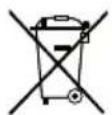
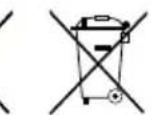
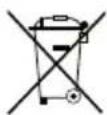
Do not dispose of electronic devices in the household garbage!
As per the Directive 2002/96/EC of the European Parliament on waste electrical and electronic equipment and its adaptation into German law, used electronic devices must be collected separately and recycled in an environmentally friendly manner.
In accordance with the regulations concerning batteries and rechargeable batteries, disposing of them in the normal household waste is explicitly forbidden. Please pay attention to dispose of your used batteries as required by law - at a local collection point or in the retail market (a disposal in domestic waste violates the Battery Directive).

BRESSER
Batteries that contain toxins are marked with a sign and a chemical symbol. Cd^ = cadmium, Hg^ = mercury, Pb^ = lead.
Cd1
Hg2
Pb3
1 battery contains cadmium
2 battery contains mercury
^3 battery contains lead
EEC conformity explanation
Bresser GmbH has issued a "Declaration of Conformity" in accordance with applicable guidelines and corresponding standards. This can be viewed any time upon request.
Your microscope is made up of the following parts (Fig. 1-4):
1 Binocular view piece (with eyepiece supports)
2 Stereo objective
3 Eyepieces
4 Illumination (LED)
5 Microscope stage (with black and white object plate)
6 Stage clips
7 Focus knob
8 On/off switch
9 Battery compartment
10 Mounting screws
11 Battery compartment cover
12 Battery contacts (flat sheets and spring terminals)
13 Diffusion cap
Location
Before you start, choose an ideal location for using your microscope. It is important that you have enough light available (window, desk lamp).
Simple Observation
Place the object to be observed (for example, a rock) in the middle of the microscope stage (5). The objective plate can be taken off. It has a black and a white side. Bright or transparent objects can best be examined on the black side.
When the object is large enough, it is best to fix it in place with the stage clips (6).
Now, take a look through the binocular eye lens (1) and change the distance of the eyepiece (3), so that you have a circular, clear image. The sharpness is adjusted by slowly turning the focus knob (7).
Replacing the batteries
Turn off the illumination (4) with the On/Off switch (8). Remove both eyepieces (3) from the eyepiece supports (1) and turn the entire microscope over. In the base of the microscope there is a battery compartment (9). Loosen the 4 fixing screws (10) of the battery

BRESSER
compartment cover (11) and remove the cover.
Place the batteries in the compartment so that the flat minus poles (-) press against the spring terminal and the plus poles (+) are touching the flat contact sheets (12).
Put on the cover (11) and fix it with the 4 screws (10). Turn the microscope over again. Place the eyepieces back on. You can not turn on the light (4) with the on/off switch (8) on the base of the microscope.
TIPS on cleaning
Remove the device from it's energy source before cleaning (remove batteries).
Clean the exterior of device with a dry cloth. Do not use cleaning fluids so as to avoid causing damage to electronic components.
Protect the device from dust and moisture. Store the device in the bag supplied or in its original packaging.
Batteries should be removed from the device if it is not going to be used for a long period of time.
Clean the lens (objective and eyepiece) only with the cloth supplied or some other soft lint-free cloth (e.g. micro-fibre). Do not use excessive pressure - this may scratch the lens.
Dampen the cleaning cloth with a spectacle cleaning fluid and use it on very dirty lenses.

BRESSER
ONACHOCTb TpaBMnpoBaHnI!
!Pn N0JIb3OBAHm DaHHbIM yCTpOINCTBOM MOKeT
NOTpe6oBaTbcr npImHeHne
HNCTpyMeHTOB C OCTpbIMN
KpaAMn. XpaHIne ycTPOINCTBO,
PpHaADJeXHOCTn INHCTpyMeHTbl
B HeIOCTyINHom dIa ITei MeCTe.
CyueCTByET pNCK NOJYHTb
TPABMY!
JaHHoe yctpoiCTBO COepeKHT 3JIeKTPoHHbIe KOMnOHeHTbl, npBODmblE B DeNCTBne OT nCTouHnKa Toka (6aTaapeyn). He OCTaBnHte pe6eHka 6e3 npncMOTpa. YcTPOiCTBO CNeDyET NcNoJb3OBaTB ToNbKO TaK, KaK yKa3aHO B INCTpyKuHn, HNaue eCt b cepbe3HbI pNCK NoJyUHTb YdAP TOKOM.
NckIIOHTe DoCTyn Detey K 6bataepKam! Pnp yctahOBke/3aMeHe 6bataeek cO6HOnaTe NOLpHocTb. BbTEKNe nn NOBpeXdEHhle 6bataeKN Bb3bBaOT pa3dpaxKeHHN
PnKoHTaKe c Kokei. B cnyuae Heo6xOIMocTn HaedeBaIte NOxOJaUne 3aunTHbIe nepuATkn.
TeMoryT NOB30BaTbCRA
yCTPOIcTBOMTOJIbKOIOJNpHCMOTPOM
B3POcblx. XpaHnte yNaKOBky
(IIaCTIKOBbie NaKeTb, pe3HOBble
JeHTbI np.) B HeOCTyNHOM IJa
DeteMeCTe.CuEcTByeToNaCHOCTb
UYUJEHH!
ONACHOCTb IOKAPA/B3PbIBA
He donyckaIte HarpeBaHnHa yctpoiCTBa Do BbICOKo TEMnepaTybl. HcnoJIb3yIte ToIbKO peKOMeHDoBaHbIe 6aTapeKn. He 3aKOpaYBaIte yCTPOICTBO 6batapeKn, He 6pOcaIte INB OROH! NpeperpeB HnnpabNbHoe o6paueHne MOryt CTaTB pNpuHoi KOporTKoro 3aMbKaHn, NoJkapa n daKe B3pbIbA!
ONACHOCTb NOBpeKdEHHa Maepnana!
HnKOrda He pa3bpaTye yctpoNCTBO. PpB03HNKHOBEHn HEcnpaBHOCTeO6paHTeCb K DnIepy. OH CBAJKeTcC HauHM cepBNCbIM ueHTpOM n npHeoXoDMOCtNoITpABNTycTPONCTBO B peMOHT.
YTNIN3AUIN
YTNIN3NpyTe ynaKOBky KaK npednncaHO 3akoHOM. Pn Heo6xOAnMOCTn pOKOHcyIbTnpyITecb C MecTHbIMN BIACTAMN.
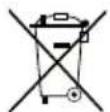
He BbIbpaCbBaIte 3JIeKTPoHHbIe DetaNN B O6bHbMycOpHbI KOHTeHep.EBpOEnckan DnpeKTINBa no yTINIm3aunn 3JIeKTPoHHoro n 3JIeKTPnueckoro 06OpyDobAHN 2002/96/EU n COOTBeTCTByIOuNe eJ 3aKOHbTIpe6yOt OTdEJIbHO r C6opa n nepepa6OTKn NOO6hIx YcTPOCTB.

BRESSER

3JIeMeHTbI NITaHn He RBJIOrC6bITOBbIMN
OTXODAMN,NO3TOMY B COOTBETCTBHN C 3aKOHODaTeIbHbIMN Tpe6OBAHnMn Hx Heo6xoDnMo CdaBaTb B NyHKtbl PnEma NCNoJIb3OBAHHbIX 3JemeHTOB NITAHN.Bbl MoKeTe 6ecPiataHO CdaTb NCNoJIb3OBAHHbIE 3JemeHTB IITAHN.B HAeEM MaRa3He NN pRdOM CBAMn (HaPnMeP,B TOpRObIX ToKax NN B NYKtAX PnEma). Ha 3JemeHTax PtTAHN 3IO6paKeH nepeepkHytb KOHTeHep,a TaKxe Yka3aHo CoedeJaueeeH JDOBHToe BeueCTBO: Cd 06O3Haayet KaDMN, Hg -pTyt_b ,a Pb -cBnHeu


Cd^1
Hg2
Pb3
OuKOB I npOTpHTe HnH3bI C He6oJIbUHM ycHnHeM.

BRESSER
Garantie & Service
The regular guarantee period is 2 years and begins on the day of purchase. To benefit from an extended voluntary guarantee period as stated on the gift box, registration on our website is required. You can consult the full guarantee terms as well as information on extending the guarantee period and details of our services at www.bresser.de/warranty_terms.
Garantie et Service

- Media about this product
- Infos produit
- RISK of bodily injury!
- FIRE-/ DANGER OF EXPLOSION!
- RISK of material damage
- DISPOSAL
- BRESSER
- EEC conformity explanation
- Your microscope is made up of the following parts (Fig. 1-4):
- Location
- Simple Observation
- Replacing the batteries
- TIPS on cleaning
- ONACHOCTb TpaBMnpoBaHnI!
- ONACHOCTb IOKAPA/B3PbIBA
- ONACHOCTb NOBpeKdEHHa Maepnana!
- YTNIN3AUIN
- Garantie & Service
- Garantie et Service
Brand : BRESSER
Model : Biolux ICD 20x Stereo
Category : Microscope