TT9260WN - Toaster Rival - Free user manual and instructions
Find the device manual for free TT9260WN Rival in PDF.


| Product Type | Toaster |
| Brand | Rival |
| Model | TT9260WN |
| Power Source | 120 V, AC |
| Intended Use | Household |
| Warranty | 1 year |
| Number of Slots | 2 |
| Main Functions | Toasting, automatic shut-off, extra-lift carriage, browning selector, self-adjusting bread guides, Cancel button, defrost function |
| Care and Cleaning | Clean crumb tray regularly, wipe housing with a damp cloth, do not immerse |
| Safety | Polarized plug, automatic shut-off if jammed, cool-touch housing, do not insert metal utensils |
| Repairability | No user-serviceable parts |
| Accessories | No accessories provided |
| Cord Length | Short (integrated cord, extension cord not recommended) |
Frequently Asked Questions - TT9260WN Rival
User questions about TT9260WN Rival
0 question about this device. Answer the ones you know or ask your own.
Ask a new question about this device
Download the instructions for your Toaster in PDF format for free! Find your manual TT9260WN - Rival and take your electronic device back in hand. On this page are published all the documents necessary for the use of your device. TT9260WN by Rival.
USER MANUAL TT9260WN Rival
TT9260-WN(428-1253) visual.qxd 1/27/04 16:56 Page 2
LIMITED ONE-YEAR WARRANTY
The manufacturer warrants this product to be free from defects in materials or workmanship for one (1) year from date of original purchase. If you have a claim under this warranty please follow these procedures: 1) Within the first 45 days from date of original purchase, defective product should be returned to original place of purchase for replacement (with proof-of-purchase). 2) Within the first 12 months from date of purchase the manufacturer will repair or replace (at no charge) the defective product if it is delivered freight prepaid during that period to an authorized service station. To obtain warranty service visit:
www.rivalproducts.com
Or, you may write to Rival Cro The Holmes Group, attention: Consumer Returns, 32B Spur Drive, El Pepe, TX 79906. Proof of purchase is required when requesting warranty service - SAVE YOUR SALES RECEIPT. This warranty is extended only to the original purchaser and does not apply to commercial use, unreasonable use, or to damage to the product (not resulting from defect or malfunction) while in the possession of the consumer. The manufacturer disclaims all responsibility for consequential, incidental, or commercial losses caused by the use of this product. Some states do not allow this exclusion or limitation of incidental or consequential losses, so the foregoing disclaimer may not apply to you. This warranty gives you specific legal rights, and you may also have other legal rights which vary from state to state.

©2004 The Rival Company
A Division of The Holmes Group, Inc.
28-1253

TT9260-WN
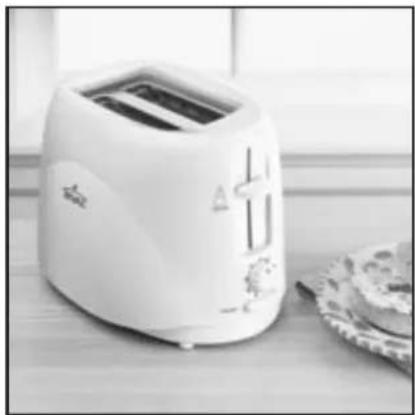
Toast-Excel Toaster
Owner's Guide
READ AND SAVE THESE INSTRUCTIONS
IMPORTANT SAFEGUARDS
When using electrical appliances, basic safety precautions should always be followed, including the following:
- Read all instructions before using.
- Do not touch hot surfaces. Use handles or knobs.
- To protect against fire, electric shock and personal injury, do not immerse toaster, cord or plug, in water or other liquid.
- Close supervision is necessary when any appliance is used by or near children.
- Unplug from outlet when not in use and before cleaning. Allow unit to cool before putting on or taking off parts.
- Do not operate any appliance with a damaged cord or plug, or after the appliance malfunctions or has been damaged in any manner. Call Rival's Customer Service Department (see warranty) to return for examination, repair, or adjustment.
- The use of accessory attachments not recommended by the appliance manufacturer may result in fire, electric shock or personal injury.
- Do not use outdoors.
- Do not let cord hang over edge of table or counter, or touch hot surfaces.
- Do not place on or near a hot gas or electric burner, or in a heated oven.
- To disconnect, unplug from wall outlet.
- Oversized foods, metal foil packages, or utensils must not be inserted in a toaster as they may involve a risk of fire or electrical shock.
- A fire may occur if this toaster is covered or touching flammable material, including curtains, draperies, walls, and like material, when in operation.
- Do not attempt to dislodge food when toaster is plugged in.
- Failure to clean crumb tray may result in a fire hazard.
- Do not clean with metal scouring pads. Pieces can break off the pad and touch electrical parts, involving a risk of electrical shock.
- Do not use appliance for other than intended use.
SAVE THESE INSTRUCTIONS
This appliance is for HOUSEHOLD USE ONLY.
No user-serviceable parts inside. Do not attempt to service this product.
A short power-supply cord is provided to reduce the hazards resulting from entanglement or tripping over a longer cord. An extension cord may be used with care; however, the marked electrical rating should be at least as great as the electrical rating of the toaster. The extension cord should not be allowed to drape over the counter or tabletop where it can be pulled on by children or tripped over unintentionally.
POLARIZED PLUG
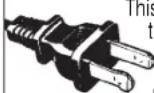
Do not attempt to modify the plug in any way. If the plug fits loosely into the AC outlet or if the AC outlet feels warm do not use that outlet.
BEFORE USING YOUR TOASTER
NOTE: When first used, your appliance may smoke slightly. Any smoker or odor is normal and will not recur after a few uses.
Your new Rival Toaster has a cool touch exterior design that stays cool to the touch.
TT9260-WN(428-1253) visual.qxd 1/27/04 16:56 Page 6
HOW TO TOAST BREAD
- Plug power cord into 120 volt AC outlet.
- Adjust browning control to desired lightness or darkness. Turn knob clockwise for darker toast.
- Insert bread into toasting slots. Depress bread lever. The wire basket will automatically adjust to the thickness of food, centering it vertically for even browning.
- Toast will automatically pop up when selected browning is reached and unit will shut off. Additional Extra Lift feature allows you to lift the lever higher to easily remove the toast.
- It is highly recommended that you press the CANCEL button when you wish to shut off the toaster mid-cycle. Pushing up the TOASTING LEVER can be harmful to your toaster.
- This toaster comes equipped with an automatic safety shut-off feature. If food becomes jammed or lodged inside the toaster and cannot be removed easily, the unit will automatically shut off. To remove lodged food, unplug toaster and allow to cool completely. Turn upside down and shake. NEVER INSERT FORK OR OTHER METAL OBJECT INTO TOASTING SLOTS. Continue to use toaster normally.
- When not using your toaster, unplug cord from wall outlet.
HOW TO TOAST PASTRIES AND OTHER CONVENIENCE FOODS
Many varieties of fresh or frozen pastries and convenience foods may be heated in your toaster. Exact settings are difficult to recommend due to personal preference; experiment to suit individual taste. Set browning control to the third position ( ) for fresh pastry or sixth position () for frozen pastry and adjust to personal taste.
NOTE: Some frozen pastries and convenience foods require two cycles for desired result. Rotate knob to the "snowflake (*)" to defrost foods.
IMPORTANT
- Remove all protective wrappings from food before placing in toasting slots.
- A void toasting foods with "runny" frostings, icings or open fillings.
- A void torn slices of bread and broken pastries which may get lodged in toasting slots.
- To remove lodged food, unplug toaster and allow to cool completely. Turn upside down and shake. NEVER INSERT FORK OR OTHER METAL OBJECT INTO TOASTING SLOTS.
- Different breads require different settings.
HOW TO CLEAN YOUR RIVAL® TOASTER
CAUTION: Unplug. Never immerse toaster in water.
- Allow unit to cool completely.
- Wipe outside with soft, damp cloth. Never use abrasive cleanser or steel wool to clean.
- Slide crumb tray out in back bottom of toaster and empty crumbs. Wipe surface with damp cloth to remove stubborn spots.
TT9260-WN(428-1253) visual.qxd 1/27/04 16:56 Page 8
NOTES
-E6-
TT9260-WN(428-1253) visual.qxd 1/27/04 16:56 Page 10
GARANTIE LIMITEE DE UN AN
©2004 The Rival Company
A Division of The Holmes Group, Inc.
Imprime en Chine TT9260-WN/428-1253
TT9260-WN
Brand : Rival
Model : TT9260WN
Category : Toaster