Binary - Watch Breo - Free user manual and instructions
Find the device manual for free Binary Breo in PDF.


Frequently Asked Questions - Binary Breo
User questions about Binary Breo
0 question about this device. Answer the ones you know or ask your own.
Ask a new question about this device
Download the instructions for your Watch in PDF format for free! Find your manual Binary - Breo and take your electronic device back in hand. On this page are published all the documents necessary for the use of your device. Binary by Breo.
USER MANUAL Binary Breo
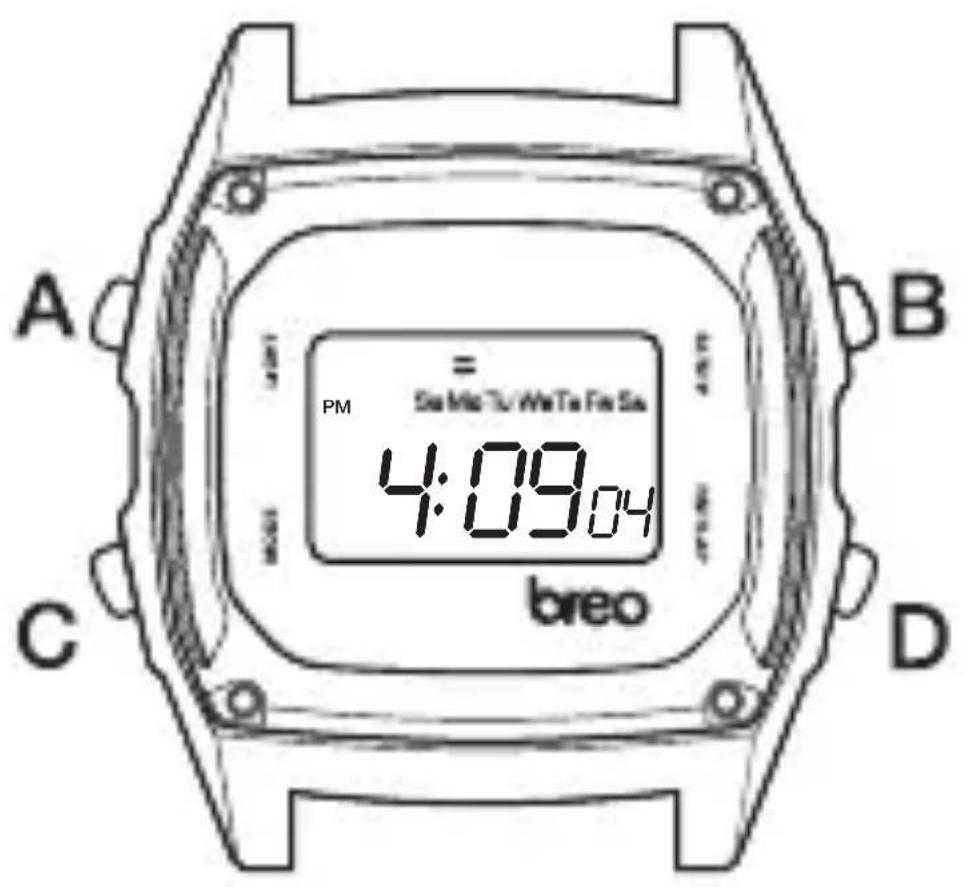
In normal display mode, the display can show Hours, Minutes, Seconds and Week Day. Alarm Function can maintain the sound for 20 seconds and report the correct time at each hour. Stopwatch Function, 12/24 Hours Format, Backlight Function (A).
2. TIME ADJUSTMENT
In Normal Display mode, hold (C) until the display starts to flash. Press (C) again. Seconds will flash. Press (D) to set the seconds to zero. Press (B). Minutes will flash. Press (D) to advance the minutes value. Press (B) again. Hour will flash. Press (D) to advance the hour value. Press (B). Month will flash. Press (D) to advance the month value. Press (B) Date will flash. Press (D) to advance the date value. Press (B). Day Indication marker will flash. Press (D) to move through the days of the week. Press (C) to exit time adjusting mode.
3. SETTING THE ALARM AND TIME REPORTING
HOW TO SET THE ALARM:
In Normal Display mode, hold (C) until the display starts to flash. Use (D) to advance the hour value. Press (B). Minutes will flash. Use (D) to advance the minutes value. Press (C) to set the alarm and return to normal display mode.
DAILY ALARM MODE:
In Normal Display mode, press and hold (D). Press (B) to select the
alarm symbol and Chime Symbol alternatively on or off. The alarm symbol on the normal display means alarm will sound for 20 seconds at a pre-set time every day. The chime symbol on the normal display means it will chime on the hour.
4. READING THE DISPLAY
In normal display mode, press (B) to display Month/Date. Hold (B) and press (D) to alternate between Month/Date, Date/Month.
12/24 HOUR FORMAT:
In Normal Display mode, press and hold (D) to display alarm mode. Press (C) to select 12 or 24 hours format alternatively. The 'PM' or 'AM' symbol on the display means both normal time and alarm time are in 12 hours format. Otherwise, they are in 24 hours format.
5. STOPWATCH MODE
NET TIME MEASUREMENT:
In Normal Display mode, press (C) to activate stopwatch mode. Press (B) to start and stop the timer. Press (D) to reset the timer.
LAP TIME MEASUREMENT: (ie more than one runner on a track) In Normal Display mode, Press (C) to activate stopwatch mode. Press (B) to start timer, and then press (D) to show the first runner's time. (The timer continues counting). Press (D) to release lap time display and return to the timer. Repeat this process for all runners. Once all runners have finished, press (D) to reset the timer to zero.