FL200 - Headphones Gioteck - Free user manual and instructions
Find the device manual for free FL200 Gioteck in PDF.



| Product Type | Wireless Audio Headset |
| Brand | Gioteck |
| Model | FL200 |
| Power Source | Rechargeable Lithium-Ion Battery |
| Charging Time | 2 to 3 hours |
| Connectivity | Bluetooth (estimated) |
| Main Functions | Volume control, mute, external speakers, retractable microphone, power on/off |
| LED Indicators | Power status (blinking blue), microphone status (solid red when muted) |
| Charging Port | USB |
| Box Contents | FL200 headset, USB charging cable, user guide |
| Warranty | 1 year |
| Recycling | Do not dispose of with household waste, take to WEEE collection point |
| Safety Precautions | Do not expose to moisture, extreme temperatures (0-40°C), or solvents; do not disassemble; keep out of reach of children under 7 years old |
| Care and Cleaning | Clean with a dry, soft cloth; avoid benzene, thinner, acetone, or alcohol |
Frequently Asked Questions - FL200 Gioteck
User questions about FL200 Gioteck
0 question about this device. Answer the ones you know or ask your own.
Ask a new question about this device
Download the instructions for your Headphones in PDF format for free! Find your manual FL200 - Gioteck and take your electronic device back in hand. On this page are published all the documents necessary for the use of your device. FL200 by Gioteck.
USER MANUAL FL200 Gioteck
GAMING STEREO HEADSET
FL200UNI-11-MU
FL200UNI-12-MU
FL200UNI-13-MU
NEED HELP?
WWW.GIOTECK.COM/CONTACT-SUPPORT
ACTIVATE YOUR PRODUCT WARRANTY: GIOTECK.COM/REGISTER
Thank you for buying the Gioteck FL200 Gaming Stereo Headset. These Headphones are designed to be convenient, stylish and provide high quality audio Playback from any wired audio device.
The FL200 has an external speaker function for enjoying music with friends or listening to movies together.
Please read this User Guide thoroughly before use so that you can understand the setup and functions.
CONTENTS
Please check your package contains the following items:
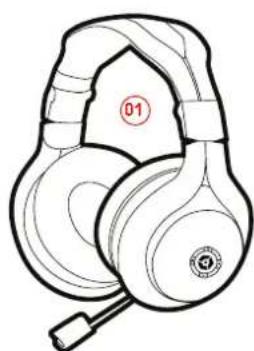
01]FL200GamingHeadset
02] USB Charging Cable
03]User Guide
1
PRECAUTIONS

Before using the headset, turn the volume down to a mid-level or very low, then slowly adjust it to a comfortable level. Exposure to high volume sound levels may cause temporary or permanent damage to your hearing. You should always set your volume to moderate levels and avoid long exposure to high volume levels.
- Contains small parts. Not suitable for children under 7 years of age.
- Store in a dry & dust free area.
- Do not store in areas of extreme low [0^] or high [40^] temperatures.
- Avoid direct sunlight and heat sources.
- Do not allow the product to get wet or dirty; doing so may cause damage.
- Do not clean with benzene, paint thinner, acetone, alcohol, or other such solvents.
- Do not take the product apart; doing so will void your warranty and may cause electrical shock or damage to internal components.
- Please help to conserve the environment by recycling the cardboard packaging of this product.
This product should NOT be disposed of in normal household waste. It should be disposed of separately. Please take it to an electrical waste collection point.
This product is covered by a one [1] year warranty.
For full Terms and Conditions, and for Technical Assistance,
go to: www.gioteck.com/contact-support
Activate your product warranty: www.gioteck.com/register
For help with the set-up or operation of this product please go to: GIOTECK.COM/CONTACT-SUPPORT
乙
2
PRODUCT FEATURES
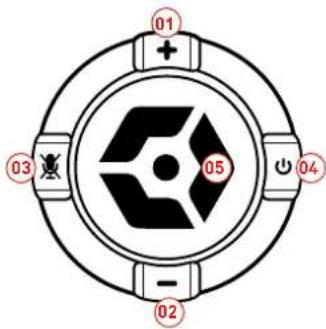
01]VolumeUp
02]Volume Down
03]Mute Button
04]PowerButton
[05] Multi-Function Button
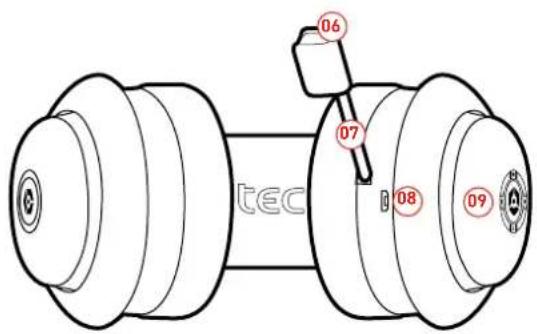
06] Microphone Indication LED
[07] Retractable Boom Microphone
[08] USB Charging Port
09] Status LED
HEADPHONE FUNCTIONALITY
Note: Please fully charge the battery before using for the first time.
See "Charging the Headphones" section of this User Guide for details.
To turn the Headphones ON simply hold down the Power Button for 2 seconds. The status LED Indicator on the earmcup will flash blue every 5 seconds when the headset is ON. To turn the Headphones OFF simply hold down the Power Button for 2 seconds.
+ADJUSTING VOLUME
Press the volume + / - key to adjust the volume. One short press will adjust one level, holding down the volume key will adjust continuously.
AUTURE FUNCTION
To mute the Headphones push the Mute Button, to unmute simply push the Button again. When the Microphone is muted the Microphone Indication LED will turn red.
EXTERNAL SPEAKER MODE
To enable the external Speaker mode hold the multi-function button for 2 Seconds. External speaker mode will be indicated by a blue LED. To change back to headphones mode hold the multi-function button for 2 Seconds.

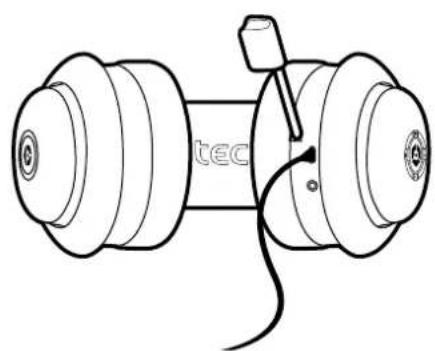
1] To charge the Headphones, use the supplied USB cable and insert into any powered USB Port. Normal charging process takes 2-3 hours.
2] The red LED on the left Earcup will turn on when charging and will turn off when charging is complete.
3] Make sure the battery has been fully charged and fully released at the first three times of use to ensure the battery the best performance. After charging is complete, please remove the cable from the Headphones and the USB Cable from the USB port.

Do not keep the Headphones connected to the USB port for a long time when charging complete as this will shorten the lifetime of the Battery.
CARACTERISTIQUES DU PRODUIT
This product is manufactured by GoodBetterBest [BBB] of the United Kingdom. Our goods come with guarantees that cannot be excluded under the Australia, an Consumer Law. You are entitled to a replacement, or refund for a major failure and/or compensation for any other reasonably foreseeable loss or damage. You are also entitled to have the goods repaired or replaced if the goods fail to be of acceptable quality and the failure does not amount to a major failure. BBB warrants to the original consumer purchaser that the product will be free of defects in materials and/or workmanship for the length of time specified in the warranty period from the date of purchase, this being 1 Year, as set forth at: www.goteac.com/contact-support
If a defect covered by this warranty occurs during the warranty period, GoodBetterBest at its option will repair or replace, at no charge; any part that GoodSeller Best determines to be defective. To make a warranty claim please contact GBB's Australian distributor. Turn Left Distribution at Helpdesk@turnleft.big Tom Left Distribution is responsible for the servicing of warranty claims for purchases made in Australia. The purchaser will be required to bear the expense of sending the product back to the Australian distributor to claim the warranty. If you are unable to satisfactorily resolve your issue with him, he/she please contact GBB through his website at: www.gbbheck.com/contact-support or alternative way, you can contact GBB directly at: GBB Limited, 103 Devonshire Business Centre, Works Road, Lettworth, SG6 1GJ, United Kingdom.
This warranty shall not apply if the product has been damaged by abuse, misuse, negligence, accident modification, tampering or by any causes unrelated to defective materials and/or workmanship. Repair or replacement as provided under this warranty is GoodBetterhest exclusive prerogative. In order to obtain warranty services under certain circumstances (particularly when the retailer will not accept the return of the defective product), you may be required by GBB to return the product directly to GBB in the United Kingdom for inspection and evaluation, along with evidence of purchase including the price paid and the date the item was purchased, for a determination of whether the warranty applies. If you have been asked by GBB to return the product to GBB in the United Kingdom, and the product is defective and covered under the applicable warranty period, GBB shall provide the appropriate warranty services. If the warranty does not apply either due to misuse, damage, negligence, etc., or because the warranty period has expired, you may be charged to return the product to you (if you instruct us to do so). Any applicable implied warranties, including warranties or merchantability and illness for a particular purpose are hereby limited to the length of time specified in the warranty period below, beginning from the date of purchase and are subject to the conditions set forth in this limited warranty.
In no event shall GoodBetterBest be accountable for incidental damages resulting from the breach of any express or implied warranties. You may have different or additional legal rights, including longer warranty periods, which vary from jurisdiction to jurisdiction. Some jurisdictions do not allow certain limitations on how long an implied warranty lasts, so the above limitations may not apply to you. In addition, consumers have legal rights under applicable national legislation governing the sale of consumer goods. Such rights are not affected by the warranties set forth here n, except to the extent allowed by law.
Complies with IDA Standards DB100398


This product complies with the following legal regulations. For further information go to www.giotech.co.uk. This device complies with Industry Canada (US) 710 standard operation. Operation is subject to the following two conditions: [1] this device may not cause interference, and [2] this device must accept any interference, including interference that may cause undesired operation of the device.
Caution: The user is cautioned that changes or modifications not expressly approved by the party responsible for compliance could void the user's author to be operate the equipment. This device complies with Part 15 of the FCC Rules, Operation is subject to the following two conditions: [i] This device may not cause harmful interference and 12 this device must accept any interference received, including interference that may cause unlesired operation. However, there is no guarantee that interference will not occur in a particular installation. The device and its antenna must not be located or operating in conjunction with any other antenna or Longline, Gidlock are not responsres for any initerference caused by unlesired and changes in this equipment. This equipment generates, uses, and can radiate radio frequency energy and it not installed correctly, may cause harmful interference to radio communications. This equipment has been tested and found to comply with the limits for a Class B digital device, pursuant to part 15 of the FCC Rules. These limits are designed to provide reasonable protection against harmful interference in a wireless terminal installation. If this equipment does cause harmful interference to radio/television reception by the following:
Reonent or relocate the necexing antenna
- Increase the separation between the equipment and receivables.
- Connect the equipment into an outlet of a circuit different from that to which the receiver is connected.
- Consult the dealer or an experienced radio/TV technician for help. This equipment, complements with CC radiation exposure limits as much as can be uncontrolled new material. Not user must follow, he specific operating instructions for satisfying RF exposure compliance.
FN-Biochthonlich Ltd Herbydeclare that: Fx product is an indispensable with the essential requirements and other provisions of Directive 2004/108/FC and RSTTo 1999/FC. FR-Par document, Goodbetterness Ltd declare this product conformaux criteriés landement et autres dispositions du Directive 2004/108/U et I (1999/FC).
EN This product should NOT be disposed of in normal household waste. It should be disposed of separately. Please take Liy an electrical waste collection point. DI - 1 item, Freshhold start NED (1 m), term normal (Hausdorff), standard gendered, pre-qualified, Brite Bringers etc (ceram Ernährungszeit für Kefenstrum).
ES Estecks NO de dirasse a la basa normal, s no zor separado. Lleveo e um pinto de recardo de deshesos elecricos.
19. - Cr prehni, N doit 4285 tere jenee wvee the orructs mneanses, il tali tere e pe. Vaylity le houmnes a un point de ralite de ulesions d'echiniques.
PT. Este produits NACCe se erve alimentado ao livo comestmo normal. Devar ser el minado separadamente. Por favor leve o para um ponto de coieta de reciclamente el electratico.
11- Queote proieto NON pue esse meiolo trei reliot domestr ci, hemseri sapparamente: portada en un comer: i tarmamento dei reliot in approachare e nitrificare e erir rnrn [24-1].
