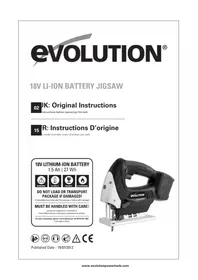
RAGE7 - Saw EVOLUTION - Free user manual and instructions
Find the device manual for free RAGE7 EVOLUTION in PDF.

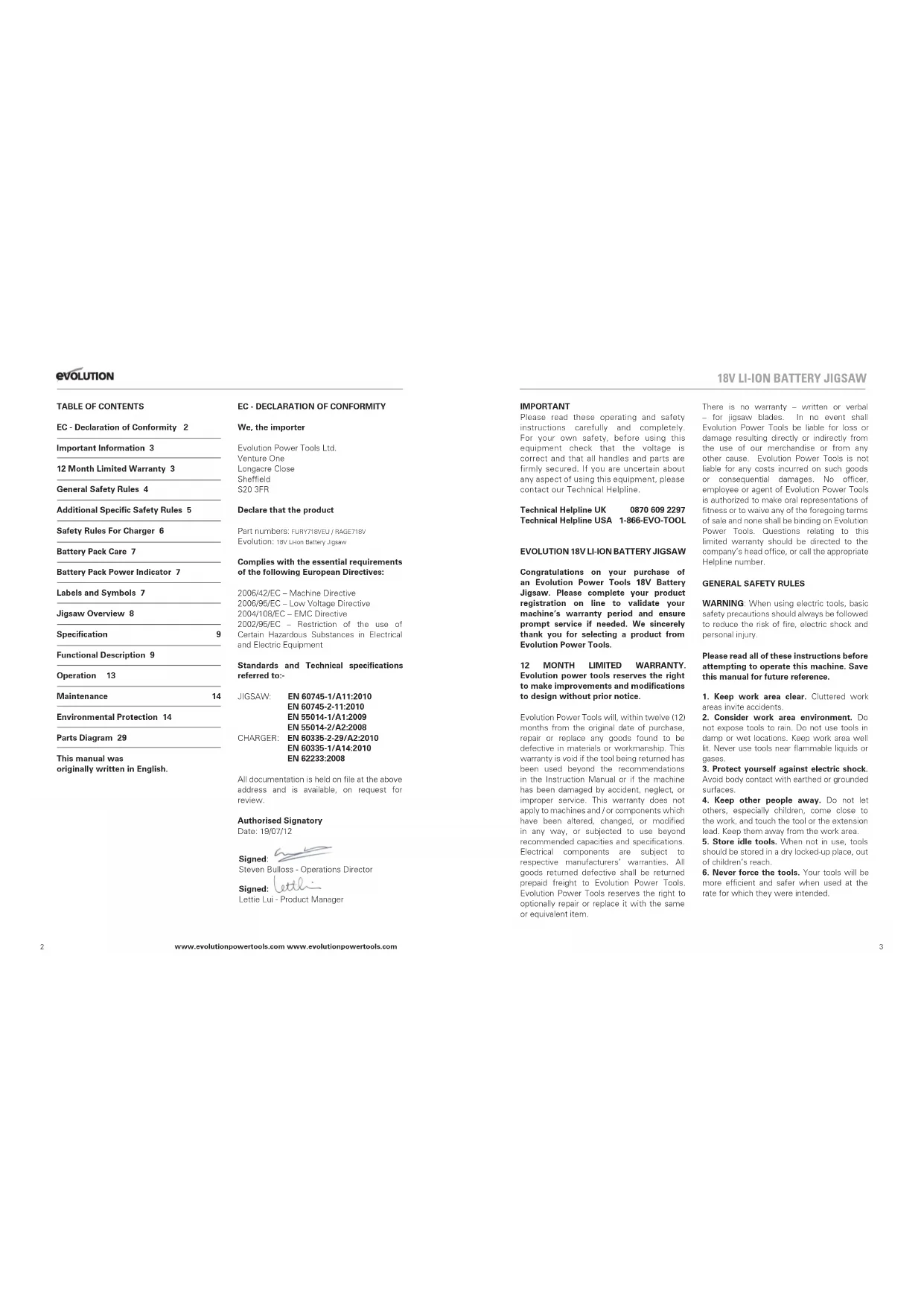

| Product type | Cordless jigsaw |
| Brand | Evolution |
| Model | RAGE7 |
| Rated voltage | 18 V DC |
| No-load speed | 0 – 2400 strokes/min |
| Cutting length | 25.4 mm |
| Blade type | Standard jigsaw blades |
| Power source | Rechargeable lithium-ion battery 18 V, 1.5 Ah, 27 Wh |
| Charger | Input 230–240 V AC, 50/60 Hz; output 18 V DC, 1.7 A; protection class II |
| Sound pressure level | 87.3 dB(A), K=3 dB |
| Sound power level | 98.3 dB(A), K=3 dB |
| Vibration | 5.383 m/s², K=1.5 m/s² |
| Main features | Laser guide, orbital action (4 positions 0-3), variable speed, blade brake, safety lock, tool-free blade change |
| Shoe plate tilt | 0° to 45° with positive stops at 15°, 30°, 45° |
| Box contents | Instruction manual, Allen key, 3 blades, 1 battery, 1 charger |
| Maintenance and cleaning | Clean with a dry cloth; do not use chemical cleaners; keep ventilation slots clean; no additional lubrication required |
| Safety | Wear safety glasses and dust mask; do not expose to water; use safety lock; read manual before use |
| Spare parts and repairability | Contact manufacturer or authorized service center for repairs; use only original parts |
| Warranty | 12 months limited (excluding blades) |
Frequently Asked Questions - RAGE7 EVOLUTION
User questions about RAGE7 EVOLUTION
0 question about this device. Answer the ones you know or ask your own.
Ask a new question about this device
Download the instructions for your Saw in PDF format for free! Find your manual RAGE7 - EVOLUTION and take your electronic device back in hand. On this page are published all the documents necessary for the use of your device. RAGE7 by EVOLUTION.
USER MANUAL RAGE7 EVOLUTION
UK: Original Instructions
nstructions before operating this tool.

R: Instructions D'origine
Published Date - 19/07/2012
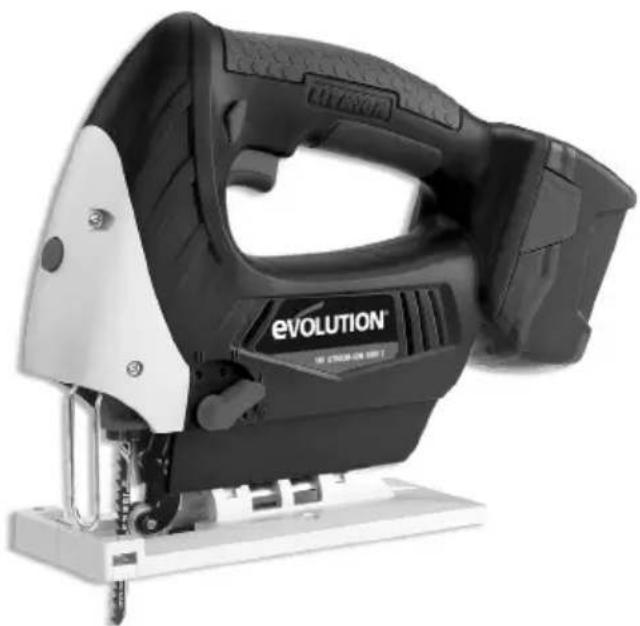
TABLE OF CONTENTS
EC - Declaration of Conformity 2
Important Information 3
12 Month Limited Warranty 3
General Safety Rules 4
Additional Specific Safety Rules 5
Safety Rules For Charger 6
Battery Pack Care 7
Battery Pack Power Indicator 7
Labels and Symbols 7
Jigsaw Overview 8
Specification
Functional Description 9
Operation 13
Maintenance 14
Environmental Protection 14
Parts Diagram 29
This manual was
originally written in English.
EC - DECLARATION OF CONFORMITY
We, the importer
Evolution Power Tools Ltd.
Venture One
Longacre Close
Sheffield
S203FR
Declare that the product
Part numbers: FURY718veU/RAGE718V
Evolution: 18v LhON Battery Jigsaw
Complies with the essential requirements of the following European Directives:
2006/42/EC - Machine Directive
2006/95/EC - Low Voltage Directive
2004/108/EC -EMC Directive
2002/95/EC - Restriction of the use of
Certain Hazardous Substances in Electrical and Electric Equipment
Standards and Technical specifications referred to:-
JIGSAW: EN 60745-1/A11:2010
EN 60745-2-11:2010
EN 55014-1/A1:2009
EN 55014-2/A2:2008
CHARGER: EN 60335-2-29/A2:2010
EN 60335-1/A14:2010
EN 62233:2008
All documentation is held on file at the above address and is available, on request for review.
Authorised Signatory
Date: 19/07/12
Signed:
Steven Bullos - Operations Director
Signed:
Lettie Lui - Product Manager
IMPORTANT
Please read these operating and safety instructions carefully and completely. For your own safety, before using this equipment check that the voltage is correct and that all handles and parts are firmly secured. If you are uncertain about any aspect of using this equipment, please contact our Technical Helpline.
Technical Helpline UK 0870 609 2297
Technical Helpline USA 1-866-EVO-TOOL
EVOLUTION 18V LI-ION BATTERY JIGSAW
Congratulations on your purchase of an Evolution Power Tools 18V Battery Jigsaw. Please complete your product registration on line to validate your machine's warranty period and ensure prompt service if needed. We sincerely thank you for selecting a product from Evolution Power Tools.
12 MONTH LIMITED WARRANTY. Evolution power tools reserves the right to make improvements and modifications to design without prior notice.
Evolution Power Tools will, within twelve (12) months from the original date of purchase, repair or replace any goods found to be defective in materials or workmanship. This warranty is void if the tool being returned has been used beyond the recommendations in the Instruction Manual or if the machine has been damaged by accident, neglect, or improper service. This warranty does not apply to machines and/or components which have been altered, changed, or modified in any way, or subjected to use beyond recommended capacities and specifications. Electrical components are subject to respective manufacturers' warranties. All goods returned defective shall be returned prepaid freight to Evolution Power Tools. Evolution Power Tools reserves the right to optionally repair or replace it with the same or equivalent item.
There is no warranty - written or verbal - for jigsaw blades. In no event shall Evolution Power Tools be liable for loss or damage resulting directly or indirectly from the use of our merchandise or from any other cause. Evolution Power Tools is not liable for any costs incurred on such goods or consequential damages. No officer, employee or agent of Evolution Power Tools is authorized to make oral representations of fitness or to waive any of the foregoing terms of sale and none shall be binding on Evolution Power Tools. Questions relating to this limited warranty should be directed to the company's head office, or call the appropriate Helpline number.
GENERAL SAFETY RULES
WARNING: When using electric tools, basic safety precautions should always be followed to reduce the risk of fire, electric shock and personal injury.
Please read all of these instructions before attempting to operate this machine. Save this manual for future reference.
- Keep work area clear. Cluttered work areas invite accidents.
- Consider work area environment. Do not expose tools to rain. Do not use tools in damp or wet locations. Keep work area well lit. Never use tools near flammable liquids or gases.
- Protect yourself against electric shock. Avoid body contact with earthed or grounded surfaces.
- Keep other people away. Do not let others, especially children, come close to the work, and touch the tool or the extension lead. Keep them away from the work area.
- Store idle tools. When not in use, tools should be stored in a dry locked-up place, out of children's reach.
- Never force the tools. Your tools will be more efficient and safer when used at the rate for which they were intended.
EVOLUTION
18V LI-ION BATTERY JIGSAW
- Use the right tool. Do not force small tools to do the job of a heavy duty tool. Do not use tools for purposes not intended; for example do not use circular sews to cut tree limbs or logs.
- Dress properly. Do not wear loose clothing or jewellery which may get caught in moving parts. Non-skid footwear is recommended when working outdoors. If you have long hair, tie it back and wear protective hair covering.
- Use protective equipment. Use safety glasses. Use face or dust mask if cutting operations create dust.
- Connect dust extraction equipment. If the machines have a connection for dust extraction equipment, ensure these are connected and properly used.
- Do not damage the cable. Never pull the power cable to disconnect the machine. Keep the cable away from heat, oil and sharp edges. 12. Secure workpiece. Where possible, use clamps or a vice to hold the workpiece. It's much safer than using your hands.
- Don't over reach. Keep proper footing and balance at all times.
- Maintain tools in good working condition. Keep cutting tools sharp and clean for better performance and optimum safety. Follow instructions for lubricating and changing accessories. Inspect power cables regularly and, if damaged, have them replaced by an authorised service centre. Inspect extension cables regularly and replace immediately if damaged. Keep handles dry, clean and free from oil and grease at all times.
- Disconnect tools. Disconnect tools from the power supply when not in use, before any maintenance operation and when changing accessories such as blades, bits, cutters, etc.
- Remove adjusting keys and spanners. Get into the habit of checking that adjusting keys and spanners have been removed from the machine before turning it on.
- Avoid unintentional starting. Ensure switch is in "off" position before plugging in the machine.
- Use proper extension leads. When the tool is used outdoors, use only extension leads intended for outdoor use and labelled as such.
-
Stay alert. Concentrate on what you are doing, use common sense and do not operate the tool when you are tired.
-
Check that no part is damaged. Before using a tool, make sure that it is in good working order. Check the alignment and condition of moving parts, mounting and any other aspect that may affect its operation. A guard or other part that is damaged should be properly repaired or replaced by an authorised service centre unless otherwise indicated in this instruction manual. Do not use the tool if the switch does not turn on and off.
-
Warning. The use of any accessory or attachment other than one recommended in this instruction manual may present a risk of personal injury.
- Have your tool repaired at an authorised service centre. This electric tool complies with current safety rules. Repairs should only be carried out by an authorised service centre using original spare parts. Failing this, the user could expose themselves to considerable danger.
HEALTH ADVICE
WARNING: When drilling, sanding, sawing or grinding, dust particles will be produced. In some instances, depending on the materials you are working with, this dust can be particularly harmful to you (e.g. lead from old gloss paint). You are advised to consider the risks associated with the materials you are working with and to reduce the risk of exposure.
You should:
Work in a well-ventilated area.
- Work with approved safety equipment, such as dust masks that are specially designed to filter microscopic particles.
ADDITIONAL SAFETY RULES
FOR YOUR EVOLUTION JIGSAW
- Do not expose to rain or water.
- Do not drop, shake or strike the battery.
- Wear hearing protection when necessary. Exposure to noise can cause hearing loss.
-
Cutting/scraping blades and accessories can become very hot. Take care when changing or handling any bits or accessories.
-
Recharge the battery only with the charger specified by the manufacturer. A charger that is suitable for one type of battery pack may create a risk of fire when used with another battery pack.
- Use this power tool only with specially designated battery packs. Use of any other battery packs may create a risk of injury and fire.
- When the battery pack is not in use, keep it away from other metal objects like paper clips, coins, keys, nails, screws or other small metal objects that can make a connection from one terminal to another. Shorting the battery terminals together may cause burns or a fire.
- Under extreme conditions electrolyte may be leak from the battery. If contact accidentally occurs, flush your skin with water. If electrolyte contacts your eyes, additionally seek medical help. Electrolyte from the battery may cause irritation or burns. 9. Hold the tool by the insulated gripping surfaces, especially when performing an operation where the blade may contact hidden wiring. If the blade contacts a 'live' wire, exposed metal parts of the power tool could become 'live' and give the operator an electric shock.
- If possible, use clamps or a vice to hold your work.
- When cutting into walls, floors or similar areas, make sure, as far as possible, that there are no services (gas or water pipes, electric cables etc) in the path of the blade. Striking hidden services could cause injury to the user and damage to the property. 12. Always disconnect the jigsaw battery before changing the blade. Never use damaged or distorted blades.
- Always allow the saw to come to a complete halt before putting it down. A running tool may bounce uncontrollably if the blade tip contacts any surface.
- Always consider the work environment and wear the appropriate personal protection equipment. This could include dust masks, eye protection, safety footwear etc.
SAFETY RULES FOR YOU EVOLUTION BATTERY CHARGER
WARNING: READ AND UNDERSTAND ALL OF THESE INSTRUCTIONS. SAVE THESE INSTRUCTIONS FOR FUTURE OPERATOR USE.
- Do not use the charger outdoors or expose to wet or damp conditions. Water entering the charger will increase the risk of electric shock.
- Use this charger only with the designated rechargeable battery packs. Other types of battery may overheat and burst causing personal injury or damage.
- Do not abuse the charger cord. Never use the cord to carry the charger. Do not pull the cord rather than the plug when disconnecting from the power supply. Replace damaged cords immediately.
- Ensure that the power cord is routed so that it does not pose a trip hazard. Also ensure that it cannot come into contact with sharp edges or moving parts which could cause damage to the cord.
- Do not use any attachment not recommended or sold by the battery charger manufacturer. Use of unauthorised attachments or battery pecks could lead to a significant risk of electric shock, fire or personal injury.
- Keep the power cord and the charger body from heat sources. Heat can damage the charger body and/or internal parts.
- Do not use this charger if the cord or plug is damaged. A damaged cord or plug must be replaced before the charger can be used.
- Do not use the charger if it has been dropped, received a sharp blow or in any other way has been damaged. Have the charger checked at an authorized service centre.
- Do not disassemble charger. Take to an authorized service centre when service or repair is required.
- Unplug the charger from the mains power supply when attempting maintenance or cleaning. This will reduce the risk of electric shock.
EVOLUTION
18V LI-ION BATTERY JIGSAW
-
Disconnect the charger from the mains supply when not in use. Store in a locked cupboard out of children's reach. Do not store with any other small metallic items that could fall into the charger battery-pack port. Do not store in locations where the temperature may reach or exceed 50^ .
-
Do not touch any of the uninsulated terminals in either the battery charger or the battery pack. Terminals may be 'live' and there is a risk of electric shock.
WARNING: This machine is not intended for use by persons (including children) with reduced physical, sensory or mental capabilities, or lack of experience and knowledge, unless they have been given supervision or instruction concerning the safe use of the machine by a person responsible for their safety.
Children should be supervised to ensure that they do not have access to, and are not allowed to play with, this machine.
- Do not charge the battery pack when the temperature is below 0^ (32^) or above 40^ (104^) .
- Always protect the battery terminals when the battery pack is not used.
- Do not short the battery pack.
WARNING: A battery short can cause a large current flow, overheating, possible burns and even irreparable damage to the battery.
- Do not touch the terminals with any conductive material.
- Avoid storing the battery pack in a container with other metal objects such as nails, coins, etc. 6. Do not expose the battery pack to water or rain.
- Do not store the battery pack in locations where the temperature may reach or exceed 50^ (122°F).
- Do not incinerate the battery pack even if it is severely damaged or is completely worn out. The battery pack can explode in a fire. 9. Be careful not to drop, shake or strike the battery.
BATTERY POWER INDICATOR
The battery pack is equipped with a power indicator. To show how much power is left in the battery pack, press the power indication button.
| LED STATUS BATTERY CONDITION | |
| Only Red LED 'on'. Battery | power very low. Battery needs to be re charged. |
| Orange & Red LEDs 'on'. Battery | power is low. |
| 1 Green 1 Orange 1 Red LED 'on' | Battery pack is good to use. |
| All LEDs 'on'. Battery Pack | is fully charged. |
SAFETY LABELS & SYMBOLS
WARNING: Do not operate machine if warning and / or instruction labels are missing or damaged. Contact Evolution Power Tools for replacement labels.
Note: All or some of the following symbols may appear in the manual or on the product.
| Symbol Description | |
| V Volts | |
| A Amperes | |
| Hz Hertz | |
| Min1 | Speed |
| ~ Alternating Current | |
| No No Load Speed | |
| A | Wear Safety Goggles |
| B | Wear Ear Protection |
| C | Do Not Touch |
| D | Wear Dust Protection |
| E | Restriction of Hazardous Substances Directive |
| E | CE certification |
| F | Waste electrical and electronic equipment |
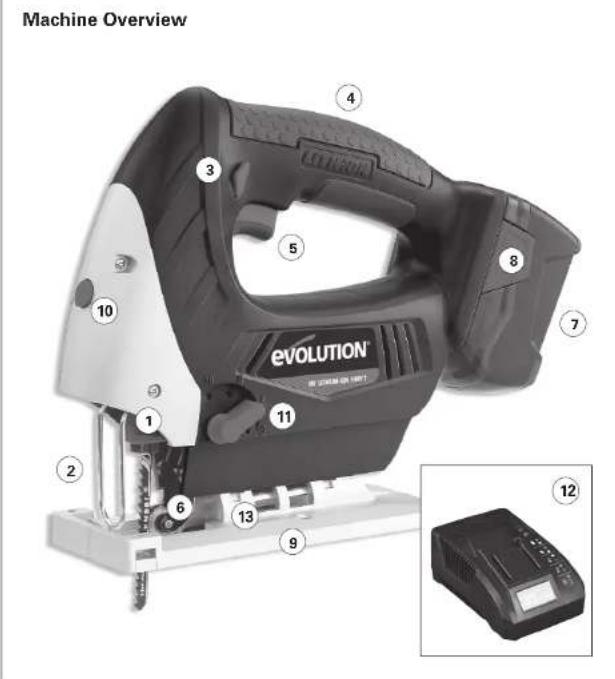
- KEYLESS COLLET CHUCK
2.BLADE GUARD - SWITCH SAFETY LOCK SLIDE BUTTON
4.SOFT GRIP HANDLE - ON/OFF TRIGGER SWITCH
- GUIDE ROLLER
-
INSERTED BATTERY PACK
-
BATTERY PACK LOCKING TAB
- FOOTPLATE
- LASER GUIDE ON/OFF SWITCH
- ORBITAL ACTION
CONTROL SELECTOR
- CHARGER
- FOOTPLATE ANGLE GUIDE
SPECIFICATION
EVCUATION BATTERY JIGSAW & CHARGE
JIGSAW
18V-DC
No Load Speed: 0-2/400 strokes per minute
Stroke Length: 25.4mm
Blade Type:T-shank
CHARGER
Rated Voltage: 230-240VAC
Rated Frequency: 50/60Hz
Rate Input Power: 55W
Rated Output Voltage: 18VDC
Rated Output Current: 1.7A
Protection Class
Degree Of Protection: Ordinary
Charging Time: 1 Hour
BATTERY PACK Battery Amps:1.5A Battery Watts/Hour:27 W/h Battery Voltage:18V-DC Battery Capacity:1500mAh Lio
NOISE AND VIBRATION DATA
Sound Pressure: 87.3d
Sound Power: 98.3d
Vibration: 5.383m/s
The declared vibration total value has been measured in accordance with a standard test method and may be used for comparing one tool with another.
The declared vibration total value may also be used in a preliminary assessment of exposure.
WARNING: The vibration emission during actual use of the power tool can differ from the declared total value depending on the ways in which the tool is used. The need to identify safety measures and to protect the operator are based on an estimation of exposure in the actual conditions of use (taking account of all parts of the operating cycle, such as the times the tool is switched off, when it is running idle, in addition to trigger time).
ITEMS SUPPLIED
Instruction Manual: 1pc
HexKey: 1pc
Jigsaw Blades: 3pcs
18 Battery Pack: 1pc
18V Battery Charger: 1pc
FUNCTIONAL DESCRIPTION
Note: Before using this tool, read the Instruction manual carefully.
BEFORE USE
A Battery Pack must be inserted into the tool as described below. It is important that the battery pack is of the designated type recommended for this machine. Newly purchased Battery Packs do not come fully charged, and should be charged before use.
Note: Battery power and performance will improve after several discharge/charging cycles have been completed.
WARNING: The battery pack and battery charger are specially designed to work together. Do not attempt to use any other type of charger or battery pack with this Jigsaw.
1. CHARGING A BATTERY PACK (Fig. 1)
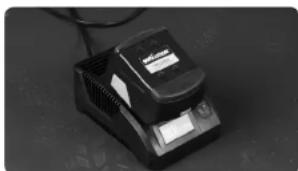
- Position the charger on a work bench or similar in a well ventilated location and ensure that the charger cannot be covered by workshop cloths etc.
- Plug the charger into a suitable power socket. The green LED will illuminate.
-
Slide the Evolution 18V battery pack into the docking port of the charger. It will only fit in one way round.
-
Firmly side the battery pack down into the charger to ensure terminal connection. The battery looking tabs should positively engage the charger. The red LED will light to confirm terminal connection and that the charging cycle has started.
When the green LED flashes, the charging cycle is 90% completed. - Remove the battery pack from the charger when the flashing green LED remains steady, and store the charger safely for future use. Remove the battery pack by pressing the two locking tabs on either side of the pack and slide the pack from the charger.
CHARGING INDICATOR
This charger is designed to detect problems that can sometimes arise with rechargeable battery packs. The status of the two LED's can alert the operator to potential problems. Please refer to the table below.
WARNING: When a battery becomes discharged due to prolonged use or exposure to direct sunlight or heat, always allow the battery pack to cool down before recharging. This will allow the battery to be recharged to its full capacity.
CHARGING TIMES
Normal charging time is approximately 1 hour but this can vary depending upon circumstances.
- If the battery pack is only partially discharged it may take less than an hour to recharge.
- If the battery pack and ambient temperature are very cold then recharging could take up 1.5 hours.
- If the battery pack is very hot it may not recharge. Allow it to cool right down before beginning the charging process.
| RED LED | GREEN LED | CHARGER OR BATTERY PACK CONDITION |
| OFF | ON | Charger connected to power supply and ready to receive battery pack |
| ON | OFF | Battery pack correctly inserted and charging cycle in progress |
| OFF | FLASHING | Battery charging and at a 90% of full charge |
| OFF | ON | Steady green LED - Battery is completely charged |
| FLASHING | FLASHING | At the same time - Battery pack too hot or cold for charging |
| FLASHING | FLASHING | Alternately - Battery pack defective and needs to be replaced |
Note: If battery pack failure is suspected, we recommend that the operator inserts a new battery of known quality into the charger to check that the charger is working correctly. If the new battery charges correctly, then the original battery is probably defective and should be sent for safe recycling. If the new battery pack displays the same problems as the original, have the charger tested by a qualified person.
2. INSTALLING OR
REMOVING THE BATTERY PACK
Check that the battery pack is of the designated type for this machine. We recommend that the trigger switch is locked in the 'OFF' position when removing or inserting the Battery Pack. Refer to section 5 below.
- Slide the Battery Pack onto the base of the tools handle. The Battery can only fit one way round.
- Firmly slide the Battery Pack fully into the tools handle to engage the locking tabs. The electrical connections inside the handle will be made automatically.
EVOLUTION
To remove the Battery Pack, simply press the two locking tabs with your finger and thumb and slide the Battery Pack from the handle.
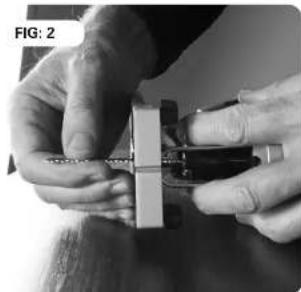
3. INSTALLING OR REMOVING A BLADE (Fig. 2)
Note: The Battery Pack must be disconnected from the machine when installing or removing the blade.
Installation:
- Remove the Battery Pack.
- Check that the jigsaw blade is of the correct type.
Pull back on the colletch chuck sleeve using your finger and thumb of one hand. - Insert the blade into the chuck fully ensuring that the blade teeth face forwards.
- Release the chuck sleeve.
- Check to ensure the blade is securely gripped by the chuck.
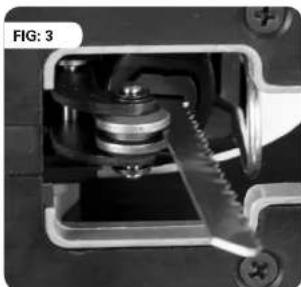
- Check to ensure that the back of the blade has engaged into the groove in the guide roller. (Fig. 3)
- Replace the battery pack.
Removal:
Note: A recently used blade can be very hot. Allow such a blade to cool down before attempting to remove it from the machine.
- Stop the machine with the chuck at the bottom of its stroke.
- Remove the Battery Pack
- Set the Cutting Action Selection Switch to position 3.
Pull back on the collet chuck sleeve using your finger and thumb of one hand.
Using your other hand gently ease the blade rearward to release any pressure being exerted by the guide roller on the back of the blade.
Pull the blade downwards and away from the machine.
4. ON/OFF TRIGGER SWITCH (Fig. 4a)
This tool is fitted with a variable speed Trigger Switch that delivers higher speed as the trigger pressure is increased.
The Trigger Switch is also fitted with a brake function which stops the chuck immediately when you quickly release the trigger.
18V LI-ION BATTERY JIGSAW
5. TRIGGER SWITCH SAFETY LOCK (Fig. 4b)
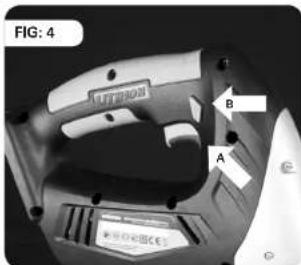
The Trigger Switch can only be operated once the safety lock has been disengaged.
To disengage the safety lock press the safety lock slide button on either the Right Hand or Left Hand side of the handle.
- Press the trigger switch to start the machine.
Note: The Safety Lock will automatically reset to the 'Safe' position when the trigger switch is released and the machine has stopped
6. LASER CUTTING GUIDE
This jigsaw is fitted with a Laser Guide which can be particularly useful when cutting straight lines.
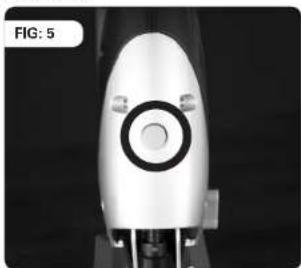
Only switch the Laser Guide on when you are about to make a straight cut, and switch it off when the cut has been completed. The switch is located on the front of the machine. Press the button once to switch the Laser Guide 'On', Press once more to switch the Laser Guide 'Off'. (Fig. 5)
WARNING: Do not look directly into the laser beam, or point it at another person, or at pets or other animals. Do not use the Laser Guide if the material to be cut is reflective. Any repairs to the laser must be entrusted to Evolution Power Tools or their appointed agent. The laser module must not be replaced with a laser of a different type.
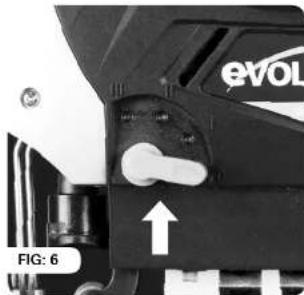
7. CUTTING ACTION SELECTION SWITCH (Fig. 6)
This jigsaw has a 4 position switch (0-3) located on the Left-Hand side of the machine just behind the blade. Only operate this switch when the machine is switched Off and the blade is stationary.
Position '0' Positions '1-3'
Straight cutting action Orbital cutting actions
Orbital cutting action has an aggressive blade cutting motion and is especially suited for cutting soft materials. During orbital cutting the blade moves forwards as well as up and
EVOLUTION
down. Position 1 is the least aggressive of the orbital cutting actions, with position 3 being the most aggressive.
The Table below gives some typical examples of the use of the orbital cutting facility. We recommend that the operator always practices on a piece of unwanted material to determine the most suitable selection for the task at hand.
- Adjust the speed of the blade as necessary to achieve optimum cutting performance.
- Use the Laser guide if necessary, but only on non-reflective materials.
Note: Do not force the blade. Let the blade do the work by adjusting the speed and feed rates to achieve best performance.
| POSITION | TYPICAL APPLICATION |
| 0 | Thin materials. Fine cuts. Tight curves. All metals |
| 1 | Hard materials such as chipboard, MDF, Plywood etc |
| 2 | Thick materials such as constructional timber and plastic |
| 3 | Fast cuts when cutting with the grain in softwood material |
GENERAL CUTTING ADVICE
Note: Always ensure that the footplate of the jigsaw is in close contact with the workpiece throughout the cutting procedure. If the footplate is allowed to "lift" away from the workpiece operator control and accuracy will be compromised.
- Clearly mark out the cutting line to be followed on the workpiece (use a pencil or other suitable marking device).
- Small workpieces should be secured in a vice or clamped to a workbench. Check that the passage of the blade is not obstructed.
- Larger workpieces should be clamped to sawhorses or similar. Check that the passage of the blade is not obstructed.
- Set the Cutting Action Selection Lever to the desired position.
Align the saw with the cutting line and rest the front of the footplate on the workpiece.
Note: Ensure that the blade is not in contact with the workpiece at this stage.
- Switch the machine 'On' and gently feed the jigsaw into the workpiece. Be careful to hold the jigsaw firmly and keep full control as the blade contacts the workpiece.
CUTTING METAL
When cutting any metal a suitable cutting.
lucendant/coolent should be used. Cast iron and Brass can be cut without a cutting
lubricant. Always use a blade that is capable of cutting metal, and secure the workpiece securely, if practicable, in a vice or similar clamping device.
WARNING: When cutting metal the Cutting Action Selection Lever must be set to the 0' position.
ANGLE CUTTING FOOTPLATE ANGLE ADJUSTMENT
Note: The footplate is factory set and adjusted so that the blade cuts at 90^ to the footplate.
The footplate may be tilted to allow an angle of up to 45^ to either side with positive location stops at 15^, 30^ and 45^
To adjust the footplate:
- Remove the battery from the jigsaw.
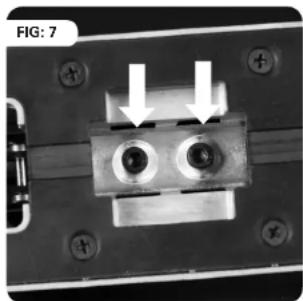
- Loosen the two hex-headed screws underneath the footplate using a suitable allen key. (Fig. 7)
18V LI-ION BATTERY JIGSAW
- Tilt the footplate to the desired angle (Fig. 8)
to do the work. Do not force'the blade. A trial run on unwanted material to determine the best combination of blade feed and speed is recommended.
Return to the factory setting when angled cutting is completed. Recheck the security of the blade.
CUTTING CIRCLES OR CURVES
When cutting curves, particularly tight curves, start with a reasonably slow speed, and gradually increase the speed until the optimum performance is achieved.
Do not force the blade, as in curved cutting this can lead to the blade defection, and possible blade breakage.
To cut a circle from a workpiece:
Mark out the circle in the required position.
- Drill a 12mm hole near the centre of the hole.
- Insert the jigsaw blade into the 12 mm hole. Ensure that there is clearance
between the blade and the workpiece.
- Begin cutting towards the outside of the
circle, slowly in a spiral fashion, until the blade is following the required cutting line.
- Advance the jigsaw slowly to avoid cutting a slanted surface or experiencing blade deflection.
BLADES
Choose blades carefully. Use only a blade that is suitable for this machine and for the material to be cut.
The ability of any jigsaw to follow curves, provide smooth finishes or faster cutting is directly related to the type of blade employed.
MAINTENANCE
Your Evolution Jigsaw requires no major additional lubrication or maintenance. Occasionally apply a drop of light machine oil to the blade guide spindle. There are no user serviceable parts in your Evolution Jigsaw, or Evolution 18v Charger.
EVOLUTION
Keep the tool clean, but do not use chemical cleaners which may damage the plastic parts. Clean with a dry cloth. Ensure that the motor ventilation slots are kept clean.
ENVIRONMENTAL PROTECTION
Waste electrical products should not be disposed of with household waste. Please recycle where facilities exist. Check with your Local Authority or retailer for recycling advice.
FR
Protection environmentale 28
Pièces diagramme 29
EC-DECLARATION DE CONFORMITE
Nos, l'importateur
Evolution Power Tools Ltd.
Venture One
Longacre Close
Sheffield
S203FR
2006/42/EC - Directive machine
2004/108/EC - EMC Directive
Steven Bulloss - Operations Director
Signed:
Lettie Lui - Product Manager
EVOLUTION
18V LI-ION BATTERY JIGSAW
IMPORTANT
APPLICATIONS CLASSIQUES
A flammability hazard may exist if the package or battery cell is damaged.
MUST BE HANDLED WITH CARE!
Lithium-lon batteries are classified as 'Class 9 Miscellaneous Dangerous Substances & Articles'.
For more information, please call Evolution on +44 (0)114 251 1022. Cell made in China.

- UK: Original Instructions
- R: Instructions D'origine
- TABLE OF CONTENTS
- EC - Declaration of Conformity 2
- EC - DECLARATION OF CONFORMITY
- We, the importer
- Declare that the product
- Complies with the essential requirements of the following European Directives:
- Standards and Technical specifications referred to:-
- Authorised Signatory
- IMPORTANT
- EVOLUTION 18V LI-ION BATTERY JIGSAW
- MONTH LIMITED WARRANTY. Evolution power tools reserves the right to make improvements and modifications to design without prior notice.
- GENERAL SAFETY RULES
- Please read all of these instructions before attempting to operate this machine. Save this manual for future reference.
- EVOLUTION
- HEALTH ADVICE
- You should:
- ADDITIONAL SAFETY RULES
- FOR YOUR EVOLUTION JIGSAW
- SAFETY RULES FOR YOU EVOLUTION BATTERY CHARGER
- 18V LI-ION BATTERY JIGSAW
- BATTERY POWER INDICATOR
- SAFETY LABELS & SYMBOLS
- SPECIFICATION
- JIGSAW
- CHARGER
- ITEMS SUPPLIED
- FUNCTIONAL DESCRIPTION
- BEFORE USE
- CHARGING A BATTERY PACK (Fig. 1)
- CHARGING INDICATOR
- CHARGING TIMES
- INSTALLING OR
- REMOVING THE BATTERY PACK
- Installation:
- Removal:
- ON/OFF TRIGGER SWITCH (Fig. 4a)
- TRIGGER SWITCH SAFETY LOCK (Fig. 4b)
- LASER CUTTING GUIDE
- GENERAL CUTTING ADVICE
- CUTTING METAL
- ANGLE CUTTING FOOTPLATE ANGLE ADJUSTMENT
- To adjust the footplate:
- CUTTING CIRCLES OR CURVES
- To cut a circle from a workpiece:
- BLADES
- MAINTENANCE
- ENVIRONMENTAL PROTECTION
- FR
- EC-DECLARATION DE CONFORMITE
- APPLICATIONS CLASSIQUES
- MUST BE HANDLED WITH CARE!
Brand : EVOLUTION
Model : RAGE7
Category : Saw