Pureza AC350 - Air purifier DIRT DEVIL - Free user manual and instructions
Find the device manual for free Pureza AC350 DIRT DEVIL in PDF.


| Product type | Air purifier |
| Brand | Dirt Devil |
| Model | Pureza AC350 |
| Weight | Approximately 6.4 kg |
| Power supply | 220-240 V~, 50 Hz |
| Power (L/M/H) | 63 / 81 / 107 W |
| Cable length | Approximately 1.8 m |
| Power levels | L (silent), M (medium), H (high) |
| Timer | 2, 4 or 8 hours |
| Filters | HEPA filter and charcoal filter (carbon) |
| Filter replacement indicators | LED "Odor Filter" (charcoal) and "HEPA" |
| Charcoal filter replacement | Every 3 months or when the LED lights up |
| HEPA filter replacement | Every 6 months or when the LED lights up |
| Housing maintenance | Clean with a soft cloth; vacuum the ventilation slots |
| Safety | Do not use outdoors or in a humid room; do not cover; unplug before cleaning |
| Spare parts | Front cover (ref. 350012), Filter kit (1 HEPA + 2 charcoal, ref. 350022) |
| LED reset | Press and hold the filter replacement key after replacement |
Frequently Asked Questions - Pureza AC350 DIRT DEVIL
User questions about Pureza AC350 DIRT DEVIL
0 question about this device. Answer the ones you know or ask your own.
Ask a new question about this device
Download the instructions for your Air purifier in PDF format for free! Find your manual Pureza AC350 - DIRT DEVIL and take your electronic device back in hand. On this page are published all the documents necessary for the use of your device. Pureza AC350 by DIRT DEVIL.
USER MANUAL Pureza AC350 DIRT DEVIL
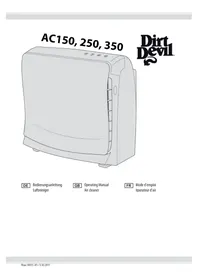
AC150, 250, 350
Dirt Devil ^®
natural_image
Line drawing of a portable kitchen appliance with control panel and buttons (no text or symbols)
Operating Manual
Air cleaner
natural_image
Line drawing of two electronic devices, one front open and one side with ventilation slots (no text or symbols)natural_image
Illustration of a microwave oven with three arrows pointing to the lid (no text or symbols)
ACHTUNG:
natural_image
Illustration of hands installing or opening a large paper on a device (no text or symbols visible)natural_image
Illustration of a hand opening a device into a panel with a mesh cover (no text or symbols)natural_image
Diagram of a panel or enclosure with two downward arrows pointing to its side (no text or symbols present)natural_image
Illustration of hands installing or opening a printer cover (no text or symbols visible)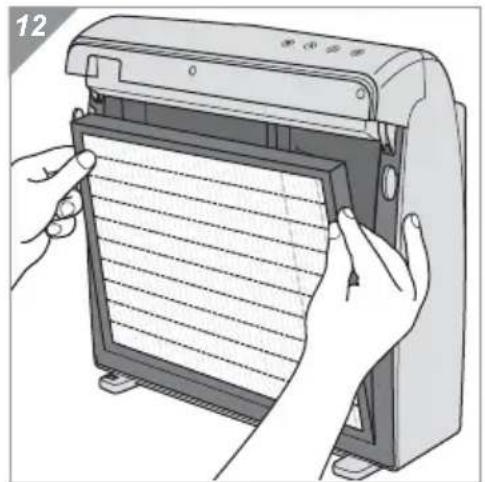
natural_image
Illustration of hands installing or adjusting a device with a grid-patterned cover (no text or symbols visible)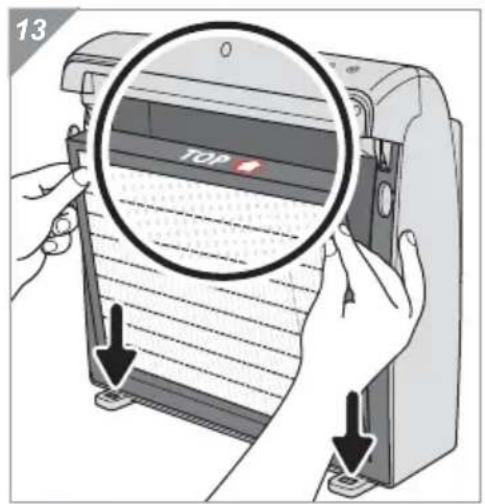
We are pleased that you have chosen our air purifier.
Thank you for your purchase and your confidence in us.
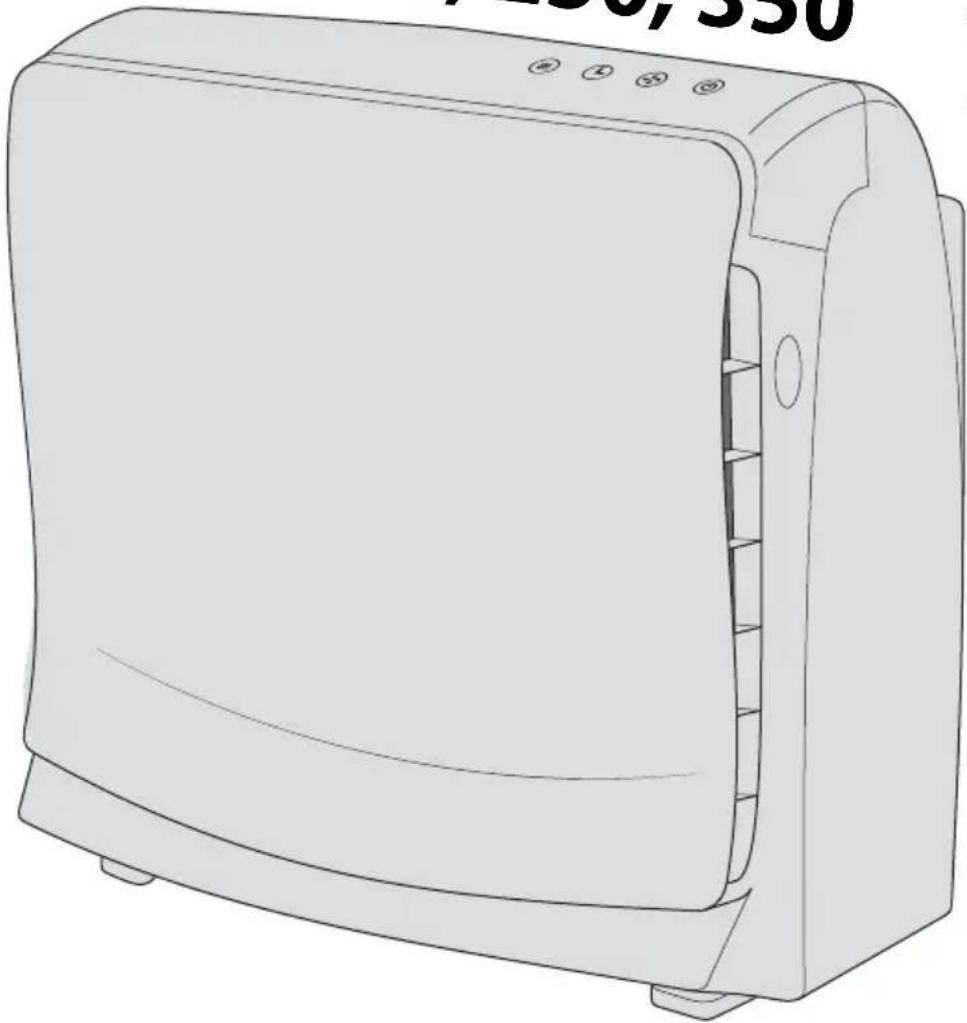
Operating panel and parts of the appliance (Fig. 1)
1 Replacing and resetting the filter
○ "Odor Filter": Replacing the carbon filter
○ "HEPA": Replacing the HEPA filter
▶ chapter 4.2, „Replacing the carbon filter“
▶ chapter 4.3, „Replacing the HEPA filter“
▶ chapter 4.4, „Resetting the filter change LED“
2 Timer
○ "2": shuts off after 2 hours
○ "4": shuts off after 4 hours
○ "8": shuts off after 8 hours
▶ chapter 3.4, „Setting the timer“
3 Power
○ "L": appliance runs particularly quietly
○"M": medium setting
○ "H": appliance runs at high speed
▶ chapter 3.3, „Selecting the power“
4 Power
○ Switches the appliance on/off
▶ chapter 3.2, „Switching on“
5 Buttons to release the front panel
6 Insertion mark for the HEPA filter
7 HEPA filter
8 Carbon filter
9 Blower
10 Front panel
11 Base with recess for the front panel
12 Air inlet
13 Plug and power cord
14 Air outlet
not shown:
Operating manual
Technical data
| Model name: PUREZA 150 | PUREZA250 | PUREZA350 |
| Model: AC150 AC250 AC350 | ||
| Type of appliance: Air purifier | ||
| Voltage: 220 V | -240 V~, 50 Hz | |
| Cord length: approx. 1.8 m | ||
| Power: 33/42/67 W (L/M/H) 45/62/85 W (L/M/H) 63/81/107 W (L/M/H) | ||
| Weight: approx. 3.6 kg | approx. 4.7 kg | approx. 6.4 kg |
1 Safety instructions .... 20
1.1 Re: Operating Manual 20
1.2 Concerning certain groups of persons.... 20
1.3 Re: Power supply 21
1.4 If the appliance is faulty.... 21
1.5 Re: Proper use.... 22
2 Unpacking and setting up 23
2.1 Unpacking 23
2.2 Selecting the location for installation 23
3 Connecting and operating....24
3.1 Connecting 24
3.2 Switching on.... 24
3.3 Selecting the power.... 25
3.4 Setting the timer 25
4 Caring for the appliance....26
4.1 Cleaning the housing.... 26
4.2 Replacing the carbon filter.... 27
4.3 Replacing the HEPA filter 28
4.4 Resetting the filter change LED 29
5 Solving problems .... 30
5.1 Correcting problems yourself.... 30
5.2 Hotline and customer service.... 31
5.3 Accessories and spare parts 31
5.4 Warranty 31
5.5 Disposal 31
1.1 Re: Operating Manual
Read the operating manual completely before working with the appliance. Keep the operating manual in a safe place. If you pass the appliance on to someone else, give them the operating manual as well.
Failure to comply with this operating manual can lead to serious injuries or damage to the appliance. We assume no liability for damage that occurs as a result of failure to comply with the instructions in this operating manual.
Important notes in the following chapters is specially marked.

WARNING:
Warns of health hazards and identifies possible risks of injury.

CAUTION:
Indicates possible dangers to the appliance or other objects.
NOTE:
Highlights tips and information.
1.2 Concerning certain groups of persons
These appliances can be used by children of 8 years and upwards and persons with impaired physical, sensory or mental abilities, or insufficient experience or knowledge, providing they are supervised or have been instructed in the proper use of the appliance and understand the risks involved.
Children must not play with the appliance. Children must not perform cleaning or user maintenance tasks without supervision.
- Keep packaging material out of the reach of children. There is risk of asphyxia-tion.
- Keep the remote control and battery out of the reach of children. There is a risk that children will swallow the battery.
1.3 Re: Power supply
The appliance is operated with electrical power, which means there is always a risk of electric shock. Therefore:
■ Never immerse the appliance in water or other liquids. Keep it away from rain and moisture. Do not operate the appliance outdoors or in rooms with a high level of humidity.
- Never touch the plug with wet hands. Always pull directly on the plug if you want to disconnect the appliance from the mains. Never pull on the cord as this could damage it. Never carry the appliance by its cord.
Take care that the power cord is not bent, pinched, or rolled over, and does not touch heat sources or sharp edges. Also take care that it does not become a stumbling hazard.
Before connecting to the power supply, make sure that the voltage stated on the type plate matches the voltage of your plug socket.
Before you clean or maintain the appliance, switch off the appliance and pull the plug from the mains socket.
1.4 If the appliance is faulty
Never operate a faulty appliance or an appliance with a faulty cord. If the power cord of this appliance is damaged it must be replaced by the manufacturer, their authorised service representative or a similarly qualified person to avoid danger.
- Hand over a faulty appliance to an authorised dealer or the Customer Service department for repairs. Address ▷ page 102, „International Service“.

1.5 Re: Proper use
Only ever use the air purifier domestically. It is not suitable for commercial use.
Only use the air purifier domestically for purifying cool, dry room air. Any other use is considered improper use and is prohibited.
In particular, the following is prohibited:
Suctioning air which is contaminated with toxic vapours or gases, exhaust or flue gases or has microbiological contamination. Air which has a level of contamination from dust or chippings which exceeds the normal domestic concentration must not be suctioned either. Your health may be at risk from air with this type of contamination.
Use in the vicinity of explosive, burning, oxidising, accelerating, combustible or volatile substances or suctioning said substances. Do not use the product simultaneously with, e.g. impregnating agents, hair sprays, insecticides or other combustible fluids and scents or in an chlorinated environment. There is risk of fire or explosion.
Suctioning fatty or hot air, e.g. in the vicinity of chimneys, ovens, hobs, grills, toasters etc., or burning candles. There is a risk of fire.
Use as a substitute for proper ventilation, e.g. as a fresh air supply. The appliance is not a suitable substitute for airing or ventilation. It cannot regulate (neither increase nor reduce) air humidity either.
Use as a substitute for extractor hoods or extractor units, e.g. in kitchens or carpenter's workshops.
Use outdoors or in wet rooms (e.g. in bathrooms or saunas). There is a risk of the appliance being damaged by moisture.
■ Sticking objects into the appliance's openings. Take particular care to keep hair and loose items of clothing away from the appliance. Risk of injury!
■ Use without all filters being correctly installed.
■ Covering the appliance or placing objects on the appliance.
■ Modifying or repairing the appliance yourself.
2.1 Unpacking
Unpack the appliance and all accessory parts and check that the contents are undamaged and complete (▷ page 18, „Your air purifier“).

CAUTION:
Always dispatch the appliance in its original packaging to avoid transport damage. Keep the packaging for this purpose. Dispose of packaging material which is no longer required in accordance with the applicable regulations of your country.
NOTE:
Contact our service representative immediately if you notice any transport damage ▷ page 102, „International Service“.
2.2 Selecting the location for installation

WARNING:
Risk of fire or explosion! Set the appliance up in a place in which it cannot come into contact with chemicals or heat sources and cannot suction explosive, hot or fatty air.

WARNING:
Hazard to your health! Set the appliance up so that the soiled air is not suctioned past persons, in particular if they are sleeping.

WARNING:
Risk of falling! Only unwind the sufficient length of cord so that you can connect the plug to the nearest socket. Wind the rest of the cord back onto the cord winder in the base. Always lay the cord so that it cannot become a stumbling hazard.

CAUTION:
Make sure that you place the appliance on a stable, horizontal surface. Never place the appliance on soft surfaces, such as beds or sofas. Do not set up the appliance in the pivoting range of doors or windows or in areas in which you have to move it frequently.
Make sure that the air can be suctioned and given off free from obstructions.

3 Connecting and operating
3.1 Connecting

WARNING:
Risk of injury! Check the appliance and its power cord before every use. A damaged appliance must never be used.

CAUTION:
Only use the appliance if you have made sure that all the filters are properly in place and no openings are blocked.
natural_image
Line drawing of a desktop computer with front panel and rear panel (no text or symbols)- Make sure that the location for installation meets all the requirements in ▷ chapter 2.2, „Selecting the location for installation“.
- Make sure that the socket which you intend to use carries the same electrical voltage as that shown on the type plate on the underside of the appliance.
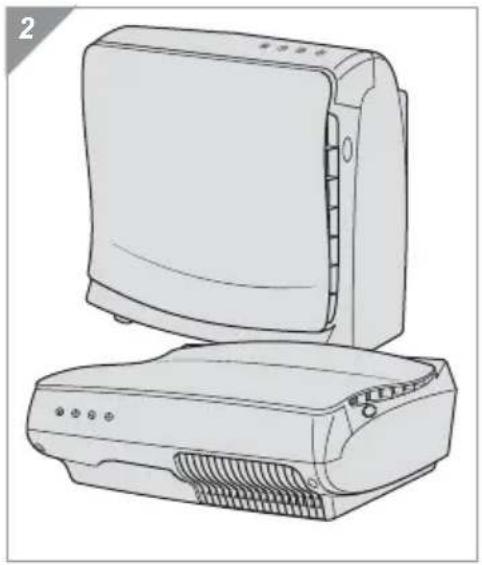
- You can now set up the appliance upright or lying flat (Fig. 2). There are 4 feet provided on the respective underside for this purpose.
- Make sure that there is sufficient free space around the air inlet and air outlet.
3.2 Switching on

CAUTION:
You only need to touch the buttons on the operating panel very lightly. It is not necessary to actuate them with force. This can cause damage to the buttons.
-
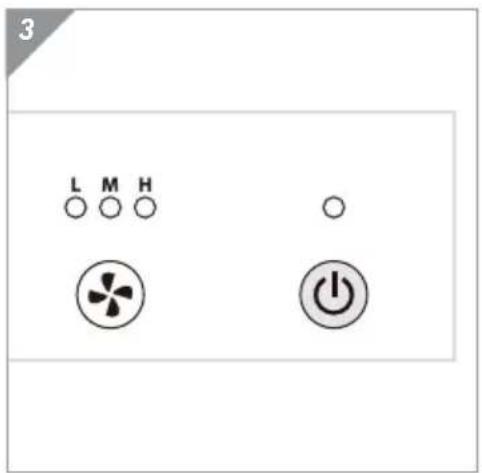
Switch on the appliance by pressing the ⏻ button (Fig. 3).
-
The LED above the button lights up.
- If you wish to adjust the power: ▷ chapter 3.3, „Selecting the power“.
- If you want the appliance to switch off after a certain period of time: ▷ chapter 3.4, "Setting the timer".
To switch off the appliance, press the button (Fig. 3) again. All the LEDs go out and the blower stops.
3.3 Selecting the power
-
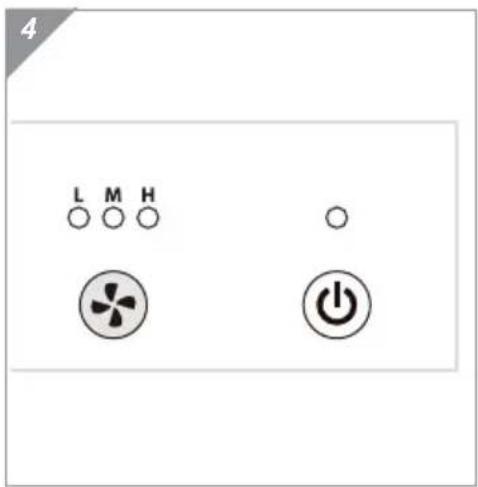
Select the power on the appliance when it is switched on using the ⚙ button (Fig. 4):
-
" L": appliance runs particularly quietly
- " M": medium setting
- "H": appliance runs at high speed.
The LED shows the respective current setting.

3.4 Setting the timer
If you want the appliance to run for a certain time and then switch off automatically, it is recommendable to use the timer function:
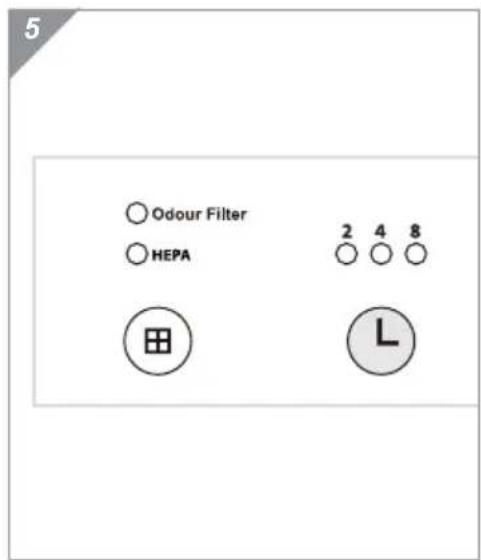
-
Select the duration until automatic deactivation on the appliance when it is switched on using the button (Fig. 5):
-
"2": the appliance switches off after 2 hours
- "4": the appliance switches off after 4 hours
- "8": the appliance switches off after 8 hours
CAUTION:
Make sure that the LED to match your selection lights up. If none of the 3 timer LEDs light up, the appliance will continue to run.
You can still switch off the appliance at any time using the button.

WARNING:
Risk of injury! Before you clean or maintain the appliance, switch off the appliance and pull the plug from the mains socket.

CAUTION:
The appliance will run less efficiently if it is not cared for sufficiently.
As required: Clean the housing ( chapter 4.1, „Cleaning the housing“).
Every 3 months or as soon as the "Odor Filter" LED lights up: ▷ chapter 4.2, "Replacing the carbon filter"
Every 6 months or as soon as the "HEPA" LED lights up: ▷ chapter 4.3, „Replacing the HEPA filter“
4.1 Cleaning the housing
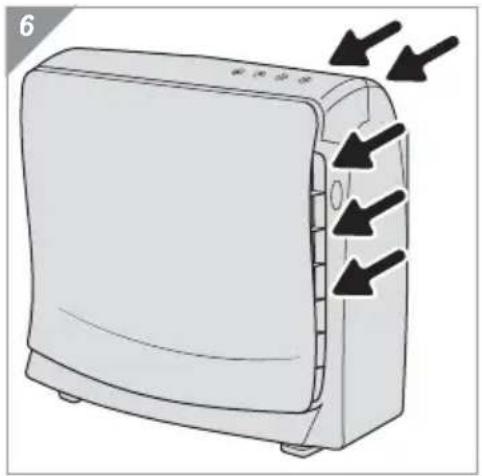
natural_image
Illustration of a microwave oven with three arrows indicating airflow direction (no text or symbols)
CAUTION:
Do not use cleaning agents, scouring agents or alcohol, as these may damage the housing.
- With the appliance switched off, remove any fluff and dust from the ventilation slats with a vacuum cleaner (Fig. 6).
- Clean the remaining surfaces with a soft, lint-free cloth.
4.2 Replacing the carbon filter
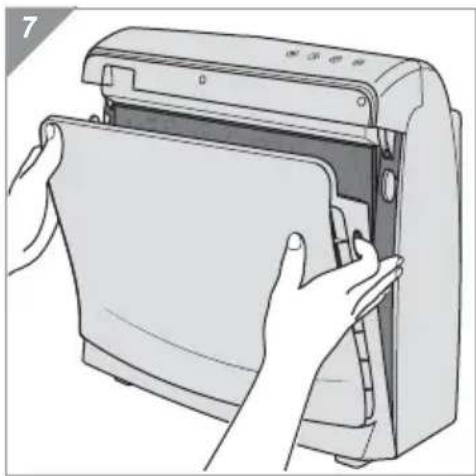
natural_image
Illustration of hands installing or opening a device into a paper filter (no text or symbols visible)- Make sure that the plug has been disconnected from the mains socket.
- Push the release catches on the front panel (Fig. 7). Carefully remove the front panel.
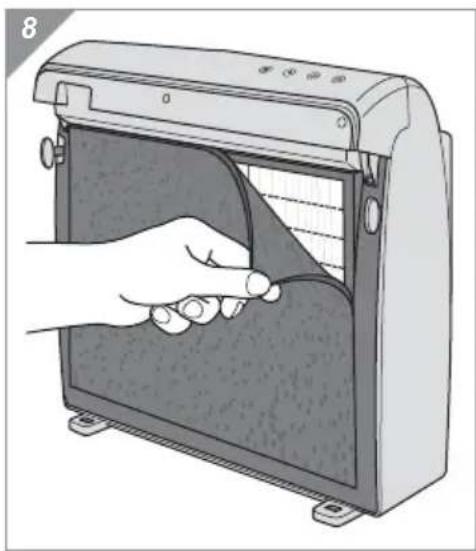
natural_image
Illustration of a hand opening a device with a curved panel and ventilation slots (no text or symbols)- Remove the used carbon filter from the HEPA filter (Fig. 8).
CAUTION:
The carbon filter cannot be cleaned. It can only be replaced (for ordering details see ▷ chapter 5.3, „Accessories and spare parts“).
NOTE:
Dispose of the used filter with the domestic waste.
- Unpack the new carbon filter.
- Fit the new carbon filter to the hook and eye fasteners on the HEPA filter.
natural_image
Diagram of a panel or enclosure with two downward arrows pointing to its side (no text or symbols present)NOTE:
It does not matter which way round you attach the new filter. However, as soon as the filter has been used, you can no longer turn it round as dirt would otherwise get into the HEPA filter.
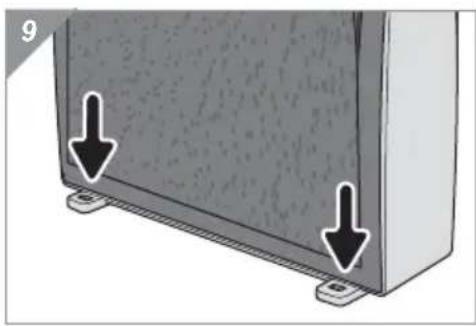
- Place the front panel in the recesses in the bases of the appliance (Fig. 9/arrows).
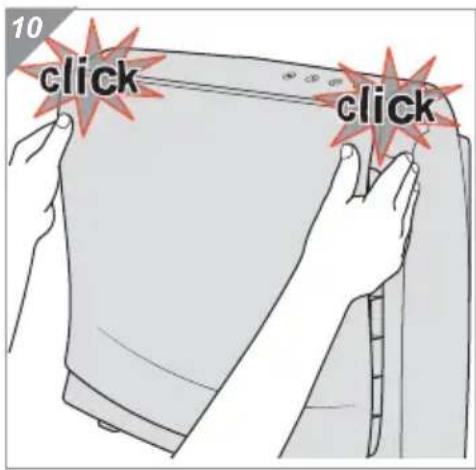
- Then push down the front panel (Fig. 10) until you hear and see the release catches click into place.

4.3 Replacing the HEPA filter
natural_image
Illustration of hands installing or opening a printer into a paper (no text or symbols visible)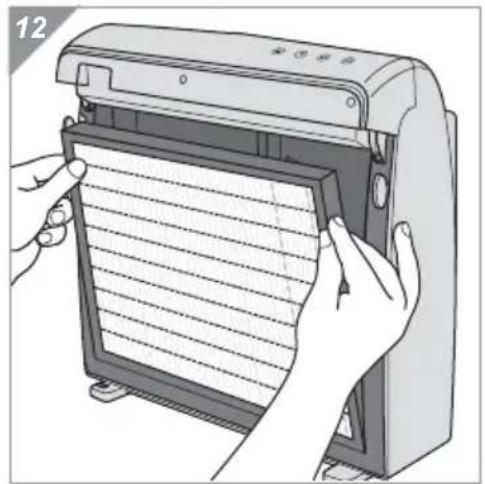
natural_image
Illustration of hands installing or adjusting a sheet of paper inside a device (no text or symbols visible)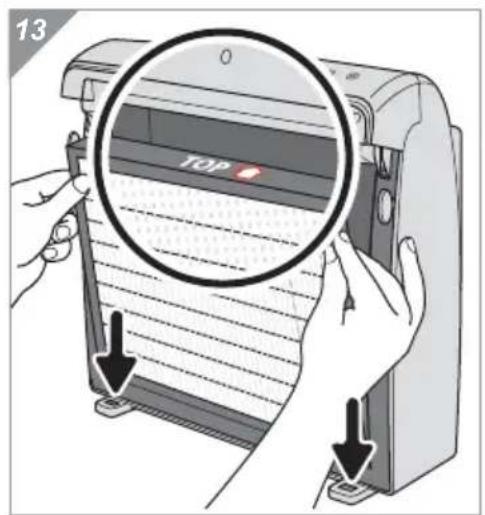
- Make sure that the plug has been disconnected from the mains socket.
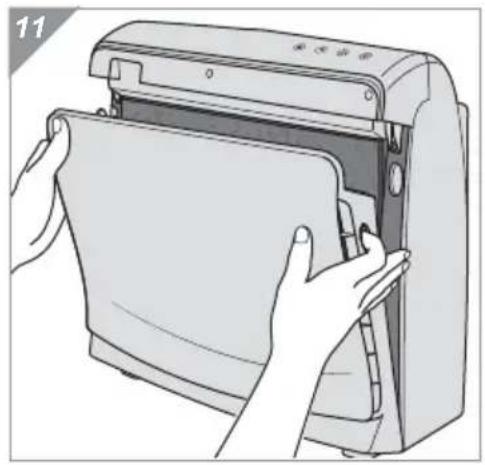
- Push the release catches on the front panel (Fig. 11). Carefully remove the front panel (Fig. 11).
- Remove the carbon filter from the HEPA filter (Fig. 8).
NOTE:
If you do not want to replace the carbon filter at the same time, make a note of which side was facing the HEPA filter. This is important so that no dirt gets into the HEPA filter when re-fitting.
- Remove the used HEPA filter (Fig. 12) from its fitting.
CAUTION:
The HEPA filter cannot be cleaned. It can only ever be replaced (for ordering details see ▷ chapter 5.3, „Accessories and spare parts“).
NOTE:
Dispose of the used filter with the domestic waste.
- Unpack the new HEPA filter.
- Place the new HEPA filter in its fitting.
NOTE:
Make sure that the "TOP" marking (Fig. 13/"TOP") on the HEPA filter points upwards (Fig.13/arrow) into the inside of theance.
-
Fit the carbon filter to the hook and eye fasteners on the HEPA filter again (Fig. 8). If you do not insert a new carbon filter, make sure that the side of the carbon filter which is on the inside is the side which was on the inside beforehand.
-
Place the front panel in the recesses in the bases of the appliance (Fig. 13/arrows).
-
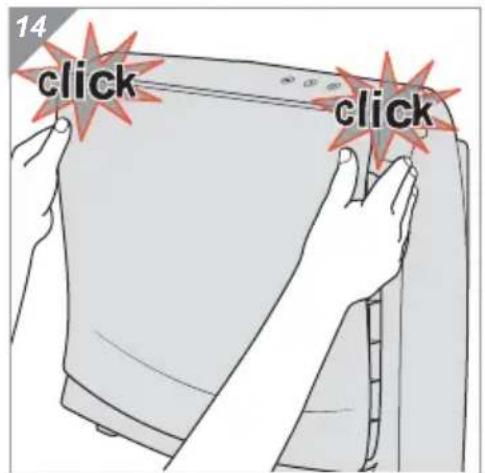
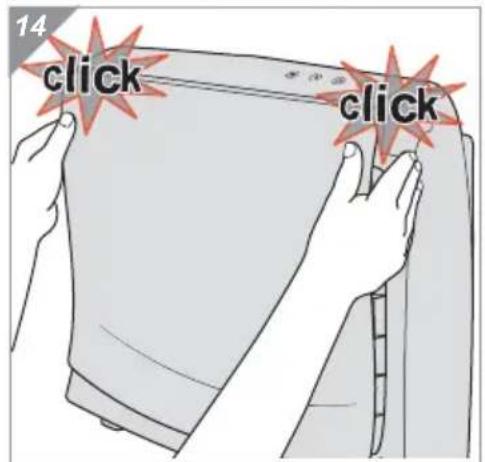
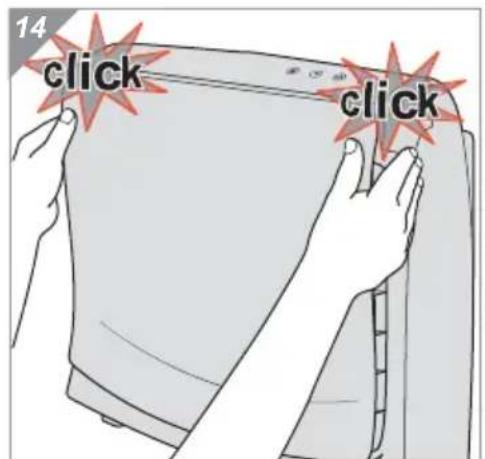
Then push down the front panel (Fig. 14) until you hear and see the release catches click into place.
4.4 Resetting the filter change LED
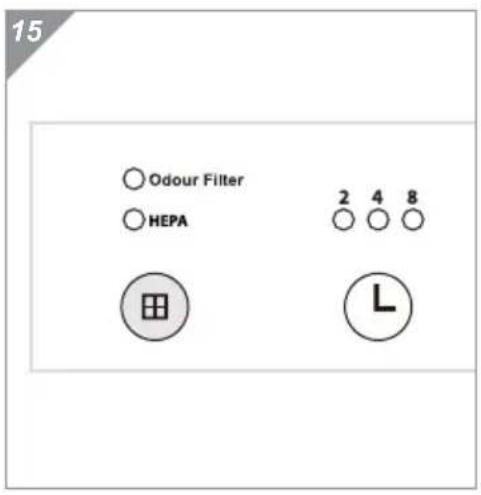
If one of the two filter change LEDs ("Odor Filter" or "HEPA") is still lit up after replacing the filter although you have replaced the filter in question with a new one:
- Press and hold the button until the LED goes out.

5.1 Correcting problems yourself
Before contacting the service hotline ( page 102, „International Service“), please check if you can solve the problem yourself using the following table.

WARNING:
Never use a faulty appliance or operate an appliance with a faulty power cord.
Before you try to localise the problem, switch off the appliance and pull the plug from the mains socket.
| Problem Possible cause Solution | ||
| The appliance will not start | The power cord is not plugged in. | Insert the plug into the mains socket. |
| The front panel or the HEPA/carbon filter is not inserted properly. | Check whether the front panel and the HEPA/carbon filter are inserted correctly, see ▷ chapter 4.2, „Replacing the carbon filter“ or ▷ chapter 4.3, „Replacing the HEPA filter“ respectively. | |
| The appliance switches itself off | The timer function had been activated. | See ▷ chapter 3.4, „Setting the timer“ for information on selecting and deselecting the timer function. |
| The "Odor Filter" LED above the button lights up | The carbon filter needs to be replaced. | Replace the carbon filter as described in ▷ chapter 4.2, „Replacing the carbon filter“. |
| The "HEPA" LED above the button lights up | The HEPA filter needs to be replaced. | Replace the HEPA filter as described in ▷ chapter 4.3, „Replacing the HEPA filter“. |
| The appliance is unusually loud when running | The highest power level ("H") has been set. | Select a power level which you find more pleasant, ▷ chapter 3.3, „Selecting the power“. |
| One of the filters is soiled and has to be replaced. | Replace the filters as described in ▷ chapter 4.2, „Replacing the carbon filter“ and ▷ chapter 4.3, „Replacing the HEPA filter“. | |
| The air inlet or outlet is not free from obstructions. | Make sure that there is sufficient free space around the air inlet and outlet. | |
NOTE:
If you cannot solve the problem using this table, contact the Dirt Devil customer service department ( page 102, „International Service“).
5.2 Hotline and customer service
▷ page 102, „International Service“
NOTE:
This operating manual is available in electronic form. Simply visit www.dirtdevil.com and look for "OPERATING MANUALS" in the download area. Enter the model number of the appliance and download the corresponding PDF.
5.3 Accessories and spare parts
| AC150 AC250 AC350 | ||
| 150012 Front panel (Fig. 1/10) | 250012 Front panel (Fig. 1/10) | 350012 Front panel (Fig. 1/10) |
| 150022 Filter set (1 HEPA, 2 carbon filters) | 250022 Filter set (1 HEPA, 2 carbon filters) | 350022 Filter set (1 HEPA, 2 carbon filters) |
5.4 Warranty
The statutory warranty regulations in accordance with the EU Directive 1999/44/EC apply. In non-EU countries the minimum requirements of the warranty in the respective country apply.
5.5 Disposal
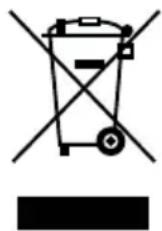
CAUTION:
Risk of environmental damage in case of improper disposal! Electrical waste must not be disposed of together with domestic waste. Use local old-appliance collection points instead.

natural_image
Line drawing of two electronic devices, one front view and one side view, with no visible text or symbols.natural_image
Illustration of a portable air conditioner unit with three black arrows indicating airflow or heat transfer (no text or symbols)
ATTENTION:
natural_image
Illustration of hands installing or opening a printer into a device (no text or symbols visible)natural_image
Illustration of a hand inserting a cable into a device panel (no text or symbols visible)natural_image
Diagram of a panel or enclosure with two arrows pointing to its side (no text or symbols present)natural_image
Illustration of hands installing or opening a device into a paper filter (no text or symbols visible)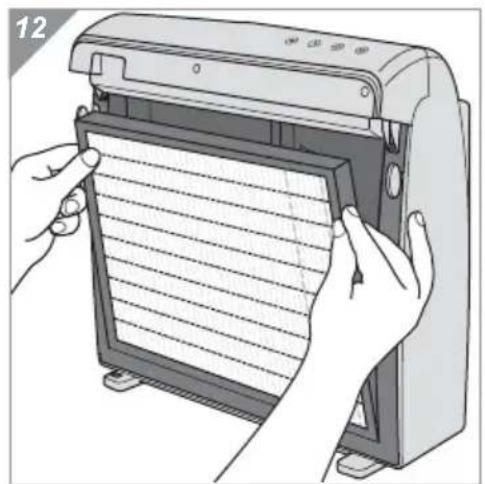
natural_image
Illustration of hands installing or adjusting a grid-patterned device into a machine (no text or symbols visible)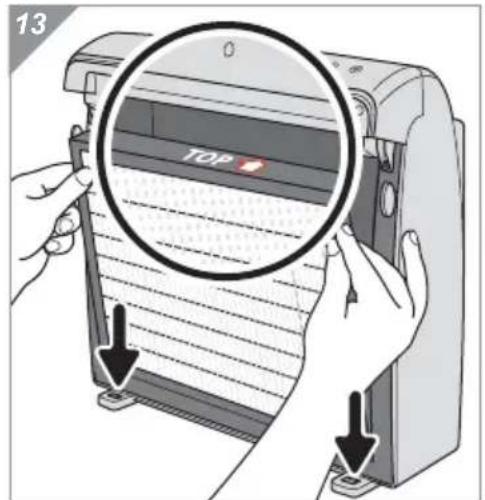
natural_image
Line drawing of a portable air conditioner unit (no text or symbols)Telefon mit Vorwahl • Phone number with area code • Téléphone avec indicatif • Telefoon met kengetal • Teléfono con prefijo • Telefono con prefisso • Şehirlerarasi kodla telefon
Fehlerbeschreibung • Description of the malfunction • Description du problème Omschrijving van de fout • Descripción del fallo • Descrizione del difetto • Hata tanımı:
Royal Appliance International GmbH
Jagenbergstraße 19
41468 Neuss
Germany
de@dirtdevil-service.eu
www.dirtdevil.de
+49 (0) 180 - 501 50 50*
+49 (0) 2131 - 60 90 60 95
DE
* € 0.14 per minute from German landlines, maximum German mobile phone tariff € 0.42 per minute.
The cost of calls from abroad—outside Germany—depend upon the current prices of the respective foreign telephone company.
FR

- ACHTUNG:
- Operating panel and parts of the appliance (Fig. 1)
- Replacing and resetting the filter
- Timer
- Power
- Power
- Safety instructions .... 20
- Unpacking and setting up 23
- Connecting and operating....24
- Caring for the appliance....26
- Solving problems .... 30
- Re: Operating Manual
- WARNING:
- CAUTION:
- NOTE:
- Concerning certain groups of persons
- Re: Power supply
- If the appliance is faulty
- Re: Proper use
- In particular, the following is prohibited:
- Unpacking
- Selecting the location for installation
- Connecting and operating
- Connecting
- Switching on
- Selecting the power
- Setting the timer
- Cleaning the housing
- Replacing the carbon filter
- Replacing the HEPA filter
- Resetting the filter change LED
- Correcting problems yourself
- Hotline and customer service
- Accessories and spare parts
- Warranty
- Disposal
- ATTENTION:
- Fehlerbeschreibung • Description of the malfunction • Description du problème Omschrijving van de fout • Descripción del fallo • Descrizione del difetto • Hata tanımı:
- Royal Appliance International GmbH
- DE
- FR
Brand : DIRT DEVIL
Model : Pureza AC350
Category : Air purifier