
UBDM7500ZG - Blu-ray player SAMSUNG - Free user manual and instructions
Find the device manual for free UBDM7500ZG SAMSUNG in PDF.
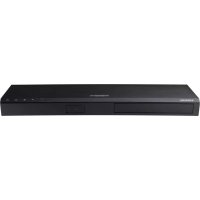



| Product Type | Ultra HD Blu-ray Player |
| Brand | Samsung |
| Model | UBDM7500ZG |
| Dimensions (W x H x D) | 406.0 x 44.7 x 230.0 mm |
| Weight | 1.8 kg |
| Power Supply | AC (rated voltage indicated on product label) |
| Standby Power Consumption | 1.0 W |
| Supported Disc Formats | Ultra HD Blu-ray, Blu-ray, DVD-Video, DVD±R/RW, Audio CD, CD-R/RW, BD-RE/-R |
| Video File Formats | AVI, MKV, ASF, WMV, MP4, MOV, 3GP, VRO, MPG, MPEG, TS, TP, TRP, DIVX, WEBM, RMVB (with H.264, HEVC, MPEG4, VC1, VP8, VP9 codecs, etc.) |
| Audio Formats | WMA, MP3, M4A, FLAC, OGG, WAV, AAC, ALAC, APE, AIFF |
| Image Formats | JPEG, PNG, BMP (up to 15360x8640) |
| Connectivity | HDMI (output), optical digital audio output, Ethernet 100BASE-TX, USB 2.0 (front) |
| Network | Wired Ethernet (Cat 7 recommended), no built-in Wi-Fi |
| Main Features | Ultra HD Blu-ray/Blu-ray/DVD/CD disc playback, USB playback, Smart Hub app access, internet browsing, online software update, Samsung TV control |
| Maximum Video Output | 2160p (Ultra HD) via HDMI |
| Region Code | Blu-ray: B (Europe); DVD: 2 (Europe) |
| Included Accessories | Remote control, AA batteries (2), power cord, user manual |
| Care and Cleaning | Unplug the device, wipe with a soft dry cloth; do not use chemicals |
| Safety | Class 1 laser product; do not open the casing; protect from moisture and heat sources |
| Warranty | 24 months parts and labor (metropolitan France) |
Frequently Asked Questions - UBDM7500ZG SAMSUNG
User questions about UBDM7500ZG SAMSUNG
0 question about this device. Answer the ones you know or ask your own.
Ask a new question about this device
Download the instructions for your Blu-ray player in PDF format for free! Find your manual UBDM7500ZG - SAMSUNG and take your electronic device back in hand. On this page are published all the documents necessary for the use of your device. UBDM7500ZG by SAMSUNG.
USER MANUAL UBDM7500ZG SAMSUNG
Class II product: This symbol indicates that it does not require a safety connection to electrical earth (ground).

AC voltage: This symbol indicates that the rated voltage marked with the symbol is AC voltage.

DC voltage: This symbol indicates that the rated voltage marked with the symbol is DC voltage.

Caution, consult instructions for use: This symbol instructs the user to consult the user manual for further safety related information.
- The slots and openings in the cabinet and in the back or bottom are provided for necessary ventilation. To ensure reliable operation of this apparatus, and to protect it from overheating, these slots and openings must never be blocked or covered.
- Do not place this apparatus in a confined space, such as a bookcase, or built-in cabinet, unless proper ventilation is provided.
- Do not place this apparatus near or over a radiator or heat register, or where it is exposed to direct sunlight.
- Do not place vessels (vases etc.) containing water on this apparatus. A water spill can cause a fire or electric shock.

This symbol indicates that high voltage is present inside. It is dangerous to make any kind of contact with any internal part of this product.

- Do not expose this apparatus to rain or place it near water (near a bathtub, washbowl, kitchen sink, or pool, etc.). If this apparatus accidentally gets wet, unplug it and contact an authorised Samsung dealer or service centre immediately.
- This apparatus uses batteries. In your community, there might be environmental regulations that require you to dispose of these batteries properly. Please contact your local authorities for disposal or recycling information.
- Do not overload wall outlets, extension cords or adaptors beyond their capacity, since this can result in fire or electric shock.
- Route power-supply cords so that they are not likely to be walked on or pinched by items placed on or against them. Pay particular attention to cords at the plug end, at wall outlets, and the point where they exit from the apparatus.
- To protect this apparatus from a lightning storm, or when it is left unattended and unused for long periods of time, unplug it from the wall outlet and disconnect the antenna or cable system. This will prevent damage to the set due to lightning and power line surges.
- Before connecting the AC power cord to the DC adaptor outlet, make sure the voltage designation of the DC adaptor corresponds to the local electrical supply.
- Never insert anything metallic into the open parts of this apparatus. Doing so may create a danger of electric shock.
- To avoid electric shock, never touch the inside of this apparatus. Only a qualified technician should open this apparatus.
- Make sure to plug the power cord in until it is firmly seated. When unplugging the power cord from a wall outlet, always pull on the power cord's plug. Never unplug by pulling on the power cord. Do not touch the power cord with wet hands.
- If this apparatus does not operate normally - in particular, if there are any unusual sounds or smells coming from it - unplug it immediately and contact an authorised Samsung dealer or service centre.
- Maintenance of Cabinet.
- Before connecting other components to this product, be sure to turn them off.
- If you move your product suddenly from a cold place to a warm place, condensation may occur on the operating parts and lens and cause abnormal disc playback. If this occurs, unplug the product, wait for two hours, and then connect the plug to the power outlet. Then, insert the disc, and try to play back again.
- Be sure to pull the power plug out of the outlet if the product is to remain unused or if you are leaving the house for an extended period of time (especially when children, elderly, or disabled people will be left alone in the house).
Accumulated dust can cause an electric shock, an electric leakage, or a fire by causing the power cord to generate sparks and heat or the insulation to deteriorate.
- Contact an authorised service centre for information if you intend to install your product in a location with heavy dust, high or low temperatures, high humidity, chemical substances, or where it will operate 24 hours a day such as in an airport, a train station, etc. Failing to do so may lead to serious damage to your product.
- Use only a properly grounded plug and wall outlet.
- An improper ground may cause electric shock or equipment damage. (Class 1 Equipment only)
To turn this apparatus off completely, you must disconnect it from the wall outlet. Consequently, the wall outlet and power plug must be readily accessible at all times. - Do not allow children to hang on the product. - Store the accessories (battery, etc.) in a location safely out of the reach of children.
- Do not install the product in an unstable location such as a shaky self, a slanted floor, or a location exposed to vibration.
- Do not drop or strike the product. If the product is damaged, disconnect the power cord and contact a Samsung service centre.
- To clean this apparatus, unplug the power cord from the wall outlet and wipe the product using a soft, dry cloth. Do not use any chemicals such as wax, benzene, alcohol, thinners, insecticide, air fresheners, lubricants, or detergent. These chemicals can damage the appearance of the product or erase the printing on the product.
- Do not expose this apparatus to dripping or splashing. Do not put objects filled with liquids, such as vases on the apparatus.
- Do not dispose of batteries in a fire.
- Do not plug multiple electric devices into the same wall socket. Overloading a socket can cause it to overheat, resulting in a fire.
- There is danger of an explosion if you replace the batteries used in the remote with the wrong type of battery. Replace only with the same or equivalent type.
- WARNING - TO PREVENT THE SPREAD OF FIRE, KEEP CANDLES AND OTHER ITEMS WITH OPEN FLAMES AWAY FROM THIS PRODUCT AT ALL TIMES. WARNING
- To reduce the risk of fire or electric shock, do not expose this appliance to rain or moisture.
CLASS 1 LASER product
This Compact Disc player is classified as a CLASS 1 LASER product. Use of controls, adjustments or performance of procedures other than those specified herein may result in hazardous radiation exposure.
CAUTION:
- THIS PRODUCT USES AN INVISIBLE LASER BEAM WHICH CAN CAUSE HAZARDOUS RADIATION EXPOSURE IF DIRECTED. BE SURE TO OPERATE PRODUCT CORRECTLY AS INSTRUCTED.
- THIS PRODUCT UTILIZES A LASER. USE OF CONTROLS OR ADJUSTMENTS OR PERFORMANCE OF PROCEDURES OTHER THAN THOSE SPECIFIED HEREIN MAY RESULT IN HAZARDOUS RADIATION EXPOSURE. DO NOT OPEN COVERS AND DO NOT REPAIR YOURSELF. REFER SERVICING TO QUALIFIED PERSONNEL.
This product satisfies CE regulations when shielded cables and connectors are used to connect the unit to other equipment. To prevent electromagnetic interference with electric appliances, such as radios and televisions, use shielded cables and connectors for connections.
CLASS 1 LASER PRODUCT KLASSE 1 LASER PRODUKT LUOKAN 1 LASER LAITE CLASS 1 LASER APPARAT PRODUCTO LASER CLASE 1
If the Region number of an Ultra HD Blu-ray Disc/Blu-ray Disc/DVD does not correspond to the Region number of this product, the product cannot play the disc.
IMPORTANT NOTE
The mains lead on this equipment is supplied with a molded plug incorporating a fuse. The value of the fuse is indicated on the pin face of the plug. If it requires replacing, a fuse approved to BS1362 of the same rating must be used.
Never use the plug with the fuse cover omitted if the cover is detachable. If a replacement fuse cover is required, it must be of the same colour as the pin face of the plug. Replacement covers are available from your dealer.
If the fitted plug is not suitable for the power points in your house or the cable is not long enough to reach a power point, you should obtain a suitable safety approved extension lead or consult your dealer for assistance.
However, if there is no alternative to cutting off the plug, remove the fuse and then safely dispose of the plug. Do not connect the plug to a mains jack, as there is a risk of shock hazard from the bared flexible cord.
To disconnect the apparatus from the mains, the plug must be pulled out from the mains socket, therefore the mains plug shall be readily operable.
The product unit accompanying this user manual is licensed under certain intellectual property rights of certain third parties.
2 Accessories
Check for the supplied accessories shown below.
Batteries (AA Size)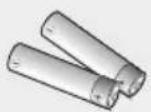
Power Cable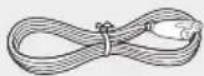
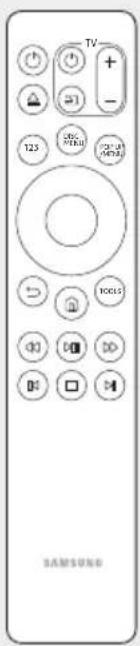
User Manual Remote Control
For further instructions, refer to the Web Manual.
Web manual: www.samsung.com → Product name search : UBD-M7500
3 Remote Control
The TV volume, source, and on/off buttons inside the TV section on the remote only work with Samsung TVs. To use these buttons with another TV brand, enter the appropriate TV Control Code on the next page. When the player displays an Ultra HD Blu-ray or standard Blu-ray Disc's menu, you cannot start the movie by pressing the ▸ button on the remote control. To play the movie, you must select Play Movie or Start in the disc's menu, and then press the OK button on the remote control.
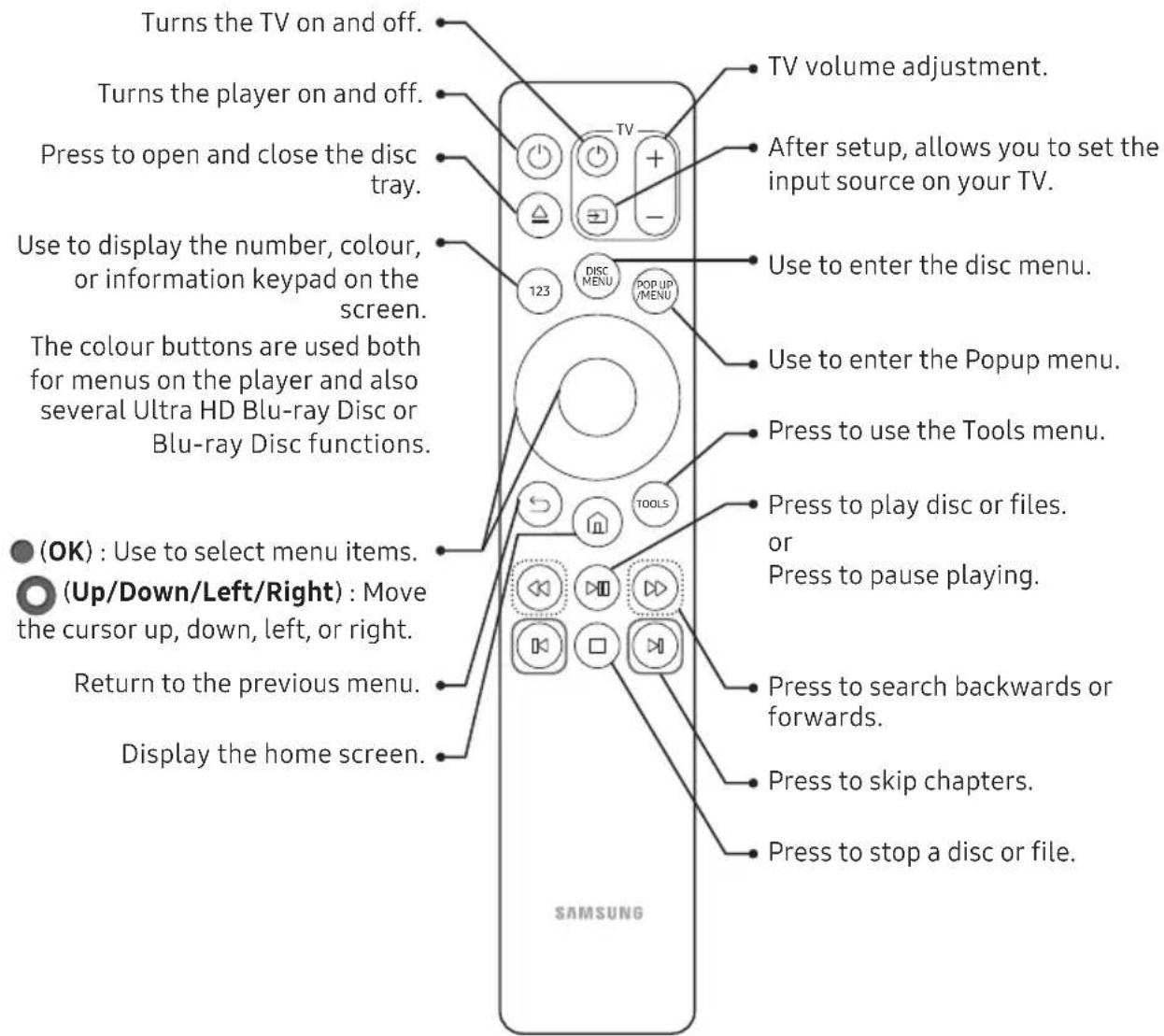
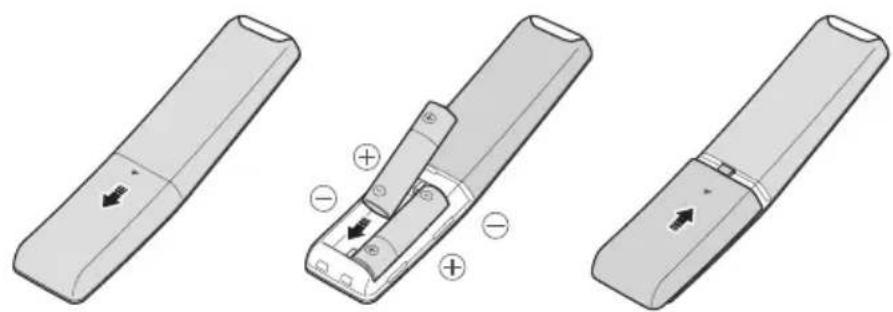
Inserting Batteries (AA Battery x2)
Slide the battery cover in the direction of the arrow until it is completely removed.
Insert 2 AA batteries (1.5V) in the correct +/- polarity configuration. Slide the battery cover back into position.
Using Remote Control Buttons to Enter TV Codes
- Press and hold the (TV Power) button.
- While holding the (TV Power) button, press the buttons on the remote that correspond to a two-digit TV Code from the list below. Use the illustration to the right as a guide.
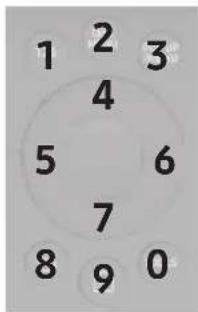
For example: To enter 01, press the TOOLS button and then press the 123 button.
Note that some TV brands have more than one 2-digit code. If the first code does not work, try the next.
TV Control Codes
| Brand Codes | |
| SAMSUNG 01, | 02, 03, 04, 05, 06, 07, 08, 09 |
| AIWA 82 | |
| ANAM 10, 11, | 12, 13, 14, 15, 16, 17, 18 |
| BANG & OLUFSEN | 57 |
| BLAUPUNKT 71 | |
| BRANDT 73 | |
| BRIONVEGA 57 | |
| CGE 52 | |
| CONTINENTAL EDISON | 75 |
| DAEWOO | 19, 20, 23, 24, 25, 26, 27, 28, 29, 30, 31, 32, 33, 34 |
| EMERSON | 64 |
| FERGUSON | 73 |
| FINLUX | 06, 49, 57 |
| FORMENTI | 57 |
| FUJITSU | 84 |
| GRADIENTE | 70 |
| GRUNDIG | 49, 52, 71 |
| HITACHI | 60, 72, 73, 75 |
| IMPERIAL | 52 |
| JVC | 61, 79 |
| LG | 06, 19, 20, 21, 22, 78 |
| Brand Codes | |
| LOEWE | 06, 69 |
| LOEWE OPTA | 06, 57 |
| MAGNAVOX | 40 |
| METZ | 57 |
| MITSUBISHI | 06, 48, 62, 65 |
| MIVAR 52, 77 | |
| NEC | 83 |
| NEWSAN | 68 |
| NOBLEX 66 | |
| NOKIA | 74 |
| NORDMENDE | 72, 73, 75 |
| PANASONIC 13 | 53, 54, 74, 75 |
| PHILIPS | 06, 56, 57 |
| PHONOLA 72, | 73, 75 |
| PIONEER | 58, 59, 73, 74 |
| RADIOLA | 06, 56 |
| RADIOMARELLI | 57 |
| RCA | 45, 46 |
| REX | 74 |
| SABA | 57, 72, 73, 74, 75 |
| SALORA 74 | |
| SANYO | 41, 42, 43, 44, 48 |
| SCHNEIDER | 06 |
| SELECO | 74 |
| SHARP | 36, 37, 38, 39, 48 |
| SIEMENS | 71 |
| SINGER | 57 |
| SINUDYNE | 57 |
| SONY | 35, 48 |
| TELEAVA | 73 |
| TELEFUNKEN | 67, 73, 75, 76 |
| THOMSON | 72, 73, 75 |
| THOMSON ASIA | 80, 81 |
| TOSHIBA | 47, 48, 49, 50, 51, 52 |
| WEGA | 57 |
| YOKO | 06 |
| ZENITH | 63 |
4 Front Panel and Rear Panel
Front Panel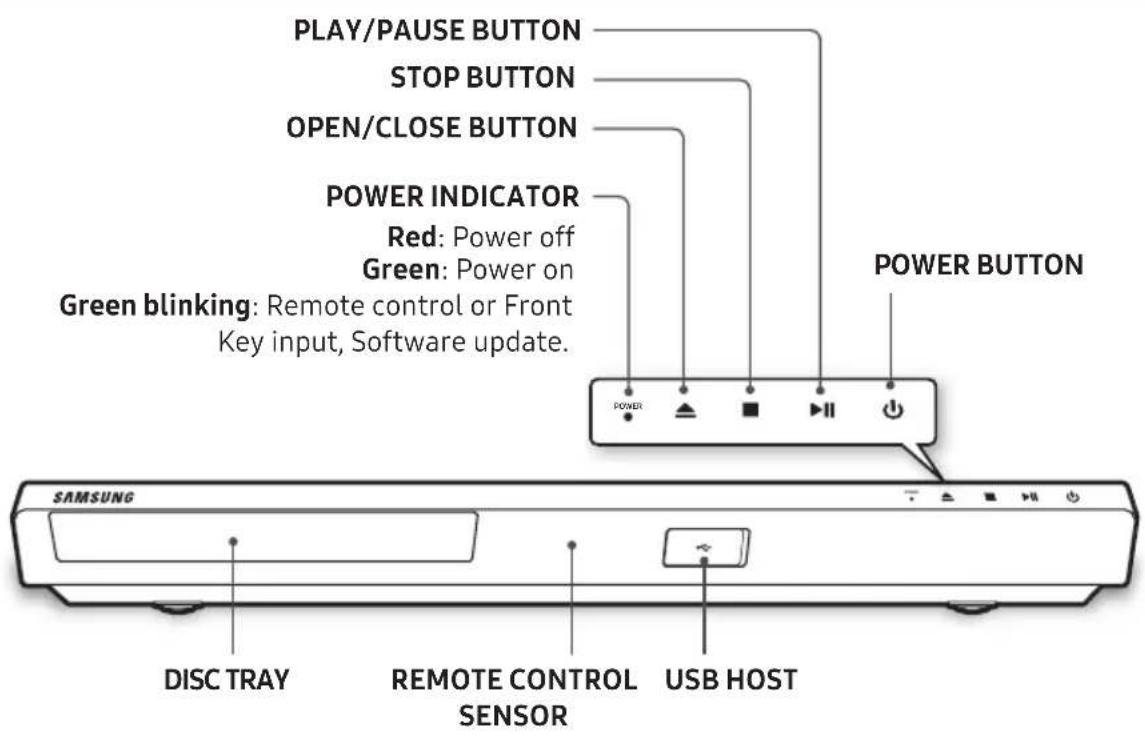
Rear Panel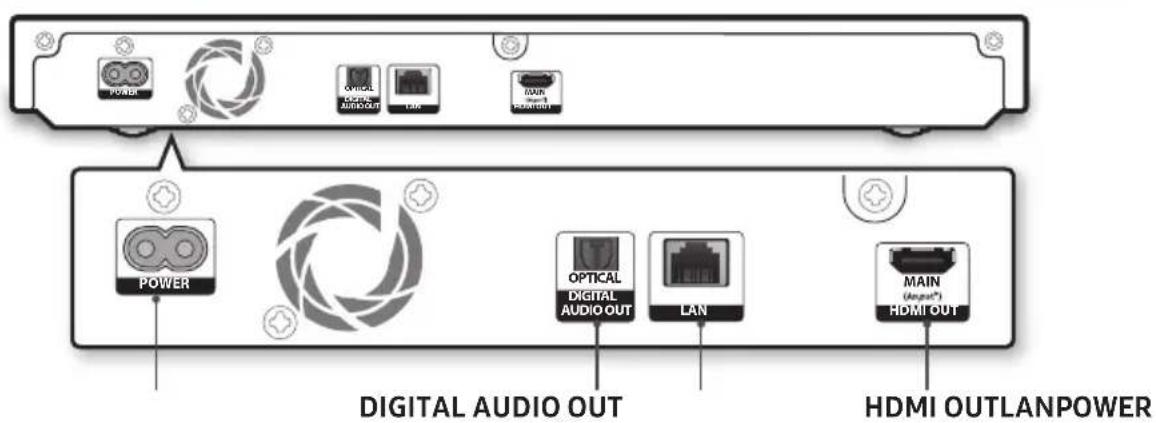
5 Connections
Connecting to a TV
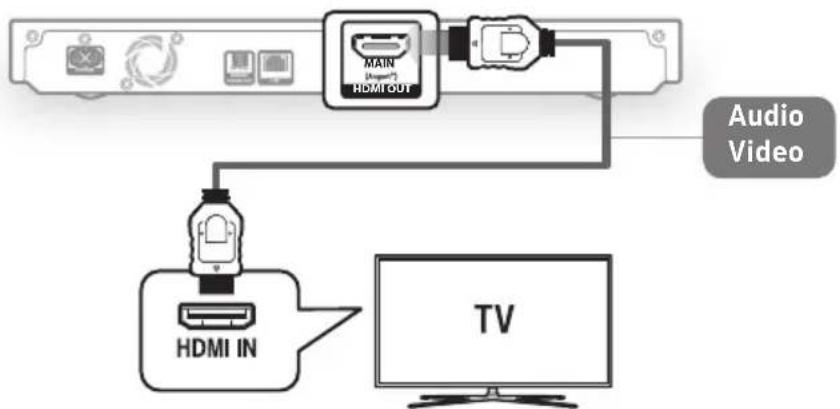
UHD TVs support only the HDMI OUT port. To view video in the HDMI 720p, 1080p, or 2160p output mode, you must use a high speed (category 2) HDMI cable.
Connecting to an Audio Device
Method 1: Connecting to an HDMI (HDR) compatible Soundbar / AV receiver that supports pass through
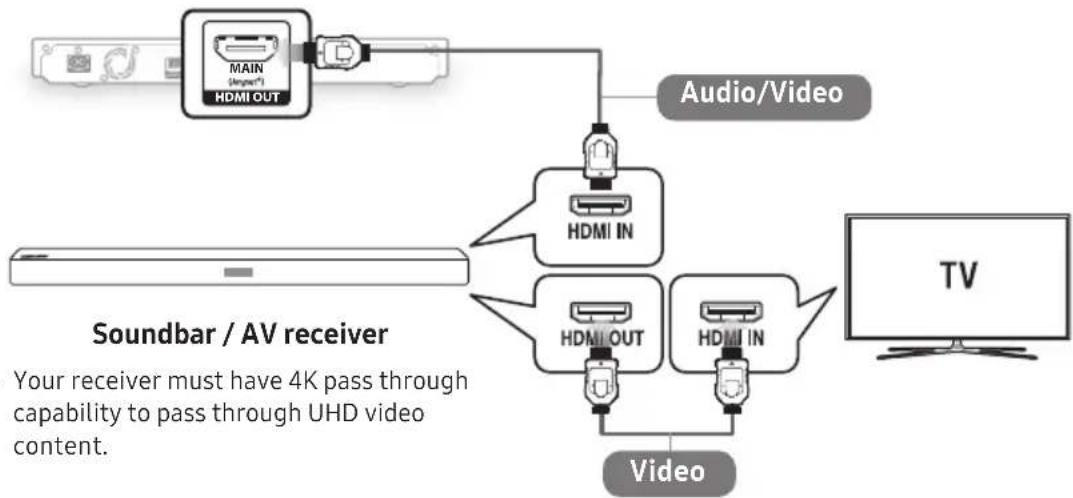
You must set up HDMI UHD Color to enable HDR on your Samsung TV manually if your player is not directly connected to the TV. (For example, through a Soundbar or AV receiver.) HDR: High Dynamic Range is a technique used to reproduce a greater dynamic range of luminosity than is possible with conventional imaging devices.
Method 2: Connecting to a Soundbar / AV receiver with a Digital Optical cable
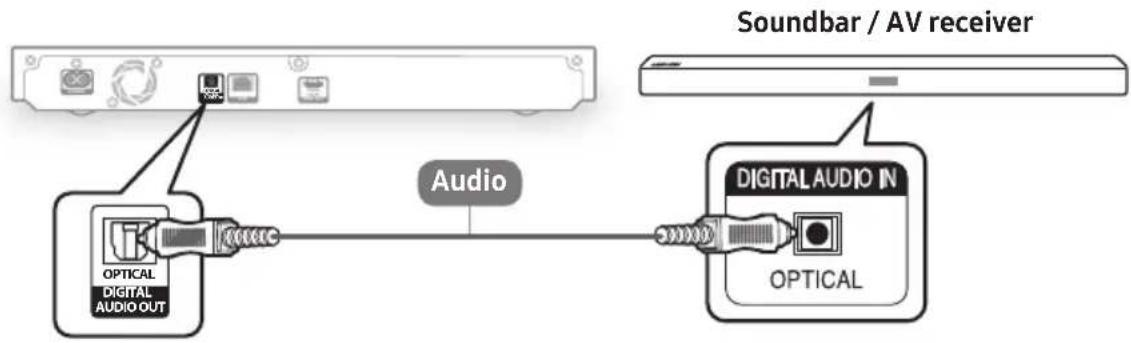
Connecting to a Network
Wired Network
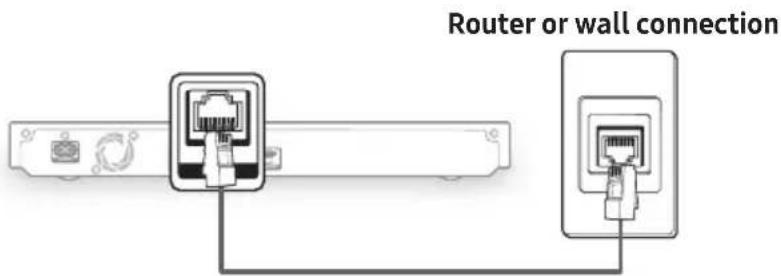
Use Cat 7 (STP) cable for the connection. (Shielded Twisted Pair)
6 The Initial Settings Procedure
- Plug in the Ultra HD Blu-ray Player, turn on your TV, and then turn on the Ultra HD Blu-ray Player by pressing the (Power) button on the remote.
- Follow the directions for the initial setup displayed on the screen.
Home Screen
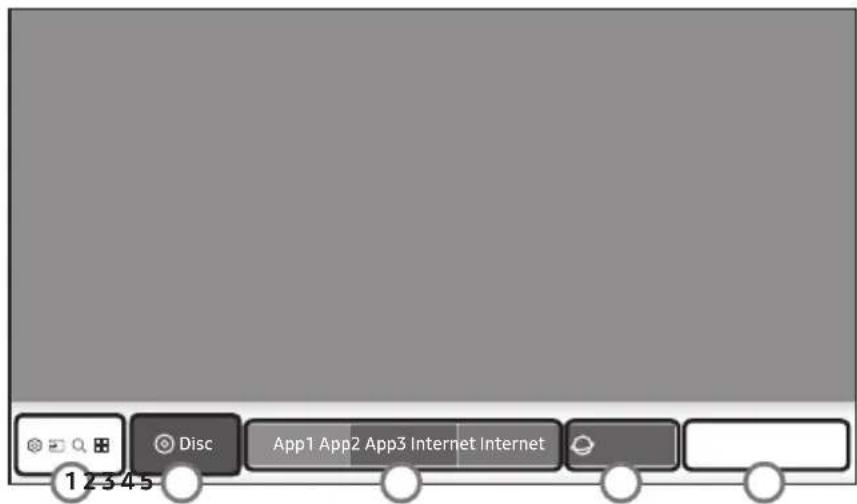
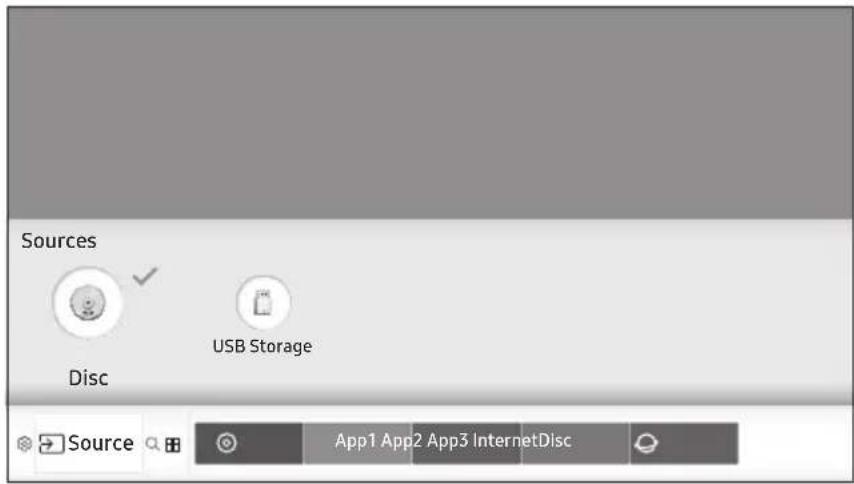
| 1 Functions) | Settings: Press the OK button to open the product's menu. In the menu, you can set various functions to suit your personal preferences. With the Settings menu displayed, press the Up button on the remote control to display the Quick Settings menu items. Use the Left/Right buttons on the remote control to jump to the desired menu and configure settings with ease. Source: Select an inserted disc or USB storage device, or a connected network device. Search: Lets you search for content in Apps and YouTube by entering corresponding search words. APPS: Access various for pay or free-of-charge applications. | ||
| 2 Disc | Displays the selected source. | 3 Downloaded Apps | Displays downloaded apps. Apps displayed here can be deleted, edited, or rearranged, if necessary. |
| 4 Internet | You can access the Internet. | 5 | Use the Add to Home option to add frequently used menu items to the bottom of the Home screen. |
7 Playing Media Content
Playing a Commercial Disc
Select HOME > Source > Disc.
Playing Media Contents Saved on a USB Memory Device
Select HOME > Source > USB Storage.
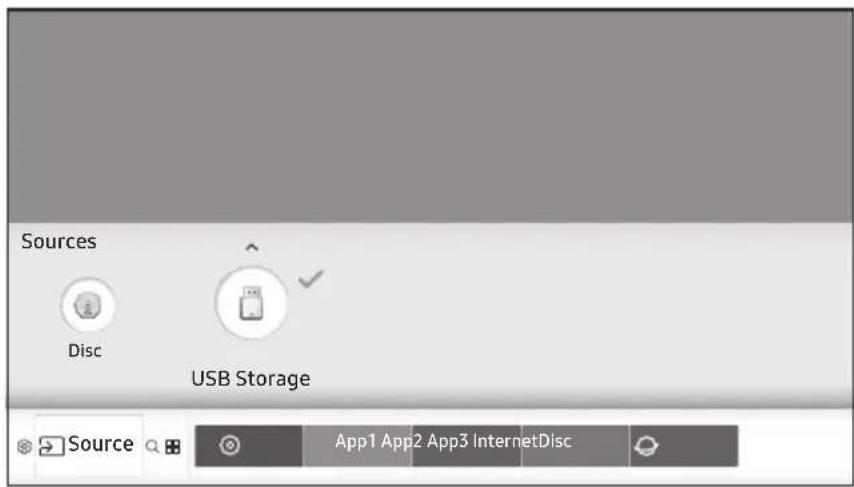
When connected to a USB device, the screen displays a message at the top.
8 Additional Functions
APPS
You can download applications from the Internet, and access various applications and view them on your TV. To access some applications, you need to have a Samsung account.
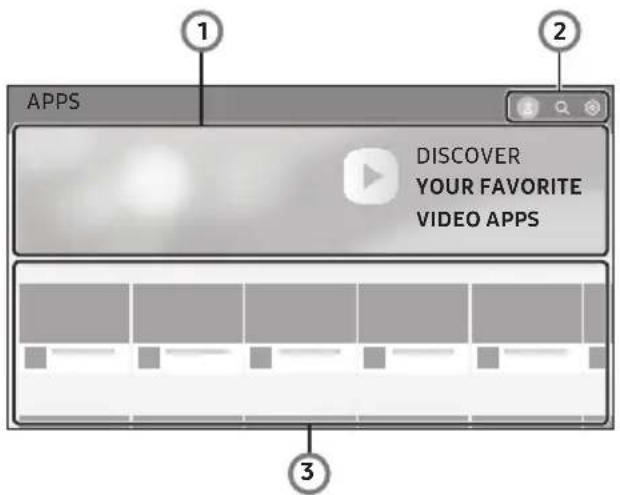
| 1 | Download a video app to play video. | |
| 2 | 8 | Log in with your Samsung account. Use a variety of Samsung- provided functions. If you do not have a Samsung account, create one here. |
| Q | Enter the name of a specific app to search for it. | |
| Configure settings for a downloaded app. | ||
| 3 | Available apps are displayed at the bottom. Use the Up/Down/Left/Right buttons to download or use a desired app. | |
Upgrading Software
- Select HOME > Settings > Support > Software Update > Update Now.
- The product searches online for the latest software version.
- If it finds a new version, the Update Request pop-up appears. Select OK.
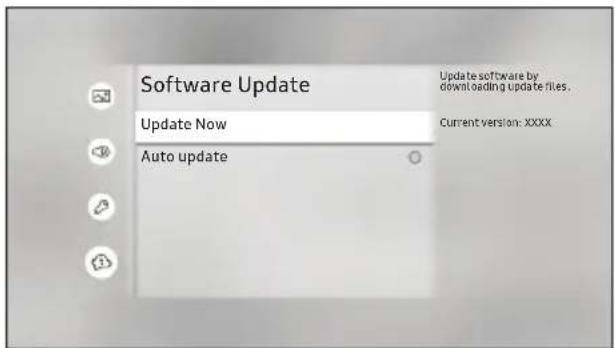
Never turn the product off or back on manually during the update process. Make sure there is no disc in the player before you start the update process. You can set the Auto update function so that the product downloads new update software automatically. You can also download the latest firmware file from the Samsung website, copy the files from the PC to a USB memory stick, insert the stick into the front USB port, and then select Update Now.
9 Specifications
| General | Weight 1.8 kg | |
| Dimensions 406.0 (W) X 44.7 (H) X 230.0 (D) mm | ||
| Operating Temperature Range +5°C to +35°C | ||
| Operating Humidity Range 10 % to 75 % | ||
| USB | Type A USB 2.0 | |
| DC output 5V 500mA Max. | ||
| HDMI | Video 2160p, 1080p, 720p, 576p/480p | |
| Audio PCM, Bitstream | ||
| Audio Output Digital Audio Output Optical | ||
| Network Ethernet 100BASE - TX Terminal | ||
Network speeds equal to or below 10Mbps are not supported. - Design and specifications are subject to change without prior notice. - For the power supply and power consumption, refer to the label attached to the product. Weight and dimensions are approximate.
| Overall Standby Power Consumption (W) | 1.0W | |
| Ethernet | Port deactivation method | HOME > Settings > General > System Manager > Wol On/Off |
- An administration fee may be charged if either (a) an engineer is called out at your request and there is no defect in the product (i.e. where you have failed to read this user manual). (b) you bring the unit to a repair centre and there is no defect in the product (i.e. where you have failed to read this user manual). The amount of such administration charge will be advised to you before any work or home visit is carried out.
Licences
- Manufactured under license from Dolby Laboratories. Dolby, Dolby Audio, Pro Logic, and the double-D symbol are trademarks of Dolby Laboratories.

DOLBY
AUDIO
- For DTS patents, see http://patents.dts.com. Manufactured under license from DTS Licensing Limited. DTS, the Symbol, DTS in combination with the Symbol, the DTS-HD logo, and DTS-HD Master Audio are registered trademarks or trademarks of DTS, Inc. in the United States and/or other countries. © DTS, Inc. All Rights Reserved.


Master Audio
DivX
This DivX Certified device can play DivX® HD video files (including .avi, .divx).
Download free software at www.divx.com to create, play and stream digital videos.
To play purchased DivX movies, first register your device at vod.divx.com. Find your registration code in the DivX VOD section of your device setup menu.
This DivX Certified device can play DivX® HD video (including .avi, .divx).
DivX, DivX Certified and associated logos are trademarks of DivX, LLC and are used under licence.
Covered by one or more of the following U.S. patents: 7,295,673; 7,460,668; 7,515,710; 8,656,183; 8,731,369; RE45,052.
- The terms HDMI and HDMI High-Definition Multimedia Interface, and the HDMI Logo are trademarks or registered trademarks of HDMI Licensing LLC in the United States and other countries.
HD
- Oracle and Java are registered trademarks of Oracle and/or its affiliates. Other names may be trademarks of their respective owners.
HIGH-DEFINITION MULTIMEDIA INTERFACE
Java
- Open Source Licence Notice
In the case of using open source software, Open Source Licences are available on the product menu.
- Blu-ray Disc™, Blu-ray™, Ultra HD Blu-ray Disc™, Ultra HD Blu-ray™ and the logos are trademarks of the Ultra HD Blu-ray Disc/Blu-ray Disc Association.
- THIS PRODUCT IS SOLD WITH A LIMITED LICENCE AND IS AUTHORISED TO BE USED ONLY IN CONNECTION WITH HEVC CONTENT THAT MEETS EACH OF THE THREE FOLLOWING QUALIFICATIONS: (1) HEVC CONTENT ONLY FOR PERSONAL USE; (2) HEVC CONTENT THAT IS NOT

Covered by Patents at patentlist.hevcadvance.com
OFFERED FOR SALE; AND (3) HEVC CONTENT THAT IS CREATED BY THE OWNER OF THE PRODUCT.
THIS PRODUCT MAY NOT BE USED IN CONNECTION WITH HEVC ENCODED CONTENT CREATED BY A THIRD PARTY, WHICH THE USER HAS ORDERED OR PURCHASED FROM A THIRD PARTY, UNLESS THE USER IS SEPARATELY GRANTED RIGHTS TO USE THE PRODUCT WITH SUCH CONTENT BY A LICENSED SELLER OF THE CONTENT.
YOUR USE OF THIS PRODUCT IN CONNECTION WITH HEVC ENCODED CONTENT IS DEEMED ACCEPTANCE OF THE LIMITED AUTHORITY TO USE AS NOTED ABOVE.
10 Supported Formats
▸ Disc types and contents your product can play
| Media Disc | Type Details | |
| VIDEO | Ultra HD Blu-ray Disc | Ultra HD BD-ROM format. |
| Blu-ray Disc BD | -ROM format. | |
| DVD-VIDEO DVD-RW, DVD-R DVD+RW, DVD+R | DVD-VIDEO, recorded DVD+RW/DVD-RW(V)/DVD-R/+R that have been recorded and finalised, or a USB storage media containing DivX, MKV, MP4 contents. | |
| MUSIC | CD-RW/-R, DVD-RW/-R, CDDA, BD-RE/-R | Audio CD (CD-DA), music recorded on CD-RW/-R, DVD-RW/-R, BD-RE/-R or a USB storage media containing MP3 or WMA contents. |
| PHOTO | CD-RW/-R, DVD-RW/-R, BD-RE/-R | Photos recorded on CD-RW/-R, DVD-RW/-R, BD-RE/-R or a USB storage media containing JPEG contents. |
Supported Video Formats
| File Extension | Container | Video Codec Resolution | Frame rate (fps) | Bit rate (Mbps) | Audio Codec | |
| *.avi | AVI | H.264 BP/MP/HP | 4096x2160 | 4096X2160: 30 | 60 | Dolby Digital LPCM |
| *.mkv | 3840X2160: 60 | |||||
| *.asf | ||||||
| *.wmv | ||||||
| *.mp4 | ||||||
| *.mov | AVI | MKV | 4096x2160 | 4096X2160: 30 | 60 | |
| *.3gp | ASF | 3GP | 3GP | 60 80 | ||
| *.vro | MP4 | ( H.265 - Main, Main10 ) | ||||
| *.mpg | 3GP | Motion JPEG 3840x2160 30 80 | ||||
| *.mpeg | AVI | MOV | MVC | 60 | 20 | |
| *.ts | FLV | DivX 3.11 / 4 / 5 / 6 | ||||
| *.tp | VRO | MPEG4 SP/ASP | ||||
| *.trp | VOB | Window Media Video v9(VC1) | ||||
| *.mov | AVI | PS | MPEG2 | |||
| *.flv | SVAF | MPEG1 | ||||
| *.vob | Microsoft MPEG-4 v1, v2, v3 | 30 | ||||
| *.svi | Window Media Video v7(WMV1), v8(WMV2) | |||||
| *.m2ts | H 263 Sorrenson | |||||
| *.mts | ||||||
| *.divx | VP6 | |||||
| *.webm | WebM | VP8 1920x1080 | 60 20 | Vorbis | ||
| VP9 | 4096x2160 | 4096X2160: 60 40 | ||||
| *.rmvb | RMVB | RV8/9/10 (RV30/40) | 1920x1080 | 60 20 | RealAudio 6 | |
The DivX codec is not supported by models made for the U.S. or Canada.
Supported Subtitle File Formats
| Name | File Extension | |
| External | MPEG-4 Timed text | .ttxt |
| SAMI | .smí | |
| SubRip | .srt | |
| Subscriber | .sub | |
| Micro DVD | .sub or .txt | |
| SubStation Alpha | .ssa | |
| Advanced SubStation Alpha | .ass | |
| Powerdivx | .psb | |
| SMPTE-TT Text | .xml | |
| Internal | Xsub | AVI |
| SubStation Alpha | MKV | |
| Advanced SubStation Alpha | MKV | |
| SubRip | MKV | |
| VobSub | MKV | |
| MPEG-4 Timed text | MP4 | |
| TTML in smooth streaming | MP4 | |
| SMPTE-TT TEXT | MP4 | |
| SMPTE-TT PNG | MP4 |
Supported Music File Formats
| File Extension | Type Code | dec Support Range |
| *.mp3 | MPEG | MPEG1 Audio Layer 3 |
| *.m4a | MPEG4 | AAC - |
| *.mpa | ||
| *.aac | ||
| *.flac | FLAC | FLAC |
| *.ogg | OGG | Vorbis |
| File Extension | Type Code | Support Range | |
| *.wma | WMA | WMA | For WMA 10 Pro supports up to M2 profile and 5.1 channels. WMA lossless audio is not supported. |
| *.wav | wav | wav - | |
| *.mid*.midi | midi | midi | Type 0, type 1 and Seek is not supported. Only available with USB. |
| *.ape | ape | ape - | |
| *.aif*.aiff | AIFF | AIFF - | |
| *.m4a | ALAC | ALAC - |
Supported Picture File Formats
| File Extension | Type Resolution | |
| *.jpg | JPEG | 15360x8640 |
| *.jpeg | ||
| *.png | PNG | 4096x4096 |
| *.bmp | BMP | 4096x4096 |
Region Code
Both products and discs are coded by region. These regional codes must match for a disc to play. If the codes do not match, the disc will not play.
The region number for this product is displayed on the rear panel of the product.
| Disc Type Region Code Area | ||
| Blu-ray Disc | A | North America, Central America, South America, Korea, Japan, Taiwan, Hong Kong and South East Asia. |
| B | Europe, Greenland, French territories, Middle East, Africa, Australia and New Zealand. | |
| C | India, China, Russia, Central and South Asia. | |
| DVD-VIDEO | 1 | The U.S., U.S. territories and Canada |
| 2 | Europe, Japan, the Middle East, Egypt, Africa, Greenland | |
| 3 | Taiwan, Korea, the Philippines, Indonesia, Hong Kong | |
| 4 | Mexico, South America, Central America, Australia, New Zealand, Pacific Islands, Caribbean | |
| 5 | Russia, Eastern Europe, India, North Korea, Mongolia | |
| 6 | China | |
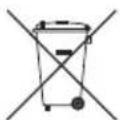
Correct disposal of batteries in this product
(Applicable in the European Union and other European countries with separate battery return systems.)
This marking on the battery, manual or packaging indicates that the batteries in this product should not be disposed of with other household waste at the end of their working life. Where marked, the chemical symbols Hg, Cd or Pb indicate that the battery contains mercury, cadmium or lead above the reference levels in EC Directive 2006/66.
If batteries are not properly disposed of, these substances can cause harm to human health or the environment.
To protect natural resources and to promote material reuse, please separate batteries from other types of waste and recycle them through your local, free battery return system.

Correct Disposal of This Product (Waste Electrical & Electronic Equipment)
(Applicable in the European Union and other European countries with separate collection systems) This marking on the product, accessories or literature indicates that the product and its electronic accessories (e.g. charger, headset, USB cable) should not be disposed of with other household waste at the end of their working life.
To prevent possible harm to the environment or human health from uncontrolled waste disposal, please separate these items from other types of waste and recycle them responsibly to promote the sustainable reuse of material resources.
Household users should contact either the retailer where they purchased this product, or their local government office,
for details of where and how they can take these items for environmentally safe recycling.
Business users should contact their supplier and check the terms and conditions of the purchase contract.
This product and its electronic accessories should not be mixed with other commercial wastes for disposal.
For information on Samsung's environmental commitments and product specific regulatory obligations e.g. REACH, WEEE, Batteries, visit:
http://www.samsung.com/uk/aboutsamsung/samsungelectronics/corporatecitizenship/data-corner.html
1 Safety Information
Warning
Caution
CLASS 1 LASER PRODUCT KLASSE 1 LASER PRODUKT LUOKAN 1 LASER LAITE KCLASS 1 LASER APPARAT PRODUCTO LASER CLASE 1
| Marke Codes | |
| SAMSUNG 01, | 02, 03, 04, 05, 06, 07, 08, 09 |
| AIWA 82 | |
| ANAM 10, 11, | 12, 13, 14, 15, 16, 17, 18 |
| BANG & OLUFSEN | 57 |
| BLAUPUNKT 71 | |
| BRANDT 73 | |
| BRIONVEGA 57 | |
| CGE 52 | |
| CONTINENTAL EDISON | 75 |
| DAEWOO | 19, 20, 23, 24, 25, 26, 27, 28, 29, 30, 31, 32, 33, 34 |
| EMERSON | 64 |
| FERGUSON | 73 |
| FINLUX | 06, 49, 57 |
| FORMENTI | 57 |
| FUJITSU | 84 |
| GRADIENTE | 70 |
| GRUNDIG | 49, 52, 71 |
| HITACHI | 60, 72, 73, 75 |
| IMPERIAL | 52 |
| JVC | 61, 79 |
| LG | 06, 19, 20, 21, 22, 78 |
| Marke Codes | |
| LOEWE | 06, 69 |
| LOEWE OPTA | 06, 57 |
| MAGNAVOX | 40 |
| METZ | 57 |
| MITSUBISHI | 06, 48, 62, 65 |
| MIVAR 52, 77 | |
| NEC | 83 |
| NEWSAN | 68 |
| NOBLEX 66 | |
| NOKIA | 74 |
| NORDMENDE | 72, 73, 75 |
| PANASONIC 13 | 53, 54, 74, 75 |
| PHILIPS | 06, 56, 57 |
| PHONOLA 72, | 73, 75 |
| PIONEER | 58, 59, 73, 74 |
| RADIOLA | 06, 56 |
| RADIOMARELLI 57 | |
| RCA | 45, 46 |
| REX | 74 |
| SABA | 57, 72, 73, 74, 75 |
| SALORA 74 | |
| SANYO | 41, 42, 43, 44, 48 |
| SCHNEIDER | 06 |
| SELECO | 74 |
| SHARP | 36, 37, 38, 39, 48 |
| SIEMENS | 71 |
| SINGER | 57 |
| SINUDYNE 57 | |
| SONY | 35, 48 |
| TELEAVA | 73 |
| TELEFUNKEN | 67, 73, 75, 76 |
| THOMSON | 72, 73, 75 |
| THOMSON ASIA | 80, 81 |
| TOSHIBA | 47, 48, 49, 50, 51, 52 |
| WEGA | 57 |
| YOKO | 06 |
| ZENITH | 63 |
- Manufactured under license from Dolby Laboratories. Dolby, Dolby Audio, Pro Logic, and the double-D symbol are trademarks of Dolby Laboratories.

DOLBY
AUDIO
- For DTS patents, see http://patents.dts.com. Manufactured under license from DTS Licensing Limited. DTS, the Symbol, DTS in combination with the Symbol, the DTS-HD logo, and DTS-HD Master Audio are registered trademarks or trademarks of DTS, Inc. in the United States and/or other countries. © DTS, Inc. All Rights Reserved.

dtshD
Master Audio
DivX
- The terms HDMI and HDMI High-Definition Multimedia Interface, and the HDMI Logo are trademarks or registered trademarks of HDMI Licensing LLC in the United States and other countries.

HIGH-DEFINITION MULTIMEDIA INTERFACE
Covered by Patents at patentlist.hevcadvance.com
THE HEVC CONTENT IS NOT OFFERED FOR SALE, AND (3) THE HEVC CONTENT WAS CREATED BY THE PRODUCT OWNER.
| Marque Codes | |
| SAMSUNG 01, | 02, 03, 04, 05, 06, 07, 08, 09 |
| AIWA 82 | |
| ANAM 10, 11, | 12, 13, 14, 15, 16, 17, 18 |
| BANG & OLUFSEN | 57 |
| BLAUPUNKT 71 | |
| BRANDT 73 | |
| BRIONVEGA | 57 |
| CGE | 52 |
| CONTINENTAL EDISON | 75 |
| DAEWOO | 19, 20, 23, 24, 25, 26, 27, 28, 29, 30, 31, 32, 33, 34 |
| EMERSON | 64 |
| FERGUSON | 73 |
| FINLUX | 06, 49, 57 |
| FORMENTI | 57 |
| FUJITSU | 84 |
| GRADIENTE | 70 |
| GRUNDIG | 49, 52, 71 |
| HITACHI | 60, 72, 73, 75 |
| IMPERIAL | 52 |
| JVC | 61, 79 |
| LG | 06, 19, 20, 21, 22, 78 |
| Marque Codes | |
| LOEWE | 06, 69 |
| LOEWE OPTA | 06, 57 |
| MAGNAVOX | 40 |
| METZ | 57 |
| MITSUBISHI | 06, 48, 62, 65 |
| MIVAR 52, 77 | |
| NEC | 83 |
| NEWSAN | 68 |
| NOBLEX 66 | |
| NOKIA | 74 |
| NORDMENDE | 72, 73, 75 |
| PANASONIC | 13, 53, 54, 74, 75 |
| PHILIPS | 06, 56, 57 |
| PHONOLA 72, | 73, 75 |
| PIONEER | 58, 59, 73, 74 |
| RADIOLA | 06, 56 |
| RADIOMARELLI | 57 |
| RCA | 45, 46 |
| REX | 74 |
| SABA | 57, 72, 73, 74, 75 |
| SALORA 74 | |
| SANYO | 41, 42, 43, 44, 48 |
| SCHNEIDER | 06 |
| SELECO | 74 |
| SHARP | 36, 37, 38, 39, 48 |
| SIEMENS | 71 |
| SINGER | 57 |
| SINUDYNE | 57 |
| SONY | 35, 48 |
| TELEAVA | 73 |
| TELEFUNKEN | 67, 73, 75, 76 |
| THOMSON | 72, 73, 75 |
| THOMSON ASIA | 80, 81 |
| TOSHIBA | 47, 48, 49, 50, 51, 52 |
| WEGA | 57 |
| YOKO | 06 |
| ZENITH | 63 |
- Manufactured under license from Dolby Laboratories. Dolby, Dolby Audio, Pro Logic, and the double-D symbol are trademarks of Dolby Laboratories.

DOLBY
AUDIO
- For DTS patents, see http://patents.dts.com. Manufactured under license from DTS Licensing Limited. DTS, the Symbol, DTS in combination with the Symbol, the DTS-HD logo, and DTS-HD Master Audio are registered trademarks or trademarks of DTS, Inc. in the United States and/or other countries. © DTS, Inc. All Rights Reserved.


Master Audio
DivX
- The terms HDMI and HDMI High-Definition Multimedia Interface, and the HDMI Logo are trademarks or registered trademarks of HDMI Licensing LLC in the United States and other countries.

HIGH-DEFINITION MULTIMEDIA INTERFACE
Covered by Patents at patentlist.hevcadvance.com
OFFERED FOR SALE; AND (3) HEVC CONTENT CREATED BY THE PRODUCT OWNER. THIS PRODUCT MAY NOT BE USED IN CONNECTION WITH HEVC ENCODED CONTENT CREATED BY A THIRD PARTY, WHICH THE USER HAS ORDERED OR PURCHASED FROM A THIRD PARTY, UNLESS A SELLER HOLDING A LICENSE ON THE CONTENT HAS SEPARATELY GRANTED THE USER THE RIGHTS TO USE THE PRODUCT WITH THAT CONTENT. YOUR USE OF THIS PRODUCT IN CONNECTION WITH HEVC ENCODED CONTENT IS CONSIDERED AN ACCEPTANCE OF THE LIMITED USE AUTHORITY AS INDICATED ABOVE.
10 Supported formats
Samsung Electronics France
Samsung Electronics Switzerland
GmbH, Binzalle 4, CH-8055 Zürich
WARRANTY CONDITIONS:
| Marca Codici | |
| SAMSUNG 01, | 02, 03, 04, 05, 06, 07, 08, 09 |
| AIWA 82 | |
| ANAM 10, 11, | 12, 13, 14, 15, 16, 17, 18 |
| BANG & OLUFSEN | 57 |
| BLAUPUNKT 71 | |
| BRANDT 73 | |
| BRIONVEGA 57 | |
| CGE 52 | |
| CONTINENTAL EDISON | 75 |
| DAEWOO | 19, 20, 23, 24, 25, 26, 27, 28, 29, 30, 31, 32, 33, 34 |
| EMERSON | 64 |
| FERGUSON | 73 |
| FINLUX | 06, 49, 57 |
| FORMENTI | 57 |
| FUJITSU | 84 |
| GRADIENTE | 70 |
| GRUNDIG | 49, 52, 71 |
| HITACHI | 60, 72, 73, 75 |
| IMPERIAL | 52 |
| JVC | 61, 79 |
| LG | 06, 19, 20, 21, 22, 78 |
| Marca Codici | |
| LOEWE | 06, 69 |
| LOEWE OPTA | 06, 57 |
| MAGNAVOX | 40 |
| METZ | 57 |
| MITSUBISHI | 06, 48, 62, 65 |
| MIVAR 52, 77 | |
| NEC | 83 |
| NEWSAN | 68 |
| NOBLEX 66 | |
| NOKIA | 74 |
| NORDMENDE | 72, 73, 75 |
| PANASONIC 13 | 53, 54, 74, 75 |
| PHILIPS | 06, 56, 57 |
| PHONOLA 72, | 73, 75 |
| PIONEER | 58, 59, 73, 74 |
| RADIOLA | 06, 56 |
| RADIOMARELLI | 57 |
| RCA | 45, 46 |
| REX | 74 |
| SABA | 57, 72, 73, 74, 75 |
| SALORA 74 | |
| SANYO | 41, 42, 43, 44, 48 |
| SCHNEIDER | 06 |
| SELECO | 74 |
| SHARP | 36, 37, 38, 39, 48 |
| SIEMENS | 71 |
| SINGER | 57 |
| SINUDYNE | 57 |
| SONY | 35, 48 |
| TELEAVA | 73 |
| TELEFUNKEN | 67, 73, 75, 76 |
| THOMSON | 72, 73, 75 |
| THOMSON ASIA | 80, 81 |
| TOSHIBA | 47, 48, 49, 50, 51, 52 |
| WEGA | 57 |
| YOKO | 06 |
| ZENITH | 63 |
4 Front panel and rear panel
Front panel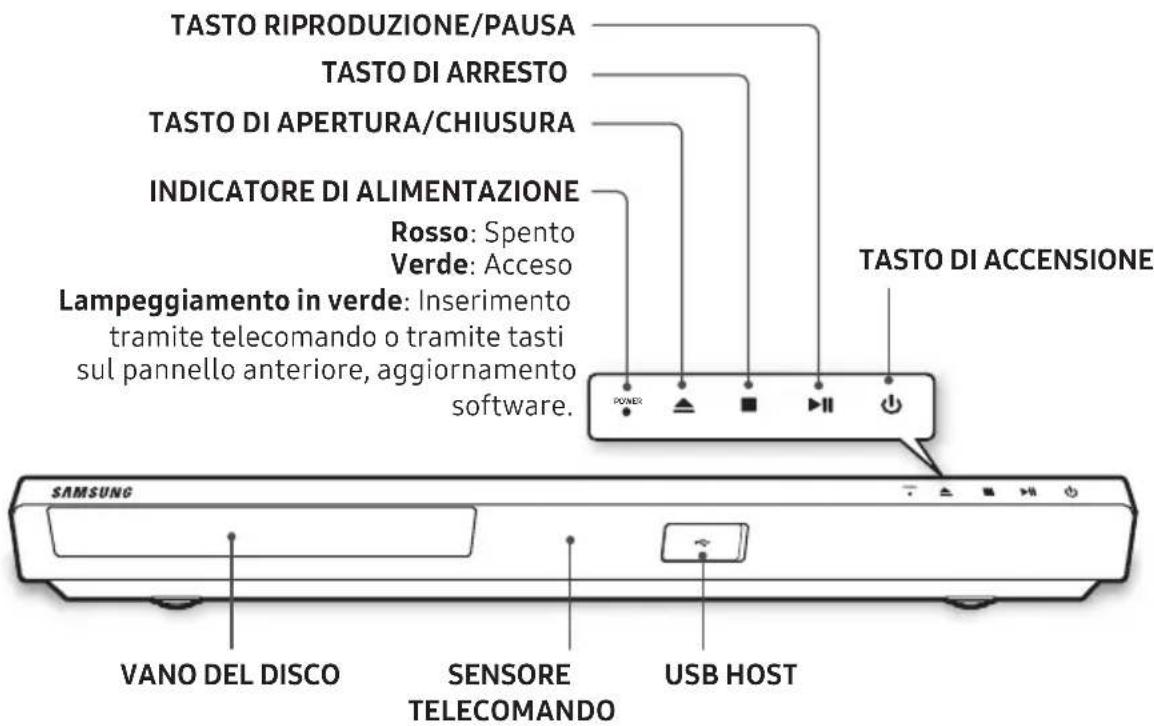
Rear panel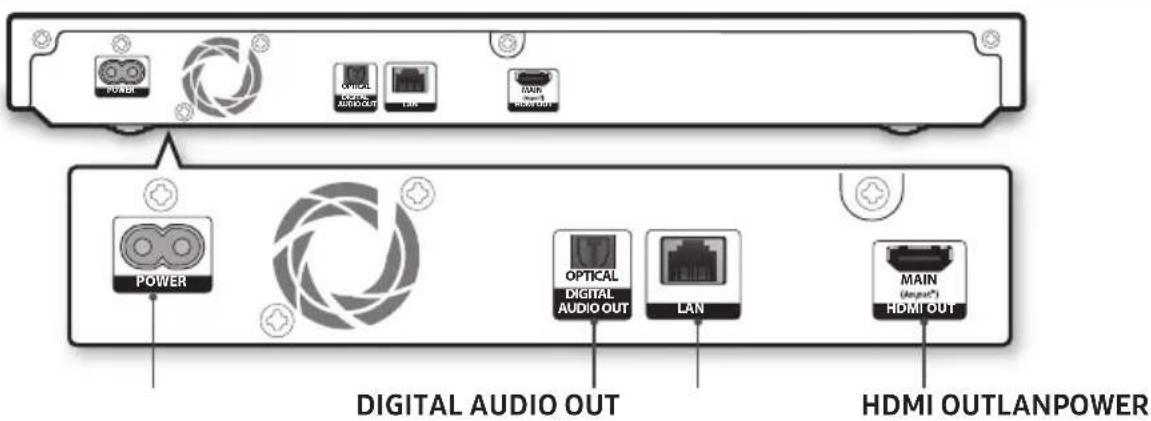
5 Concessions
- Manufactured under license from Dolby Laboratories. Dolby, Dolby Audio, Pro Logic, and the double-D symbol are trademarks of Dolby Laboratories.

DOLBY
AUDIO
- For DTS patents, see http://patents.dts.com. Manufactured under license from DTS Licensing Limited. DTS, the Symbol, DTS in combination with the Symbol, the DTS-HD logo, and DTS-HD Master Audio are registered trademarks or trademarks of DTS, Inc. in the United States and/or other countries. © DTS, Inc. All Rights Reserved.


Master Audio
DivX
- The terms HDMI and HDMI High-Definition Multimedia Interface, and the HDMI Logo are trademarks or registered trademarks of HDMI Licensing LLC in the United States and other countries.
HIGH-DEFINITION MULTIMEDIA INTERFACE
Covered by Patents at patentlist.hevcadvance.com
THIS PRODUCT CANNOT BE USED IN CONNECTION WITH HEVC ENCODED CONTENT CREATED BY A THIRD PARTY, ORDERED OR PURCHASED BY THE USER FROM A THIRD PARTY, UNLESS AN AUTHORIZED SELLER OF THE CONTENT GRANTS THE USER SEPARATE RIGHTS TO USE THE PRODUCT WITH SUCH CONTENT.
© 2017 Samsung Electronics Co., Ltd. All rights reserved.
Contact SAMSUNG WORLD WIDE
If you have any questions or comments relating to Samsung products, please contact the SAMSUNG customer care centre.
| Country Contact Centre | Web Site |
| UK 0330 SAMSUNG (7267864) | www.samsung.com/uk/support |
| IRELAND (EIRE) | www.samsung.com/ie/support |
| GERMANY 06196 9340275 | www.samsung.com/de/support |
| FRANCE 01 48 63 00 00 | www.samsung.com/fr/support |
| ITALIA 800-SAMSUNG (800.7267864) | www.samsung.com/it/support |
| SPAIN 34902172678 | www.samsung.com/es/support |
| PORTUGAL 808 20 7267 | www.samsung.com/pt/support |
| LUXEMBURG 261 03 710 | www.samsung.com/be_fr/support |
| NETHERLANDS 088-9090100 (lokaal tarief) | www.samsung.com/nl/support |
| BELGIUM 02-201-24-18 | www.samsung.com/be/support (Dutch)www.samsung.com/be_fr/support (French) |
| NORWAY 815 56480 | www.samsung.com/no/support |
| DENMARK 70 70 19 70 | www.samsung.com/dk/support |
| FINLAND 030-6227 515 | www.samsung.com/ft/support |
| SWEDEN 0771 726 786 | www.samsung.com/se/support |
| POLAND | 801-172-678* lub +48 22 607-93-33* (koszt polaczenia wedlug taryfy operadora) |
| HUNGARY | 0680SAMSUNG (0680-726-786)0680PREMIUM (0680-773-648) |
| Country | Contact Centre | Web Site |
| AUSTRIA | 0800-SAMSUNG (0800-7267864) [Only for Premium HA] 0800-366661 [Only for Dealers] 0810-112233 | www.samsung.com/at/support |
| SWITZERLAND | 0800 726 78 64 (0800-SAMSUNG) | www.samsung.com/ch/support (German) www.samsung.com/ch_fr/support (French) |
| CZECH | 800 - SAMSUNG (800-726786) | www.samsung.com/cz/support |
| SLOVAKIA | 0800 - SAMSUNG (0800-726 786) | www.samsung.com/sk/support |
| CROATIA 072 726 786 | www.samsung.com/hr/support | |
| BOSNIA | 055 233 999 | www.samsung.com/support |
| MONTENEGRO | 020 405 888 | www.samsung.com/support |
| SLOVENIA | 080 697 267 (brezplačna številka) | www.samsung.com.si |
| SERBIA | 011 321 6899 | www.samsung.com/rs/support |
| BULGARIA | *3000 Lěha в мржата 0800 111 31, Беллatable телегонна линия | www.samsung.com/bg/support |
| ROMANIA | *8000 (apel in retea) 08008-726-78-64 (08008-SAMSUNG) Apel GRATUIT | www.samsung.com/ro/support |
| CYPRUS | 8009 4000 only from landline, toll free | www.samsung.com/gr/support |
| GREECE | 80111-SAMSUNG (80111 726 7864) only from land line (+30) 210 6897691 from mobile and land line | |
| LITHUANIA 8-800-7777 | www.samsung.com/lt/support | |
| LATVIA | 8000-7267 | www.samsung.com/lv/support |
| ESTONIA 800-7267 | www.samsung.com/ee/support | |
- CLASS 1 LASER PRODUCT
- CAUTION
- IMPORTANT NOTE
- ACCESSORIES
- REMOTE CONTROL
- INSERTING BATTERIES (AA BATTERY X2)
- USING REMOTE CONTROL BUTTONS TO ENTER TV CODES
- TV CONTROL CODES
- FRONT PANEL AND REAR PANEL
- CONNECTIONS
- CONNECTING TO A TV
- CONNECTING TO AN AUDIO DEVICE
- METHOD 2: CONNECTING TO A SOUNDBAR / AV RECEIVER WITH A DIGITAL OPTICAL CABLE
- CONNECTING TO A NETWORK
- WIRED NETWORK
- THE INITIAL SETTINGS PROCEDURE
- HOME SCREEN
- PLAYING MEDIA CONTENT
- PLAYING A COMMERCIAL DISC
- PLAYING MEDIA CONTENTS SAVED ON A USB MEMORY DEVICE
- ADDITIONAL FUNCTIONS
- APPS
- UPGRADING SOFTWARE
- SPECIFICATIONS
- LICENCES
- SUPPORTED FORMATS
- REGION CODE
- CORRECT DISPOSAL OF BATTERIES IN THIS PRODUCT
- CORRECT DISPOSAL OF THIS PRODUCT (WASTE ELECTRICAL & ELECTRONIC EQUIPMENT)
- SAFETY INFORMATION
- WARNING
- WARRANTY CONDITIONS
- CONCESSIONS
- CONTACT SAMSUNG WORLD WIDE
Brand : SAMSUNG
Model : UBDM7500ZG
Category : Blu-ray player