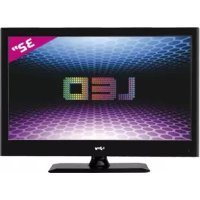
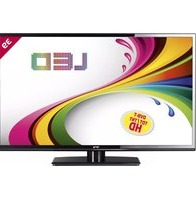
LED 32 - Television i-Joy - Free user manual and instructions
Find the device manual for free LED 32 i-Joy in PDF.



| Product type | 32-inch LED TV |
| Brand | i-Joy |
| Model | LED 32 (reference 32D9) |
| Dimensions (approx.) | 73 cm (width) × 46 cm (height) × 18 cm (depth) with stand |
| Weight (approx.) | 5.5 kg |
| Power supply | AC 100-240 V, 50/60 Hz |
| Supported resolutions (PC) | 640×480, 800×600, 1024×768, 1360×768 |
| Supported resolutions (HDMI/YPbPr) | 480i/p, 576i/p, 720p (50/60 Hz), 1080i (50/60 Hz), 1080p (50/60 Hz) |
| Connectivity | 3× HDMI, 1× USB, 1× VGA, 1× YPbPr, 1× SCART, 1× headphone output, antenna input, CI Slot |
| Main functions | Digital TV (DTV) and analog TV (ATV), teletext, EPG guide, USB recording (PVR), Time Shift, subtitles, multilingual OSD, parental lock |
| Supported USB formats | Photo, music, movie, text; disk up to 2 TB, FAT/FAT32 partition |
| Care and cleaning | Unplug before cleaning; use a soft, dry cloth; do not use chemical products; avoid moisture and dust |
| Safety | Do not open the casing (risk of electric shock); do not expose to rain or moisture; do not obstruct ventilation openings; do not place heavy objects on the power cord |
| Spare parts and repairability | Contact after-sales service or an authorized dealer for any repairs; warranty under conditions |
| General information | Made in China; supplier: I-JOY EUROPE INTERNATIONAL, S.L; CE certificate; manual available for download |
Frequently Asked Questions - LED 32 i-Joy
User questions about LED 32 i-Joy
0 question about this device. Answer the ones you know or ask your own.
Ask a new question about this device
Download the instructions for your Television in PDF format for free! Find your manual LED 32 - i-Joy and take your electronic device back in hand. On this page are published all the documents necessary for the use of your device. LED 32 by i-Joy.
USER MANUAL LED 32 i-Joy
- MANUAL DE USUARIO
-USERMANUAL - MANUAL DO UTILIZER
LIVRET D'INSTRUCTIONS
Índice
2006/95/EC-Low-Voltage-Directive (LVD)
2004/108/EC-Electromagnetic-Compatibility-Directive (EMC)

Fernando Robles / Administrador
Introduction
- Warning
- Caution
- Main Unit Description
Remote Control
- OSD basic adjustment
- DTV Features
- USB Features
PVR Operation
- Specifications
- Trouble Shooting
Introduction
Thank you very much for your purchase of our product of LED TV. It serves as a normal color TV and PC monitor. To enjoy your TV to the full from the very beginning, read this manual carefully and keep it handy for ready reference.
INSTALLATION
① Locate the TV in a room where direct light does not strike the screen. Total darkness or a reflection on the picture screen can cause eyestrain. Soft and indirect lighting is recommended for comfortable viewing.
② Allow enough space between the receiver and the wall to permit ventilation.
③ Avoid excessively warm locations to prevent possible damage to the cabinet or premature component failure.
④ This TV can be connected to AC 100-240V 50/60Hz.
⑤ Do not install the TV in a location near heat sources such as radiator, air ducts, direct sunlight, or in a place somewhere like close compartment and close area. Do not cover the ventilation openings when using the TV.
⑥ The indicator light will last about 30 seconds to go out after cutting off the electricity, during this period, you cannot repower it on until the indicator light goes out, thanks a lot for your attention!
Warning

CAUTION RISK OF ELECTRIC SHOCK DO NOT OPEN

CAUTION: TO AVOID THE RISK OF ELECTRIC SHOCK.
DO NOT REMOVE COVER (OR BACK).
NO USER- SERVICEABLE PARTS INSIDE.
REFER SERVICING TO QUALIFIED SERVICE PERSONNEL.

This symbol is intended to alert the user to avoid the risk of electric shock, do not disassemble this equipment by anyone except a qualified service personnel.

This symbol is intended to alert the user to the presence of important operating and maintenance instructions in the literature accompanying the equipment.

Class I structures of equipment should be connected to the grid power output with a protective earth connection on the socket. Power plug as a broken appliance, broken installations should be easy to operate.
Caution

Caution
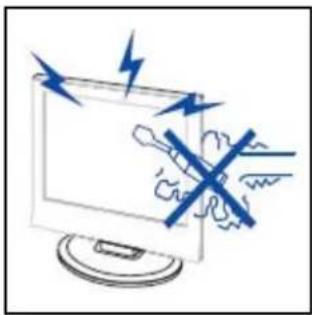
High voltages are used in the operation of this product. Do not open the product's casing. Refer servicing to qualified service personnel.
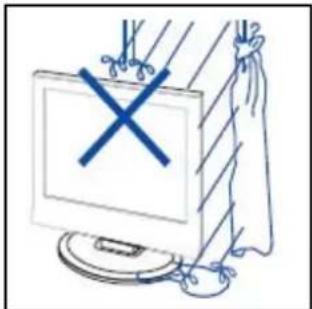

Caution
To prevent fire or electrical shock hazard, do not expose the main unit to rain or moisture, do not place objects filled with liquids, such as vases, on the apparatus.
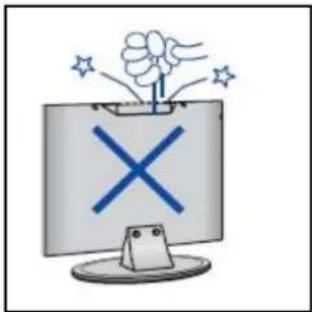

Caution
Do not drop or push objects into the television cabinet slots or openings. Never spill any kind of liquid on the television receiver.
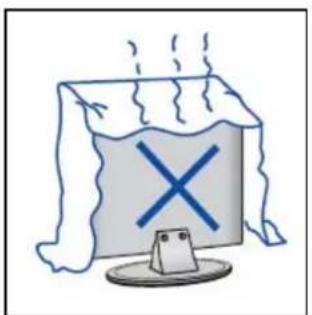

Caution
Avoid exposing the main unit to direct sunlight and other sources of heat. Do not stand the television receiver directly on other products which give off heat. E. g. video cassette players, Audio amplifiers. Do not block the ventilation holes in the back cover. Ventilation is essential to prevent failure of electrical component. Do not squash power supply cord undueit of hbenheavyobjects.
Caution
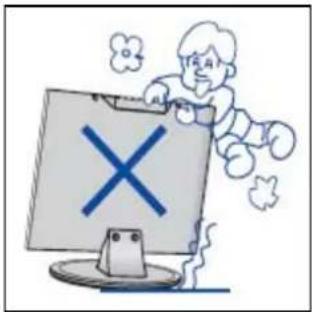

Never stand on, lean on, push suddenly the product or its stand. You should Pay special attention to children.
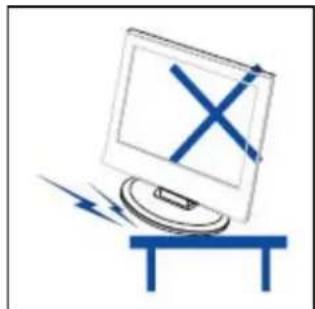

Do not place the main unit on an unstable cart stand, shelf or table. Serious injury to an individual, and damage to the television, may result if it should fall.
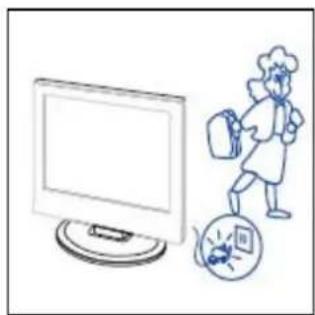

When the product is not used for an extended period of time, it is advisable to disconnect the AC power cord from the AC outlet.
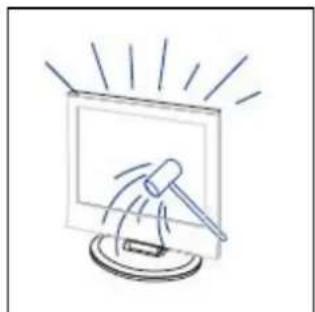

The LED panel used in this product is made of glass. Therefore, it can break when the product is dropped or applied with impact. Be careful not to be injured by broken glass pieces in case the LED panel breaks.
Main unit description
Control Panel Button Function
VOL + :Volumeup.
VOL- : Volume down.
CH + : TV channel up.
CH- : TV channel down.
MENU:Press to select the main menu.
SOURCE: Select the input signal.
POWER: Turn the TV on or off.
TV Terminal Connections
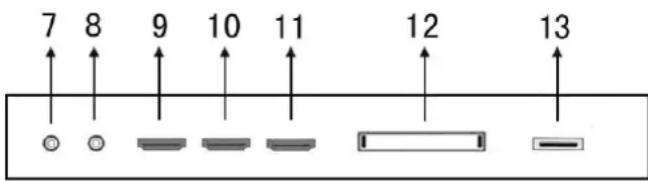
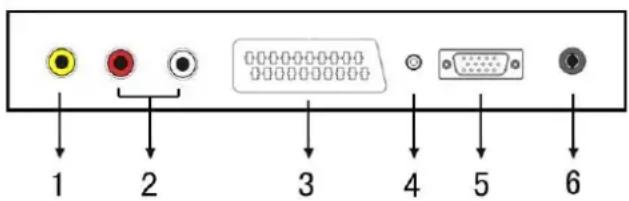
- VIDEO input terminal.
- AUDIO input terminal.
- SCART input terminal.
- PC AUDIO terminal.
- VGA input terminal.
- TV antenna.
- Mini-YPBPR input terminal.
- HEADPHONE output terminal.
- HDMI input terminal 1.
- HDMI input terminal 2.
- HDMI input terminal 3.
- CI slot
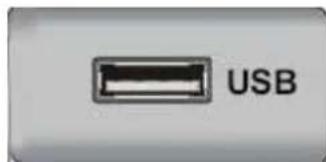
- USB input terminal.
Optional Configuration as below:
Connect the USB to the USB jack on the set.
NOTE
-
It is only 500mA MAX of DC current output when you connect with USB jack
-
To ensure the Mobile HD works well, you should use other power supply for the Mobile HD. And do not use the USB jack in the same time.
-
It supports Mobile HD by connecting with USB jack (must more than 2 GB). The partitions of the Mobile HD can't be more than 4 partitions. The max partition is 2TB. It supports FAT/FAT32 document. The max FAT document is 4GB and the max FAT32 document is 2TB.
Remote control
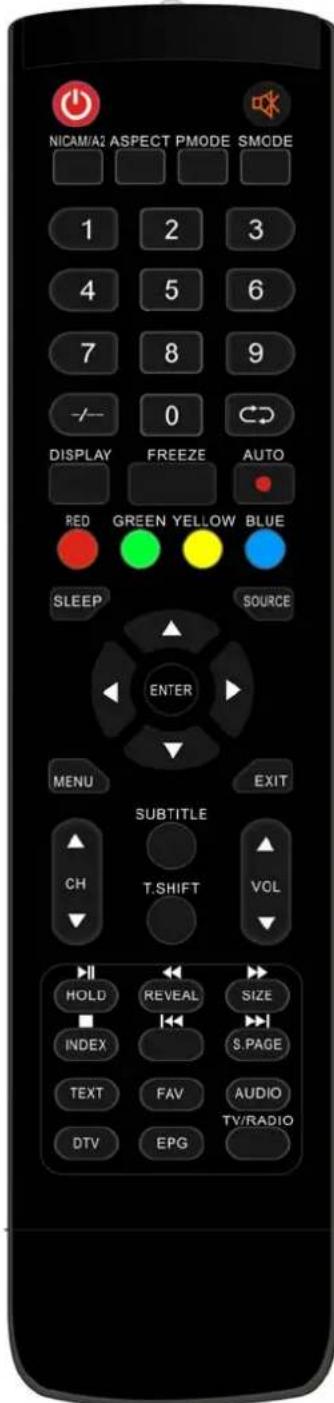
Press this button to Turn the TV on or off.
: Press this button to mute or restore sound.
NICAM/A2: In the TV condition, press this key to select the stereo mode.
ASPECT: Press to adjust picture ratio.
PMODE: Select picture mode.
SMODE: Select sound mode.
0-9: Select and switch to a channel using 0 - 9.
-/-: Switch the program digit.
: Switch back and front between the current and previous channels.
Repeat the program in MEDIA
DISPLAY: Display TV information.
FREEZE: Press to hold the picture.
: Start to record.
(The U disk will be formatted when in burning, please do not store important files in the U disk)
AUTO: Adjust the picture automatically in pc mode.
RED, GREEN, YELLOW, BLUE: Correspond to the different colored subjects.
SLEEP: Set the sleep timer.
SOURCE: Press to change signal source.
ENTER: Enter the selected option or execute the selected operation. NOTE: press this button to display "channel list" in TV source.
MENU: Press this button to enter the main menu for various optional adjustable setting.
EXIT: Exit the OSD (On-screen display).
CHV/CHA: Change the channel up and down.
VOL▼/VOL▲: Adjust the volume.
SUBTITLE: Open or close subtitle.
(Used for models with DTV function only)
TSHIFT: Press the button to pause current DTV program and start record background
(Used for models with DTV function only)
HOLD: Freeze a multi-page passage on screen in Teletext mode.
(Used for European region only)
Press to start playing the MEDIA, or to pause playing.
(Used for models with MEDIA function only)
REVEAL: Press this button to reveal the hidden information in Teletext page. Press again to hide the information.
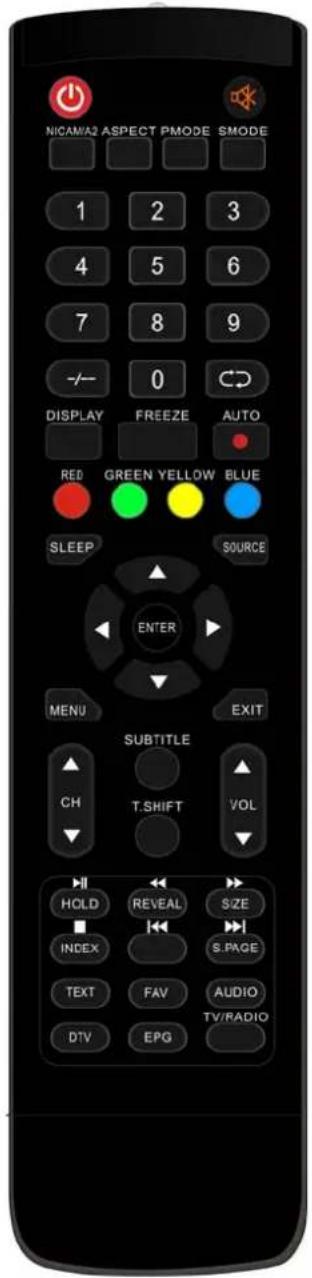
Press to play backward
(Used for models with MEDIA function only)
SIZE: Display the top, bottom or all of page to read easily in Teletext mode.
: Press to play forward.
(Used for models with MEDIA function only)
INDEX: Press this button to go to the index page in Teletext.
□: Stop playing the Media.
(Used for models with MEDIA function only)
K:Skip to previous chapter
(Used for models with MEDIA function only)
S.PAGE: Carry out the function of SUBCODE in the text while enter the text display mode.
:Skip to next chapter
(Used for models with MEDIA function only)
TEXT: Press to enter the Teletext mode.
FAV: Switch between customer set "Favorite List"
AUDIO: Press to select the DTV audio.
(Used for models with DTV function only)
DTV: Press to switch to DTV (Digital TV) mode.
NOTE: press this button to display "Record list" in DTV
EPG: Enter electronic program guide.
(Used for models with DTV function only)
TV/RADIO: Switch between TV and RADIO
(Used for models with DTV function only)
OSD basic adjustment
Installation Guide
If this is the first time you are turning on the TV and there are no programs in the TV memory, the installation Guide menu will appear on the screen.
- Press the “▲/▼/▲/▼” button to select the local language.
- Press the “ / / ” button to select mode.
- Press the “ / / ” button to select the local country you want to
- Press the “ / / / ” button to select Air or cable.
- Press the “▲/▼/▲/▲” button to select mode :DTV+ATV,DTV,ATV.
- Press the “ / / / ” button to select “ON” or “OFF”.
| First Time Setup | |||
| OSD Language | English | ||
| Mode Setting | Home Mode | ||
| Country | UK | ||
| Tuner Type | Antenna | ||
| Auto Scan | DTV+ATV | ||
| LCN | On | ||
| Start | |||
| Move Adjust | MENU: Return | EXIT: Exit | |
Note: Searching for platform will take a long time, please be patient!
Channel
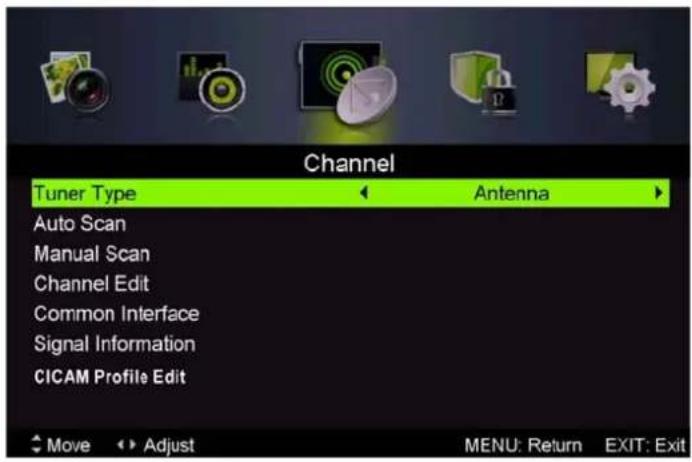
Press MENU button to display the main menu. Press / button to select CHANNEL in the main menu
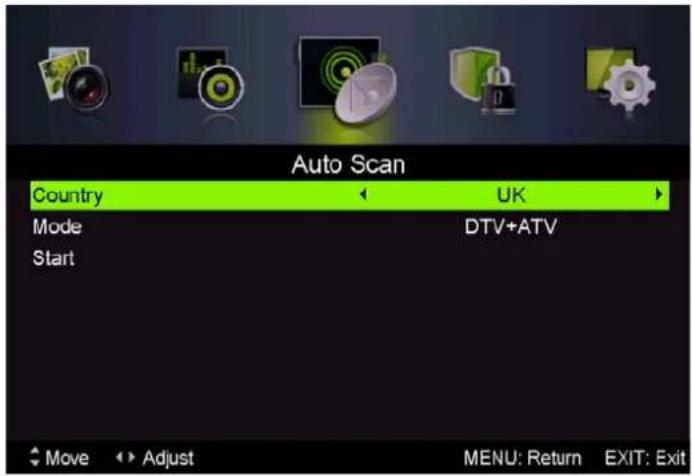
1.Auto Scan
Press “ / ” button to select "Auto Scan"
Press "▲/▼" button to select country and press the "▲/▼" button to select mode.
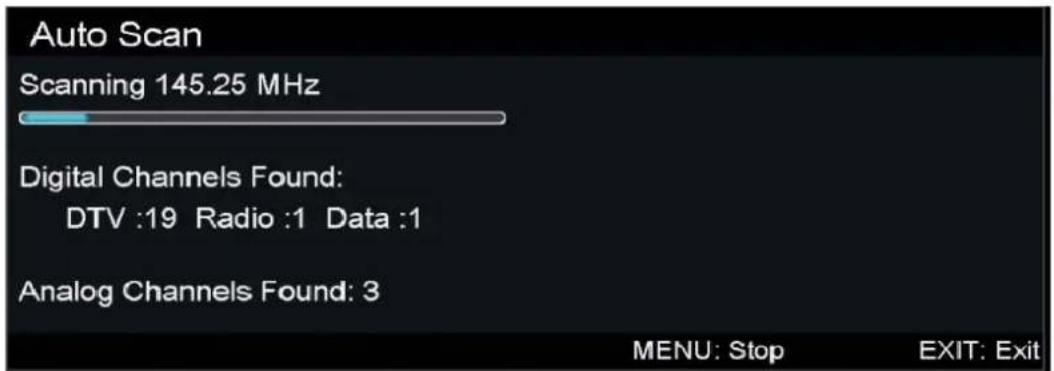
Press“ / "button and then press "▶"button to start scanning. Press "MENUR" or "EXIT"button to stop
Note: Searching for platform will take a long time. Please be patient!
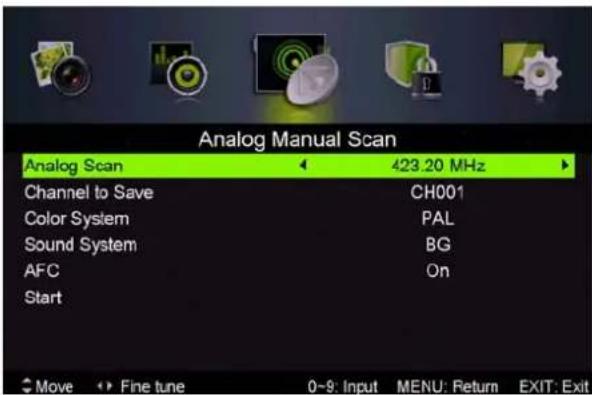
2.Analog Manual Scan
Press / button to select "Manual scan" and press the button to Analog manual scan.
Press "MENU" button to return the previous menu. Press "EXIT" button to exit the menu.
3.Digital Manual Tuning
Press “ / ” button to select “Diigital Manual Scan” and press the “ ” button to start.
Press "MENU" button to return the previous menu.
Press "EXIT" button to exit the menu.
4. Channel Edit
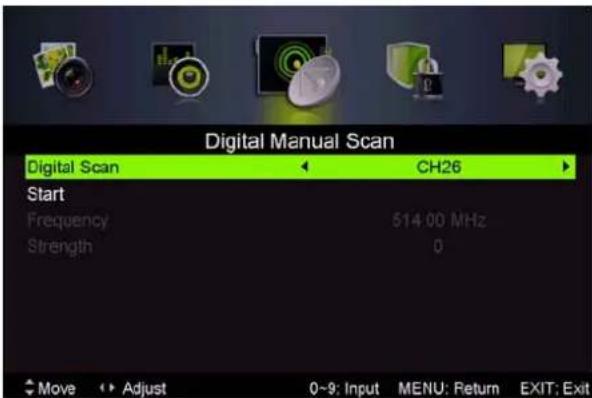
Press “▲/▼” button to select “Channel Edit” and press the “ENTER” button to enter.
a. DELETE
Press “ / ” button to select the program and press “RED” button once to delete the program.
b. SKIP
Press / button to select the channel which you want to skip and press the "GREEN" button to skip. Press "GREEN" button again to cancel the setting.
c. MOVE
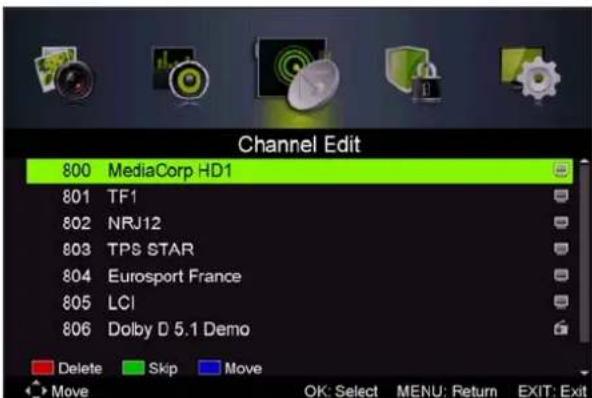
Press “▲/▼” button to select the channel and press the “BLUE” button to move. Then press the “▲/▼” button to select the channel with which you want to move. Press “BLUE” button again to confirm.
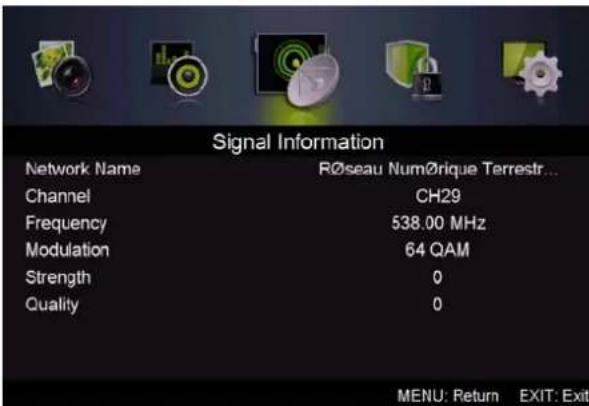
5. Signal information (only use in DTV)
Press “▲/▼” button to select “Signal information” and press the “ENTER” button. Press “MENU” button to return the previous menu. Press “EXIT” button to exit the menu.
PICTURE
You can select the type of picture, which best corresponds to your viewing.
Press the "MENU" button to enter the OSD menu. Then press / button to select the "PICTURE" menu. Press / button to select "Picture Mode" and press the / button to select.
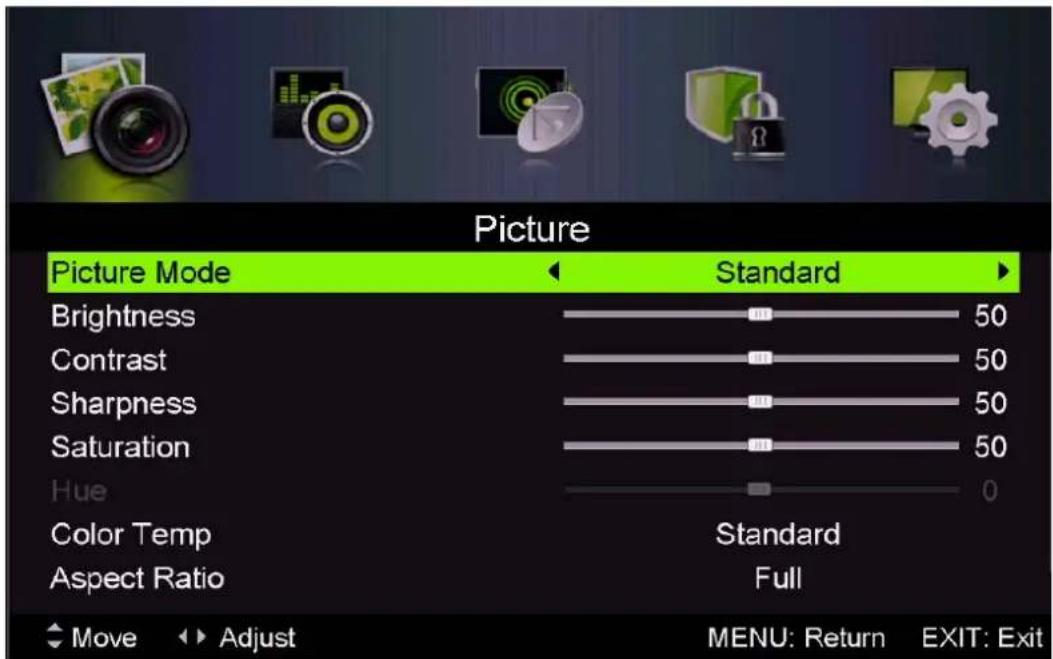
- Press “▲/▼” button to select “Brightness” and press the “</▶” button to enter brightness adjustment menu to adjust brightness.
- Press “▲/▼” button to select “Contrast” and press the “▲/▼” button to enter contrast adjustment menu to adjust contrast.
- Press “▲/▼” button to select “Sharpness” and press the “▲/▼” button to enter sharpness adjustment menu to adjust sharpness.
- Press “ / ” button to select “Saturation” and press the “ / ” button to enter Saturation adjustment menu to adjust saturation.
- Press “▲/▼” button to select “Hue” and press the “▲/▼” button to enter hue adjustment menu to adjust hue.
Note: The 'hue' item is used in NTSC mode only.
- Press “▲/▼” button to select “Sharpness” and press the “▲/▼” button to enter sharpness adjustment menu to adjust sharpness.
- Press “▲/▼” button to select “Color Temp” and press the “</▶” button to select mode: Standard, Cool, Warm..
- Press “ / ” button to select “Aspect Ratio” and press the “ / ” button to select.
- Press “▲/▼” button to select “Advanced Settings” and press the “▶” button to enter Advanced Settings adjustment menu to adjust.
SOUND
You can select the type of sound, which best corresponds to your listening.
Press the "MENU" button to enter the OSD menu. Then press / button to select the
"ROUND" menu.
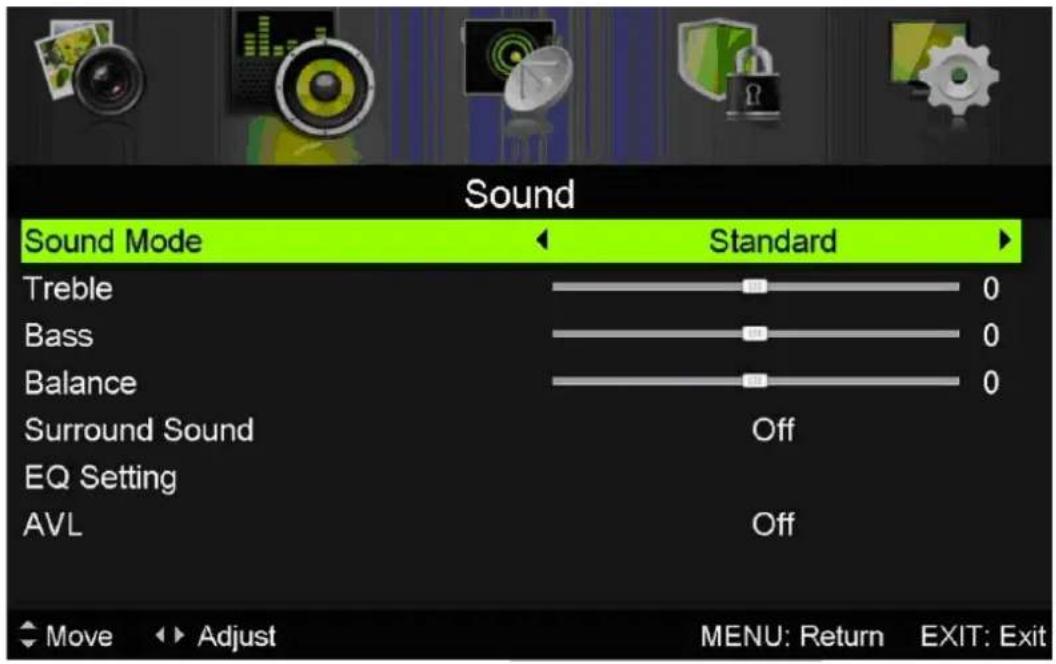
- Press “▲/▼” button to select “Sound Mode” and press the “▲/▼” button to select mode.
- Press “▲/▼” button to select “Treble” and press the “←/▶” button to adjust.
- Press “▲/▼” button to select “Bass” and press the “▲/▼” button to adjust.
- Press “ / ” button to select “Balance” and press the “ / ” button to adjust.
- Press “▲/▼” button to select “Surround sound” and “▲/▼” button to select “ON” or “OFF”.
- Press “▲/▼” button to select “EQ Setting” and “</▲” button to enter EQ Setting adjustment menu to adjust EQ..
- Press “▲/▼” button to select “AVL” and press the “▲/▼” button to select “On” or “Off”.
LOCK SYSTEM
Press the "MENU" button to enter the OSD menu. Then press / button to select the "Lock System" menu. The default password is "0000".
Note: The administrator password is "8899".
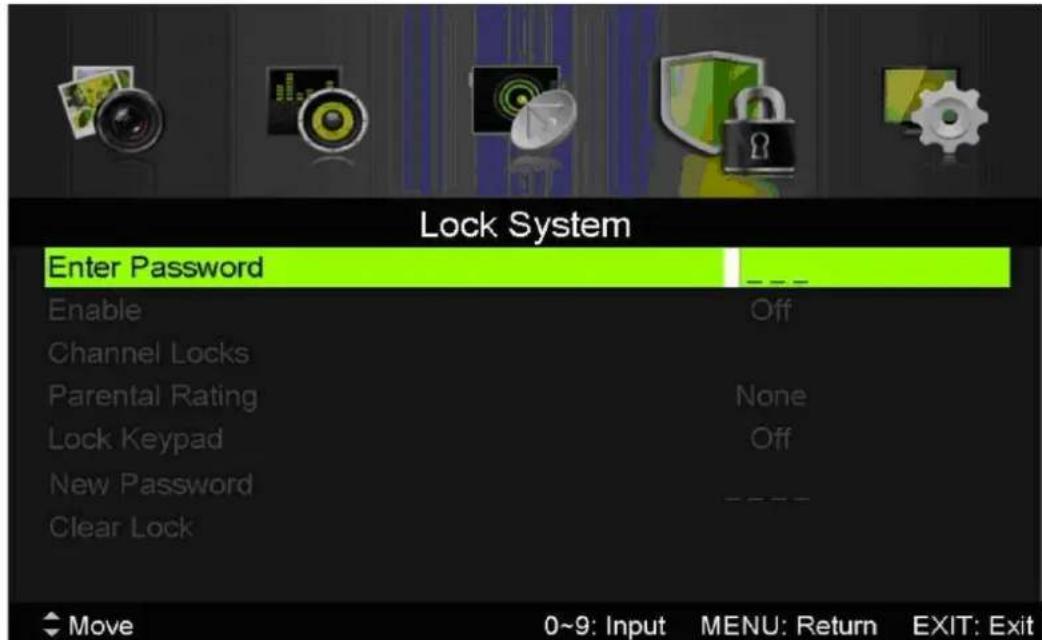
- Press “▲/▼” button to select “Enable” and then press “▲/▼” button to select “On” or “Off”
- Press “▲/▼” button to select “channel locks” and press the “▶” button to select channel (s) to lock.
- Press “ / ” button to select “Parental Rating” and press the “ / ” button to set.
- Press / button to select "Lock Keypad", then press button to select "On" or "Off", The key board will be invalid if you set Lock Keypad "On".
- Press / button to select "New Password" and set your new password.
- Press / button to select "Clear Lock" and then press the "▶" button to clear.
SETUP
Press the "MENU" button to enter the OSD menu. Then press / button to select the "SETUP" menu.
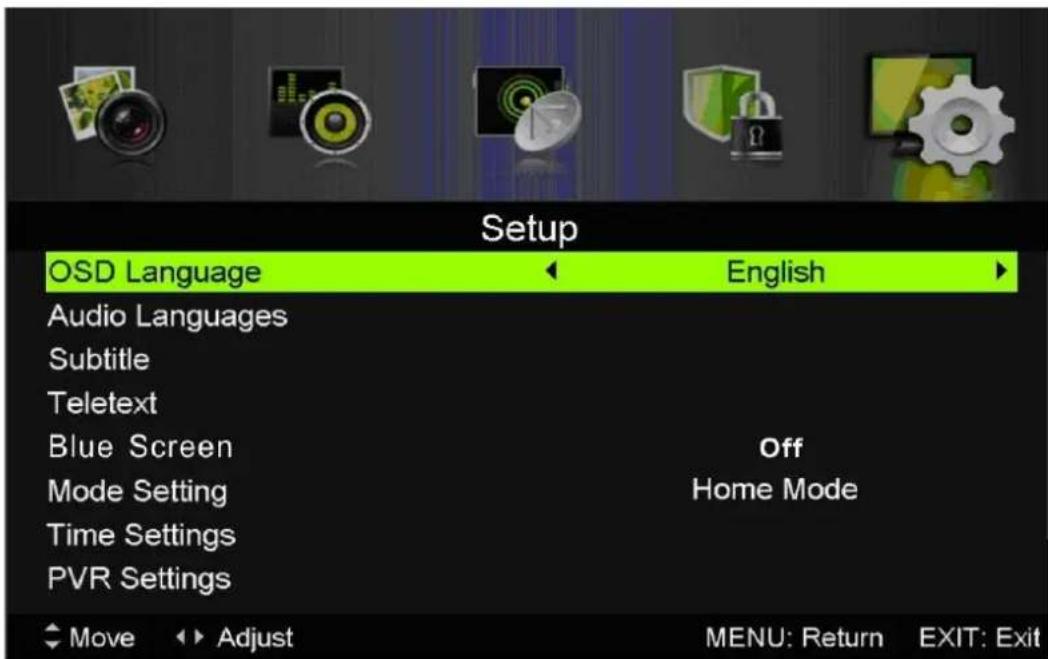
- Press “▲/▼” button to select “OSD Language” and press the “ ” button to select the OSD language which you desire.
- Press “▲/▼/” button to select “Audio Language” and press the “▶” button to enter the Audio language adjustment menu to select the Audio language which you desire.
- Press “▲/▼” button to select “Subtitle” and press the “▶” button to select “On” or “Off”. Note: This function is only used for DTV source.
- Press “▲/▼” button to select “Teletxt” menu and press the “▶” button to enter sub-menu.
- Press “▲/▼” button to select “Blue Screen” and press the “</▶” button to select “On” or “Off”.
- Press “ // ” button to select Mode Setting.
- Press “ / / / ” button to select “Time Setting”.
- Press “ // ” button to select “PVR Settings”.
- Press “▲/▼” button to select “First Time Installation”, then press “ENTER” button to set relevant options including OSD language, country and tuning.
- Press “▲/▼” button to select “Reset”, then press “ENTER” a dialogue. Press “▲” button selecting “Yes” to restore all settings to default setting.
- Press “▲/▼” button to select “Software Update (USB)”, then press “ENTER” button to update software using USB.
DTV Features
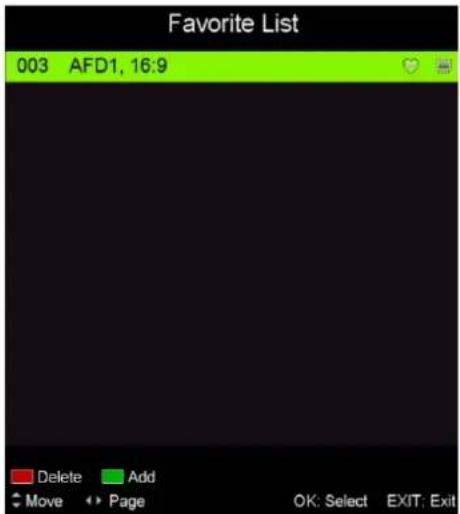
Favorite List
When the source is selected as DTV, users can enter Favorite List by pressing "FAV" button. The "Favorite List" window is illustrated as follows: Favorite List
Program Information
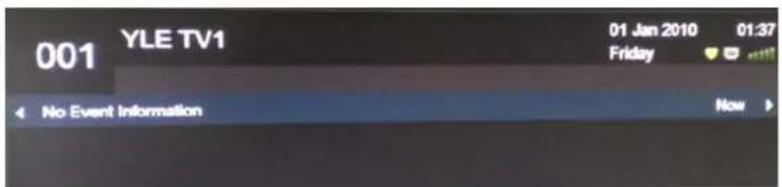
When the source is selected as DTV, you can press "display" button to display the channel's information. The program information window is illustrated as follows:
Audio
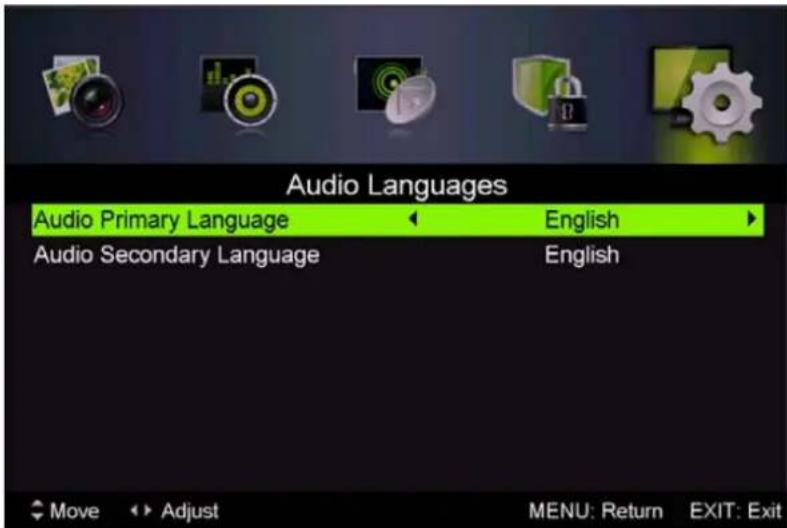
When the source is selected as DTV, users can enter the Setup menu to enter the "Audio Language" menu. The "audio language" window is illustrated, and press / button to select the "audio language" menu.
Electronic Program Guide (EPG)
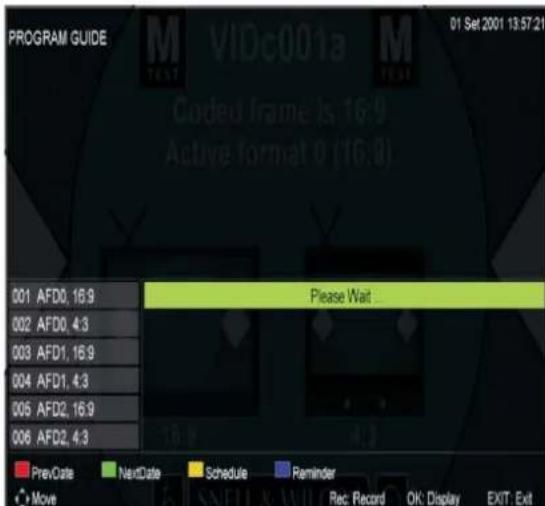
Electronic Program Guide (EPG) provides program information which will be broadcasted now or in the future. The system will display EPG window by pressing "EPG" button. DATE and TIME information is displayed on the right of the window. The left side shows all channels. The right side shows the programs in the channel. The selected program is also displayed on the top of the screen.
-
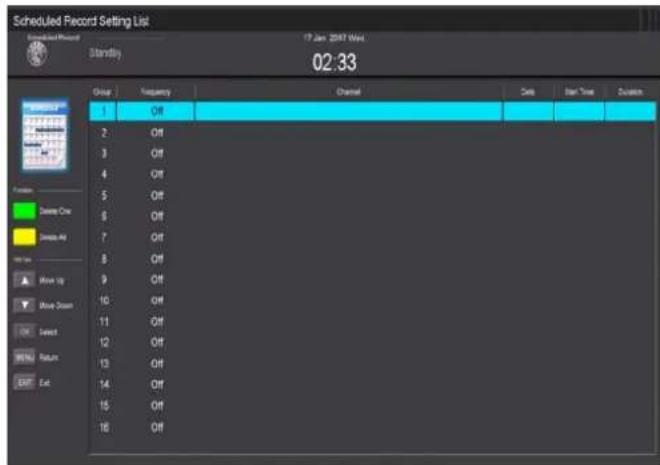
Press the "▲/▼" button to select the "program". You can press "RED" button to enter record mode. Press "GREEN" button to display the program's detail. Press "YELLOW" button to Check details at PVR's Schedule List introduction. Press "Blue" button to enter remind setting.
-
Press the "▲/▼" button to select "CH" and press the "▲/▼" button to select the channel number to see the current channel's program forecast.
Note: The U disk will be formatted when in burning, please do not store important files in the U disk.
Subtitle
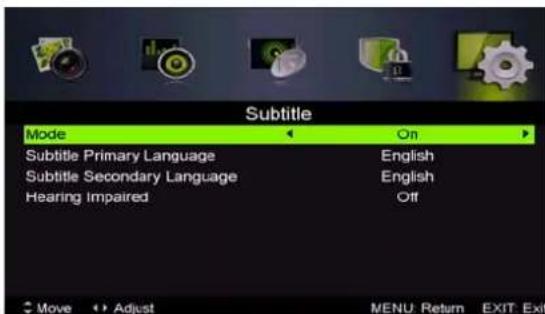
When the source is selected as DTV, users can go to the menu to set.
Note: The pictures in regard to function are provided for reference purposes only.
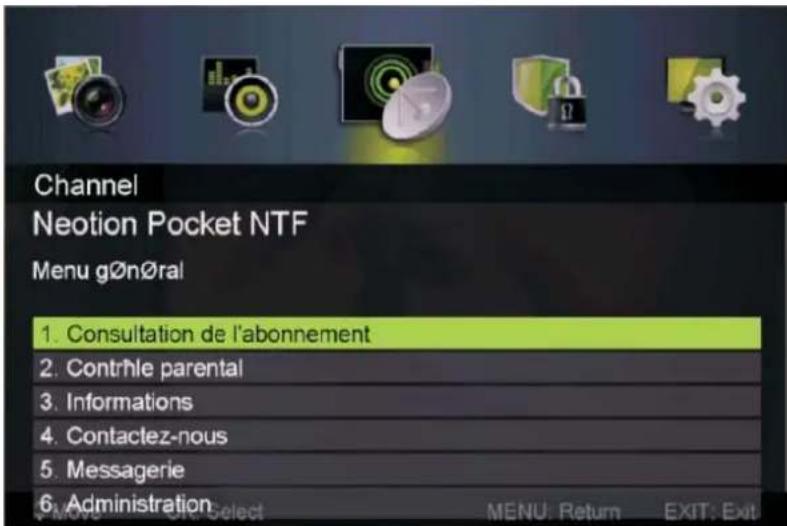
Common interface
Press the “ / ” button to select Common interface, then press ENTER button to enter sub menu. Only available when there is CI card under DTV.
USB Features
Press the "SOURCE" button to change to the "MEDIA" source.

Photo
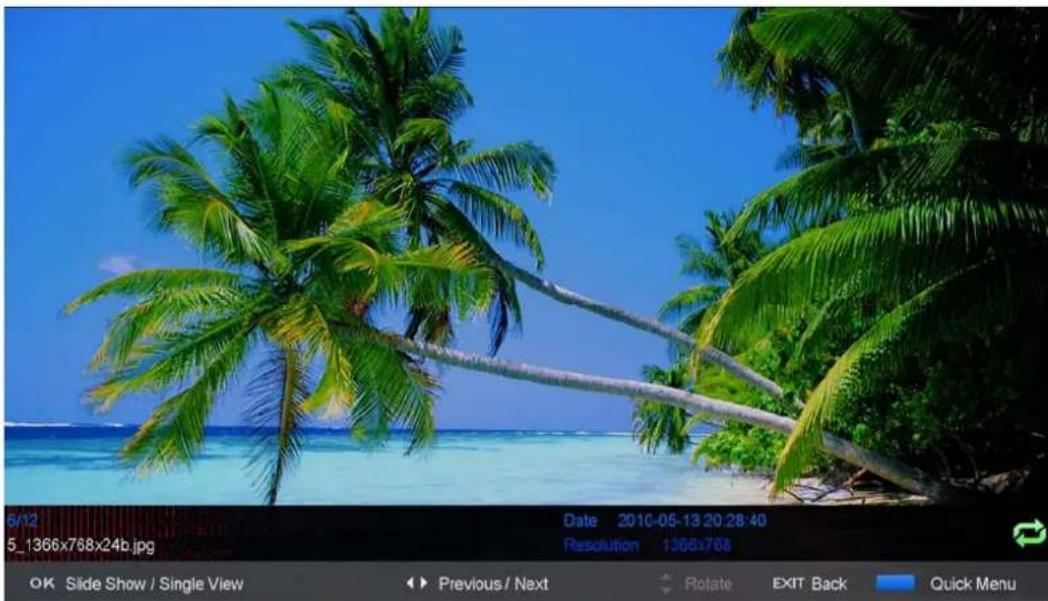
- Press the “ ” button enter the “PHOTO” option, and press enter button to enter
- Press / button to select drive disk you want to watch, then press enter button to enter.
- Press "BLUE" button to enter the sub menu to set.
- Press the "exit" button to back to the previous menu.
Music
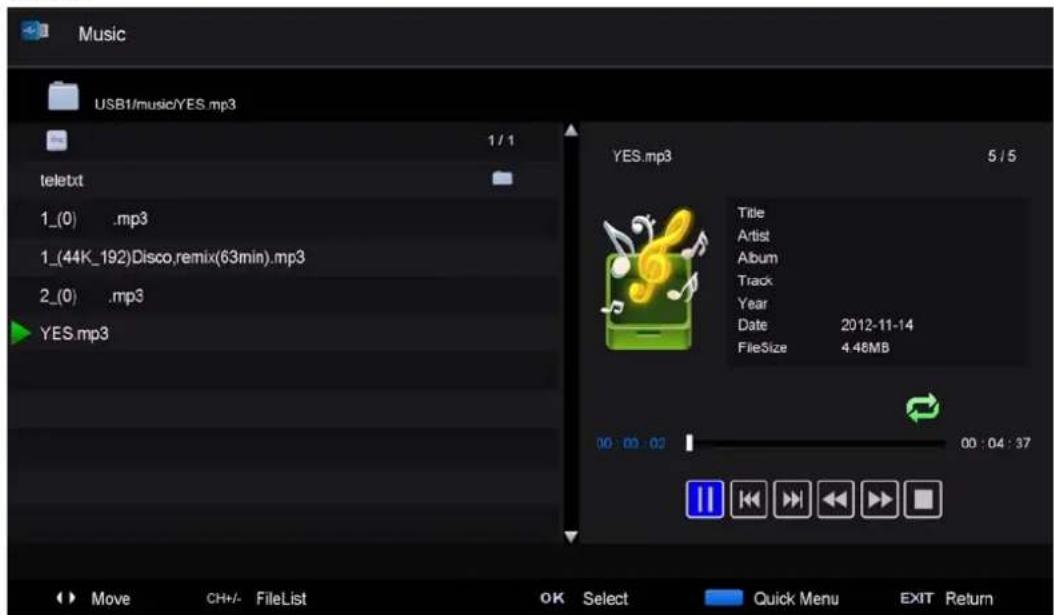
- Press / button to select MUSIC in the main menu, then press enter button to enter
- Press / button to select drive disk you want to watch, then press enter button to enter
- Press "BLUE" button to enter the sub menu to set.
4.. Press the "exit" button to back to the previous menu
Movie
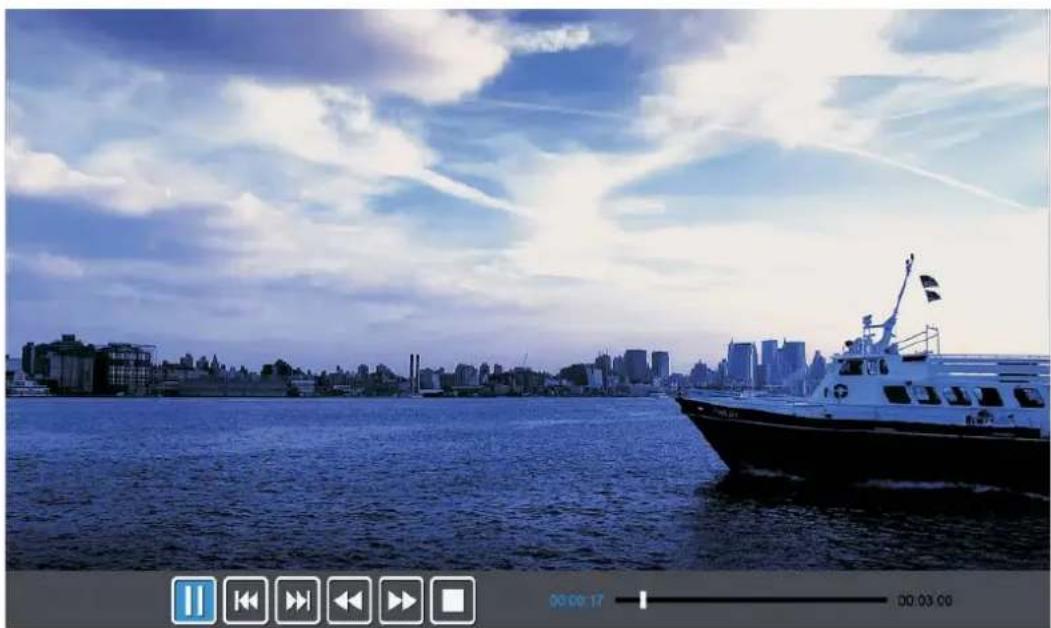
- Press / button to select MOVIE in the main menu, then press enter button to enter
- Press / button to select drive disk you want to watch, then press enter button to enter
- Press "BLUE" button to enter the sub menu to set.
- Press the "exit" button to back to the previous menu.
Text

- Press / button to select TEXT in the main menu, then press enter button to enter.
- Press / button to select drive disk you want to watch, then press enter button to enter
- Press "BLUE" button to enter the sub menu to set.
- Press the "EXIT" button to back to the previous menu.
PVR Operation
In DTV source, press the "MENU" button to enter the OSD menu. Then press / button to select the "Setup" menu.
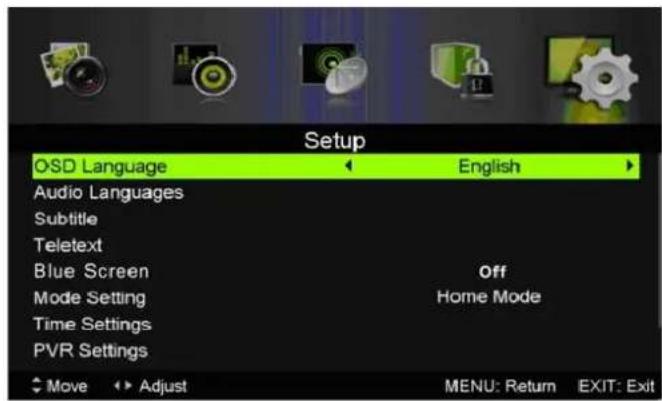
- Press “▲/▼” button to select “PVR Settings” and press the “ENTER” or “▶” button to enter.
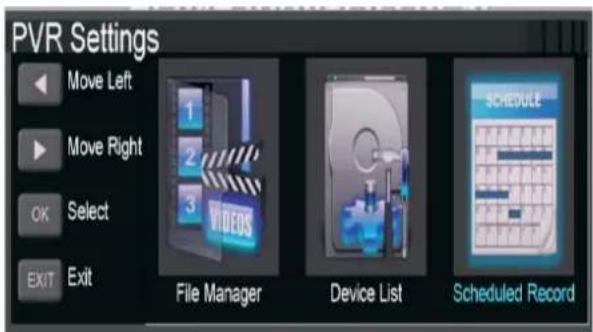
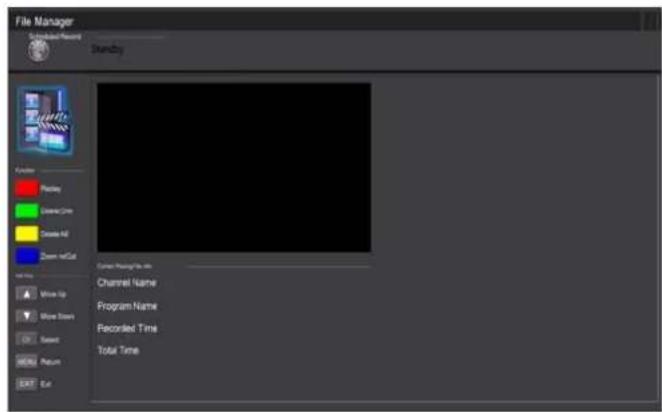
a) Press “</
button to select "File Manager" and press the "ENTER" button to check PVR file system.
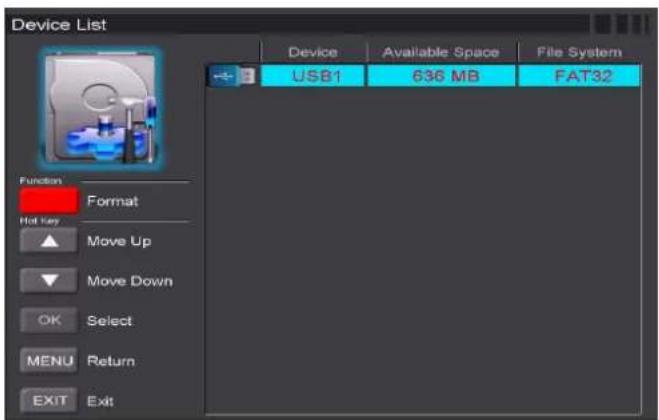
b) Press / button to select "Device List" and press the "ENTER" button to the sub menu.
c) Press “▲/▼” button to select “Scheduled Record” and press the “ENTER” button to set.
Note:
-
The U disk will be formatted when in format, please do not store important files in the U disk.
-
Press "●" button for the first time to start recording, for the second time, the sign of recorder will be slimmed down, but it's still under recording.
SPECIFICATIONS
RGB INPUT
| Mode | Resolution | Horizontal Frequency (KHz) | Vertical Frequency (HZ) |
| DOS | 720x400 | 31.5 | 70 |
| VGA | 640x480 | 31.5 | 60 |
| SVGA | 800x600 | 37.9 | 60 |
| XGA | 1024x768 | 48.4 | 60 |
| WXGA | 1360x768 | 47.7 | 60 |
HDMI INPUT
| Mode | Resolution | Horizontal Frequency (KHz) | Vertical Frequency (HZ) |
| VGA 640 x 480 31.47 59.94 | |||
| 480i 720 x480i 15.73 | 59.94/60 | ||
| 576i 720 x 576i | 15.63 | 50 | |
| 480p | 720 x480p | 31.47 | 59.94/60 |
| 576p | 720 x 576p | 31.26 | 50 |
| 720p | 1280 x 720p | 37.50 | 50 |
| 44.96 | 59.94/60 | ||
| 1080i | 1920 x 1080i | 28.13 | 50 |
| 33.75 | 59.94/60 | ||
| 1080p | 1920 x 1080p | 56.25 | 50 |
| 67.5 | 59.94/60 | ||
COMPONENT (YPbPr) INPUT
| Mode | Resolution | Horizontal Frequency (KHz) | Vertical Frequency (HZ) |
| 480i 720 x480i 15.73 | 59.94/60 | ||
| 576i 720 x 576i | 15.63 | 50 | |
| 480p | 720 x480p | 31.47 | 59.94/60 |
| 576p | 720 x 576p | 31.26 | 50 |
| 720p | 1280 x 720p | 37.50 | 50 |
| 44.96 | 59.94/60 | ||
| 1080i | 1920 x 1080i | 28.13 | 50 |
| 33.75 | 59.94/60 | ||
| 1080p | 1920 x 1080p | 56.25 | 50 |
| 67.5 | 59.94/60 | ||
Trouble Shooting
Before consulting service personnel, check the following chart for possible solutions.
| PROBLEM | SOLUTION |
| TV will not turn on | •Make sure the power cord is plugged in. •The batteries in the remote control may be Exhausted; replace the batteries. |
| No picture, no sound | •Check the cable between TV and antenna/external AV device. •Press the power button on the remote. •Press the SOURCE button the remote, then press the “▲/▼”button repeatedly to select the TV source. |
| Poor picture, sound OK | •Check the cable between TV and antenna/external AV device. •Try another channel, the station may have broadcast difficulties. •Adjust the brightness/contrast in the Video menu. Check that the unit is set to PAL. |
| Audio noise | •Move any infrared equipment away from the TV. |
The TFT LED panel uses a panel consisting of sub pixels which requires sophisticated technology to produce. However, there may be a small number of bright or dark pixels on the screen. These pixels will have no impact on the performance of the product.
Conditions of Guarantee
- For the guarantee to be carried out, all products must be delivered to IJOY perfectly packed, preferably in its own original packing, with all accessories, user manuals and drivers that the packaging would originally contain. Otherwise, IJOY will not be held responsible for damages that might occur during transportation.
- To be able to carry out the guarantee it will necessary to have a copy of the proof of purchase, preferably with a copy of the original bill.
- The repair of the products will be carried out according to the problem reported by the client; therefore it is essential that the client indicates in a clear form and in the most specific way possible where the problem lies, to be able to solve it in the correct manner. In the case that there is not problem with the product a diagnosis and transportation charge can be applied.
- The client must have carried out a security copy of the data as during the reparation process there exists the possibility that such data may be lost and/or erased. In any case IJOY will not be held responsible for the loss of data contained in hard drives, as well as any other non-original accessory, might there be batteries, memory cards, CD's DVD's, etc.
- In the case that there is no possibility of repair of the product, it can be replaced by another one of similar or superior characteristics, taking into consideration the state in which the product is received, such as usage marks, scratches, etc. In any case the product returned to the customer will have been tested to be functioning correctly.
- The Guarantee will only cover errors caused by deficiencies in manufacturing, and does not therefore cover damage caused by mis-use, modifications or damages caused by accidents of any nature of caused by the client. The guarantee does not cover: Accessories, pieces exposed to normal wear and tea. The Guarantee will not be valid when the product is not used for the purpose for which it was originally conceived.
- In the case of TFT, there exists what are known as dead pixels or bright dots (due to the complexity of the manufacturing process), in such cases, there exists a maximum limit permitted by law (ISO 13406/02) that allows this not to be considered defective.
- The power supplies or chargers and batteries will have a guarantee limited to six months as long as they used within the established operating conditions for the correct usage have not been exposed to power surges.
- It will be necessary that the equipment has a legible serial number, that the guarantee seal has not been manipulated and in perfect state; that the equipment has all original seals in all components so that the guarantee is valid.
- The guarantee period starts in the moment of first purchase of the product. The reparation or substitution of the product will not imply an extension of the guarantee period.
- In the case that the product is not covered by the guarantee, a budget will be drawn up which has to be approved by the client. In the case that the budget is not approved by the client, the client must pay for the cost incurred in the transportation, manipulation and diagnosis of the product.
- Once the product is repaired after notifying the client, the client will have a period of ten working days to pick up the product. After this period of time, a daily storage charge will be applicable depending on the volume of the product.
i-Joy
C/ Mario Roso de Luna, 31 P.I. Fin de Semana -28022-Madrid (Spain)
Tel. +34 902 55 55 60
E-mail: rma@i-joy.es (Under warranty) | postventa@i-joy.es (Technical doubts)
Web: www.i-joy.es
DECLARATION OF CONFORMITY
Manufacturer Name:
I-JOY EUROPE INTERNATIONAL, S.L
C/MARIO ROSO DE LUNA,31
28022 - MADRID, ESPANA
TEL: +34 91 551 1787
B86300548
We declare under our own exclusive responsibility, that the product:
Product: TV
Original model: 32D9
Model Name: i-LED 32
Brand Name: i-Joy
Manufacturing country: China
Is in compliance with the standards:
EN55014-1:2006
EN55014-2:1997/+A1:2001
EN6100-3-2:2006
EN6100-3-3:1995/+A1+A2
Corresponding to the following directives:
2006/95/EC-Low-Voltage-Directive (LVD)
2004/108/EC-Electromagnetic-Compatibility-Directive (EMC)

Fernando Robles / Administrador Madrid, 14th October 2013
After-sale Service
In case any problem mostly like a fault occurs while your using LED TV, please contact the store where you purchased this unit or the service agency.
- MANUAL DE USUARIO
-USERMANUAL - MANUAL DO UTILIZER
LIVRET D'INSTRUCTIONS
Conteudo
CONDITIONS DE GARANTIES
2006/95/EC-Low-Voltage-Directive (LVD)
2004/108/EC-Electromagnetic-Compatibility-Directive (EMC)
CE
- Índice
- Introduction
- INSTALLATION
- Warning
- Caution
- Main unit description
- Control Panel Button Function
- TV Terminal Connections
- Optional Configuration as below:
- NOTE
- Remote control
- Press to play backward
- OSD basic adjustment
- Installation Guide
- Channel
- 1.Auto Scan
- 2.Analog Manual Scan
- 3.Digital Manual Tuning
- Channel Edit
- a. DELETE
- b. SKIP
- c. MOVE
- Signal information (only use in DTV)
- PICTURE
- SOUND
- LOCK SYSTEM
- SETUP
- DTV Features
- Favorite List
- Program Information
- Audio
- Electronic Program Guide (EPG)
- Subtitle
- Common interface
- USB Features
- Photo
- Music
- Movie
- Text
- PVR Operation
- Note:
- SPECIFICATIONS
- Trouble Shooting
- Conditions of Guarantee
- i-Joy
- DECLARATION OF CONFORMITY
- After-sale Service
- Conteudo
- CONDITIONS DE GARANTIES
Brand : i-Joy
Model : LED 32
Category : Television