SRK35ZJXS - Air Conditioning MITSUBISHI - Free user manual and instructions
Find the device manual for free SRK35ZJXS MITSUBISHI in PDF.



| Product type | Split system air conditioner |
| Brand | Mitsubishi Heavy Industries |
| Model | SRK35ZJXS |
| Refrigerant | R410A (PRG = 1975) |
| Main functions | Cooling, Heating, Dehumidification, Ventilation, Automatic |
| Operating modes | AUTO, COOL, HEAT, DRY, FAN |
| Rated power | 3.5 kW (estimated) |
| Power supply | 230 V / 50 Hz |
| Remote control | Wireless with LCD screen |
| Filters | Air filter, Hypoallergenic filter, Washable photocatalytic deodorizing filter |
| Timers | SLEEP, OFF-TIMER, ON-TIMER, PROGRAM TIMER |
| Special functions | HIGH POWER, ECONOMY, 3D AUTO, ALLERGEN CLEAR, SELF CLEAN |
| Automatic restart | Yes (after power cut) |
| Airflow adjustment | Motorized vertical and horizontal direction |
| Maintenance and cleaning | Clean filters every 15 days; clean the device with a soft dry cloth |
| Safety | Mandatory grounding, earth leakage circuit breaker recommended, overcurrent protection |
| Self-diagnosis | Yes (RUN and TIMER indicators flash according to error code) |
| Environmental instructions | WEEE must not be disposed of in household waste; used batteries must be deposited at recycling centers |
Frequently Asked Questions - SRK35ZJXS MITSUBISHI
User questions about SRK35ZJXS MITSUBISHI
0 question about this device. Answer the ones you know or ask your own.
Ask a new question about this device
Download the instructions for your Air Conditioning in PDF format for free! Find your manual SRK35ZJXS - MITSUBISHI and take your electronic device back in hand. On this page are published all the documents necessary for the use of your device. SRK35ZJXS by MITSUBISHI.
USER MANUAL SRK35ZJXS MITSUBISHI
natural_image
Line drawing of a single air conditioner unit (no text or symbols)SRK20ZJX-S
SRK25ZJX-S
SRK35ZJX-S
SRK50ZJX-S
SRK60ZJX-S
MANUEL DE L'UTILISATEUR
CLIMATISEUR
ANWENDERHANDBUCH
KLIMAGERÄT
ISTRUZIONI PER L'USO
This air conditioner complies with EMC Directive 2004/108/EC, LV Directive 2006/95/EC.
Thank you for purchasing a MITSUBISHI HEAVY INDUSTRIES, LTD. Air-Conditioner. To get the best long-lasting performance, please read and follow this User's Manual carefully before using your air-conditioner. After reading, please store the Manual in a safe place and refer to it for operational questions or in the event of any irregularities.
This air-conditioner is intended for domestic use.
Do not vent R410A into the atmosphere: R410A is a fluorinated greenhouse gas, covered by the Kyoto Protocol with a Global Warming Potential (GWP) = 1975.
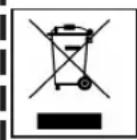
Your Air Conditioning product may be marked with this symbol. It means that waste electrical and electronic equipment (WEEE as in directive 2002/96/EC) should not be mixed with general household waste. Air conditioners should be treated at an authorized treatment facility for re-use, recycling and recovery and not be disposed of in the municipal waste stream. Please contact the installer or local authority for more information.
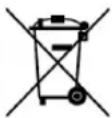
This symbol printed in the batteries attached to your Air Conditioning product is information for end-users according to the EU directive 2006/66/EC article 20 annex II. Batteries, at their end-of-life, should be disposed of separately from general household waste. If a chemical symbol is printed beneath the symbol shown above, this chemical symbol means that the batteries contain a heavy metal at a certain concentration. This will be indicated as follows: Hg:mercury(0.0005%), Cd:cadmium(0.002%), Pb:lead(0.004%) Please, dispose of batteries correctly at your local community waste collection or the recycling center.
contents
Safety precautions.... 2
Name of each part and its function ....4
Remote control handling 6
Operation failure with the remote control ..... 6
Temporary run operation 6
Operation and display section for remote control ....7
Current time setting 7
AUTO mode operation ....8
Temperature adjustment during AUTO...... 8
FAN SPEED 8
COOL/HEAT/DRY/FAN mode operation .....9
Air-conditioner operable temperature setting 9
Characteristics of HEAT mode operation ..... 9
Airflow direction adjustment 10
3D AUTO operation 10
SLEEP TIMER operation ......11
OFF-TIMER operation 11
ON-TIMER operation.... 12
SLEEP TIMER + ON-TIMER operation ..... 12
PROGRAM TIMER operation 13
ALLERGEN CLEAR operation ...... 13
HIGH POWER/ECONOMY operation ..... 14
SELF CLEAN operation 15
Auto restart function 15
Tips for effective operation 15
Installation location setting.... 16
Maintenance.... 17
Proper installation.... 19
Troubleshooting 19
Notice 20
Contact your dealer.... 21
About the Multiple Air-conditioner...... 21
Self diagnosis function 22
Safety precautions
- Before starting to use the system, please read these "Safety precautions" carefully to ensure proper operation of the system.
- The safety precautions are classified as “ △DANGER” and “ CAUTION”. Precautions as shown in the column “ DANGER ” indicate that improper handling could lead to drastic result like death, serious injury, etc. Even precautions as shown in the column “ △CAUTION ” might pose a serious problem, depending on the circumstances. Please observe these precautions with great care, since they are essential to your safety.
- Symbols which appear frequently in the text have the following meaning:

Strictly prohibited Provide prop

Observe instructions with ng great care

- When you have read this instruction manual, please keep it without missing. If someone else takes over as operator, make certain that the manual is also passed on to the new operator.
INSTALLATION PRECAUTIONS
| ⚠️ | ⚠️CAUTIONDANGER | ||
| The system is for domestic, residential etc. use. | Do not install it where flammable gas may leak. | Depending on the place of installation, an earth leakage breaker may be necessary. | |
 | If used in severer environments, such as an engineering workplace, the equipment may function poorly. | Gas leaks may cause fire. If you do not install on earth leakage breaker, you may get an electric shock. | |
| The system must be installed by your dealer or a qualified professional. | Make sure to install the drain hose properly so that all the water is drained out. | Make sure that the system has been properly earthed. | |
 | It is not advisable to install the system by yourself, as faulty handling may cause leakage of water, electric shock or fire. | Improper installation may lead to water drop in the room resulting in wet furniture. | Earth cables should never be connected to a gas pipe, water pipe, lightning conductor or telephone earth cable. Incorrect installation of the earth cable may produce an electric shock. |
■ OPERATION PRECAUTIONS
| △ DANGER | |||||
| Do not expose yourself to the cooling air for a long period. | Do not insert anything into the air inlet. | Store the remote control out of reach of infants. | |||
 | This could affect your physical condition and cause health problems. |  | This may cause injury, as the internal fan rotates at high speed. |  | Failure to observe this may result in the batteries being swallowed or other accidents. |
| △ CAUTION | |||||
| Only use approved fuses. | Do not handle the switches with wet hands. | Do not swing from the indoor unit. | |||
 | Use of steel or copper wire instead of an approved fuse is strictly prohibited, as it may cause a breakdown or fire. |  | This may cause an electric shock. If the i |  | lls down, you may get injured. |
| Do not place a flammable insecticide or paint spray near the blower, nor spray it directly on the system. | You should not expose any combustion appliance directly to the air stream of the air-conditioner. | Do not wash the air-conditioner with water. | |||
 | This may result in a fire. The appliance may |  | nad-equately. |  | This could cause an electric shock. |
| The system should only be used for its original purpose and not for anything else like, for instance, preservation of food, plants or animals, precision devices or works of art. | Do not place anything containing water, like vases, on top of the unit. | Do not install the system where the airflow direction is aimed directly at plants or animals. | |||
 | The system is only intended for use in ordinary domestic rooms. Any other use of the system may damage the quality of food, etc. |  | Water entering the unit could damage the insulation and therefore cause an electric shock. |  | This will damage their health. |
| CAUTION | |||||
| Do not sit on the outdoor unit nor put anything on it. | After a long period of use, check the unit's support structure from time to time. | Do not touch the aluminum fins on the air heat exchanger. | |||
 | If the unit falls down or things drop off it, people could get hurt. |  | If you do not repair any damage right away, the unit may fall down and cause personal injury. |  | It may result in injury. |
| Do not place household electrical appliances or household items under neath the indoor or outdoor units. | Do not operate the system without the air filter. | Do not shut off the power supply immediately after stopping the operation. | |||
 | Condensation falling from the unit may stain objects and cause accidents or electrical shock. |  | It can cause malfunction of the system due to clogging of the heat exchanger. |  | Wait at least 5 minutes, otherwise there is a risk of water leakage or breakdown. |
| Do not control the system with main power switch. | If you operate the system together with a combustion appliance, you must regularly ventilate the indoor air. | Stand firmly on a stepladder or other stable object when removing the inlet panel and filters. | |||
 | It can cause fire or water leakage. In addition, the fan can start unexpectedly, which can cause personal injury. |  | Insufficient ventilation may cause accidents due to oxygen deficiency. |  | Failure to observe this may result in injury through insecure objects top-pling over. |
| When you clean the system, stop the unit and turn off the power supply. | Do not place objects near the outdoor unit or allow leaves to gather around the unit. | Contact your dealer to clean inside the indoor unit, do not attempt to do by yourself. | |||
 | Never open the panel while the internal fan is rotating. |  | If there are objects or leaves around the outdoor unit, small animals may enter unit and contact electrical parts and may cause a break-down, smoke or fire. |  | The use of a non-approved detergent or improper washing method may damage the unit's plastic components and cause leaks. Damage, smoke, or fire may also happen if the detergent comes in contact with electrical parts or the unit's motor. |
| Stop the unit and turn off the power if you hear thunder or there is a danger of lightning. | |||||
 | It may damage the unit. | ||||
■ PRECAUTIONS FOR RELOCATION OR REPAIRS
| ⚠ DANGER | |||||
| Do not perform any repairs or modifications by yourself. Consult the dealer if the unit requires repair. | Consult your dealer for repairs. | In case the air-conditioner is relocated elsewhere, contact your dealer or a professional fitter. | |||
 | If you repair or modify the unit, it can cause water leaks, electric shocks or fire. |  | Wrong repairs could cause an electric shock, fire, etc. |  | Faulty installation may cause water leakage, electric shock, fire, etc. |
If you notice anything abnormal (smell of burning, etc.), stop the system, turn off the power supply and consult your dealer.
If the air-conditioner fails to cool or warm the room, it may have a refrigerant leakage. Contact your dealer. If refrigerant needs to be added, check with your dealer for proper instructions.


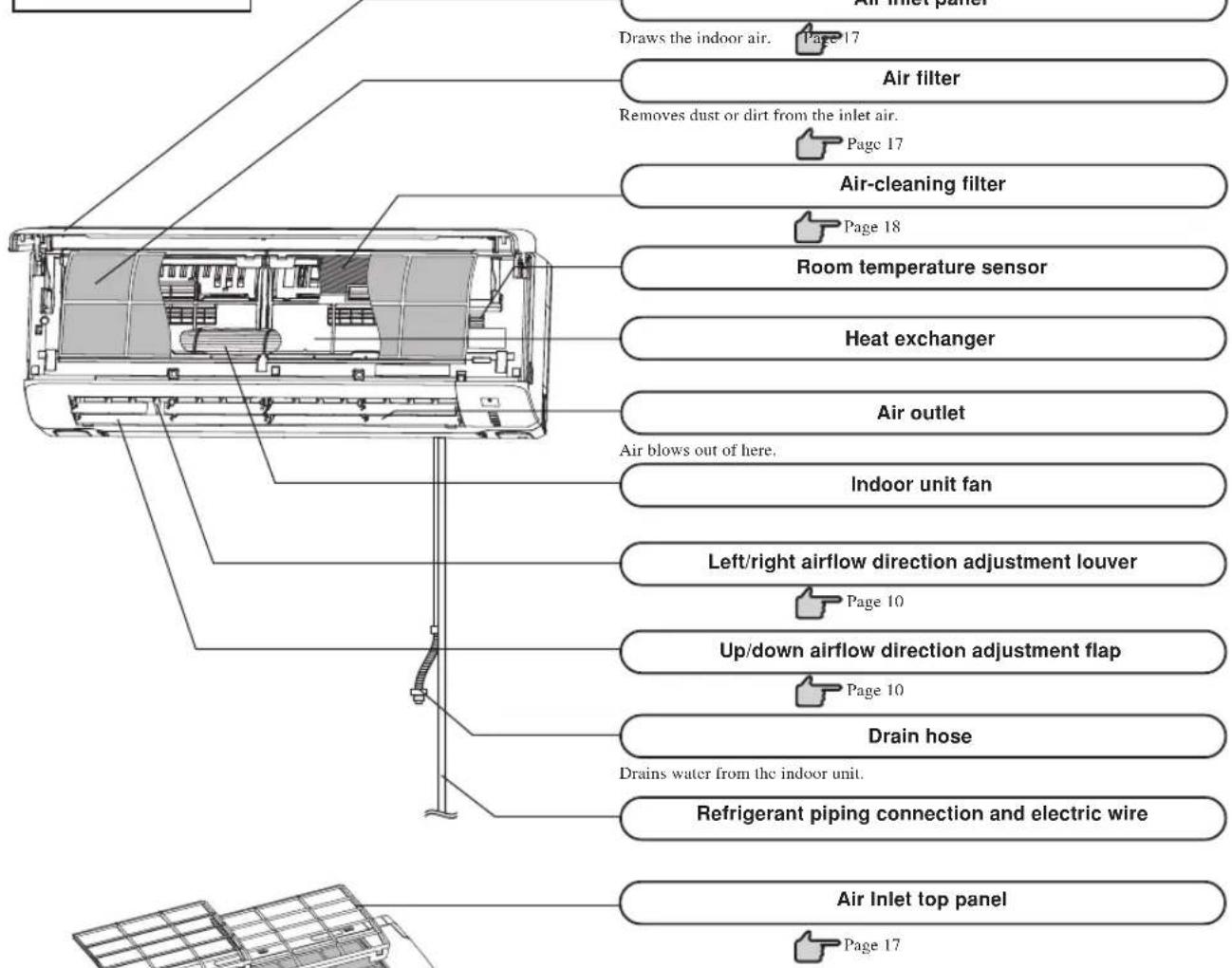
Name of each part and its function
INDOOR UNIT
OUTDOOR UNIT
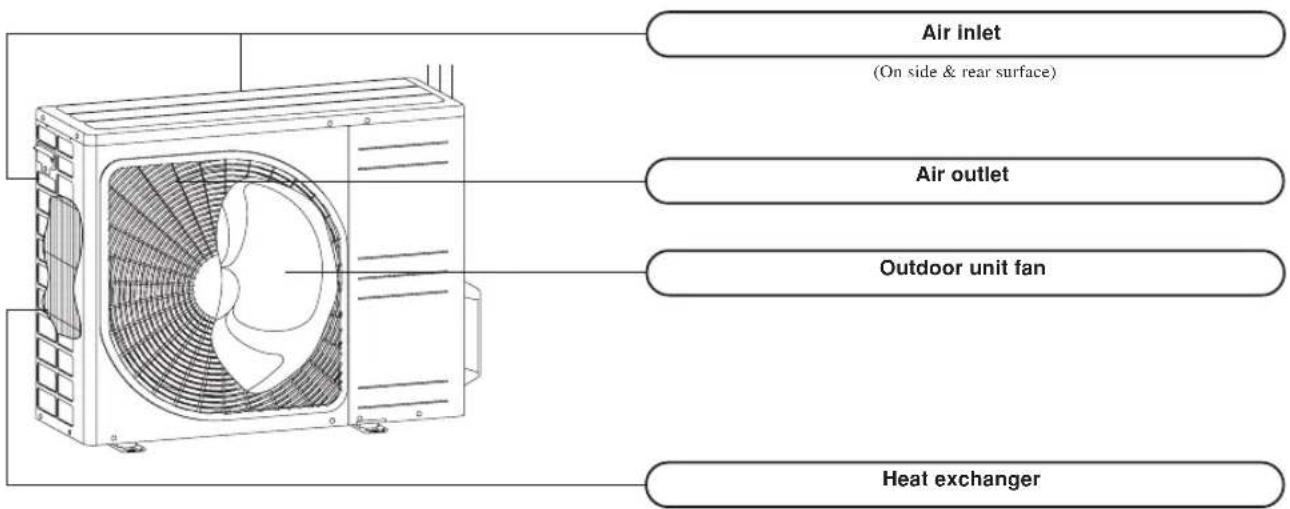
Name of each part and its function
Unit display section
Unit ON/OFF button
This button can be used for turning on/off the unit when remote control is not available.

Page 6
Remote control signal receiver



RUN (HOT KEEP) light (green/blue)
•Illuminates during operation.
green : except ECONO operation
blue : ECONO operation
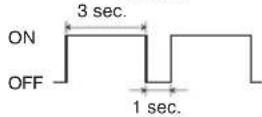
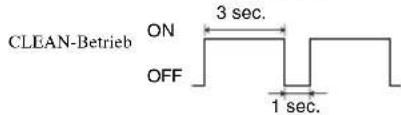
- Blinks when airflow stops due to the 'HOT KEEP' and 'CLEAN operation'.
HOT KEEP
CLEAN operation

3D AUTO light (green)
Illuminates during 3D AUTO operation.
HI POWER light (green)
Illuminates during HIGH POWER operation.
TIMER light (yellow)
Illuminates during TIMER operation.
Accessories
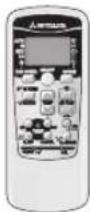
Wireless remote control
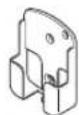
Wireless remote control holder
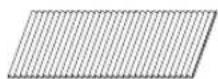
Allergen clear filter (Light orange)
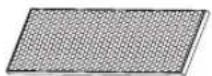
Photocatalytic washable deodorizing filter (Orange)

Battery
(R03 (AAA, Micro) ×2)

Wood screw (Quantity:2)
(for remote control holder mounting)
CAUTION
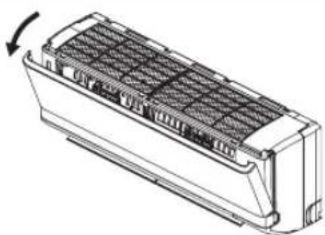
- Do not touch the air inlet panel while it is operating.
The air inlet panel opens up while the system is operating.
Please do not install the unit in a fashion in which the air inlet panel cannot open or place objects near the indoor unit.
natural_image
Technical line drawing of a rectangular air vent or cooling unit with internal grid structure (no text or symbols)NOTE
•Buzzer sound for remote control
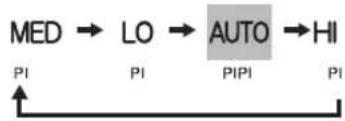
When preset temperature 24^ , automatic operation and automatic airflow are selected, the buzzer sound (PiPi) is produced. When turning off the air conditioner by pressing ON/OFF button (except CLEAN mode), the buzzer sound (Pi) is produced. This function is useful for operating the air conditioner in the darkness.
Air flow setting
flowchart
graph LR
    A["MED"] --> B["LO"]
    B --> C["AUTO"]
    C --> D["HI"]
    style C fill:#cccccc,stroke:#333
    style D fill:#ffffff,stroke:#333
Preset temperature

Remote control handling
Replacing the batteries
The following cases signify exhausted batteries. Replace old batteries with new ones.
- Receiving beep is not emitted when a signal is transmitted.
•Display fades away.

Pull out the cover and take out old batteries.

Insert new batteries. R03 (AAA, Micro) x2
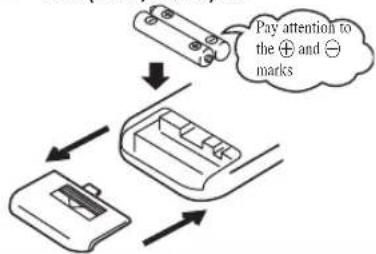
flowchart
graph TD
    A["Receipt"] --> B["Payment to mark"]
    B --> C["Receive Payment"]
    style A fill:#f9f,stroke:#333
    style B fill:#ccf,stroke:#333
    style C fill:#cfc,stroke:#333

Close the cover.

Press the ACL switch with the tip of a ballpoint pen.
The timer setting mode is displayed.

Page 7

- Do not use old and new batteries together.
- Remove the batteries when the remote control is not used for a long period.
•The recommended effective period of a battery conforming to JIS or IEC should be 6 to 12 months with normal use. If used longer, or when an unspecified battery is used, liquid may leak from the battery, causing the remote control to malfunction.
•The recommendable effective period is printed on the battery. This may be shorter due to manufacturing time to the unit. However, the battery may still be in working order after expiry of its nominal life.
■When the display shows any abnormal condition, Press the ACL switch with the tip of a ballpoint pen.
Using the remote control holder
The remote control can be attached to a wall or pillar by using a remote control holder. Before installing the remote control, check that the air-conditioner receives the signals properly.
For installing or removing the remote control, move it up or down in the holder.
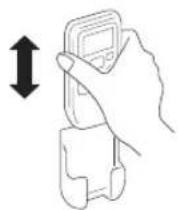
Warning note for remote control handling
| Strictly prohibited | ||
| •Do not go near high temperature places, such as an electric carpet or stove. | •Do not leave the remote control exposed to direct sunlight or other strong lighting. | •Do not drop the remote control. Handle with care. |
| •Do not put any obstructing obstacles between the remote control and the unit. | •Do not spill any liquid on the remote control. | •Do not place heavy objects on the remote control, or step on it. |
Operation failure with the remote control
•Are the batteries running down?

"Replacing the batteries" above.
Replace the batteries with new ones and retry the operation.
- If the operation fails, operate the unit with temporary operation function.
Contact your dealer to have the remote control checked.

Below
Temporary run operation
- The unit ON/OFF button on the unit operates ON/OFF temporarily when the remote control is not used.
Operation program
•OPERATION MODE : AUTO
•FAN SPEED : AUTO
• AIR FLOW : AUTO
•Operation starts by pressing the unit ON/OFF button; it stops if you press the button again.
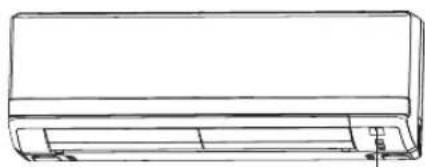
natural_image
Line drawing of a rectangular air conditioner unit with no text or symbolsUnit ON/OFF button
NOTE
- Do not hold the Unit ON/OFF button down for more than 5 seconds. (Holding it down longer than 5 seconds sets the automatic cooling used during servicing or when relocating the air-conditioner.)
Operation and display section for remote control
Operation section
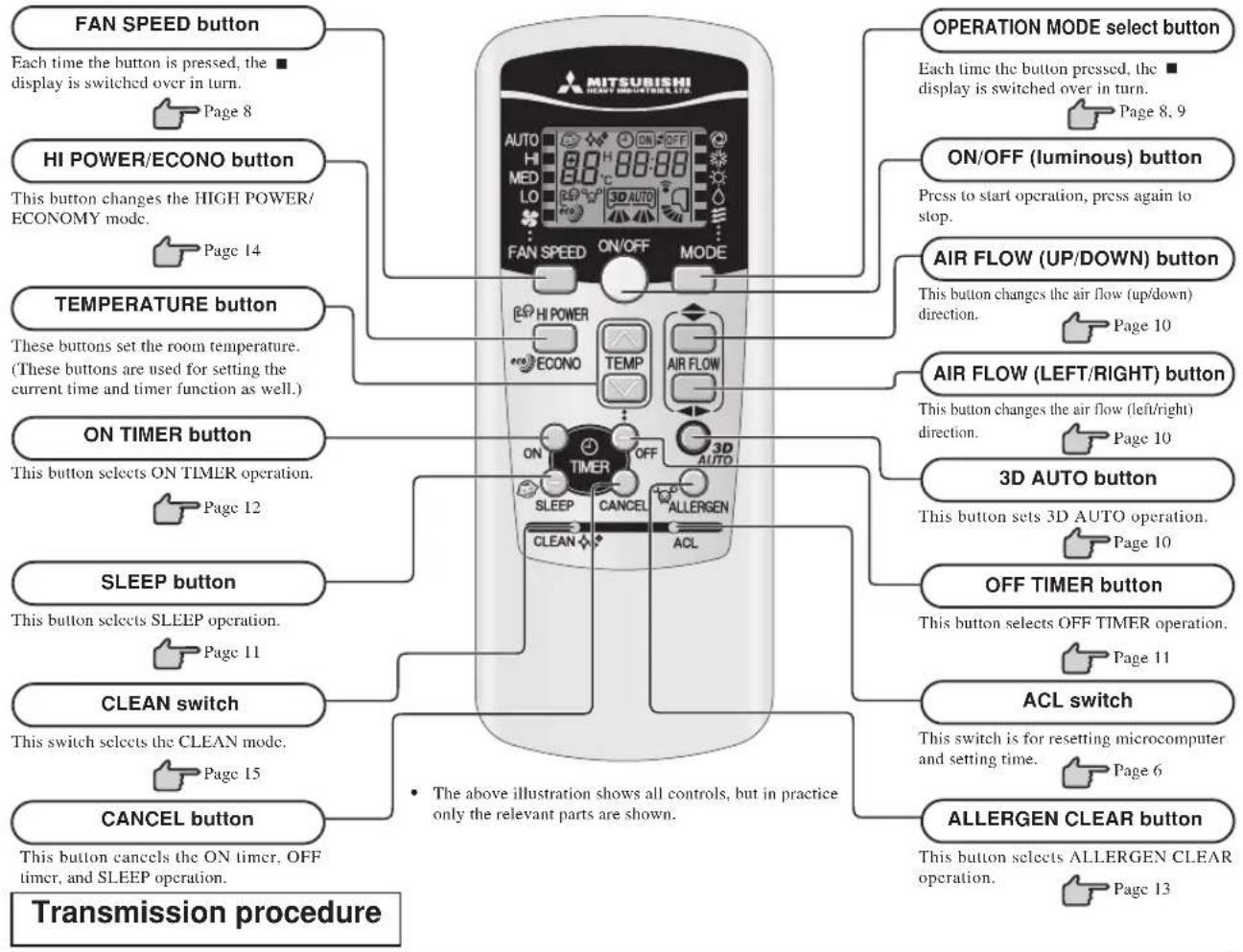
flowchart
graph TD
    A["FAN SPEED button"] --> B["Each time the button is pressed, the display is switched over in turn."]
    B --> C["Page 8"]
    D["HI POWER/ECONO button"] --> E["This button changes the HIGH POWER/ECONOMY mode."]
    E --> F["Page 14"]
    G["TEMPERATURE button"] --> H["These buttons set the room temperature. (These buttons are used for setting the current time and timer function as well.)"]
    H --> I["Page 12"]
    J["ON TIMER button"] --> K["This button selects ON TIMER operation."]
    K --> L["Page 11"]
    M["SLEEP button"] --> N["This button selects SLEEP operation."]
    N --> O["Page 15"]
    P["CLEAN switch"] --> Q["This switch selects the CLEAN mode."]
    Q --> R["Page 15"]
    S["CANCEL button"] --> T["This button cancels the ON timer, OFF timer, and SLEEP operation."]
    T --> U["Page 13"]

    V["OPERATION MODE select button"] --> W["Each time the button pressed, the display is switched over in turn."]
    W --> X["Page 8, 9"]
    Y["ON/OFF (luminous) button"] --> Z["Press to start operation, press again to stop."]
    Z --> AA["Page 10"]
    AB["AIR FLOW (UP/DOWN) button"] --> AC["This button changes the air flow (up/down) direction."]
    AC --> AD["Page 10"]
    AE["AIR FLOW (LEFT/RIGHT) button"] --> AF["This button changes the air flow (left/right) direction."]
    AF --> AG["Page 10"]
    AH["3D AUTO button"] --> AI["This button sets 3D AUTO operation."]
    AI --> AJ["Page 10"]
    AK["OFF TIMER button"] --> AL["This button selects OFF TIMER operation."]
    AL --> AM["Page 11"]
    AN["ACL switch"] --> AO["This switch is for resetting microcomputer and setting time."]
    AO --> AP["Page 6"]
    AQ["ALLERGEN CLEAR button"] --> AR["This button selects ALLERGEN CLEAR operation."]
    AR --> AS["Page 13"]
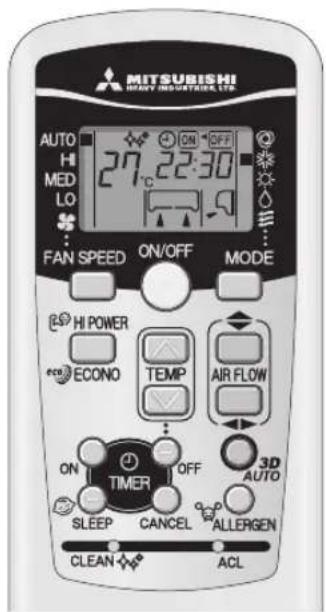
When each button on the remote control is pressed – with the remote control pointing towards the air-conditioner unit a signal is transmitted. When the air-conditioner receives the signal correctly, it will beep.
Current time setting
■ When inserting the batteries, the current time is automatically set to time setting mode. 13:00 is displayed as the current time. Set the clock to the right time.
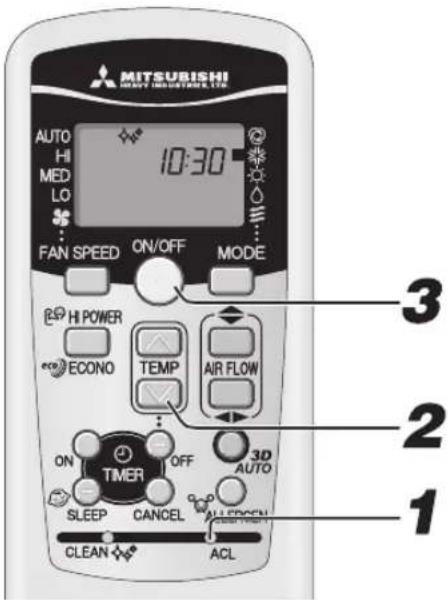
Example: Set to 10:30.

Press the ACL switch.
Press with the tip of a ballpoint pen, etc. The time display blinks and can be set to the current time.

Press the "or" button.
(Set to 10:30)

Press the ON/OFF button.
The display changes from blinking to steady lighting and the setting is complete. Make sure to press the button within 60 seconds from the last operation in step 2, otherwise the time is not set.
NOTE
- The timer operation works based on the time clock, so please set it correctly.
- The remote control data is reset when the present time is set.
AUTO mode operation
■ Automatically selects the operation mode (COOL, HEAT, DRY) depending on the room temperature when switched on.
![MITSUBISHI AUTO INDUSTRIES LTD. AUTO HI MED LO FAN SPEED ON/OFF MODE 1 2 When the unit is not in AUTO mode: 1 Press MODE button. Move the [■mark] to the (Auto) position. Point the remote control toward the air-conditioner, and 2 Press the ON/OFF button. To stop: Press the ON/OFF button. NOTE • In case air is not blowing out during the operation. Page 20 • When the included clean filter is in- stalled the air conditioner will clean the air during automatic operation. AUTO mode can be operated by simply pressing the ON/OFF button. Display in OFF status • The current time and preset OPERA- TION MODE are displayed while the air conditioner is turned off. • If you do not want the AUTO mode program, change to COOL, HEAT, DRY or FAN instead of AUTO. • Airflow direction adjustment procedure. Page 9 Page 10](/content/2026/02/397020/images/e6015f95b6f98f1c04a5a9e9f6f57928022373ec1f87c3f424fb4b848c802dd6.jpg)
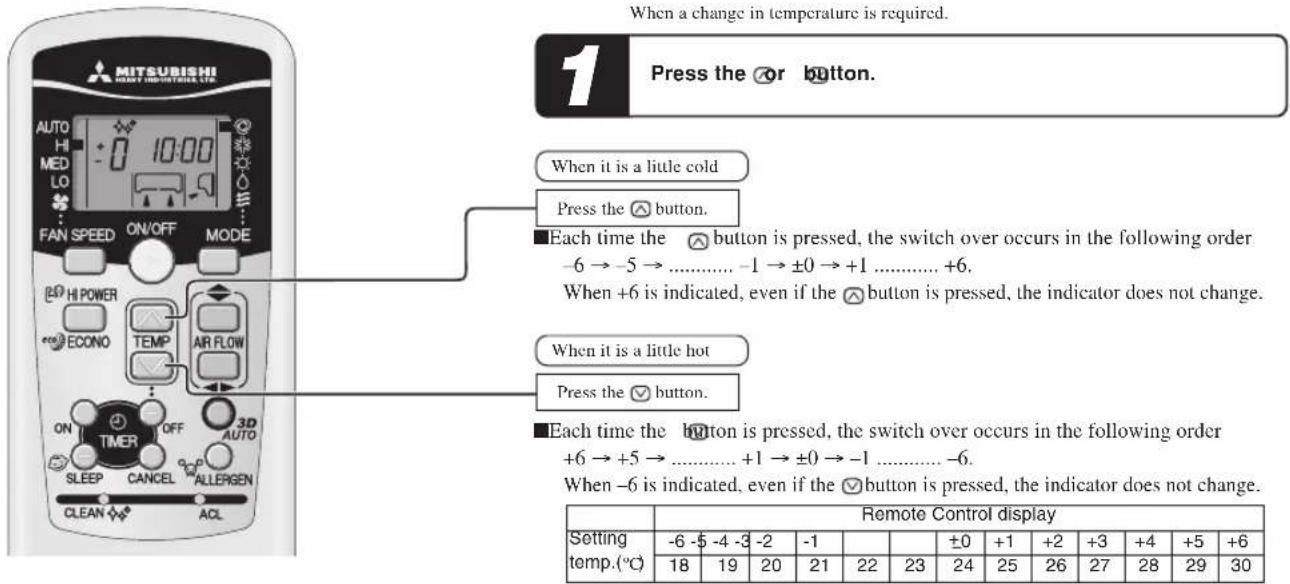
Temperature adjustment during AUTO
Air temperature adjustment is possible even during automatic operation. There are 6 levels of adjustment possible with the ⚙ button or the √ button. During automatic operation, 24°C is preset both for heating and cooling.
FAN SPEED
■You can choose the capacity of your air-conditioner when heating mode, cooling mode or fan mode.
| Operation capacity by your choice FAN SPEED | |
| Set automatically by microcomputer AUTO | |
| Powerful operation with high capacity III | |
| Standard operation MED | |
| Energy-saving operation I.O |
Press the FAN SPEED button.
Move the [■ mark] to the preferred fan speed position.
| AUTO HLMED LO | |

- When changing FAN SPEED from HI to LO, the sound of refrigerant flowing may be heard.
COOL/HEAT/DRY/FAN mode operation
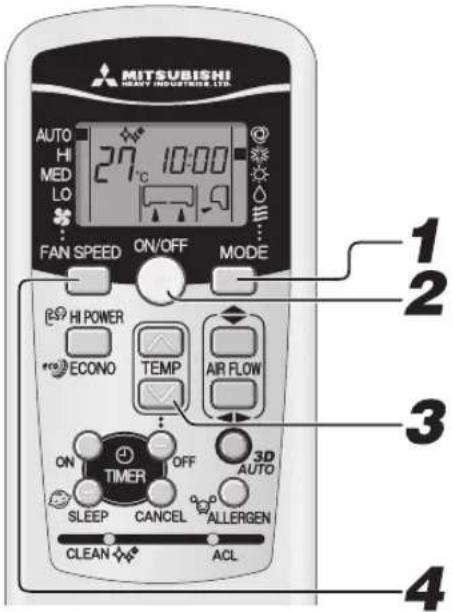
Point the remote control toward the air-conditioner, and
Airflow direction adjustment procedure.


Press the MODE select button.
Move the [■hark] to the required operation position.
*(Cool), (Heat), (Dry), (Fat)

Press the ON/OFF button.

Press the TEMP button.
Press ☑ button for the preferred temperature.
Standard
| COOL | 26°C~28°C | HEAT | 22°C~24°C | DRY | 24°C~26°C | FAN | — |

Press the FAN SPEED button
Set the fan speed as preferred.
NOTE
• In case air is not blown out, when starting the heating operation.
•The operation program can also be set or changed when the air-conditioner is not in operation.
To stop: Press the ON/OFF button.
Air-conditioner operable temperature setting
■ Use within the following operational range. Operating outside of this range may result in the protection devices being activated, preventing the unit from working.
| Cooling operation Heating operation | ||
| Outside temperature | Approximately -15 to 46 °C Approximately -15 to 21 °C | |
| Inside temperature | Approximately 18 to 32 °C Approximately 15 to 30 °C | |
| Inside humidity | Below approximately 80%The long-term use of the unit with a humidity level exceeding 80% may result in condensation forming on the surface of the indoor unit, leading to water drips. | — |
Characteristics of HEAT mode operation
Mechanism and capacity of HEAT mode operation
Mechanism
- The unit draws heat from the cold outside air, transfers it to indoors and heats the room. As a characteristic of heat pump system, the heating capacity reduces when the outside air temperature gets colder.
- It may take some time to supply hot air after turning on the air-conditioner.
- If the outside temperature becomes extremely low, it would be better to use an additional source of heating.
Defrosting
If the outside temperature becomes low and humidity is high, the heat exchanger in the outdoor unit may frost over, which prevents efficient heating. If this happens, the automatic defrost function is activated and during defrosting the heating operation stops for 5 to 15 minutes during defrosting.
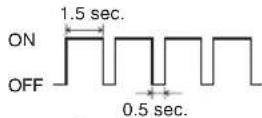
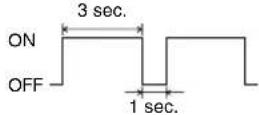
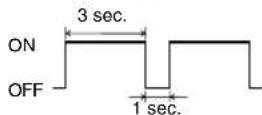
- Both indoor and outdoor fans stop and the RUN light blinks slowly (1.5 sec. ON, 0.5 sec. OFF) during defrosting.
- The outdoor unit may give off some steam during defrosting. This is to help the defrosting process and is not a defect.
•The HEAT operation resumes as soon as defrosting has been completed.
Airflow direction adjustment
Adjusting airflow direction


flowchart
graph TD
    A["Left/right direction can be adjusted with the AIRFLOW"] --> B["(LEFT/RIGHT) button on the remote control. Every time you press this button"]
    B --> C["Change on AIRFLOW (LEFT/RIGHT) mode."]
    C --> D["(Louver stopped)"]
    C --> E["(Swing)"]
    D --> F["Arrow to right"]
    E --> G["Arrow left"]
    F --> H["Arrow right"]
    G --> I["Arrow down"]
    H --> J["Arrow down"]
    I --> K["Arrow down"]
    J --> L["Arrow down"]
    K --> M["Arrow down"]
    L --> N["Arrow down"]
    M --> O["Arrow down"]
    N --> P["Arrow down"]
    O --> Q["Arrow down"]
    P --> R["Arrow down"]
- When operation starts, the flap and louver direction is fixed at the horizontal / center position in order to avoid cold draft, and return to the set the position that was set after the warm air supply is starting.
- The flap and louver direction will be controlled to the horizontal/center position when the room temperature reaches the set temperature and compressor stops or when defrosting is in operation.
- The airflow direction cannot be set during the period mentioned above. Change the airflow direction settings after the warm air is supplied and the flap/louver goes to the set position.
MEMORY FLAP (FLAP OR LOUVER STOPPED)
When you press the AIRFLOW (UP/DOWN or LEFT/RIGHT) button once while the flap or louver is operating, it stops swinging at the position. Since this angle is memorized in the microcomputer, the flap or louver will automatically be set at this angle when the next operation is started.
DANGER
- Do not expose directory to airflow from the air-conditioner for a long time.
CAUTION
- When in COOL or DRY operation, do not operate for a long period with the airflow blowing straight down. Otherwise, condensation may appear on the outlet grill and drip down.
- Do not try to adjust the flaps and louvers by hand, as the control angle may change or the flap or louver may not be closed completely.
•Recommended angle of the flap when stopping
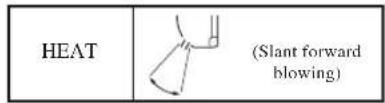
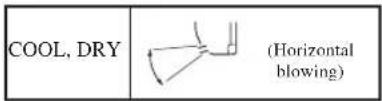
3D AUTO operation
■ Fan speed and air flow direction are automatically controlled, allowing the entire room to be efficiently conditioned.
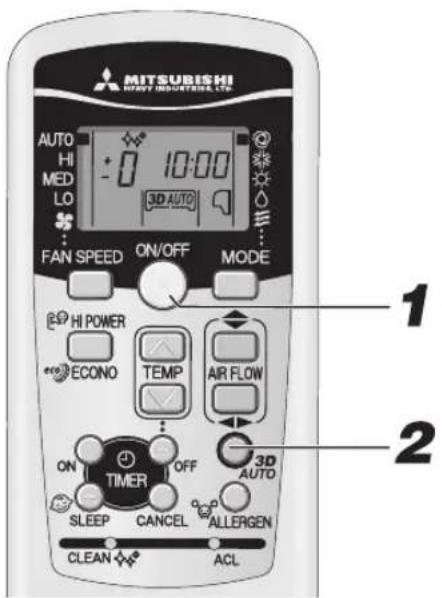
1 Press the ON/OFF button.
Releasing procedure
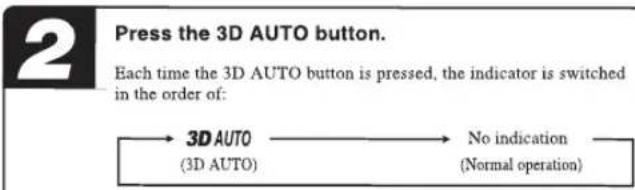
Press the 3D AUTO button to turn off the 3D AUTO indicator.
NOTE
• 3D AUTO operation is cancelled when you switch the operation program.
• The 3D AUTO light illuminates during 3D AUTO operation.
- If 3D AUTO operation is cancelled then the air flow direction changes to that used before 3D AUTO was set.
SLEEP TIMER operation
■The unit stops automatically after the set time lapses.
The set temperature is automatically adjusted according to the elapsed time in order to avoid too much cooling or heating.

Page 13
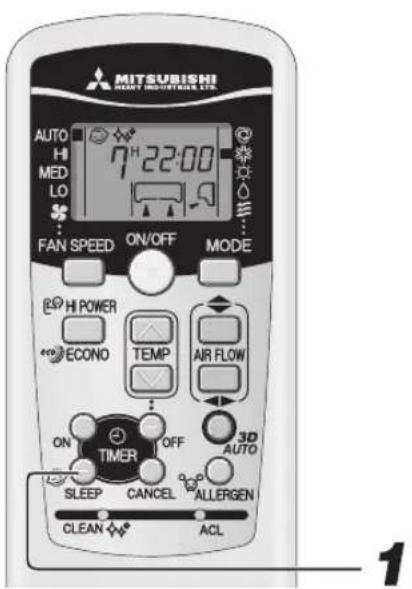
Changing of set time
Set a new time by pressing SLEEP button.
How to cancel
Press the CANCEL button to turn off the SLEEP indicator.

Press the SLEEP button.
■If it is pressed while the unit is off
SLEEP TIMER operation starts with the previous operation settings, and the air conditioning is turned off after the set time elapses.
■If it is pressed while the unit is running
The air conditioner is turned off after the set time elapses.
Every time the button is pressed, the display changes as follows:
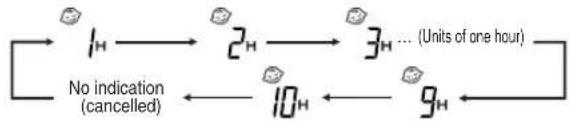
flowchart
graph LR
    A["1H"] --> B["2H"]
    B --> C["3H ... (Units of one hour)"]
    C --> D["9H"]
    D --> E["10H"]
    E --> F["No indication (cancelled)"]
Example: You prefer it to stop after 7 hours.
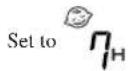
The timer light (yellow) is on.

•The unit stops after the set time lapses.
NOTE
- SLEEP operation will not function during ALLERGEN CLEAR operation.
- Cannot be set at the same time with OFF-TIMER.
OFF-TIMER operation
■ The unit stops automatically when the set time comes.
With the air conditioner turned off, start the operation from Step 1. With the air conditioner running, start from Step 2.
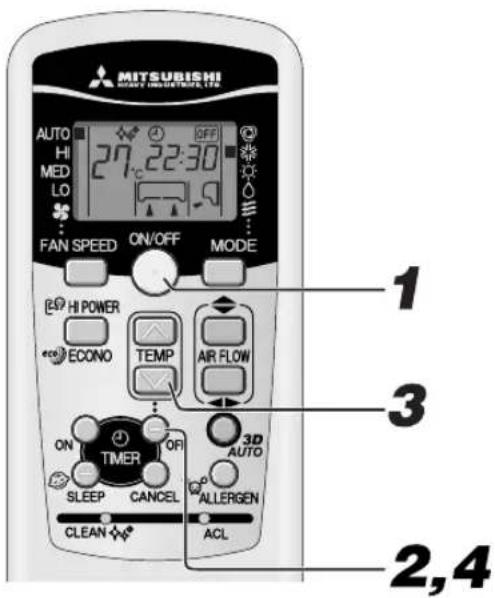
Example: You prefer it to stop 22:30.

Press the ON/OFF button.

Press the OFF TIMER button.
OFF TIMER display OF blinking.

Press the "or" button.
Every time the ⏻ button is pressed, the display is switched in the order of:

Every time the ⏻ button is pressed, the display is switched in the order of:

Sct at 22:30.

Press the OFF TIMER button.
The display changes from blinking to steady lighting and the setting is complete. The timer light (yellow) is on.
Changing of set time
Set a new time by using the OFF TIMER button.
How to cancel
Press the CANCEL button to turn off the timer display.
NOTE
• The unit stops at the end of the set period of time.
- Make sure to press the button within 60 seconds from the last operation in step 3, otherwise the setting is not completed.
- The current time is not displayed during OFF-TIMER operation.
• OFF-TIMER operation will not function during ALLERGEN CLEAR operation.
- Different from SLEEP TIMER operation, automatic set temperature adjustment is not done during OFF-TIMER operation.
ON-TIMER operation
Operation starts 5 to 60 minutes before the set time so that the room temperature reaches the optimum temperature at the set time. ON-TIMER operation can be set regardless of whether the air-conditioner is running or not.

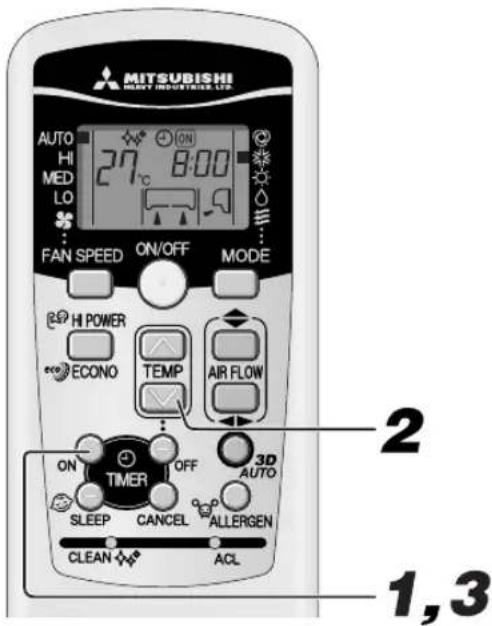
Example: In the case the preferred room temperature is required at 8:00.

Press the ON-TIMER button.
ON TIMER indicator ON blinking.

Press the “↗ or ⏻ button.
Every time the Ⓐ button is pressed, the display is switched in the order of:

Every time the button is pressed, the display is switched in the order of:

Set at 8:00.

Press the ON TIMER button.
The display changes from blinking to steady lighting and the setting is complete. The timer light (yellow) is on.
The operation stops if it is set during operation.
Changing of set time
Set a new time by using the ON-TIMER button.
How to cancel
Press the CANCEL button to turn off the timer indicator.
NOTE
• Operation starts 5 to 60 minutes before the set time.
• The timer light (yellow) goes out at the set time.
- Make sure to press the button within 60 seconds from the last operation in step 2, otherwise the setting is not completed.
• The current time is not displayed during ON-TIMER operation.
• ON-TIMER operation will not function during ALLERGEN CLEAR operation.
SLEEP TIMER + ON-TIMER operation
■Combined timer operation of SLEEP TIMER and ON TIMER.
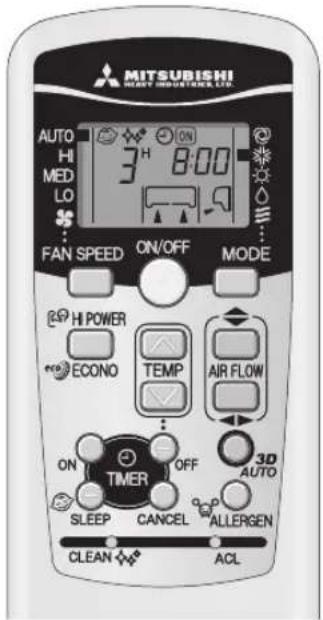
Example: When it is required to stop after 3 hours and then start operation at 8:00, near the set temperature.
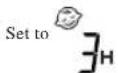
■SLEEP TIMER setting
Set by the procedures on page 11.
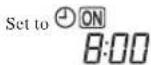
■ON TIMER operation setting
Set by the above procedure mentioned in ON TIMER.
The setting of the lighting of the timer light (yellow) of this unit is complete.

• After the SLEEP TIMER set time has elapsed, the operation stops, and it starts from 5 to 60 minutes before the ON TIMER's set time.
• The timer light is turned off when ON TIMER set time comes.
Changing of set time
Set a new time by using the SLEEP or ON TIMER button.
How to cancel
Press the CANCEL button to turn off the timer display.
PROGRAM TIMER operation
The timer operations of the combination of ON and OFF TIMER. Once this has been set the timer operations will be repeated at the same time every day unless the ON/OFF button is pressed.
Example: When it is preferred to stop at 22:30, and then start operation at 8:00, near the set temperature.
■OFF TIMER operation setting
Set by the procedures on page 11.
Set to

■ON TIMER operation setting
Set by the procedures on page 12.
Set to

Timer light (yellow) on the unit will light when the setting is completed.
The set time will be displayed on the remote control unit. The display will change depending on the operational status.
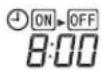
With ON TIMER, the air conditioner starts running. Then, with OFF TIMER, the air conditioner stops running.
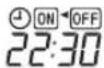
With OFF TIMER, the air conditioner stops running. Then, with ON TIMER, the air conditioner starts running.
Changing of set time
Set a new time by using the OFF TIMER or ON TIMER button.
How to cancel
Press the CANCEL button to turn off the timer display.
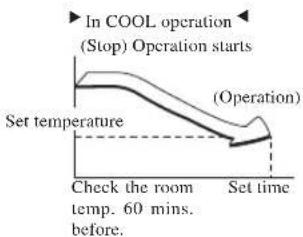
Comfort Start-up
In ON TIMER operation, the unit starts the operation a little earlier, so that the room can approach optimum temperature at ON time. This is so called "Comfort start-up".
- Mechanism
The room temperature is checked 60 minutes before the ON time. Depending on the temperature at that time, the operation starts 5 to 60 minutes before the timer is at ON.
•The function is available for both COOL and HEAT operation mode (including AUTO). It does not work for DRY mode.
SLEEP TIMER
When SLEEP TIMER is selected, the set temperature is automatically adjusted after a while, ensuring that the room is not too cold during cooling or too warm during heating.
- During cooling: the preset temperature is lowered by 1^ at the start of SLEEP operation (when the timer is set). After that, the temperature goes up by 1^ every an hour to become 1^ higher than the present temperature.
- During heating: Preset temperature is lowered by 1^ at the start of SLEEP operation (when the timer is set). After that the temperature to becomes 3^ lower in an hour and 6^ lower in two hours than the present temperature.
ALLERGEN CLEAR operation
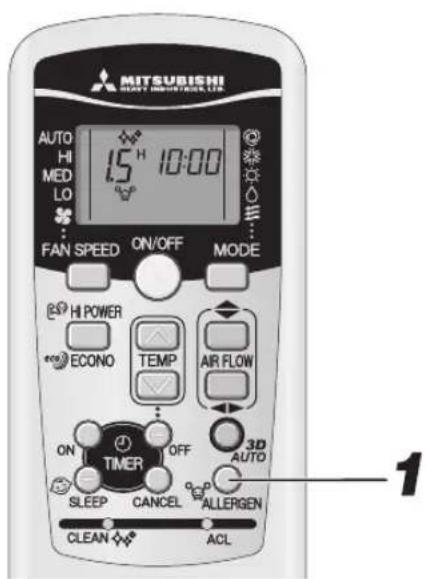
■ The power of enzymes is used to eliminate allergy-causing allergens that accumulate on the allergen clear filter.
Aim the remote control at the air-conditioner.
1
Press the ALLERGEN CLEAR button.
To stop:
Press the ON/OFF or ALLERGEN CLEAR button.

- Since the room temperature may change quite a bit, it is recommended that this be used when no one is in the room. (It completes automatically in approximately 90 min.)
- During ALLERGEN CLEAR operation temperature, fan speed, airflow direction and timer operations settings cannot be made.
HIGH POWER/ECONOMY operation
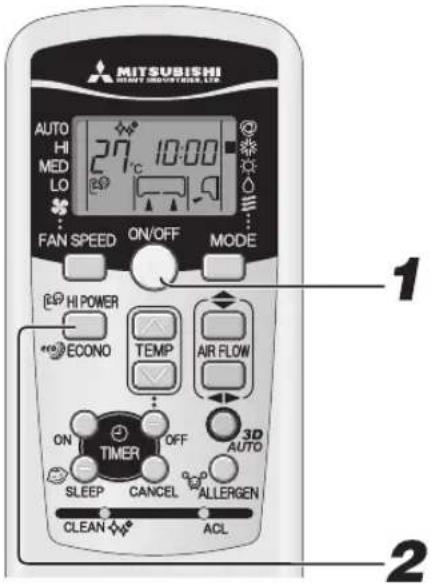
If the air-conditioner is not operating, point the remote control toward the air conditioner, and

Press the ON/OFF button.

Press the HI POWER/ECONO button.
- When the operating mode is AUTO, COOL or HEAT
Every time the HI POWER/ECONO button is pressed, the display is switched in the order of:

flowchart
graph LR
    A["(HIGH POWER)"] --> B["eco"]
    B --> C["No display"]
    D["(ECONOMY) (Normal operation)"] --> B
- When the operating mode is DRY or PROGRAM TIMER
Every time the III POWER/ECONO button is pressed, the display is switched in the order of:

flowchart
graph LR
    A["eco"] --> B["No display"]
    C["(ECONOMY) (Normal operation)"] --> A
. Concerning HIGH POWER operation
Pressing the HI POWER/ECONO button intensifies the operating power and initiates powerful cooling or heating operation for 15 minutes continuously. The remote control 📄️ displays and the FAN SPEED display disappears.
NOTE
- During the HIGH POWER operation, the room temperature is not controlled. When it causes an excessive cooling or heating, press the HI POWER/ECONO button again to cancel the HIGH POWER operation.
•HIGH POWER operation is not available during the DRY, the program timer and 3D AUTO operations. -
When HIGH POWER operation is set after ON TIMER operation, HIGH POWER operation will start from the set time.
-
When the following operations are set, HIGH POWER operation will be canceled.
①When the HI POWER/ECONO button is pressed again.
②When the operation mode is changed.
③When it has been 15 min. since HIGH POWER operation has started.
④When the 3D AUTO button is pressed. - Not operable while the air conditioner is OFF.
Concerning ECONOMY operation
Pressing the HI POWER/ECONO button initiates a soft operation with the power suppressed in order to avoid an excessive cooling or heating. The unit operates 1.5°C higher than the setting temperature during cooling or 2.5°C lower than that during heating. The remote control displays and the FAN SPEED display disappears.
NOTE
- It will go into ECONOMY operation at the next time the air-conditioner runs in the following case.
① When the air-conditioner is stopped by ON/OFF button during ECONOMY operation.
② When the air-conditioner is stopped in SLEEP or OFF TIMER operation during ECONOMY operation.
③When the operation is retrieved from CLEAN or ALLERGEN CLEAR operation.
- When the following operations are set, ECONOMY operation will be canceled.
①When the HI POWER/ECONO button is pressed again.
②When the operation mode is changed DRY to FAN.
•Not operable while the air conditioner is OFF.
SELF CLEAN operation
■ CLEAN operation should be run after AUTO, COOL and DRY operation to remove the moisture from inside the indoor unit and control the growth of mold and bacteria.

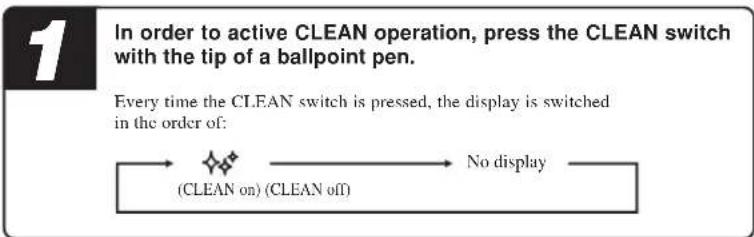
flowchart
graph LR
    A["(CLEAN on) (CLEAN off)"] --> B["No display"]
    B --> C["Every time the CLEAN switch is pressed, the display is switched in the order of:"]

- Two hours later, the air conditioner stops running automatically. To stop the air conditioner immediately, press the ON/OFF button.
- CLEAN operation is not operated after HEAT and FAN, OFF-TIMER, SLEEP and ALLERGEN CLEAR operations have finished.
•The indoor unit fan runs for about two hours in CLEAN operation.
•The RUN light illuminates during CLEAN operation.
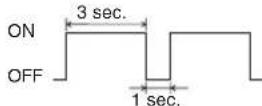
- Pressing the SLEEP button or ALLERGEN CLEAR button during CLEAN operation cancels the CLEAN operation and then the unit is set to SLEEP or ALLERGEN CLEAR operation.
- This is not a function for removing mold, germs or grime that have already adhered to the unit.
Auto restart function
■What is auto restart function?
- Auto restart function records the operational status of the air-conditioner immediately prior to be switched off by a power cut, and then automatically resumes operations after the power has been restored.
•The following settings will be cancelled:
①Timer settings
②HIGH POWER operations
NOTE
- Auto restart function is set at on when the air-conditioner is shipped from the factory. Consult with your dealer if this function needs to be switched off.
- When power failure occurs, the timer setting is cancelled. Once power is resumed, set the timer again.
Tips for effective operation
■Please observe the following for the most economic and comfortable use of your unit.
| Set a suitable room temperature.Excessively high or low temperatures are not good for your health and waste of electricity. | Clean the filters frequently.Clogged filters may block the airflow and cause less efficient operation. | Avoid direct sunlight and draught.Cut out direct sunlight by drawing the cur-tains or blinds when cooling. Keep windows and doors shut, except when ventilating. |
| Adjust the airflow direction properly.Adjust the up/down and left/right airflow to ensure a steady room temperature. | Operate the unit only when needed.Use the timer properly to operate the unit only when needed. | Keep heat source away when cooling.Keep heat sources out of the room as much as possible. |
Installation location setting
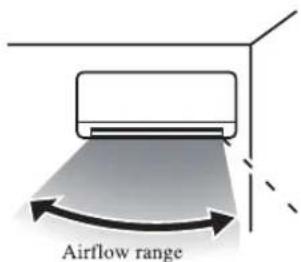
Take the air conditioning unit's location into account and adjust the left/right airflow range to maximize air-conditioning.
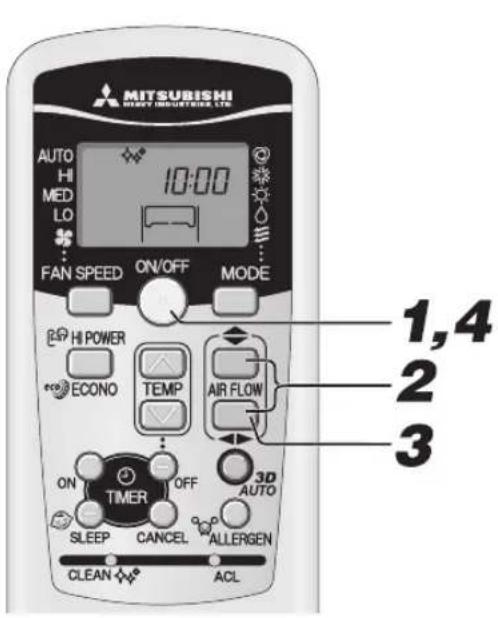
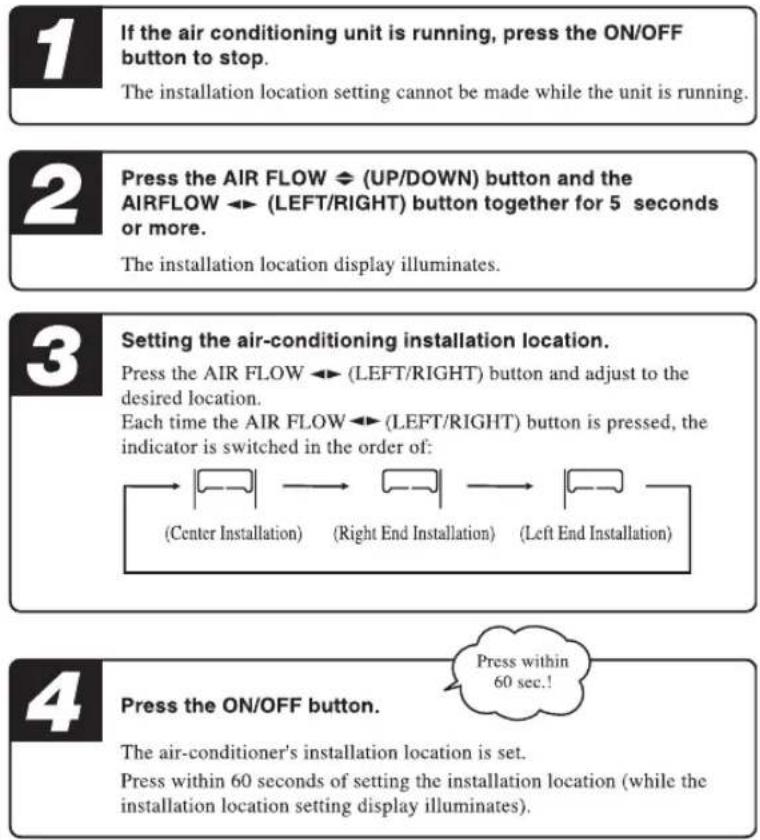
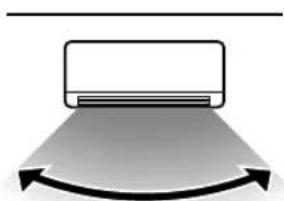
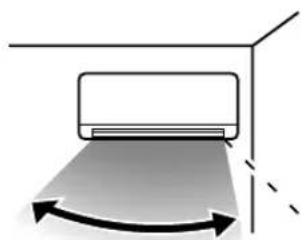
Air conditioner installation location and airflow range
The diagram below indicates the airflow ranges corresponding to the air-conditioner's installation location. Consider your room's layout and set the airflow range to maximize conditioning effectiveness.
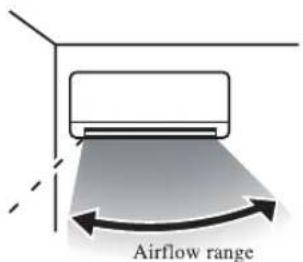
(Left End Installation)
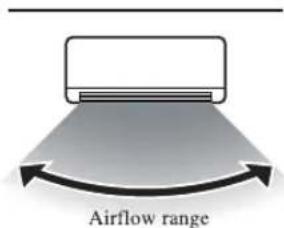
(Center Installation)
(Right End Installation)
Maintenance
Before maintenance
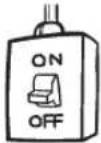
Turn off the power supply.
- Do not spill any liquid.
Wipe the unit with a soft, dry cloth.

- Do not touch the aluminum fins on the heat exchanger.
- Stand firmly on a stepladder or other stable object when removing the inlet panel and filter.
Do not use the following articles:
•Hot water (40°C or more)
It may deform or discolour the unit.
•Petrol, paint thinner, benzine or cleanser, etc. They may deform or scratch the unit.
How to open, close the air inlet panel
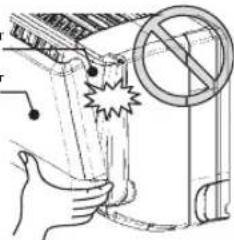
Open
Place fingers at the recesses on both sides of the panel and pull up the panel forward so that it will be open by about 60 degrees.
The inner air inlet panel
The outer air inlet panel
natural_image
Illustration of a hand holding a device with a prohibition symbol (no text or labels)Removal, installation of air inlet panel
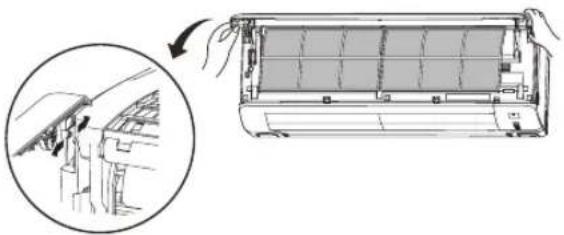
Removal
When removing the air inlet panel for internal cleaning or others, open the panel by 80 degrees and then pull it forward.
Installation
Secure the upper edge of the air inlet panel by lightly pushing it in, and then close the panel.
natural_image
Diagram showing a car air conditioner unit being lifted, with an inset close-up of the component (no text or symbols present)During the operational season
Cleaning the air filter Standard interval is once every two week
1 Remove the air filter
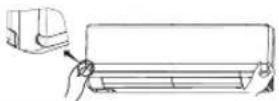
• Pull up the air inlet panel forward.
- Lightly hold the knobs at both sides and lift a little to remove the panel forward.
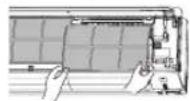
2 Cleaning If the filter is very dirty, clean it with warm water (approx. 30°C), and dry it thoroughly.
CAUTION
- Do not clean the filters with boiling water.
- Do not dry them over an open flame.
• Pull them out gently.
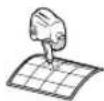
3 Reinstall the air filter
- Hold firmly the filter at both sides as shown at right and insert securely.
- Operating without putting back the air filters will make the unit dusty, and may cause damage.
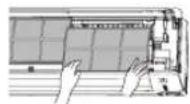
Cleaning the unit
- Wipe the unit with a soft, dry cloth, or use a vacuum cleaner.
- If the unit is very dirty, wipe it with a cloth soaked in warm water.
Cleaning the air inlet panel
- Removal, installation of air inlet panel.
• Wipe the panel with a soft, dry cloth.

CAUTION
- Do not wash the air inlet panel with water.
Close
Push both ends evenly and press further lightly at the center.
NOTE
The air inlet panel consists of two parts, the outer air inlet panel (which can always be seen) and the inner air inlet panel (which is usually hidden from view).
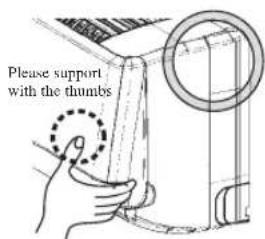
• To open and close the air inlet panel, please place your fingers in the grooves near the bottom on both sides of it and pull. At the same time, please also support the face of the outer air inlet panel with your thumbs. This will prevent the outer air inlet panel from suddenly opening, which can occur without support from the thumbs, as seen in the picture on the right. Proper finger placement can be seen in the picture on the left.
- The outer air inlet panel will automatically shut about 5 seconds after you shut the inner air inlet panel (if the unit is plugged in). Please do not shut forcibly. Doing so will likely damage the unit.
- Please do not wash the air inlet panel.
Removal, installation of air inlet top panel
Removal
Remove the air inlet panel. ① Hold the handle of the air inlet top panel and lift up until you hear a click and the tabs come out. ② Pull the panel towards you.
Installation
Align the air inlet top panel with the rail and slide the panel towards the back until in strikes the end. Push the panel in until you hear a click and the tabs lock into place.
(To install the air inlet top panel. Follow the opposite of the removal procedure.)
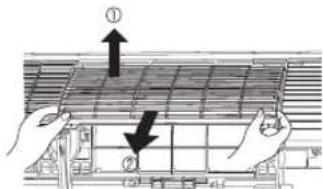
At the end of the season

Perform the fan operation for a half day.
Dry the inside of the unit.

Stop the unit and turn off the power supply.
The unit consumes appr. 2W even when the unit is not operating. Turning off the power supply will help saving energy consumption and cost.

Clean and reinstall the air filters.

Clean both the indoor and outdoor units.

Remove batteries from the remote control.
At the beginning of the season

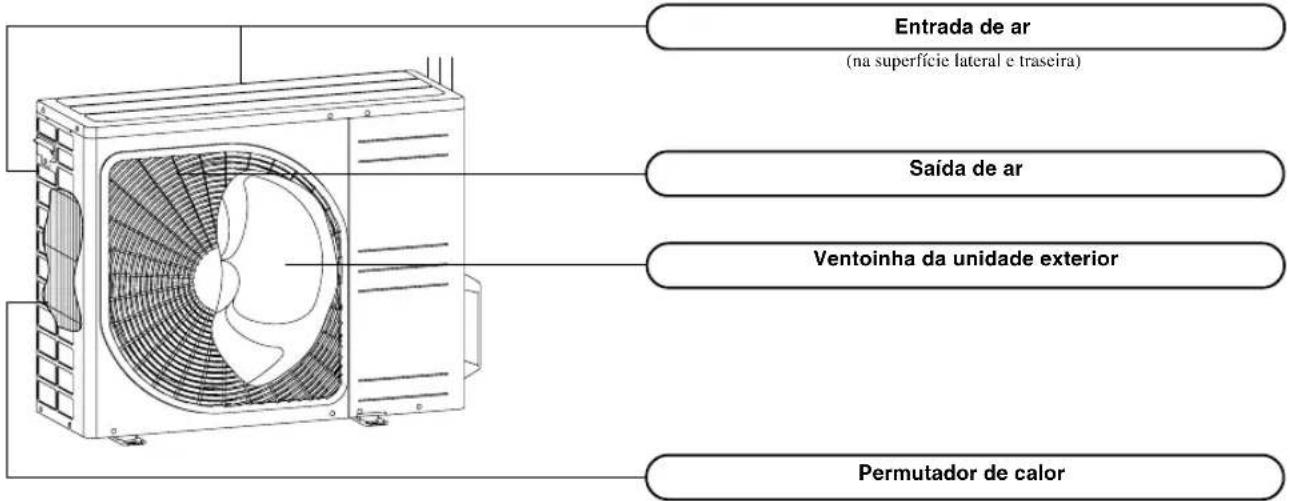
Make sure that there are no obstacles blocking the airflow around the air intake and outlet openings of the indoor and outdoor units.

Check if there is no corrosion or rust on the base frame of the outdoor unit.

Ensure that the earth wiring is not snapped nor disconnected.

Ensure that the air filters are clean.

Turn on the power supply.

Insert batteries in the remote control.
Installing, inspecting, and replacing the air-cleaning filter
- Open the air inlet panel and remove the air filters.

- Remove the filter holders, with the air-cleaning filter installed in the folders, from the air-conditioner.
- Remove the allergen clear filter (Light orange) from filter holder and inspect the filter. Use a vacuum cleaner to remove any dust or dirt from the allergen clear filter. Replace the allergen clear filter if it cannot be cleaned or if it has been for about 1 year. (The allergen clear filter should be replaced after about 1 year of use. However, the actual replacement period may vary depending on the conditions in which the filter is used.)
Remove the photocatalytic washable deodorizing filter (orange) from the filter holder and inspect the filter. Periodically, remove any dust or dirt from the photocatalytic washable deodorizing filter. If the photocatalytic washable deodorizing filter is particularly dirt, it may be washed with water. However, the filter is fragile so be sure to wash it installed in the filter holder to avoid damaging it. After washing the filter, place it in sunlight to dry. Placing the filter in sunlight revitalizes the deodorizing effect.
(Do not dispose of the filter holders. They are reusable.)
- Install the air-cleaning filter in the filter holders, and then install the filter holders in the air-conditioner.
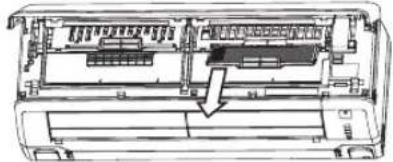
natural_image
Technical line drawing of a mechanical device interior with no visible text or symbols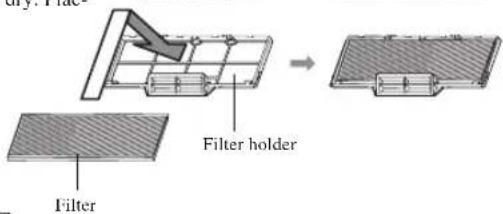
NOTE
- The allergen clear filter and the photocatalytic washable deodorizing filter may be installed on either the right or left side of the air-conditioner. - Install the allergen clear filter with the light orange side front.
- Install the air filters and closed the air inlet panel.

CAUTION
•The heat exchanger may injure your fingers.
For replacement the air-cleaning filter, contact your dealer.
| Item Feature Color | ||
| Allergen clear filter | The power of enzyme is used to eliminate allergy-causing allergens that accumulate on the filter. | Light orange |
| Photocatalytic washable deodorizing filter | Sources of odors on the filter are broken up, resulting in a deodorizing effect. | Orange |
Proper installation
Suitable installation position
- Do not put any obstruction in front of the indoor unit, preventing proper ventilation and functioning.
- Do not install the unit in any of the following places:
•Where there is a danger of leaking flammable gases.
•Where there is substantial splashing of oil. - Malfunctioning due to corrosion may occur if the unit is installed in a spa where sulfide gases are generated, or in a seaside resort exposed to sea breezes. Contact your dealer.
• The air-conditioner and remote control must be at least 1 metre away from a TV set or radio. - Drain the dehumidified liquid from the indoor unit into a spot that drains well.
Pay attention to operating noises!
- When you install the unit, take care to choose a place that can comfortably stand the weight of the unit and does not increase the operating noise or vibration. If vibration is transmitted through the house, fix the unit with the aid of vibration-proof pads between the unit and the fittings.
- Select a place where cold or hot air, operation noises from the indoor and outdoor units do not cause any inconvenience to your neighbours.
- Do not leave any obstacles near the outlet and inlet of the outdoor unit. This may cause malfunctioning and increased operating noise.
- If you hear an irregular noise during operation, contact your dealer.
Inspection and maintenance
Depending on operating environment, the inside of the air-conditioner may become dirty after a few year operations. This will reduce performance. In addition to normal cleaning, we would recommend inspection and maintenance. (This may lead the air-conditioner to having a longer life without any trouble.)
- Contact your dealer, or any distributor, for inspection and maintenance. (There will be a charge for this service).
• We would recommend inspection and maintenance to be carried out during the off-season.
- If the supply cord of this appliance is damaged, it must only be replaced by a repair shop appointed by the manufacturer, because special purpose tools are required.
- Contact your dealer, or any distributor, for inspection and maintenance. (There will be a charge for this service). - We would recommend inspection and maintenance to be carried out during the off-season. - If the supply cord of this appliance is damaged, it must only be replaced by a repair shop appointed by the manufacturer, because special purpose tools are required.
Troubleshooting
Please carry out the following checks before making a service call.
The air-conditioner does not work at all.
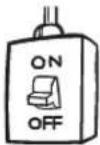
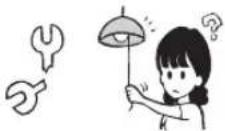
| Has the power switch been turned off? | Has the timer been set in the “ON” position? | Is there a power failure or a blown fuse? |
 |  |  |
If the air-conditioner does not operate properly after you have checked the left points, or if any doubt still exists after you have consulted page 20, or if things happen as shown on page 21, switch off the power and contact your dealer.
Poor cooling or heating
Have you set the thermostat at a suitable temperature?suitable temperatu: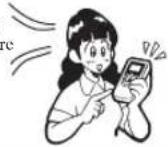 | Is the air filter clean? (Not clogged?)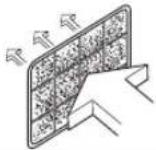 | Did you leave any doors or windows open?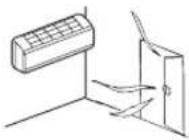 |
Poor cooling
Is there any direct sunlight entering the room?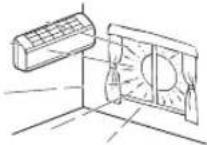 | Is there a heat source in the room?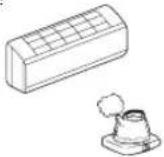 | Are there too many people in the room?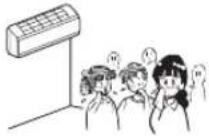 |
An alternative refrigerant (R410A) is used in this air-conditioner. When asking your dealer for service or inspection and maintenance, explain the dealer about it.
Notice
The unit does not restart immediately after you have stopped it.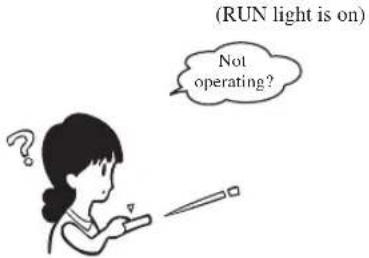 | Restart is blocked for 3 minutes after you have stopped the operation to protect the unit.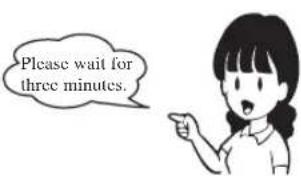 The three-minute protection timer in the microcomputer automatically starts it up again. The three-minute protection timer in the microcomputer automatically starts it up again. |
| Airflow is not blown out when starting the HEATING operation.RUN light blinks slowly (1.5 sec ON, 0.5 sec OFF) | Airflow has stopped to prevent blowing out of cold air until the indoor heat exchanger has warmed up. (2 to 5 min.) (HOT KEEP program) |
| Airflow is not blown out for 5 to 10 min. or blown out not warm wind for a moment at HEATING operation.RUN light blinks slowly (1.5 sec ON, 0.5 sec OFF) | When outdoor temperature is low and humidity is high, the unit sometimes performs defrosting automatically. Please wait. During defrost-ing, water or steam may escape from the outdoor unit. |
| Airflow is not blown out when starting the DRY operation.(RUN light is on) | The indoor fan may stop to prevent re-evaporation of dehumified moisture and to save energy. |
| Some steam escapes during COOL operation. | This may occur if the room's temperature and humidity are very high. It disappears as soon as the temperature and humidity decrease. |
| There is a slight smell. | Air blown out during operation may smell. This is caused by tobacco or cosmetics adhering to the unit. |
You hear a slight gurgling sound. | This is caused by refrigerating liquid moving within the unit. |
| You hear a slight cracking sound. | This is caused by heat expansion or contraction. |
| You hear a hissing or clicking sound. | This is caused by the operation of the refrigerant control valves or electric components. |
| After a power cut, the unit does not restart even if power has been restored. | If the auto restart function is not set, the unit will not restart automatically. Use the remote control to start the operation again. |
| Remote control signals are not received. | Remote control signals may not be received if the signal receiver on the air-conditioner is exposed to direct sunlight or other bright light. If so, cut out the sunlight or reduce the other light. |
| Moisture may form on the air outlet grills. | If the unit is operated for a long time in high humidity, moisture may form on the air outlet grills and start dripping. |
| Whistling noise is heard from the outdoor unit. | The noise means that the revolution speed of the compressor is increasing or decreasing. |
| Fan won't stop immediately after unit operation was stopped. | Indoor fan: Fan will not stop after 2 hours if set to CLEAN operation. Outdoor fan: Fan will not stop about a 1 minute period in order to protect the unit. |
| RUN light stays on even though operation was stopped. | The RUN light illuminates during CLEAN operation. Run light turns off when CLEAN operation ends. |
| Sometimes a “Shooooo” sound might come for a short time from the unit that is turned off. | This is the sound when operation of another indoor unit is stopped. |
Contact your dealer
■ Turn off the power switch immediately and inform your dealer in any of the following situations:
The fuse or switch blows continuously.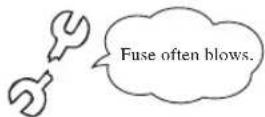 | The cable becomes extremely hot.The covering of the cable is cracked.△CAUTIONIf the power cord becomes damaged, ask your dealer or a qualified engineer to install the replacement to avoid accidents. | |
The TV, radio or other equipment starts to malfunction.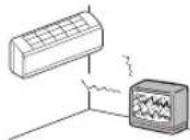 | A switch does not activate properly. You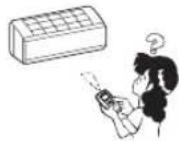 | hear a strange noise during operation.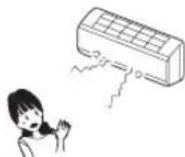 |
| When abnormalities occur, turn off the power supply immediately and turn it on after 3 minutes. Restart the operation with ON/OFF button of the remote control and the abnormalities still continue. | The RUN and TIMER lights on the unit display section blink quickly (0.5 sec. ON; 0.5 sec. OFF) and do not work. | |
About the Multiple Air-conditioner
Simultaneous Operation
- The air-conditioners cannot be in different operating modes at the same time, such as one unit being in the "Cool" mode and one unit being in the "Heat" mode.
- When conducting different operations, the air-conditioner that was operated first will be given priority, so the air-conditioner that is operated after that will conduct air blowing operation.
- When you want to give priority to the air-conditioner that was started later, either stop the air-conditioner that has priority or cause the operation type of the unit operated first to match that of the unit operated second.
Automatic Operation
- When the remote control operation switch is in the "Auto" mode the air-conditioner automatically selects either "Cool," "Dry," or "Heat" when operation is started depending on the room temperature.
- During simultaneous operation of air-conditioner units, operation modes may be automatically changed in response to the temperatures of the individual rooms; this will result in the operation of the outdoor unit being stopped. In such a case, COOL or HEAT mode should be used instead of AUTO. (This is only relevant when more than one air-conditioner unit is being used.)
Refrigerant (oil) recovery operation
- If the all of the indoor units are not operated at the same time for an extended period, the cooling or heating performance may temporarily decrease. This is in order to control the recovery of the refrigerant (oil) in the stopped indoor unit(s). At this time, the sound of refrigerant flowing may be heard from the stopped indoor unit(s).
Self diagnosis function
We are constantly trying to do better service to our customers by installing such judges that show abnormality of each function as follows:
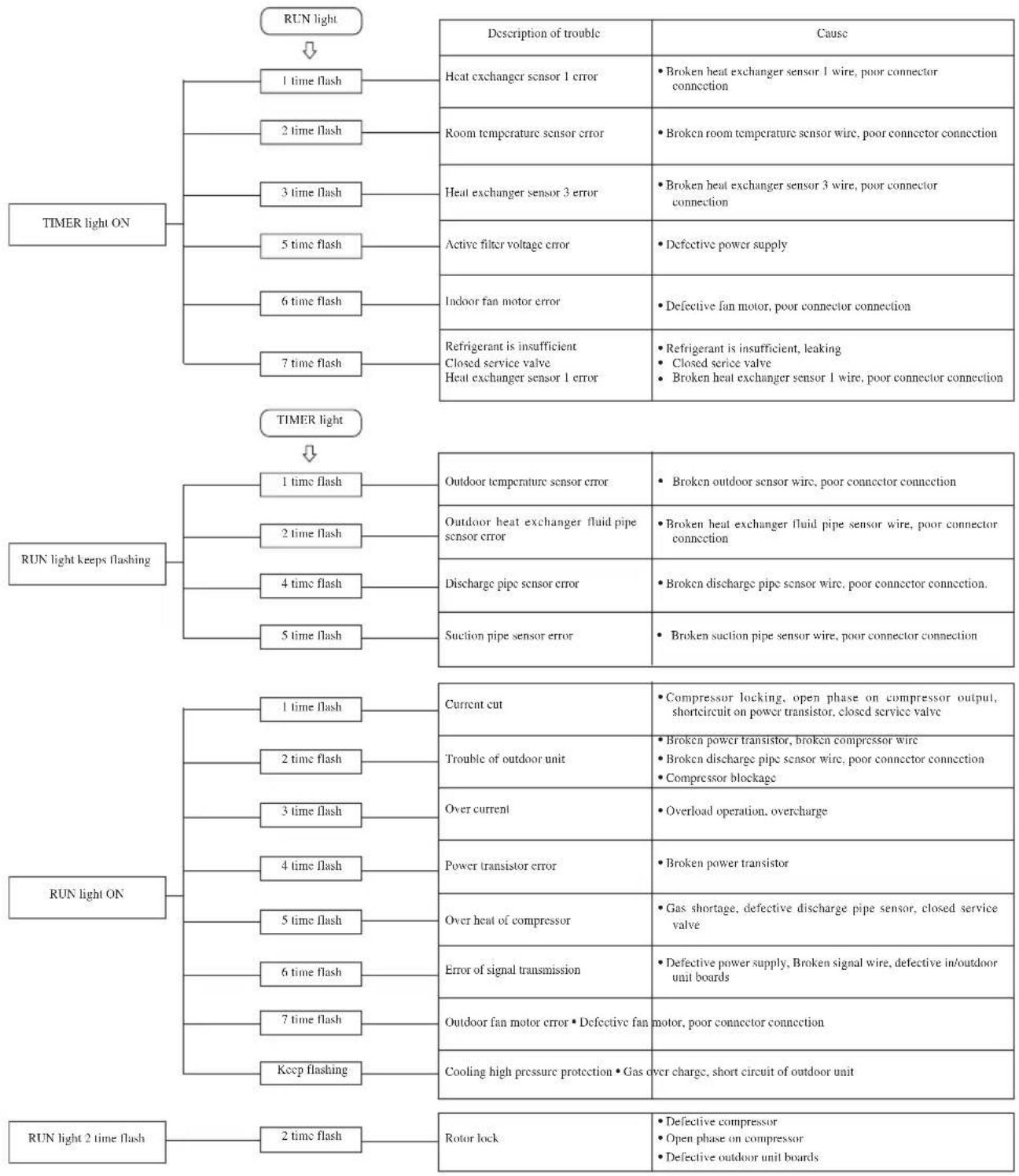
flowchart
graph TD
    A["TIMER light ON"] --> B["1 time flash"]
    A --> C["2 time flash"]
    A --> D["3 time flash"]
    A --> E["5 time flash"]
    A --> F["6 time flash"]
    A --> G["7 time flash"]
    H["TIMER light keeps flashing"] --> I["1 time flash"]
    H --> J["2 time flash"]
    H --> K["4 time flash"]
    H --> L["5 time flash"]
    M["RUN light ON"] --> N["1 time flash"]
    M --> O["2 time flash"]
    M --> P["3 time flash"]
    M --> Q["4 time flash"]
    M --> R["5 time flash"]
    M --> S["6 time flash"]
    M --> T["7 time flash"]
    M --> U["Keep flashing"]
    V["TIMER light 2 time flash"] --> W["2 time flash"]
    X["Description of trouble"] --> Y["Cause"]
    Z["Heat exchanger sensor 1 error"] --> AA["• Broken heat exchanger sensor 1 wire, poor connector connection"]
    AB["Room temperature sensor error"] --> AC["• Broken room temperature sensor wire, poor connector connection"]
    AD["Heat exchanger sensor 3 error"] --> AE["• Broken heat exchanger sensor 3 wire, poor connector connection"]
    AF["Active filter voltage error"] --> AG["• Defective power supply"]
    AH["Indoor fan motor error"] --> AI["• Defective fan motor, poor connector connection"]
    AJ["Refrigerant is insufficient Closed service valve Heat exchanger sensor 1 error"] --> AK["• Refrigerant is insufficient, leaking Closed serice valve Broken heat exchanger sensor 1 wire, poor connector connection"]
    AL["Outdoor temperature sensor error"] --> AM["• Broken outdoor sensor wire, poor connector connection"]
    AN["Outdoor heat exchanger fluid pipe sensor error"] --> AO["• Broken heat exchanger fluid pipe sensor wire, poor connector connection"]
    AP["Discharge pipe sensor error"] --> AQ["• Broken discharge pipe sensor wire, poor connector connection."]
    AR["Suction pipe sensor error"] --> AS["• Broken suction pipe sensor wire, poor connector connection"]
    AT["Current cut"] --> AU["• Compressor locking, open phase on compressor output, shortcircuit on power transistor, closed service valve"]
    AV["Trouble of outdoor unit"] --> AW["• Broken power transistor, broken compressor wire Broken discharge pipe sensor wire, poor connector connection Compressor blockage"]
    AX["Over current"] --> AY["• Overload operation, overcharge"]
    AZ["Power transistor error"] --> BA["• Broken power transistor"]
    BB["Over heat of compressor"] --> BC["• Gas shortage, defective discharge pipe sensor, closed service valve"]
    BD["Error of signal transmission"] --> BE["• Defective power supply, Broken signal wire, defective in/outdoor unit boards"]
    BF["Outdoor fan motor error • Defective fan motor, poor connector connection"] --> BG["Cooling high pressure protection • Gas over charge, short circuit of outdoor unit"]
    BH["Rotor lock"] --> BI["• Defective compressor Open phase on compressor Defective outdoor unit boards"]
natural_image
Technical line drawing of a car air conditioner unit with internal compartments (no text or symbols)
Pile
(R03 (AAA, Micro) ×2)
natural_image
Technical line drawing of a rectangular air conditioner unit with heat sinks and ventilation grilles (no text or symbols)NOTA
natural_image
Line drawing of a wall-mounted air conditioner unit (no text or symbols)Bouton AIR FLOW (UP/DOWN)
Bouton ALLERGEN CLEAR
MEMORY FLAP (FLAP OR LOUVER STOPPED)
natural_image
Pure diagram of a printer or printer with an arrow indicating compression or spread (no text or symbols)natural_image
Pure diagram of a printer with an arrow indicating compression or spread (no text or symbols)natural_image
Pure diagram of a printer or printer with an arrow indicating motion, no text or symbols presentnatural_image
Diagram showing a car air conditioner unit being lifted, with an inset close-up of the component (no text or symbols present)Pour le fermer
natural_image
Technical line drawing of a mechanical device interior showing internal components and a highlighted section (no text or symbols)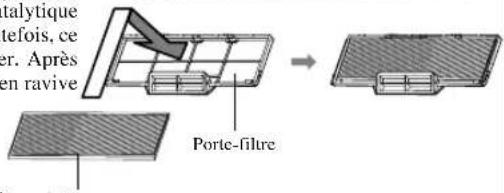

Seite 59
Allergenfilter (Hellorange)
natural_image
Technical line drawing of a rectangular air conditioner unit with grid pattern and airflow direction arrow (no text or symbols)ANMERKUNG
natural_image
Line drawing of a wall-mounted air conditioner unit (no text or symbols)AIR FLOW (UP/DOWN)-Taste
*(Cool), (Heat), (Dry), (Fa)

natural_image
Diagram of a printer or printer with a paper roll and arrow indicating motion (no text or symbols)Luftstrombereich
(Installation an linker Seite)
natural_image
Pure diagram of a printer or printer with no text, numbers, or symbolsLuftstrombereich
(Mitteninstallation)
natural_image
Diagram of a printer or printer with an arrow indicating compression or spread (no text or symbols present)Luftstrombereich
Bei Ende der Saison
natural_image
Technical line drawing of a mechanical device interior showing internal components and a downward arrow indicating a feature (no text or symbols present)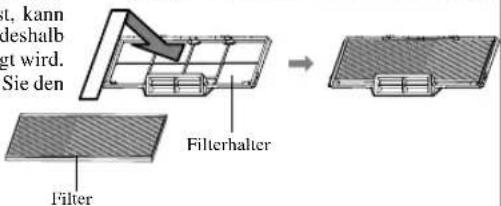
Angemessene Installation
natural_image
Technical line drawing of a car air conditioner unit with grid cover (no text or symbols)natural_image
Technical line drawing of a rectangular air conditioner unit with heat sinks and ventilation grilles (no text or symbols)NOTA
flowchart
graph TD
    A["Device with battery"] --> B["Switch"]
    B --> C["Cell with battery casing"]
    C --> D["Arrow pointing inward"]
    D --> E["Arrow pointing inward"]
    E --> F["Arrow pointing inward"]

natural_image
Line drawing of a wall-mounted air conditioner unit (no text or symbols)*(Cool), (Heat), (Dry), (Fain)

natural_image
Diagram of a printer with a paper roll and arrow indicating compression (no text or symbols)natural_image
Pure diagram of a printer with an arrow indicating compression or spread (no text or symbols)natural_image
Pure diagram of a printer or printer with an arrow indicating motion, no text or symbols presentnatural_image
Diagram showing a hand installing or adjusting the internal panel of an air conditioner unit, with a magnified inset illustrating the process (no text or symbols present)Per richiudere
natural_image
Cross-sectional diagram of a computer chassis showing internal components and a highlighted area (no text or labels)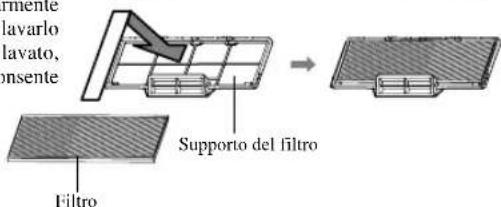
NOTA
natural_image
Technical line drawing of a car air conditioner unit with internal compartments (no text or symbols)natural_image
Technical line drawing of a rectangular air conditioner unit with heat sinks and cooling fins (no text or symbols)NOTA
natural_image
Technical line drawing of a rectangular air conditioner unit with internal components (no text or symbols)*(Cool), (Heat), (Dry), (Fat)

natural_image
Pure diagram of a printer or printer with an arrow indicating compression or spread (no text or symbols)natural_image
Pure diagram of a printer with a curved arrow indicating compression or spread (no text or symbols)natural_image
Diagram of a printer with an arrow indicating motion or flow, no text or symbols presentnatural_image
Diagram showing a hand installing or adjusting the internal structure of an air conditioner unit, with a magnified inset illustrating the detail (no text or symbols present)natural_image
Technical line drawing of a computer chassis showing internal components and a highlighted area (no text or symbols)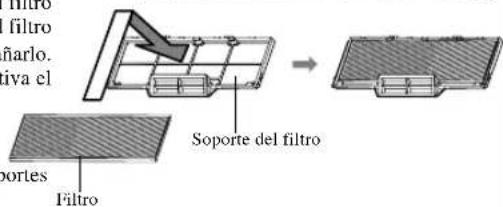
NOTA
natural_image
Technical line drawing of a car air conditioner unit with internal grid structure (no text or symbols)CLEAN werking

Pagina 125
TIMER lampje (geel)
natural_image
Technical line drawing of a rectangular air conditioner unit with grid pattern and airflow direction indicator (no text or symbols)OPMERKING
natural_image
Line drawing of a wall-mounted air conditioner unit with mounting bracket (no text or symbols)(Cool), (Heat), (Dry), (Fat)

MEMORY FLAP (FLAP OF LAMEL GESTOPT)
natural_image
Pure diagram of a printer or printer with an arrow indicating motion, no text or symbols presentnatural_image
Pure diagram of a printer with an arrow indicating compression or spread (no text or symbols)natural_image
Diagram of a printer or printer with an arrow indicating compression or spread (no text or symbols present)Luchtstroom-bereik
(Rechterkant-installatie)
Onderhoud
Voor onderhoud
•Heet water (40°C of meer)
natural_image
Diagram showing a car air conditioner unit being installed, with a magnified inset illustrating the process (no text or symbols present)Sluiten
natural_image
Technical line drawing of a mechanical air conditioner unit with internal grid structure (no text or symbols)UNIDADE EXTERIOR
(R03(AAA, Micro) ×2)

natural_image
Technical line drawing of a rectangular air conditioner unit with heat sinks and cooling fins (no text or symbols)NOTA
natural_image
Line drawing of a wall-mounted air conditioner unit (no text or symbols)flowchart
graph LR
    A["AUTOHIMEDLO"] --> B["NOTA"]
*(Cool), (Heat), (Dry), (Fat)

natural_image
Pure diagram of a printer or printer with an arrow indicating motion, no text or symbols presentnatural_image
Simple line drawing of a printer with an open lid and curved arrow indicating compression (no text or symbols)natural_image
Diagram of a printer with a paper roll and arrow indicating motion (no text or symbols)natural_image
Illustration of a hand holding a device with a prohibition symbol (no text or labels)natural_image
Diagram showing a car air conditioner unit being lifted, with an inset close-up of the component (no text or symbols present)Fechar
natural_image
Technical line drawing of a mechanical device interior showing internal components and a highlighted section (no text or symbols)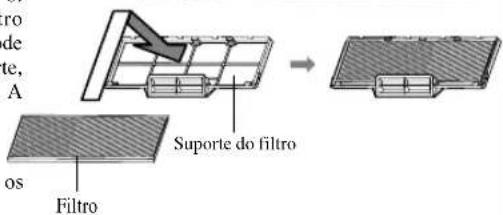
NOTA
natural_image
Technical line drawing of a car air conditioner unit with internal compartments (no text or symbols)

169
natural_image
Technical line drawing of a rectangular air conditioner unit with heat sinks and cooling fins (no text or symbols)ΣΗΜΕΙΩΣΗ
natural_image
Line drawing of a wall-mounted air conditioner unit (no text or symbols)natural_image
Diagram of a printer or printer with an arrow indicating compression or spread (no text or symbols present)natural_image
Pure diagram of a printer with an arrow indicating compression or spread (no text or symbols)natural_image
Diagram of a printer with a curved arrow indicating motion or orientation (no text or symbols)natural_image
Diagram showing airflow or ventilation from a wall-mounted air conditioner unit, with a magnified inset illustrating the process (no text or symbols present)Στο τέλος εποχής
natural_image
Technical line drawing of a mechanical device interior (no text or symbols)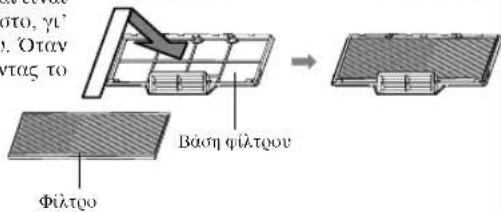
natural_image
Technical line drawing of a car air conditioner unit with internal compartments (no text or symbols)natural_image
Technical line drawing of a rectangular air conditioner unit with heat sinks and ventilation grilles (no text or symbols)ПРИМЕЧАНИЕ
natural_image
Line drawing of a rectangular air conditioner unit with a handle and base (no text or symbols)natural_image
Diagram of a printer or printer with an arrow indicating compression or spread (no text or symbols present)natural_image
Pure diagram of a printer with curved arrow indicating motion (no text or symbols)natural_image
Diagram showing a printer with an arrow indicating motion or flow, no text or symbols presentnatural_image
Diagram showing airflow or ventilation system inside a car air conditioner unit, with a magnified inset illustrating the process (no text or symbols present)Закрывание
natural_image
Technical line drawing of a mechanical device interior showing internal components and a directional arrow (no text or symbols)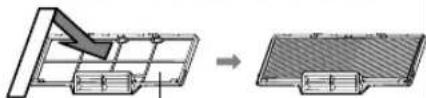
natural_image
Diagram showing a mechanical assembly with a downward arrow and a separate view of a rectangular component (no text or symbols)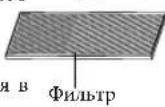
Фильтродержатель
ПРИМЕЧАНИЕ
natural_image
Technical line drawing of a rectangular electronic device with grid-like internal structure and an arrow indicating rotation (no text or symbols)NOT
flowchart
graph TD
    A["Battery"] --> B["Process Step"]
    B --> C["Circuit Board"]
    C --> D["Output"]

natural_image
Line drawing of a wall-mounted air conditioner unit (no text or symbols)*(Cool), (Heat), (Dry), (Fat)

natural_image
Illustration of a hand holding a device with a prohibition symbol (no text or labels)natural_image
Diagram showing a car air conditioner unit being cleaned with a tool, with an inset close-up of the component (no text or symbols present)Kapama
natural_image
Cross-sectional diagram of a computer chassis showing internal components (no text or labels)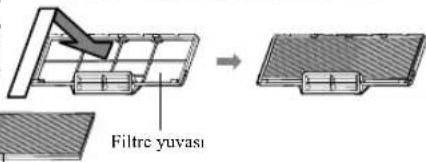
16-5, 2-Chome, Kounan, Minato-ku, Tokyo, 108-8215, Japan
Fax: (03) 6716-5926
3rd Floor Thavies Inn House 3-4 Holborn Circus London EC1N 2HA, ENGLAND
Phone: 44(0)20 7842 8171
Fax: 44(0)20 7842 8104
- MANUEL DE L'UTILISATEUR
- ANWENDERHANDBUCH
- ISTRUZIONI PER L'USO
- contents
- Safety precautions
- INSTALLATION PRECAUTIONS
- ■ OPERATION PRECAUTIONS
- ■ PRECAUTIONS FOR RELOCATION OR REPAIRS
- Name of each part and its function
- INDOOR UNIT
- OUTDOOR UNIT
- Unit display section
- Unit ON/OFF button
- Remote control signal receiver
- RUN (HOT KEEP) light (green/blue)
- 3D AUTO light (green)
- HI POWER light (green)
- TIMER light (yellow)
- Accessories
- CAUTION
- - Do not touch the air inlet panel while it is operating.
- NOTE
- •Buzzer sound for remote control
- Air flow setting
- Preset temperature
- Remote control handling
- Replacing the batteries
- Using the remote control holder
- Warning note for remote control handling
- Operation failure with the remote control
- Temporary run operation
- Operation program
- Operation and display section for remote control
- Current time setting
- Press the ACL switch.
- Press the "or" button.
- Press the ON/OFF button.
- AUTO mode operation
- Temperature adjustment during AUTO
- FAN SPEED
- COOL/HEAT/DRY/FAN mode operation
- Air-conditioner operable temperature setting
- Characteristics of HEAT mode operation
- Mechanism and capacity of HEAT mode operation
- Mechanism
- Defrosting
- Airflow direction adjustment
- Adjusting airflow direction
- MEMORY FLAP (FLAP OR LOUVER STOPPED)
- DANGER
- 3D AUTO operation
- Press the ON/OFF button.
- Releasing procedure
- SLEEP TIMER operation
- Press the SLEEP button.
- ■If it is pressed while the unit is off
- ■If it is pressed while the unit is running
- OFF-TIMER operation
- Press the OFF TIMER button.
- Changing of set time
- How to cancel
- ON-TIMER operation
- SLEEP TIMER + ON-TIMER operation
- ■SLEEP TIMER setting
- ■ON TIMER operation setting
- PROGRAM TIMER operation
- ■OFF TIMER operation setting
- Comfort Start-up
- SLEEP TIMER
- ALLERGEN CLEAR operation
- 1
- Press the ALLERGEN CLEAR button.
- HIGH POWER/ECONOMY operation
- Concerning HIGH POWER operation
- Concerning ECONOMY operation
- SELF CLEAN operation
- Auto restart function
- ■What is auto restart function?
- Tips for effective operation
- Installation location setting
- Air conditioner installation location and airflow range
- Maintenance
- Before maintenance
- Do not use the following articles:
- How to open, close the air inlet panel
- Open
- Removal, installation of air inlet panel
- Removal
- Installation
- During the operational season
- Cleaning the air filter Standard interval is once every two week
- Reinstall the air filter
- Cleaning the unit
- Cleaning the air inlet panel
- Close
- Removal, installation of air inlet top panel
- At the end of the season
- At the beginning of the season
- Installing, inspecting, and replacing the air-cleaning filter
- Proper installation
- Suitable installation position
- Pay attention to operating noises!
- Inspection and maintenance
- Troubleshooting
- Notice
- Contact your dealer
- About the Multiple Air-conditioner
- Simultaneous Operation
- Automatic Operation
- Refrigerant (oil) recovery operation
- Self diagnosis function
- NOTA
- Bouton AIR FLOW (UP/DOWN)
- Bouton ALLERGEN CLEAR
- Pour le fermer
- ANMERKUNG
- AIR FLOW (UP/DOWN)-Taste
- Bei Ende der Saison
- Angemessene Installation
- Per richiudere
- TIMER lampje (geel)
- OPMERKING
- MEMORY FLAP (FLAP OF LAMEL GESTOPT)
- Onderhoud
- Voor onderhoud
- Sluiten
- UNIDADE EXTERIOR
- Fechar
- ΣΗΜΕΙΩΣΗ
- Στο τέλος εποχής
- ПРИМЕЧАНИЕ
- Закрывание
- NOT
Brand : MITSUBISHI
Model : SRK35ZJXS
Category : Air Conditioning