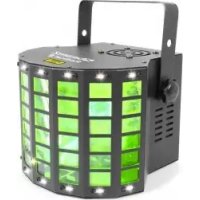
USER MANUAL Radical 2 BeamZ
SAFETY INSTRUCTIONS....3
LASER SAFETY 4
INSTALLATION 5
UNPACKING INSTRUCTION 5
POWERSUPPLY 5
LASER LIFETIME 6
DMX512 CONTROL 6
REMOTE CONTROLLER....6
CLEANING....7
REPLACING THE FUSE 7
NEDERLANDS
VEILIGHEIDSINSTRUCTIES 8
LASER VEILIGHEID....9
INSTALLATIE....10
UITPAKKEN....10
AANSLUITSPANNING....10
LASER LEVENSDUUR....10
DMX BEDIENING 11
AFSTANDSBEDIENING....11
REINIGEN 12
VERVANGEN ZEKERING....12
DEUTSCH
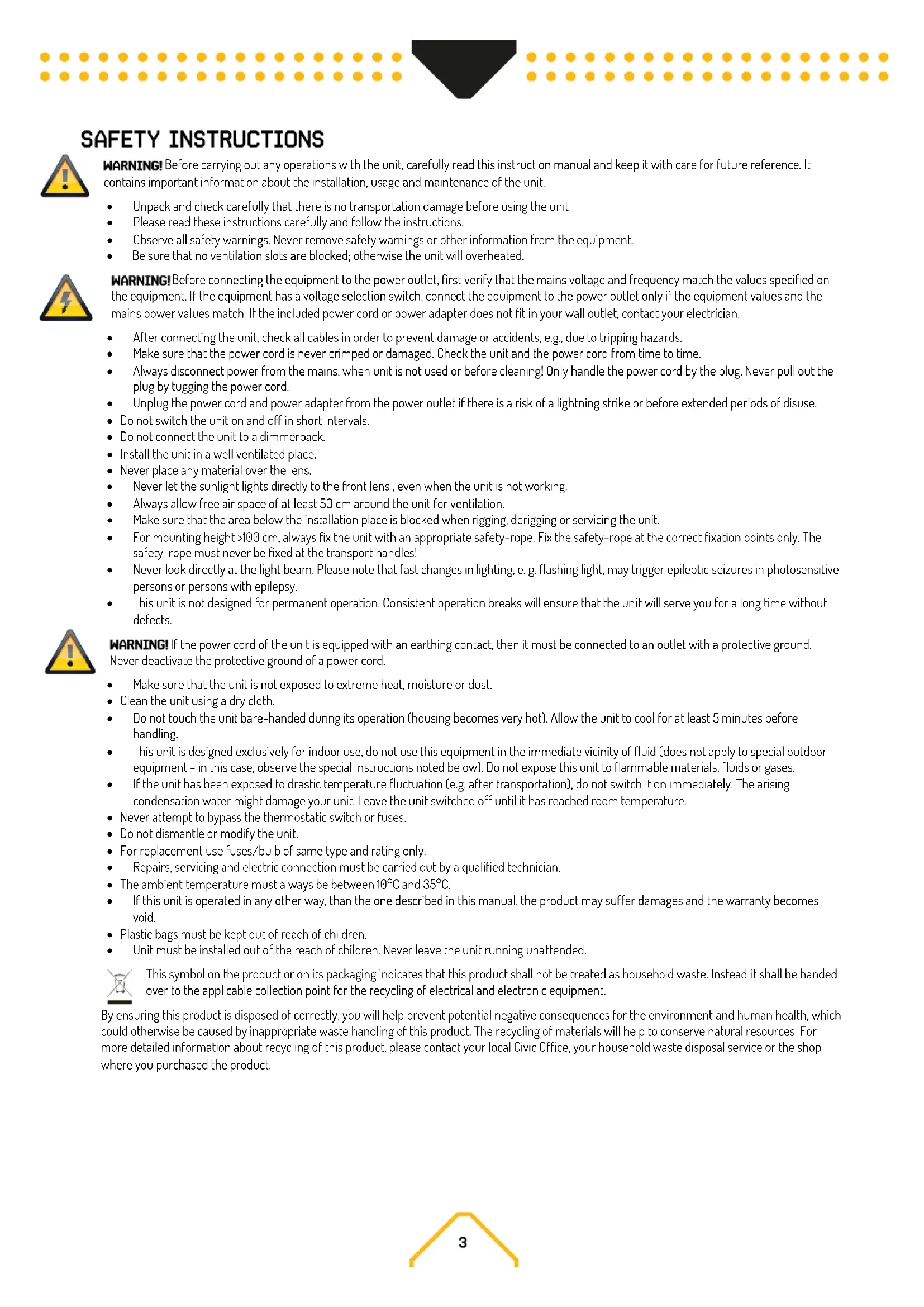
WARNING! Before carrying out any operations with the unit, carefully read this instruction manual and keep it with care for future reference. It contains important information about the installation, usage and maintenance of the unit.
• Unpack and check carefully that there is no transportation damage before using the unit
- Please read these instructions carefully and follow the instructions.
- Observe all safety warnings. Never remove safety warnings or other information from the equipment.
- Be sure that no ventilation slots are blocked; otherwise the unit will overheated.

WARNING! Before connecting the equipment to the power outlet, first verify that the mains voltage and frequency match the values specified on the equipment. If the equipment has a voltage selection switch, connect the equipment to the power outlet only if the equipment values and the mains power values match. If the included power cord or power adapter does not fit in your wall outlet, contact your electrician.
• After connecting the unit, check all cables in order to prevent damage or accidents, e.g., due to tripping hazards.
• Make sure that the power cord is never crimped or damaged. Check the unit and the power cord from time to time.
- Always disconnect power from the mains, when unit is not used or before cleaning! Only handle the power cord by the plug. Never pull out the plug by tugging the power cord.
• Unplug the power cord and power adapter from the power outlet if there is a risk of a lightning strike or before extended periods of disuse.
- Do not switch the unit on and off in short intervals.
- Do not connect the unit to a dimmerpack.
• Install the unit in a well ventilated place.
- Never place any material over the lens.
- Never let the sunlight lights directly to the front lens, even when the unit is not working.
• Always allow free air space of at least 50 cm around the unit for ventilation.
• Make sure that the area below the installation place is blocked when rigging, derigging or servicing the unit.
- For mounting height >100 cm, always fix the unit with an appropriate safety-rope. Fix the safety-rope at the correct fixation points only. The safety-rope must never be fixed at the transport handles!
- Never look directly at the light beam. Please note that fast changes in lighting, e.g. flashing light, may trigger epileptic seizures in photosensitive persons or persons with epilepsy.
- This unit is not designed for permanent operation. Consistent operation breaks will ensure that the unit will serve you for a long time without defects.

WARNING! If the power cord of the unit is equipped with an earthing contact, then it must be connected to an outlet with a protective ground. Never deactivate the protective ground of a power cord.
• Make sure that the unit is not exposed to extreme heat, moisture or dust.
- Clean the unit using a dry cloth.
- Do not touch the unit bare-handed during its operation (housing becomes very hot). Allow the unit to cool for at least 5 minutes before handling.
- This unit is designed exclusively for indoor use, do not use this equipment in the immediate vicinity of fluid (does not apply to special outdoor equipment - in this case, observe the special instructions noted below). Do not expose this unit to flammable materials, fluids or gases.
- If the unit has been exposed to drastic temperature fluctuation (e.g. after transportation), do not switch it on immediately. The arising condensation water might damage your unit. Leave the unit switched off until it has reached room temperature.
- Never attempt to bypass the thermostatic switch or fuses.
- Do not dismantle or modify the unit.
- For replacement use fuses/bulb of same type and rating only.
• Repairs, servicing and electric connection must be carried out by a qualified technician.
- The ambient temperature must always be between 10°C and 35°C .
- If this unit is operated in any other way, than the one described in this manual, the product may suffer damages and the warranty becomes void.
- Plastic bags must be kept out of reach of children.
- Unit must be installed out of the reach of children. Never leave the unit running unattended.

This symbol on the product or on its packaging indicates that this product shall not be treated as household waste. Instead it shall be handed over to the applicable collection point for the recycling of electrical and electronic equipment.
By ensuring this product is disposed of correctly, you will help prevent potential negative consequences for the environment and human health, which could otherwise be caused by inappropriate waste handling of this product. The recycling of materials will help to conserve natural resources. For more detailed information about recycling of this product, please contact your local Civic Office, your household waste disposal service or the shop where you purchased the product.
LASER SAFETY

READ FOR THE COMMISSIONING OF THE LASER ALL SAFETY INSTRUCTIONS AND TECHNICAL DATA OF THIS MANUAL CAREFULLY AND THOROUGHLY.

Laser Light is different from any other light source with which you may be familiar. The light from this product can potentially cause eye injury if not set up and used properly. Laser light is thousands of times more concentrated than light from any other kind of light source. This concentration of light power can cause instant eye injuries, primarily by burning the retina (the light sensitive portion at the back of the eye). Even if you cannot feel "heat" from a laser beam, it can still potentially injure or blind you or your audience. Even very small amounts of laser light are potentially hazardous even at long distances. Laser eye injuries can happen quicker than you can blink.
It is wrong to assume that a single beam of a bundle of hundreds by the laser beams made, it cannot cause injury.
It is also incorrect to assume that it is safe to look at a moving beam. In the laser safety regulation, it is not legal to aim Class 3B/4 lasers in areas which people can get exposed also on a dance floor.

CAUTION:
- Do not point lasers at people or animals.
- Never look into the laser aperture or laser beams, this can potentially cause instant eye injury or blindness if laser light directly strikes the eyes.
- Do not point lasers in areas in which people can potentially get exposed, such as uncontrolled balconies, etc.
• Install the laser units such that laser beams above the audience move See section later in this manual.
- Test the laser units always first before the public is present.
- Do not point lasers into the public or at highly reflective surfaces such as windows, mirrors and shiny metal. Even laser reflections can be hazardous.
• Never point a laser at aircraft or into the sky, this is a federal offense.
- Use of controls or adjustments or performance of procedures other than those specified herein may result in hazardous radiation exposure.
- Do not expose the output optic (aperture) to cleaning chemicals.
- The operation of a laser is only allowed if the show is controlled by a skilled and well-trained operator familiar with the requirements that are needed.
- Do not use laser if housing is damaged or open, or if optics appear damaged in any way.
- Never leave this device running unattended.
• Always use appropriate lighting safety cables when hanging lights and effects overhead.
The legal requirements for using laser entertainment products vary from country to country. The user is responsible for the legal requirements at the location/country of use.

This unit contains laser components with high power, live parts and parts that emit radiation. Therefore, DO NOT OPEN the housing. THIS CAN BE FATAL! It can also cause blindness, skin burns and fires.

EYE DAMAGE OCCURS FASTER THAN YOU CAN BLINK YOUR EYES.
Further guidelines and safety programs for safe use of lasers can be found in the ANSI Z136.1 Standard "For Safe Use of Lasers", available from "www.laserinstitute.org". Many local governments, corporations, agencies, military and others, require all lasers to be used under the guidelines of ANSI Z136.1. Laser Display guidance can be obtained via the International Laser Display Association, www.laserist.org.

ATTENTION! The use in France is only allowed to the professional user and not to the end user. See decision: www.legifrance.gouv.fr

INSTALLATION

CAUTION! Please consider the respective national norms during the installation! The installation must only be carried out by an authorized employee or dealers!
This fixture has been designed to be hung. It is recommended for safety purposes, your lighting effect are properly mounted using a suitable hanging clamp and safety cable. Items appropriate for safe and effective mounting are easily sourced from your lighting vendor.
International laser safety regulations require that lasers must be operated in the fashion illustrated below, with a minimum of 3 meters (9.8 ft) of vertical separation between the floor and the lowest laser light vertically. Additionally, 2.5 meters of horizontal separation is required between laser light and audience or other public spaces.


CAUTION! Use of controls, adjustments, or performance of procedures other than what is specified herein may result in hazardous radiation exposure!
- The installation of the fixture has to be built and constructed in a way that it can hold 10 times the weight for 1 hour without any harming deformation.
• Always use the supplied mounting bracket to hang the fixture.
• The fixture should aid of a mounting bracket (not included) to the supplied mounting bracket to be confirmed.
- The installation must always be secured with a secondary safety attachment, e.g. an appropriate catch net. This secondary safety attachment must be constructed in a way that no part of the installation can fall down if the main attachment fails.
• Make sure the area below the installation place is free from unwanted persons during rigging, de-rigging and servicing.
- The operator has to make sure that safety-relating and machine-technical installations are approved by an expert before taking into operation for the first time and after changes before taking into operation another time.
- The operator has to make sure that safety-relating and machine-technical installations are approved by a skilled person once a year.
• The fixture should be installed in the position where persons cannot reach.
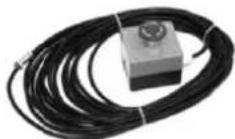
- For your own safety and for others, we do strongly recommend you to use this laser emergency kill switch. (ref.no: 152.958)

CAUTION! When installing the device, make sure there is no highly in inflammable material (decoration articles, etc.) in between a distance of min 0.5 meter.
UNPACKING INSTRUCTION

CAUTION! Immediately upon receiving the product, carefully unpack the carton, check the contents to ensure that all parts are present, and have been received in good condition. Notify the shipper immediately and retain packing material for inspection if any parts appear damage from
shipping or the package itself shows signs of mishandling. Save the package and all packing materials. In the event that the product must be returned to the factory, it is important that the product be returned in the original factory box and packing.
If the unit has been exposed to drastic temperature fluctuation (e.g. after transportation), do not switch it on immediately. The arising condensation water might damage your unit. Leave the unit switched off until it has reached room temperature.
POWERSUPPLY
On the label on the backside of the unit is indicated on this type of power supply must be connected. Check that the mains voltage corresponds to this, all other voltages than specified, the light effect can be irreparably damaged. The product must also be directly connected to the mains and may be used. No dimmer or adjustable power supply.

WARNING! Always connect the unit to a protected circuit (circuit breaker or fuse). Make sure the unit has an appropriate electrical ground to avoid the risk of electrocution or fire.
LASER LIFETIME
Follow below advice to enjoy a longer laser lifetime:
- Quick on/off switching of this device will reduce durability of the laser diode dramatically.
- Ensure that device does not get overheated:
○ Switch off device when it is not needed. Diodes are switched on and can wear out even if there is no visible laser output.
- Switch off device after 1 hour and let the laser cooling down for 15 minutes.
o Ensure that the fans and heat sinks are free of dust and dirt.

DMX512 CONTROL
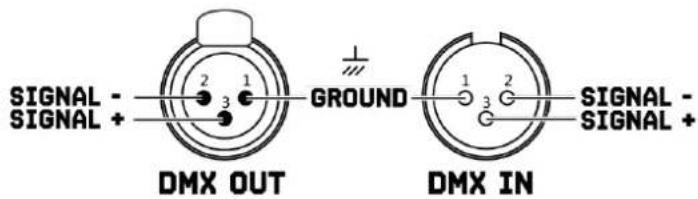
If you are using a standard DMX controller, you can connect the DMX output of the controller directly to the DMX input of the first unit in a DMX chain. Always connect the output of one unit with the input of the next unit until all units are connected.
![graph TD A["DMX SIGNAL"] --> B["Power"] B --> C["1"] C --> D["2"] D --> E["3"] E --> F["4"] F --> G["OUT"] style A fill:#f9f,stroke:#333 style B fill:#ccf,stroke:#333 style C fill:#cfc,stroke:#333 style D fill:#fcc,stroke:#333 style E fill:#cff,stroke:#333 style F fill:#ffc,stroke:#333 style G fill:…](/content/2026/02/390063/images/ea6e145964c0f4bf9d64177c49ca2a6febcafd20982df96934fc71950c03f70d.jpg)

CAUTION! At the last unit, you must close the DMX line with a terminating resistor. Take an XLR connector and solder a 120 Ohm resistor between signal (-) and signal (+) and connect it to the DMX output of the last unit in the line.

REMOTE CONTROLLER
BLACK OUT MODE
Press modes. Press return the last
AUTO MODE
Automatic mode will enable you to run the automatic programs on the product.
To turn on Automatic mode:
- Press remote controller.
- Press (+) to choose between the different auto programs.
SOUND MODE
Sound-Active mode will enable the product to respond to the music.
To turn on Sound-Active mode:
- Press mote controller.
- Press (+) or (-) to choose between the different sound programs.
STROBE MODE
To adjust the strobe speed of the automatic program and the sound active program.
- Press note controller.
- Press ↔ or ← to either increase or decrease the speed of the program.
- Press again to be off the strobe.
SPEED MODE
To adjust the speed of the automatic program and the sound active program.
- Press remote controller.
- Press together increase or decrease the speed of the program.
DMX / % MODE
To enable DMX or disallow DMX on the product.
Press remote controller, the product work on the DMX controlling modes.
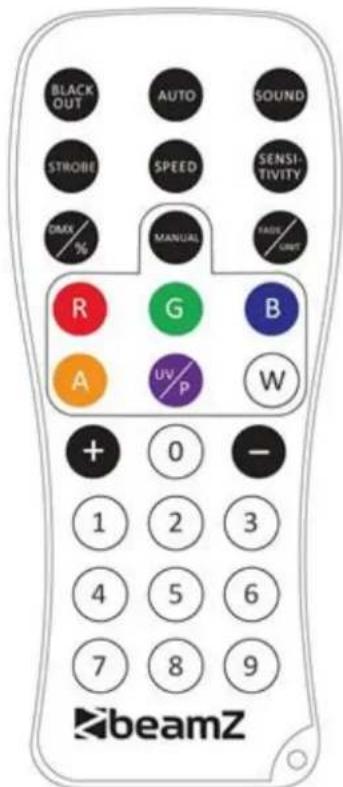
MANUAL MODE
- Press note controller.
- Press (Red Blue or white) to choose your colour.
- Press again , <Red to close your colour.
- Press (4) to either increase or decrease the percentage of each colour.
FADE/UNIT MODE
To enable or disallow laser on the product.
- Press of FADE/UNIT controller.
- Press <again to turn ON or OFF the laser.

CAUTION! The remote control is supplied with a battery inserted. An insulating foil between the battery and the battery contacts prevents the battery from being discharged during storage. Prior to the first operation remove the foil from the battery support on the rear side of the remote control. Otherwise operation of the remote control is not possible.
If the range of the remote control decreases, replace the battery. For this purpose, on the rear side of the remote control press the small bar with the groove to the right (1) and at the same time remove the battery support (2). For operation, one 3 V button cell type CR 2025 is required. When inserting, pay attention that the positive pole of the button cell shows upwards in the support.

CLEANING
The buildup of dust, dirt and other airborne particles will reduce the unit's light output. It will also prevent the unit from cooling correctly, and this will reduce the unit's lifetime. The rate of dirt buildup will vary depending on environmental factors such as airborne dust, use of smoke machines, airflow from ventilation systems, etc. The unit's cooling fans will accelerate buildup, and any smoke particles that are present in the atmosphere will increase the tendency for dirt to clog.
To get the best performance and lifetime from the unit, inspect it regularly and clean it as soon as you see signs of dirt buildup.
Assess the operating environment each time you begin to use the unit. In dusty or smoky conditions, inspect the unit after a few hours and check it frequently the unit may attract dirt faster than you expect. Draw up a cleaning schedule that will make sure that dirt is removed before it can build up.
Use the following guidelines:
- Disconnect the unit from power and allow it to cool completely before cleaning.
- Do not use solvents, abrasives or any other aggressive product to clean the unit.
- Vacuum or use low-pressure compressed air to remove dust and loose particles from surfaces and air vents. Prevent the blades of cooling fans from turning before you aim a vacuum or air jet at the fan, or you may spin the fan too fast and damage it.
- Clean glass components by wiping gently with a soft, clean, lint-free cloth moistened with a weak detergent solution. Put the solution on the cloth and not on the surface to be cleaned. Avoid rubbing glass surfaces.
- Dry the unit with a soft, clean, lint-free cloth or low-pressure compressed air before reapplying power.
REPLACING THE FUSE
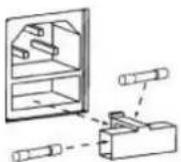
If the fuse is defective, replace the fuse with a fuse of the same type and value. Before replacing the fuse, unplug mains lead.
Procedure:
Step 1: Open the fuse holder on the rear panel with a fitting screwdriver.
Step 2: Remove the old fuse from the fuse holder.
Step 3: Install the new fuse in the fuse holder.
Step 4: Replace the fuse holder in the housing.
VEILIGHEIDSINSTRUCTIES

REPLACEMENT DU FUSIBLE
| MENU | DESCRIPTION |
| AUTO | Au-1 | Auto program 1 |
| Au-2 | Auto program 2 |
| Au-3 | Auto program 3 |
| Au-4 | Auto program 4 |
| Au-5 | Auto program 5 |
| Au-6 | Auto program 6 |
| Au-7 | Auto program 7 |
| SOUND | So-1 | Sound program 1 |
| So-2 | Sound program 2 |
| So-3 | Sound program 3 |
| So-4 | Sound program 4 |
| So-5 | Sound program 5 |
| So-6 | Sound program 6 |
| So-7 | Sound program 7 |
| SPEED | SP1-SP9 | Speed value for program adjustable |
| SENSITIVITY | Se1-Se9 | MIC value adjustable |
| SILENT SCENE | OFF | The fixture is open light on music by sound program |
| ON | The fixture is closed light on music by sound program |
| INFRA | ON | Enable IR remote controller signal receiving |
| OFF | Disenable IR remote controller signal receiving |
| ADDRESS | A000 | DMX address setting |
| SLAVE | Slav | Slave |
| DISPLAY | dISP | Display normal |
| dSIP | Display inversion |
DMX CHANNELS
| CHANNEL | FUNCTION | VALUE | DESCRIPTION |
| 1 | Laser | 000-009 | No function |
| 010-059 | Laser motor clockwise rotation (From slow to fast) |
| 060-069 | Stop |
| 070-119 | Laser motor counter clockwise rotation (From slow to fast) |
| 120-129 | Stop |
| 130-255 | Back and forward movement with increasing speed |
| 2 | Motor rotation | 000-127 | Motor rotation |
| 128-255 | Back and forward movement with increasing speed |
| 3 | Colours macro | 000-009 | No function |
| 010-019 | Red |
| 020-029 | Green |
| 030-039 | Blue |
| 040-049 | White |
| 050-059 | Red + Green |
| 060-069 | Green+ Blue |
| 070-079 | Blue + White |
| 080-089 | Red+ White |
| 090-099 | Red+ Blue |
| 100-109 | Green+ White |
| 110-119 | Blue+ Green+ White |
| 120-129 | Red+ Blue+ White |
| 130-139 | Red+ Green+ White |
| 140-149 | Red+ Green+ Blue |
| 150-159 | All LED on |
| 160-169 | Rainbow Group effect 1 |
| 170-179 | Rainbow Group effect 2 |
| 180-189 | Rainbow Group effect 3 |
| 190-199 | Rainbow Group effect 4 |
| 200-209 | Rainbow Group effect 5 |
| 210-219 | Rainbow Group effect with strobe 1 |
| 220-229 | Rainbow Group effect with strobe 2 |
| 230-239 | Rainbow Group effect with strobe 3 |
| 240-249 | Rainbow Group effect with strobe 4 |
| 250-255 | Rainbow Group effect with strobe 5 |
| 4 | Auto/Sound | 000-009 | No function |
| 010-119 | Auto DMX (From slow to fast) |
| 120-255 | Sound DMX (From slow to fast) |
TECHNICAL SPECIFICATIONS
Rated voltage : 100-240VAC, 50-60Hz, 0.2-0.1A
LED : 4x 3 Watt Red, Green, Blue, White / 16x 0.5Watt White
Laser : 150mW @650nm Red / 75mW @532nm Green Class 3B
Fuse : F1A
DMX Channels :4
Functions : DMX, Automatic programs, Sound to light and Master-Slave.
Dimensions per unit : 205 x 200 x 150mm
Weight (per unit) : 2.20kg
Design and product specifications are subject to change without prior notice.
The products referred to in this manual conform to the European Community Directives to which they are subject:
European Union
Tronios B.V.,
7602KR Almelo, The Netherlands
2014/35/EU
2014/30/EU
2011/65/EC

United Kingdom
Tronios Ltd.,
130 Harley Street,
London W1G 7JU, United Kingdom
S.I. 2016:1101
S.I. 2016:1091
S.I. 2012:3032

BEAMZ
is a leading developer of lighting products, including intelligent DMX moving heads, wireless battery operated DMX effects, static washes, sound-activated club effects, strobes & blacklights, LED lighting, fog and special effects machines, lasers and indoor and outdoor architectural lighting, as well as lighting controllers and protective bags.