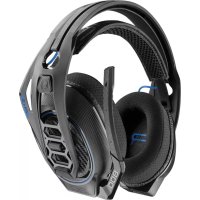
RIG 800HS - Earphones PLANTRONICS - Free user manual and instructions
Find the device manual for free RIG 800HS PLANTRONICS in PDF.



| Product type | Wireless gaming headset |
| Brand | Plantronics |
| Model | RIG 800HS |
| Dimensions (approx.) | 200 x 200 x 100 mm |
| Weight (approx.) | 300 g |
| Power source | Rechargeable lithium-ion battery via USB (4.5 h for full charge) |
| Battery life | Approximately 12 hours (depending on usage) |
| Connectivity | 2.4 GHz wireless via USB/optical adapter |
| Compatibility | PS4, PS4 Slim, Xbox One, PC (with optical cable for RIG 800HS/800HD) |
| Microphone | Adjustable boom mic with mute (lift boom to mute) |
| Main functions | Main volume and game/chat mix, equalization (4 modes: Pure, Seismic, Intense, Vocal), microphone control (mic monitor: off/low/high) |
| Headband adjustment | 3 sizes (small, medium, large) by moving ear cups |
| Care and cleaning | Wipe with a soft, dry cloth; do not use liquids or abrasive products |
| Safety | Listen at moderate volume to protect hearing; do not force the mic boom beyond limits |
| Spare parts | Removable ear cups and headband (replacement possible through retailer) |
| Repairability | Not specified; contact Nacon support in case of failure |
| Warranty | Manufacturer's standard (check local conditions) |
Frequently Asked Questions - RIG 800HS PLANTRONICS
User questions about RIG 800HS PLANTRONICS
0 question about this device. Answer the ones you know or ask your own.
Ask a new question about this device
Download the instructions for your Earphones in PDF format for free! Find your manual RIG 800HS - PLANTRONICS and take your electronic device back in hand. On this page are published all the documents necessary for the use of your device. RIG 800HS by PLANTRONICS.
USER MANUAL RIG 800HS PLANTRONICS
Adjust mic monitoring
Support 7
Setup and basics
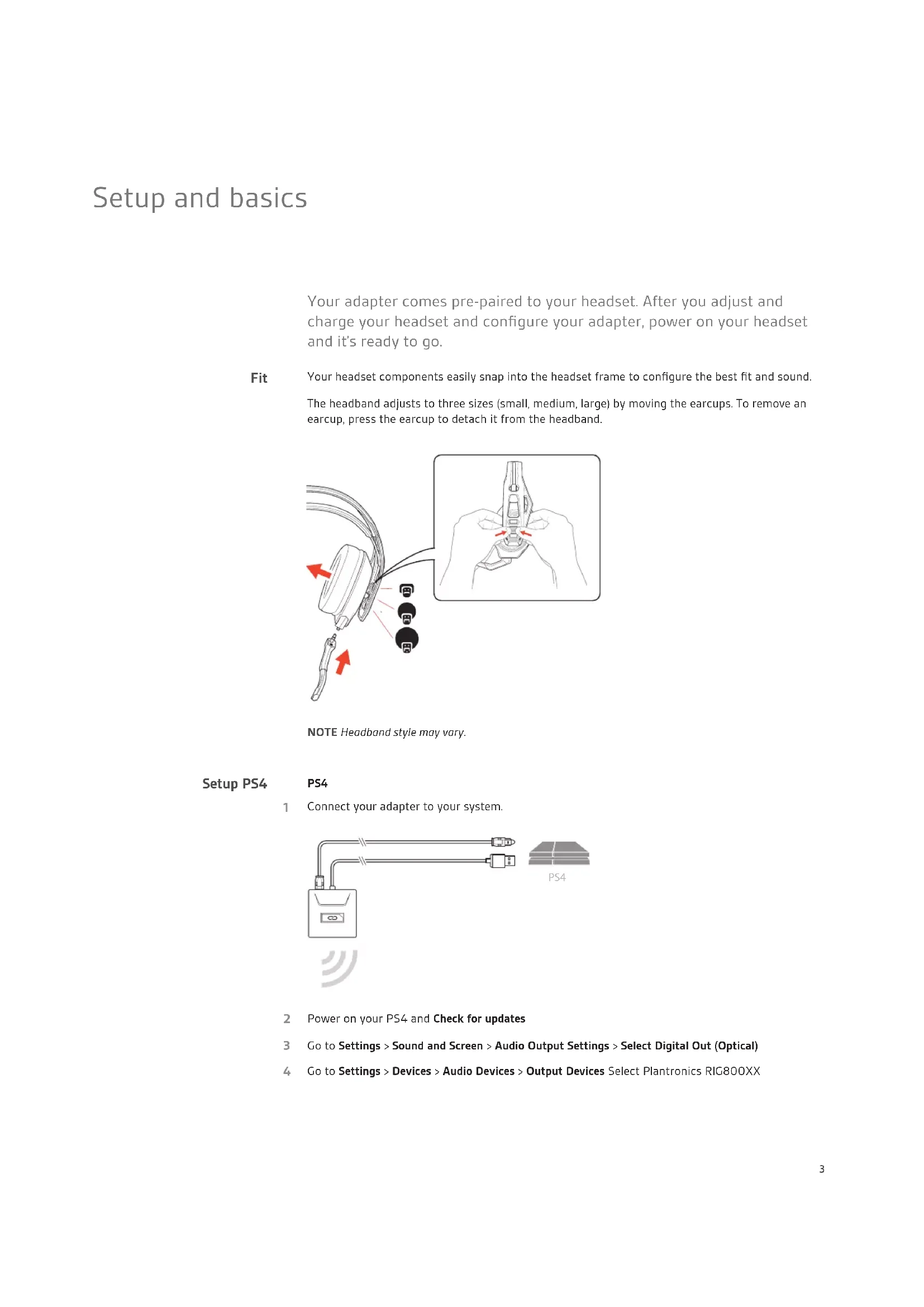
Your adapter comes pre-paired to your headset. After you adjust and charge your headset and configure your adapter, power on your headset and it's ready to go.
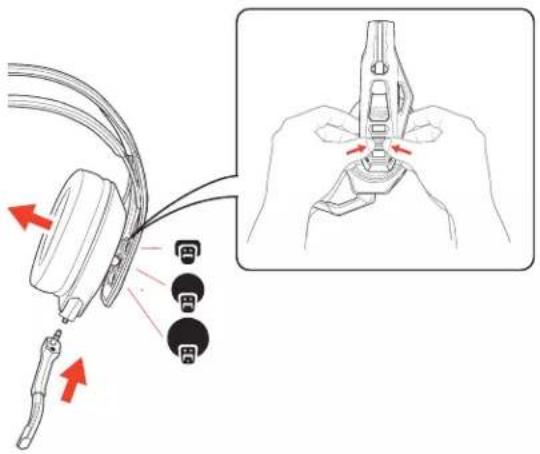
Fit Your headset components easily snap into the headset frame to configure the best fit and sound.
The headband adjusts to three sizes (small, medium, large) by moving the earcups. To remove an earcup, press the earcup to detach it from the headband.
text_image
Diagram showing cable connector insertion and disassembly process with labeled parts and red arrows indicating directionNOTE Headband style may vary.
Setup PS4 PS4
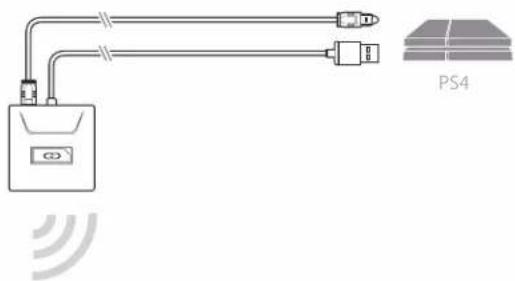
1 Connect your adapter to your system.

natural_image
Pure electrical circuit lines without any symbols2 Power on your PS4 and Check for updates
3 Go to Settings > Sound and Screen > Audio Output Settings > Select Digital Out (Optical)
4 Go to Settings > Devices > Audio Devices > Output Devices Select Plantronics RIG800XX
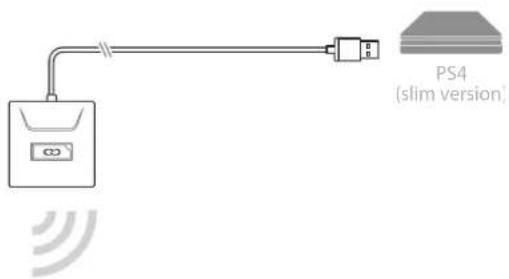
PS4 (slim version)
1 Connect your adapter to your system.
text_image
PS4 (slim version)2 Power on your PS4 and Check for updates
3 Go to Settings > Devices > Audio Devices > Output Devices Select Plantronics RIG800XX
4 Go to Settings > Devices > Audio Devices > Output to headphones > All audio
Setup Xbox One 1 Connect your adapter to your system.
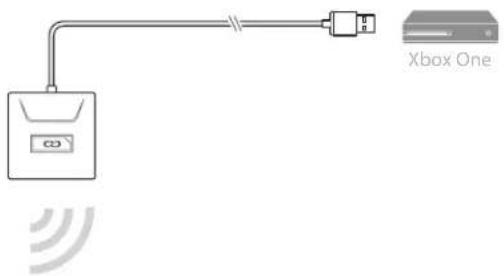
text_image
Xbox One2 Power on your Xbox One and Check for updates
3 Go to Display and Sound > Kinect and Devices > Device Options > Assign
Setup PC 1 Connect your adapter to your system.
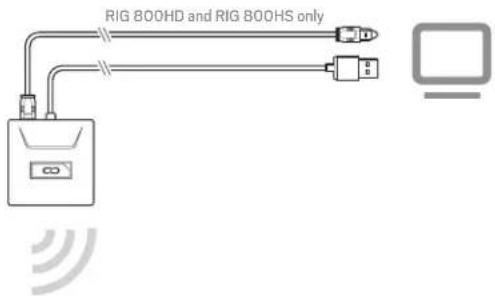
text_image
RIG 800HD and RIG 800HS onlyIMPORTANT Optical cable connection is only for RIG 800HD and RIG 800HS.
2 RIG 800HX and RIG 800LX only: Ensure the switch on the back of the adapter is set to «PC.»
Charge
It takes up to 4.5 hours to fully charge your headphones. The headset LED is red while charging and turns off when complete.
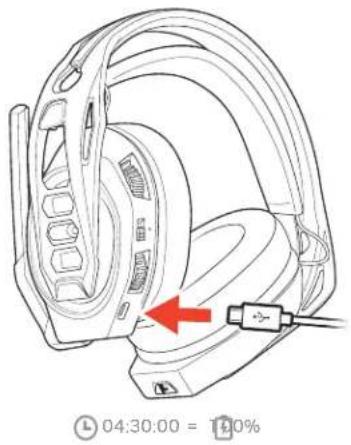
text_image
04:30:00 = 140%Adjust volume
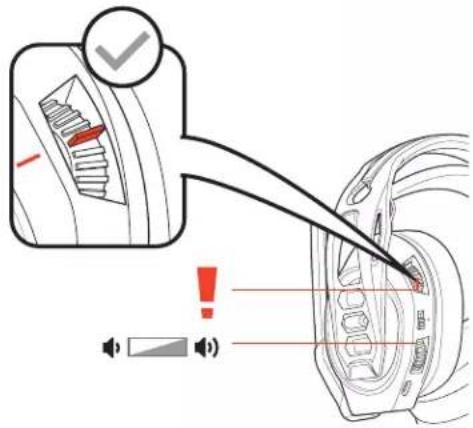
1 To increase or decrease the game and chat volume, adjust the top headset dial.
2 To increase or decrease the master volume, adjust the bottom headset dial.
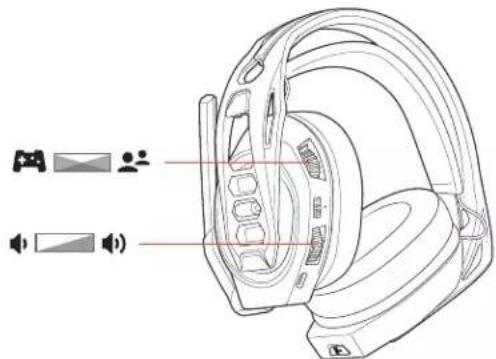
text_image
Technical diagram of a headphones with labeled components and audio iconsIMPORTANT For the PS4 (slim version), set the top headset dial in the middle; game and chat remain balanced. Use the bottom headset dial to increase or decrease the master volume.
text_image
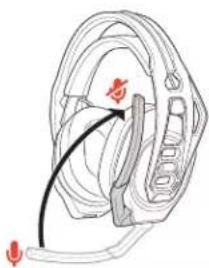
Diagram illustrating a mechanical component with warning and sound wave indicators, showing gear and motor assembly.Mute
Lift the boom to a full stop to mute the microphone.
natural_image
Diagram of a human ear with a black arrow pointing to the ear area, no text or symbols presentCAUTION Do not force the boom past its upper or lower limits.
Set EQ
Cycle through the EQ modes by tapping the EQ button.
| Tap the EQ button and hear | EQ mode | |
| one tone | Pure EQ is our signature sound | |
| two tones | Seismic EQ boosts bass | |
| three tones | Intensify EQ focuses on detail sounds | |
| four tones | Vocal EQ emphasizes vocal frequencies | |
Adjust mic monitoring
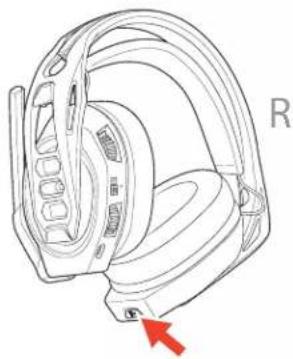
Press and hold the Mute button to cycle through mic monitoring levels. Mic monitoring lets you hear your own voice in the headset.
natural_image
Line drawing of a car head with a red arrow pointing to the side of the head (no text or symbols present)| Press and hold the Mute button and hear | Mic monitoring level | ||
| one | tone | None | |
| two tones | Low | ||
| three tones | High | ||
Support
NEED MORE HELP?
www.nacongaming.com

nacon
NACONG GAMING, Inc
10400 NE 4 ^th Street, Suite 500,
Bellevue, WA 98004 USA
(+1) 800-617-0174
Headquarter
NACON
©2020 NACON, NACON and RIG are trademarks of NACON, registered in the US and other countries. Manufactured under license from Dolby Laboratories, Dolby and the double-D symbol are registered trademarks of Dolby Laboratories. All other trademarks are the property of their respective owners.
Patents pending.
208788-06 (06.20)
RIG
Série RIG 800
Guide d'utilisation
FR
Sommaire
text_image
Diagram showing cable connector insertion and disassembly process with labeled parts and red arrows indicating movementtext_image
PS4 (slim version)text_image
04:30:00 = 100%Régler le volume
text_image
Technical diagram of a headphones with labeled components and audio iconstext_image
Diagram illustrating a car interior with warning indicators and speaker symbols, showing a vehicle's seat and head assembly.Mode discrétion
natural_image
Diagram of a medical device with a curved arrow indicating motion or force (no text or labels)natural_image
Line drawing of a helmet with a red arrow pointing to the side of the head (no text or symbols present)text_image
Diagram illustrating cable connector assembly with pinning and adjustment mechanism, showing labeled components and directional arrows.text_image
PS4 (slim version)text_image
04:30:00 = 140%text_image
Technical diagram of a headphones with labeled components and audio iconstext_image
Diagram illustrating a device's internal structure with warning labels and speaker icons, showing a close-up of the component.Stummschaltung
natural_image
Diagram of a human ear with a finger pointing to the ear area, showing anatomical structure without any text or symbols.Cycle through the EQ modes by tapping the EQ button.
natural_image
Line drawing of a car head with a red arrow pointing to the ear (no text or symbols present)text_image
Diagram illustrating cable connector assembly with magnified detail showing pin alignment and red directional arrows indicating movement.text_image
PS4 (slim version)text_image
04:30:00 = 100%Volume aanpassen
text_image
Technical diagram of a headphones with labeled components and audio iconstext_image
Diagram illustrating car seatbelt usage with warning labels and speaker iconsMute
natural_image
Diagram of a human ear with a black arrow pointing to the ear area, no text or symbols presentnatural_image
Line drawing of a car head with a red arrow pointing to the side (no text or symbols present)text_image
Diagram illustrating cable connector assembly with red arrows indicating direction and magnified detail showing pin alignmentnatural_image
Pure electrical circuit lines without any symbolstext_image
PS4 (slim version)text_image
04:30:00 = 100%Ajustar el volumen
text_image
Technical diagram of a headset with labeled components and camera iconstext_image
Diagram showing a car interior with warning indicators and speaker icons, including a checkmark and sound level markers.Silencio
natural_image
Diagram of a human ear with a black arrow pointing to the ear area, no text or symbols presentnatural_image
Line drawing of a car head with a red arrow pointing to the side of the seat (no text or symbols present)text_image
Diagram illustrating cable connector assembly with red arrows indicating direction and magnified detail showing pin alignmentnatural_image
Pure electrical circuit lines without any symbolstext_image
PS4 (slim version)text_image
04:30:00 = 140%Regolare il volume
text_image
Technical diagram of a headset with labeled components and audio icons, showing front and side views.text_image
Diagram illustrating a car interior with warning indicators and speaker symbols, showing a vehicle's head and rear wheel.natural_image
Diagram of a human ear with a black arrow pointing to the ear area, no text or symbols presentnatural_image
Line drawing of a helmet with a red arrow pointing to the side (no text or symbols)text_image
Diagram illustrating cable connector assembly with magnified detail showing pin alignment and red directional arrows indicating movement.text_image
PS4 (slim version)natural_image
Line drawing of a headband device with a red arrow pointing to the cable (no text or symbols present)04:30:00 = 140%
text_image
Technical diagram of a headset with labeled components and camera iconstext_image
Diagram illustrating car seatbelt usage with warning labels and speaker iconsОтключение звука
natural_image
Diagram of a medical device with a curved arrow indicating direction (no text or symbols)natural_image
Line drawing of a headboard with a red arrow pointing to the side of the head (no text or symbols present)text_image
Diagram illustrating cable connector assembly with magnified detail showing pin alignment and red directional arrows indicating movement.注头带佩戴方式可能有所不同。
设置 PS4
PS4
1 将适配器连接到系统。
text_image
PS4text_image
PS4 (slim version)natural_image
Technical line drawing of a headset with a red arrow indicating a connection point (no text or symbols present)04:30:00 = 140%
text_image
Technical diagram of a headphones with labeled components and audio iconstext_image
Diagram illustrating car seatbelting with warning labels and speaker iconstext_image
Diagram showing ear anatomy with labeled parts and directional arrows indicating movement or forcenatural_image
Line drawing of a car head with a red arrow pointing to the side (no text or symbols)按住“静音”按钮并聆听 麦克风监控级别
一 种 音 调 无
两种音调低
三 种 音 调 高
支持
需要更多帮助?
www.nacongaming.com

nacon
NACONG GAMING, Inc
10400 NE 4 ^th Street, Suite 500,
Bellevue, WA 98004 USA
(+1) 800-617-0174
Headquarter
NACON
text_image
Diagram illustrating cable connector assembly with pinning and adjustment mechanism, showing cable attachment and pin positioning stepsnatural_image
Pure electrical circuit lines without any symbols
text_image
PS4 (slim version)natural_image
Line drawing of a headset with a red arrow indicating the headrest (no text or symbols present)04:30:00 = 140%
text_image
Technical diagram of a headphones with labeled components and audio iconstext_image
Diagram showing a device with warning icon and warning labels, indicating a warning or alert mechanism.음소거