B1471N2S2 - Oven NEFF - Free user manual and instructions
Find the device manual for free B1471N2S2 NEFF in PDF.


| Brand | NEFF |
| Model | B1471N2S2 |
| Product type | Built-in oven |
| Power supply | 220-240 V, 50/60 Hz |
| Number of functions | 5 |
| Cooking functions | Top/bottom heat, Circotherm hot air, Radiant grill, Fan-assisted grill, Bottom heat |
| Oven levels | 4 |
| Included accessories | Enameled baking tray, Baking/roasting grid, Drip pan with grid |
| Clock type | Electronic with timer and delayed programming |
| Interior lighting | 40 W incandescent bulb, E14, heat-resistant up to 300 °C |
| Oven door | Removable for cleaning |
| Interior grid | Removable (unscrew knurled screws) |
| Control type | Retractable knobs |
| Display | Electronic with clock |
| Door material | Glass with heat-reflective coating |
| Safety | Cooling fan, programmable automatic shut-off |
| Recommended cleaning | Hot water and dish soap, no steam cleaner or abrasives |
| Documentation | User manual available in PDF |
Frequently Asked Questions - B1471N2S2 NEFF
User questions about B1471N2S2 NEFF
0 question about this device. Answer the ones you know or ask your own.
Ask a new question about this device
Download the instructions for your Oven in PDF format for free! Find your manual B1471N2S2 - NEFF and take your electronic device back in hand. On this page are published all the documents necessary for the use of your device. B1471N2S2 by NEFF.
USER MANUAL B1471N2S2 NEFF
natural_image
Front view of a modern oven with control panel and door (no visible text or symbols)
natural_image
Abstract black-and-white geometric symbol resembling a stylized letter or icon, enclosed in a circle with two horizontal bars at the bottom (no text or symbols present)EFF
| de | Seite | 2–29 | nl | pagina | 72– 92 | el | Σελίδα | 135–155 |
| en | page | 30 – 50 | it | pagina | 93 – 113 | |||
| fr | page | 51 – 71 | es | página | 114 – 134 |
Inhaltsverzeichnis
natural_image
Hand pressing a button on a circular component with an arrow indicating left motion (no text or symbols)natural_image
Pure diagram of a central oval shape with surrounding icons (no text or symbols)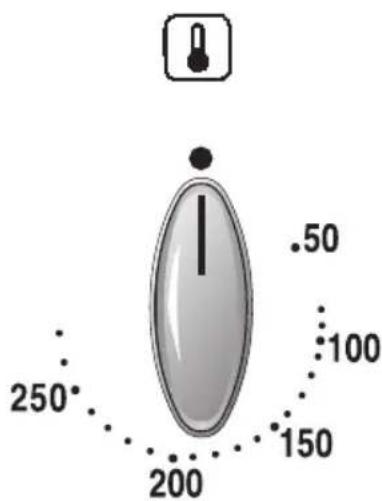
Stellungen:
50–275 Temperatur in °C
natural_image
Technical diagram of a server room interior with numbered components (1-4), showing internal layout and ventilation slots (no text or symbols)Drehknopf
Tageszeit
Backen in Backformen
natural_image
Illustration of a baked pie on a metal rack (no text or symbols)
natural_image
Illustration of a tray with scattered food items, possibly tomatoes or baked goods (no text or symbols visible)Backen
natural_image
Illustration of a rolled-up food item on a metal tray (no text or symbols)natural_image
Illustration of two meatballs on a tray (no text or symbols)Braten
natural_image
Illustration of two raw chicken wings placed on a metal griddle tray (no text or symbols)natural_image
Illustration of a rectangular tray with three curved, mesh-like structures inside (no text or symbols)natural_image
3D rendering of a mechanical assembly with multiple cylindrical components and mounting brackets (no visible text or symbols)natural_image
Hand turning a component into a mechanical bracket (no text or symbols visible)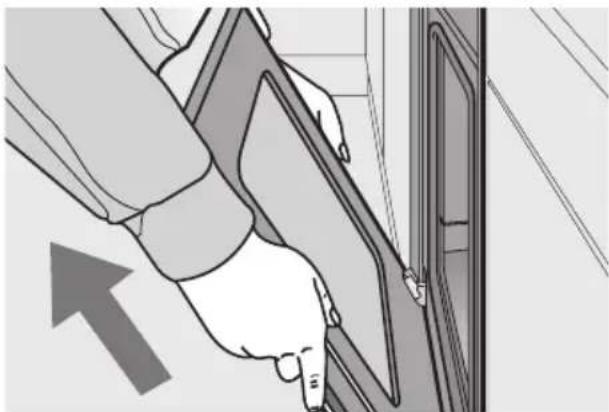
natural_image
Illustration of a hand inserting a card into a door, with an arrow indicating direction (no text or symbols present)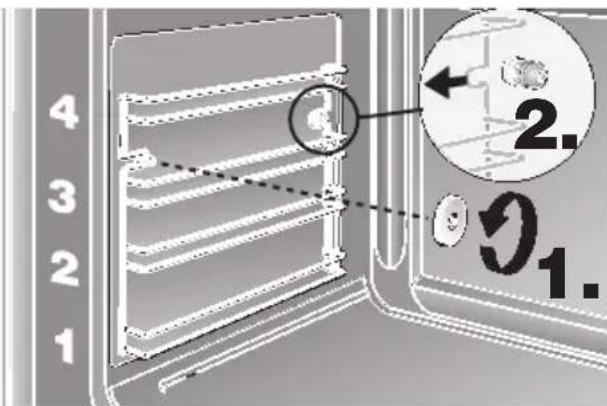
natural_image
Technical line drawing of a mechanical assembly with pipes and a central component (no text or symbols)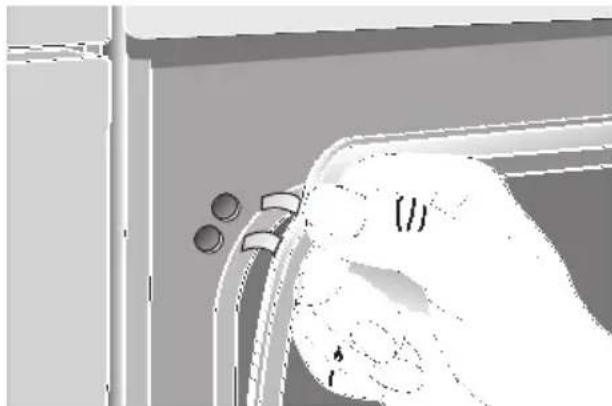
natural_image
Illustration of a hand holding a zipper with two circular buttons, no text or symbols presentWas ist wenn?
| Page | Page | |
| Important Information | Cleaning and Care | |
| Notes on disposal 31 | Important cleaning basics 47 | |
| Before connecting your new appliance ... 31 | Enamel and glass 47 | |
| Stainless steel front 47 | ||
| Appliance safety considerations 32 | Oven interior 47 | |
| Introducing: Your New Cooker | Removing/installing the oven door 48 | |
| Control panel overview 33 | Removing the suspend grids 48 | |
| Accessories 34 | Service and Repair Information 49 | |
| Slide-in levels 34 | Trouble-shooting Guide 50 | |
| Before Using Your Appliance for the First Time | ||
| Setting the time of day 35 | ||
| Preliminary cleaning 35 | ||
| Initial burn-in 35 | ||
| Electronic clock | ||
| Minute timer 36 | ||
| Automatic timer 37+38 | ||
| Special functions 39 | ||
| Information 39 | ||
| Baking and Roasting | ||
| Description of Oven Features 40 | ||
| Switching the oven ON and OFF | 41 | |
| Baking | 42 | |
| Roasting | 43 | |
| Grilling | 44 | |
| Cooking Tips and Helpful Hints | 45 | |
| Defrosting and Cooking | 46 | |
Notes on disposal
☐ Old appliances still have some residual value. An environment-friendly method of disposal will ensure that valuable raw materials can be recovered and used again.
Before you dispose of your old appliance, make sure that it has been rendered inoperable.
☐ Your new appliance was protected by suitable packaging while it was on its way to you. All materials used for this purpose are environment-friendly and suitable for recycling. Please make a contribution to protecting the environment by disposing of the packaging appropriately.
Up-to-date information concerning options for disposing of your old appliance and the packaging from the new one can be obtained from your retailer or local government office.
Before connecting your new appliance
☐ Before using your new appliance, please read these Instructions for Use carefully. They contain important information concerning your personal safety as well as on use and care of the appliance.
☐ The Instructions for Use apply to several versions of this appliance. Accordingly, you may find descriptions of individual features that do not apply to your specific appliance.
☐ Please keep the operating and installation instructions in a safe place; this important documentation may also be of use to a possible subsequent owner.
☐ Do not use the appliance if it is damaged in any way.
☐ Installation and connection of the appliance should be performed according to the instructions and connection diagram provided, and should be entrusted to a licensed specialist. In the event of a damage that occurs as a result of improper connection, the warranty will be void.
☐ Our appliances meet the applicable safety regulations for electrical appliances. Repairs may be performed only by customer service engineers trained by the manufacturer. Inexpert repairs may entail serious injury to you, the user.
Appliance safety considerations
☐ The appliance should only be used for the preparation of food.
☐ The surfaces of heating and cooking appliances get hot during operation. The interior oven walls and the heating elements get extremely hot. Always keep children away from the appliance.
☐ Never leave the appliance unattended when cooking with fat or oil. They can catch fire if overheated.
☐ Clean the oven regularly.
Fatty or oily remnants could ignite when the oven is switched on.
☐ Make sure that the power cord never comes into contact with the hotplates, and does not get caught in the hot oven door. The plastic insulation could melt.
☐ In the case of a defect, switch off (or remove) the mains fuse in the building electrical system.
☐ Do not store combustible items in the oven. They could ignite if the oven is switched on accidentally.
☐ Do not clean the oven with steam or high-pressure cleaners.
☐ If using hot air ⚠, do not place greaseproof paper loosely in the oven (e.g. when heating the oven). The hot-air fan could draw in the paper which may damage the heater and fan.
☐ Do not insert a baking sheet at the bottom of the oven, or cover it with aluminium foil, because a heat build-up would result. Roasting and baking times would change, and the enamel would be damaged.
☐ Never pour water directly into the hot oven. Damage to the enamel could result.
☐ Fruit juices dripping from the baking sheet leave spots that cannot be removed later. For baking, use the deeper universal baking pan.
☐ Never stand or sit on the open oven door.
☐ The oven door must close properly.
Keep the door sealing surfaces clean.
Introducing: Your new Cooker
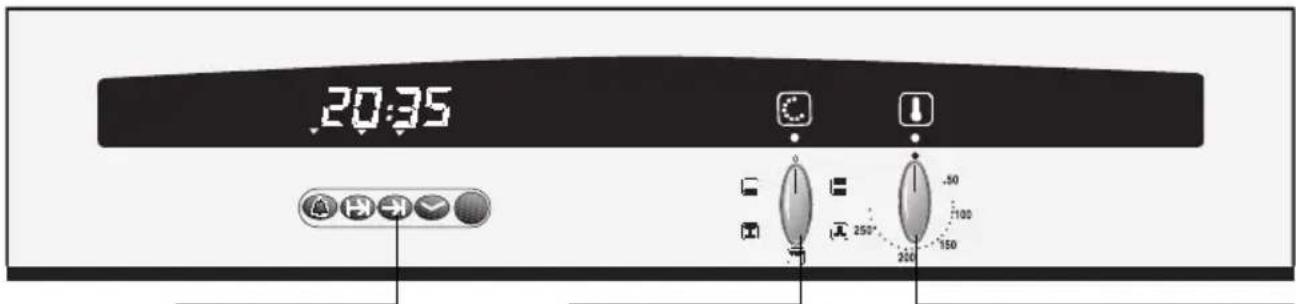
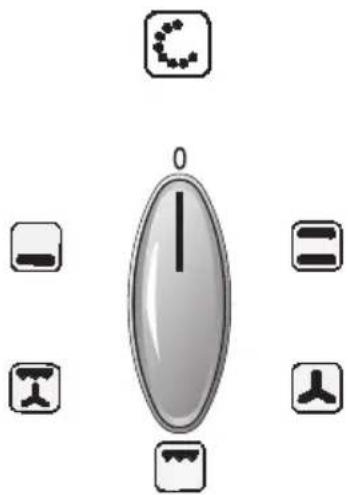
Function selectorElectronic clock Temperatur selector with control lamp
The control panel:
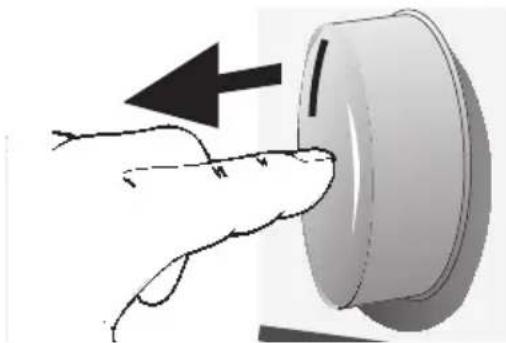
☐ The switches are retractable.
☐ To engage and disengage, depress the switch, making sure that it is in OFF position.
natural_image
Hand pressing a button on a circular device with an arrow indicating left motion (no text or symbols)Function selector Temperature selector
natural_image
Pure diagram of a central oval shape with six surrounding icons (no text or labels)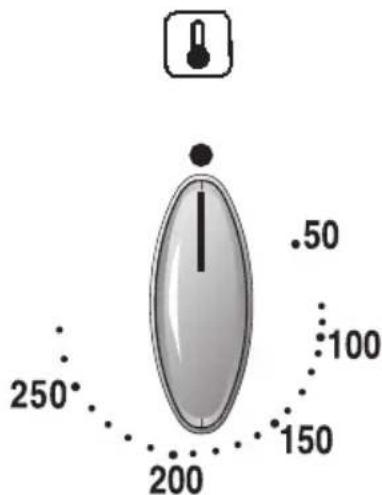
Settings:
Top/bottom heat
Hot air
Surface grilling
Combination hot-air/ surface grilling
Bottom heat
Settings:
50–275 Temperature in °C
Accessories
☐ Your appliance is supplied with:
| 1 Baking tray, enamelled |
| 1 Wire shelf |
| 1 Universal pan with grid |
☐ The following accessories can be obtained from a specialist dealer:
Order no.
| Universal pan with grid | Z 1230 X2 |
| Soufflé pan Z 1270 X2 | |
| Baking tray, aluminium | Z 1330 X0 |
| Baking tray, enamelled | Z 1340 X2 |
| Wire shelf, high/low | Z 1430 X0 |
| Wire shelf, close mesh | Z 1440 X0 |
| Roasting tray (only for use with Universal pan) | Z 1510 X2 |
| Pizza stone | Z 1910 X0 |
| Supplementary equipment set – Clou Z 1750 X0 |
Note:
☐ The baking tray or universal pan may distort while the oven is operating. This is caused by major temperature differences on the utensil. These differences may occur if only one part of the utensil was covered or if deep-frozen food, e. g. pizza, was placed on the utensil.
The distortion will already subside again during baking, roasting or grilling.
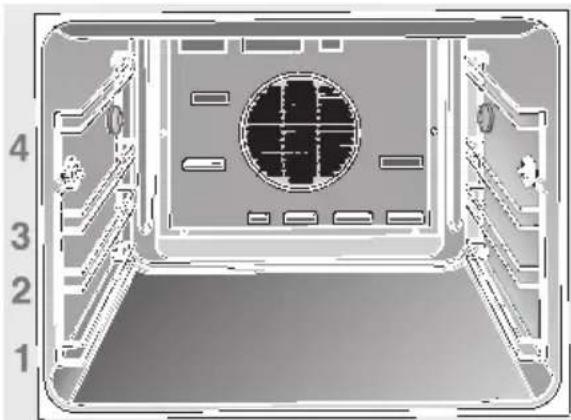
Slide-in levels
☐ Your oven features 4 slide-in levels. The slide-in levels are counted from bottom to top. The numbers are marked in the oven.
When using hot-air baking or roasting, do not use slide-in level »2«, in order not to block air circulation.
natural_image
Technical diagram of a mechanical or electronic component with numbered reference lines (1–4), no readable text or symbols present.Before Using Your Appliance for the First Time
Time of day
Before you use your appliance for the first time, it is necessary to set the current time on the electronic timer.
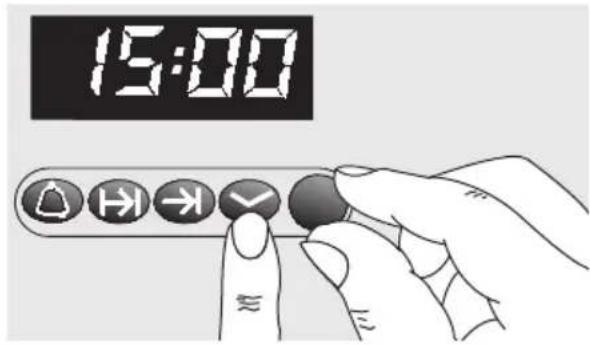
☐ After connecting to the mains, or after a power failure, the display 0:00 will blink.
Setting the time:
Press the ☑ button and set the current time with the rotary knob (e.g. 15:00).
Note: The time cannot be set if an automatic function is active (see Electronic clock for cancelling automatic function).
Preliminary cleaning:
- Clean the appliance exterior with a soft moistened cloth.
- Clean the oven and the accessories with a hot detergent solution.
Initial burn-in
- Heat the empty oven for approx.
30 minutes.
Select top and bottom heat at a setting of 240^ C.
During the initial burn-in phase, please open the kitchen windows to dissipate unpleasant odours.
Electronic clock
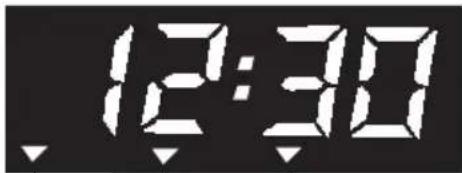
Function indicator
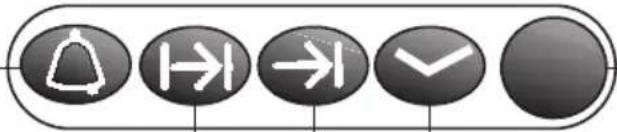
Minute timer
ON time
OFF time
natural_image
Five black circular buttons with white directional and flow icons (bell, hand, right, down, check) arranged horizontally on a white background.Rotary knob
Time
☐ The electronic clock can be operated with one hand; after pressing the button, set the time with the rotary knob. Adjustments can be made for as long as the display flashes (4 seconds).
Setting the time:
See section "Before using your appliance for the first time".
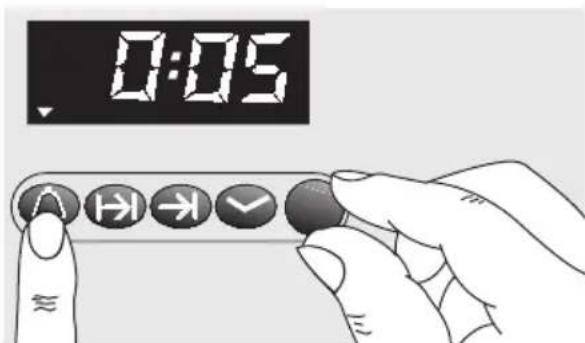
Minute timer:
- Press the ⏻ button and set the cooking time (e.g. 5 minutes). When the timer switches on, the remaining time is displayed.
- If you want to display the current time, press the ✅ button.
- When the time has elapsed, a signal is emitted and the arrow display flashes. To stop the signal, press the △ button.
Setting the timer:
Automatic timer
☐ You can switch the oven on and off via the electronic clock.
Automatic switch off:
☐ If you wish to bake or roast food immediately, it is only necessary to set the ON time.
- Select the heating system and the oven temperature.
- Press the ➕ button and set the ON time with the rotary knob (e.g. 1 hour and 30 minutes).
When the ON time has been set, the current time is displayed.
The ▼ displayed above the ⏻ button indicates automatic mode.
- When the time has elapsed (e.g. 1 hour and 30 minutes), a signal is emitted and the ▼ flashes. The oven is automatically switched off. To stop the signal, press the ⏻ button.
- Switch the oven off.
- To end automatic mode, press the ➕ button again.
Setting the ON time:
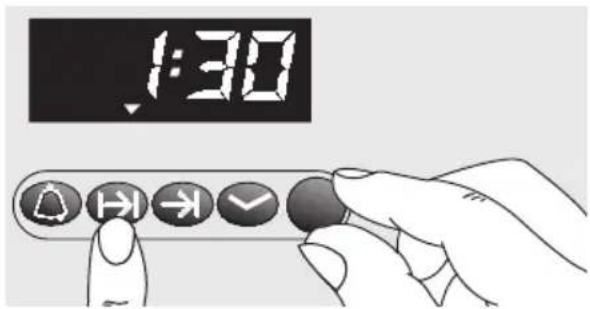
Electronic clock
Automatic switch on and switch off:
☐ If the food is to be baked or roasted later on, both the ON time and OFF time must be set.
- Select the heating system and the oven temperature. When the settings have been made, the current time is displayed.
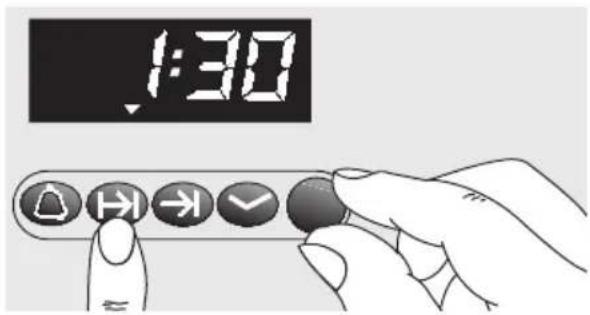
- Press the ➕ button and set the ON time with the rotary knob (e.g. 1 hour and 30 minutes).
- Press the ➞ button and set the OFF time with the rotary knob. The ▼ displayed above the ➞ button indicates automatic mode (e.g. 12:30).
- The oven is automatically switched on and off at the preset times (e.g. 11:00 and 12:30).
- When the time has expired, a signal is emitted and the ▼ flashes. To stop the signal, press the → button.
- Switch the oven off.
- To end automatic mode, press the → button.
Checking, correcting and cancelling settings:
- To check your settings, press the or button.
- If required, correct the settings with the rotary knob.
- If you want to cancel your settings, turn the set time back to 0:00 and switch the oven off.
Setting the ON time:
Setting the OFF time:
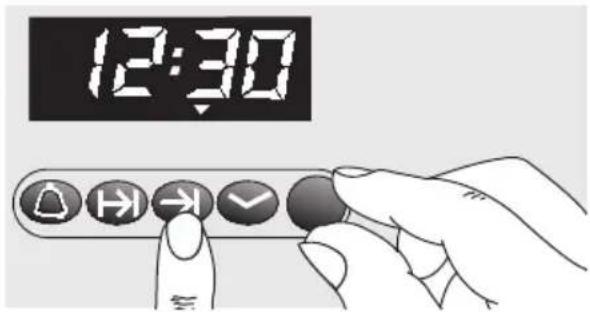
Electronic clock
Special functions
Masking out the display:
-
Press the ☑ button for 4 seconds. The display then goes blank and the time continues running in the background.
-
To switch on the display, briefly press the ☑ button.
Dimming the display:
☐ Between 22.00 and 6.00 the display is automatically dimmed.
Note:
☐ The automatic timer is best used with dishes which require little attention.
☐ The minute timer and OFF time can be pre-programmed up to a max. 24 hours.
☐ The settings can be displayed at any time by pressing the relevant button.
☐ To cancel the preset time:
Press the ⏻ button and reset the time to 0:00.
Top and bottom heat

(Conventional heating system)
The food being baked or roasted is exposed to heat radiation from heating elements located at the top and bottom of the oven cavity.
Baking and roasting is possible on one slide-in level only.
Advantages:
- B aking of cake with moist filling, pizza, quiche
- b r ead baking
Hot-air circulation

A fan system located in the rear oven wall circulates the hot air in the oven, achieving an especially effective heat transfer to the food being baked or roasted.
Advantages:
– low soiling of oven interior
– simultaneous baking and roasting on several oven levels is possible
– shorter preheating times
- low oven temperatures
- gentle defrosting
Surface grilling

The food being prepared is exposed to heat radiation from the heating element at the top of the oven cavity.
Advantages:
- Particularly effective with flat, small cuts of meat, i.e., steaks, sausages, fish, vegetables and toast.
Combination hot-air/surface grilling

With combination hot-air/surface grilling, the air circulating fan and the grilling radiators are activated in alternation.
The heat generated by the grilling radiator is evenly distributed in the oven cavity.
Advantages:
- Particularly effective with poultry and larger cuts of meat.
Bottom heat

With this setting, only the heating element at the bottom of the oven cavity is activated.
Advantages:
- Particularly useful with dishes and baked goods that require a distinctive bottom crust or browning.
⚠️ Use just before the end of the baking or roasting time.
Switching the Oven ON and OFF
Before switching on your oven, you should decide which heating system you wish to use.
Switching the oven ON:
- Use the function selector to determine the desired system.
- Set the temperature control knob to the desired temperature.
☐ The selected temperature will be controlled automatically.
☐ The oven temperature control lamp illuminates when the oven is first switched on, and extinguishes when the required temperature has been reached.
Switching the oven OFF:
☐ To switch the oven OFF, turn both the temperature selector and function selector to the »0« position.
Note:
☐ The appliance features a cooling fan which runs until the oven has cooled down.
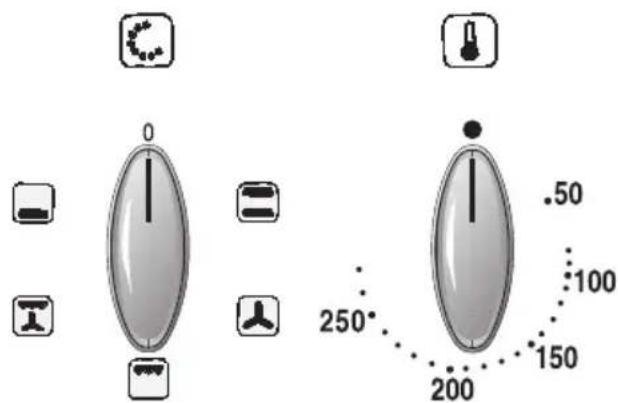
Function selector Temperature selector
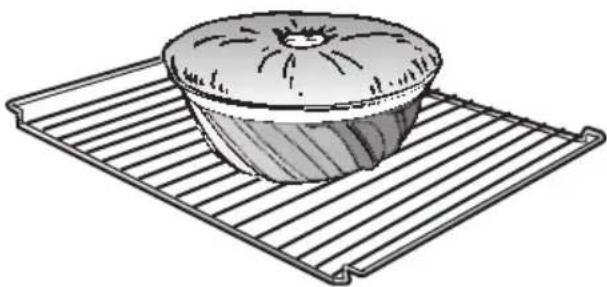
Using baking tins
□ Always place baking tins in the centre of the baking grill.
☐ We recommend dark metallic baking tins.
Using tinplate baking tins:
Hot air Shelf position 3
☐Top/bottom heat Shelf position 1
Top/bottom heat:
☐ If the cake bottom gets too dark:
Check the slide-in level. Shorten the baking time, and possibly use a lower baking temperature.
☐ If the cake bottom stays too light:
Check the slide-in level. Increase the baking time, select a lower temperature, or use a dark metal baking tin.
Hot-air circulation: 🏠
☐ Do not place baking forms or high cakes too close to the rear oven wall.
Using baking sheets
☐ The slanted (handle) end of the baking sheet must always face the oven door.
□ Always fully insert baking sheets into the oven.
☐ Use only original baking sheets.
Notes:
☐ You can influence the degree of browning by changing the temperature setting.
☐ If a cake collapses after removing it from the oven, use less liquid on your next attempt, consider using a longer baking time, or use a slightly lower temperature setting.
natural_image
Illustration of a baked pie on a metal rack (no text or symbols)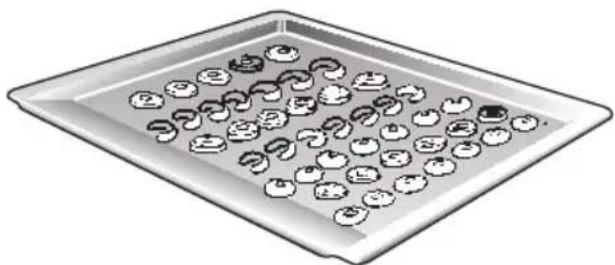
natural_image
Illustration of a tray with apples and food items, no text or symbols presentRoasting with hot-air circulation 🙏 or with top/bottom heat 📞
Notes:
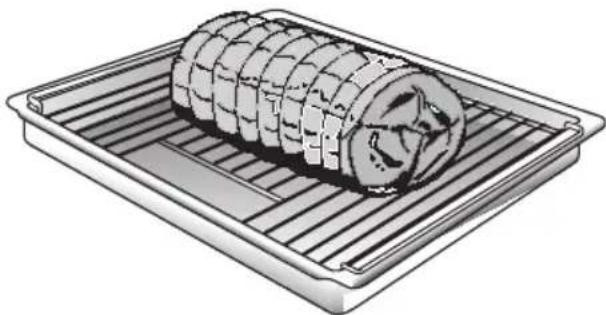
☐ Place the grill into the universal baking pan and slide them together into the same slide-in level.
□ Meat can be roasted in the oven in a particularly economical fashion if the weight of the cut exceeds 750 grams.
☐ Roasting in an uncovered pot: Rinse the universal baking pan and/or the roaster with water, and place the meat into it.
☐ With fat meat and poultry, pour 125 to 250 ml of water (to suit the size and kind of roast) into the universal pan. At your discretion, baste lean meat with fat, or cover it with bacon strips.
☐ The roast drippings collecting in the universal pan make a tasty gravy. Dissolve the drippings with hot water, bring to a boil, thicken with corn starch, season to taste and, if required, pass it through a strainer.
☐ No preheating is required. Save energy by putting the roast into the oven while it is still cold.
natural_image
Illustration of a rolled-up food item on a rectangular plate (no text or symbols)☐ Roasting in a covered pot: Place the meat into the roasting pot (or Dutch oven), cover it with a matching lid, and place it on the grill in the oven. We recommend that beef roast be prepared in a covered roasting pot.
Cooking tips:
☐ For roasting, use only cookware with oven-proof handles.
☐ Prepare large roast directly in the universal pan, without using the grill.
☐ Smaller cuts of roast can be roasted on aluminium foil. To do so, bend the edges of the foil upward, as if to form a dish, and place it on the grill.
☐ After the end of the selected roasting time and with the oven switched OFF, leave the roast in the closed oven for approx. 10 minutes.
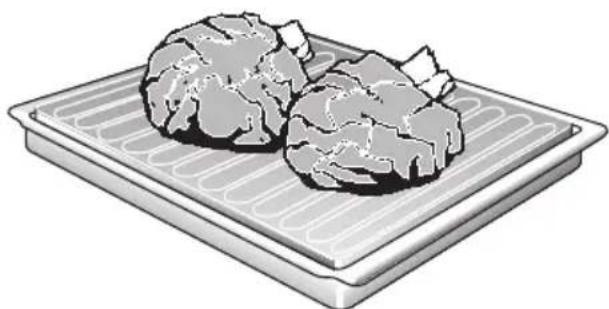
Roasting on the roasting sheet
(Optional accessory available from your dealer.)
With hot-air 📁 for large, fatty roasts.
☐ Place the roasting sheet into the universal pan. The roasting sheet prevents soiling of the oven.
☐ Grease and juice drippings from the roast are collected in the universal pan.
☐ To render your roast more crispy when using the roasting sheet, you may wish to set a slightly higher temperature than indicated in the roasting table.
natural_image
Illustration of two meatballs on a tray (no text or symbols)Grilling
! Exercise CAUTION when grilling. Always keep children at a safe distance.
Notes on grilling:
□ Always close the oven door when grilling.
☐ The grilling temperatures are variable.
□ Always use the grill and the universal pan.
□ Always place food to be grilled in the centre of the wire grill.
☐ If the grilling radiator (heating element) switches OFF automatically, the overheating protection was activated. The radiator will be reactivated after a short period of time.
Place the grill into the universal baking pan and slide them together into the same slide-in level.
Combination hot-air/surface grilling
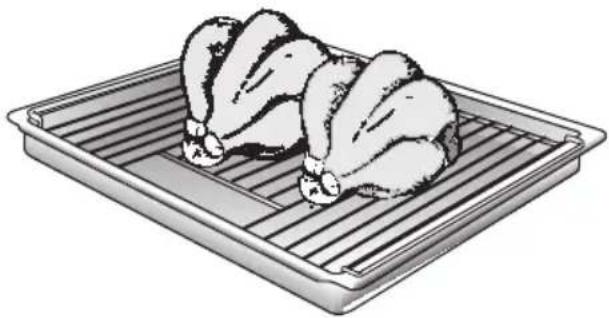
Use this method for particularly crispy poultry or roast (e.g., pork roast with rind).
☐ Use the grill and universal pan together. For roast, heat-proof utensils are preferred. Turn large roasts after about half of the total grilling time has elapsed.
☐ To prevent breakage after removing them from the oven, place glass utensils on a dry kitchen towel instead of cold or wet surfaces.
☐ Dependent on the type of food being prepared, combination hot-air and surface grilling can cause an increased degree of oven soiling. Therefore, to prevent burning-in of the soil, thorough cleaning of the oven is recommended after each use.
natural_image
Illustration of two whole chicken wings placed on a metal griddle (no text or symbols)☐ Whole poultry should be turned after approx. two-thirds of the cooking time has elapsed. With duck and goose, pierce the skin under the wings to allow excess fat to drain off.
☐ After the end of the selected roasting time and with the oven switched OFF, leave the roast in the closed oven for approx. 10 minutes.
Surface grilling

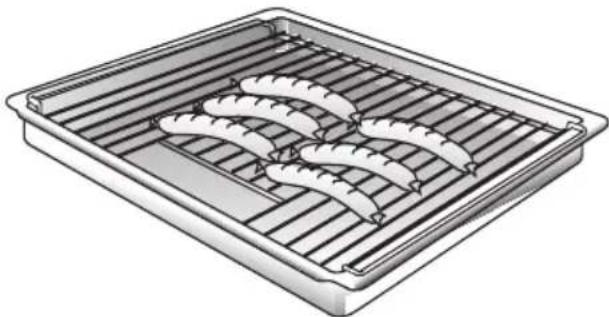
Used for smaller dishes having little height/thickness.
□ Always use the grill and universal pan together.
☐ Turn the food after approx. two-thirds of the grilling time has elapsed.
☐ At your discretion, lightly baste the grill and the food with oil.
natural_image
Illustration of a rectangular tray with three curved food items, possibly sausages or meatballs (no text or symbols)Cooking Tips and Helpful Hints
For baking:
☐ The bottom of a cake baked on a baking sheet stays too light.
☐ The bottom of a cake baked in a tin stays too light.
☐ The bottom of cake or cookies gets too dark.
☐ The cake gets too dry.
☐ The inside of the cake remains spongy or doughy, or meat stays raw in the centre.
☐ When baked with hot-air circulation, cake baked in round or square tins gets too dark at the rear.
☐ With very moist baked or roasted goods: For example, when making fruit pie or a water-basted roast, steam develops, condenses on the oven door, and may cause water to drip onto the floor or into the modular furniture enclosing the appliance.
Remove from the oven all baking sheets or universal baking pan currently not in use.
Use a grill and not a baking sheet to support the cake tin during baking.
Set cake or cookies into a higher set of slide-in rails.
Select a slightly higher oven temperature, and shorter baking time.
Use a slightly lower baking or roasting temperature.
Note: Baking or roasting times cannot be shortened by using higher temperatures (done on the outside, raw inside). Select a slightly longer baking or roasting time, allow cake dough more time to rise. Reduce the amount of liquid used in the dough.
Avoid blocking the air vents at the rear wall of the oven cavity with the cake tins.
Several brief periods of opening the oven door during baking (1 to 2 times, more frequently with longer roasting times) will aid in venting the water vapours from the oven, thereby greatly reducing water condensation.
To save energy:
☐ Preheat only if expressly required by the recipe.
☐ Dark baking tins have a higher degree of heat absorption.
☐ Residual heat: In the case of longer baking times, you can switch off the oven 5 – 10 minutes before the full baking time has elapsed.
Defrosting and cooking using the hot-air system

Important heating system information:
☐ For defrosting and cooking of frozen or deep-frozen foods, use only the hot-air heating system.
□ With all deep-frozen foods, follow the food processing company's instructions on the package.
☐ As a rule, defrosted frozen or deep-frozen foods (especially meats) require less cooking time than fresh products, since freezing has a pre-cooking effect.
☐ If frozen meat is placed in the oven, the defrosting time must be added to the required cooking time.
□ Always defrost deep-frozen poultry before cooking because the giblets must be removed.
☐ For cooking deep-frozen fish, use the same temperatures as for fresh fish.
☐ Deep-frozen ready-to-eat meals in aluminium dishes may be placed into the oven several at a time.
Standard defrosting of various foods:
Slide-in levels:
With 1 baking sheet: Slide-in level 3
With 2 baking sheets: Slide-in levels 1 and 3
☐ All stated times are approximate guidelines that vary with the shape and volume of deep-frozen products.
☐ Raw deep-frozen products or foods from a freezer always defrost at 50^ C. Higher defrosting temperatures may cause the food to dry out.
☐ Defrost deep-frozen meals packed in aluminium foil or closed aluminium containers at a setting of 130 – 140°C.
☐ Defrost and warm up deep-frozen baked goods at 100 – 140°C. Brush bread, rolls or yeast pastry lightly with water to make the crust more appealing.
☐ Defrost dry deep-frozen yeast cakes at 160 – 170°C for 20 – 30 minutes.
☐ Defrost moist deep-frozen yeast cakes (with fruit topping) at 160 – 170°C for 30 – 50 minutes after wrapping in aluminium foil to prevent cake from drying out.
☐ Defrost and toast deep-frozen toast (with topping) at 160 – 170°C for about 20 minutes.
Frozen pizza:
Please follow the manufacturers' instructions.
Cleaning and Care
Important cleaning basics:
☐ For cleaning, do not use abrasives, no corrosive cleaners, and no sharp objects.
☐ Do not scratch off burnt-in food residues, but soak them off with a moist cloth and dishwashing detergent.
☐ Special cleaners, such as oven cleaning spray, must not be used on aluminium or plastic parts.
Stainless steel front:
☐ When using commercially available stainless steel cleaning agents, the lettering may become damaged.
☐ Do not use scouring sponges.
☐ Use commercially available detergents applied to a soft, moistened cloth or a chamois.
Enamel and glass:
☐ Use hot detergent suds for cleaning.
☐ For cleaning the mating surface of the oven door at the front of the oven, the door should be removed.
Oven interior:
☐ Clean the oven after each use, especially after roasting or grilling. Food remnants burn in when the oven is reheated.
The baked in remnants are very difficult to remove once burnt in.
☐ You can reduce the degree of soiling by frequent cleaning using the hot-air system.
⚠ Do not clean the warm oven with any of the cleaning products specifically designed for this purpose.
☐ When baking very moist cake, use the universal baking pan.
☐ For roasting, use the appropriate utensils (Dutch oven).
☐ Clean the oven before soiling becomes too heavy. Wash out the oven cavity with hot detergent suds.
☐ Leave the door open until the interior has dried.
Oven door pane:
☐ The temperature of the pane inside the oven door is reduced by a heat-reflecting coating.
☐ The reduced temperature ensures that visibility through the oven door window is not impaired.
☐ When the oven door is open, this coating may have a bright appearance. This is quite normal and does not indicate a quality defect.
Cleaning and Care
Manual cleaning steps:
Note: To make the manual cleaning steps following the automatic oven cleaning function more convenient, the appliance features the following options:
Removing the oven door:
- Fully open the oven door.
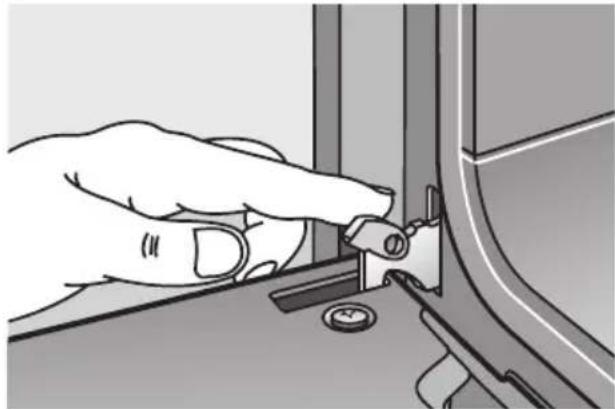
- Move the catch levers on the right and left-hand sides to the fully open position.
- Placing the door at an upward angle toward you, grasp the door with both hands and lift it out of the hinges toward you.
Hanging the oven door:
- Set both hinges into their respective receptacles on the left and right, and swing the oven door downward.
- Close the catch levers on the left and right.
- Close the oven door.
Switch On the oven light:
☐ Set the function selector to a random position.
Removing the suspend grids:
- On both left and right sides, remove two milled screws each.
- Carefully remove the suspended grids.
natural_image
Hand turning a component into a mechanical bracket (no text or symbols visible)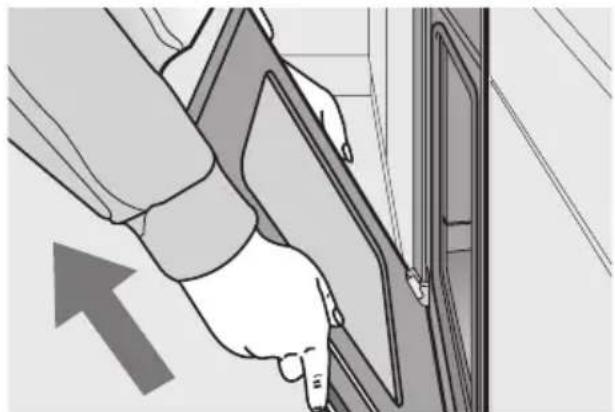
natural_image
Illustration of a hand inserting a cable into a door panel, with an arrow indicating direction (no text or symbols)
Service and Repair Information
In the event of problems or repairs that you cannot solve or perform yourself, our customer service will be happy to help.
Check the customer service directory for a customer service facility in your area.
Caution: Calling the customer service because of an operator error can be very costly! In the event of a customer service request, please have the following information handy:
E-Number FD
You can find this information on the appliance's nameplate. The nameplate is located on the appliance, behind the oven door, on the left bottom edge of the oven.
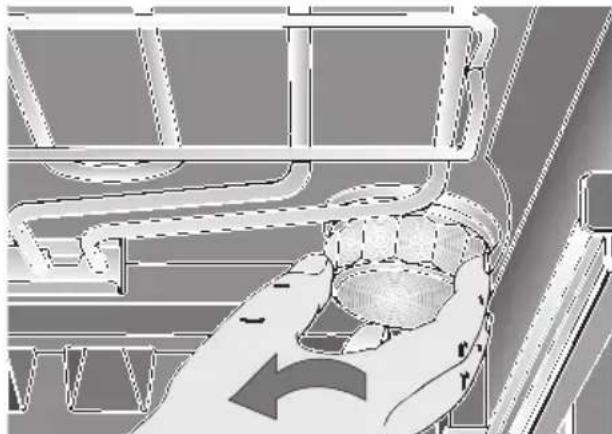
Replacing the oven light:
Caution: Unplug the appliance or remove the fuse!
- To prevent damage, place a dish towel into the cold oven.
- Unscrew the lamp cover by turning it counter-clockwise.
-
Replace the lamp.
-
Type: Incandescent bulb E 14, 220 - 240 V, 40 W, heat-resistant to 300°C.
- You may obtain this bulb from your customer service or from your appliance dealer.
Replacing the oven door seal:
- Remove the defective oven door seal by simply unhooking it.
You may obtain the new oven door seal from your customer service.
natural_image
Diagram of a hand holding a container with curved pipes and a directional arrow, no text or symbols present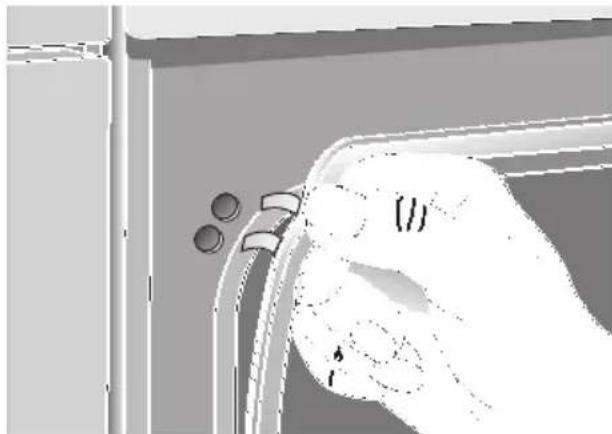
natural_image
Illustration of a hand holding a tool near a window with two circular components, no text or symbols presentTrouble-shooting Guide
Calling the customer service is not always really necessary. In some cases, you can remedy the situation yourself. The following table may contain some helpful tips.
Important general safety guidelines:
Service or repair work on the electronic components may only be performed by a qualified expert. Without exception, prior to starting such repairs, the appliance must be disconnected from the mains. This may be accomplished by tripping the automatic fuse or by removing the fuse from the fuse box that controls your flat or apartment.
| Problem Possible cause | Remedy | |
| ... if there is a general failure of all electrical functions, i.e., the control lamps have suddenly ceased to function. | Defective fuse. Check teh fuse in the fuse box, and replace if required. | |
| ... if liquids or thin viscous dough are distributed at a visibly uneven thickness. | The appliance has not been placed or installed plumb-and-level. | Level the appliance using the level-ling feet, or check the installation. |
| ... if the oven and the left front hot-plate suddenly stop functioning. | The electronic clock is set to an automatic timing cycle. | Set electronic clock to operation without automatic timer:1. Reset ON time ➡ to 0:00.2. Press the ➡ button. |
| ... if the oven and the left front hot-plate suddenly stop functioning and the electronic clock flashes 0:00? | The power supply was briefly inter-rupted. | Reset the time of day. |
| ... if electronically controlled func-tions fail? | Energy pulses (e.g. lightning flash). Reset the relevant functions. | |
| ... if the oven cleaning control lamp fails to illuminate after the function has been activated? | Temperature inside oven cavity is still too high, i.e., after prolonged use of the hotplates.Defective control lamp. | Prior to using the oven cleaning fun-ction, the oven must be allowed to cool completely.Replacement only by an authorised expert. |
| ... if enamelled slide-in parts have dull, light blotches? | Normal occurrence due to dripping meat juices. | Not possible. |
| ... if after prolonged use, the oven window panes are soiled from the inside. | This kind of soiling is normal.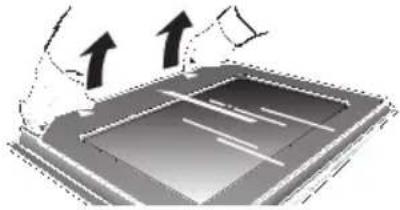 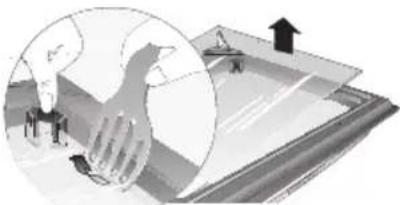 | Detach the oven door and lay front side down on a soft, clean base.Grip the door glass near the hinges, pull up and remove.Doors with 3 panels:Disengage inner door glass at the corner pieces and lift it up using, for example, a pair of frying tongs made of plastic or wood.Installing the cleaned glass:Insert the inner door glass and lock into position.Attach the door glass and lock into position by pressing the glass near the hinges. |
Sommaire
Page
Page
natural_image
Hand pressing a button on a circular component with an arrow indicating left motion (no text or symbols)natural_image
Pure diagram of a central oval shape with vertical lines and surrounding icons (no text or symbols)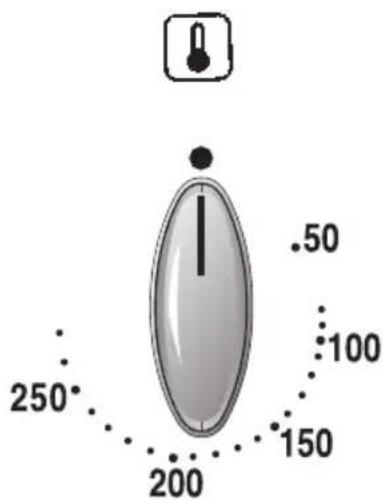
Positions:
natural_image
Technical diagram of a mechanical or electronic component with numbered reference lines (1-4), showing internal structure and no readable text or symbols.natural_image
Five circular icons with white directional arrows and a bell symbol, arranged horizontally (no text or labels)Bouton rotatif
Heure actuelle
natural_image
Illustration of a baked pie on a metal rack (no text or symbols)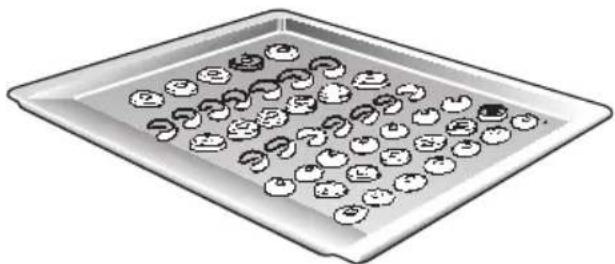
natural_image
Illustration of a tray with multiple small food items, some arranged in rows (no text or symbols visible)Rôtissage
natural_image
Illustration of a rolled food item on a metal tray (no text or symbols)natural_image
Illustration of two meatballs on a tray with grating lines (no text or symbols)Grillades
natural_image
Illustration of two whole chicken wings placed on a metal griddle (no text or symbols)natural_image
Illustration of a rectangular tray with three curved, swirled food items inside (no text or symbols)Conseils et astuces
natural_image
Hand turning a component into a mechanical bracket (no text or symbols visible)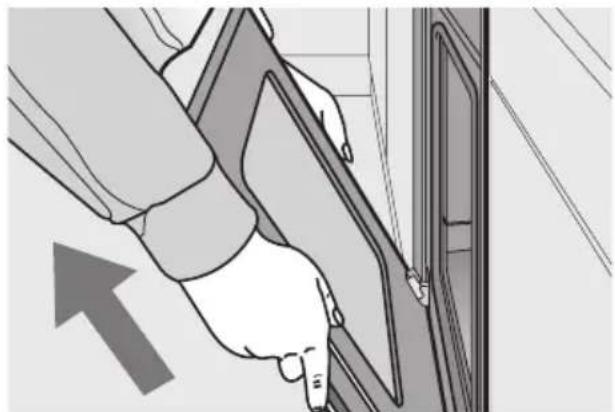
natural_image
Illustration of a hand inserting a cable into a door panel, with an arrow indicating direction (no text or symbols)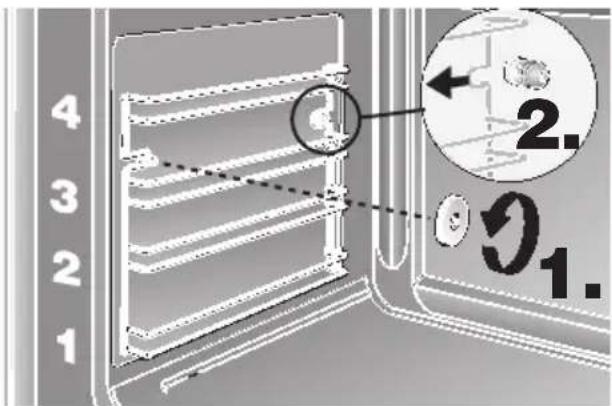
Attention: mettre le four hors tension.
natural_image
Diagram of a hand holding a small object inside a vehicle or industrial container, with no visible text or symbols.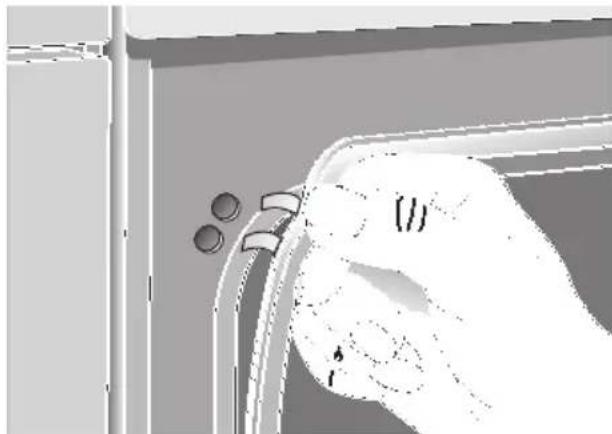
natural_image
Illustration of a hand holding a small object near a window frame, with no visible text or symbols.natural_image
Hand pressing a button on a circular component with an arrow indicating left motion (no text or symbols)natural_image
Pure electrical circuit lines without any symbols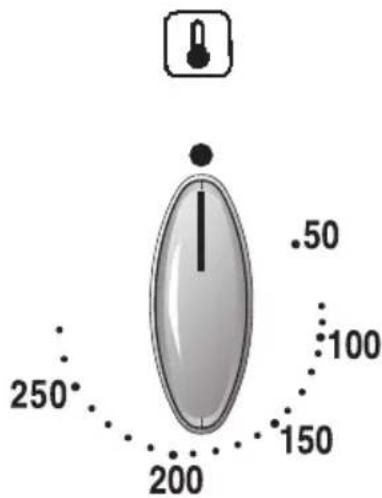
Standen:
natural_image
Interior view of a server room with numbered floor indicators (1-4) and a central circular vent (no text or symbols on the diagram itself)natural_image
Five black circular buttons with white directional and check symbols, no text or numbers presentDraaiknop,
Tijd van de dag
natural_image
Illustration of a baked pie on a metal rack (no text or symbols)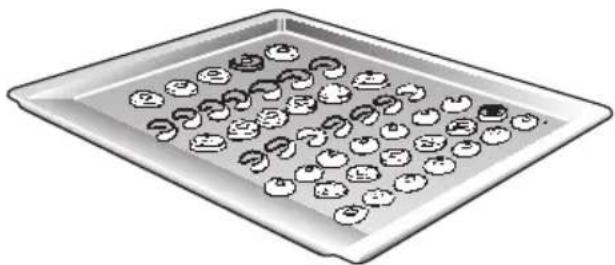
natural_image
Illustration of a tray with apples and food items, no text or symbols present
Grillen
natural_image
Illustration of two chicken wings placed on a metal tray (no text or symbols)natural_image
Illustration of a rectangular tray with three curved food items, no text or symbols presentTips en trucs
Voor bakken:
natural_image
Hand turning a component into a mechanical bracket (no text or symbols visible)
natural_image
Illustration of a hand inserting a cable into a door panel, with an arrow indicating direction (no text or symbols)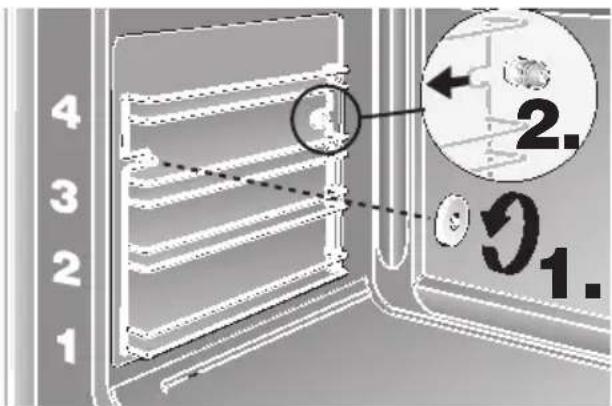
natural_image
Diagram of a hand holding a container with an arrow indicating direction (no text or symbols present)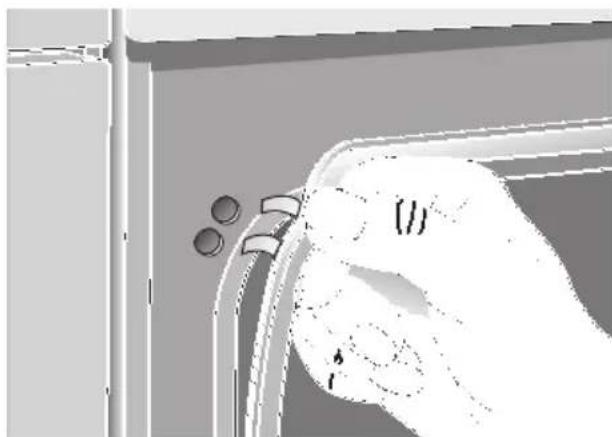
natural_image
Illustration of a hand holding a small object with circular elements, no text or symbols presentnatural_image
Hand pressing a button on a circular mechanical component with an arrow indicating left motion (no text or symbols)natural_image
Pure diagram of a central oval shape with six surrounding icons (no text or symbols)Posizioni:
50–275 Temperatura in °C
Accessori
natural_image
Top-down technical diagram of a device casing with internal components and numbered reference lines (1–4), no readable text or symbols.natural_image
Illustration of a baked pie on a metal rack (no text or symbols)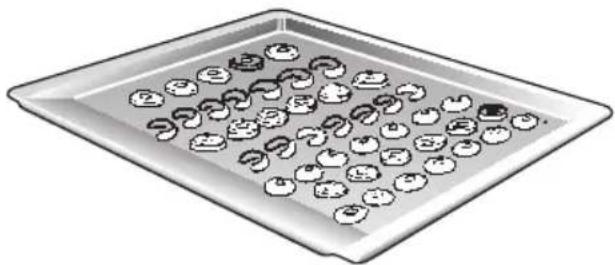
natural_image
Illustration of a tray with multiple apple-shaped items, some containing handwritten or printed symbols (no readable text)natural_image
Illustration of a rolled food item on a metal tray (no text or symbols)natural_image
Illustration of two meatballs on a tray (no text or symbols)Cottura al grill
natural_image
Illustration of two whole chicken wings placed on a metal griddle (no text or symbols)natural_image
Illustration of a rectangular tray with three curved, ribbed meat-like objects inside (no text or symbols)Consigli e astuzie
Per informare:
natural_image
Hand turning a mechanical component into a bracket (no text or symbols visible)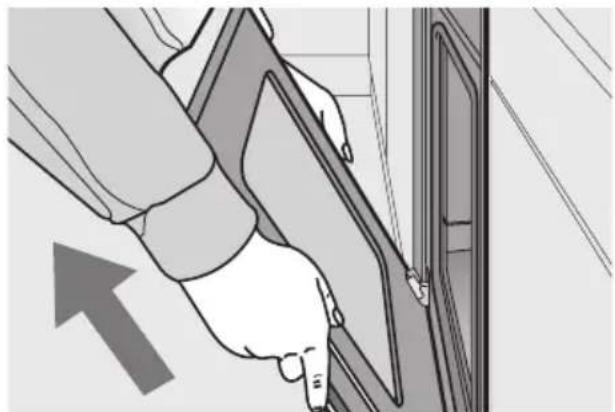
natural_image
Illustration of a hand inserting a cable into a door panel, with an arrow indicating direction (no text or symbols)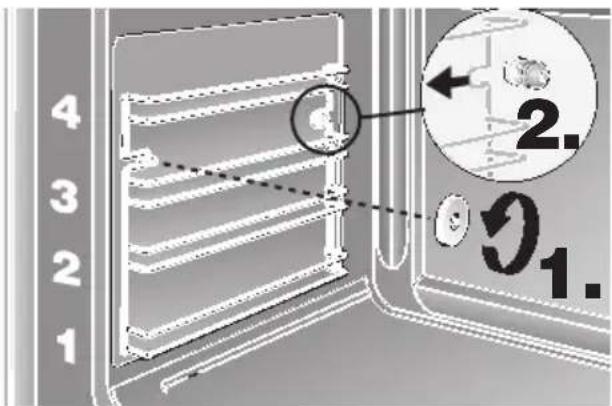
natural_image
Illustration of a hand holding a small object inside a vehicle or industrial container, with no visible text or symbols.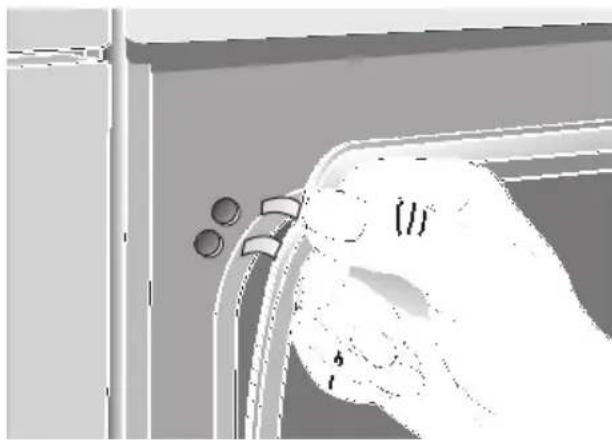
natural_image
Illustration of a hand holding a small object with two circular elements, next to a window frame (no text or symbols)natural_image
Hand pressing a button on a circular dial (no text or symbols visible)natural_image
Pure diagram of a central oval shape with surrounding icons (no text or symbols)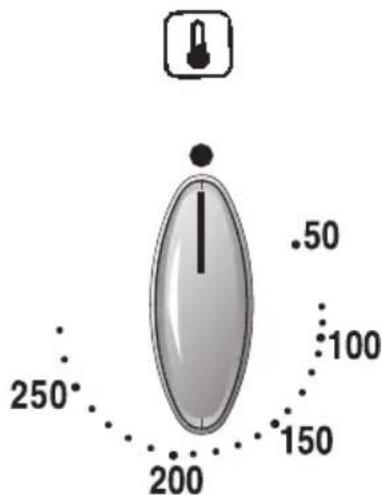
Posiciones:
natural_image
Top-down architectural or mechanical diagram showing a central circular component with surrounding structural elements (no text or symbols)natural_image
Illustration of a baked pie on a cooling rack (no text or symbols)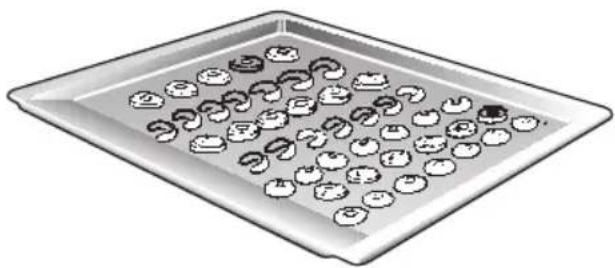
natural_image
Illustration of a tray with multiple small food items, possibly apples or cookies, arranged in rows (no text or symbols visible)natural_image
Illustration of a rolled-up food item on a rectangular plate (no text or symbols)natural_image
Illustration of two fried meat pieces on a rectangular plate (no text or symbols)Asado al grill
natural_image
Illustration of two fried chicken wings placed on a metal griddle (no text or symbols)natural_image
Illustration of a rectangular tray with three curved food items, possibly sausages or meatballs (no text or symbols)natural_image
Hand turning a mechanical component into a bracket (no text or symbols visible)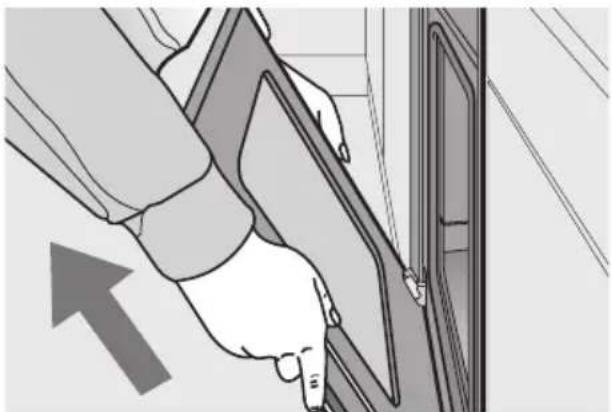
natural_image
Illustration of a hand inserting a cable into a door panel, with an arrow indicating direction (no text or symbols)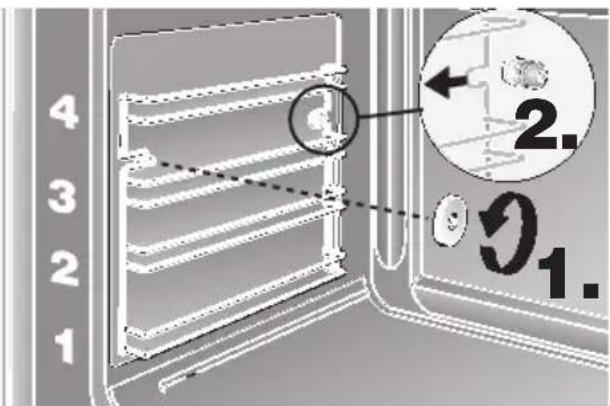
natural_image
Architectural floor plan showing room layouts and a hand holding a circular object (no text or labels)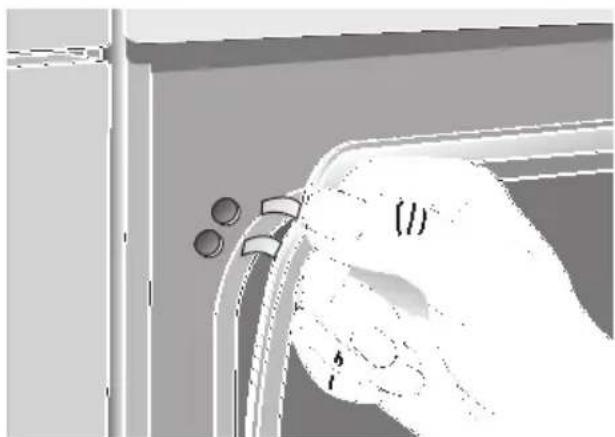
natural_image
Hand holding a small object with two circular holes, no visible text or symbolsnatural_image
Hand pressing a button on a circular device with an arrow indicating left motion (no text or symbols)natural_image
Pure diagram of a central oval shape with vertical lines, surrounded by six small icons (no text or symbols)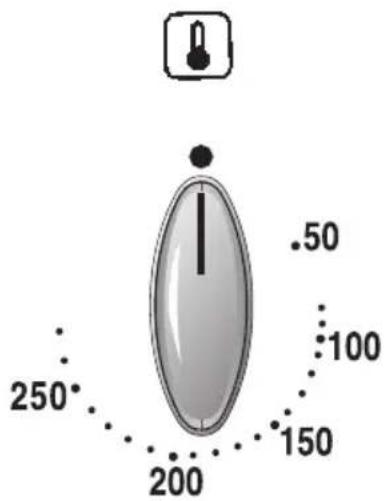
Θέσεις/Επιλογές:
natural_image
Technical diagram of a mechanical or electronic component with numbered reference lines (1–4), no readable text or symbols present.natural_image
Five black circular buttons with white directional and check symbols, no text or numbers presentnatural_image
Illustration of a baked pie on a metal rack (no text or symbols)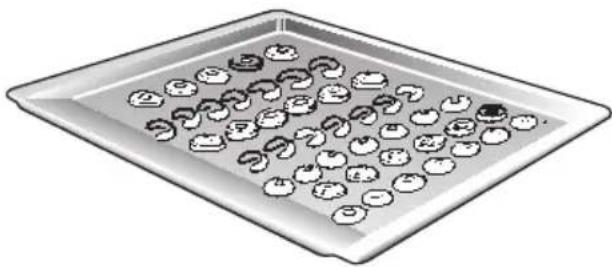
natural_image
Illustration of a tray with multiple small food items, some resembling apples or vegetables, arranged in rows (no text or symbols visible)natural_image
Illustration of a rolled food item on a metal tray (no text or symbols)natural_image
Illustration of two meatballs on a tray (no text or symbols)Γκριλ
natural_image
Illustration of two chicken wings placed on a metal tray (no text or symbols)natural_image
Illustration of a rectangular baking tray with three curved food items, no text or symbols present.natural_image
Hand turning a mechanical component into a curved panel (no text or symbols visible)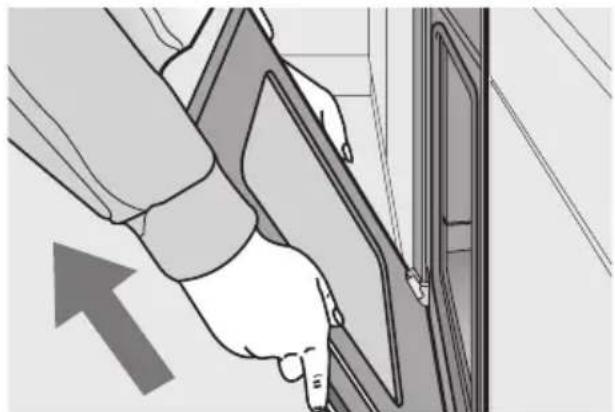
natural_image
Illustration of a hand inserting a cable into a door panel, with an arrow indicating direction (no text or symbols)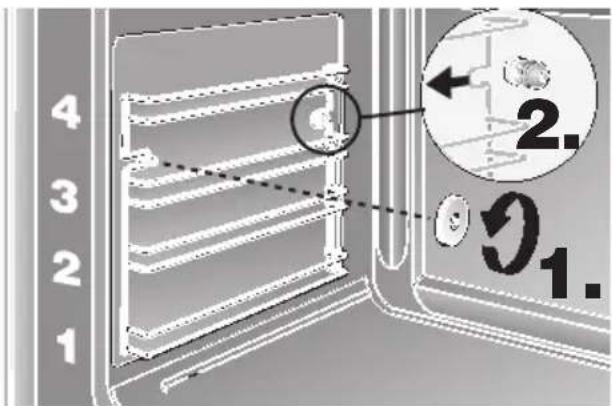
natural_image
Diagram of a hand pressing down on a mechanical component with directional arrows indicating motion (no text or symbols)