
Fidelity 142 - Telephone TOPCOM - Free user manual and instructions
Find the device manual for free Fidelity 142 TOPCOM in PDF.



| Brand | Topcom |
| Model | Fidelity 142 |
| Product type | Corded landline phone |
| Power supply | 1 non-rechargeable 9V battery |
| Dialing | DTMF (tones) |
| Display | Backlit LCD screen with date, time, name and number |
| Direct memories | 8 keys (M1 to M7 and VIP), up to 20 digits and 13 characters per entry |
| Call list | Up to 30 entries with date and time |
| Caller ID | Yes (requires operator subscription) |
| Voicemail | Message indicator (depending on operator) |
| Last number redial | Last 5 dialed numbers |
| Mute function | Yes (microphone can be disabled during call) |
| Ringer | 3 types and 3 adjustable volume levels (can be turned off) |
| Automatic prefix | Yes (for private branch exchange) |
| Screen languages | Multiple languages available (selection via menu) |
| Operating temperature | +5 °C to +45 °C |
| Warranty | 24 months |
| Maintenance | Clean with a soft, dry cloth. Do not use abrasive products. |
| Safety | Do not change batteries while the phone line is connected. Protect from water and lightning. |
| Included accessories | Phone cord, handset, base |
Frequently Asked Questions - Fidelity 142 TOPCOM
User questions about Fidelity 142 TOPCOM
0 question about this device. Answer the ones you know or ask your own.
Ask a new question about this device
Download the instructions for your Telephone in PDF format for free! Find your manual Fidelity 142 - TOPCOM and take your electronic device back in hand. On this page are published all the documents necessary for the use of your device. Fidelity 142 by TOPCOM.
USER MANUAL Fidelity 142 TOPCOM
USER MANUAL • HANDLEIDING • MANUEL D'UTILISATEUR
1 INSTALLATION
- Put a battery in the battery compartment to activate the display:
- Open the battery compartment at the bottom of the unit.
- Insert 1 X 9V battery
- Close the battery compartment.
- Connect one end of the line cord to the telephone line wall socket and the other end to the bottom of the phone.
When the battery is removed, the memories and settings will be lost. Never change batteries when the telephone line is connected!
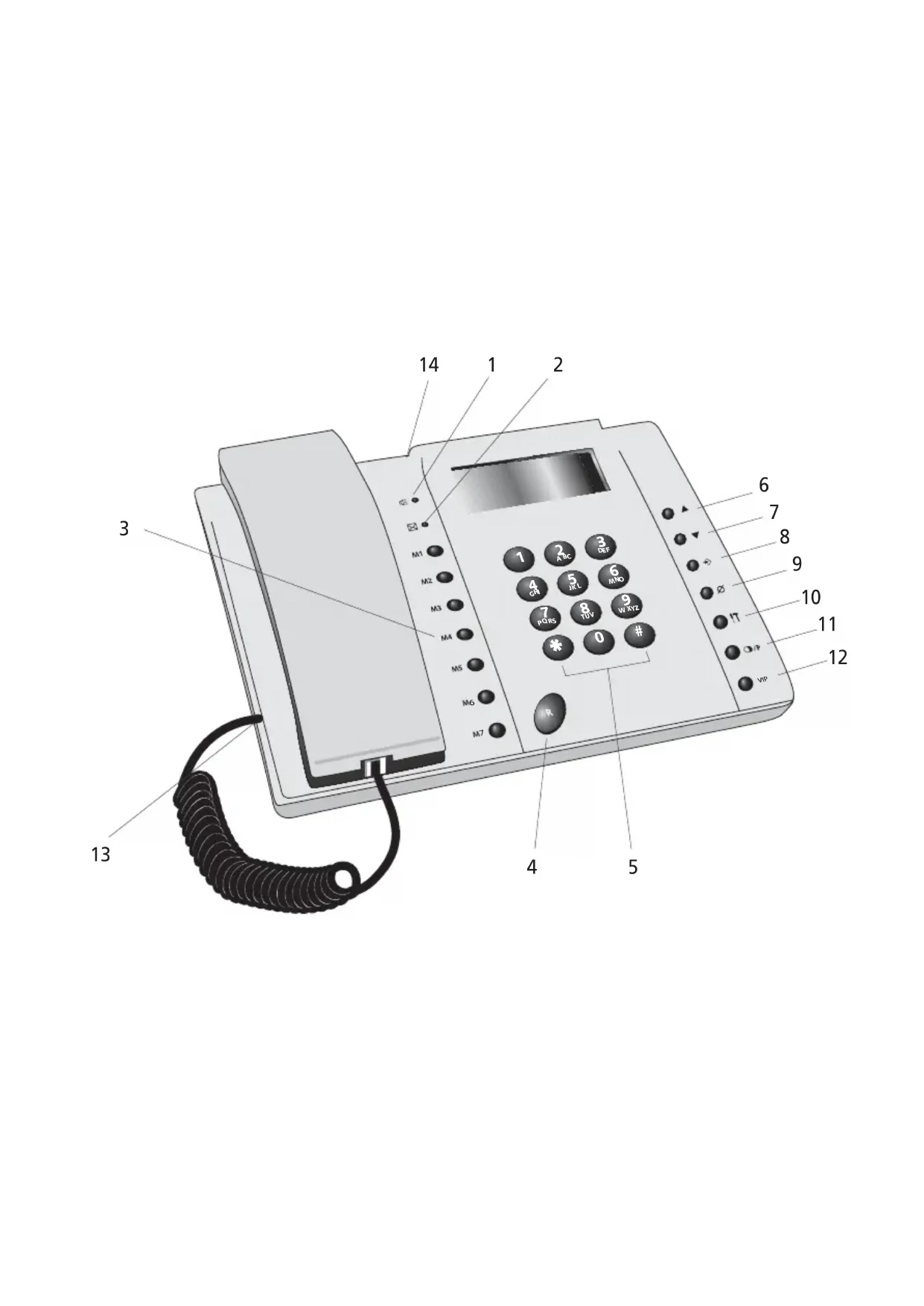
2 B UTTONS/LED
1 'In communication' indicator

2 ' New Calls' indicator
3 D irect Memory button M1-M7
4 F lash button R
5 A Iphanumerical keypad
6 Up button
7 Down button ▼
8 Program button
9 E r ase/Mute button
10 Menu Button IT
11 Redial / Pause button ☐/P
12 Direct Memory button VIP
13 Handset connection
14 Telephone line input
3 DISPLAY/LED
3.1 Standard display information
Display information Description
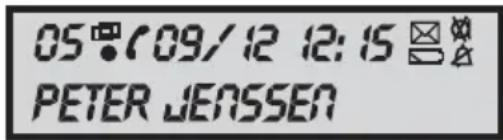
05 The number of the call in the Call list
- You received a new call - You received the call more than once - The handset is Off Hook
12:15 Time indication (24h format)
09/12 Date indication (day/month)
The battery is almost empty
You received new messages in the telephone network mailbox
PETER JENSSEN Caller's name
Ringer off Mute indicator
3.2 LED Indicators
LED Description
The handset is Off Hook Blinks once = new call received in the Call list. Blinks twice = new voice mail message received.
4 OPERATION
4.1 Setting the language of the display text
You can select the desired language as follows:
- Press the Menu button, the standard language is displayed.
- Use the Up or Down button to changethe language.
- Press the Program button → to confirm your setting or press the Erase button to exit the menu.
4.2 Setting the ringer type
3 different ringer types can be selected.
- Press the Menu button twice.
- Use the Up or Down button to select the desired ringer type.
Note: You cannot hear the ring melody when changing it.
- Press the Program button → to confirm your setting or press the Erase button to exit the menu.
4.3 Setting the volume level
3 different ringer volume levels can be selected.
- Press the Menu button three times. The ringer volume is displayed.
- Use the Up or Down button to select the desired ringer volume.
- Press the Program button → to confirm your setting or press the Erase button to exit the menu.
When 'X' is selected, the ringer is switched OFF. The Ringer Off icon is displayed.
4.4 Setting the Date and Time
When you have a subscription to the Caller ID service and your telephone provider sends the date and time together with the telephone number, the phone's clock will be set automatically.
It is also possible to set the clock manually:
- Press the Menu button four times, the clock is displayed and the day is blinking.
- Enter the day, the month and the time (24h format) by means of the Numerical keypad.
- Press the Program button → to confirm your setting or press the Erase button to exit the menu.
4.5. Setting the Dial Prefix
When you dial out a telephone number from the Call list, the programmed prefix will be added in front of the telephone number. This function is useful when you have a PABX where you have to dial a prefix to take the external line.
- Press the Menu button five times.
- Enter the Prefix by means of the Numerical Keypad.
- Press the Program button → to confirm your setting or press the Erase button to exit the menu.
5 M AKING A PHONE CALL
There are 2 ways to make a phone call:
-
Enter the telephone number. If needed, you can erase the last digits by pressing the Erase button. Pick up the handset. After 3 seconds, the phone number will be dialled automatically.
-
Pick up the receiver. Enter the telephone number.
Note: The call duration timer is shown on the 1e line of the display [mm:ss].
5.1 Last number redial
The Fidelity 140 saves the 5 last dialled telephone numbers in the memory with indication of the call duration, the date and the time.
Press the Redial button to scroll through the Redial memory.
Pick up the receiver. The selected number will be dialled automatically after 3 seconds.
Note: The Redial button can also be used as a Pause button while entering a telephone number! The letter 'P' appears on the display on the location where you have added a pause of 3 sec.
5.2 Deactivating the microphone (mute)
It is possible to deactivate the microphone and speaker during a conversation by pressing the Erase/Mute button. You can now talk freely without the caller hearing you. The mute icon appears on the display when the microphone is deactivated. Press the Erase/Mute button again if you want to resume your conversation.
6 CALLER ID
6.1 General information
When you have a subscription to the Caller ID service from you telephone provider, the caller's phone number will appear on the display. Depending on the telephone network, the caller's name will also be shown on the display. If your telephone company doesn't send the name, but you saved the telephone number with the name in a direct memory, the programmed name will be shown on the display (name tagging function).
During an incoming call, the following information can appear on the display:
NUM. UNKNOWN
You have a subscription to the Caller ID service but the caller's number is not available (for ex. international calls).
NUM. BLOCKED
You have a subscription to the Caller ID service but the caller's number is a private number.
LONG DISTANCE
You have a subscription to the Caller ID service but the caller's number is from a foreign country.
6.2 Call list
The Fidelity 140 has a Call List in which you can save at least 30 incoming telephone numbers with name. Every incoming number is saved in the Call List with indication of date and time.
In standby mode the number of new received calls is shown on the display.
6.2.1 Scrolling through the Call List
You can scroll through the Call list with the Up ▲ or Down button.
When you have reached the beginning/end of the list, “----” appears on the display. Every time a new call comes in, is shown on the display. When you have received the call more than once, is displayed.
6.2.2 Erasing numbers from the Call List
a) Erasing one number
- Select the call you wish to erase with the Up or Down button.
- Press the Erase button once. "CLEAR?" appears on the display.
- Press the Erase button once again to confirm or the Up or Down button to scroll through the rest of the Call List.
b) Erasing the entire Call List
- Enter the Call List, press and hold the Erase button until "CLEAR ALL?" appears on the display.
- Press the Erase button once again to confirm or use the Scroll switch to scroll through the rest of the Call List.
6.2.3 Calling a number from the Call List
- Select the desired telephone number with the Up or Down button.
- P ick up the handset, the number will be dialed automatically.
6.3 Voice mail
!!! This function only works if your telephone company sends the Voice Mail signals together with the Caller ID information !!!
When the Fidelity 140 has received a voice mail message, the Voice Mail symbol ☐ appears on the display. As soon as you have listened to the messages in the mailbox, the ☐ symbol disappears.
7 M E M ORY NUMBERS
You can program 8 Direct (M1-M7 and VIP) (number: max 20 digits, name: max. 13 characters).
7.1. Use of the alphanumerical keypad
Use the alphanumeric keypad to enter text. To select a letter, press the corresponding button. For ex. if you press numerical button '5', the first character (J) will be shown on the display. Press multiple times if you want to select another character under this button.
Press button '2' twice to select the letter 'B'. If you want to select 'A' as well as 'B', press
button '2' once to select 'A', wait for 2 seconds until the cursor has moved to the next location and press then button '2' twice to select 'B'.
Wrongly entered characters can be erased by pressing the Erase button ∅You can move the cursor by using the Scroll switch. The character in front of the cursor will be erased.
Available Characters
Press these buttons to get the following characters:
[1] Space 1.; ? !: - " ' ( )
[2] A B C 2
[3] D E F 3
[4] G H I 4
[5] J K L 5
[6] M N O 6
[7] P Q R S 7
[8] T U V 8
[9] W X Y Z 9
[0] 0 & / \$ % £
[ ]
[#]#
7.2 Programming Direct memory numbers
- Press the Program button in standby mode.
- Enter the desired telephone number
- Press the Program button to confirm.
- Enter the desired name.
- Press the Program button to confirm.
- Press the desired Direct Memory button (M1-M7 or VIP)
- Press the Program button to confirm.
Use the same instruction to change the Direct Memory number.
7.3 Saving a number from the Call List as a Direct Memory number
- Select the call you wish to erase with the Up or Down button..
- Press the Program button to confirm.
- Press the desired Direct Memory button (M1-M7 or VIP)
- Press the Program button to confirm.
7.4 Calling a Direct /Indirect Memory number
- Press the desired Direct Memory button (M1-M7 or VIP)
- P ick up the handset and the number will be dialled automatically.
7.5 Erasing a number or name from the Direct/Indirect Memory
- Press the desired Direct Memory button (M1-M7 or VIP)
- Press the Erase button once. "CLEAR?" appears on the display.
- Press the Erase button once again to confirm
8 WARRANTY
- This equipment comes with a 24-month warranty. The warranty will be honoured on presentation of the original bill or receipt, provided the date of purchase and the unit type are indicated.
- During the time of the warranty Topcom will repair free of charge any defects caused by material or manufacturing faults. Topcom will at its own discretion fulfil its warranty obligations by either repairing or exchanging the faulty equipment.
• Any warranty claims will be invalidated as a result of intervention by the buyer or unqualified third parties. - Damage caused by inexpert treatment or operation, and damage resulting from the use of non-original parts or accessories not recommended by Topcom is not covered by the warranty.
- The warranty does not cover damage caused by outside factors, such as lightning, water and fire, nor does it apply if the unit numbers on the equipment have been changed, removed or rendered illegible.
Note: Please do not forget to enclose your receipt if you return the equipment.
9 T ECHNICAL DATA
Dialling options: DTMF (tone)
Batteries:
1x9V
non-rechargeable
Ambient temperature: +5 °C to +45 °C
Permitted relative air humidity: 25 to 85 %
The CE symbol indicates that the unit complies with the essential requirements of the R&TTE directive.
1 INSTALLATIE
[7] P Q R S 7
[8] T U V 8
[9] W X Y Z 9
[0] 0 & / \$ % £
[∗] *
[#]#
NUM. UNKNOWN (numret ok nt)
10 Valikkopainike IT
Dialling options: DTMF (tone)
Batteries:
1x9V
non-rechargeable
Ambient temperature: +5 °C to +45 °C
Permitted relative air humidity: 25 to 85 %
This product is in compliance with the essential requirements and other relevant provisions of the R&TTE directive 1999/5/EC. The Declaration of conformity can be found on :
http://www.topcom.net/support/declarations/
visit our website
www.topcom.net



- 1 INSTALLATION
- 2 B UTTONS/LED
- 3 DISPLAY/LED
- 3.1 STANDARD DISPLAY INFORMATION
- DISPLAY INFORMATION DESCRIPTION
- 3.2 LED INDICATORS
- LED DESCRIPTION
- 4 OPERATION
- 4.1 SETTING THE LANGUAGE OF THE DISPLAY TEXT
- 4.2 SETTING THE RINGER TYPE
- 4.3 SETTING THE VOLUME LEVEL
- 4.4 SETTING THE DATE AND TIME
- SETTING THE DIAL PREFIX
- 5 M AKING A PHONE CALL
- 5.1 LAST NUMBER REDIAL
- 5.2 DEACTIVATING THE MICROPHONE (MUTE)
- 6 CALLER ID
- 6.1 GENERAL INFORMATION
- NUM. UNKNOWN
- NUM. BLOCKED
- LONG DISTANCE
- 6.2 CALL LIST
- 6.2.1 SCROLLING THROUGH THE CALL LIST
- 6.2.2 ERASING NUMBERS FROM THE CALL LIST
- 6.2.3 CALLING A NUMBER FROM THE CALL LIST
- 6.3 VOICE MAIL
- 7 M E M ORY NUMBERS
- USE OF THE ALPHANUMERICAL KEYPAD
- AVAILABLE CHARACTERS
- 7.2 PROGRAMMING DIRECT MEMORY NUMBERS
- 7.3 SAVING A NUMBER FROM THE CALL LIST AS A DIRECT MEMORY NUMBER
- 7.4 CALLING A DIRECT /INDIRECT MEMORY NUMBER
- 7.5 ERASING A NUMBER OR NAME FROM THE DIRECT/INDIRECT MEMORY
- 8 WARRANTY
- 9 T ECHNICAL DATA
- 1 INSTALLATIE
- NUM. UNKNOWN (NUMRET OK NT)
Brand : TOPCOM
Model : Fidelity 142
Category : Telephone