MDECTH1 - Telephone Marquant - Free user manual and instructions
Find the device manual for free MDECTH1 Marquant in PDF.


| Product type | DECT cordless phone |
| Brand | Marquant |
| Model | MDECTH1 |
| Technology | DECT |
| Number of handsets supported | Up to 5 handsets |
| Indoor range | Up to 50 meters |
| Outdoor range | Up to 300 meters |
| Base power supply | Mains adapter included |
| Handset power supply | 2 Ni-MH rechargeable batteries (AAA type) |
| Talk time | Up to 10 hours |
| Standby time | Up to 100 hours |
| Initial charging time | 20 hours |
| Display | Backlit LCD |
| Main functions | Phonebook, call list, intercom, call transfer, handsfree, mute, redial of last 5 numbers, paging |
| Phonebook capacity | 50 numbers |
| Caller ID display | CLIP (depending on operator subscription) |
| Display languages | 5 languages |
| Headset jack | 2.5 mm jack (3 poles) |
| Maintenance | Clean with a slightly damp or antistatic cloth. Do not use detergents. |
| Safety | Use only the provided adapter. Do not expose to water. Observe battery polarity. |
| Base dimensions (approx.) | 100 x 80 x 50 mm |
| Handset dimensions (approx.) | 150 x 50 x 25 mm |
| Handset weight (approx.) | 120 g (with batteries) |
Frequently Asked Questions - MDECTH1 Marquant
User questions about MDECTH1 Marquant
0 question about this device. Answer the ones you know or ask your own.
Ask a new question about this device
Download the instructions for your Telephone in PDF format for free! Find your manual MDECTH1 - Marquant and take your electronic device back in hand. On this page are published all the documents necessary for the use of your device. MDECTH1 by Marquant.
USER MANUAL MDECTH1 Marquant
natural_image
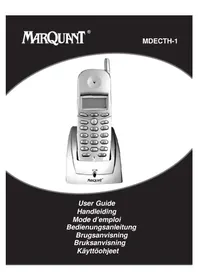
Black-and-white photo of a Marquint mobile phone with keypad and antenna (no visible text or symbols on main body)User Guide Handleiding Mode d'emploi Bedienungsanleitung Brugsanvisning Bruksanvisning Käyttöohjeet
MARQUANT® MDECTH-1
Safety Instructions
- Only use the charger plug supplied. Do not use other chargers, as this may damage the battery cells.
- Only insert rechargeable batteries of the same type. Never use ordinary, non-rechargeable batteries. Insert rechargeable batteries so they connect to the right poles (indicated in the battery compartment of the handset).
- Do not touch the charger and plug contacts with sharp or metal objects.
- The operation of some medical devices may be affected.
- The handset may cause an unpleasant buzzing sound in hearing aids.
- Do not place the basic unit in a damp room or at a distance of less than 1.5 m away from a water source. Keep water away from the handset.
- Do not use the telephone in environments where there is a risk of explosions.
- Dispose of the batteries and maintain the telephone in an environment-friendly manner.
- As this telephone cannot be used in case of a power cut, you should use a mains-independent telephone for emergency calls, e.g. a mobile phone.
Cleaning
Clean the telephone with a slightly damp cloth or with an anti-static cloth. Never use cleaning agents or abrasive solvents.
1 INSTALLATION
Before you use the telephone for the first time, you must first make sure the battery is charged for 20 hours. If you do not do this, the telephone will not work optimally.
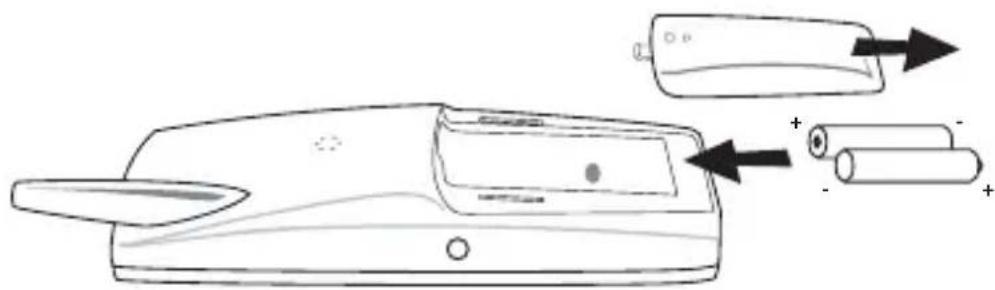
- O pen the battery compartment (see below).
- Insert the batteries respecting the (+ and -) polarity.
• C lose the battery compartment. - Leave the handset on the base unit for 20 hours. The Line/Charge indicator (LEB) on the base unit will light up.
natural_image
Line drawing of a handheld device with battery and cylindrical components, no text or symbols present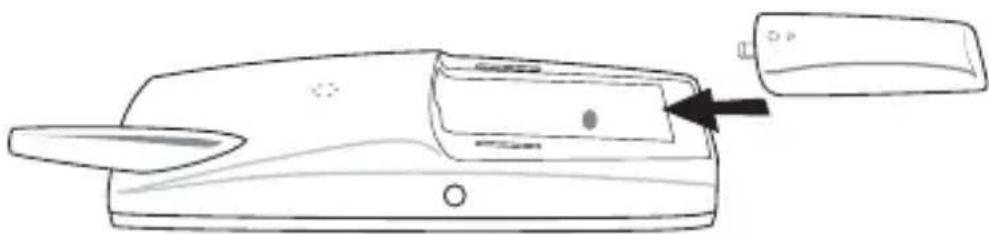
natural_image
Line drawing of a device with a paper clip and a small object inserted, no text or symbols presentBattery indicator:
• The battery is fully charged.
• The battery is half drained (50%)
- The battery is low. When the battery is low, you will hear warning signals and the battery symbol on the display will blink.
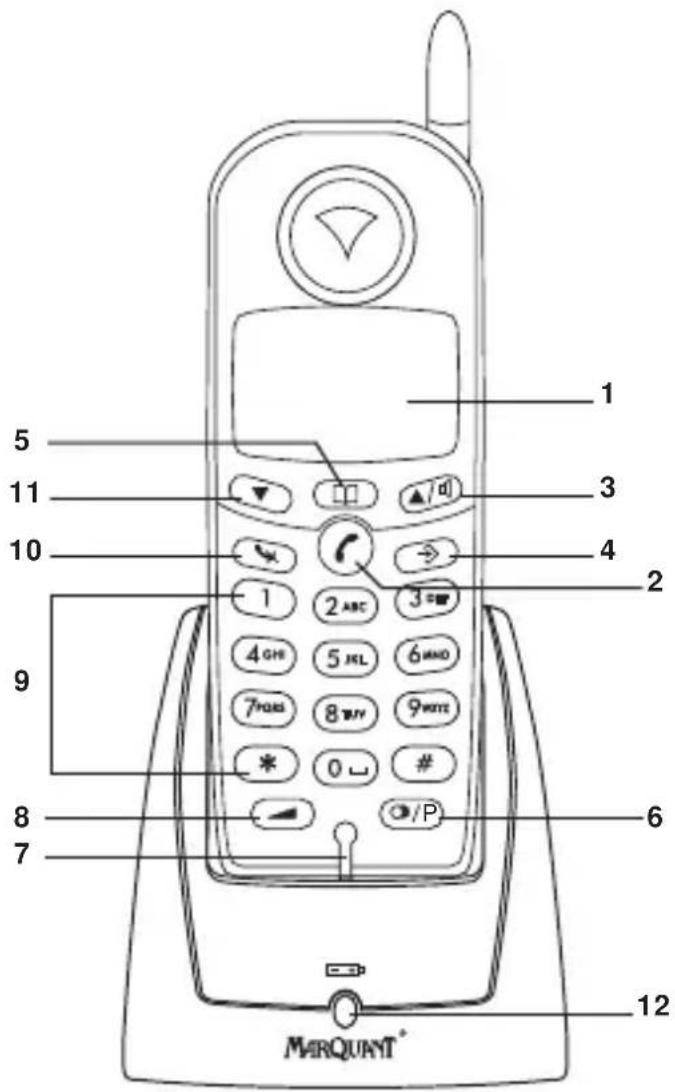
2 K EYS/LED
1 Display
2 Line key
3 Up/Handsfree key /▲
4 Programming key
5 Phonebook key
6 Redial/Pause key /B
7 Microphone
8 Volume/Ringer key
9 Alphanumeric keys
10 Delete/Mute key
11 Down/Flash key ▼
12 Charge indicator (LED)
3 DISPLAY (LCD)
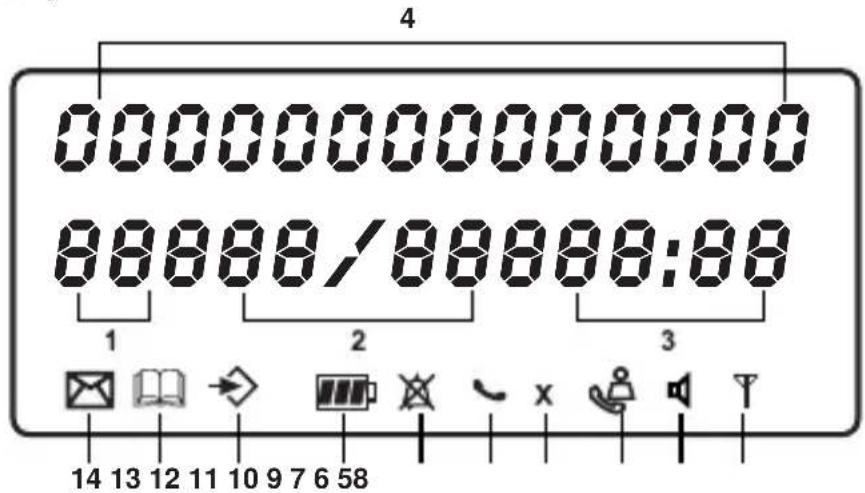
1 Number of calls received.
2 Date (day/month) of calls received.
3 Time (hour:minutes) of calls received.
4 Call information.
5 Symbol display():
- this symbol means that the handset is located within the range of the base unit.
- w hen this symbol starts blinking, this means you are beyond the range of the base unit. Move closer to the base unit so that the connection between the base unit and the handset can be restored.
6 Symbol display ( ):
- this symbol means that the telephone has received calls that are automatically stored in the Call List.
7 Symbol display ( ): X
- this symbol means that the mute function is activated, the microphone is turned off during a conversation.
8 Symbol display ( ):
- this symbol appears on the display when one makes or receives a call.
9 Symbol display ( ): ✗
- this symbol means that the ringer is turned off. When one receives a call, the telephone does not ring. The telephone will ring when one receives an internal call.
0 Symbol display ( ):
- this symbol is the battery indicator.
1 Symbol display ( ):
- this symbol means you are in the menu.
2 Symbol display ( ):
- this symbol appears when you browse the numbers in the Phone Book.
3 Symbol display ( ):
- t his symbol appears when you have received a voice mail message (see chapter 6).
4 Symbol display ( ):
- this symbol means that the handsfree function is activated. You can now talk without having to pick up the handset.
4 OPERATION
4.1 Setting the language
The telephone has 5 display languages: see display languages table on packaging!!
To set the language, do the following:
- Press the Programming key
- Press the Up or Down key repeatedly until 'SETTING' appears on the display
- Press the Programming key
- 'LANGUE' appears on the display.
- Press the Programming key
- The language set appears on the display.
- Press the Up or Down key repeatedly to select the language you would like to use.
- Once the desired language appears on the display, press the Programming key to confirm your selection or repeatedly press the Mute/Delete key to leave the menu.
4.2 Subscribing a handset to a base unit
In order to be able to make and receive telephone calls, a new handset has to be subscribed to the base unit. You can subscribe 5 handsets to one base unit. By default, each handset is subscribed as handset 1 on the base unit upon delivery (base unit 1).
!!! You only need to subscribe the handset if: !!!
- the handset subscription has been removed from the base unit (e.g. for reinitialisation)
- you want to subscribe a different handset to this base unit.
The underlined procedure is only applicable to a handset and base unit!!
Keep the Paging key on the base unit pressed for 10 seconds until the Line/Charge indicator on the base unit begins to blink rapidly. The Line/Charge indicator will blink rapidly for one minute. During this minute, the base unit is in subscribing mode and you must do the following to subscribe the handset:
- Press the Programming key
- Press the Up or Down key repeatedly until 'BASE SUB' appears on the display.
- Press the Programming key
- 'BASE_' appears on the display.
- Enter a number of the base unit you would like to subscribe the handset to (1-4). Use the number keypad.
Note: Each handset can be subscribed to 4 different DECT base units. Each base unit is assigned a number from 1 to 4 in the handset. When you subscribe a new handset, you can assign a base unit number. It is best to use '1'.
- 'SEARCHING' and the symbol appears on the display.
- The RFPI code (each base unit has a unique RFPI code) appears on the display and a signal sounds when the handset has found the base unit.
- Press the Programming key
• 'PIN' appears on the display.
- Enter the 4-digit PIN code of the base unit in (default PIN code is '0000'). Use the number keypad.
- Press the Programming key
• The handset is subscribed to the base unit.
4.3 Subscribing handset on another base (other brand/model)
Put the base in subscription mode (see manual of the base). If the base is in subscribing mode, you have to do the following to subscribe the handset:
- Press the Programming key
- Press the Up or Down key repeatedly until 'BASE SUB' appears on the display.
- Press the Programming key
- 'BASE_' appears on the display.
- Enter a number for the base unit to which you would like to subscribe the handset (1-4). Use the number keypad.
- 'SEARCHING' and the symbol appear on the display.
- The RFPI code (each base unit has a unique RFPI code) appears on the display and a signal sounds once the base unit is found by the handset.
- Press the Programming key
• 'PIN' appears on the display. - Enter the 4-digit PIN code of the base unit (default PIN code is '1590'). Use the number keypad.
- Press the Programming key
- The handset is subscribed to the base unit.
4.4 Making Calls
4.4.1 External Call
- Press the Line key
- The Line/Charge indicator (LED) on the base unit will blink. 'EXT' and the Call symbol appear on the display.
- You will hear the dial tone. Dial the telephone number you wish to call.
• The number appears on the display and is dialled. - After finishing your call, press the Line key ⬇ to hang up or put the handset back on the base unit.
4.4.2 Number preparation
- Dial the telephone number you wish to call. You can correct the number by pressing the Delete/Mute key
- Press the Line key
- The Line/Charge indicator (LEB) on the base unit will blink. 'EXT' and the Call symbol appear on the display.
- The telephone number is dialled automatically.
- A fter finishing your call, press the Line key to hang up or put the handset back on the base unit.
4.4.3 Redialling the last number dialled
- Press the Line key
- The Line/Charge indicator (LED) on the base unit will blink. 'EXT' and the Call symbol appear on the display.
- You will hear the dial tone.
- Press the Redial key ⚙. The number you last called is dialled automatically without having to re-enter the number.
4.4.4 Redial one of the last 5 numbers dialled
- Press the Redial key ⬤. The number you last called appears on the display. If you would like to dial one of the last 5 numbers dialled, press the Redial key ⬤ a few times until the desired number appears on the display.
- Press the Line key
- The number shown on the display is dialled automatically without you having to re-enter the number.
- A fter finishing your call, press the Line key to hang up or put the handset back on the base unit.
4.4.5 Calling a programmed number from the Phone Book
The telephone has a Phone Book in which you can program the telephone number of calls received by name. If you would like to call a number from the Phone Book, do the following:
- Press the Phone Book key. The first number of the Phone Book appears on the display.
- Press the Up or Down key repeatedly to select the telephone number you wish to call.
- Press the Line key
- The number shown on the display, is dialled automatically without you having to re-enter the number.
- A fter finishing your call, press the Line key to hang up or put the handset back on the base unit.
4.4.6 An internal call: calling another handset
This function only works if multiple handsets are subscribed to the base unit !
- Press the Programming key
- Press the Up or Down key ▲▼ repeatedly until 'INTERCOM' appears on the display.
- Press the Programming key
- 'INT' appears on the display
- Dial the number of the handset you would like to call.
- A fter finishing your call, press the Line key to hang up or put the handset back on the base unit.
4.5 Receiving a Call
4.5.1 Receiving an external call
-
All subscribed handsets will ring when you receive a call.
• The Call symbol blinks on the display. -
The telephone number of the caller appears on the display if you have Caller ID service (CLIP). Consult your telephone company. The name of the caller also appears on the display if:
- the name is programmed into the Phone Book
- the network sends the name together with the telephone number (FSK CID system only).
- Press the Line key to accept the external call.
- During the call 'EXT' and the symbol appear on the display. The call timer starts running.
- A fter finishing your call, press the Line key to hang up or put the handset back on the base unit.
4.5.2 Receiving an internal call
This function only works if multiple handsets are subscribed to the base unit!
• The handset rings.
- 'INT' and the number of the handset you are trying to reach, appear on the display. The Call symbol blinks on the display.
- Press the Line key to accept the internal call.
- During the call, 'INT', the handset number of the caller and the symbol appear on the display. The call timer starts running.
- A fter finishing your call, press the Line key to hang up or put the handset back on the base unit.
4.5.3 Receiving an external call during an internal call
If you receive an external call during an internal call, you will hear a call waiting tone (double beep) on both handsets being used for an internal call.
- Press the Line key twice to accept the external call.
- A fter finishing your call, press the Line key to hang up or put the handset back on the base unit.
4.6 Activate/deactivate handsfree function
This function allows you to communicate without having to pick up the handset. When you are on the phone, press the Up/Handsfree key ▲to activate the handsfree function.
Press the same button to deactivate the handsfree function.
Note : When you are calling in handsfree mode and you want to change the volume, press the Volume button ▶.
Attention !! When you use the handsfree function for a long time, the batteries will be empty quickly !
4.6 Headset connection
You can connect a headset with a 3 pole jack plug of 2,5mm on the right side of the handset. When the headset is connected, you can only hear and talk through the headset. The headset microphone can still be muted by the Mute key. The handsfree speaker can still be activated by pressing the handsfree key
4.7 Transferring a call to another handset
- You have an external caller on the line.
- Press the Programming key
- 'INTERCOM' appears on the display.
- Press the Programming key
• The external call is now on hold. - 'INT' appears on the display.
- Dial the number of the handset to which you would like to transfer the call.
- If the handset dialled is answered, you can have an internal conversation. Press the Line key and the external call is transferred.
- If the handset dialled is not answered, press the Down key ▼ to speak to the external caller again.
4.8 Out of Range Warning
If the handset is out of range of the base unit, a warning signal will sound.
- 'SEARCHING' appears on the display and the symbol blinks on the display.
- M ove closer to the base unit.
- As soon as you are back within range of the base unit, a signal sounds and the symbol stops blinking.
4.9 Setting the speaker volume
Use the Volume/Ringer key ▶ to set the volume of the speaker (handset). You can choose from 5 levels. The telephone is set to level '3' by default.
During a call, you can change the volume as follows:
- Press the Volume/Ringer key
- The volume level currently set appears on the display.
- Use the number keys to set the desired level (1-5).
- Press the Volume/Ringer key → to confirm your selection.
Note : You have 8 seconds to set the desired volume; if you do not, the telephone returns to standby mode and the volume remains unchanged.
4.10 Call Duration Indicator on the Display
As soon as you press the Line key the call duration appears on the display (minutes-seconds). E.g. "01-20" for 1 minute and 20 seconds.
The call duration remains visible on the display for 5 seconds after each call.
4.11 Turning off the microphone (mute)
It is possible to turn off the microphone during a call by pressing the Delete/Mute key . Now you can speak freely without the caller being able to hear you.
- You are on the phone. The Line/Charge indicator (LED) on the base unit will blink and the Call symbol appears on the display.
- Press the Delete/Mute key to turn off the microphone.
- The symbol 'X' appears on the display ( X).
MARQUANT®
MDECTH-1
- When you want to resume the conversation, press the Delete/Mute key again.
- The symbol 'X' disappears from the display ( ). The person on the other end of the line can hear you again.
4.12 Pause key
If you dial a telephone number and you would like to add a pause to this number, press the Pause key at the desired place in the number.
When you call this number, this pause (3 seconds) is automatically included.

- MARQUANT® MDECTH-1
- Safety Instructions
- Cleaning
- INSTALLATION
- K EYS/LED
- DISPLAY (LCD)
- OPERATION
- Setting the language
- Subscribing a handset to a base unit
- Subscribing handset on another base (other brand/model)
- Making Calls
- External Call
- Number preparation
- Redialling the last number dialled
- Redial one of the last 5 numbers dialled
- Calling a programmed number from the Phone Book
- An internal call: calling another handset
- Receiving a Call
- Receiving an external call
- Receiving an internal call
- Receiving an external call during an internal call
- Activate/deactivate handsfree function
- Headset connection
- Transferring a call to another handset
- Out of Range Warning
- Setting the speaker volume
- Call Duration Indicator on the Display
- Turning off the microphone (mute)
- MARQUANT®
- MDECTH-1
- Pause key
Brand : Marquant
Model : MDECTH1
Category : Telephone