USER MANUAL SDB 2200 C1 SILVERCREST
Operating instructions
DE AT CH
Before reading, unfold the page containing the illustrations and familiarise yourself with all functions of the device.
Scope of delivery 32
Operating elements 32
Technical data 32
Safety instructions 33
Before initial use 36
Filling the water tank 36
Plugging in and ironing 37
Steam ironing 37
Ironing with steam blast 37
Temporarily setting the steam iron aside 37
Turning off the steam iron 37
Drip-stop function 38
Automatic switch-off 38
Cleaning 38
Self-cleaning function 38
Housing 39
Metal parts 39
Storage 39
Troubleshooting 39
Disposal 39
Warranty and service 40
Importer 40
Read the operating instructions carefully before using the device for the first time and preserve this booklet for later reference. Pass this manual on to whoever might acquire the device at a future date.
Introduction
Congratulations on the purchase of your new appliance.
You have clearly decided in favour of a quality product. These operating instructions are a constituent of this product. They contain important information with regard to safety, use and disposal. Before using the product, familiarise yourself with all of these operating and safety instructions. Use the product only as described and only for the specified areas of application. Please also pass these documents on to any future owner, together with the product.
Intended use
The steam iron is exclusively intended for ironing textiles. The iron may only be used indoors and in private households. Any other use is deemed improper. The apparatus is not intended for commercial use!
Scope of delivery
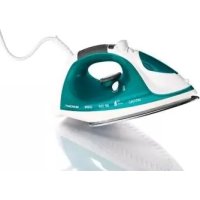
Steam Iron
Measuring beaker
Operating instructions
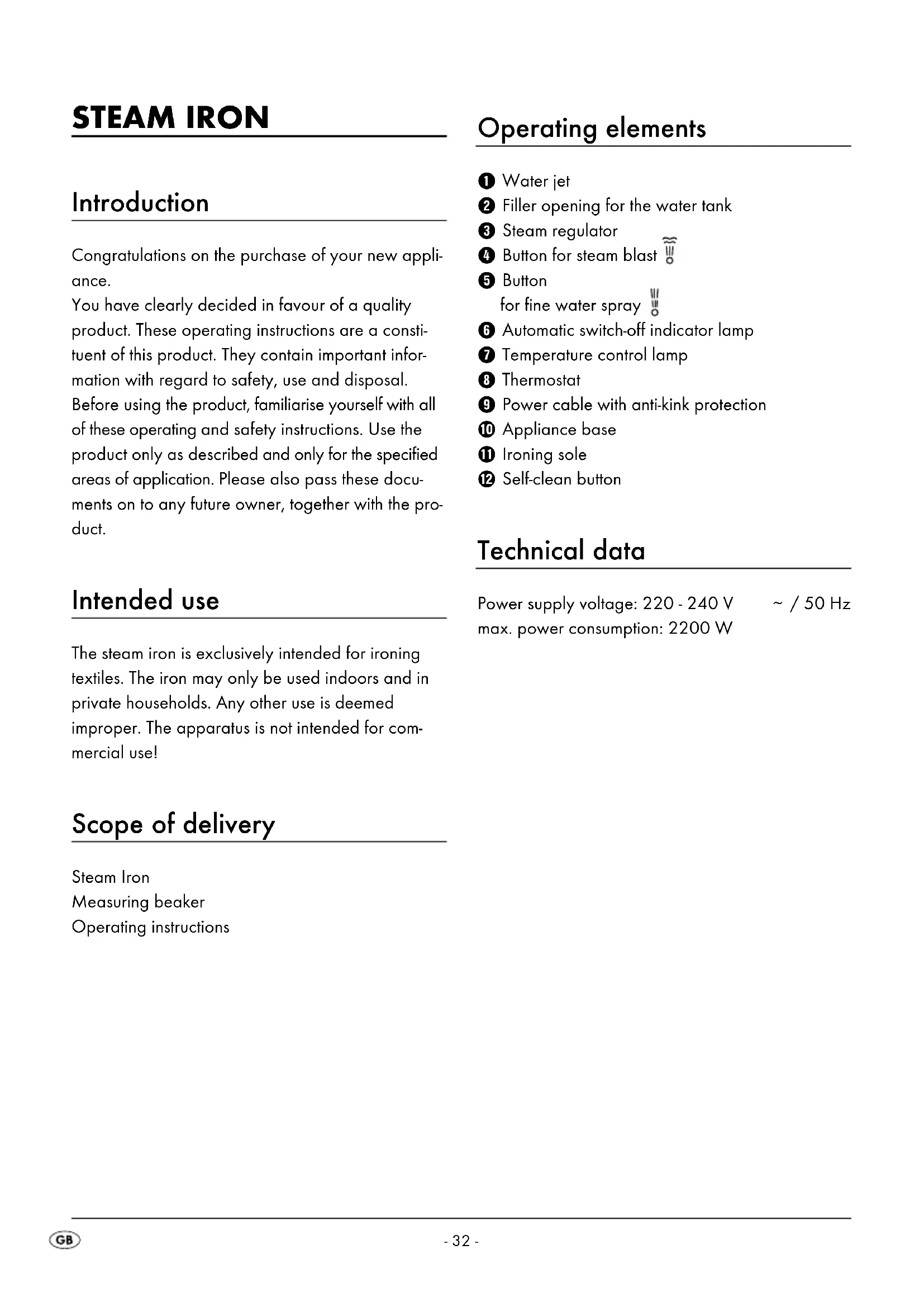
Operating elements
① Water jet
② Filler opening for the water tank
③ Steam regulator
④ Button for steam blast
⑤ Button
for fine water spray
⑥ Automatic switch-off indicator lamp
⑦ Temperature control lamp
8 Thermostat
9 Power cable with anti-kink protection
⑩ Appliance base
⑪ Ironing sole
⑫ Self-clean button
Technical data
Power supply voltage: 220 - 240 V \~ / 50 Hz
max. power consumption: 2200 W
Risk of Burns!
- Always hold the steam iron by the handle when it is hot.
- Children should be supervised to ensure that they do not play with the appliance.
- Never hold your hand over the steam spray or touch hot metal parts.
- The filler opening of the water reservoir must not be opened while the iron is in use. First allow the steam iron to cool down and remove the plug from the power socket.
- The iron and its connecting cable must be kept out of the reach of children younger than 8 years old when it is switched on or cooling down.
⚠️ Risk of Injury! Risk of fire!
- Never leave a steam iron that is hot, switched on or connected to the mains power supply unattended.
- Do not put the steam iron into storage until it has cooled down completely.
- This steam iron must be used and placed on a stable surface.
-
When ironing, only use the temperatures detailed in the garment care instructions, or those suitable for the material. Otherwise, you could damage the textiles. Should care instructions not be given or known, start with the lowest temperature setting.
-
NEVER allow children to use the steam iron.
- Always put the iron on a level, heat-resistant surface. The iron must be in a stable position.
- Should you wish to put the steam iron down, always put it on the appliance base.
⚠️ Risk of electric shock!
- The rating of the local power supply must correspond with the details given on the rating plate of the appliance.
- To avoid potential risks, arrange for defective appliances to be checked and possibly repaired by a qualified specialist workshop, or contact our Customer Service Department.
- Arrange for defective power plugs and/or cables to be replaced immediately by qualified technicians or our Customer Service Department.
- To disconnect from the power source, only pull the plug itself, not the cable.
- Never bend (kink) or crush the power cable. Arrange it in such a way that it cannot come into contact with hot surfaces and so that no-one can step on it or trip over it.
- Remove the plug from the power socket after every use, and before cleaning or filling with tap water.
- Always unwind the power cable fully before switching on, and do not use an extension cable.
- Never touch the power cable or the plug with wet hands.
- Never use the steam iron near a bath, shower, wash basin or other vessel containing water. The proximity of moisture presents a danger, even when the appliance is switched off.
- Under no circumstances should you submerge the steam iron in liquid or permit liquids to penetrate the casing of the steam iron. Do not expose the appliance to humidity and do not use outdoors. Should liquids enter the casing, unplug the appliance from the socket immediately and arrange for it to be repaired by a qualified technician.
- You may not open the casing of the steam iron. Should repairs be necessary, only allow authorised technicians to repair a defective appliance.
- Under NO circumstance should you use the appliance if it shows visible signs of damage, has fallen, or is leaking. Arrange for it to be repaired by qualified specialists.
- Do not use the appliance if the anti-kink protection on the power cable is damaged!
- This appliance may be used by children aged 8 years or over and by individuals with reduced physical, sensory or mental capabilities, or lack of experience and/or knowledge if they are supervised or have been instructed in the safe use of the appliance and have understood the potential risks. Children may not play with the appliance.
Cleaning and user maintenance should not be carried out by children without supervision.

Attention!
- Should the clothing care instructions forbid ironing, (symbol the clothing item may not be ironed. If you do so, the clothing item could be permanently damaged.
- The water tank is to be filled exclusively with tap water or distilled water. Otherwise, you will damage the steam iron.
- Do not clean the steam iron with solvents, alcohol or abrasive cleaning agents, since these could cause damage.
Before initial use
- Remove the steam iron from the packaging.
- Remove all stickers and protective film from the steam iron and the ironing sole ⑪.

Risk of asphyxiation!
Plastic bags can be dangerous. To avoid the risk of asphyxiation, keep plastic bags out of the reach of toddlers and small children.
- Pour water into the water tank (see chapter "Filling the water tank").
- Insert the plug into a wall power socket supplying an electrical current as detailed on the rating plate.
- Move the thermostat ⑧ to the "MAX" position.
- Heat the steam iron up for several minutes at the highest setting.
- Press the button for the steam blast ④ a few times until steam exits from the ironing sole ⑪.
- Then iron a scrap piece of material to remove possible contamination from the ironing sole 11.
Filling the water tank
- Hold the iron at an angle.
- Open the cover of the filler opening for the water tank ②.
- Using the measuring beaker, fill the water tank to the "MAX" marking.
- Slide the cover of the filler opening for the water tank ② back to close it.
(i) Note:
Should the tap water in your area be rated as hard, it is recommended that you mix tap water with some distilled water. Otherwise, the jets for the steam blast function could calcify (become blocked) prematurely.
To extend the optimal steam blast function, mix tap water with distilled water as follows.
| Water hardness | Ratios - distilled water to tap water |
| very soft / soft 0 | |
| medium 1 : 1 | |
| hard 2 : 1 | |
| very hard 3 : 1 | |
The water hardness level can be queried at your local water works.
Plugging in and ironing
Dry ironing is possible at all temperatures, steam ironing is possible by adjusting to on the thermostat 8.
- Insert the plug into a power socket.
Attention!
Should the clothing care instructions forbid ironing, (symbol ☐) the clothing item may not be ironed. If you do so, the clothing item could be permanently damaged.
- Check the care instructions on the labels in the garment to see whether it is suitable for being ironed, and at which temperature setting.
| Symbol thermostat 8 | Type of material |
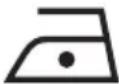 | Acrylic, rayon |
 | Silk, wool, polyester blended fabrics |
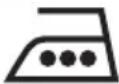 | Cotton, linen, viscose |
- Select the best suitable temperature setting with the thermostat 8.
The temperature control lamp ⑦ glows. When the set temperature has been reached, the temperature control lamp ⑦ goes out.
- Wait until the temperature control lamp ⑦ switches off.
- To moisten the laundry, press the button for fine water spray 5.
This function is suitable for extremely dry and extremely crumpled garments.
Steam ironing
- Set the steam regulator 3 to the desired steam setting.
- The thermostat ⑧ must be moved to at least adjustment range. Otherwise it cannot produce any steam.
Ironing with steam blast
The steam blast is especially suitable for smoothing parts of a garment that are difficult to reach.
- Slightly raise the steam iron.
- For a steam blast, press the steam blast button 4.
Temporarily setting the steam iron aside
Risk of fire!
NEVER leave the hot, mains-connected or switched-on steam iron unattended.
- Set the thermostat ⑧ to the "MIN" position.
- Always put the steam iron on the appliance base 10.
Turning off the steam iron
- Remove the plug from the wall socket.
- Empty the water tank and clean the ironing sole ⑪.
- Put the steam iron on the appliance base 10 after it has cooled down.
Drip-stop function
With conventional steam irons it can occur that water drips from the ironing sole ⑪ at low temperatures. However, this iron possesses a new equipment characteristic, the DRIP-STOP function. At low temperatures the iron automatically switches off the steam-blast function. When this happens, a "CLICK" is heard. You must then select a suitable temperature using the thermostat ⑧. As soon as this is reached, steam production continues.
Automatic switch-off
The iron is equipped with an automatic switch-off. This stops the iron from heating up.
If the iron is standing on its ironing sole ⑪ and has not been moved for approx. 30 seconds, acoustic warning signals are heard and the automatic switch-off indicator lamp ⑥ flashes. The iron will no longer be heated. To deactivate the automatic switch-off, pick up the iron and move it around a little. The automatic switch-off indicator lamp ⑥ will go off and the iron will heat up again.
If the iron is standing on its base ⑩ and has not been moved for approx. 8 minutes, acoustic warning signals are heard and the automatic switch-off indicator lamp ⑥ flashes. The iron is no longer heated. To deactivate the automatic switch-off, pick up the iron and move it around a little. The automatic switch-off indicator lamp ⑥ will go off and the iron will heat up again.
(i) Note:
The automatic switch-off is not a substitute for unplugging the apparatus from the power supply! It is only intended for reducing the risk of fire if the iron is accidentally left on!
Cleaning
Self-cleaning function
- Fill the water tank to the "MAX" marking.
- Insert the plug into a wall socket.
- Move the thermostat ⑧ to the "MAX" position.
- Adjust the steam regulator ③ to maximum steam power.
- Allow the steam iron to heat up until the temperature control lamp ⑦ switches off and once again glows.
- Hold the steam iron horizontally over a catchment receptacle.
- Position the steam regulator ③ at the maximum steam power level. Press and hold down the self-clean button ⑫. Thereby, steam and boiling water flows from the steam exit holes in the ironing sole ⑪. Impurities that may be present are washed out.
- Release the self-clean button ⑫ as soon as all of the water has exited.
- Thoroughly dry the ironing sole ⑪. For this, slide the ironing sole ⑪ back and forth over a hand towel or an old piece of material several times.
- Allow the steam iron to cool down before placing it in storage.
Housing
⚠ Potentially fatal danger!
Disconnect the plug before cleaning. Otherwise there is a risk of receiving a potentially fatal electric shock!
Risk of physical injury!
Allow the appliance to cool before cleaning it. If you do not, there is a risk of receiving burn injuries!
- Clean the casing with a soft, dry cloth only.
Attention!
Do not use aggressive, abrasive or chemical cleaning agents. These could attack the surfaces and cause irreparable damage to the appliance.
- Clean the metal components with a lightly damp cloth and a mild, non-abrasive cleaning agent.
Storage
Store the appliance in a clean, dust-free, and dry location after it has cooled down.
Troubleshooting
Steam iron producing little or no steam:
The reserves of water in the steam iron are depleted. Fill the water tank with tap water (See "Filling the water tank").
The steam iron does not get hot:
- The steam iron is not plugged in or is not switched on. Insert the plug into a wall power socket and adjust the thermostat ⑧ to the desired ironing temperature.
- The steam iron is defective. Arrange for the steam iron to be repaired by qualified specialists.
Disposal

Do not dispose of the appliance in your normal domestic waste. This appliance is subject to the provisions of European Directive 2002/96/EC.
Dispose of the appliance through an approved disposal centre or at your community waste facility. Observe the currently applicable regulations. In case of doubt, please contact your waste disposal centre.

Dispose of all packaging materials in an environmentally friendly manner.
Warranty and service
The warranty for this appliance is for 3 years from the date of purchase. The appliance has been manufactured with care and meticulously examined before delivery.
Please retain your receipt as proof of purchase. In the event of a warranty claim, please telephone our
Service Department. This is the only way to ensure that your goods are dispatched free of charge.
The warranty only covers claims for material and manufacturing defects, but not for transport damage, wearing parts or damage to fragile components such as buttons or batteries. This product is for private use only and is not intended for commercial use.
The warranty is void in the case of incorrect and improper handling, use of force and internal manipulation that is not carried out by our authorised service branch. Your statutory rights are not restricted in any way by this warranty.
The warranty period will not be extended by repairs made under warranty. This also applies to replaced and repaired parts. Any damage and defects that are discovered immediately after purchase must be reported immediately after unpacking the appliance, no more than two days after the purchase date.
Repairs made after the expiration of the warranty period are subject to payment.

Service Great Britain
Tel.: 0871 5000 720 (£ 0.10/Min.)
E-mail: kompernass@lidl.co.uk
IAN 85032
Importer
KOMPERNASS GMBH
BURGSTRASSE 21
44867 BOCHUM, GERMANY
www.kompernass.com
KOMPERNASS GMBH
Burgstraße 21
D-44867 Bochum
www.kompernass.com