
WEP450 - Hi-Fi System SAMSUNG - Free user manual and instructions
Find the device manual for free WEP450 SAMSUNG in PDF.



| Product Type | Bluetooth Headset |
| Brand | Samsung |
| Model | WEP450 |
| Bluetooth Version | 2.0 + EDR |
| Supported Profiles | Headset Profile, Hands-Free Profile |
| Maximum Range | 10 meters (30 feet) |
| Standby Time | Up to 200 hours |
| Talk Time | Up to 6 hours |
| Charging Time | Approximately 2 hours |
| Dimensions (approx.) | 50 x 20 x 15 mm |
| Weight (approx.) | 10 g |
| Power Supply | Built-in rechargeable battery, AC charger (travel adapter) |
| Key Functions | Answer/end call, reject call, voice dialing, call waiting, call transfer, volume control, mute/unmute microphone |
| Care and Cleaning | Wipe with a dry cloth. Do not expose to water or moisture. |
| Safety | Do not disassemble or modify. Avoid temperatures >50°C. Use only the provided adapter. Comply with applicable regulations. |
| Spare Parts and Repairability | Contact a Samsung authorized service center for battery replacement or repair. Manufacturer warranty 1 year. |
| General Information | Bluetooth PIN: 0000. Indicator lights: blue (connected), red (low battery). |
Frequently Asked Questions - WEP450 SAMSUNG
User questions about WEP450 SAMSUNG
0 question about this device. Answer the ones you know or ask your own.
Ask a new question about this device
Download the instructions for your Hi-Fi System in PDF format for free! Find your manual WEP450 - SAMSUNG and take your electronic device back in hand. On this page are published all the documents necessary for the use of your device. WEP450 by SAMSUNG.
USER MANUAL WEP450 SAMSUNG
NA. 10/2008. Rev. 10
SAMSUNG
English / Français / Español
Bluetooth®
HEADSET
WEP450
MOBILE ENHANCEMENT
English.... 1
Français. 13
Español 27
Contents
Safety and usage information....2
Your headset overview ....3
Charging the headset.... 4
Turning the headset on or off 5
Understanding various modes ....5
Pairing with your Bluetooth phone 6
Using call functions....7
Safety approvals 8
UL certified travel adapter ....9
Cautions 10
Warranty and parts replacement.... 10
Specifications 12
Bluetooth® is a registered trademark of the Bluetooth SIG, Inc. worldwide. Bluetooth QD ID: B014567
Safety and usage information
- Never disassemble or modify your headset for any reason. Doing this may cause the headset to malfunction or become combustible. Bring the headset to an authorized service center to repair it or replace the battery.
- When using your headset while driving, follow local regulations in the country or region you are in.
- Avoid storage at high temperatures (above 50°C/122°F), such as in a hot vehicle or in direct sunlight, as this can damage performance and reduce battery life.
- Do not expose the headset or any of its supplied parts to rain or other liquids.

At very high volumes, prolonged listening to the headset can damage your hearing.
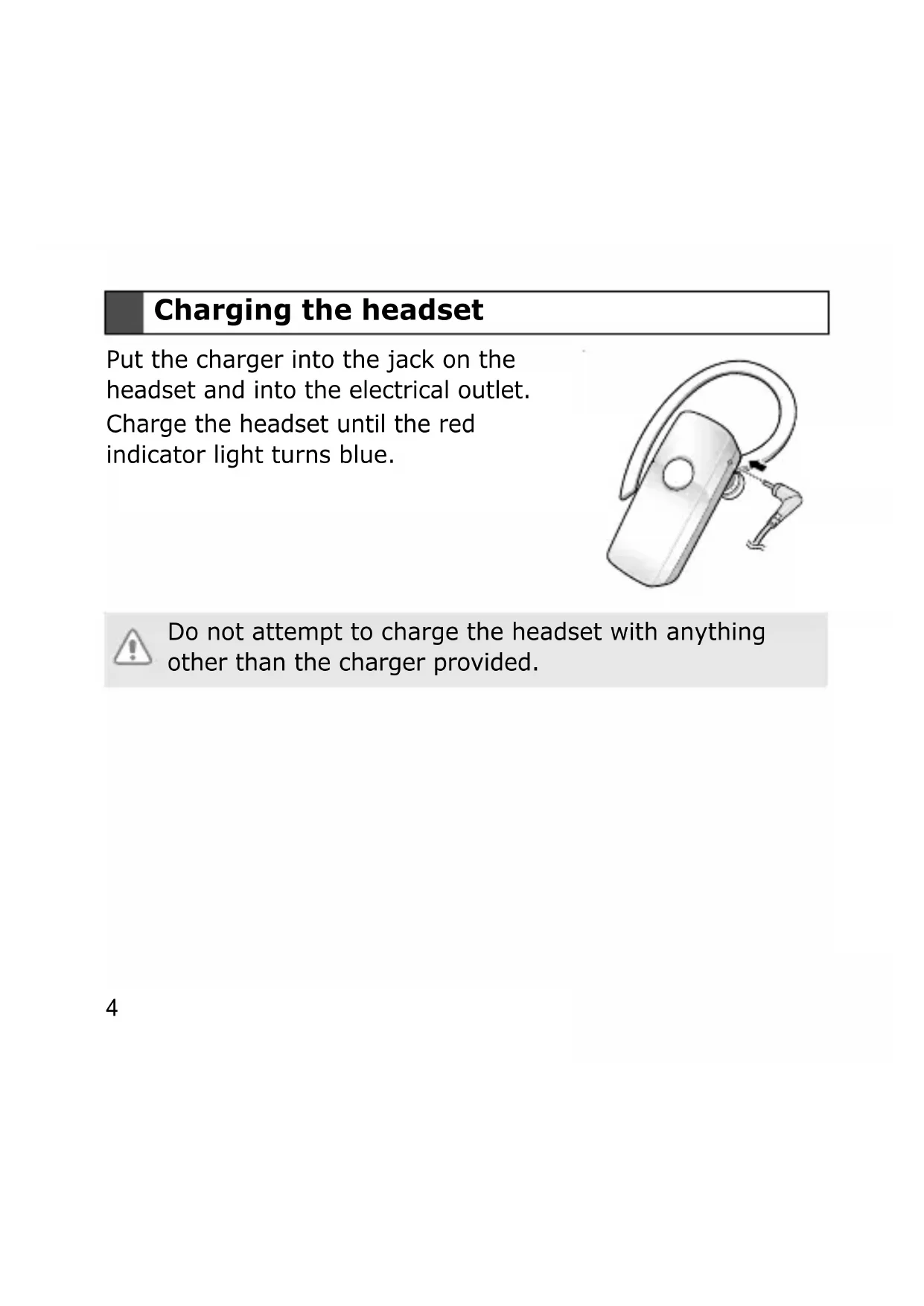
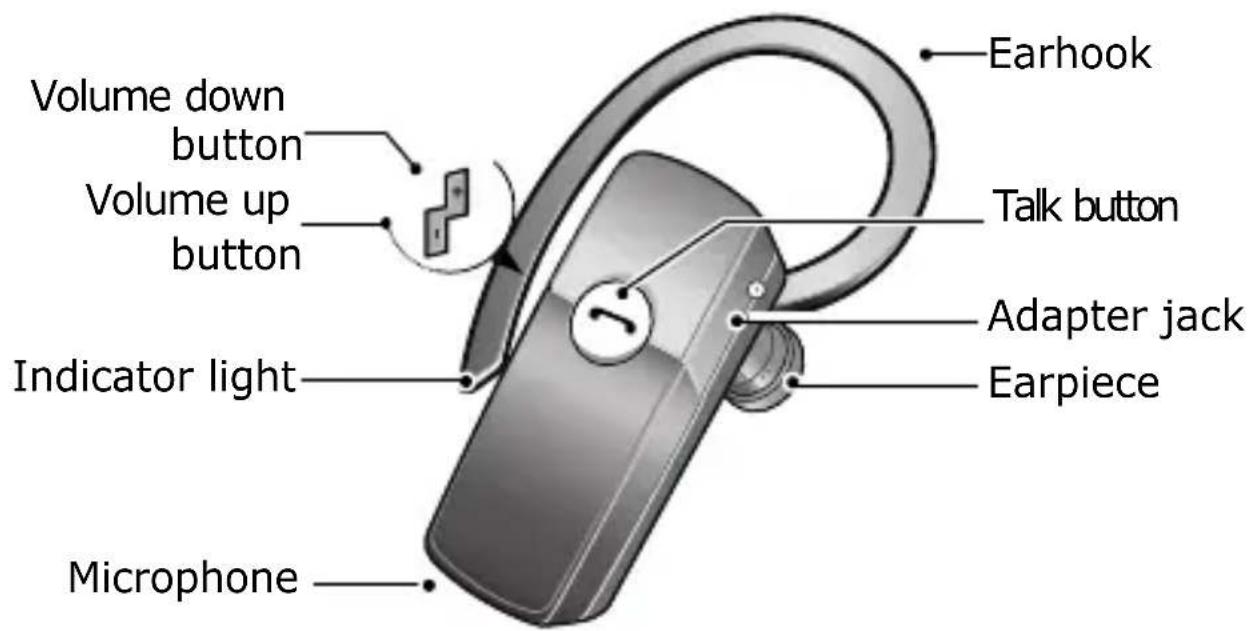
Your headset overview
Charging the headset
Plug the charger into the headset's jack and into an electrical outlet. Charge the headset until the red indicator light turns blue.
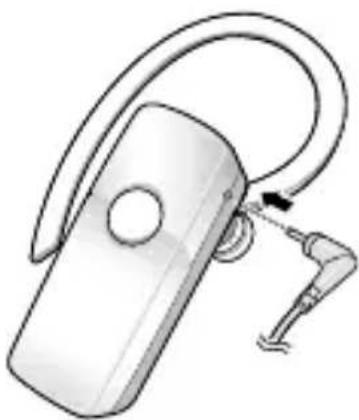

Do not attempt to charge the headset with anything other than the charger provided.
Turning the headset on or off
To turn the headset on, press and hold the talk button until the blue indicator light flashes 4 times.
To turn the headset off, press and hold the talk button until both blue and red indicator lights flash.
Understanding various modes
- Standby mode: The headset is waiting for a call. The blue indicator light flashes every 6 seconds.
- Active mode: The headset has a call in progress. The blue indicator light flashes every 8 seconds.
- Pairing mode: The blue indicator light stays lit. You can discover and connect to your headset on your phone.
- Low battery mode: There is less than 10% of battery power left. The red indicator light flashes. You must recharge the battery.
Pairing with your Bluetooth phone
1. Enter Pairing mode.
- Turn off your headset and press and hold the talk button until the blue indicator light remains lit after blinking.
- If you turn it on for the first time, it proceeds into Pairing mode immediately.
2 Search for and pair with your phone according to your phone's user guide. (Bluetooth PIN: 0000, 4 zeros)
- If the pairing is successful, the blue indicator light will flash 10 times rapidly before entering Standby mode.
- If the blue indicator light remains lit, retry pairing.

When the headset and the phone are paired, the headset attempts to reconnect automatically each time it turns on. Otherwise, press the talk button to reconnect.
Using call functions
Some functions may not be supported by your phone.
In Standby mode
Press the talk button to:
- Answer an incoming call
- Make a voice-activated call
Press and hold the talk button to:
- Redial the last number called
- Reject an incoming call
In Active mode
Press the talk button to:
- End a call
- Transfer a call from the phone to the headset
Press and hold the talk button to:
- Place a call on hold
- Answer a second call
- Retrieve a call on hold
Press [+] or [-] to adjust the volume.
Press and hold [+] or [-] to turn the microphone off or on.
Safety approvals
FCC
FCC ID: A3L-WEP450
This device complies with part 15 of the FCC Rules. Operation is subject to the following two conditions:
(1) This device may not cause harmful interference, and (2) this device must accept any interference received, including interference that may cause undesired operation.
The device and its antenna must not be co-located or operating in conjunction with any other antenna or transmitter.
Users are not permitted to make changes or modify the device in any way.
Changes or modifications not expressly approved by Samsung will void the user's authority to operate the equipment.
Industry Canada
IC ID: 649E-WEP450
Operation is subject to the following two conditions: (1) This device may not cause interference and (2) This device must
accept any interference, including interference that may cause undesired operation of the device.
The term "IC:" before the certification/registration number only signifies that registration was performed based on a Declaration of Conformity indicating that Industry Canada technical specifications were met. It does not imply that Industry Canada approved the equipment.
UL certified travel adapter
The travel adapter for this headset has met UL 1310 safety requirements. Please adhere to the following safety instructions per UL guidelines.
FAILURE TO FOLLOW THE INSTRUCTIONS OUTLINED MAY LEAD TO SERIOUS PERSONAL INJURY AND POSSIBLE PROPERTY DAMAGE.
IMPORTANT SAFETY INSTRUCTIONS - SAVE THESE INSTRUCTIONS.
DANGER - TO REDUCE THE RISK OF FIRE OR ELECTRIC SHOCK, CAREFULLY FOLLOW THESE INSTRUCTIONS.
FOR CONNECTION TO A SUPPLY NOT IN THE U.S.A., USE AN ATTACHMENT PLUG ADAPTOR OF THE PROPER CONFIGURATION FOR THE POWER OUTLET. THIS POWER UNIT IS INTENDED TO BE CORRECTLY ORIENTATED IN A VERTICAL, HORIZONTAL, OR FLOOR MOUNT POSITION.
Cautions
Changes or modifications made in the radio phone, not expressly approved by Samsung, will void the user's authority to operate the equipment. Only use approved batteries, antennas and chargers. The use of any unauthorized accessories may be dangerous and void the phone warranty if said accessories cause damage or a defect to the phone. Although your phone is quite sturdy, it is a complex piece of equipment and can be broken. Avoid dropping, hitting, bending or sitting on it.
Warranty and parts replacement
Samsung warrants this product as free of defects in material, design and workmanship for the period of one year from the
original date of purchase. (Depending on your country, the length of warranty may vary.)
If during the period of warranty this product proves defective under normal use and service, you should return the product to the retailer from whom it was originally purchased or to a qualified service center. The liability of Samsung and its appointed maintenance company is limited to the cost of repair and/or replacement of the unit under warranty.
- The warranty is limited to the original purchaser.
- A copy of your receipt or other proof of purchase is required for proper warranty service.
- The warranty is void if the serial number, date code label, or product label is removed, or if the product has been subject to physical abuse, improper installation, modification, or repair by unauthorized third parties.
- Specifically exempt from any warranty are limited-life consumable components such as batteries and other accessories.
- Samsung will not assume any responsibility for any loss or damage incurred in shipping. All repair work on Samsung products by unauthorized third parties voids any warranty.
Specifications
| Item Specifications and description | |
| Bluetooth version 2.0 | + EDR |
| Support profile Headset Profile, Hands-Free Profile | |
| Operating range Up to 30 feet (10 meters) | |
| Standby time Up to 200 hours | * |
| Active time Up to 6 hours | * |
| Charging time Approximately 2 hours | * |
* Depending on the phone type and usage, the actual time may vary.


- BLUETOOTH®
- HEADSET
- WEP
- CONTENTS
- SAFETY AND USAGE INFORMATION
- YOUR HEADSET OVERVIEW
- CHARGING THE HEADSET
- TURNING THE HEADSET ON OR OFF
- UNDERSTANDING VARIOUS MODES
- PAIRING WITH YOUR BLUETOOTH PHONE
- USING CALL FUNCTIONS
- IN STANDBY MODE
- IN ACTIVE MODE
- SAFETY APPROVALS
- FCC
- INDUSTRY CANADA
- UL CERTIFIED TRAVEL ADAPTER
- CAUTIONS
- WARRANTY AND PARTS REPLACEMENT
- SPECIFICATIONS
Brand : SAMSUNG
Model : WEP450
Category : Hi-Fi System