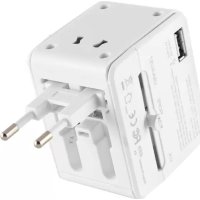
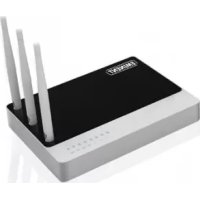
EM4630 - Router Eminent - Free user manual and instructions
Find the device manual for free EM4630 Eminent in PDF.


| Product Type | WiFi Travel Router |
| Brand | Eminent |
| Model | EM4630 |
| Dimensions (approx.) | 7 x 5 x 2 cm |
| Weight (approx.) | 50 g |
| Power | Via USB port (USB cable included) |
| Connectivity | WiFi 802.11 b/g/n, RJ45 Ethernet port (WAN) |
| Max WiFi Speed | 150 Mbps |
| Ports | 1 WAN Ethernet 10/100 port |
| WiFi Frequencies | 2.4 GHz |
| Number of Simultaneous Users | Up to 10 |
| WiFi Security | WPA/WPA2-PSK |
| Configuration | Via web interface (192.168.16.254) |
| Main Functions | Router, access point, WiFi repeater mode |
| Maintenance and Cleaning | Wipe with a soft, dry cloth. Do not use chemicals. |
| Safety | Do not expose to moisture or excessive heat. Disconnect during thunderstorms. |
| Spare Parts and Repairability | Not user-serviceable. Contact the manufacturer for assistance. |
| General Information | Manual, drivers, and firmware available at www.eminent-online.com |
Frequently Asked Questions - EM4630 Eminent
User questions about EM4630 Eminent
0 question about this device. Answer the ones you know or ask your own.
Ask a new question about this device
Download the instructions for your Router in PDF format for free! Find your manual EM4630 - Eminent and take your electronic device back in hand. On this page are published all the documents necessary for the use of your device. EM4630 by Eminent.
USER MANUAL EM4630 Eminent
Congratulations with the purchase of this high-quality Eminent product! This product has undergone extensive testing by Eminent's technical experts. Should you experience any problems with this product, you are covered by a five-year Eminent warranty. Please keep this manual and the receipt in a safe place.
Register your product now on www.eminent-online.com and receive product updates!
2.0 (EN) Interface & LED Indicator description
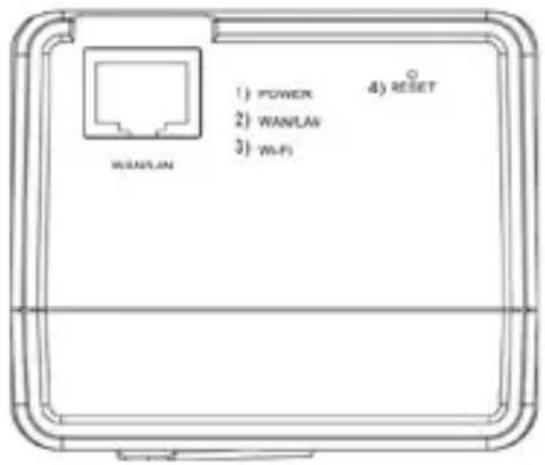
1) Power LED green: the power is on
2) LAN/WAN LED green: LAN/WAN port is working
3) Wi-Fi LED green: Wireless LAN is working
4) Reset: press the reset button for minimum of 6 seconds to restore factory defaults.
2.1 Function of multi-national travel adapter
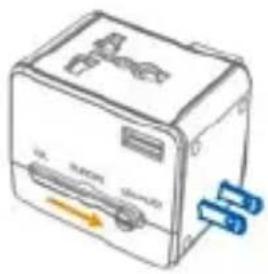
USA / CHINA
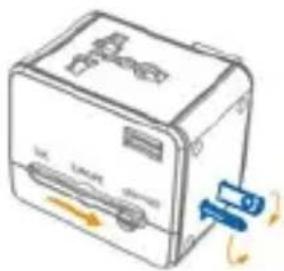
AUSTRALIA / NEW ZEALAND
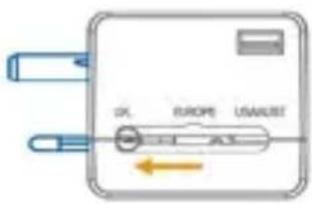
UNITED KINGDOM
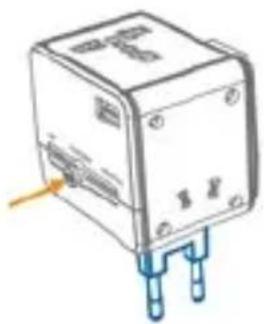
EUROPE
Note: The EM4630 has no built-in converter. Only use devices that are compatible with the voltages of the country you are staying. For example 110V devices do not work on a 230V power socket. Some devices do support a voltage range from 100-240V.

The devices are protected by a built-in fuse of 6A. The fuse is not exchangeable. Once it's blown the device can no longer be used. A blown fuse will void the warranty.
EN 3.0 Installation
- Connect the Ethernet cable (not supplied) to the WAN port
- Connect the other end of the cable to the internet port of the hotel room (or modem/Router)
- Plugin the Travel router in the power socket and wait for about 30 seconds
- Choose the WiFi network: default SSID: TravelWiFi-XXXX and connect (default password: 12345678)
- You are now connected to the internet
NL 3.0 Installatie
3.1 Secure your connection
We strongly advise you to secure your wireless connection.
You only need to do these steps once.
- Open your browser and type 192.168.16.254 in the URL address
NL
3.1 Beveilig uw verbinding
- Select the type of connection the EM4630 will have to make to connect to the internet: Cable or Wireless connection, Press 'Next'. (If cable connection is selected please continue to step 6)
NL 3. Selecteer het type verbinding waarmee de EM4630 met het internet verbonden is, druk op 'Next' (wanneer u de kabel verbinding heeft geselecteerd ga dan naar stap 6) - Sélectionnez le type de connexion que l'EM4630 utilisera pour se connecter à Internet : Connexion câblée ou sans fil, puis appuyez sur 'Next'. (Si la connexion du câble est sélectionné s'il vous plaît passez à l'étape 6)
- Selezionare il tipo di connessione di EM4630 per effettuare la connessione ad Internet: via cavo o wireless, quindi premere "Next". (se è stata selezionata la connessione via cavo procedere al punto 6)
DE 3. Wählen Sie den Verbindungstyp, mit dem der EM4630 eine Verbindung mit dem Internet herstellen wird: Kabel- oder Drahtlosverbindung, und klicken Sie dann auf „Next“. (Wenn Kabelanschluss
ES 3. Seleccione el tipo de connexion que tendrá EM4630 para conectarse a internet: Conexión con cables o inalámbrica, pulse "Next" (Si está seleccionado la conexión por cable, por favor vaya al - Seleccione o tipo de ligação que o EM4630 terá de fazer para ligar à Internet: Ligação por cabo ou sem fios, prima "Next". (Se a conexão do cabo é selecionado por favor, continue para o passo
HU 3. Írja be a kívánt SSID-t és a (8 jegyű) jelszót, majd nyomja meg a „Next“ gombot. (Ha a kábeles kapcsolatot választja, kérjük, folytassa a 6 lépéssel)
STEP / STAP / ÉTAPE / PROCEDURE / SCHRITT / PASO / PROTEJA / LÉPÉSEKET

External Wireless Devices
| NO. | SSID | Security | Ch | Signal(%) |
| AAAA | WEP | 1 | 60 | |
| BBBB | WPA2PSK/TKIPAES | 6 | 90 | |
| CCCC | NONE | 8 | 100 | |
| Previous | Re-Scan | Next | ||

EN 4. Select the WiFi network you want to connect to.
NL 4. Selecteer het gewenste WiFi netwerk
FR 4. Sélectionnez le réseau Wi-Fi désiré
IT 4. Selezionare la rete WiFi alla quale si desidera connettersi.
DE 4. Wählen Sie das WiFi-Netzwerk welche Sie eine Verbindung herstellen möchten.
ES 4. Seleccione la red WIFI a la que desea conectarse.
PT 4. Seleccione a rede Wi-Fi que você deseja se conectar.
4. Válassza ki a WIFI hálózatot, amelyhez csatlakozni szeretne.
STEP / STAP / ÉTAPE / PROCEDURE / SCHRITT / PASO / PROTEJA / LÉPÉSEKET
5
SSID
Security Mode
Encryption Type
Pass Phrase
BBBB
WPA2PSK

AES

86888888
Previous

Next

EN
- Enter the WiFi password in the field Pass Phrase
NL
Network Connection..... (Please waiting about 60sec)

STEP / STAP / ÉTAPE / PROCEDURE / SCHRITT / PASO / PROTEJA / LÉPÉSEKET
7
Advanced

Completed
Previous

OK

EN
Please check our website www.eminent-online.com for the newest updated manual, drivers and firmware. Also, you will find frequently asked questions in the FAQ section.
NL
4.0 Frequently Asked Questions and other related information
The latest Frequently asked questions for your product can be found on the support page of your product. Eminent will update these pages frequently to assure you have the most recent information. Visit www.eminent-online.com for more information about your product.
5.0 Service and support
This user's manual has been carefully written by Eminent's technical experts. If you have problems installing or using the product, please fill out the support form at the website www.eminent-online.com/support.
You can also contact us by phone. Below you will find a list with phone numbers for each supported country.
Country Phone number Rate per minute*
Belgium (Dutch) 070 277 286 €0.30
Belgium (French) 070 277 286 €0.30
Denmark +45 69918565 Local Costs
Finland +35 8942415826 Local Costs
Germany +49 (0)30 887 89 298 Local Costs
Italy +39 0240042016 Local Costs
Norway +47 21075033 Local Costs
Spain 807 080 042 €0.41
Sweden +46 840 309985 Local Costs
The Netherlands 0900-3646368 €0.45
UK +44 (0)203 318 9998 Local Costs
Hungary 1-4088902 (From Budapest) Local Costs
Hungary 06-1-4088902 (From the rest of Hungary) Local Costs
Hungary +36 1-4088902 (International) Local Costs
* Rates mentioned in this table do not include cell phone charges.
6.0 Warning and points of attention

Due to laws, directives and regulations set out by the European parliament, some (wireless) devices could be subject to limitations concerning its use in certain European member states. In certain European member states the use of such devices could be prohibited. Contact your (local) government for more information about this limitations.
Always follow up the instructions in the manual*, especially where it concerns devices which need to be assembled.
Warning: In most cases this concerns an electronic device. Wrong/improper use may lead to (severe) injuries!
Repairing of the device should be done by qualified Eminent staff. The warranty immediately voids when products have undergone self repair and/or by misuse. For extended warranty conditions, please visit our website at www.eminent-online.com/warranty.
*Tip: Eminent manuals are written with great care. However, due to new technological developments it can happen that a printed manual does not longer contain the most recent information.
If you are experiencing any problems with the printed manual or you can not find what you are looking for, please always check our website www.eminent-online.com first for the newest updated manual.
Also, you will find frequently asked questions in the FAQ section. It is highly recommended to consult the FAQ section. Very often the answer to your questions will be found here.
7.0 Warranty conditions
The five-year Eminent warranty applies to all Eminent products unless mentioned otherwise before or during the moment of purchase. When having bought a second-hand Eminent product the remaining period of warranty is measured from the moment of purchase by the product's first owner. The Eminent warranty applies to all Eminent products and parts inextricably connected to and/or mounted on the main product. Power supply adapters, batteries, antennas and all other products not integrated in or directly connected to the main product and/or products of which, without reasonable doubt, can be assumed that wear and tear show a different pattern than the main product are not covered by the Eminent warranty. Products are not covered by the Eminent warranty when subjected to incorrect/improper use, external influences and/or when opened by parties other than Eminent.
8.0 Declaration of Conformity
To ensure your safety and compliance of the product with the directives and laws created by the European Commission you can obtain a copy of the Declaration of Conformity concerning your product by sending an e-mail message to: info@eminent-online.com. You can also send a letter to:
Eminent Europe BV
PO Box 276
6160 AG Geleen
The Netherlands

WWW.EMINENT-ONLINE.COM
Trademarks: all brand names are trademarks and/or registered trademarks of their respective holders.
The information contained in this document has been created with the utmost care. No legal rights can be derived from these contents. Eminent cannot be held responsible, nor liable for the information contained in this document.

Eminent is a member of the Intronics Group
EM4630 | 05-2013


- 2.0 (EN) INTERFACE & LED INDICATOR DESCRIPTION
- 2.1 FUNCTION OF MULTI-NATIONAL TRAVEL ADAPTER
- EN 3.0 INSTALLATION
- NL 3.0 INSTALLATIE
- 3.1 SECURE YOUR CONNECTION
- NL
- 3.1 BEVEILIG UW VERBINDING
- STEP / STAP / ÉTAPE / PROCEDURE / SCHRITT / PASO / PROTEJA / LÉPÉSEKET
- 5
- EN
- 7
- COMPLETED
- 4.0 FREQUENTLY ASKED QUESTIONS AND OTHER RELATED INFORMATION
- 5.0 SERVICE AND SUPPORT
- COUNTRY PHONE NUMBER RATE PER MINUTE
- 6.0 WARNING AND POINTS OF ATTENTION
- 7.0 WARRANTY CONDITIONS
- 8.0 DECLARATION OF CONFORMITY
Brand : Eminent
Model : EM4630
Category : Router