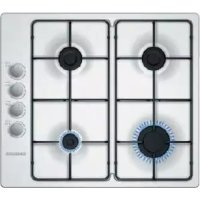
CA114251 - Cooker CONSTRUCTA - Free user manual and instructions
Find the device manual for free CA114251 CONSTRUCTA in PDF.



| Product type | Built-in gas hob |
| Brand | Constructa |
| Model | CA114251 |
| Category | Cooker (hob) |
| Number of burners | 4 (wok, rapid, semi-rapid, auxiliary) |
| Ignition | Automatic spark ignition (requires electrical outlet) |
| Safety | Thermocouple (flame safety) on each burner |
| Power supply | Gas (natural, butane or propane) + 220-240 V for ignition |
| Wok burner (max power) | Not specified in the manual |
| Rapid burner (pan diameter) | 22 - 26 cm |
| Semi-rapid burner (pan diameter) | 14 - 20 cm |
| Auxiliary burner (pan diameter) | 12 - 16 cm |
| Included accessories | Additional coffee maker grid (optional) |
| Cleaning | With soapy water and a sponge; do not use a steam cleaner |
| Burner maintenance | Clean the slots and spark plugs regularly with a non-metallic brush |
| Installation | Built into a cabinet; requires adequate ventilation |
| Technical service | Contact Constructa after-sales service (numbers vary by country) |
| Warranty | According to the conditions of the country of purchase; present the proof of purchase |
| Disposal | Compliant with WEEE directive; recycling of packaging |
Frequently Asked Questions - CA114251 CONSTRUCTA
User questions about CA114251 CONSTRUCTA
0 question about this device. Answer the ones you know or ask your own.
Ask a new question about this device
Download the instructions for your Cooker in PDF format for free! Find your manual CA114251 - CONSTRUCTA and take your electronic device back in hand. On this page are published all the documents necessary for the use of your device. CA114251 by CONSTRUCTA.
USER MANUAL CA114251 CONSTRUCTA
[en] Instruction manual 15
[es] Instrucciones de uso 21
Fare for forgiftning!
natural_image
Illustration of a kettle being heated by a stove, with hands holding the stove (no text or symbols)Ekstra kafferist
natural_image
Illustration of a cooking pot, its lid, and side table with a stove (no text or symbols)Simmer Plate
natural_image
Simple 3D illustration of a circular platform with a base and top, no text or symbols present.Simmer Cap
natural_image
Abstract diagram with concentric circles and curved lines, no text or symbols presentnatural_image
Exploded view diagram of a mechanical assembly showing internal components (no text or labels)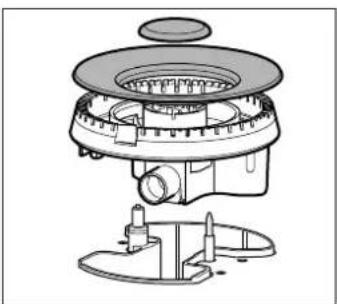
natural_image
Technical line drawing of a mechanical device with no visible text or symbolsManuel tænding
⚠️ Fare for stikflammer!
natural_image
Two identical illustrations of a cooking pot with a stove and a cooking pan, showing no text or symbols.natural_image
Illustration of a kettle being heated by two hands using a stand (no text or symbols)natural_image
Illustration of a cooking pot and its cooking pan with a stove (no text or symbols)Simmer Plate
natural_image
Simple line drawing of a circular object with a base and top, resembling a fan or stand (no text or symbols)Simmer Cap
natural_image
Abstract diagram with curved lines and circles, no text or symbols presentnatural_image
Exploded view diagram of a mechanical assembly showing internal components (no text or labels)
natural_image
Technical line drawing of a mechanical device with no visible text or symbolsAnzünden per Hand
natural_image
Two identical cooking pots on gas, one with a checkmark and the other with a cross (no text or symbols)Safety precautions ....15
Your new appliance....17
Gas burners ....17
Cooking pans....18
Cleaning and maintenance....19
Trouble shooting ....19
Technical Assistance Service ....20
Used appliances and packaging....20
Additional information on products, accessories, replacement parts and services can be found at wwwConstructa.de and in the online shop wwwConstructa-eshop.com

Safety precautions
Read these instructions carefully. You will only be able to use your appliance safely and effectively when you have read them. These operating and installation instructions should be retained, and passed onto the buyer if the appliance is sold.
The manufacturer is exempt from all responsibility if the requirements of this manual are not complied with.
The images shown in these instructions are for guidance only.
Do not remove the appliance from its protective packaging until it is installed in the unit. Do not switch on the appliance if it is damaged in any way. Contact our Technical Assistance Service.
This appliance is class 3 type, according to the EN 30-1-1 regulation for gas appliances: built-in appliance.
Before installing your new hob, ensure that it is being installed according to the assembly instructions.
This appliance cannot be installed on yachts or in caravans.
This appliance must only be used in well ventilated places.
This appliance is not intended for operation with an external clock timer or a remote control.
All operations relating to installation, connection, regulation and conversion to other gas types must be performed by an authorised technician, respecting all applicable regulations, standards and the specifications of the local gas and electricity suppliers. Special attention shall be paid to ventilation regulations.
This appliance leaves the factory set to the gas type that is indicated on the specifications plate. If this needs to be changed, please consult the assembly
instructions. It is recommended you contact the Technical Assistance Service to change to another gas type.
This appliance has been designed for home use only, not for commercial or professional use. This appliance is only intended for cooking purposes, not as a heating system. The warranty will only be valid if the appliance is used for the purpose for which it was designed.
Never leave the appliance unattended during operation.
Do not use lids or protective barriers for children which are not recommended by the hob manufacturer. They may cause accidents such as those due to the overheating, ignition or detachment of fragments of materials.
This appliance may be used by children 8 years old and older and by persons with reduced physical, sensory or mental capacity or a lack of experience or knowledge if they are supervised or they have been instructed about the safe use of the appliance and have understood the associated dangers.
Never let children play with the appliance. Cleaning and user maintenance must not be carried out by unsupervised children.
Risk of deflagration!
Accumulation of unburned gas in an enclosed area carries a risk of deflagration. Do not subject the appliance to draughts. These might blow out the burners. Carefully read the instructions and warnings on the operation of gas burners.
Risk of poisoning!
The kitchen will become hot and humid and combustion products produced when this gas appliance is used. Make sure the kitchen is well ventilated, particularly when
the hob is in operation: either keep the natural ventilation apertures open, or install a ventilation system (extractor hood). Intense prolonged use of the appliance may require additional or more effective ventilation: open a window or increase the power of the ventilation system.
Risk of burns!
The hotplates and their immediate vicinity get very hot. Never touch the hot surfaces. Keep children under 8 years old well away from this appliance.
Risk of fire!
■ The hotplates get very hot. Do not rest inflammable objects on the hob. Do not store objects on the hob.
- Do not store or use corrosive chemicals, products which produce fumes, inflammable materials or non-food products below or near this domestic appliance.
- Fat or oil which is overheated can catch fire easily. Never leave fat or oil to heat up unattended. If oil or fats do catch fire, never use water to put the fire out. Put the fire out by covering the pan with a lid and switch off the hotplate.
Risk of injuries!
- Pans which are damaged, are not the right size, hang over the edge of the hob or are not positioned correctly can cause serious injuries. Follow the advice and warnings provided relating to the cooking pans.
In the event of a malfunction, turn off the appliance's gas and electricity supply. For repairs, call our Technical Assistance Service. - Do not tamper with the appliance's interior. If necessary, call our Technical Assistance Service.
- If one of the control knobs will not turn, do not force it. Call the Technical Assistance Service immediately so that they can repair or replace them.
Risk of electric shock!
Do not clean the appliance using steam cleaners.
Your new appliance
Page 2 shows an overall view of your new appliance as well as the burner power.
Accessories
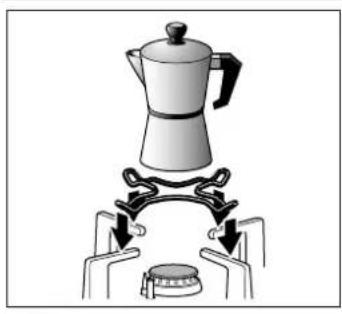
The following accessories can be purchased from the Technical Assistance Service:
natural_image
Illustration of a kettle being heated by two hands using a stand (no text or symbols)Additional coffee maker support
Only for use on the auxiliary burner with pans which are no more than 12 cm in diameter.
natural_image
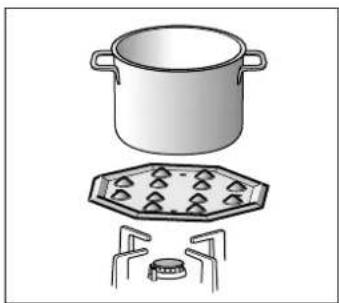
Illustration of a cooking pot, its lid, and side table with a stove (no text or symbols)Simmer Plate
This accessory has been designed to reduce the level of heat at the lowest power setting.
Place the accessory directly on the pan support with the cones facing upwards, never directly over the burner. Centre the pan over the accessory.
natural_image
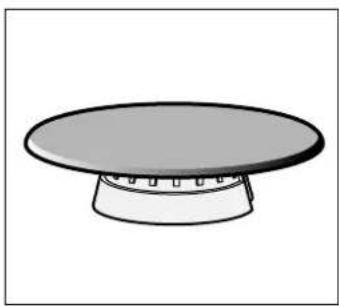
Simple line drawing of a circular platform with a base and top, no text or symbols present.Simmer Cap
Burner specially designed to cook at minimum power. In order to use it, remove the auxiliary burner and replace it with the Simmer Cap burner.
The manufacturer accepts no liability if these accessories are not used or are used incorrectly.
Gas burners
Remove the plastic covering used to protect the stainless steel before using the appliance (depending on the model). If any traces of adhesive remain on the printed areas, remove them with a wet cloth.
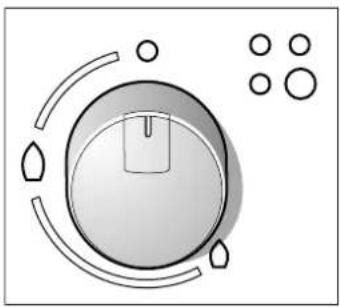
There are indications to show which burner each control knob operates.
natural_image
Abstract diagram with curved lines and circles, no text or symbols presentIt is essential to ensure that all the burner parts and pan supports are correctly installed for the appliance to work correctly. Do not swap the burner caps around.
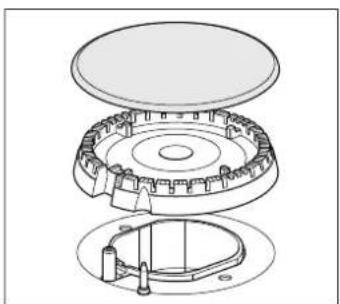
natural_image
Exploded view diagram of a mechanical assembly showing layered components (no text or labels)
natural_image
Technical line drawing of a mechanical device with no visible text or symbolsSwitching on manually
- Press the chosen burner control knob and turn it anticlockwise to the required setting.
- Use any type of lighter or flame (cigarette lighter, matches, etc.) and bring it close to the burner.
Switching on automatically
If your hob can be switched on automatically (ignition sparkers):
- Press the chosen burner control knob and turn it anticlockwise to the maximum power setting. While the control knob is still pressed down, sparks are produced on all burners. The flame ignites.
- Release the control knob.
- Turn the control knob to the required setting.
If it does not come on, turn the control knob to the off setting and repeat the steps above. This time, press and hold the control knob for longer (up to 10 seconds).
Risk of deflagration!
If after 15 seconds the flame does not ignite, switch off the burner and open a nearby window or door. Wait at least one minute before trying to switch the burner back on.
Safety system
Depending on the model, your hob may have a safety system (thermocouple) that prevents the flow of gas if the burners accidentally switch off.
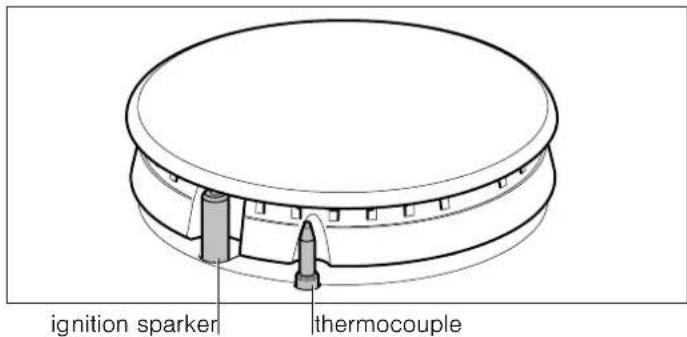
To ensure that this device is active:
- Switch on the burner as usual.
- Without releasing the control knob, press and hold it down firmly for 4 seconds after lighting the flame.
Switching off a burner
Turn the corresponding control knob clockwise to the 0 setting.
Power levels
The progressive control knobs can be used to control the power needed, from minimum to maximum power.
| Setting | ○ | Control knob off |
| High flame | ◇ | Maximum capacity or aperture and electricity on |
| Low flame | ◇ | Minimum capacity or aperture |
Warnings
It is normal to hear a soft whistling noise while the burner is operating.
When first used, it is normal for the burner to give off odours. This does not pose any risk and does not indicate a malfunction. They will disappear in time.
An orange-coloured flame is normal. This is caused by the presence of dust in the atmosphere, spilt liquids, etc.
If the burner flames are accidentally blown out, switch off the burner operating control knob and do not try to relight it for at least 1 minute.
A few seconds after the burner is switched off, a sound (thud) will be produced. This is not a fault - this means that the safety device is no longer operating.
Keep the burner as clean as possible. If the ignition sparkers are dirty they will not light properly. Clean them periodically using a small non-wire brush. Bear in mind that the ignition sparkers must not suffer any serious impacts.
Cooking guidelines
| Burner Very high - High Medium Low | |||
| Wok burner Boiling, steaming, griddling, toasting, paellas, Asian food (wok). | Reheating and keeping things hot: cooked and pre-cooked dishes | ||
| Rapid burner Escalopes, steaks, omelettes, frying | Rice, white sauce, ragout | Steaming: fish, vegetables | |
| Semi-rapid burner | Steamed potatoes, fresh vegetables, vegetable stews, pasta | Reheating, keeping things hot and making tasty casseroles | |
| Auxiliary burner | Cooking: casseroles, rice pudding, caramel | Defrosting and slow cooking: vegetables, fruit and frozen products | Melting: butter, chocolate, jelly |
Cooking pans
Suitable pans
| Burner Minimum pan diameter | Maximum pan diameter |
| Wok burner 22 cm | |
| Rapid burner 22 cm 26 cm | |
| Semi-rapid burner 14 cm 20 cm | |
| Auxiliary burner 12 cm 16 cm |
Precautions for use
The following advice is intended to help you save energy and prevent pan damage:
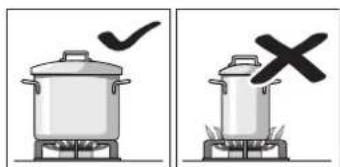
natural_image
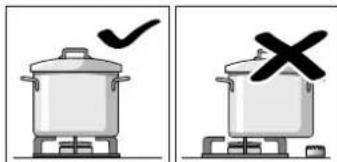
Two identical illustrations of a cooking pot with a checkmark and a cross symbol, no text or labels present.Use pans which are the right size for each burner.
Do not use small pans on large burners. The flame must not touch the sides of the pan.
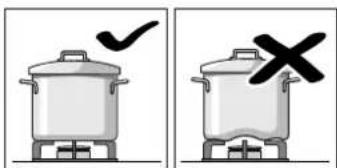
Do not use damaged pans, which do not sit evenly on the hob. Pans may tip over.
Only use pans with a thick, flat base.
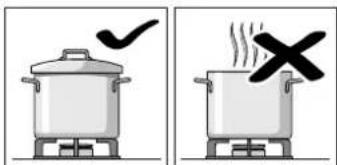
Do not cook without using a lid and make sure the lid is properly fitted. This wastes energy.
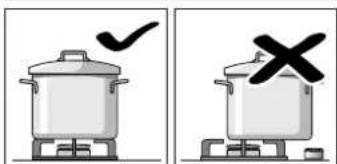
Always centre the pan over the burner, not to one side. Otherwise it could tip over.
Do not place large pans on the burners near the control knobs. These may be damaged by the very high temperatures.
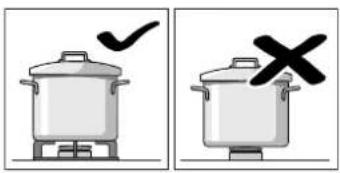
Place the pans on the pan supports, never directly on the burner.
Make sure that the pan supports and burner caps are correctly positioned before using the appliance.
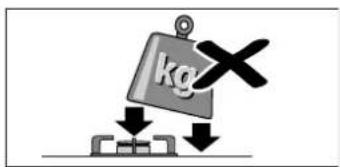
Pans should be placed on the hob carefully.
Do not strike the hob and do not place excessive weight on it.
Cleaning and maintenance
Cleaning
Once the appliance is cool, use a sponge to clean it with soap and water.
After each use, clean the surface of the respective burner parts once they have cooled down. If any residue is left (baked-on food, drops of grease etc.), however little, it will become stuck to the surface and more difficult to remove later. The holes and grooves must be clean for the flame to ignite properly.
The movement of some pans may leave metal residue on the pan supports.
Clean the burners and pan supports using soapy water and scrub with a non-wire brush.
If the pan supports are fitted with rubber rests, ensure that these are also cleaned. The rests may come loose and the pan support may scratch the hob.
Always dry the burners and pan supports completely. Water droplets or damp patches on the hob at the start of cooking may damage the enamel.
After cleaning and drying the burners, make sure the burner caps are correctly positioned on the diffuser.
Caution!
Do not use steam cleaners. This could damage the hob.
Maintenance
Always clean off any liquid as soon as it is spilt. This will prevent food remains from sticking to the hob surface and you will save yourself any unnecessary effort.
Do not leave acidic liquids (e.g. lemon juice, vinegar, etc.) on the hob.
Due to the high temperatures endured, the wok burner and the stainless steel zones (grease drip tray, burner outline, etc.) can change colour. This is normal. After each use, clean these areas with a product that is suitable for stainless steel.
It is recommended that the cleaning product available from our Technical Assistance Service (code 464524) is used regularly.
Trouble shooting
Sometimes certain faults detected can be easily resolved. Before calling the Technical Assistance Service, bear in mind the following advice:
Fault Possible cause Solution
| The general electrical system is malfunctioning. | Defective fuse. Check the fuse in the main fuse box and change it if it is damaged. | |
| The automatic safety switch or circuit breaker has tripped. | Check the main control panel to see if the automatic safety switch or circuit breaker has tripped. | |
| The automatic switching on function does not work. | There may be food or cleaning products stuck between the ignition sparkers and the burners. | The space between the ignition sparker and the burner must be clean. |
| The burners are wet. Dry the burner caps carefully. | ||
| The burner caps are not correctly positioned. Check that the burner caps are correctly positioned. | ||
| The appliance is not earthed, is poorly connected or the earthing is faulty. | Contact the installation technician. | |
| The burner flame is not uniform. | The burner components are not correctly positioned. | Correctly place the parts on the appropriate burner. |
| The grooves on the burner are dirty. Clean the grooves on the burner. | ||
| The gas flow is not normal or there is no gas. | The gas supply is blocked by gas taps. Open all gas taps. | |
| If the gas is supplied from a gas cylinder, check that it is not empty. | Change the gas cylinder. | |
| The kitchen smells of gas. | A gas tap has been left on. Turn off the taps. | |
| Incorrect coupling of gas cylinder. Check that the coupling is sound. | ||
| Possible gas leak. Shut off the gas supply, ventilate the premises and immediately notify an authorised installation technician to check and certify the installation. Do not use the appliance until ensuring that there is no gas leak in the installation or appliance itself. | ||
Fault Possible cause Solution
| The burner immediately switches off after releasing the control knob. | The control knob was not held down for long enough. | Once the burner is on, hold the control knob down a few seconds longer. |
| The grooves on the burner are dirty. Clean the grooves on the burner. | ||
Technical Assistance Service
When contacting our Technical Assistance Service, please provide the product number (E-Nr.) and production number (FD) of the appliance. This information is given on the specifications plate located on the lower section of the hob and on the label in the user manual.
Please find the contact data of all countries in the enclosed customer service list.
Rely on the professionalism of the manufacturer. You can therefore be sure that the repair is carried out by trained service technicians who carry original spare parts for your appliances.
Warranty conditions
In the unlikely event that the appliance is damaged or does not meet your expectations in terms of quality, please inform us as soon as possible. For the warranty to be valid, the appliance must not have been tampered with, or used inappropriately.
The applicable warranty conditions are those set out by the company's representative office in the country of purchase. Detailed information is available from retail outlets. Proof of purchase must be presented to obtain the benefits of the warranty.
We reserve the right to introduce changes.
Used appliances and packaging
If the ⚡ symbol is shown on the specifications plate, bear in mind the following instructions:
Environmentally-friendly disposal
Dispose of packaging in an environmentally-friendly manner.
This appliance is labelled in accordance with European Directive 2012/19/EU concerning used electrical and electronic appliances (waste electrical and electronic equipment - WEEE). The guideline determines the framework for the return and recycling of used appliances as applicable throughout the EU.
The packaging of your appliance has been manufactured using only the materials which are strictly necessary to guarantee efficient protection during transport. These materials are 100% recyclable, thus reducing the environmental impact. You can also contribute to caring for the environment by following the advice below:
■ Dispose of the packaging in the appropriate recycling bin.
Before you get rid of an old appliance, make sure you disable it. Contact your local authority to find out the address of your nearest recycling centre to dispose of your appliance.
- Do not pour used oil down the sink. Collect it in a sealed container and take it to an appropriate collection point or, failing that, place it in the rubbish bin (it will end up in a controlled dump; this is probably not the best option, but it will avoid contaminating ground water)
natural_image
Illustration of a kettle being heated by two hands using a stand (no text or symbols)natural_image
Illustration of a cooking pot and its lid with a stove (no text or symbols)Simmer Plate
natural_image
Simple line drawing of a circular object mounted on a base (no text or symbols)Simmer Cap
natural_image
Abstract diagram with concentric circles and scattered circles, no text or symbols presentnatural_image
Exploded view diagram of a mechanical assembly showing internal components (no text or labels)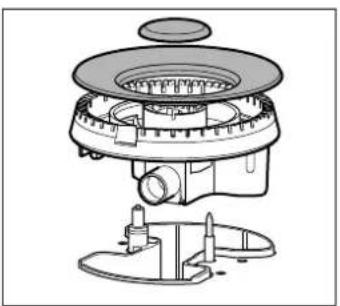
natural_image
Technical line drawing of a mechanical device with no visible text or symbolsEncendido manual
natural_image
Two identical illustrations of a cooking pot with a checkmark and a cross symbol, no text or labels present.natural_image
Illustration of a kettle being heated by two hands using a stand (no text or symbols)natural_image
Illustration of a cooking pot and its cooking pan with a stove (no text or symbols)Simmer Plate
natural_image
Simple line drawing of a circular object mounted on a base (no text or symbols)Simmer Cap
natural_image
Abstract diagram with curved lines and circles, no text or symbols presentnatural_image
Exploded view diagram of a mechanical assembly showing internal components (no text or labels)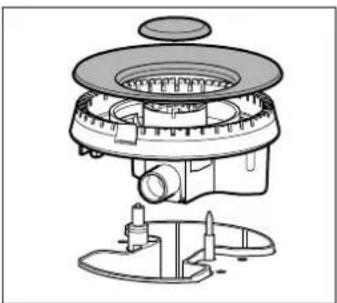
natural_image
Technical line drawing of a mechanical device with no visible text or symbolsAllumage manuel
natural_image
Two identical illustrations of a cooking pot with a stove and a cooking pan, one marked with a checkmark and the other with a cross (no text or symbols)natural_image
Illustration of a kettle being heated by a stove, with hands operating it (no text or symbols)natural_image
Illustration of a cooking pot, its lid, and side table with a stove (no text or symbols)Simmer Plate
natural_image
Simple 3D illustration of a circular platform with a base and top, no text or symbols present.Simmer Cap
natural_image
Abstract diagram with curved lines and circles, no text or symbols presentnatural_image
Exploded view diagram of a mechanical assembly showing layered components (no text or labels)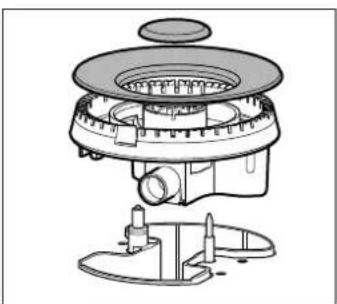
natural_image
Technical line drawing of a mechanical device with no visible text or symbolsKézi gyújtás
natural_image
Illustration of a kettle being heated by two hands using a stove (no text or symbols)natural_image
Illustration of a cooking pot and its cooking pan with a stove (no text or symbols)Simmer Plate
natural_image
Simple line drawing of a circular object mounted on a base (no text or symbols)Simmer Cap
natural_image
Abstract diagram with a central circular element, curved lines, and scattered circles (no text or symbols)natural_image
Exploded view diagram of a mechanical assembly showing layered components (no text or labels)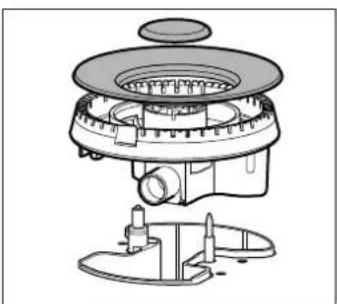
natural_image
Technical line drawing of a mechanical device with no visible text or symbolsAccensione manuale
natural_image
Two identical illustrations of a cooking pot with a checkmark and a cross symbol, no text or labels present.natural_image
Illustration of a kettle being heated by two hands using a stand (no text or symbols)natural_image
Illustration of a cooking pot and its octagonal stove with a side table (no text or symbols)Simmer Plate
natural_image
Simple line drawing of a circular object mounted on a base (no text or symbols)Simmer Cap
natural_image
Abstract diagram with curved lines and circles, no text or symbols presentnatural_image
Exploded view diagram of a mechanical assembly showing internal components (no text or labels)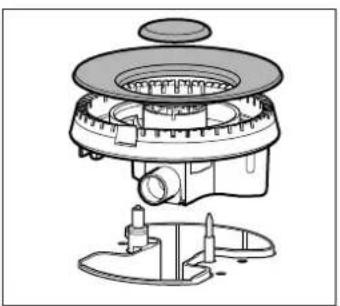
natural_image
Technical line drawing of a mechanical device with no visible text or symbolsnatural_image
Two identical illustrations of cooking pots on stovels, one with a checkmark and the other with a cross (no text or symbols)natural_image
Illustration of a kettle being heated by a stove, with hands holding the stove (no text or symbols)natural_image
Illustration of a cooking pot, its lid, and side table with a stove (no text or symbols)Simmer Plate
natural_image
Simple 3D illustration of a circular platform with a base and top, no text or symbols present.Simmer Cap
natural_image
Abstract diagram with concentric circles and curved lines, no text or symbols presentnatural_image
Exploded view diagram of a mechanical assembly showing internal components (no text or labels)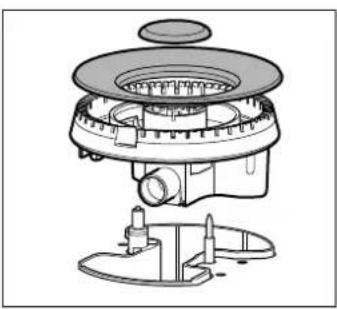
natural_image
Technical line drawing of a mechanical device with no visible text or symbolsZapalanie ręczne
natural_image
Illustration of a kettle being heated by a stove, with no text or symbols present.natural_image
Illustration of a cooking pot, a tray with food items, and a stove (no text or symbols)Simmer Plate
natural_image
Simple line drawing of a circular platform with a base and top, no text or symbols present.Simmer Cap
natural_image
Diagram of a circular device with internal components and surrounding circles (no text or symbols)natural_image
Exploded view diagram of a mechanical assembly showing internal components (no text or labels)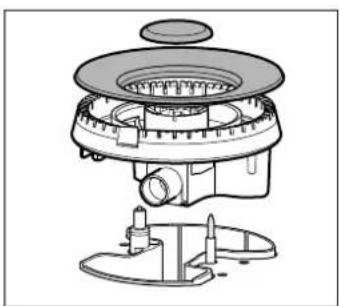
natural_image
Technical line drawing of a mechanical device with no visible text or symbolsAcendimento manual
natural_image
Two identical illustrations of a cooking pot on a stove, one with a checkmark and the other with a cross (no text or symbols)Utilize apenas recipientes de base plana e grossa.
natural_image
Illustration of a kettle being heated by a stove, with steam rising from the base (no text or symbols)natural_image
Illustration of a cooking pot, a tray with food items, and a stove (no text or symbols)Simmer Plate
natural_image
Simple line drawing of a circular platform with a base and top, no text or symbols present.Simmer Cap
natural_image
Diagram of a circular device with internal components and surrounding circles (no text or symbols)natural_image
Exploded view diagram of a mechanical assembly showing layered components (no text or labels)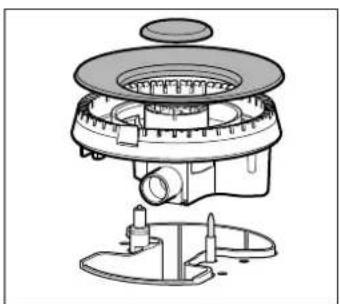
natural_image
Technical line drawing of a mechanical device with no visible text or symbolsAprindere manuală
natural_image
Illustration of a kettle being heated by a stove, with steam rising from the base (no text or symbols)natural_image
Illustration of a cooking pot, a tray with food items, and a stove (no text or symbols)Simmer Plate
natural_image
Simple line drawing of a circular platform with a base and top, no text or symbols present.Simmer Cap
natural_image
Diagram of a circular device with internal components and surrounding circles (no text or symbols)natural_image
Exploded view diagram of a mechanical assembly showing layered components (no text or labels)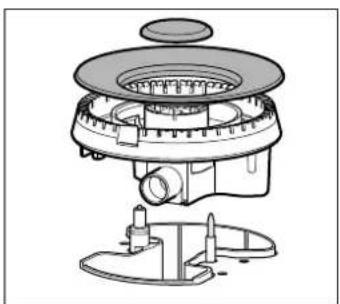
natural_image
Technical line drawing of a mechanical device with no visible text or symbolsManuel tändning
natural_image
Two identical cooking pots with steam rising, one marked with a checkmark and the other with a cross (no text or symbols)natural_image
Illustration of a kettle being heated over a stove with two handles (no text or symbols)Kahve cezvesi eki
natural_image
Illustration of a cooking pot, its lid, and side table with a stove (no text or symbols)Simmer Plate
natural_image
Simple line drawing of a circular plate with a base and top, no text or symbols present.Simmer Cap
natural_image
Simple diagram of a circular device with internal components and surrounding circles (no text or symbols)natural_image
Exploded view diagram of a mechanical assembly showing layered components (no text or labels)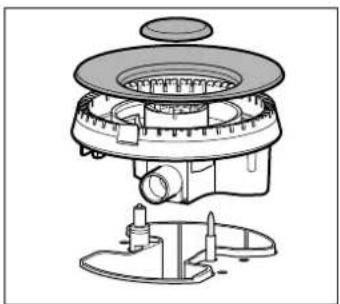
natural_image
Technical line drawing of a mechanical device with no visible text or symbolsManuel çakmak
natural_image
Two identical cooking pots with steam rising, one marked with a checkmark and the other with a cross (no text or symbols)

- Fare for forgiftning!
- Ekstra kafferist
- Simmer Plate
- Simmer Cap
- Manuel tænding
- ⚠️ Fare for stikflammer!
- Anzünden per Hand
- Safety precautions
- The manufacturer is exempt from all responsibility if the requirements of this manual are not complied with.
- Risk of deflagration!
- Risk of poisoning!
- Risk of burns!
- Risk of fire!
- Risk of injuries!
- Risk of electric shock!
- Your new appliance
- Accessories
- Additional coffee maker support
- Gas burners
- Switching on manually
- Switching on automatically
- Safety system
- Switching off a burner
- Power levels
- Warnings
- Cooking pans
- Precautions for use
- Cleaning and maintenance
- Cleaning
- Caution!
- Maintenance
- Trouble shooting
- Technical Assistance Service
- Warranty conditions
- Used appliances and packaging
- Environmentally-friendly disposal
- Encendido manual
- Allumage manuel
- Kézi gyújtás
- Accensione manuale
- Zapalanie ręczne
- Acendimento manual
- Aprindere manuală
- Manuel tändning
- Manuel çakmak
Brand : CONSTRUCTA
Model : CA114251
Category : Cooker