ManualGo.com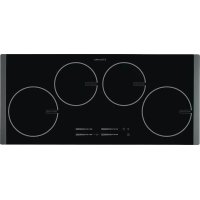
EHD90341P - Cooker ELECTROLUX - Free user manual and instructions
Find the device manual for free EHD90341P ELECTROLUX in PDF.


Download the instructions for your Cooker in PDF format for free! Find your manual EHD90341P - ELECTROLUX and take your electronic device back in hand. On this page are published all the documents necessary for the use of your device. EHD90341P by ELECTROLUX.
USER MANUAL EHD90341P ELECTROLUX
- Only adults can use this appliance. Chil- dren must get supervision to make sure that they do not play with the appliance.
- Keep all packaging away from children. There is a risk of suffocation.
- Keep children away from the appliance when it is on. Warning! Start the child safety device to prevent small children and pets from an accidental activation of the appliance. Safety during operation
- Remove all packaging, stickers and lay- ers from the appliance before the first use.
- Set the cooking zones to "off" after each use.
- Risk of burns! Do not put metallic ob- jects, for example cutlery or saucepan lids, on the cooking surface, as they can become hot.
- Users with an implanted pacemaker must keep their upper body minimum 30 cm from induction cooking zones that are switched on. Warning! Fire danger! Overheated fats and oils can catch fire very quickly. Correct operation
- Always monitor the appliance during op- eration.
- Only use the appliance for domestic cook- ing tasks!
- Do not use the appliance as a work or a storage surface.
- Do not put or keep very flammable liquids and materials, or fusible objects (made of plastic or aluminium) on or near the appli- ance.
- Be careful when you connect the appli- ance to the near sockets. Do not let elec- tricity bonds touch the appliance or hot cookware. Do not let electricity bonds tan- gle. How to prevent a damage to the appliance
- If the objects or cookware fall on the glass ceramic, the surface can be dam- aged.
- Cookware made of cast iron, cast alumi- nium or with damaged bottoms can scratch the glass ceramic if you move them on the surface.
- Do not let cookware boil dry to prevent the damage to cookware and glass ce- ramics.
- Do not use the cooking zones with empty cookware or without cookware. electrolux 13• Do not cover the parts of the appliance with aluminium foil.
- Do not cover the ventilation space of 5 mm between the worktop and front of the unit below it. Warning! If there is a crack on the surface, disconnect power supply to prevent the electric shock. INSTALLATION INSTRUCTIONS Before the installation , note down the serial number (Ser. Nr.) from the rat- ing plate. The rating plate of the ap- pliance is on its lower casing. EHD90341P
ELECTROLUX 220-240 V 50-60 Hz 7,4 kW Induction 7,4 kW Safety instructions Warning! You must read these! Make sure that the appliance is not dam- aged because of transportation. Do not connect a damaged appliance. If it is necessary, speak to the supplier. Only an authorised service technician can install, connect or repair this appli- ance. Use only original spare parts. Only use built-in appliances after you as- semble the appliance into correct built- in units and work surfaces that align to the standards. Do not change the specifications or modify this product. Risk of injury and damage to the appliance. Fully obey the laws, ordinances, direc- tives and standards in force in the coun- try where you use the appliance (safety regulations, recycling regulations, elec- trical safety rules etc.)! Keep the minimum distances to other appliances and units! Install anti-shock protection, for exam- ple install the drawers only with a pro- tective floor directly below the appliance! Protect the cut surfaces of the worktop against moisture with a correct sealant! Seal the appliance to the work top with no space left with a correct sealant! Protect the bottom of the appliance from steam and moisture, e.g. from a dishwasher or oven! Do not install the appliance adjacent to doors and below windows! If not, hot cookware can be hit off the hob when you open doors or windows. Warning! Risk of injury from electrical current. Carefully obey the instructions for electrical connections.
- The electrical mains terminal is live.
- Loose and incorrect plug and socket con- nections can make the terminal become too hot.
- A qualified electrician must install the clamping connections correctly.
- Use a strain relief clamp on cable.
- Use the correct mains cable of type H05BB-F Tmax 90°C (or higher) for a sin- gle-phase or two-phase connection.
- Replace the damaged mains cable with a special cable (type H05BB-F Tmax 90°C; or higher). Speak your local Service Force Centre. The appliance must have the electrical instal- lation which lets you disconnect the appli- ance from the mains at all poles with a con- tact opening width of minimum 3 mm. You must have correct isolation devices: line protecting cut-outs, fuses (screw type fuses removed from the holder), earth leak- age trips and contactors. Sticking on the seal
- Clean the worktop in the area of the cut- out section.
- Bond the sealing tape to the lower edge of the cooking surface along the outer edge of the glass ceramic. Do not extend it. Let stay the cut ends in the middle of one side. When you have cut it to length (add some mm), push the two ends to- gether. 14 electroluxAssembly min. 500 mm min. 50 mm min. 50 mm min. 5 mm min. 55mm min. 55mm
1 Induction cooking zone 2300W, with the Power function 3200W 2 Induction cooking zone 1800W, with the Power function 2800W 3 Induction cooking zone 1800W, with the Power function 2800W 4 Induction cooking zone 2300W, with the Power function 3200W 5 Control panel Control panel layout
16 electroluxUse the sensor fields to operate the appliance. Indicators, displays and sounds tell which functions operate. sensor field function
starts and stops the hob
starts and stops the key lock or child lock
cooking zones' indicators of timer shows for which zone you set the time
the timer display shows the time in minutes
- there is no cookware on the cooking zone
- the cookware is not correct
- automatic switch off is active
shows that cooking zone stays hot
a control bar to set the heat setting
increases or decreases the time
selects the cooking zone
starts and stops STOP+GO +number in the timer display shows that there is a malfunction. Residual heat indicator Warning! Risk of burns from residual heat! The induction cooking zones make the heat necessary for cooking directly in the bottom of the cookware. The glass ceramic is heat- ed by the residual heat of the cookware. OPERATING INSTRUCTIONS On and Off Touch for 1 second to start or stop the appliance. Automatic Switch Off The function stops the hob automatically if:
- all cooking zones are off.
- you do not set the heat setting after you start the hob.
- you cover a sensor field with an object (a pan, a cloth, etc.) for longer than 10 sec- onds. The sound operates until you re- move the object.
- the hob gets too hot (e.g. when a sauce- pan boils dry). Before you use the hob again, the cooking zone must be cool.
you use incorrect cookware. comes on and after 2 minutes the cooking zone stops automatically.
- you do not stop a cooking zone or change the heat setting. After some time comes on and the hob stops. See the table. Automatic Switch Off times Heat setting 1-2 3-4 5 6-9 Stops after 6 hours 5 hours 4 hours 1.5 hours electrolux 17The heat setting Touch the control bar at the heat setting. The heat setting indicators come on. The automatic heat up The Automatic heat up function sets the highest heat setting for some time, and then decreases to the necessary level. Touch . The indicator flashes. Set the heat setting (1-8). The indicator of the heat setting comes on. The indicator above comes on and after some time goes out. The time of the automatic heat up changes for different heat settings.
Switching the Power function on and off The Power function makes more power avail- able to the induction cooking zones. The Power function is activated for 10 minutes at most. After that the induction cooking zone automatically switches back to the highest heat setting (9). To switch on, touch , the indicator above comes on. To switch off, touch a heat setting (1-9). Power management The power management divides the power between two cooking zones in a pair (see the figure). The power function increases the power to the maximum level for one cooking zone in the pair and automatically decreases in the second cooking zone to a lower power level. The display for the re- duced zone alternates. Using the Timer Count Down Timer Use the Count Down Timer to set how long the cooking zone operates for one cooking session. Set the Count Down Timer after the se- lection of the cooking zone. You can set the heat setting before or after you set the timer.
- Selection of the cooking zone: touch again and again until the indicator of a necessary cooking zone comes on.
Starting the Count Down Timer: touch of the timer to set the time (
minutes). When the indicator of the cook- ing zone flashes slower, the time counts down.
- Checking the remaining time: select the cooking zone with . The indicator of the cooking zone flashes faster. Dis- play shows the remaining time.
- Changing the Count Down Timer: se- lect the cooking zone with touch or
- Stopping the timer: select the cooking zone with . Touch . The remaining time counts backwards to
. The indi- 18 electroluxcator of the cooking zone goes out. To switch off You can also touch and at the same time. When the time elapses, the sound oper- ates and
flashes. The cooking zone switches off.
Stopping the sound: touch CountUp Timer (Count up timer) Use the CountUp Timer to monitor how long the cooking zone operates.
- Selection of the cooking zone (if more than 1 cooking zone operate): touch again and again until the indica- tor of a necessary cooking zone comes on.
Starting the CountUp Timer: touch of the timer comes on. When the indi- cator of the cooking zone flashes slower, the time counts up, display switches be- tween and time elapsed (minutes)
- Checking the elapsed time: select the cooking zone with . The indicator of the cooking zone flashes faster. Display shows the elapsed time.
- Stopping the CountUp Timer: select the cooking zone with and touch or to switch off the timer. The indicator of the cooking zone goes out. Minute Minder You can use the timer as a Minute Minder while cooking zones do not operate. Touch . Touch or of the timer to select the time. When the time elapses, the sound operates and
Stopping the sound: touch STOP+GO The function sets all cooking zones that operate to the lowest heat setting. When operates, you cannot change the heat setting. The function does not stop the timer func- tion.
The heat setting that you set before comes on. Lock You can lock the control panel, but not
It prevents an accidental change of the heat setting. To start this function touch . The indica- tor comes on. The Timer stays on. To stop this function touch . The indica- tor goes out. When you stop the appliance, you also stop this function. The child safety device This function prevents an accidental opera- tion of the hob. Starting the child safety device
Start the hob with . Do not set the heat settings .
Touch for 4 seconds. The indicator comes on.
Switching off the child safety device
Start the hob with . Do not set the heat settings . Touch for 4 seconds. The indicator goes out.
Overriding the child safety device for one cooking session
Start the hob with . The indicator comes on.
Touch for 4 seconds. Set the heat setting in less than 10 seconds. You can operate the hob.
When you stop the hob with , the child safety device operates again. OffSound Control (Deactivation and activation of the sounds) Deactivation of the sounds Deactivate the appliance. Touch for 3 seconds. The displays come on and go out. Touch for 3 seconds. comes on, the sound is on. Touch , comes on, the sound is off. When this function operates, you can hear the sounds only when:
- the Minute Minder comes down
- the Count Down Timer comes down
- you put something on the control panel. electrolux 19Activation of the sounds Deactivate the appliance. Touch for 3 seconds. The displays come on and go out. Touch for 3 seconds. comes on, because the sound is off. Touch , comes on. The sound is on.
HELPFUL HINTS AND TIPS
Use the induction cooking zones with suitable cookware. Cookware for induction cooking zones Important! In induction cooking a powerful electromagnetic field generates an almost instant heat inside the cookware. Cookware material
- correct: cast iron, steel, enamelled steel, stainless steel, a multi-layer bottom (marked as correct by a manufacturer).
not correct: aluminium, copper, brass, glass, ceramic, porcelain. Cookware is correct for an induction hob if
- ... some water boils very quickly on a zone set to the highest heat setting..
- ... a magnet pulls on to the bottom of the cookware. The bottom of the cookware must be as thick and flat as possible. Cookware dimensions : induction cooking zones adapt to the dimension of the bottom of the cookware automat- ically to some limit. But, the magnetic part of the bottom of the cookware must have a minimum diameter of ap- proximately 3/4 of the cooking zones. Operating noises If you can hear
- cracking noise: cookware is made of dif- ferent materials (Sandwich construction).
- whistling: you use one or more cooking zones with high power levels and the cookware is made of different materials (Sandwich construction).
- humming: you use high power levels.
- clicking: electric switching occurs.
- hissing, buzzing: the fan operates. The noises are normal and do not refer to any defects. Energy saving
- If possible, always put the lids on the cookware.
- Put cookware on a cooking zone be- fore you start it. Öko Timer (Eco Timer) To save the energy, the heater of the cooking zone switches itself off earlier than count down timer signal. The heat- ing time reduction depends on cooking level and cooking time. Examples of cooking applications The data in the table is for guidance only. Heat set- ting Use to: Time Hints
Keep cooked foods warm as re- quired Cover the food 1-2 Hollandaise sauce, melt: butter, choco- late, gelatine 5-25 min Mix occasionally 1-2 Solidify: fluffy omelettes, baked eggs 10-40 min Cook with a lid on 2-3 Simmer rice and milkbased dishes, heat- ing up ready-cooked meals 25-50 min Add at least twice as much liquid as rice, stir milk dishes part way through 3-4 Steam vegetables, fish, meat 20-45 min Add a few tablespoons of liquid 4-5 Steam potatoes 20-60 min Use max. ¼ l water for 750 g of po- tatoes 20 electroluxHeat set- ting Use to: Time Hints 4-5 Cook larger quantities of food, stews and soups 60-150 min Up to 3 l liquid plus ingredients 6-7 Gentle fry: escalope, veal cordon bleu, cutlets, rissoles, sausages, liver, roux, eggs, pancakes, doughnuts as re- quired Turn halfway through 7-8 Heavy fry, hash browns, loin steaks, steaks 5-15 min Turn halfway through 9 Boil large quantities of water, cook pasta, sear meat (goulash, pot roast), deep fry chips The Power function is suitable for heating large quantities of water. Information on acrylamides Important! According to the newest scientific knowledge, if you brown food (specially the one which contains starch), acrylamides can pose a health risk. Thus, we recommend that you cook at the lowest temperatures and do not brown food too much.
Clean the appliance after each use. Always use cookware with clean bottom. Warning! Sharp objects and abrasive cleaning agents will damage the appliance. For your safety, do not clean the appli- ance with steam blasters or high-pres- sure cleaners. Scratches or dark stains on the glass ceramic have no effect on how the ap- pliance operates. To remove the dirt:
1. – Remove immediately: melted plas-
tic, plastic foil, and food with sugar. If not, the dirt can cause damage to the appliance. Use a special scraper for the glass . Put the scraper on the glass surface at an acute angle and move the blade on the surface . – Remove after the appliance is suf- ficiently cool: limescale rings , water rings, fat stains, shiny metallic discol- orations. Use a special cleaning agent for glass ceramic or stainless steel.
2. Clean the appliance with a moist cloth
3. At the end rub the appliance dry with
Problem Possible cause and remedy You cannot start the appliance or operate it.
- You touched 2 or more sensor fields at the same time. Only touch one sensor field.
- There is water or fat stains on the control panel. Clean the con- trol panel
The child safety device or key lock or operates . See the chapter Operating the appliance.
- Start the appliance again and set the heat setting within 10 sec- onds. A sound operates (6x) and the appliance stops or a sound op- erates when the appliance is off. You covered one or more sensor fields. Uncover the sensor fields. electrolux 21Problem Possible cause and remedy The residual heat indicator does not come on. The cooking zone is not hot because it operated only for a short time. If the cooking zone is supposed to be hot, speak to the Af- ter Sales Service. A sound operates and appliance starts and stops again. After 5 seconds one more sound oper- ates. You covered . Uncover the sensor field. Heat setting alternates The Power management is active. See the section Power man- agement. comes on
- No cookware on the cooking zone. Put cookware on the cook- ing zone.
- Not correct cookware. Use the correct cookware.
- The diameter of the bottom of the cookware is too small for the cooking zone. Move cookware to a smaller cooking zone.
- The automatic switch-off operates. Stop the appliance and start it again.
- Overheating protection for the cooking zone operates. Switch off the cooking zone. Switch on the cooking zone again. and number come on. There is an error in the appliance. Disconnect the appliance from the electrical supply for some time. Disconnect the fuse from the electrical system of the house. Connect again. If comes on again, speak to the after sales service. comes on There is an error in the appliance, because a cookware boils dry or you use not correct cookware. Overheating protection for the cooking zone operates. The automatic switch-off operates. Switch off the appliance. Remove the hot cookware. After approx- imately 30 seconds switch on the cooking zone again. should disappear, residual heat indicator can stay. Cool down the cookware and check it with the section "Cookware for the in- duction cooking zone". If you tried the above solutions and cannot repair the problem, speak to your dealer or the Customer Care Department. Give the da- ta from the rating plate, three-digit-letter code for the glass ceramic (it is in the cor- ner of the cooking surface) and an error mes- sage that comes on. If you operated the appliance incorrectly, the servicing by a customer service techni- cian or dealer will not be free of charge, even during the warranty period. The instruc- tions about the customer service and condi- tions of guarantee are in the guarantee book- let. ENVIRONMENT CONCERNS The symbol on the product or on its packaging indicates that this product may not be treated as household waste. Instead it should be taken to the appropriate collection point for the recycling of electrical and electronic equipment. By ensuring this product is disposed of correctly, you will help prevent potential negative consequences for the environment and human health, which could otherwise be caused by inappropriate waste handling of this product. For more detailed information about recycling of this product, please contact your local council, your household waste disposal service or the shop where you purchased the product. 22 electroluxPackaging material The packaging materials are friendly to the environment and can be recycled. The plastic components are identified by marking: >PE<,>PS<, etc. Discard the packaging materials as household waste at the waste disposal facilities in your municipality. electrolux 23Electrolux. Thinking of you. Partagez notre imagination sur www.electrolux.com SOMMAIRE Consignes de sécurité 24 Instructions d'installation 25 Description de l'appareil 27 Notice d'utilisation 29 Conseils utiles 31 Entretien et nettoyage 33 En cas d'anomalie de fonctionnement