MSO5211 - Microwave Oven ACP - Free user manual and instructions
Find the device manual for free MSO5211 ACP in PDF.



User questions about MSO5211 ACP
0 question about this device. Answer the ones you know or ask your own.
Ask a new question about this device
Download the instructions for your Microwave Oven in PDF format for free! Find your manual MSO5211 - ACP and take your electronic device back in hand. On this page are published all the documents necessary for the use of your device. MSO5211 by ACP.
USER MANUAL MSO5211 ACP
Accelerated Cooking Products
Owner's Manual
THIS OVEN IS INTENDED FOR COMMERCIAL USE ONLY
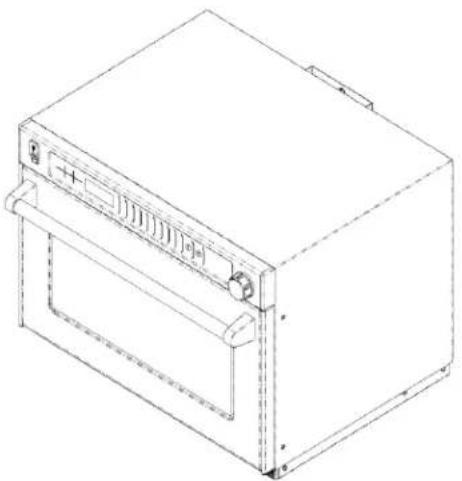
Commercial Microwave Oven
Keep these instructions for future reference. If the oven changes ownership, be sure this manual accompanies the oven.
Contents
Model Identification 2
Precautions to Avoid Possible
Exposure to Excessive
Microwave Energy. 2
Important Safety Instructions. 3-4
Earthing Instructions. 5
Installation. 5
Display and Features. 6-8
Using Oven Controls. 9
Programming Oven Controls. 10-11
Changing User Options. 11
User Options Table. 12
Care and Cleaning. 13
Before Calling for Service. 14
When contacting ACP, provide product information. Product information is located on oven serial plate. Record the following information:
| Model Number: |
| Manufacturing Number: |
| Serial or S/N Number: |
| Date of purchase: |
| Dealer's name and address: |
Any questions or to locate an authorized ACP servicer, call toll free 1-866-426-2621 inside U.S.A. or Canada, or 1-319-368-8120 outside U.S.A or Canada. Warranty service must be performed by an authorized ACP servicer. ACP also recommends contacting an authorized ACP servicer if service is required after warranty expires.
IMPORTANT SAFETY INSTRUCTIONS

It is used to alert you to potential personal injury hazards. Obey all safety messages that follow this symbol to avoid possible injury or death. When using electrical equipment, basic safety precautions should be followed to reduce the risk of burns, electrical shock, fire, or injury to persons.
PRECAUTIONS TO AVOID POSSIBLE EXPOSURE TO EXCESSIVE MICROWAVE ENERGY
A. DO NOT attempt to operate this oven with the door open since open door operation can result in harmful exposure to microwave energy. It is important not to defeat or tamper with the safety interlocks.
B. DO NOT place any object between the oven front face and the door or allow soil or cleaner residue to accumulate on sealing surfaces.
C. DO NOT operate the oven if it is damaged. It is particularly important that the oven door close properly and that there is no damage to the:
- door (bent)
- hinges and latches (broken or loosened)
- door seals and sealing surfaces.
D. The oven should not be adjusted or repaired by anyone except properly qualified service personnel.
SAVE THESE INSTRUCTIONS
IMPORTANT SAFETY INSTRUCTIONS

It is used to alert you to potential personal injury hazards. Obey all safety messages that follow this symbol to avoid possible injury or death.

WARNING
When using electrical equipment, basic safety precautions should be followed to reduce the risk of burns, electrical shock, fire, or injury to persons.
- READ all instructions before using equipment.
- READ AND FOLLOW the specific "PRECAUTIONS TO AVOID POSSIBLE EXPOSURE TO EXCESSIVE MICROWAVE ENERGY" on page 2.
- This equipment MUST BE GROUNDED. Connect only to properly GROUNDED outlet. See "GROUNDING/EARTHING INSTRUCTIONS" on page 5.
- Install or locate this equipment ONLY in accordance with the installation instructions in this manual.
- Some products such as whole eggs and sealed containers—for example, closed glass jars—are able to explode and SHOULD NOT be HEATED in this oven.
- Use this equipment ONLY for its intended use as described in this manual. Do not use corrosive chemicals or vapors in this equipment. This type of oven is specifically designed to heat, cook, or dry food. It is not designed for industrial or laboratory use.
- As with any equipment, CLOSE SUPERVISION is necessary when used by CHILDREN.
- DO NOT operate this equipment if it has a damaged cord or plug, if it is not working properly, or if it has been damaged or dropped.
- This equipment, including power cord, must be serviced ONLY by qualified service personnel. Special tools are required to service equipment. Contact nearest authorized service facility for examination, repair, or adjustment.
- DO NOT cover or block filter (if applicable) or other openings on equipment.
- DO NOT store this equipment outdoors. DO NOT use this product near water - for example, near a kitchen sink, in a wet basement, a swimming pool, or a similar location.
- DO NOT immerse cord or plug in water.
- Keep cord AWAY from HEATED surfaces.
- DO NOT let cord hang over edge of table or counter.
- See door cleaning instructions on page
- Cleaning and user maintenance shall not be made by children without supervision.
- To avoid risk of fire in the oven cavity: a. DO NOT overcook food. Carefully attend oven when paper, plastic, or other combustible materials are placed inside the oven to facilitate cooking. b. Remove wire twist-ties from paper or plastic bags before placing bag in oven. c. If materials inside the oven ignite, keep oven door CLOSED, turn oven off and disconnect the power cord, or shut off power at the circuit breaker panel.
d. DO NOT use the cavity for storage. DO NOT leave paper products, cooking utensils, or food in the cavity when not in use.
- For commercial use only.
- It is hazardous for anyone other than a competent person to carry out any service or repair operation that involves the removal of any cover which gives protection against exposure to microwave energy.
- If the door or door seals are damaged, the oven must not be operated until it has been repaired by a competent person.
- Appliance is not to be used by children 8 years and below or persons with reduced physical, sensory or mental capabilities or lack of experience and knowledge, unless they have been given supervision or instruction.
- Children being supervised not to play with appliance.
- Only use utensils that are suitable for use in microwave oven.
- When heating food in plastic or paper containers, keep an eye on the oven due to the possibility of ignition.
- If smoke is observed, switch off or unplug the appliance and keep the door closed in order to stifle any flames.
- Failure to maintain the oven in a clean condition could lead to deterioration of the surface that could adversely affect the life of the appliance and possibly result in a hazardous situation.
- The appliance should not be cleaned with a water jet (for appliances intended to stand on the floor and which are not at least IPX5).
- Liquids or other foods must not be heated in sealed containers since they are liable to explode.
- Microwave heating of beverages can result in delayed eruptive boiling, therefore care must be taken when handling the container.
Combination Ovens Only:
- DO NOT insert oversized foods or oversized utensils in a microwave/convection oven as they may create a fire, an electrical arc, or risk of electrical shock.
- DO NOT clean with metal scouring pads. Pieces can break off the pad and touch electrical parts involving risk of electrical shock.
- DO NOT use paper products not intended for high temperature cooking when equipment is operated in convection or combination mode.
- DO NOT store any materials, other than manufacturer's recommended accessories, in this equipment when not in use.
- DO NOT cover any part of the oven with metal foil. Airflow restriction will cause overheating of the oven.
- DO NOT spray oven cleaning solutions toward the rear inner cavity surface. This will contaminate and damage the convection heating assembly.
3
IMPORTANT SAFETY INSTRUCTIONS

WARNING
To avoid risk of fire in the oven cavity:
a. DO NOT overcook food. Carefully attend oven when paper, plastic, or other combustible materials are placed inside the oven to facilitate cooking.
b. Remove wire twist-ties from paper or plastic bags before placing bag in oven.
c. If materials inside the oven ignite, keep oven door CLOSED, turn oven off and disconnect the power cord, or shut off power at the fuse or circuit breaker panel.
d. DO NOT use the cavity for storage. DO NOT leave paper products, cooking utensils, or food in the cavity when not in use.

WARNING
Liquids such as water, coffee, or tea are able to be overheated beyond the boiling point without appearing to be boiling due to surface tension of the liquid. Visible bubbling or boiling when the container is removed from the microwave oven is not always present. THIS COULD RESULT IN VERY HOT LIQUIDS SUDDENLY BOILING OVER WHEN A SPOON OR OTHER UTENSIL IS INSERTED INTO THE LIQUID. To reduce the risk of injury to persons:
i) Do not overheat the liquid.
ii) Stir the liquid both before and halfway through heating it.
iii) Do not use straight-sided containers with narrow necks.
iv) After heating, allow the container to stand in the microwave oven for a short time before removing the container.
v) Use extreme care when inserting a spoon or other utensil into the container.

CAUTION
To avoid personal injury or property damage, observe the following:
- Do not deep fat fry in oven. Fat could overheat and be hazardous to handle.
- Do not cook or reheat eggs in shell or with an unbroken yolk using microwave energy. Pressure may build up and erupt. Pierce yolk with fork or knife before cooking.
- Pierce skin of potatoes, tomatoes, and similar foods before cooking with microwave energy. When skin is pierced, steam escapes evenly.
- Do not operate equipment without load or food in oven cavity.
- Use only popcorn in packages designed and labeled for microwave use. Popping time varies depending on oven wattage. Do not continue to heat after popping has stopped. Popcorn will scorch or burn. Do not leave oven unattended.
-
Do not use regular cooking thermometers in oven. Most cooking thermometers contain mercury and may cause an electrical arc, malfunction, or damage to oven.
-
Do not use metal utensils in oven.
- Never use paper, plastic, or other combustible materials that are not intended for cooking.
- When cooking with paper, plastic, or other combustible materials, follow manufacturer's recommendations on product use.
- Do not use paper towels which contain nylon or other synthetic fibers. Heated synthetics could melt and cause paper to ignite.
- Do not heat sealed containers or plastic bags in oven. Food or liquid could expand quickly and cause container or bag to break. Pierce or open container or bag before heating.
- To avoid pacemaker malfunction, consult physician or pacemaker manufacturer about effects of microwave energy on pacemaker.
- An authorized servicer MUST inspect equipment annually. Record all inspections and repairs for future use.
SAVE THESE INSTRUCTIONS

WARNING
To reduce the risk of burns, electrical shock, fire, or personal injury when using electrical equipment, basic safety precautions should be followed.
- READ all instructions before using equipment.
- READ AND FOLLOW the specific "PRECAUTIONS TO AVOID POSSIBLE EXPOSURE TO EXCESSIVE MICROWAVE ENERGY" on page 1.
- This equipment MUST BE GROUNDED. Connect only to properly GROUNDED outlet. See "GROUNDING/EARTHING INSTRUCTIONS" on page 4.
- Install or locate this equipment ONLY in accordance with the installation instructions in this manual.
- Some products such as whole eggs and sealed containers—for example, closed glass jars—are able to explode and SHOULD NOT be HEATED in this oven.
- Use this equipment ONLY for its intended use as described in this manual. Do not use corrosive chemicals or vapors in this equipment. This type of oven is specifically designed to heat, cook, or dry food. It is not designed for industrial or laboratory use.
- As with any equipment, CLOSE SUPERVISION is necessary when used by CHILDREN.
- DO NOT operate this equipment if it has a damaged cord or plug, if it is not working properly, or if it has been damaged or dropped.
- This equipment, including power cord, must be serviced ONLY by qualified service personnel. Special tools are required to service equipment. Contact nearest authorized service facility for examination, repair, or adjustment.
- DO NOT cover or block filter (if applicable) or other openings on equipment.
- DO NOT store this equipment outdoors. DO NOT use this product near water - for example, near a kitchen sink, in a wet basement, a swimming pool, or a similar location.
- DO NOT immerse cord or plug in water.
- Keep cord AWAY from HEATED surfaces.
- DO NOT let cord hang over edge of table or counter.
- See door cleaning instructions on page 4. Cleaning and user maintenance shall not be made by children without supervision.
- To avoid risk of fire in the oven cavity: a. DO NOT overcook food. Carefully attend oven when paper, plastic, or other combustible materials are placed inside the oven to facilitate cooking. b. Remove wire twist-ties from paper or plastic bags before placing bag in oven. c. If materials inside the oven ignite, keep oven door CLOSED, turn oven off and disconnect the power cord, or shut off power at the fuse or circuit breaker panel.
d. DO NOT use the cavity for storage. DO NOT leave paper products, cooking utensils, or food in the cavity when not in use.
- For commercial use only.
- It is hazardous for anyone other than a competent person to carry out any service or repair operation that involves the removal of any cover which gives protection against exposure to microwave energy.
- If the door or door seals are damaged, the oven must not be operated until it has been repaired by a competent person.
- Appliance is not to be used by children 8 years and below or persons with reduced physical, sensory or mental capabilities or lack of experience and knowledge, unless they have been given supervision or instruction.
- Children being supervised not to play with appliance.
- Only use utensils that are suitable for use in microwave oven.
- When heating food in plastic or paper containers, keep an eye on the oven due to the possibility of ignition.
- If smoke is observed, switch off or unplug the appliance and keep the door closed in order to stifle any flames.
- Failure to maintain the oven in a clean condition could lead to deterioration of the surface that could adversely affect the life of the appliance and possibly result in a hazardous situation.
- The appliance should not be cleaned with a water jet (for appliances intended to stand on the floor and which are not at least IPX5).
- Liquids or other foods must not be heated in sealed containers since they are liable to explode.
- Microwave heating of beverages can result in delayed eruptive boiling, therefore care must be taken when handling the container.
Combination Ovens Only:
- DO NOT insert oversized foods or oversized utensils in a microwave/convection oven as they may create a fire, an electrical arc, or risk of electrical shock.
- DO NOT clean with metal scouring pads. Pieces can break off the pad and touch electrical parts involving risk of electrical shock.
- DO NOT use paper products not intended for high temperature cooking when equipment is operated in convection or combination mode.
- DO NOT store any materials, other than manufacturer's recommended accessories, in this equipment when not in use.
- DO NOT cover any part of the oven with metal foil. Airflow restriction will cause overheating of the oven.
- DO NOT spray oven cleaning solutions toward the rear inner cavity surface. This will contaminate and damage the convection heating assembly.
CAUTION
To avoid risk of personal injury or property damage, observe the following safety instructions:
General Use:
- Do not use regular cooking thermometers in oven. Most cooking thermometers contain mercury and may cause an electrical arc, malfunction, or damage to oven.
- Never use paper, plastic, or other combustible materials that are not intended for cooking.
- When cooking with paper, plastic, or other combustible materials, follow manufacturer's recommendations on product use.
- Do not use paper towels which contain nylon or other synthetic fibers. Heated synthetics could melt and cause paper to ignite.
- To avoid surface deterioration, keep the oven in a clean condition. Infrequent cleaning could adversely affect the life of the appliance and possible result in a hazardous situation.
- Clean oven regularly and remove any food deposits.
Heating Foods and Liquids:
- Liquids such as water, coffee, or tea are able to be overheated beyond the boiling point without appearing to be boiling due to surface tension of the liquid. Visible bubbling or boiling when the container is removed from the microwave oven is not always present. THIS COULD RESULT IN VERY HOT LIQUIDS SUDDENLY BOILING OVER WHEN A SPOON OR OTHER UTENSIL IS INSERTED INTO THE LIQUID. To reduce the risk of injury to persons:
a. Do not overheat the liquid.
b. Stir the liquid both before and halfway through heating it.
c. Do not use straight-sided containers with narrow necks.
d. After heating, allow the container to stand in the microwave for a short time before removing it.
e. Use extreme care when inserting a spoon or other utensil into the container.
- Do not deep fat fry in oven. Fat could overheat and be hazardous to handle.
- Do not cook or reheat eggs in shell or with anunbroken yolk using microwave energy. Pressure may build up and erupt. Pierce yolk with fork or knife before cooking.
-
Pierce skin of potatoes, tomatoes, and similar foods before cooking with microwave energy. When skin is pierced, steam escapes evenly.
-
Do not heat sealed containers or plastic bags in oven. Food or liquid could expand quickly and cause container or bag to break. Pierce or open container or bag before heating.
- Do not heat baby bottles in oven.
- Baby food jars shall be open when heated and contents stirred or shaken before consumption, in order to avoid burns.
- Never use oven to heat alcohol or food containing alcohol as it can more easily catch fire if overheated.
Additional Microwave Oven Safety Instructions:
- Do not operate equipment without load or food in oven cavity.
- Use only popcorn in packages designed and labeled for microwave use. Popping time varies depending on oven wattage. Do not continue to heat after popping has stopped. Popcorn will scorch or burn. Do not leave oven unattended.
- Do not use metal utensils in oven.
- An authorized servicer MUST inspect equipment annually. Record all inspections and repairs for future use.
Additional Combination Oven Safety Instructions:
- Do not pop popcorn in this oven.
- Do not use metal utensils in oven except when recommended by microwave food manufacturers or recipe requires metal utensils in convection or combination mode. Heat food in containers made of glass or china if possible.
- Oven temperature is at least 450^ in convection mode. Verify plastic, paper or other combustible materials are recommended by the manufacturer to withstand the maximum oven temperature.
- Racks, utensils, rack guides, and oven surfaces may become hot during or after use. Use utensils or protective clothing, like pan grips or dry oven mitts, when necessary to avoid burns.
- Do not unplug oven immediately after use. Internal fan must cool oven to avoid damage of electrical components.
- Caution: To avoid burns, do not use containers loaded with liquid or kitchen products that become liquid by heating at levels above those that can be easily observed.
Unpacking Oven
- Inspect oven for damage such as dents in door or inside oven cavity.
Report any dents or breakage to source of purchase immediately. Do not attempt to use oven if damaged. - Remove all packing materials from oven interior.
- If oven has been stored in extremely cold area, wait a few hours before connecting power.
- A protective film is used to prevent scratching of the outer case during transportation. Peel off the film from the exterior of the oven before installation.
- The warning label provided with the oven must be placed in a conspicuous location near the oven.
Radio Interference
Microwave operation may cause interference to WiFi network, radio, television, or a similar oven. Reduce or eliminate interference by doing the following:
- Clean door and sealing surfaces of oven according to provided instructions.
- Place WiFi network, radio, television, etc. as far as possible from oven.
- Use a properly installed antenna on radio, television, etc. to obtain stronger signal reception.
Oven Placement
- Do not install oven next to or above source of heat, such as pizza oven or deep fat fryer. This could cause microwave oven to operate improperly and could shorten life of electrical parts.
- Do not block or obstruct oven filter. Allow access for cleaning.
Install oven on level countertop surface. - Outlet should be located so that plug is accessible when oven is in place.

CAUTION
To avoid risk of electrical shock, severe personal injury or death, unplug power cord or open circuit breaker to oven before cleaning.
Cleaning Interior, Exterior, and Door
Clean microwave oven daily with mild detergent in warm water using soft sponge or cloth. Wring sponge or cloth to remove excess water before wiping equipment. If desired,
boil a cup of water in microwave oven to loosen soil before cleaning. DO NOT allow cooking residues such as grease or fat to remain in oven interior for any length of time.
- Do NOT allow cooking residues to remain in oven cavity.
- Do NOT use abrasive cleansers or cleaners containing ammonia.
These could damage finish.
- Do NOT use caustic cleaning products or those containing ammonia, phosphates or chlorine in oven. These could damage oven. Use non-caustic cleaner.
- NEVER pour water into microwave oven bottom.
- Do NOT use water pressure type cleaning systems.
- For more detailed cleaning instructions, see the Owner's Manual on-line at www.acpsolutions.com.

WARNING
To avoid risk of electrical shock or death, this oven must be grounded and plug must not be altered.
Grounding/Earthing Instructions


Oven MUST be grounded. Grounding reduces risk of electric shock by providing an escape wire for the
electric current, if an electrical short occurs. This oven is equipped with a cord having a ground wire with a grounding plug. The plug must be plugged into an outlet that is properly installed and grounded.
Consult a qualified electrician or servicer if grounding instructions are not completely understood, or if doubt exists as to whether the oven is properly grounded.
Do not use an extension cord.
If the product power cord is too short, have a qualified electrician install a three-slot receptacle. This oven should be plugged into a separate circuit with the electrical rating as provided in product specifications (available on ACP's website at www.acpsolutions.com). When a microwave oven is on a circuit with other equipment, an increase in cooking times may be required and fuses can be blown.
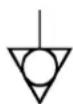
External Equipotential
Earthing Terminal (export only) Equipment has secondary earthing terminal. Terminal provides external earthing connection used
in addition to earthing prong on plug. Located on outside of oven back, terminal is marked with symbol shown below.
AWARNING
Excessive Weight Hazard
Use two or more people to move and install oven.
Failure to do so can result in back or other injury.
Unpacking Oven
- Inspect oven for damage such as dents in door or inside oven cavity.
Report any dents or breakage to source of purchase immediately.
Do not attempt to use oven if damaged.
- Remove all materials from oven interior.
- If oven has been stored in extremely cold area, wait a few hours before connecting power.
Radio Interference
Microwave operation may cause interference to radio, television, or a similar microwave oven. Reduce or eliminate interference by doing the following:
- Clean door and sealing surfaces of oven according to instructions in Care and Cleaning section.
- Place radio, television, etc. as far as possible from oven.
- Use a properly installed antenna on radio, television, etc. to obtain stronger signal reception.
Oven Placement
- Do not install oven next to or above source of heat, such as pizza oven or deep fat fryer. This could cause microwave oven to operate improperly and could shorten life of electrical parts.
- Do not block or obstruct oven filter. Allow access for cleaning.
Install oven on level countertop surface. - If provided, place warning label in a conspicuous place close to microwave oven.
- Outlet should be located so that plug is accessible when oven is in place.
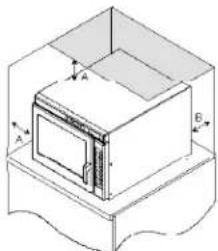
Oven Clearances
A—For North American (UL/CSA) models, allow at least 2^ (5.1 cm) of clearance around top of oven. For all international models (50 Hz), allow at least 7^ (18 cm) of clearance around the top of the oven. Proper air flow around oven cools electrical components.
With restricted air flow, oven may not operate properly and life of electrical parts is reduced.
B—There is not an installation clearance requirement for the back of the oven.
C-Allow at least 1" (2.54 cm) of clearance around sides of oven.
D—Install combination oven so oven bottom is at least 3 feet (91.5 cm) above floor.
Microwave Oven Displays



Manual Time Entry Pad
Time entry pad is used to enter cooking time for either manual entry or programming. Cooking time ranges from one second (00:01) to 60 minutes. If more than 60 minutes of total cooking time is required, open door and inspect food before beginning a new cooking cycle. Using manual time entry does not affect the programmed settings.
Quantity Pad
The quantity pad automatically adjusts a preset cooking time for two servings of a food item. When pressed before a preprogrammed cooking cycle, the oven automatically adjusts the cook time. To clear, open the door or press the STOP pad. For instructions on how to use this feature, see the Preprogrammed Pads section on page 9 of this manual.
A/B Pad
The A/B pad toggles menu selection between two sets of preprogrammed menu settings. Selecting Menu A allows preset programs 0 through 9 to operate using keystads 0 through 9. Selecting Menu B allows preset programs 10 through 19 to operate using keystads 0-9.
Power Level Pad
The power level keypad allows the user to change the microwave power level for different stages of a cook cycle. For instructions on how to program the power level, see page 10 of the Programming Oven Controls section of this manual.
Stage Cooking
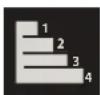
A user can program up to four different stages combining both power levels and time changes per keypad. Each combination is known as a stage. See page 10 of the Programming Oven Controls section of this manual for more information about stage cooking.
Program Save Pad
Programs or settings can be changed and saved based on a user's preference. For instructions on saving changes, see pages 9-11 of the Programming Oven Controls section of this manual.

START Pad
The START pad is used to begin manual time entry for a cooking cycle.

STOP Pad
The STOP pad stops a cooking sequence in progress, clears any remaining time, and also ends a programming option cycle.
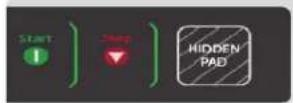
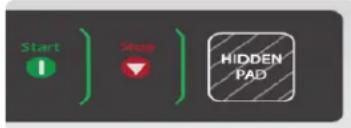
Hidden Key Pad
The hidden key pad can be used for adjusting oven controls based on user preferences. It is located to the right of the STOP pad. For instructions on how to use this, see page 11 of the Programming Oven Controls section of this manual.
Control Knob
The control knob, located to the right of the number pads, can be used for several different purposes. If enabled, the user may turn the knob to either add or subtract time from the total cooking time. Or, the user may push on the knob to start a selected cooking cycle, if enabled.
To learn how to enable this feature, see pages 11 and 12 of the Programming Oven Controls section of this manual.


Single Pad Programming
Each numbered pad can be programmed for a specific food item, such as defrosting and then cooking vegetables or other frozen foods. To use this feature, program the pad to the desired length of time and power level. Press the pad once and the microwave will begin cooking. For instructions, see page 10 of the Programming Oven Controls section of this manual.
Double Pad Programming
A maximum of 100 programs can be saved when this feature is enabled. Each entry will be assigned a double digit number, for example 01, 05, or 20. When double pad programming is enabled, two pads must be pressed to start the cooking cycle.
USB Compatibility
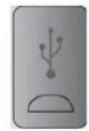
A standard USB flash drive is compatible with the microwave oven. This feature allows the user to save preprogrammed settings and user options to the flash drive rather than programming the settings directly to the numeric keypads.
Top or Bottom Only Cooking
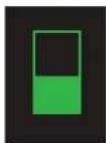
Top Only or Bottom Only cooking allows the user to use only the top or bottom of the microwave during a cooking cycle. When "Top Only" is selected, only the top magnetrons operate. When "Bottom Only" is selected only the bottom magnetrons operate. See page 10 for more information about this feature.
User Options
User options such as beep volume or the number of programmable pads can be changed and saved. To change different options, see page 11 of the Programming Oven Controls in this manual.
Mid-Cycle Cooking Pause
The cooking pause is a feature unique to this series of microwaves. This pause enables extra ingredients to be added, cooking progress to be checked, or for food to sit for a necessary time between cooking cycles. During a mid-cycle cooking pause, the microwave beeps continuously and PROGRAM PAUSED displays until the oven door is opened and closed. To continue the cycle, press the START button. To utilize this feature, see
the Programming Oven Controls section of this manual.

What is stage cooking?
Stage cooking enables several different cooking cycles, or stages, to be used consecutively without repeated input from the user. Stage cooking can be set to defrost food initially, then cook it, and keep the food warm until serving time. The total cooking time for all combined stages cannot exceed 60 minutes.
To learn how to use the stage cooking function, see page 10 of the Programming Oven Controls section of this manual.
Manual Time Entry
To cook food using a specific time and power level.
- Open oven door and place food in oven. Close door.
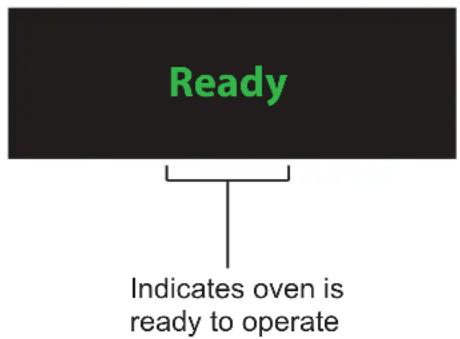
- READY displays. Fan and light will turn on.
- Press TIME ENTRY pad.
- If pad does not work, open and close oven door and try again.
- Enter cooking time by using the numbered keyboards.
- Press POWER LEVEL pad to change power level.
- To change the microwave's power, press pads 1 (for 10% ) through 9 (for 90% ).
- If stage cooking is desired, press STAGE and repeat steps 2 through 4.
- Up to four different stages can be programmed.
- Press START pad.
- Oven operates and time counts down.
- At end of cooking cycle oven beeps and shuts off. DONE displays.


Preprogrammed Pads
Cooking food using preprogrammed keypads.
For instructions on programming keypads, see page 10 of the Programming Oven Controls section of this manual.
-
Open oven door and place food in oven. Close door.
-
READY displays. Fan and light will turn on.
-
Press desired pad.
-
For single pad entry, press only one pad.
- For double pad entry, press the two pads representing the two digits.
-
To change single or double pad entry option see User Options section in this manual.
-
When cooking two of the same food item, press the QUANTITY pad before a preprogrammed cook cycle. The oven will automatically adjust the program.
-
Display will read, "DOUBLE."
-
To clear, open and close the door or press the STOP pad
-
Oven begins to cook.
-
For additional cooking time, press preprogrammed number pad again.
-
At the end of the cooking cycle oven beeps and shuts off. DONE displays.
| Pad | Time |
| 1 | 10 sec. |
| 2 | 20 sec. |
| 3 | 30 sec. |
| 4 | 45 sec. |
| 5 | 1 min. |


Factory Settings
Microwave cooking uses high frequency energy waves to heat the food. When cooking, microwave energy causes food molecules to move rapidly. This rapid movement between the food molecules creates heat, which cooks the food.
Is it safe to run a microwave if it is empty?
Running a microwave without a load can cause serious damage to electrical components. When food is placed in the oven, microwave energy generated by the magnetron is absorbed by the food. When no food is in the oven, there is nothing to absorb the energy. The energy bounces around the cavity and is channeled back through the waveguide. This can cause arcing, fire and may burn out the magnetron.
How do you defrost food while using a commercial microwave?
Not all commercial microwaves have the defrost button that is commonly found on a residential microwave. To defrost, simply use 20% microwave power level.
How do you know if a container is microwave safe?
To test if a container is microwave safe, place it in the microwave next to a container of water that is microwave safe. Run the microwave for one minute. If the tested container is warm or hot, it is not microwave safe.
Programming Pads
Oven is shipped from the factory set for single pad programming. To change the oven default to double pad programming, see User Option section. To program the amount of time or power level setting for a pad:
- READY must be in the display. If not, open and close door.
-
Press PROGRAM SAVE pad.
-
Programming mode begins
"Enter Program to Add/Review" displays -
Press desired number pad to be programmed.
-
Display will show all settings for the pad
-
The pad number that is being programmed displays beside the word ITEM
-
Press TIME ENTRY to program amount of cooking time.
-
Enter desired cooking time by using numeric key pads
Maximum cooking time is 60 minutes -
Press POWER LEVEL to program level of microwave power.
-
For a lower microwave power, press pads 1 (for 10% ) through 9 (for 90% )
-
Press numeric key pad for desired level. Press same numeric key pad again to set power level to 100%
-
Press PROGRAM SAVE to save changes.
- To discard changes, press STOP/RESET.

Programming Multiple Stages
Stage cooking allows consecutive cooking cycles without interruption.
Up to four different cooking cycles can be programmed into a memory pad.
To use stage cooking:
- Follow steps 1 through 5 above.
-
Press STAGE.
-
This will begin programming for the next cooking stage.
- Display indicates stage to be programmed
- Enter cook time and power level as in steps 4 and 5
- To enter another cooking stage for that pad, press STAGE pad again
- Up to four different stages can be programmed
-
Total cooking time (all stages totaled) is 60 minutes
-
Press PROGRAM SAVE to save the programming and changes.
- To discard changes, press STOP/RESET before pressing PROGRAM SAVE.

Programming Top & Bottom Only Cooking
- Push the POWER LEVEL pad. Select and program the preferred microwave power.
- If the POWER LEVEL pad is pushed a second time, "Top Only" heating option will be selected and displayed.
- If the POWER LEVEL pad is pushed a third time, "Bottom Only" heating is selected and displayed.
- If the POWER LEVEL button is pushed a fourth time, the oven resets and both top and bottom will heat.
Top Only Cooking
Manual Stage: 1
00:00 MW:50%
U Flashing
Bottom Only Cooking
Manual Stage: 1
00:00 MW:50%
U Flashing
Top and Bottom Cooking
Manual Stage: 1 00:50 MW: 100%
U Flashing
Mid-Cycle Cooking Pause
To add a pause to a programmed cook cycle:
- Press HIDDEN PAD after entering time or power level.
- A short beep sounds. This indicates the program is set for a mid-cycle pause.
- Continue programming pad as desired.
To remove a pause from a programmed cook cycle:
- Press HIDDEN PAD after entering time or power level.
- A short beep sounds. This indicates that the mid-cycle has been removed.
- Continue programming as desired.
Hidden Key Pad
Using the USB Flash Drive
- READY must be in the display. If not, open and close door.
- Open the oven door completely.
- Insert USB flash drive.
- Press and hold the 5 pad until "USB" appears on the display.
-
To transfer programming FROM the USB flash drive TO the oven, press the 1 pad.
-
Or to transfer programming TO the USB flash drive FROM the oven, press the 2 pad.
-
Push the START pad to begin transfer.
-
Display will read, "Contacting USB card."
-
Display will then read, "Transferring data from USB to oven," or vice versa.
-
Once programming has been successfully transferred, display will read, "Done - Loaded Programs."
- Shut the door to clear the display and begin cooking cycle
- Error codes:
- No file: USB flash drive is empty or does not have the correct file(s) required for operation.

Changing User Options
Options such as single and double pad programming or beep volume can be changed to suit individual preferences.
If oven has just been turned on, door must be opened and closed before proceeding:
-
Press firmly on hidden pad located to the right of the STOP keypad.
-
Pad is unmarked
-
The display remains the same when hidden pad is pressed
-
Press PROGRAM SAVE pad.
-
The first user option will display. Oven is now in options mode.
-
Press desired number pad to control changes in options.
See table on next page for options
- Current option will display
- Press the same number pad again to disable or enable the setting.
Each time the pad is pressed the option will change
To change additional options repeat steps 3 and 4
- Press PROGRAM SAVE to return to READY mode, changes take effect immediately. To exit without saving, press the STOP pad.


User Options Table
| Numbered Pads Displays Options | ||
| 1Double Digit Entry | DisabledEnabled | Allows 10 (0-9) preprogrammed padsAllows 100 (00-99) preprogrammed pads |
| 2Manual Programming | DisabledEnabled | Manual time entry/cooking not allowedManual time entry/cooking allowed |
| 3Reset on Door Open | DisabledEnabled | Opening oven door does not reset oven back to READY modeOpening oven door resets the oven back to READY mode |
| 4Key Beep | OFFON | Keys do not beep when pressedKeys beep when pressed |
| 5Speaker Volume | OFFLOWMEDIUMHIGH | Key beep volume OFFKey beep volume LOWKey beep volume MEDIUMKey beep volume HIGH |
| 6End of Cook Signal | Solid Beep3 Second Beep4 Beeps Once4 Beeps Repeating | Done signal is a continuous beep until reset by userDone signal is a three second beepDone signal is four beeps continuouslyDone signal is four beeps, four times |
| 7Keyboard Active | 15 Seconds30 Seconds60 Seconds120 SecondsAlways | Keypad time entry window is 15 secondsKeypad time entry window is 30 secondsKeypad time entry window is one minuteKeypad time entry window is two minutesKeypad time entry window is always active |
| 8On-The-Fly Knob | DisabledEnabled | Disables turning the knob to enter manual modeAllows turning the knob to enter manual time entry mode, allows pressing knob to start oven and allows turning the knob to add time before starting a cook cycle |
| 9Manual Knob | DisabledEnabled | Disables knob completelyEnables knob according to Option 8 |
| 0Top or Bottom Cooking | DisabledEnabled | Disables the use of top or bottom only cookingEnables the use of top or bottom only cooking |
| Time Entry PadOn-The-Fly Cook | DisabledEnabled | Disables pushing any additional keystads during a cook cycleAllows pushing additional keystads to add or change time in the middle of a cook cycle without stopping |
| X2 PadX2 Prompt | DisabledEnabled | Disables X2 promptEnables X2 prompt |
| A/B PadA/B Menus | DisabledEnabled | Disables A/B MenusEnables A/B Menus |
| Power Level PadReturn to Menu | ABLast Selected | Return to Menu AReturn to Menu BReturn to last selected menu |
| Stage PadClean Filter Message(Frequency) | DisabledWeeklyMonthlyQuarterly | Oven will not display CLEAN FILTEROven will display CLEAN FILTER every seven daysOven will display CLEAN FILTER every 30 daysOven will display CLEAN FILTER every 90 days |
Options in bold are factory default.
Cleaning Interior, Exterior and Door
Clean microwave oven with mild detergent in warm water using a soft sponge or cloth. Wring sponge or cloth to remove excess water before wiping equipment. If desired, boil a cup of water in microwave oven to loosen soil before cleaning. DO NOT allow cooking residues such as grease or fat to remain in oven interior for any length of time.
- Do NOT allow cooking residues to remain in oven cavity.
- Do NOT use abrasive cleansers or cleaners containing ammonia, as they may cause damage.
- NEVER pour water into microwave oven bottom.
- Do NOT use water pressure type cleaning systems.
Cleaning Air Intake Filter
Clean air intake filters weekly for proper air flow. Do NOT use oven without filters in place.
- There are two magnetic filters below the oven door.
- Wash the filters using a washcloth with hot water and mild detergent, or in a warewasher.

CAUTION
To avoid risk of product damage, clean air filters regularly.

CAUTION
To avoid electrical shock which can cause personal injury, unplug power cord or open circuit breaker to oven before cleaning.

CAUTION
To avoid risk of product damage, do not operate oven without splatter shield in place. Arcing will damage oven cavity and antennas when operated without shield in place.
WARNING
To avoid electrical shock which can cause severe personal injury or death, do not remove outer case at any time. Only an authorized servicer should remove outer case.
| Problem Possible Cause | |
| Oven does not operate. Confirm oven is plugged | into dedicated circuit Confirm oven is on grounded and polarized circuit (Contact electrician to confirm). Check circuit breaker. |
| Oven operates intermittently. Check air filter and discharge areas for obstructions. | |
| If oven does not accept entries when pad is pressed. | Make sure oven is on. Open and close door. Press pad again. |
| If oven malfunctions or shows CALL SERVICE or an ERROR with a number | Oven control is equipped with self-diagnostic system. Self-diagnostic system alerts you if there is a problem or error. When electronic control signals a problem, follow steps listed below:1. Record number shown.2. Unplug oven. Wait one (1) minute. Plug in oven - Disconnecting electrical supply may eliminate service code. If failure continues, contact ComServ at 1-866-426-2621 or an authorized ACP servicer. |
| Oven operates but does not heat food. Place one cup of water in oven. Run for one (1) minute at full power (100%)If temperature does not rise, oven is not operating correctly. Contact ComServ at 1-866-426-2621 or an authorized ACP servicer. | |
| HOT displays Oven's magnetron is overheated. | Oven automatically interrupts cooking sequence and turns on cooling fan until normal temperature is reached. When magentrons cool to normal temperature, oven returns to READY mode. |
| CALL SERVICE (flashing after cook cycle) Oven may not be operating at full power. Contact ComServ at 1-866-426-2621 or an ACP authorized servicer. | |
Steaming Tips:
1. Cooking Vessels
a) Always heat or cook food items in covered containers to accomplish:
Retention of steam for efficient cooking and to keep foods moist
Even cooking results and temperatures
A cleaner oven interior and prevention of food splatters
b) Ceramic, paper, china, styrofoam, glass and plastic are suitable materials for use in microwave ovens. A high temperature resistant amber pan is recommended for ALL items, especially those high in fat or sugar content, as these ingredients get hot very quickly.
2. Food Temperature
a) To reach a mandatory serving temperature, frozen foods require a longer cook time than refrigerated items.
b) Refrigerated items:
- Items stored at 40^ ( 4^ ) in the refrigerator should be covered while heated; except breads, pastries or any products with a breaded coating, which should be heated uncovered to avoid softening.
c) Room temperature items:
- Foods held at room temperature, such as canned items or vegetables, will require less time to heat than refrigerated items.
d) Conventionally prepared foods should be slightly undercooked to prevent overcooking when rethermed by microwave steaming.
e) After a steaming cycle has been completed, internal food temperatures continue to slightly rise due to the presence of steam.
3. Structure of Food
a) Food items that are high in fat, sugar, salt and moisture attract and quickly absorb microwave energy, allowing for a shorter cook time.
b) Items high in protein or fiber require a longer cook time, due to a slower absorption of microwave energy.
4. Quantity
a) As the mass of food increases, so will the necessary cook time.
Refer to and comply with all USDA/FDA Food Code guidelines when cooking or heating food items.

Accelerated Cooking Products
Accelerated Cooking Products
Bedienungsanleitung
DIESER OFEN IST NUR FÜR DEN GEWERBLICHEN EINSATZ GEDACHT
Accelerated Cooking Products
Manual del usuario
ESTE HORNO ESTÁ DESTINADO EXCLUSIVAMENTE AL USO COMERCIAL
Manual Stage: 1 00:50 MW: 100%