Millenia CT Upgrade Kit - Hi-fi system Paradigm - Free user manual and instructions
Find the device manual for free Millenia CT Upgrade Kit Paradigm in PDF.



| Product Type | Home Theater System Upgrade Kit |
| Brand | Paradigm |
| Model | Millenia CT Upgrade Kit |
| Main Functions | Bluetooth with aptX, Dolby Digital, Paradigm Virtual Surround, music mode, movie mode, IR learning |
| Kit Contents | Updated control box, redesigned remote control, 2 AAA batteries |
| Control Box Power | Power adapter (not included, compatible 100-240 V) |
| Remote Control Power | 2 AAA batteries (included) |
| Wireless Connectivity | Bluetooth 4.0 with aptX codec |
| Supported Audio Formats | Dolby Digital, DTS Digital Surround, 2-channel stereo |
| Approximate Control Box Dimensions | 17 x 12 x 4 cm |
| Approximate Control Box Weight | 0.3 kg |
| Recommended Safety Distance | 20 cm from body |
| Care and Cleaning | Clean with a soft, dry cloth. Do not use abrasive products. |
| Operating Temperature | 0 °C to 35 °C |
| Operating Humidity | 10% to 90% non-condensing |
| Protection Rating | IPX0 (indoor use only) |
| Certifications | FCC Part 15, IC, WEEE |
| Warranty | 2 years (depending on retailer) |
| FCC Model Number | WUO-WBT1010 |
| IC Model Number | 7985A-WBT1010 |
Frequently Asked Questions - Millenia CT Upgrade Kit Paradigm
User questions about Millenia CT Upgrade Kit Paradigm
0 question about this device. Answer the ones you know or ask your own.
Ask a new question about this device
Download the instructions for your Hi-fi system in PDF format for free! Find your manual Millenia CT Upgrade Kit - Paradigm and take your electronic device back in hand. On this page are published all the documents necessary for the use of your device. Millenia CT Upgrade Kit by Paradigm.
USER MANUAL Millenia CT Upgrade Kit Paradigm
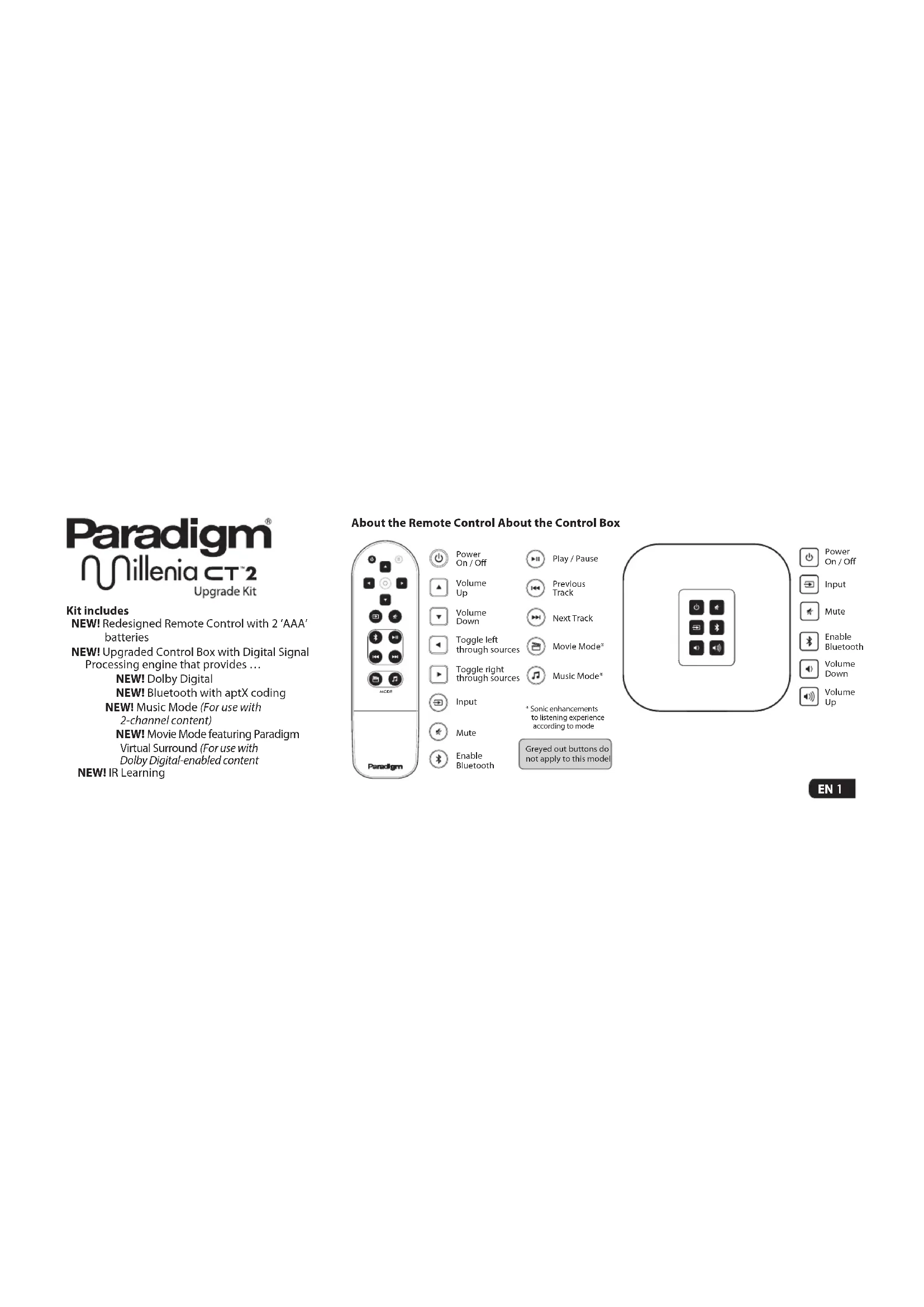
NEW! Redesigned Remote Control with 2 'AAA' batteries
NEW! Upgraded Control Box with Digital Signal Processing engine that provides ...
NEW! Dolby Digital
NEW! Bluetooth with aptX coding
NEW! Music Mode (For use with 2-channel content)
NEW! Movie Mode featuring Paradigm
Virtual Surround (For use with Dolby Digital-enabled content
NEW! IR Learning
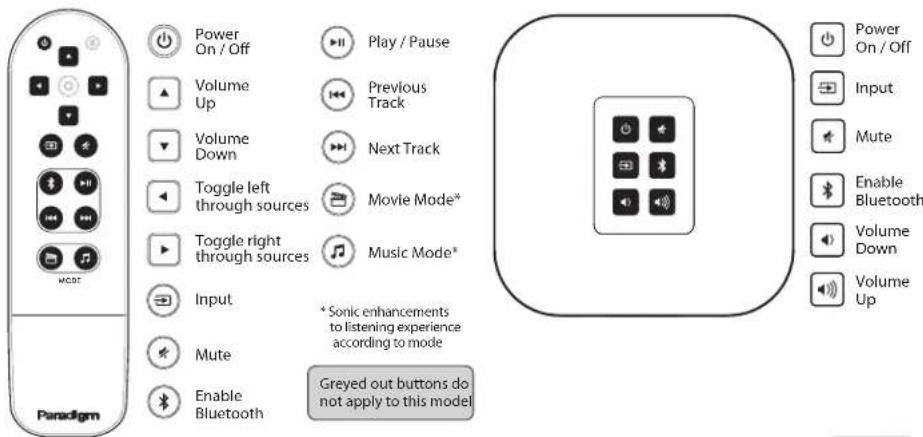
About the Remote Control About the Control Box
About Paradigm Virtual Surround?
Typically in a 2.1 system, all the audio magic of Dolby Digital or DTS Digital surround information is lost, since there are no surround speakers to deliver it. This precious information sits in the front left and right speaker channels wondering what to do with itself.
Using sophisticated mathematical algorithms, Paradigm Virtual Surround processing gathers that neglected surround information in a central sweet spot then reflows it into the front left and right channels. It's then sent out into the room in a way that creates the auditory illusion of sound enveloping the listeners on all sides. An 'illusion' perhaps, but to our ears, designed to hear in three dimensions, this spacious, ambient sound that swirls around us is very real.
IR Learning
Enabling IR Learning on Millenia CT 2
-
To enable IR Learning on Millenia CT 2, press and hold the 'MUTE' button for 5 seconds on either the remote control or the control box. The LED on the front of the control box will glow a brighter 'BLUE'. This indicates Millenia CT 2 is now in IR Learning Mode.
-
Using either the remote control or the control box press the command you would like Millenia CT 2 to learn.
For example: If you want the Millenia CT 2 to learn the 'VOLUME+' command, press 'VOLUME+'. The LED on the front of the Control Box will flash 'BLUE' slowly, this indicates that the Millenia CT 2 is in the process of learning a command.
-
Press the corresponding button on the 2nd remote control to learn the command.
-
The LED on the front of the Millenia CT 2's Control Box will flash 'BLUE' 5 times in quick succession to confirm the command was received.
- Wait a few seconds, then again press the button on the 2nd remote control to confirm the desired command.
- The LED on the front of the Millenia CT 2's Control Box will again flash 'BLUE' 5 times in quick succession to confirm the command was received.
- If the command was learned correctly, the LED on the front of the Millenia CT 2's Control Box will now glow a brighter 'BLUE'.
Repeat steps 2 through 6 to learn additional commands. NOTE: If you wait more than 20 seconds between programming commands, the Millenia CT 2 will exit the IR Learning Mode. Then you will have to start the entire process again in order to program additional features.
To end IR Learning
If no other command is pressed, the Millenia CT 2 will automatically exit IR Learning Mode in 20 seconds.
What to do if the LED flashes 'PURPLE'
If the LED on the front of the Millenia CT 2's Control Box flashes 'PURPLE', the command was not received correctly. Please try again. If the LED on the Control Box flashes 'PURPLE' after a second attempt, the Millenia CT 2 may not be able to learn your remote control.
IMPORTANT: The IR Learning Mode operates via standard 38Khz IR protocol only. Not all remotes function in the same manner. If the LED on the Control Box continues to flash 'PURPLE' it could indicate an error, please try another remote control.
How to Set Up Bluetooth
Using the Millenia CT 2's Remote Control or Control Box ...
- Turn Millenia CT 2 on.
- Press the Bluetooth button.
- On your Bluetooth enabled device, search for 'Millenia CT 2'.
- The pairing process will begin automatically and pairing will take place once a link between the device and Millenia CT 2 is established.
- Start music playback.
- Enjoy

RECYCLING AND REUSE GUIDELINES FOR EUROPE
In accordance with the European Union WEEE (Waste Electrical and Electronic Equipment) directive effective August 13, 2005, we would like to notify you that this product may contain regulated materials which, upon disposal, according to the WEEE directive, require special reuse and recycling processing. For this reason Paradigm Electronics Inc. (manufacurers of Paradigm speakers and Anthem Electronics) has arranged with our distributors in European Union member nations to collect and recycle this product at no cost to you. To find your local distributor please contact the dealer from whom
you purchased this product or go to our website at www.paradigm.com/shift. Please note that the product only falls under the WEEE directive. When disposing of packing and other shipping material we encourage you to recycle through the normal channels.
FCC ID: WUO-WBT1010 and IC ID: 7985A-WBT1010. This device complies with Part 15 of the FCC Rules. Operation is subject to the following two conditions: (1) This device may not cause harmful interference, and (2) This device must accept any interference received, including information that may cause undesired operation. Changes or modifications not expressly approved by the party responsible for compliance could void the user's authority to operate the equipment.
WIRELESS TRANSMITTER COMPLIANCE INFORMATION
The term "IC" before the radio certification number only signifies that Industry Canada technical specifications were met. This equipment complies with FCC and IC radiation exposure limits set forth for an uncontrolled environment. This equipment should be installed and operated with minimum distance 20cm between the radiator and your body. This transmitter must not be co-located or operating in conjunction with any other antenna or transmitter. To reduce potential radio interference to other users, the antenna type and its gain should be so chosen that the equivalent isotropically radiated power (e.l.r.p.) is not more than that permitted for successful communication.

DOLBY DIGITAL
Manufactured under license from Dolby Laboratories. Dolby and the double-D symbol are trademarks of Dolby Laboratories.

leetooth
The Bluetooth* word mark and logos are registered trademarks owned by Bluetooth SIG, Inc. and any use of such marks by Paradigm Electronics Inc. is under license.

The "optX® software is copyright CSR plc or its group companies. All rights reserved. The optX® mark and the aptX logo are trade marks of CSR plc or one of its group companies and may be registered in one or more jurisdictions."
NOTES
EN
Paradigm®
Brand : Paradigm
Model : Millenia CT Upgrade Kit
Category : Hi-fi system