MP 501SPF - Printer RICOH - Free user manual and instructions
Find the device manual for free MP 501SPF RICOH in PDF.



| Brand | Ricoh |
| Model | MP 501SPF |
| Product type | Multifunction laser printer |
| Functions | Print, copy, scan, fax |
| Print speed | 50 pages per minute (A4) |
| Print resolution | 1200 x 1200 dpi |
| Standard paper capacity | 1200 sheets |
| Supported paper sizes | A4, A3, A5, B4, B5, custom sizes |
| Connectivity | USB 2.0, Ethernet 10/100/1000, Wi-Fi (optional), NFC |
| Dimensions (W x D x H) | 420 x 394 x 467 mm |
| Weight | 12.5 kg |
| Power supply | 220-240 V, 50/60 Hz |
| Power consumption (average) | 800 W printing, 10 W standby |
| Noise level (printing) | 55 dB(A) |
| Display | 10.1-inch color touch screen |
| Memory | 2 GB RAM |
| Maintenance and cleaning | Clean the exterior with a soft, dry cloth. Do not use solvents. |
| Safety | Unplug before cleaning. Do not use near water. Follow safety instructions in the manual. |
| Spare parts and repairability | Contact an authorized Ricoh service center for spare parts and repairs. |
| General information | 1-year warranty, online support available. Full manual downloadable in PDF format. |
Frequently Asked Questions - MP 501SPF RICOH
User questions about MP 501SPF RICOH
0 question about this device. Answer the ones you know or ask your own.
Ask a new question about this device
Download the instructions for your Printer in PDF format for free! Find your manual MP 501SPF - RICOH and take your electronic device back in hand. On this page are published all the documents necessary for the use of your device. MP 501SPF by RICOH.
USER MANUAL MP 501SPF RICOH
Manuals Provided with This Machine
1
Safety Information for This Machine
2
Other Information for This Machine
3
Appendix
4
For information not found in paper manuals, see the online manuals available on our web site (http://www.ricoh.com/) or via the control panel.


Read this manual carefully before you use this machine and keep it handy for future reference. For safe and correct use, be sure to read the Safety Information in this manual before using the machine.
TABLE OF CONTENTS
How to Read the Manuals. 2
Symbols Used in the Manuals. 2
Disclaimer. 2
Notes 3
Machine Types. 3
1. Manuals Provided with This Machine
Manuals for This Machine. 5
How to Use the Operating Instructions. 7
Read HTML Manuals. 7
Read the HTML manuals on the control panel. 8
2. Safety Information for This Machine
Safety Symbols for This Machine 9
Safety Information. 10
Safety During Operation 10
Safety Precautions to Be Followed. 10
Safety Labels of This Machine. 17
Positions of WARNING and CAUTION labels. 17
Symbols Power Switch. 20
3. Other Information for This Machine
Laws and Regulations. 21
Duplication and Printing Prohibited. 21
Laser Safety. 21
Notes to USA Users of FCC Requirements 21
Important Safety Instructions for Facsimile Unit 24
Notes to Canadian Users of Wireless Devices 25
Notes to Canadian Users of Facsimile Unit 26
4. Appendix
Trademarks 27
How to Read the Manuals
Symbols Used in the Manuals
This manual uses the following symbols:

Important
Indicates points to pay attention to when using the machine, and explanations of likely causes of paper misfeeds, damage to originals, or loss of data. Be sure to read these explanations.

Note
Indicates supplementary explanations of the machine's functions, and instructions on resolving user errors.

Reference
This symbol is located at the end of sections. It indicates where you can find further relevant information.
[]
Indicates the names of keys on the machine's display or control panels.
![RICOH MP 501SPF - [] - 1](/content/2026/02/377509/images/a967d5db1bb47d7e3205b4ea1720c08017ac493406fdc5cee9944f889e746e27.jpg)
Indicates instructions displayed on the control panel.
![RICOH MP 501SPF - [] - 2](/content/2026/02/377509/images/659e921ec970538c993c0c0fcc19a060d96fdf798df2e99095d6b90037fba7e5.jpg)
Indicates instructions in sheet form.
![RICOH MP 501SPF - [] - 3](/content/2026/02/377509/images/394f67aa2e63e0ae9ac753852069e9dcac2a6762436b9f4184ddade329ef12c9.jpg)
Region A
(mainly Europe and Asia), (mainly Europe), or (mainly Asia)

Region B
(mainly North America)
Differences in the functions of Region A and Region B models are indicated by two symbols. Read the information indicated by the symbol that corresponds to the region of the model you are using. For details about which symbol corresponds to the model you are using, see "Model-Specific Information", Getting Started
Disclaimer
To the maximum extent permitted by applicable laws, in no event will the manufacturer be liable for any damages whatsoever arising out of failures of this machine, losses of the registered data, or the use or non-use of this product and operation manuals provided with it.
Make sure that you always copy or have backups of the data registered in this machine. Documents or data might be erased due to your operational errors or malfunctions of the machine.
In no event will the manufacturer be responsible for any documents created by you using this machine or any results from the data executed by you.
Notes
Contents of this manual are subject to change without prior notice.
The manufacturer shall not be responsible for any damage or expense that might result from the use of parts other than genuine parts from the manufacturer with your office products.
For good output quality, the manufacturer recommends that you use genuine toner from the manufacturer.
Some illustrations in this manual might be slightly different from the machine.
Machine Types
Check the type of your machine before reading the manuals.
Type 1: MP 501SPF
- Type 2: MP601SPF
Certain types might not be available in some countries. For details, please contact your local dealer.
Certain options might not be available in some countries. For details, please contact your local dealer.
Depending on which country you are in, certain units may be optional. For details, please contact your local dealer.
1. Manuals Provided with This Machine
This chapter explains manuals for this machine.
Manuals for This Machine
The operating instructions of this machine are provided in the following formats:
| Format Manuals | |
| Printed manuals • Read This First | • Start Guide • Quick Installation Guide |
| CD-ROM • Driver Installation Guide | |
| Manuals displayed on the control panel • Operating Instructions (HTML manuals) | |
| Web page • Read This First | • User Guide • Start Guide • Operating Instructions (HTML manuals) • Quick Reference Guide • Quick Installation Guide • Driver Installation Guide |
Read This First
Before using the machine, be sure to read the section of this manual entitled Safety Information. It also describes each regulation and environmental conformance.
Start Guide
Describes how to read manuals on the control panel. It also describes how to log in to the machine.
User Guide
Regarding the basic usage of this machine, frequently used functions, troubleshooting when an error message appears, etc., summaries are provided for each user manual.
Operating Instructions (HTML manuals)
Describes the setup for using the machine, how to use functions to copy, fax, print, scan or for maintenance and specifications, troubleshooting, system settings, and security functions.
Manuals are available in English, German, French, Italian, Spanish, Dutch, and Russian.
User Guide and Security Guide are available in the seven languages above and other languages.
For details about how to use the HTML manuals, see page 7 "How to Use the Operating Instructions".
Quick Reference Guide
Describes per page the basic functions of copy, fax, and scan.
- Quick Reference Copy Guide
- Quick Reference Fax Guide
- Quick Reference Scanner Guide
Quick Installation Guide
Describes procedures for unpacking and setting up the machine, which include loading paper and installing print cartridge and waste toner bottle, etc.
Driver Installation Guide
Describes how to install and configure each driver. This manual is included in the drivers CD.

Note
- Before you configure the extended security and authentication settings, refer to "Before Using This Machine" in the Security Guide.
- You can download information about the machine's certification, which is based on an IT security certification system (hereafter CC Certification), from https://support-download.com/services/device/ccmanual/mp_501_601/en/download_admin.html and https://support-download.com/services/device/ccmanual/mp_501_601/en/download_user.html. This information is about how to set up the machine. If you have purchased a CC Certified machine, be sure to read it before operating the machine so you can make the correct settings before using it.
- You can see the following manuals on the Web page.
Appendix
DHCP Option 204
How to Use the Operating Instructions
This chapter describes the operating instructions of this machine.
Read HTML Manuals
The following browsers are recommended to read the HTML manuals.
Internet Explorer 8/9/10/11
- Firefox 29
- Safari 5.1.7
- Chrome 35

Note
- If JavaScript is disabled or unavailable in your browser, you will not be able to search or use certain buttons in the HTML documentation.
- The required display resolution is 1,024 × 768 pixels or greater.
- In the help on the top right of the top page, you can check how to use the HTML manuals. The help topics explain the icons and buttons that are displayed in the HTML manuals.
Search for what you want to do or can do
Using Easy Search, you can search for what want to do or can do with this machine.
- Click Easy Search on the top right of the top page.
- Click a title to display the item you want to read.
Search by entering a keyword
You can search through the HTML manuals.
This section explains how to search for "duplex".
- Enter "duplex" in the search box on the top left of the top page.
- Click
A list of titles or descriptions that include "duplex" appears.
A search result appears in the search result window. In addition you can use the drop-down menu to select a manual.
- Click a title to display the item you want to read.

Note
- Use keywords to search for items you want to query. Depending on the keyword you enter, related keywords might also appear.
- Items including the used keyword is appear in the search result window.
- If you put a space between keywords, pages that contain both keywords are displayed. For example, if you enter "duplex" and a space and "copy", items including both words appear in the search result window.)
Read the HTML manuals on the control panel
You can also read the HTML manuals on the control panel. For details about how to read the HTML manuals on the control panel, see Start Guide
2. Safety Information for This Machine
This chapter describes the safety precautions.
Safety Symbols for This Machine
The meanings of the safety symbols for this machine are as follows:
| Caution |
| Warning; Sharp element |
| Do not touch |
| Do not throw into the fire |
| Do not use the cleaner |
| Keep out of reach of children |
| Caution, hot surface |
Safety Information
Safety During Operation
In this manual, the following important symbols are used:

WARNING
Indicates a potentially hazardous situation which, if instructions are not followed, could result in death or serious injury.

CAUTION
Indicates a potentially hazardous situation which, if instructions are not followed, may result in minor or moderate injury or damage to property.
Safety Precautions to Be Followed
This section explains safety precautions that should always be followed when using this machine.
Environments where the machine can be used
This section explains safety precautions about environments where the machine can be used.

WARNING
- Do not use flammable sprays or solvents in the vicinity of this machine. Also, avoid placing these items in the vicinity of this machine. Doing so could result in fire or electric shock.
- Do not place vases, plant pots, cups, toiletries, medicines, small metal objects, or containers holding water or any other liquids, on or close to this machine. Fire or electric shock could result from spillage or if such objects or substances fall inside this machine.

CAUTION
- Keep the machine away from humidity and dust. Otherwise a fire or an electric shock might occur.
- Do not place the machine on an unstable or tilted surface. If it topples over, an injury might occur.
- Do not place heavy objects on the machine. Doing so can cause the machine to topple over, possibly resulting in injury.
CAUTION
- Make sure the room where you are using the machine is well ventilated and spacious. Good ventilation is especially important when the machine is used heavily.
- Do not obstruct the machine's vents. Doing so risks fire caused by overheated internal components.
Handling power cords and power cord plugs
This section explains safety precautions about handling power cords and power cord plugs.
WARNING
- Do not use any power sources other than those that match the specifications shown. Doing so could result in fire or electric shock.
- Do not use any frequencies other than those that match the specifications shown. Doing so could result in fire or electric shock.
- Do not use multi-socket adaptors. Doing so could result in fire or electric shock.
- Do not use extension cords. Doing so could result in fire or electric shock.
- Do not use power cords that are damaged, broken, or modified. Also, do not use power cords that have been trapped under heavy objects, pulled hard, or bent severely. Doing so could result in fire or electric shock.
- Touching the prongs of the power cable's plug with anything metallic constitutes a fire and electric shock hazard.
- The supplied power cord is for use with this machine only. Do not use it with other appliances. Doing so could result in fire or electric shock.
- It is dangerous to handle the power cord plug with wet hands. Doing so could result in electric shock.
- If the power cord is damaged and its inner wires are exposed or broken, contact your service representative for a replacement. Use of damaged power cords could result in fire or electric shock.

WARNING
-
Be sure to disconnect the plug from the wall outlet at least once a year and check for the following:
-
There are burn marks on the plug.
-
The prongs on the plug are deformed.
-
If any of the above conditions exist, do not use the plug and consult your dealer or service representative. Use of the plug could result in fire or electric shock.
-
Be sure to disconnect the power cord from the wall outlet at least once a year and check for the following:
The power cord's inner wires are exposed, broken, etc.
- The power cord's coating has a crack or dent.
- When bending the power cord, the power turns off and on.
- Part of the power cord becomes hot.
- The power cord is damaged.
- If any of the above conditions exist, do not use the power cord and consult your dealer or service representative. Use of the power cord could result in fire or electric shock.
CAUTION
-
Be sure to push the plug of the power cord fully into the wall outlet. Partially inserted plugs create an unstable connection that can result in unsafe buildup of heat.
-
If this machine is not going to be used for several days or longer at a time, disconnect its power cord from the wall outlet.
-
When disconnecting the power cord from the wall outlet, always pull the plug, not the cord. Pulling the cord can damage the power cord. Use of damaged power cords could result in fire or electric shock.
-
Be sure to disconnect the plug from the wall outlet and clean the prongs and the area around the prongs at least once a year. Allowing dust to build up on the plug constitutes a fire hazard.
-
When performing maintenance on the machine, always disconnect the power cord from the wall outlet.
Power Source
120-127V,12A,60Hz
Please be sure to connect the power cord to a power source as above.
Handling the main machine
This section explains safety precautions about handling the main machine.

WARNING
-
The following explains the warning messages on the plastic bag used in this product's packaging.
-
Be sure to locate the machine as close as possible to a wall outlet. This will allow easy disconnection of the power cord in the event of an emergency.
- If the machine emits smoke or odours, or if it behaves unusually, you must turn off its power immediately. After turning off the power, be sure to disconnect the power cord plug from the wall outlet. Then contact your service representative and report the problem. Do not use the machine. Doing so could result in fire or electric shock.
- If metal objects, or water or other fluids fall inside this machine, you must turn off its power immediately. After turning off the power, be sure to disconnect the power cord plug from the wall outlet. Then contact your service representative and report the problem. Do not use the machine. Doing so could result in fire or electric shock.
-
Do not touch this machine if a lightning strike occurs in the immediate vicinity. Doing so could result in electric shock.
-
Keep the polythene materials (bags, etc.) supplied with this machine away from babies and small children at all times. Suffocation can result if polythene materials are brought into contact with the mouth or nose.

CAUTION
- Unplug the power cord from the wall outlet before you move the machine. While moving the machine, take care that the power cord is not damaged under the machine. Failing to take these precautions could result in fire or electric shock.
-
If you have to move the machine when the optional paper tray unit is attached, do not push on the main unit's top section. Doing so can cause the optional paper tray unit to detach, possibly resulting in injury.
-
The machine weighs approximately 28kg (62 lb.).
- When moving the machine, use the inset grips on both sides, and lift slowly in pairs. The machine will break or cause injury if dropped.
- Lifting the paper feed unit carelessly or dropping may cause injury.
CAUTION
- After you move the machine, use the caster fixture to fix it in place. Otherwise the machine might move or come down to cause an injury.
- Contact your service representative if you need to lift the machine (such as when relocating it to another floor). Do not attempt to lift the machine without the assistance of your service representative. The machine will be damaged if it topples or is dropped, resulting in malfunction and risk of injury to users.
- Before installing or removing options, always disconnect the power cord plugs from the wall outlet and allow time for the main unit to fully cool. Failing to take these precautions could result in burns.
- Do not look into the lamp. It can damage your eyes.
- Do not hold the control panel while moving the machine. Doing so may damage the control panel, cause a malfunction, or result in injury.
- Keep your hands away from the hinges and exposure glass when lowering the ADF. Not doing so result in an injury if your hands or fingers are pinched.
Handling the machine's interior
This section explains safety precautions about handling the machine's interior.
WARNING
- Do not remove any covers or screws other than those explicitly mentioned in this manual. Inside this machine are high voltage components that are an electric shock hazard and laser components that could cause blindness. Contact your sales or service representative if any of the machine's internal components require maintenance, adjustment, or repair.
- Do not attempt to disassemble or modify this machine. Doing so risks burns and electric shock. Note again that exposure to the laser components inside this machine risks blindness.
CAUTION
- Some of this machine's internal components get very hot. For this reason, take care when removing misfed paper. Not doing so could result in burns.
- When removing jammed paper, make sure not to trap or injure your fingers.
- When loading paper, take care not to trap or injure your fingers.

CAUTION
- While safety measures have been installed to prevent accidents, you must not touch the machine's rollers while it is operating. Doing so could cause injury.
- If the machine's interior is not cleaned regularly, dust will accumulate. Fire and breakdown can result from heavy accumulation of dust inside this machine. Contact your sales or service representative for details about and charges for cleaning the machine's interior.
Handling the machine's supplies
This section explains safety precautions about handling the machine's supplies.
WARNING
- Do not incinerate toner (new or used) or toner containers. Doing so risks burns. Toner will ignite on contact with naked flame.
- Do not store toner (new or used) or toner containers anywhere near naked flames. Doing so risks fire and burns. Toner will ignite on contact with naked flame.
- Do not use a vacuum cleaner to remove spilled toner (including used toner). Absorbed toner may cause a fire or explosion due to electrical contact flickering inside the vacuum cleaner. However, it is possible to use a vacuum cleaner that is explosion-proof and dust ignition-proof. If toner is spilled on the floor, remove the spilled toner slowly using a wet cloth, so that the toner is not scattered.
-
The following explains the warning messages on the plastic bag used in this product's packaging.
-
Keep the polythene materials (bags, etc.) supplied with this machine away from babies and small children at all times. Suffocation can result if polythene materials are brought into contact with the mouth or nose.
CAUTION
- Do not crush or squeeze toner containers. Doing so can cause toner spillage, possibly resulting in dirtying of skin, clothing, and floor, and accidental ingestion.
- Store toner (new or used), toner containers, and components that have been in contact with toner out of reach of children.
- If toner or used toner is inhaled, gargle with plenty of water and move into a fresh air environment. Consult a doctor if necessary.
CAUTION
- If toner or used toner gets into your eyes, flush immediately with large amounts of water. Consult a doctor if necessary.
- If toner or used toner is swallowed, dilute by drinking a large amount of water. Consult a doctor if necessary.
- When removing jammed paper or replacing toner, avoid getting toner (new or used) on your clothing. If toner comes into contact with your clothing, wash the stained area with cold water. Hot water will set the toner into the fabric and make removing the stain impossible.
- When removing jammed paper or replacing toner, avoid getting toner (new or used) on your skin. If toner comes into contact with your skin, wash the affected area thoroughly with soap and water.
- When replacing a toner or waste toner container or consumables with toner, make sure that the toner does not splatter. Put the waste consumables in a bag after they are removed. For consumables with a lid, make sure that the lid is shut.
- Do not attempt to print on stapled sheets, aluminum foil, carbon paper, or any kind of conductive paper. Doing so risks fire.
- Keep SD cards or USB flash memory devices out of reach of children. If a child accidentally swallows an SD card or USB flash memory device, consult a doctor immediately.
Safety Labels of This Machine
This section explains the machine's safety information labels.
Positions of WARNING and CAUTION labels
This machine has labels for WARNING and CAUTION at the positions shown below. For safety, please follow the instructions and handle the machine as indicated.
Main unit
Front and Left Side
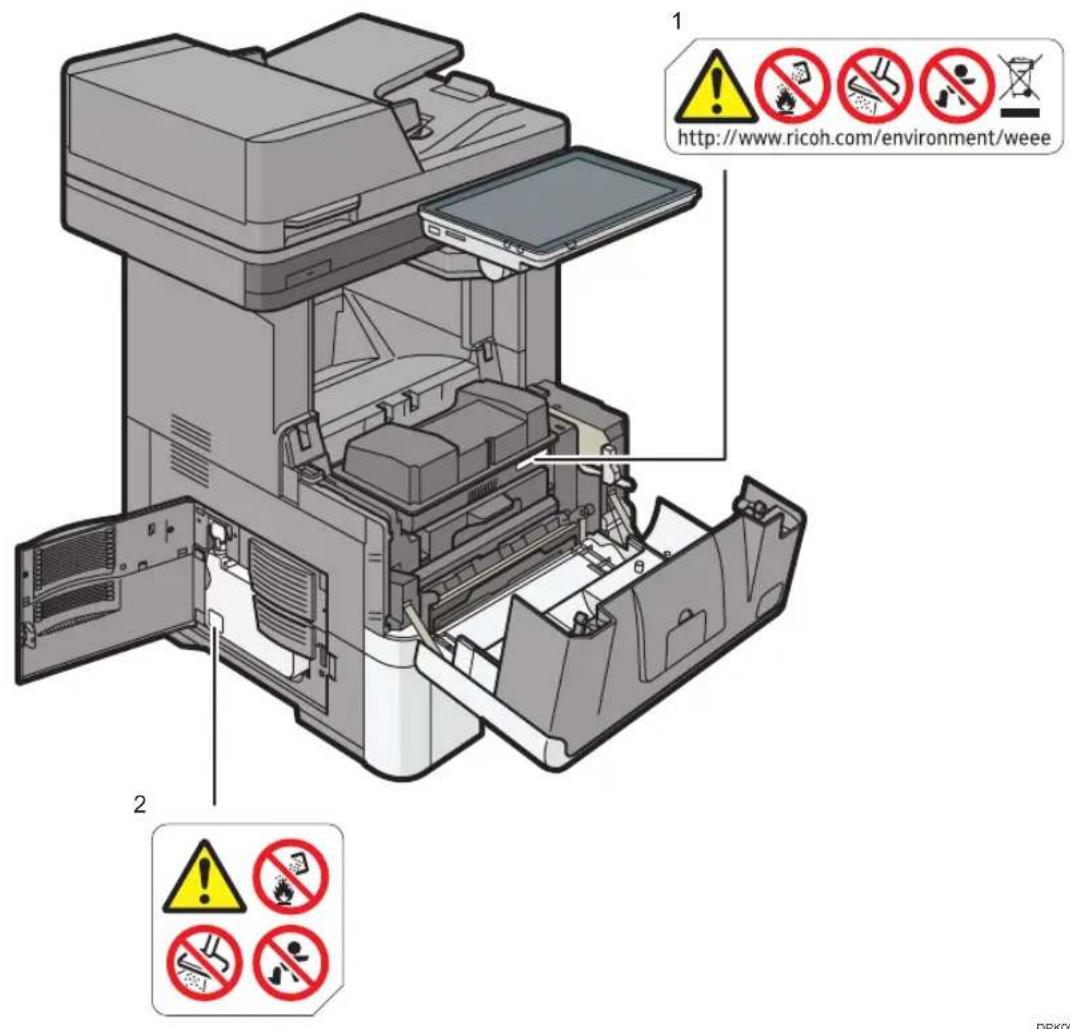
1.
Do not incinerate toner bottles. Doing so risks burns as toner will ignite on contact with naked flame.
Do not use a vacuum cleaner to remove spilled toner. Absorbed toner may cause a fire or explosion due to electrical contact sparking inside the vacuum cleaner.
Store toner bottles out of reach of children. If a child accidentally swallows toner, consult a doctor immediately.
Do not hold the toner bottle one-handed, use both hands and hold it firmly without shaking it.
Accidentally dropping the waste toner bottle may damage it. If toner scatters, you may inhale it. Also, your clothes or hands, or floor will be dirty.
2.
Do not incinerate waste toner bottles. Doing so risks burns as toner will ignite on contact with naked flame.
Do not use a vacuum cleaner to remove spilled waste toner. Absorbed toner may cause a fire or explosion due to electrical contact sparking inside the vacuum cleaner.
Store waste toner bottles out of reach of children. If a child accidentally swallows toner, consult a doctor immediately.
Do not hold the waste toner bottle one-handed, use both hands and hold it firmly without shaking it.
Accidentally dropping the waste toner bottle may damage it. If toner scatters, you may inhale it. Also, your clothes or hands, or floor will be dirty.
Front and Right side
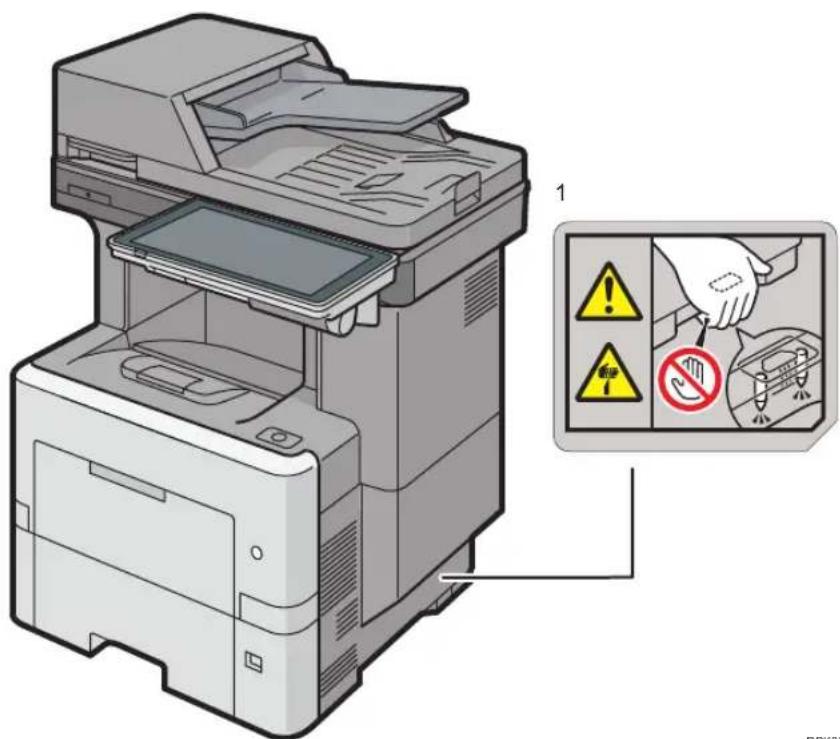
1
There are protruding parts on the lower side of this machine, which is near this label. Do not touch the lower part of this machine or areas near this label.
Rear Side
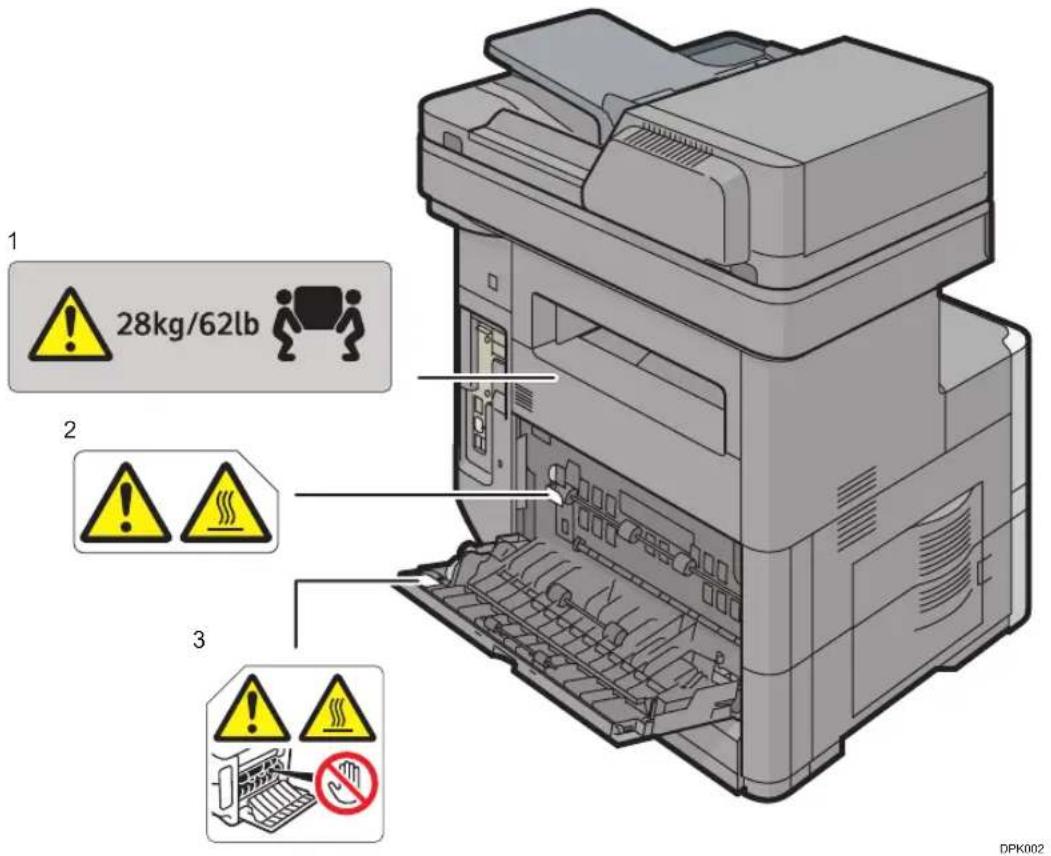
1.
The machine weighs approximately 28kg (62 lb.).
When moving the machine, use the inset grips on both sides.
2,3
Do not touch the parts a label indicates. The inside and surface of the fusing unit could be very hot. Caution should be taken when removing misfed paper.
500-sheet paper feed unit

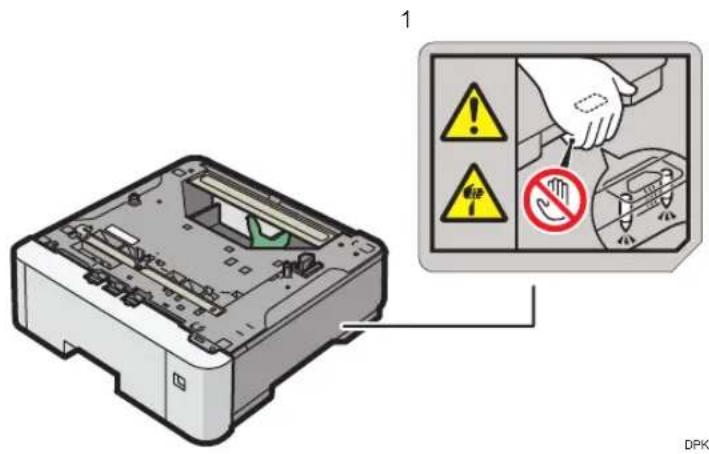
1
There are protruding parts on the lower side of this machine, which is near this label. Do not touch the lower part of this machine or areas near this label.
Symbols Power Switch
Symbols for power switch that are used for this machine are as follows:
- GTANDBY
3. Other Information for This Machine
This chapter describes laws and regulations related to this machine.
Laws and Regulations
Duplication and Printing Prohibited
Do not copy or print any item for which reproduction is prohibited by law.
Copying or printing the following items is generally prohibited by local law:
bank notes, revenue stamps, bonds, stock certificates, bank drafts, checks, passports, driver's licenses.
The preceding list is meant as a guide only and is not inclusive. We assume no responsibility for its completeness or accuracy. If you have any questions concerning the legality of copying or printing certain items, consult with your legal advisor.
Laser Safety
Laser Safety
This equipment complies with requirements of 21 CFR Subchapter J for class I laser product. This equipment contains two monolithic array laser diodes, 660-680 nanometer wavelength for each emitter. The beam divergence angle is 16 degrees (minimum) and 24 degrees (maximum) in the vertical direction, and 7 degrees (minimum) and 13 degrees (maximum) in the horizontal direction, and laser beams are generated in Continuous Wave (CW) mode. The maximum output power of the light source is 25 milliwatt.
Caution
Use of controls or adjustments or performance of procedures other than those specified in this manual might result in hazardous radiation exposure.
Notes to USA Users of FCC Requirements
Part 15 of the FCC Rules
Note:
This equipment has been tested and found to comply with the limits for a Class B digital device, pursuant to Part 15 of the FCC Rules. These limits are designed to provide reasonable protection against harmful interference in a residential installation. This equipment generates, uses and can

radiate radio frequency energy and, if not installed and used in accordance with the instructions, may cause harmful interference to radio communications. However, there is no guarantee that interference will not occur in a particular installation. If this equipment does cause harmful interference to radio or television reception, which can be determined by turning the equipment off and on, the user is encouraged to try to correct the interference by one or more of the following measures:
- Reorient or relocate the receiving antenna.
- Increase the separation between the equipment and receiver.
- Connect the equipment into an outlet on a circuit different from that to which the receiver is connected.
- Consult the dealer or an experienced radio /TV technician for help.
Caution:
Changes or modifications not expressly approved by the party responsible for compliance could void the user's authority to operate the equipment.
This transmitter must not be co-located or operated in conjunction with any other antenna or transmitter.
This equipment complies with FCC radiation exposure limits set forth for an uncontrolled environment and meets the FCC radio frequency (RF) Exposure Guidelines. This equipment should be installed and operated keeping the radiator at least 20~cm or more away from person's body (excluding extremities: hands, wrists, feet and ankles).
Declaration of Conformity
This device complies with Part 15 of the FCC Rules.
Operation is subject to the following two conditions:
(1) This device may not cause harmful interference, and
(2) this device must accept any interference received, including interference that may cause undesired operation.
Responsible party: Ricoh Americas Corporation
Address: 5 Dedrick Place, West Caldwell, NJ 07006
Telephone number: 973-882-2000
Product Name: Multi Function Peripheral
Model Number:
- MP 501SPF
- MP601SPF
Installing the Ferrite Core
A telephone line cable with a ferrite core must be used for RF interference suppression.
Part 68 of the FCC Rules regarding Facsimile Unit
- This equipment complies with Part 68 of the FCC rules. On the cover of this equipment is a label that contains, among other information, the FCC registration number and ringer equivalence number (REN) for this equipment. If requested, this information must be provided to the telephone company.
- This equipment uses the RJ11C USOC jack.
- A plug and jack used to connect this equipment to the premises wiring and telephone network must comply with the applicable FCC Part 68 rules and requirements adopted by the ACTA. A compliant telephone cord and modular plug is provided with this product. It is designed to be connected to a compatible modular jack that is also compliant. See installation instructions for detail.
- The REN is used to determine the number of devices that may be connected to a telephone line. Excessive RENs on a telephone line may result in the devices not ringing in response to an incoming call. In most but not all areas, the sum of RENs should not exceed five (5.0). To be certain of the number of devices that may be connected to a line, as determined by the total RENs, contact the local telephone company.
- If this equipment causes harm to the telephone network, the telephone company will notify you in advance that temporary discontinuance of service may be required. But if advance notice is not practical, the telephone company will notify the customer as soon as possible. Also, you will be advised of your right to file a complaint with the FCC if you believe it is necessary.
- The telephone company may make changes in its facilities, equipment, operations or procedures that could affect the operation of the equipment. If this happens the telephone company will provide advance notice in order for you to make necessary modifications to maintain uninterrupted service.
- If trouble is experienced with this equipment, for repair or warranty information, please contact Ricoh Americas Corporation Customer Support Department at 1-800-FASTFIX. If this device is causing problems with your telephone network, the telephone company may request that you disconnect the equipment until the problem is resolved.
- In the event of operation problems (document jam, copy jam, communication error indication), see the manual provided with this machine for instruction on resolving the problem.
- Connection to party line service is subject to state tariffs. Contact the state public utility commission, public service commission or corporation commission for information.
- If your home has specially wired alarm equipment connected to the telephone line, ensure the installation of this equipment does not disable your alarm equipment. If you have questions about what will disable alarm equipment, consult your telephone company or a qualified installer.
WHEN PROGRAMMING EMERGENCY NUMBERS AND/OR MAKING TEST CALLS TO EMERGENCY NUMBERS:
- Remain on the line and briefly explain to the dispatcher the reason for the call before hanging up.

- Perform such activities in the off-peak hours, such as early morning hours or late evenings.
The Telephone Consumer Protection Act of 1991 makes it unlawful for any person to use a computer or other electronic device, including FAX machines, to send any message unless such message clearly contains in a margin at the top or bottom of each transmitted page or on the first page of the transmission, the date and time it is sent and an identification of the business or other entity, or other individual sending the message and the telephone number of the sending machine or such business, other entity, or individual. (The telephone number provided may not be a 900 number or any other number for which charges exceed local or long-distance transmission charges.)
In order to program this information into your FAX machine, you should complete the following steps: Follow the FAX HEADER programming procedure in the Programming chapter of the operating instructions to enter the business identification and telephone number of the terminal or business. This information is transmitted with your document by the FAX HEADER feature. In addition to the information, be sure to program the date and time into your machine.
Important Safety Instructions for Facsimile Unit
When using your telephone equipment, basic safety precautions should always be followed to reduce the risk of fire, electric shock and injury to persons, including the following:
- Do not use this product near water, for example, near a bath tub, wash bowl, kitchen sink or laundry tub, in a wet basement or near a swimming pool.
- Avoid using a telephone during an electrical storm. There may be a remote risk of electric shock from lightning.
- Do not use a telephone in the vicinity of a gas leak to report the leak.
- Use only the power cord and batteries indicated in this manual. Do not dispose of batteries in a fire. They may explode. Check with local codes for possible special disposal instructions.
Save these instructions.
IMPORTANTMESURES DE SECURITE de I'unité Fax
Conserverces instructions.
Notes to Canadian Users of Wireless Devices
This device complies with Industry Canada licence-exempt RSS standard(s).
Operation is subject to the following two conditions:
(1) this device may not cause interference, and
(2) this device must accept any interference, including interference that may cause undesired operation of the device.
For users of Wireless LAN board:
The device for the band 5150-5250 MHz is only for indoor usage to reduce potential for harmful interference to co-channel Mobile Satellite systems.
The maximum antenna gain permitted for devices in the bands 5250-5350 MHz and 5470-5725 MHz shall comply with the e.i.r.p. limit.
The maximum antenna gain permitted for devices in the band 5725-5825 MHz shall comply with the e.i.r.p. limits specified for point-to-point and non point-to-point operation as appropriate.
High-power radars are allocated as primary users (i.e. priority users) of the bands 5250-5350 MHz and 5650-5850 MHz and these radars could cause interference and/or damage to LE-LAN devices.
Notes to Canadian Users of Facsimile Unit
This product meets the applicable Industry Canada technical specifications.
The Ringer Equivalence Number is an indication of the maximum number of devices allowed to be connected to a telephone interface. The termination on an interface may consist of any combination of devices subject only to the requirement that the sum of the RENs of all the devices does not exceed five.
This appendix describes trademarks for the machine.
Trademarks
Adobe is a trademark of Adobe Systems Incorporated in the United States and/or other countries.
Firefox is a registered trademark of the Mozilla Foundation.
Google and Chrome are trademarks of Google Inc.
Microsoft, Windows, and Internet Explorer are either registered trademarks or trademarks of Microsoft Corporation in the United States and/or other countries.
Safari is a trademark of Apple Inc., registered in the United States and other countries.
The SD is a trademark of SD-3C, LLC.
The proper names of Internet Explorer 8, 9, 10 and 11 are as follows:
- Windows Internet Explorer 8
- Windows Internet Explorer 9
Internet Explorer 10
Internet Explorer 11
Other product names used herein are for identification purposes only and might be trademarks of their respective companies. We disclaim any and all rights to those marks.
MEMO
English
- TABLE OF CONTENTS
- Manuals Provided with This Machine
- Safety Information for This Machine
- Other Information for This Machine
- Appendix
- How to Read the Manuals
- Symbols Used in the Manuals
- Important
- Note
- Reference
- []
- Region A
- Region B
- Disclaimer
- Notes
- Machine Types
- Manuals for This Machine
- Read This First
- Start Guide
- User Guide
- Operating Instructions (HTML manuals)
- Quick Reference Guide
- Quick Installation Guide
- Driver Installation Guide
- How to Use the Operating Instructions
- Read HTML Manuals
- Search for what you want to do or can do
- Search by entering a keyword
- Read the HTML manuals on the control panel
- Safety Symbols for This Machine
- Safety Information
- Safety During Operation
- WARNING
- CAUTION
- Safety Precautions to Be Followed
- Environments where the machine can be used
- Handling power cords and power cord plugs
- Handling the main machine
- Handling the machine's interior
- Handling the machine's supplies
- Safety Labels of This Machine
- Positions of WARNING and CAUTION labels
- Main unit
- Front and Left Side
- Front and Right side
- Rear Side
- 1.
- 2,3
- 500-sheet paper feed unit
- Symbols Power Switch
- Laws and Regulations
- Duplication and Printing Prohibited
- Laser Safety
- Notes to USA Users of FCC Requirements
- Part 15 of the FCC Rules
- Note:
- Caution:
- Declaration of Conformity
- Installing the Ferrite Core
- Part 68 of the FCC Rules regarding Facsimile Unit
- WHEN PROGRAMMING EMERGENCY NUMBERS AND/OR MAKING TEST CALLS TO EMERGENCY NUMBERS:
- Important Safety Instructions for Facsimile Unit
- IMPORTANTMESURES DE SECURITE de I'unité Fax
- Notes to Canadian Users of Wireless Devices
- Notes to Canadian Users of Facsimile Unit
- Trademarks
- English
Brand : RICOH
Model : MP 501SPF
Category : Printer