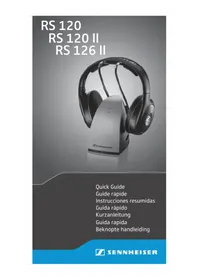
RS 126 II - Earphones SENNHEISER - Free user manual and instructions
Find the device manual for free RS 126 II SENNHEISER in PDF.



| Brand | Sennheiser |
| Model | RS 126 II |
| Product type | Wireless headphone with transmitter |
| Headphone power supply | 2 rechargeable NiMH AAA 1.2V batteries (included) |
| Transmitter power supply | Mains adapter (models NT9-3A depending on region) |
| Initial battery charge | 24 hours before first use |
| Charge time after use | Up to 18 hours maximum |
| Charge indicator | Red LED on transmitter cradle |
| Audio input connectivity | 2 RCA jacks (red/white), adapters for 3.5mm and 6.35mm jacks included |
| Transmission channel adjustment | TUNE potentiometer on headphone and channel selector on transmitter |
| Range | Approximately 100 meters in open field (estimated) |
| Headphone weight | Approximately 200 grams (estimated) |
| Headphone dimensions | Not provided |
| Transmission type | Radio frequency (ISM band) |
| Compliance | FCC, Industry Canada, Europe (depending on version) |
| Maintenance | Clean with a soft, dry cloth. Do not use solvents. |
| Batteries | Rechargeable only (NiMH), do not use alkaline batteries |
| Included accessories | Transmitter, headphone, mains adapter, RCA cable, RCA to 3.5mm adapter, 6.35mm adapter, 2 NiMH AAA batteries |
| Warranty | 24 months (under Sennheiser conditions) |
| Repairability | Removable ear pads, accessible batteries (replacement possible) |
Frequently Asked Questions - RS 126 II SENNHEISER
User questions about RS 126 II SENNHEISER
0 question about this device. Answer the ones you know or ask your own.
Ask a new question about this device
Download the instructions for your Earphones in PDF format for free! Find your manual RS 126 II - SENNHEISER and take your electronic device back in hand. On this page are published all the documents necessary for the use of your device. RS 126 II by SENNHEISER.
USER MANUAL RS 126 II SENNHEISER
TR 120/TR 120 II/TR 126 II transmitter with audio connection cable
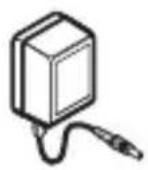
NT9-3A (US) mains unit (for US and CDN market only)
NT9-3A (AUS) mains unit (for AUS market only)
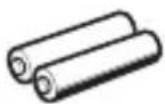
NiMH rechargeable batteries, AAA size, 1.2 V
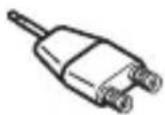
Adapter, 2 RCA sockets to 3.5mm jack plug
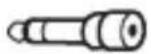
Adapter, 1/4'' (6.3 mm)
Quick Guide
Safety Guide

The diagrams corresponding to the chapter headings can be found on the fold-out page.
Preparing the transmitter for use
The transmitter is prepared for wall mounting (recess at the rear of the transmitter). The required mounting material (screws and plugs) is not included in the delivery.

Connecting the transmitter to an audio output of your audio source
Choose a suitable place near your audio source (e.g. TV, stereo or home cinema system). Avoid placing the transmitter close to metal objects such as shelf bars, reinforced concrete walls, etc. as this can decrease the transmitter's range.
Connect the transmitter's audio connection cable:
-
directly to the RCA sockets (outputs) of your audio source, making sure to connect the red RCA plug to the red RCA socket R, or
-
to the supplied RCA/3.5 mm adapter for connection to a 3.5 mm headphone socket, or
-
to the supplied RCA/3.5 mm adapter and 1 / 4'' (6.3 mm) adapter for connection to a 1 / 4'' (6.3 mm) headphone socket.
-
Set the volume for the headphone output of your audio source to a medium level. If the headphone output volume is set too low, the transmitter automatically switches off.

Some TVs have a function that mutes the TV loudspeakers when you connect a transmitter. If necessary, change this setting via the operating menu of your TV.
Connecting the transmitter to the mains
- Connect the mains unit to the socket at the rear of the transmitter. Plug the mains unit into a wall socket. The transmitter switches on and the ON/OFF LED lights up green.
Preparing the headphones for use
2 Opening the battery compartments
Turn the ear pads in the direction of the arrow until you overcome a slight resistance and lift them off the ear cups.
3 Inserting and replacing the rechargeable batteries

CAUTION
Only use NiMH rechargeable batteries, never use standard batteries!
Insert the supplied rechargeable batteries. Secure the ear pads to the ear cups.
- Charge the rechargeable batteries for at least 24 hours prior to first time use. Subsequent charging time depends on the previous operating time and is up to 18 hours max.
- Place the headphones on the charging cradle of the transmitter. The red LED lights up, indicating that the batteries are being charged. The LED remains lit even when the rechargeable batteries are fully charged.
Using the RS headphone system
Switching on the audio source
Switch on the audio source. The transmitter automatically switches on and off together with the audio source. The ON/OFF LED lights up green.
Switching on the headphones/adjusting the volume
First, set the volume on the headphones to a low level.
Switch on the headphones and set the volume to the desired level.
- Switch off the headphones after use to avoid discharging the batteries.
6 Optimizing the reception
Adjust the receiver channel with the TUNE control on the headphones.
However, if reception is subject to interference:
Change the transmission channel by setting the switch at the bottom of the transmitter to another position and re-adjust the receiver channel with the TUNE control on the headphones. Some electronic devices (e.g. televisions) can cause interference to your wireless headphone system. If this happens, increase the distance between the transmitter and the interference source.
Specifications and Frequently Asked Questions (FAQ's)
Visit our website at www.sennheiser.com.

Manufacturer declarations
Warranty
Sennheiser electronic GmbH & Co. KG gives a warranty of 24 months on this product. For the current warranty conditions, please visit our website at www.sennheiser.com or contact your Sennheiser partner.
Before putting the device into operation, please observe the respective country specific regulations!
FOR AUSTRALIA ONLY
Sennheiser's goods come with guarantees that cannot be excluded under the Australian Consumer Law. You are entitled to a replacement or refund for a major failure and compensation for any other reasonably foreseeable loss or damage. You are also entitled to have the goods repaired or replaced if the goods fail to be of acceptable quality and the failure does not amount to a major failure.
This warranty is in addition to other rights or remedies under law. Nothing in this warranty excludes, limits or modifies any liability of Sennheiser which is imposed by law, or limits or modifies any remedy available to the consumer which is granted by law.
To make a claim under this warranty, contact Sennheiser Australia Pty Ltd, Unit 3, 31 Gibbs Street, Chatswood NSW 2067, Australia; Phone: (02) 9910 6700, email: service@sennheiser.com.au.
All expenses of claiming the warranty will be borne by the person making the claim.
The Sennheiser International Warranty is provided by Sennheiser Australia Pty Ltd (ABN 68 165 388 312), Unit 3, 31 Gibbs Street, Chatswood NSW 2067, Australia.
Statements regarding FCC and Industry Canada
FCC Declaration of Conformity (DoC)

SENNHEISER
Model No: RS 110 II, RS 116 II
RS 120 II, RS 126 II
We,
Sennheiser Electronic Corporation
One Enterprise Drive • Old Lyme •
CT 06371 • USA
Tel: +1 (860) 434 9190
declare the above device comply with the requirements of Federal Communications Commission.
This device complies with Part 15 of the FCC rules. Operation is subjected to the following two conditions:
1) This device may not cause harmful interference, and
2) This device must accept any interference received, including interference that may cause undesired operation.
Responsible Part y: Greg Beebe
This device complies with Part 15 of the FCC rules and RSS-210 of Industry Canada. Operation is subjected to the following two conditions: 1) This device may not cause harmful interference, and 2) This device must accept any interference received, including interference that may cause undesired operation.
This equipment has been tested and found to comply with the limits for a Class B digital device, pursuant to part 15 of the FCC Rules and RSS-210 of Industry Canada. These limits are designed to provide reasonable protection against harmful interference in a residential installation. This equipment generates, uses and can radiate radio frequency energy and, if not installed and used in accordance with the instructions, may cause harmful interference to radio communications. However, there is no guarantee that interference will not occur in a particular installation. If this equipment does cause harmful interference to radio or television reception, which can be determined by turning the equipment off and on, the user is encouraged to try to correct the interference by one or more of the following measures:
- Reorient or relocate the receiving antenna.
- Increase the separation between the equipment and receiver.
- Connect the equipment into an outlet on a circuit different
from that to which the receiver is connected.
- Consult the dealer or an experienced radio/TV technician for help. Changes or modifications made to this equipment not expressly approved by Sennheiser electronic Corp. may void FCC authorization to operate this equipment.
CANICES-3(B)
RF Radiation Exposure Information
Since the radiated output power of this device is far below the FCC radio frequency exposure limits, it is not subjected to routine RF exposure evaluation as per Section 2.1093 of the FCC rules. This device complies with the US and Industry Canada portable device RF exposure limits set forth for an uncontrolled environment and is safe for intended operation as described in the user manual. Further RF exposure reduction can be achieved if the device can be kept as far as possible from the user's body or set to lower output power if such provision is available. The base portion of this device should be installed and operated at least 20~cm away from the user's body. Use of other accessories not verified by the manufacturer may not ensure compliance with FCC and Industry Canada RF exposure guidelines. This transmitter must not be co-located or operated in conjunction with any other antenna or transmitter.
Industry Canada statement
This device complies with RSS-210 of Industry Canada. Operation is subject to the following two conditions: (1) This device may not cause harmful interference, and (2) this device must accept any interference received, including interference that may cause undesired operation.
In compliance with:
USA FCC ID: DMORS03ABUS

Canada IC: 2099A-TR120II
Australia/ New Zealand

Contenu
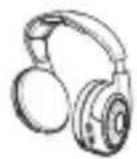
Casque HDR 120/HDR 120 II/HDR 126 II
FCC Declaration of Conformity (DoC)

SENNHEISER
Model No: RS 110 II, RS 116 II, RS 120 II, RS 126 II
We,
Sennheiser Electronic Corporation One Enterprise Drive • Old Lyme •
CT 06371 • USA
Tel: +1 (860) 434 9190
declare the above device comply with the requirements of Federal Communications Commission.
This device complies with Part 15 of the FCC rules. Operation is subjected to the following two conditions:
1) This device may not cause harmful interference, and
2) This device must accept any interference received, including interference that may cause undesired operation.
Responsible Part y: Greg Beebe
6 Optimizar recepçao
Dados技术和e Frequently Asked Questions (FAQs)
- Visit o quello site na Internet: www.sennheiser.com.

Dati tecnici e Frequently Asked Questions (FAQ)
Voedingsadapter NT9-3A (US)
Am Labor 1, 30900 Wedemark, Germany
www.sennheiser.com
Printed in China, Publ. 10/15, 545191/A03
- Preparing the transmitter for use
- Connecting the transmitter to an audio output of your audio source
- Connecting the transmitter to the mains
- Preparing the headphones for use
- Opening the battery compartments
- Inserting and replacing the rechargeable batteries
- CAUTION
- Using the RS headphone system
- Switching on the audio source
- Switching on the headphones/adjusting the volume
- Optimizing the reception
- Specifications and Frequently Asked Questions (FAQ's)
- Manufacturer declarations
- Warranty
- FOR AUSTRALIA ONLY
- Statements regarding FCC and Industry Canada
- RF Radiation Exposure Information
- Industry Canada statement
- In compliance with:
- Contenu
- Optimizar recepçao
- Dados技术和e Frequently Asked Questions (FAQs)
- Dati tecnici e Frequently Asked Questions (FAQ)
Brand : SENNHEISER
Model : RS 126 II
Category : Earphones