P3000 - Radio SCANSONIC - Free user manual and instructions
Find the device manual for free P3000 SCANSONIC in PDF.



User questions about P3000 SCANSONIC
0 question about this device. Answer the ones you know or ask your own.
Ask a new question about this device
Download the instructions for your Radio in PDF format for free! Find your manual P3000 - SCANSONIC and take your electronic device back in hand. On this page are published all the documents necessary for the use of your device. P3000 by SCANSONIC.
USER MANUAL P3000 SCANSONIC
Congratulations on your new radio.
Please take a moment to read this manual.
Safety Instructions.
Please store this instruction manual for future reference.
- Place the unit on a solid surface.
- Do not expose Scansonic P3000 to high humidity, direct sunlight, dirt, heavy vibration or extreme temperatures.
- Do not open the cabinet. Only qualified technicians are allowed to handle this Scansonic radios internal parts.
If service or repair is required, this must also be done by qualified technicians. - User a duster or a slightly damp, soft and Non-fluffy rag to clean the cabinet. Do not use corrosive or strong cleaning agents.
Make sure no liquids or moisture penetrates the radio during cleaning. Unplug the radio before cleaning it.
Unplug the radio in following cases:
Foreign objects or liquids have penetrated the radio.
The radio cannot be operated properly.
The cabinet has been damaged.
The mains plug or the mains cable is defective.
If the radio is not to be used for a longtime.
Disclaimer
Despite our best efforts we cannot guarantee that the technical data indicated are correct, complete and updated, We, Scansonic, reserve the right to make technical changes without prior notice.
SCANSONIC
P3000
Front panel Rear panel
SCANSONIC
P3000
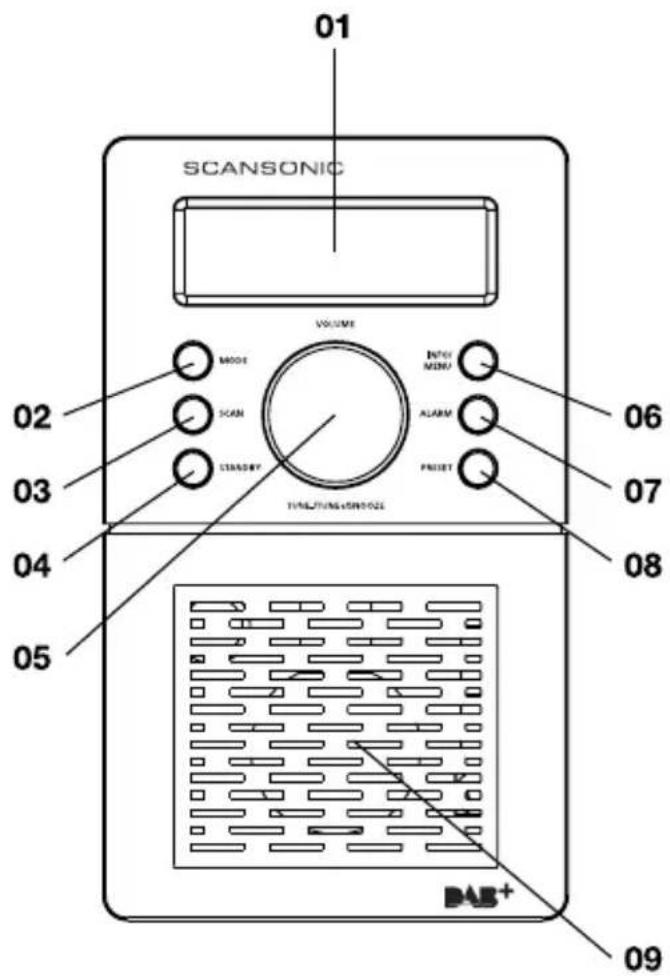
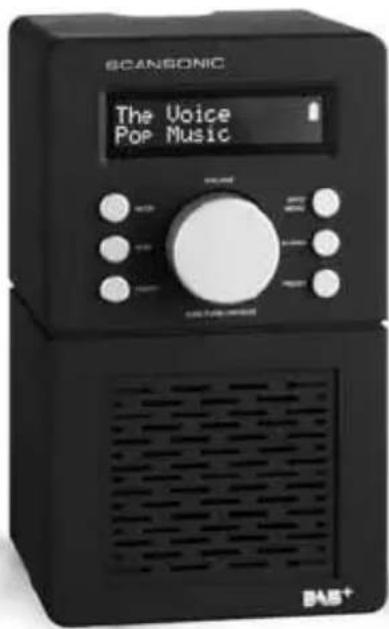
01 Display 16 × 2 Digit LCD display showing all information on the radio
02 MODE Press to select DAB radio, FM radio or AUX input
03 SCAN Press to SCAN radio channels
04 STANDBY Press to go to STANDBY mode. Press Longer to Shut down radio
05 ROTARY Volume Control / SELECT / Tune+ Tune- / SNOOZE button
06 INFO / MENU INFO: Press to retrieve information from Radio Stations
MENU: Press 2 seconds Manual Tune / EQ / Alarm / Sleep / Clock System Reset
07 ALARM Press to display Alarm 1 / Alarm 2
08 PRESET Press to preset radio stations 1-10
09 SPEAKER 3" Full range loudspeaker
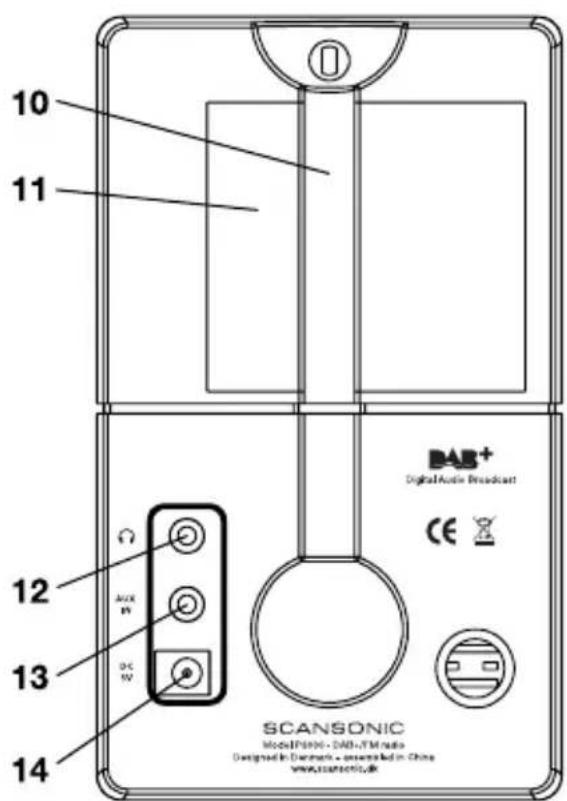
10 ANTENNA The radio comes with a telescopic antenna. To Improve FM reception, adjust the antenna for best reception
11 BATTERY This radio can also be played with batteries (AA size x 4)
12 HEADPHONE Connect a separate stereo headset to this input to listen to the radio. Connecting headset will disable the main speaker
13 AUX IN Connect a stereo or mono audio source (iPod, iPhone, iPad, MP3 Player, TV etc). Use 3.5mm jack enclosed to connect to devices
14 DC5V IN Use this input to the enclosed DC Power Supply
SCANSONIC
P3000
Connecting your radio
01 Your radio is supplied with a Mains Adaptor
02 Place your radio on a flat surface
03 Insert the adaptor plug into the DC socket on the back of your radio
04 Plug the adaptor into the 230 volts mains socket outlet
Connecting your radio - DAB
01 Carefully extend the telescopic antenna
02 Press the STANDBY button to switch on radio, the display will show "SCANSONIC" and the radio will come into DAB mode automatically
03 First time the radio is used a QUICK SCAN will be carried out, if the radio has been and turned back ON from STANDBY mode, the last used station will be selected
04 For a full SCAN please press "SCAN" button for 2 seconds
05 When scanning is completed the display shall indicate the number of found stations
06 You may PRESET your favorite stations by pressing PRESENT button and scroll to the position you would like to save and then press SELECT button for 2 seconds
07 If no Stations are found after scanning the display will show "NO STATIONS AVAILABLE" and it is necessary to relocate the radio to a position with better reception
6
SCANSONIC
P3000
Selecting a station - DAB
01 The display show the name of the station selected
02 Press down ROTARY KNOB to select TUNE - or TUNE + button to scroll the station list and find the station
03 Press down ROTARY KNOB to select the desired station
Information services - DAB
Your radio shall display different info which can be selected by pressing the INFO button
01 Date shows the current date and time.
02 Ensemble displays the name of broadcaster of the DAB Station
03 Genre displays the type of the selected station: Pop, Rock, News, Jazz Etc.
04 Data Speed display the digital bit rate and mono / stereo of selected station
05 Station displays the frequency of the selected station Frequency
06 Radio text displays text messages from the station (DLS)
SCANSONIC
P3000
Operating your radio - FM
01 Carefully extend the telescopic antenna
02 Press STANDBY to power on the radio (Use MODE to select to FM)
03 Press SCAN button to automatically scan upwards
04 Press SCAN button 2 seconds to automatically scan downwards
05 You may PRESET your favorite stations by pressing PRESENT button and scroll to the position you would like to save and then press SELECT button for 2 seconds
Display modes - FM
Your radio shall display below information by pressing the INFO button
01 Date shows the current date and time
02 Station Name shows the name of the station or the frequency of the station
03 Audio displays Mono or Stereo
04 Program displays the name of Program If not available "Prog Type N/A" shall be displayed
05 Radio text displays text messages from the station
8
SCANSONIC
P3000
AUX mode
CONNECT TO YOUR IPOD, IPHONE, IPAD & OTHER AUDIO SOURCES
The radio has an auxiliary input. This input can be used to connect an external source such as iPod, iPhone, iPad, MP3 Players and other audio sources by using the included 3.5mm mini jack cable.
To connect please connect the 3.5mm mini jack cable to your radio and to your other device.
Press MODE button to select the AUX mode.
Manual clock settings
The radio clock can be set manually as below. (Navigate by using Rotary)
01 Press MENU 2 Sec > Clock Setting > Auto Update or Manual Update
02 With Rotary please select Date Setting: DD : MM : YYYYY
03 With Rotary please select Time Setting: HH : MM
SCANSONIC
P3000
Setting the alarm
The radio alarm allows you to wake up to your desired radio station or a buzz.
01 Press ALARM button 2 Sec
02 With Rotary Select Alarm number: 1 or 2
03 With Rotary Select Alarm mode: Off / Beep / DAB / FM
04 With Rotary Select Alarm option: Once / Daily / Weekday / Weekend
05 With Rotary Select Alarm Time: 00 : 00
06 With Rotary Adjust the Alarm Level 1-20
07 When Alarm is active and to turn off press MODE or STANDBY
08 When Alarm is active press down on Rotary to enter SNOOZE Press Alarm button once to delete SNOOZE
EQ setting
The radio has an EQ function that allows your radio to play with different Equalizer settings. (Navigate by using Rotary)
01 Press MENU 2 Sec > EQ Setting
02 With Rotary please select: Flat, News, Classic, Pop or Rock
03 Press SELECT to end
10
SCANSONIC
P3000
EQ setting
The radio has an EQ function that allows your radio to play with different Equalizer settings. (Navigate by using Rotary)
01 Press MENU 2 Sec > EQ Setting
02 With Rotary please select: Flat, News, Classic, Pop or Rock
03 Press SELECT to end
Resetting the radio
If you encounter problems with your radio you may reset the radio to Factory Setting as follows. (Navigate by using Rotary)
01 Press MENU > System Reset
02 Press Select and the System shall reset to factory setting
| Band (Mode) DAB, DAB+ & FM & (AUX) |
| Output Power 2 Watts RMS |
| Loudspeaker 2.75” Full Range |
| Antenna FM & DAB telescopic |
| Power / Battery DC 5V / 4 x AA sized Alkaline Batteries |
| Inputs DC 5V Aux Input |
| Outputs Headphones |
| Dimensions 95mm(W) x 92mm(D) x 160mm(H) |
| Weight (Net) 650 g |
enjoy
www.scansonic.dk
SCANSONIC
P3000
DK Brugervejledning
SCANSONIC
P3000
Indhold
02INDHOLD
03 INFORMATION
04 OVERSIGT OG FRONT-OG BAGPANEL
06 TILSLUTNING AF DIN RADIO
06 BETJENING AF DIN RADIO - DAB
07VALG AF EN STATION - DAB
07 INFORMATIONSTJENESTER - DAB
08 BETJENING AF DIN RADIO - FM
08 VISNINGSTILSTANDE - FM
09 AUX TILSTAND
09 MANUEL INDSTILLING AF URET
10 INDSTILLE VAKKEURET
10 EQ-INDSTILLING
11 GENINDSTILLING AF RADIO
12 SPECIFICATION