ManualGo.com
 CUV12CTP5 - Climatisation PANASONIC - Free user manual and instructions
Find the device manual for free CUV12CTP5 PANASONIC in PDF.


Download the instructions for your Climatisation in PDF format for free! Find your manual CUV12CTP5 - PANASONIC and take your electronic device back in hand. On this page are published all the documents necessary for the use of your device. CUV12CTP5 by PANASONIC.
USER MANUAL CUV12CTP5 PANASONIC
Before using your air-conditioner, please read
this operating instructions carefully and keep it
for future reference.
F567398 PANASONIC HA AIR-CONDITIONING (M) SDN. BHD.LOT 2, PERSIARAN TENGKU AMPUAN, SECTION 21,SHAH ALAM INDUSTRIAL SITE, 40300 SHAH ALAM,SELANGOR, MALAYSIA HEAT-PUMP MODEL :- (Refrigerant : R22) Indoor Outdoor
: Setting the Timer 7
: Convenience Operation 7 ■ Sleep Mode Operation : Care and Maintenance 7~8 ■ Cleaning the Indoor Unit and Remote Control■ Cleaning the Air Filter■ Pre-season Inspection■ When the Air Conditioner is Not Used for anExtended Period of Time■ Recommended Inspection : Helpful information 8
: Energy Saving and Operation Hints 8
: Troubleshooting 9 ■ Normal Operation■ Abnormal Operation■ Call the Dealer ImmediatelyNote:Before using your air conditioner, please readthis operating instructions carefully and keep itfor future reference. FEATURES ● Illuminating ButtonFor your convenience to operate in the dark.(Refer page 4)● Automatic OperationSense indoor temperature to select theoptimum mode.(Refer page 5)● Comfortable Airflow Operation(Vertical Airflow Direction)Minute airflow direction control creates a pleasantroom environment.(Refer page 6)● ON / OFF Dual Setting TimerTo program the room air conditioner to turn itself onand to ensure you maximum comfort when sleeping.(Refer page 7)● Sleep ModePrevent the room from getting too hot or toocold while you are sleeping.(Refer page 7)● Auto Restart ControlRestart the unit automatically after power failure.(Refer page 8)● Enviromental Friendly(For Refrigerant : R410A Models)Zero ozone depleting potential and low global warmingpotential by using R410A refrigerant. ! Warning
1) If the supply cord is damaged or needed to be replaced,it must be replaced by the manufacturer or its service agentor a similarly qualified person in order to avoid a hazard. 2) Remove power plug or disconnect from the main beforeservicing this appliance. 3) Do not repair by yourself.In case of malfunction of this appliance, do not repair byyourself. Contact the sales dealer or service dealer for arepair. 4) Turn off the power (Isolation from main power supply). Pulloff the power plug from the receptacle, or switch off thebreaker, or switch off the power disconnecting mean toisolate the equipment from the main power supply in case ofan emergency. ! Caution DISCONNECT THE MAIN PLUG FROM THE SUPPLYSOCKET WHEN NOT IN USE, WHERE SUPPLYCONNECTION IS VIA MAIN PLUG.Airborne noise.A-weighted sound pressure level of this appliance is less than70dB (A) under the JIS C 9612 test conditions.Maximum cooling operation1 m from the unit IMPORTANT Replacement or installation of power plugs shall be performedby authorised/qualified personnel only.The wires in this main lead are coloured in accordance with thefollowing code:Green and Yellow : EarthBlue : NeutralBrown : Live“As the colours of the wires in the main lead of thisappliance may not correspond with the coloured markingsidentifying the terminals in your plug, proceed as follow:The wire which is coloured green and yellow must beconnected to the terminal in the plug which is marked by the letter E or by safety earth symbol ! or coloured green or green and yellow.The wire which is coloured blue must be connected to theterminal which is marked with letter N or coloured black.The wire which is coloured brown must be connected to theterminal which is marked with letter L or coloured red.”Please remember to record the following:● Model Number● Serial Number● Dealer’s Name● Date Purchased Note 12CTP5-01EN(01-09) 12/24/09, 11:29 AM12
■ Installation Precautions
● Do not install, remove and reinstall the unit by
Improper installation will cause leakage, electric
shock or fire. Please engage an authorized dealer
or specialist for the installation work.
● This equipment must be earthed and installed
It may cause electrical shock or fire in case
■ Operation Precautions
This sign warns of death or serious injury.
● Do not share outlet.
● Do not insert plug to operate the unit. Do not
pull out plug to stop the unit.
● Do not operate with wet hands.
● Do not damage or modify the power cord.
● Do not insert finger or other objects into the
indoor or outdoor units.
Do not expose directly to cold air for a long period.
● Use specified power cord.
occurs, switch off and unplug the power
This sign warns of injury.
● Do not pull the cord to disconnect the plug.
● Do not wash the unit with water.
● Do not use for other purposes such as
● Do not use any combustible equipment at
Do not sit or place anything on the indoor or
● Switch off the power supply before cleaning.
● Ventilate the room regularly.
● Pay attention as to whether the installation
rack is damaged after long period of usage.
● Switch off the power supply if the unit is not
used for a long period.
SAFETY PRECAUTIONS Before operating, please read the following
“Safety Precautions” carefully.
● To prevent personal injury, injury to others and
property damage, the following instructions must be
● Incorrect operation due to failure to follow instructions
will cause harm or damage, the seriousness of which
is classified as follow:
This sign warns of death or serious injury.
This sign warns of damage to property.
● The instructions to be followed are classified by the
This symbol (with a white background) denotes an
action that is PROHIBITED.
These symbols (with a black background) denote
actions that are COMPULSORY.
● This room air conditioner must be
Improper grounding could cause
● Ensure that the drainage piping is
Otherwise, water will leak out.
● Do not install the unit in a
potentially explosive atmosphere.
Gas leak near the unit could cause
6 Vertical Airflow Direction Louver
● Indoor Unit Controls
1 Operation Indication Lamps
1 Auto Operation Button
● Remote Control Indication Sticker
● Remote Control Holder
● Two RO3 (AAA) dry-cell batteries or equivalent
OFF/ON T E M P MODE FAN SPEED AUTO T IM E R AIR SWING R E S E T SLEE P M A N U A L S E L E C T S E T
/C A N C E L A B A U T AUT O H E A HEA T C O O L COOL D R DR Y FA N AN S P E E D SPEED H H A B O F F O F F O N O N AUTO OFF/ON POWER TIMER SLEEP AIR SWING
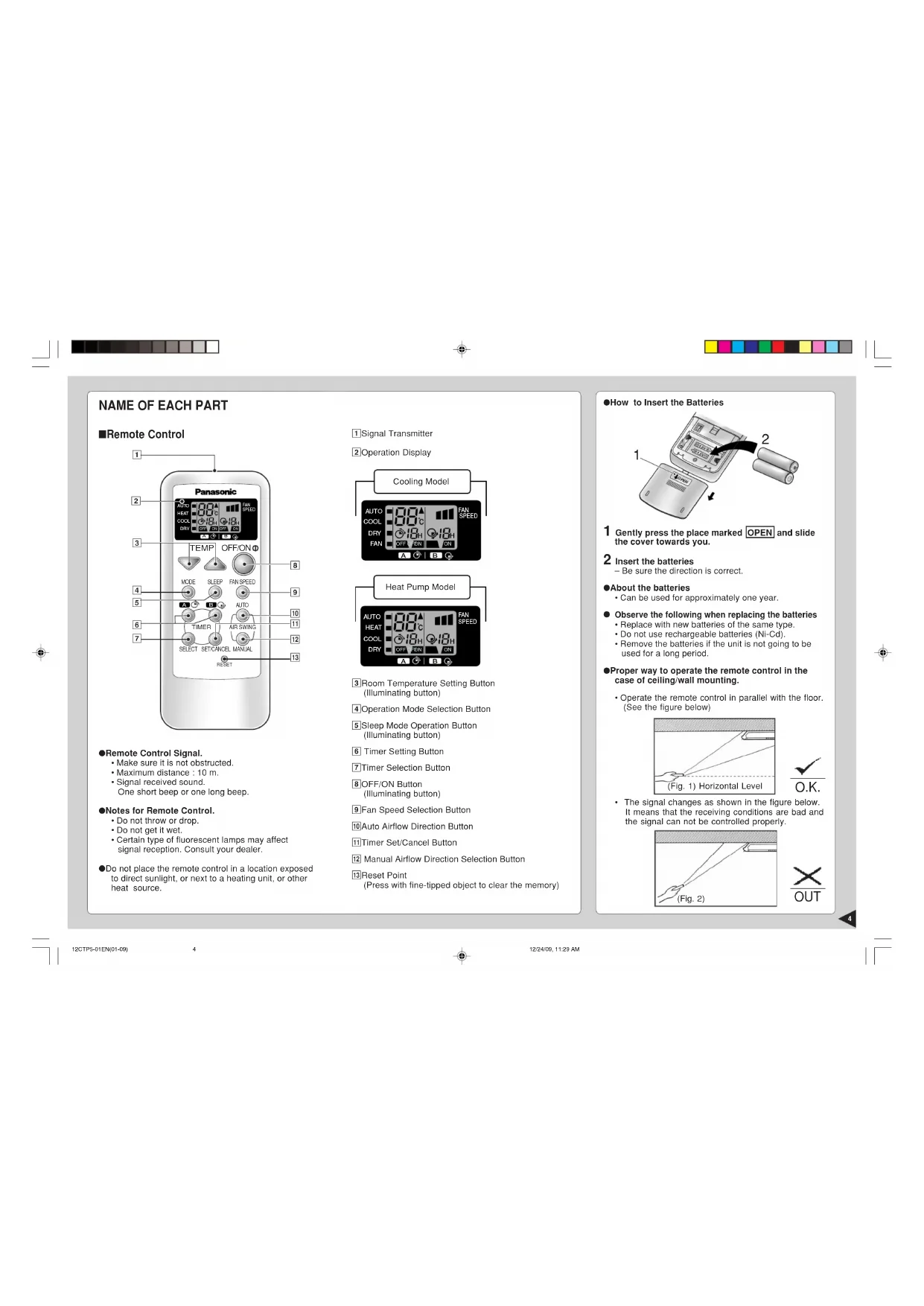
• Make sure it is not obstructed.
• Maximum distance : 10 m.
• Signal received sound.
One short beep or one long beep.
● Notes for Remote Control.
• Do not throw or drop.
• Do not get it wet.
• Certain type of fluorescent lamps may affect
signal reception. Consult your dealer.
● Do not place the remote control in a location exposed
to direct sunlight, or next to a heating unit, or other
● How to Insert the Batteries
1 Gently press the place marked OPEN and slide
the cover towards you.
2 Insert the batteries
– Be sure the direction is correct.
● About the batteries
• Can be used for approximately one year.
Observe the following when replacing the batteries
• Replace with new batteries of the same type.
• Do not use rechargeable batteries (Ni-Cd).
• Remove the batteries if the unit is not going to be
used for a long period.
● Proper way to operate the remote control in the
case of ceiling/wall mounting.
• Operate the remote control in parallel with the floor.
(See the figure below)
1 Signal Transmitter
3 Room Temperature Setting Button
4 Operation Mode Selection Button
0 Auto Airflow Direction Button
! Timer Set/Cancel Button
@ Manual Airflow Direction Selection Button
(Press with fine-tipped object to clear the memory)
• The signal changes as shown in the figure below.
It means that the receiving conditions are bad and
the signal can not be controlled properly.
■ To start the operation
•POWER indicator (green) on the indoor unit will light up.
•To stop, press once more.
• Press 2 to select:-
AUTO – Automatic Operation
COOL – Cooling Operation
DRY – Soft Dry Operation
FAN – Air Circulation Operation
AUTO – Automatic Operation
HEAT – Heating Operation
COOL – Cooling Operation
DRY – Soft Dry Operation
PREPARATION BEFORE OPERATION
1 Connect the power supply cord to an independent
■ Setting Temperature
• Press 3 to increase or decrease the temperature.
• The temperature can be set between 16°C ~ 30°C
• Recommended temperature:
• During AUTO Operation, press 3 to select:-
• Operation with 2°C higher than the standard
• Operation with the standard temperature.
• Operation with 2°C lower than the standard
● Standard Temperature
• Once the Automatic Operation is selected, the indoor
temperature sensor operates automatically to select
the desired operation mode with Cooling or Soft Dry.
• After the operation mode has been selected, the
mode does not change.
• At the beginning of the automatic operation, Heating,
Cooling or Soft Dry is automatically selected according
to the indoor temperature.
• After the operation mode has been selected, the
mode does not change.
COOL – Cooling Operation
• To set the room temperature at your preference
• Temperature is not displayed on the remote control
during AUTO operation.
DRY – Soft Dry Operation
•A very gentle Cooling Operation, prior to
dehumidification. It does not lower the room
• During Soft Dry operation, the indoor fan operates at
HEAT – Heating Operation
(for Heat Pump Model only)
• Heat is obtained from outdoor air to warm up the
room. When the outdoor ambient air temperature
falls, the heating capacity of the unit might be
• Defrosting Operation
Depend on the outdoor temperature, the operation
occasionally stops to melt the frost on the outdoor
FAN – Air Circulation Operation
(for Cooling Model only)
• Heated air rises and collects at the top of the room.
The air circulation circulates the heated air downward,
thus increasing heating effectiveness. When the unit
is installed floor mounted, you should set the
temperature higher than that of ceiling mounted.
At ceiling mounted At floor mounted
12CTP5-01EN(01-09) 12/24/09, 11:29 AM56
• Press 4 to select:-
FAN – Medium Fan Speed
FAN – High Fan Speed
AUTO FAN – Automatic Fan Speed
The speed of the indoor fan is adjusted
automatically according to the operation.
The indoor fan stops occasionally during
■ Vertical Airflow Direction
• Press and hold the Manual Airflow Direction
Selection Button 5 , then release the button at
the desired airflow direction.
• Cooling / Soft Dry/
Heating (for Heat-Pump Model only)
The airflow direction can be adjusted as desired
by using the remote control. This is effective
when you want to cool yourself directly, such as
when coming out of the bath. The louver can be
adjusted within a range between the horizontal
and 25 degrees downward at Cooling and Soft
Dry Operation, and between the horizontal and
45 degrees downward at Heating Operation.
(for Heat-Pump Model only)
■ Setting the Horizontal Airflow Direction
● Use this air conditioner under the following
• Adjust it manually
• If the unit is not going to be used for an extended
period of time, turn off the main power supply. If it is
left at the ON position, approximately 2.0 W of
electricity will be used even if the indoor unit has been
turned off with the remote control.
• If operation is stopped, then restart immediately, the
unit will resume operation only after 3 minutes.
● Automatic Operation
• Cooling / Soft Dry
The louver will automatically swing up and down
to create the feeling of a refreshing breeze.
• Heating (for Heat-Pump Model only)
When the discharge air temperature is low such
as at starts of heating operation, the air blows at
As the temperature rises, the hot air blows in a
downwards direction.
12CTP5-01EN(01-09).p65 22/1/10, 2:07 PM6ENGLISH
To obtain a comfortable room temperature while sleeping:-
• Sleep mode indicator on the indoor unit will light up.
• To cancel this operation, press once more.
● Sleep Mode Operation Details
• When the room temperature reaches the set temperature,
the airflow volume will change to low automatically.
• Sleep Mode Operation time is 8 hours.
•When used together with the timer, the timer has a priority.
CARE AND MAINTENANCE
■ Cleaning the Indoor Unit and Remote
• Wipe gently with a soft, dry cloth.
• Do not use water hotter than 40˚C or polishing fluid
■ Cleaning the Air Filter
(Recommendation:- If the unit is operated in a dusty
environment, clean the filters every two weeks,
continuous use of this dirty filters will reduce cooling
or heating efficiency)
1 Remove dirt using a vacuum cleaner.
2 Wash back of the air filter with water.
3 If badly soiled, wash it with soap or a mild household
4 Let it dry and reinstall it.
Be sure the “FRONT” mark is facing you.
* Damaged air filter.
Consult the nearest authorized dealer.
Part No.: CWD001088.
• Do not use benzene, thinner, scouring powder or
clothes soaked in caustic chemical to clean the
H OFF H ON H ON H OFF H ON H OFF SETTING THE TIMER
• Press the Timer Selection Button 1.
• Timer indicator on the indoor unit will light up.
• Select one of the following five types of operation.
Each time the button is pressed, the operation mode
is shifted in the arrow direction.
Delay OFF Timer Example :
Operation starts after
Delay OFF and Example :
ON Timer Operation stops after
1 hour and re-starts
after another 5 hours.
Delay ON and Example :
OFF Timer Operation starts after
stops after another 8
• Then press the Timer Setting Button 2 or 3 to the
desired number of hours.
(Number of hours which can be set : 1 ~ 12)
• Press the Timer Set/Cancel Button 4.
operation will start to
• Heating operation for
sleep shift operation will
start to avoid overheating.
after approx. 8 hours of sleep shift
operation, it will stop automatically.
after approx. 8 hours of sleep shift
operation, it will stop automatically.
operation will start to
12CTP5-01EN(01-09) 12/24/09, 11:29 AM78
■ Pre-season Inspection
● Clean the air filters, re-insert and operate the air
● Is the discharged air cold / warm?
Operation is normal if 15 minutes after the start of
operation, the difference between the air intake and
outlet vents temperature is:-
● Are the air intake or outlet vents of the indoor or
outdoor units obstructed?
● Are the remote control batteries weak?
If the remote control display appears weak, replace
■ When the Air Conditioner is Not Used
for an Extended Period of Time
1 To dry the internal parts of the indoor unit, operate
the unit for 2 - 3 hours using:-
2 Turn off the power supply and unplug.
3 Remove the remote control batteries.
■ Recommended Inspection
After used over several seasons, the unit will become
dirty and thus decreases the unit’s performance.
Depending on the operation conditions, a dirty unit
may produce odour and dust may pollute
dehumidification system. Therefore, a seasonal
inspection is recommended in addition to regular
cleaning. (Consult an authorized dealer).
30°C set temperature
● Automatic Operation
• If the remote control fails to function or has been
misplaced, press the Auto Operation button to start
the Automatic operation.
• The Automatic operation will be activated
immediately once the Auto operation button is
pressed. However, temperature cannot be adjusted
• The power indicator on the indoor unit will blink until
the operation mode is selected automatically.
• To cancel this operation, press once more.
• When power failure occurs, the timer setting will be
cancelled. Once power is resumed, reset the timer.
■ Thunder and Lightning
• This air conditioner is equipped with a built-in surge
protective device. However, in order to further
protect your air conditioner from being damaged by
abnormally strong lightning activity, you may switch
off the main power supply and unplug from power
■ Auto Restart Control
• If power is resumed after a power failure, the
operation will restart automatically after 3 - 4
• Operation will be restarted automatically under the
previous operation mode and airflow direction when
power is resumed as the operation is not stopped
by the remote control.
ENERGY SAVING AND OPERATION HINTS
■ Setting the Temperature
• Approximately 10% of electricity can be saved.
• Set the temperature higher or lower than the
desired temperature.
Cooling Operation : 1°C higher
Cooling Operation : 1°C higher
Heating Operation : 2°C lower
• Clean the air filters every 2 weeks.
• Dirty filters may reduces cooling or heating
■ Keep All Doors and Windows Closed
• Otherwise, cooling or heating performance will be
reduced and electricity cost is wasted.
• Do not block the air outlet vents. Otherwise, it will
lower the cooling or heating performance.
■ Timer and Sleep Mode
• To prevent wastage of electricity, use sleep mode
when sleeping or Timer when going out.
■ Avoid Direct Sunlight
• Keep curtains or drapes closed to avoid direct
sunlight during cooling operation.
■ Call the Dealer Immediately
If the following conditions occur, turn off and unplug the
main power supply, and then call the dealer immediately.
• Abnormal noise is heard during operation.
• Water or foreign material gets into the remote
• Water leak from the indoor unit.
• Switches or buttons do not operate properly.
• The circuit breaker switches off frequently.
• Power supply cord and plug become unusually
• Air conditioner has been restarted, but does not
operate for 3 minutes.
•A sound like water flowing can be heard.
• It seems that fog is coming out from the air
• The room has a peculiar odour.
• The outdoor unit emits water or steam.
• During Automatic Airflow Volume setting,
indoor fan stops occasionally.
• (For Heat Pump Model only)
Operation stops for about 12 minutes during
heating (The power indicator blinks).
• (For Heat Pump Model only)
During heating operation, indoor fan may
run at on and off conditions.
■ Abnormal Operation
• The air conditioner does not operate.
• Air conditioner produces loud noise during
• The air conditioner does not cool or warm
• Remote control / display doesn’t work
• This is to protect the air conditioner. Wait until the air
conditioner begins to operate.
• This is the sound of refrigerant flowing inside the air
• Condensation occurs when the airflow from the air
conditioner cools the room.
• This may be a damp smell emitted by the wall,
carpet, furniture or clothing in the room.
• In COOL/DRY operation, moisture in the air
condenses into water on the cool surface of outdoor
unit piping that causes dripping.
• This is to remove the smell emitted by the
• This is to melt the frost which has accumulated on
the outdoor unit (defrosting operating). This will take
no longer than about 12 minutes. Water drips from
the outdoor unit. Wait until this operation ends.
(the power indicator will light up). (Frost will
accumulates on the outdoor unit when the outdoor
temperature is low and humidity is high.)
• This is to prevent undesired cooling effect during
• Has the circuit breaker been tripped?
• Has the power plug been removed from the wall
• Is the timer being used correctly?
• Is the installation work slanted?
• Has the temperature been set incorrectly?
• Are the filters dirty?
• Are the intake or outlet vents of the outdoor unit
• Are all windows and doors closed?
OFF/ON T E M P MODE FAN SPEED AUTO T IM E R AIR SWING R E S E T SLEE P M A N U A L S E L E C T S E T
OFF/ON T E M P MODE FAN SPEED AUTO T IM E R AIR SWING R E S E T SLEE P M A N U A L S E L E C T S E T
OFF/ON T E M P MODE FAN SPEED AUTO T IM E R AIR SWING R E S E T SLEE P M A N U A L S E L E C T S E T
OFF/ON T E M P MODE FAN SPEED AUTO T IM E R AIR SWING R E S E T SLEE P M A N U A L S E L E C T S E T
OFF/ON T E M P MODE FAN SPEED AUTO T IM E R AIR SWING R E S E T SLEE P M A N U A L S E L E C T S E T
OFF/ON T E M P MODE FAN SPEED AUTO T IM E R AIR SWING R E S E T SLEE P M A N U A L S E L E C T S E T
– 52dB (A)55dB (A)60dB (A)52dB (A)58dB (A)60dB (A)52dB (A)55dB (A)60dB (A) –
OFF/ON T E M P MODE FAN SPEED AUTO T IM E R AIR SWING R E S E T SLEE P M A N U A L S E L E C T S E T
OFF/ON T E M P MODE FAN SPEED AUTO T IM E R AIR SWING R E S E T SLEE P M A N U A L S E L E C T S E T
local para obter informações sobre o método correcto de eliminação.
“Instructions for end-user” for air conditioners:
Your air conditioning product is marked with this symbol. This means that electrical
and electronic products should not be mixed with general household waste. European
Community countries (*), should have a dedicated collection system for these products.
Do not try to dismantle the system yourself as this could have harmful effects on your
health and on the environment as a result of incorrect waste handling. The dismantling
and disposal of refrigerant, oil and other parts must be done by a qualified installer in
accordance with relevant local and national regulations.
Air conditioners must be treated at a specialized treatment facility for re-use, recycling
and recovery and should not be disposed of in the municipal waste stream. Please contact your installer,
dealer or local authority for more information.
Penalties may also be applicable for incorrect disposal of waste products, in accordance with national
*subject to the national law of each member state
Information on Disposal in other Countries outside the European Union
This symbol is only valid in the European Union
If you wish to discard this product, please contact your installer, dealer or local authority and ask for the
correct method of disposal.
“Istruzioni per i consumatori” dei condizionatori d’aria:
Pursuant to at the directive 2004/108/EC, article 9(2)
Panasonic Testing Centre
Panasonic Service Europe, a division of