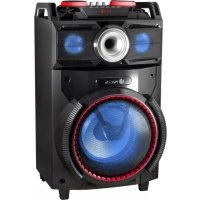
Wild Dance - Loudspeaker NGS - Free user manual and instructions
Find the device manual for free Wild Dance NGS in PDF.



| Brand | NGS |
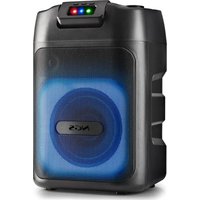
| Model | Wild Dance |
| Product type | DJ powered speaker |
| Output power | 300 W |
| Speaker | 10 inches (25 cm) |
| Power supply | Mains 230 V ~ 50 Hz |
| Audio inputs | AUX, 2 microphone inputs (6.35 mm), USB, SD card |
| Wireless connectivity | Bluetooth (range ~10 m) |
| FM radio | Yes, with auto search |
| Equalizer | 5 preset modes (EQ1-EQ5), separate treble and bass control |
| Microphone echo | Adjustable |
| Recording | To USB key or SD card via REC button |
| LED lights | Yes, with on/off button |
| Remote control | Yes, with 2 AAA batteries (not included) |
| Display | LED |
| Supported audio formats | MP3 (via USB/SD) |
| Care and cleaning | Wipe with a soft, dry cloth. Do not use abrasive products. |
| Safety | Do not expose to water or moisture. Unplug before cleaning. |
| Spare parts available | Remote control, AUX cable, power cable (subject to availability) |
Frequently Asked Questions - Wild Dance NGS
User questions about Wild Dance NGS
0 question about this device. Answer the ones you know or ask your own.
Ask a new question about this device
Download the instructions for your Loudspeaker in PDF format for free! Find your manual Wild Dance - NGS and take your electronic device back in hand. On this page are published all the documents necessary for the use of your device. Wild Dance by NGS.
USER MANUAL Wild Dance NGS
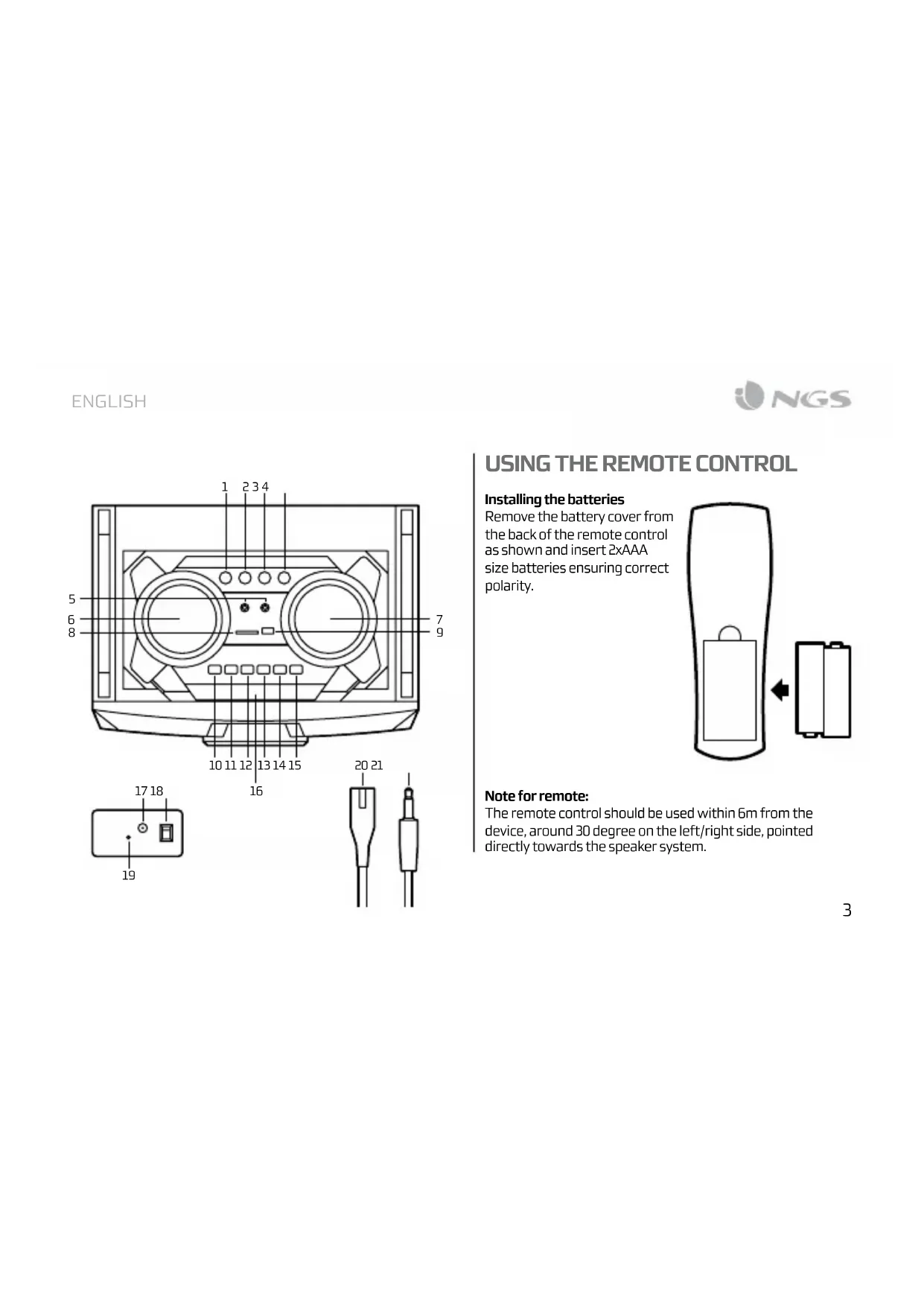
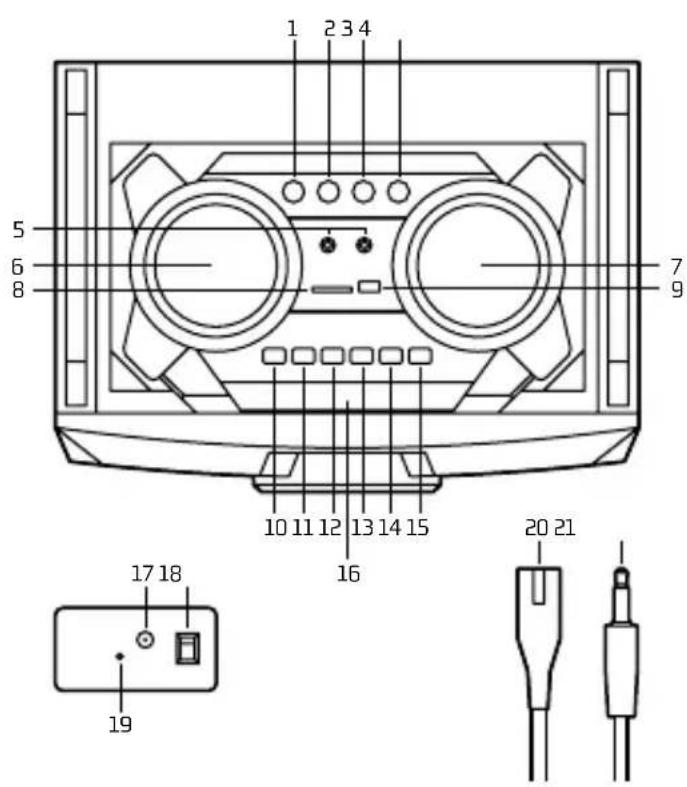
1 Echo control
2 Microphone equalizer
3 Bass control
4 Treble control
5 Double microphone inputs
6 Microphone volume control
7 Master volume control
8 SD card slot
9 USB port
10 MODE button (BT, FM, AUX, USB, SD)
11 REC (record to USB / SD card)
12 Previous
13 Play/Pause
14 Next
15 LED lights button
16 LED Display
17 Antenna
18 AC power On/Off
19 Audio input
20 AC cable
21 Auxiliary power cord
USING THE REMOTE CONTROL
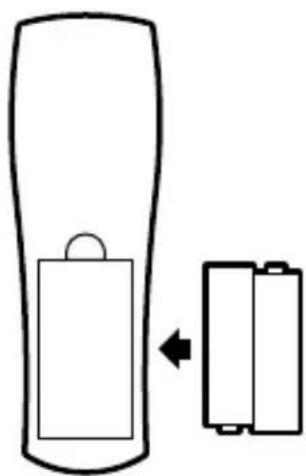
Installing the batteries
Remove the battery cover from the back of the remote control as shown and insert 2xAAA size batteries ensuring correct polarity.
Note for remote:
The remote control should be used within 6m from the device, around 30 degree on the left/right side, pointed directly towards the speaker system.
USER'S MANUAL
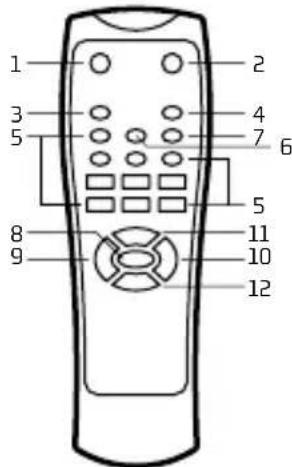
1 Poweron/Standby
2 Mute
3 Repeat key (single repeat, repeat all)
4 Mode key (choose from AUX/USB/SD/Bluetooth/FM modes)
5 0-9 keys
6 Sound mode key (choose from EQ1, EQ2, EQ3, EQ4, EQ5)
7 Record key (press to start and again to stop recording)
8 Play/pause (the sound muted when paused)
9 Volume -
10 Volume +
11 Previous song
12 Next song
AUX IN, USB/SD, BLUETOOTH, RADIO
To switch from one mode to another press the MODE button. If the device is not connected to a USB stick or an SD card, these modes will be omitted.
1.AUXIN
With the attached audio cable, you can connect the device with the external multimedia audio sources through the port "AUX". After connection, just set the mode to AUX by pressing the MODE button on the device. At this time, the LINE indicator will be displayed on the screen, suggesting the device can play the audio files from multimedia sources like PC, mobile phone, MP3 and MP4, etc.
Note: In AUXIN mode, the forward and rewind song functions will not operate. They must be accessed through the auxiliary device directly.
2. USB/SD CARD PLAYING
Insert the SD card or a USB Flash memory stick into the corresponding slot. The device will automatically play any music in MP3 format on the card.
3. BLUETOOTH mODE
A. Press the MODE button until the word "BLUE" appears on the screen. The icon will start to flash. In Bluetooth mode the device goes into searching / paring / reconnect mode for pair.
B. Now, turn ON the Bluetooth function on your mobile phone.
C. Search for "NGS WILDDANCE" and select it to pair (for first time pairing or pairing a new mobile device). Once connected, the icon will stop flashing.
D. The Bluetooth speaker will be reconnecting automatically if your mobile phone has been paired (Depend on the of mobile phone's type and configuration, manual reconnection may require on some devices).
4. RADIO MODE
Press the MODE button until a radio frequency appears on the screen. To begin an automatic search press the button. Once the search is complete, move between channels by pressing the hand buttons.
PANEL SWITCHES AND KNOBS FUNCTION
- mIEChO (ECHO)
Receiver reverberation depth adjustment.
- micVolumE KNOB (mic.VOL)
Microphone Volume adjustment.
3. TREBLE AND BASS ADJUSTMENT CONTROL (BASS & TREBLE)
Adjusts the treble and bass levels of the music.
- mIC.EQ
Adjusts microphone equalisation.
- LED
Switches the LED lights on and off.
- REC
Records on the USB stick / SD card.
BUILT-IN RECORDING FUNCTION
- Plug in a microphone to the MICIN input
- Insert USB/SD card into the corresponding port, press MODE button and select USB/SD mode.
- If the USB/SD card is plugged into the speaker for the first time, the system will automatically create a folder named VOICE to save recorded files (FAT32 USB file system is supported).
- When you are ready to record, press REC button to go to recording mode. The current sound output will stop and go to mute status, screen shows "RECORDING". The device starts recording when the screen shows 00:01 and users can use the microphone to record.
TECHNICAL SPECIFICATIONS
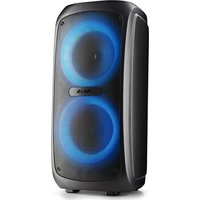
10" DJ Speaker
USB/SD/FM/BT
2 microphone inputs
LED screen
Output power: 300W
LED lights
AUX output
If at any time in the future you should need to dispose of this product please note that:
Waste electrical products should not be disposed of with household waste. Please recycle where facilities exist.
Check with your Local Authority or retailer for recycling advice.
(Waste Electrical and Electronic Equipment Directive)

HEREBY, LURBE GRUP S.A, DECLARES THAT THIS SPEAKER IS IN COMPLIANCE WITH THE ESSENTIAL REQUIREMENTS AND OTHER RELEVANT PROVISIONS OF DIRECTIVE 1999/5/EC.
MANUEL DE L'UTILISATEUR
WILDDANCE
SYSTÉME AUDIO BLUETOOTH DE HAUTE QUALITÉ
BOUTONS DE COnmANDE
AUX IN, USB/SD, BLUETOOTH, RADIO
AUX IN, USB/SD, BLUETOOTH, RADIO
AUX IN, USB/SD, BLUETOOTH, RADIO
AUX IN, USB/SD, BLUETOOTH, RADIO
AUX IN, USB/SD, BLUETOOTH, RADIO
DISPOSICOs DA DIRECTIVA 1999/5/CE.
PODREÇNIK UZYTKOWNIKA
WILDDANCE
WYSOKIEJ JAKOSCI NAGLOSNIEWE BLUETOOTH
AUX IN, USB/SD, BLUETOOTH, RADIO
AUX IN, USB/SD, BLUETOOTH, RADIO
AUX IN, USB/SD, BLUETOOTH, RADIO
Chcete-li prepnout z Jednoho rezimu do jineho, stisknefte tlacitko MODE. Neni-li k pristroji pripojen disk USB nebo karta SD, budou tyto rezimi preskočeny.
1.AUX IN
AUX IN, USB/SD, BLUETOOTH, RADIO
Tia va metaeite ano tn ia aleioupyia otyn aai niote to koumi INPUT.Eav n ouakeun dev eivai ouvdeevn oe eva USB stick n kappa tmu nuc SD, 0a ayvoroei autec tic aleioupyie.
1.AUX E XPHsH
OTAV TO KAWOSIO hou eivai ouvOeDeIevo, mOpEITE VA OUVoTe Tn OuKEun ME hXouc POUmuEoov ano EeWTEPIKecTMyEcMuOw TnOUPAC "AUX" OTO Niow Mepoc. Meta tn ouvdeon, nathote To KOUmI MODE, WOTe va exETe npoaBaoon otN aeoupyia AUX. STo diatma auto, n EvdoEn LINE EMAPAVizetai otny oOvN. AutO ONuaivei OTN OUsKeun mOpEvi avanapayei apxieia hou ano aAee, EeWTEPIKecTmyEc POAUeOsw, onwPC, kVnto tnAePwvo, MP3 KAI MP4 player, kAn.
HAS BEEN TESTED AND FOUND IN CONFORMITY WITH THE FOLLOWING HARMONIZED EUROPEAN STANDARDS:
HA SIDO TESTADO EN CONFORMIDAD CON LAS SIGUIENTES NORMAS STANDARDE EUROPEAS ARMONIZADAS:
EN 300 328 V1.9.1:2015
EN 60065:2014
EN301489-1V1.9.2:2011,EN301489-17V2.2.1:2012
EN62479:2010
AND THEREFORE COMPLY WITH THE ESSENTIAL REQUIREMENTS AND PROVISIONS OF THE FOLLOWING DIRECTIVES OF THE EUROPEAN PARLIAMENT AND EUROPEAN COUNCIL:
Y,POR LO TANTO, CUMPLE CON LOS REQUERIMIENTOS Y PROVISIONES DE LAS SIGUIENTES DIRECTVAS DEL PARLAMENTO EUROPEO:
RADIO EQUIPMENT DIRECTIVE 2014/53/EU LOW VOLTAGE DIRECTIVE (LVD) 2006/95/EC ROHS DIRECTIVE 2011/65/EU
DIRECTIVA DE EQUIPOS DE RADIO 2014/53/EU DIRECTIVA DE BAJA TENSION (LVD) 2006/95/EC
DIRECTIVA ROHS 2011/65/EU
AUTHORIZED REPRESENTATIVE:
REPRESENTANTEAUTORIZADO:
LURBE GRUP S.A
POL IND.EGUIBURUBERRI
EGUBURUBERRI.S
20100ERRENTERIA(GUIPUZCOA) SPAIN
ERRENTERIA, DECEMBER 15TH, 2016
ERRENTERIA, 15 DE DICIEMBRE DE 2016
SIGNED FIRMADO
RAUL MARTÍN
PRODUCT MANAGER
LURBE GRUP S.A. ERRENTERIA, ESPAGNE, SOUS SA RESPONSABILITE EXCLUSIVE, CERTIFIE LA CONFORMITE DU PRODUIT:
LURBE GRUP S.A, ERRENTERIA, ESPAN, DECLARA SOB A SUA EXCLUSIVA RESPONSABILDADE A CONFORMIDADE DO PRODUTO:
NGS:HAUT-PARLEUR BLUETOOTH NGS / MODELE:WILDDANCE
NGS:ALTO-FALANTE BLUETOOTH NGS / MODELO:WILDDANCE
A ETÉ TESTÉ CONFORMÉMÉNT AUX NORMES STANDARD EUROPEÉNNES HARMONISEES SUVANTES: FOITESTADO EM CONFORMIDADE COM AS SEGUITÉS NORMAS STANDARD EUROPEIAS HARMONIZAD
EN300328V1.9.1:2015
EN 60065:2014
EN301489-1V1.9.2:2011,EN301489-17V2.2.1:2012
EN62479:2010
ET RESPECTE DONC LES EXIGENCES ET LES DISPOSITIONS DES DIRECTIVES SUVANTES DU PARLEMENT EUROPEEN:
E,POR CONSEGUNTE, CUMPRE COM OS REQUISITOS E PROVISIONES DAS SEGUMENTES DIRECTIVAS DO PARLAMENTO EUROPEU:
DIRECTIVE SUR LES ÉQUIPÉMENTS RADIO 2014/53/EU
DIRECTIVE BASSE TENSION (LVD) 2006/95/EC
DIRECTIVE ROHS 2011/65/EU
- USING THE REMOTE CONTROL
- Installing the batteries
- Note for remote:
- USER'S MANUAL
- AUX IN, USB/SD, BLUETOOTH, RADIO
- 1.AUXIN
- USB/SD CARD PLAYING
- BLUETOOTH mODE
- RADIO MODE
- PANEL SWITCHES AND KNOBS FUNCTION
- TREBLE AND BASS ADJUSTMENT CONTROL (BASS & TREBLE)
- BUILT-IN RECORDING FUNCTION
- TECHNICAL SPECIFICATIONS
- WILDDANCE
- BOUTONS DE COnmANDE
- 1.AUX IN
- 1.AUX E XPHsH
Brand : NGS
Model : Wild Dance
Category : Loudspeaker