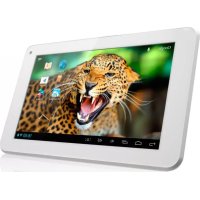
Noble 7 - Tablet Yarvik - Free user manual and instructions
Find the device manual for free Noble 7 Yarvik in PDF.



| Product type | Touchscreen tablet |
| Brand | Yarvik |
| Model | Noble 7 |
| Screen | 7 inches (estimated) |
| Operating system | Android (assumed) |
| Wireless connectivity | Wi-Fi 802.11 b/g/n, channels 1-13 |
| Power supply | Mains adapter (230 V) |
| Battery | Built-in lithium-ion |
| Main functions | Internet browsing, apps, multimedia playback, games |
| Maintenance | Clean with a slightly damp cotton cloth; do not use cleaning products |
| Safety | Use only approved accessories; do not expose to moisture or heat |
| Batteries and recycling | Do not dispose of with household waste; follow WEEE instructions |
| Regulatory information | Compliant with standards EN 60950, EN 55022, EN 301 489, etc. |
| Box contents | Tablet, mains adapter, quick start guide |
| Repairability | Battery replaceable only by a qualified technician |
Frequently Asked Questions - Noble 7 Yarvik
User questions about Noble 7 Yarvik
0 question about this device. Answer the ones you know or ask your own.
Ask a new question about this device
Download the instructions for your Tablet in PDF format for free! Find your manual Noble 7 - Yarvik and take your electronic device back in hand. On this page are published all the documents necessary for the use of your device. Noble 7 by Yarvik.
USER MANUAL Noble 7 Yarvik
3 Getting on the Internet
18
Internet instellen / Zugriff auf das Internet / Accès à Internet / Cómo acceder a Internet / Aceder à internet / Lactzenie z Internetem / Pripojeni k internetu / Pripojenie k internetu / Atkommen på internettet / Gå ut på Internet / Üvðeøn ΟTo Internet / Collegamento a Internet / Повлоченк ИntepheTy / Koble til Internett / Kako se povezati na internet / Пдкюechня до IntepheTy / JgKapcsolódás az Internetre / CBbp3Bahe KBm INtepnet / Conectare la Internet / Spajanje na Internet
4 When a Problem Occurs
24
Problemen oplossen / Problembehandlung / Dépannage / Si se produce un problema / Quando ocorre um problema / W razie problemów / Pri vzniku pvyskytne problème / Nár der opstár et problème / Nár att problem uppstár / Štav Σμβεí Káπoio Πρόβλημα / Se si verifica un problema / Πprn BO3NHKHOBENH / Nár det oppstár problemer / Ko se pojavi težava / Y pa3i BHNKHeHNa np6JIem / ā12 3 4 5 6 7 8 / Hiba esétén / Πprn np6JIemn / In cazul in care apare o problema/ Kad se pojavi problem
Soft Reset via Reset Button
26
Soft Reset via Reset Button / Soft Resetüber Reset-Taste / Réinitialisation logicielle à l'aide du bouton RESET / Restablecimiento parcial mediante el botón Reset (Restablecer) / Reinicialização parcial através do botão Reiniciar / Ponowne uruchamianie przyciskiem Reset / Cástechý reset pomoci tlacítka Vymazat / Mäkký reset pomocou tlacidla Reset / Softwarenulstilling via knappen Reset [Nulstil] / Mjuk Återstellning via aterstellningsknapp / ነναφορά Λουγισκόύ μέσω του Πλήκτρου Reset / Soft reset tramite il pulsante Reset / ΠροραμMHь сбpos nocpeπdcbOM KONKN cθρoca / Omstart med Reset-knappen / Mehka ponastavitev preko gumba za ponastavitev / ΠρoρamHe CKIДaHня 3a ДОПOMΟΤΟΚHΟΝΚСКИДaHня / Schapdεδης συσίας στηρεινης ΣФТуерно hyлпане чрз Бутон 3a hyлпанe / Resetare functiională cu ajutorul butonului de resetare / Softverski reset pomócu tipke za resetiranje
1 Package Content
Inhoud doos / Verpackungsinhalt / Contenu de l'emballage / Contenido de la caja / Conteudo da embalagem / Zawartosc opakowania / Obsah baleni / Obsah balenia / Pakkens indhold / Paketets inneha / Nepitxyoptya / Suokuaic / Contenuto della confezione / Codepxmoe ynakov / Pakkens innhold / Vsebina paketa / PoanakybaHH / A csomag tartalma / Cdbpxhanne ha onakobkata / Continutul ambalajului / Sadrzaj paketa
| 1x | Noble 7.85" tablet | Tацплétа 7.85" Noble |
| Noble 7.85" tablet | Tablet da 7.85" Noble | |
| Noble 7.85" Tablet | Планшет 7.85" Noble | |
| Tablette 7.85" Noble | Noble 7.85" nettbrett | |
| Tableta de 7.85" Noble | Tablicni računalnik Noble 7.85" | |
| Tablet de 7.85" Noble | Планшет 7.85" Noble | |
| Tablet 7.85" Noble | Nobikую 7.85" Jęszyk | |
| Noble 7.85" tablet | 7.85" Tablet geg Noble | |
| Noble 7.85" tablet | 7.85" Tablen Noble | |
| Noble 7.85" tablet | Tabletă cu ecran de 7.85" Noble | |
| Noble 7.85" platta | Noble 7.85" tablet | |
| 1x | - USB cable | Калώсы OSB |
| - USB kabel | Саво USB | |
| - USB Kabel | USB-кавел | |
| - Câble USB | USB-kabel | |
| - USB cable | Kabel USB | |
| - Cabo USB | USB-кавел | |
| - USB kabel | USB кabel | |
| - USB kabel | USB kabel | |
| - USB kabel | USB kавел | |
| - USB-kabel | Câblu USB | |
| - USB-kabel | USB kabel | |
| 1x | - Power adapter | Адалтет ританья |
| - Voedingsadapter | Stromforsyning | |
| - Netzteil | Napajalnik | |
| - Adaptateur d'alimentation | Адалтет лжвения | |
| - Adaptador de corrente | с�ллллллллллллллллллллллллллллллллллллллллллллллллллллллллллллллллллллллллллллллллллллллллллллллллллллkill | |
| - Adaptador de corrente | Hálózati adapter- Зхсаньц | |
| - Zasilacz | адалтет | |
| - Napájeci adaptér | Adaptor de alimentare | |
| - Napájaci adapétr | Naponski adapter- 3ххсаньц | |
| - Strømadapter | адалтет | |
| - Nätadapter | Adaptor de alimentare | |
| - Трòфöðotíko ǿµmaτος | Naponski adapter | |
| - Alimentatore |
1x
- Start guide
- Snelstart handleiding
- Schnellstartanleitung
- Guide de Demarrage
- Guía de Inicio
- Guia de inciação
- Przewodnik Uruchamiania
- Návod k Použiti
- Strucny námod na obsluhu
- Startvejledning
- Startguide
-08nyoεvapξns
Guida di avvio
-KpatkoepykoBOcTBO nIb30BATEA
- Startveiledning
-Aloitusopas
-KopoTkn noci6nK KopncTyBaay
-
-Hasznalati utmutató
-PbKOBODCTBO3aCTapT
- Ghid de pornography
- Brzi vodič
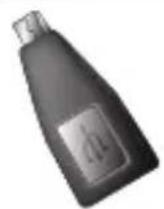
1x
USB host adapter
USB host adapter
USB-Host-Adapter
Adaptateur hote USB
Adaptador USB host
Adaptor anfittiao USB
Adapter host USB
USB host adaptor
Hostitefsky USB adaptor
USB-vaertsadapter
USB-vardadaper
Kevtpikoc ppoapmuoyeac
USB
Adattatore host USB
Xoct-adantrep USB
USB-vertsadapter
Gostitelj USB adapterja
Xoct-adantrep USB
JG USB
USB host adapter
USB xocT aanTeP
Adaptor USB host
Prilagodnik za USB kabal
- You can find the manual in the Tablet App menu
-
De handleiding is te vinden in het Tablet App menu
-
Das Handbuch befindet sich im App-Menu des Tablet
-Vous trouverezle manuel dans le menu d'applications de la tablette - Puede encontrar el manual en el menu App (Aplicaciones) de la tableta
- Pode encontrar omanual no Menu de aplicacoes do tablet
- Podrecznik znajduje w menu aplikacji tabletu
- Návod najeznete v nabídce aplíkace tabletu
- Nájdetemanual ponukyaplíkáciitabletu
- Du kan finden vejl.edningen i menuen Tablet App
-
Du hittar manualen i Tablet App-menyn
-To eyxepidio evai diaaetuo oTo mevoeapouoyw tns taaneta -
Il manuale si trova nel menu App del tablet.
- Bb moxete haTn nonHoe pyKOBOCTBO nonb3OBaTeN B MeHIO npINOxKeH NnAHNeta
- Veiledningen finnes i Tablet App-menyen
- Navodila lahko najdete v meniju aplikacij tablicnegaračunalnika
- Noci6HnK KopncTyBaay MoXHa 3HaHTy MeHIO nporpaM
aai 111 - A hasznalati utmutatot megtalalhatja a tabla Alkalmazasok menüjében
-MoKTe Da Hamepnte HapbUHnKa B MeHIOTo npINOKeHHra Tabeta - Puteti gasi manualul in meniul de aplicati tableti
- Prirucnik mozete pronaci u izborniku s aplikacijama
2 Buttons & Connections
Knoppen & Aansluitingen / Tasten & Anschlusse / Boutons et connexions / Botones y conexiones / Botes e ligações / Przyciski i ziacza / Tlačitka a pripojeni / Tlačidla a pripojenia / Knapper & tilslutninger / Knappar & Anslutnigar / Μληκτρα & Συνόθεις / Pulsanti e collegamenti / Khonkn paşaemb/ Knapper og tilkoblinger / Gumbi in Povezave / Khonkn ta po3'emn / Gombok es csatlakozások / Bytohn Bpbakn / Butoane s i conexioni / Tipke i veze
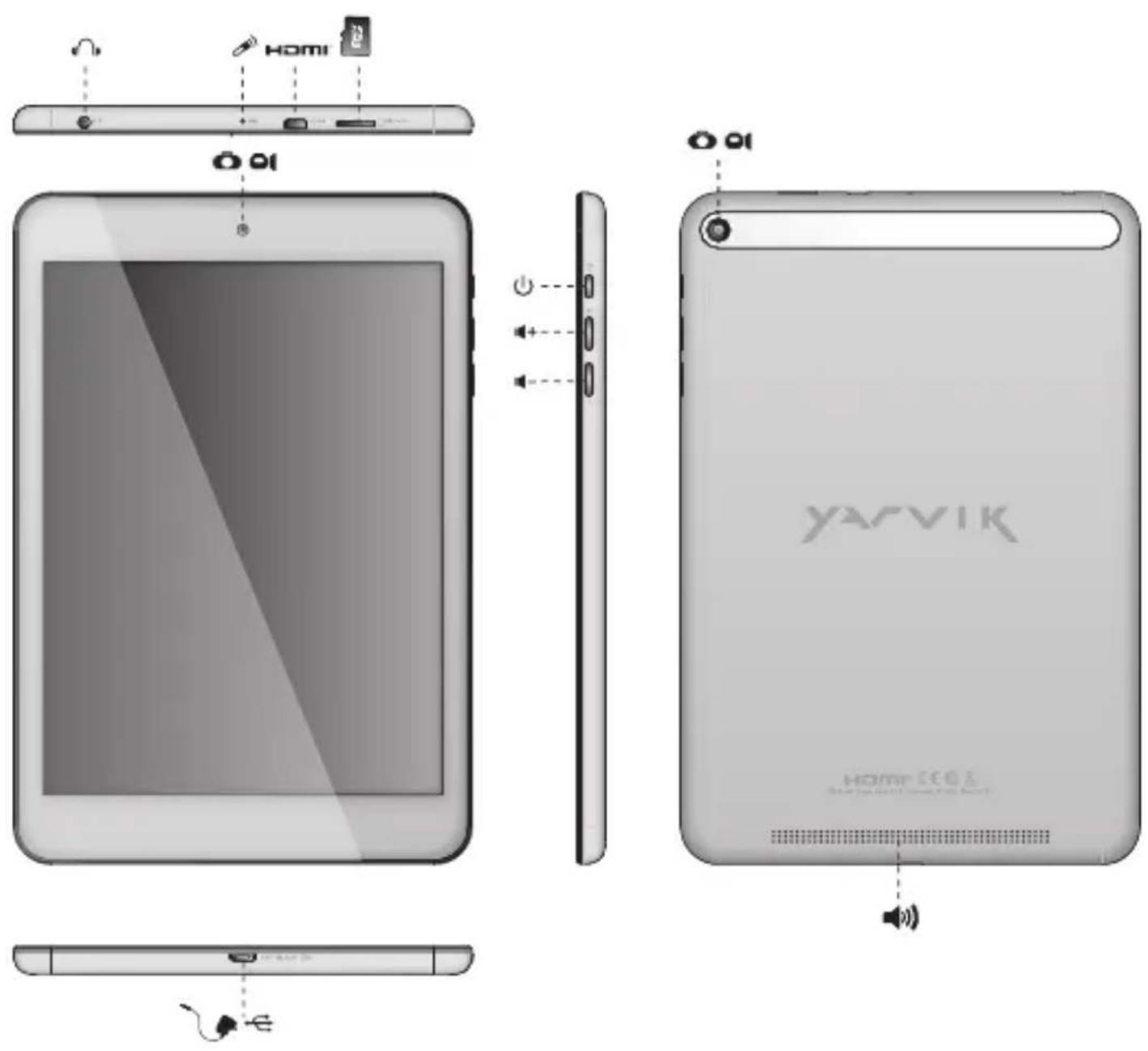
| On/Off | ||
| - Hold 3 sec. for On or Off - 3 sec. indrukken voor Aan of Uit - Zum Ein-/Ausschalten 3 Sek. drucken - Appuyez pendant 3 s pour allumer ou éteindre - Pulse durante 3 s para encender o apagar el disposicao - Mantenha premido durante 3段时间o para ligar ou desligar - Nacijsij i przytrzymaj przyze 3 sek., aby właczyć lub wylaczyć - Přidrženim po dobu 3 s zapináte nebo vypináte - Podržte 3 sek. pre zaputie alebo vyputie - Hold 3 sek. for On [Til] aller Off [Fra] - Hall ned 3 sekunder für Pà aller Av - Kpatñate 3 δeut. yia εvεpyotnoiŋη (On) n aπεvεpyotnoiŋη (Off) | - Tenere premuto 3 sec. per l'accensione o lo specnimento. - Yedeximbaite B tecehenne 3 dnia Bknioucenry iñn Bbiknioucenry - Trykk 3 sek. for pà aller av - Držite 3 sek. za vklop ali izklop - Utpmýte npotrayom 3 c dnia ybimkhenny abo BVMKhenny - Léçonsignatius 3 dnia 3 aig - Nyomja 3 mp-ig a be- vagy kikapcsoláshoz - 3adpbjxte 3 cek. 3a Bknioucbane iñn i3knioucbane - Pentru activare sau dezactivare, mentjinapàarea timp de 3 sec. - Držite 3 sek. za uključivanje ili isključivanje | |
| Sleep/Wake | ||
| - Press 1 sec. for Sleep or Wake - 1 sec. indrukken voor Slaapstand ofuit Slaapstand - Für Betriebszustand 1 Sek. drucken - Appuyez pendant 1 s pour la mise en veille ou le réveil - Pulse 1 s para que la tableta entre en el estado de inactividad o activarla - Pressione 1 seg. para suspensão ou Wake段时间o para ligar ou desligar - Nacijsij przyze 1 sek., aby przelaczyc w stan uispienia lub wybudzić - Stisknutim po dobu 1 s spustite režim spanku nebo probuzeni - Stlăcte 1 sek. pre spanok alebo prebudenie - Tryk pà 1 sek. til slumre-eller Wake - Tryck pà 1 sek. für att sova erer Wake - Paliñóte 1 δeutepólto. yia tvn kaṭáσταθη ναρκης n Wake | - Premere 1 sec. per la funzione Sleep o Wake (Sveglia). - Haxkmaite B tecehenne 1 c dnia nepexodab v cnauxi pekzm iñn no podoljene na roboty - Trykk 1 sek. for standby ellg a ut av standby - Pritisnite 1 sek. za spanje ali bujenje - Hatackaipe npotrayom 1 c dnia nepexoduy y cnauxi pekzm abo no podovjene na roboty - Nyomja 1 mp-ig az alváshoz vagy felebresztéshez - Hatachete 1 cek. 3a zacnibane iñn cbykdaene - Pentru stare de repaus sau reactivare, apàsa ti temp de 1 sec. - Pritisnite 1 sek. za spavanje ill budenje uredaja | |
| - + | Volume - + | - Volume up or Down - Volume harder of zachter - Leiser oder laute - Augmentez ou baissez le volume - Subir o bajo volumen - Aumentar ou diminuir volume - Zwiekszanie lub zmiejezsanie poziomu glosnosci - Zvyšeni nebo sniženi hlasitosti - Zviysenie alebo zniženie hlasitosti - Lydstyrike op ell er ned - Justera volymen uppàt eller nedàt - Aućŋaný òeɪwəŋ tnc évτaʊnç ñxou | - Aumento o abbassamento del volume - PerekloucateNB yBélenueHne iNn ymeNbSeHne rPOMKocStN - Volum opp ell er ned - Jakost -: Povečanje ali zmanjsanje jakosti - Knablaa rUynocti - ěgicLbCfL - Hangerö fel vagy le - YcMbBaHe iNn hAmalBaHne cnilata na 3byka - Creşterea sau reducerea volumului - Glasnoća + i - |
| O | Built-in Camera | - Built-in Camera - Ingebouwde Camera - Integrierte Kamera - Caméra intégrée - Camara integrada - Camara incorporada - Wbudowana kamera - Zabadovany fotoaparát - Zabadovany fotoaparát - Indbygget kamera - Indbygd kamera - Evóματωμένη Káμε | - Fotocamera integrata - BctroeHna kamepa - Innebygget kamera - Vgrajena kamera - B6ydobana kamepa - SlaJSL - Beépitett kamera - Brpadena kamepa - Cameră incorporată - Slusalice - Ugradena kamera |
| Built-in Microphone | - Built-in Microphone - Ingebouwde microfoon - Integrieres Mikrofon - Microphone integré - Microfono integrado - Microfone incorporeto - Wbudowany mikrofon - Zabadovany mikrofon - Zabadovany mikrofon - Indbygget mikrofon - Inbyggd mikrofon - Evóματωμένo Mɪkpóφuvo - Microfono integrato - BCTrhoENbI MɪkpóφoH - Innebygget mikrofon | - Vgrajeni mikrofon - B6ydobani MɪkpɔfON - Ssckfonsmss - Beépitett mikrofon - Brpaden MɪkpɔfON - MicrofON incorpurat - Ugradeni mikrofonn | |
| Speaker Stereo | - Built-in Speaker - Ingebouwde speaker - Integrierter Lautsprecher - Haut-parleur intégre - Altavoz integrado - Alto-falante embutido - Wbudowany glośnik - Zabudovany rePRODUCTOR - Zabudovany rePRODUCTOR - Indbygget højttaler - Inbyggd högtalare - Evōμatωμέvo ηχείοι | - Altoparlante integrato - Bystroehnblý dinhamink - Innebygget højttaler - Zvočnik Mono: Vgrajeni zvočnik - Bvbodobánní dinhamik - āvúčná ācLau - Beépitett hangszóró - Brpaden bicoskogobopitén - Difuzor/incorporat - Ugradeni zvučnik | |
| Headphones 3.5 mm | - Headphones - Hooftelefoon - Kopfhörer - Casque - Auricular - Auscultadores - Słuchawki - Słuchátka - Słuchadláz - Hovedtelefoner - Hörllurar | - Akouatíká - Cuffie - Hayshnik - Hodetelefoner - Slušalke - Habyshnik - Slezaká rží - Fejhallgató - Cnyuanki - Căşti - Slušalice | |
| USB | - Micro USB Port - Micro USB Poort - Micro USB Anschluss - Port micro USB - Micro usb puerto - Porta micro USB - Port micro USB - Micro usb portu - Micro usb portu - Micro usb port - Mikro-USB-port | - Micro USB θúpá - Micro porta USB - Micro USB nopT - Micro USB-port - Mikro USB - Micro USB nopT - Micro USB port - Micro USB port - Micro USB port - Micro USB port - Micro USB port - Micro USB prklijucak | |
| MicroSD *Up to 64 GB | - MicroSD Slot - MicroSD Slot - MicroSD-Einschub - Emplacement carte MicroSD - Ranura para tarjetas MicroSD - Ranhura para cartão MicroSD - Gniazdo karty MicroSD | - Slot pro MicroSD - Slot na Micro SD kartu - MicroSD-stik - MicroSD-kortplats - Ytôboşń MicroSD - Slot per MicroSD - Pašbem對於 kaptby MicroSD | |
| MicroSD *Up to 64 GB | MicroSD spor - Reža za MicroSD - Гиадо ду карши пам'ятī MicroSD - MicroSD utor | MicroSD nyilás - Сnot за MicroSD karpta - MicroSD Slot - MicroSD utor | |
| MicroSDHCTM 32 GB FAT32 *MicroSDXC™ 64 GB NTFS format only For more information about MicroSD formatting see forum.yarvik.com | 32GB Micro HC 64GB Micro XC | ||
| Homi | 1080p | - Mini HDMI Out - Mini HDMI Uit Mini - HDMI-Ausgang - Sortie mini HDMI - Salida mini HDMI - Saïda Mini HDMI - Wyjscie mini HDMI - Minivystup HDMI - Mini HDMI vystup - Mini-HDMI-udgang - HDMI-utgàng | - Eşőöç Mimi HDMI - Uscita mini HDMI - Béxod Mini HDMI - Mini HDMI ut - Izhod Mini HDMI - Buxid Mini HDMI - Mini HDMI Out c - Mini HDMI kimenet - Mini HDMI Ив京都 - leşire Mini HDMI - Mini HDMI izlaz |
Charging
Opladen / Laden / Chargement / Carga / Carregamento / Ladowanie / Nabijeni / Nabijanie / Oplading / Laddning / Φopriŋ / Carica / 3apádka / Lading / Polinjenje / 3apárdkænHæ kæmynrætopa / Tottés / 3apekjdahe / Incarcare / Punjenje
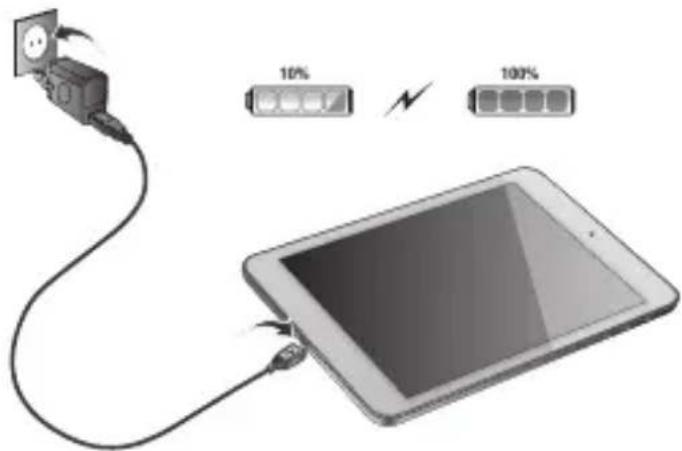
- Use only the supplied AC adapter
- Gebruik alleen de bijgeleverde AC adapter
- Verwenden Sie ausschließlich das mitgelieferte Netzeil
- Utilisez seulement l'adaptateur CA fourni
- Use exclusively el adaptor de corriente de CA incluido
- Utilize開放 o adaptador de CA fornecido
- Korzystaj tylko z dostarczonego zasilacza pradu zmiennego
- Pouzivejte pouze dodany AC adapler
- Použivajte iba dodany sietovy adaptor
- Brug kun den medfalgende AC-adapter
- Använd endast den medfoljande natadaptern
XpnoiopoioiOIOIe pOto nppeofovo tpoopooTko AC - Utilizzare solo Iadattatore CA fornito.
*UcnoIb3yIte TOnbKO BXOaHmB KOMnNEKT CTeBOaADantep - Bruk bare medfalgende AC*adapter
- Uporabite le priloženi napajalnik AC
Bukopoctoayte tibktonbokxnaehnra,0aXoNTbdo KOMNekty noCTaHH
1234567890
- Csak a mellekelt halozati adaptert hasznalja
*H3non3aaine camo cdoctabeHHA AC aanTep - Utilizati numai adaptorul CA furnizat
- Koristile samo isporčeni naponski adapter
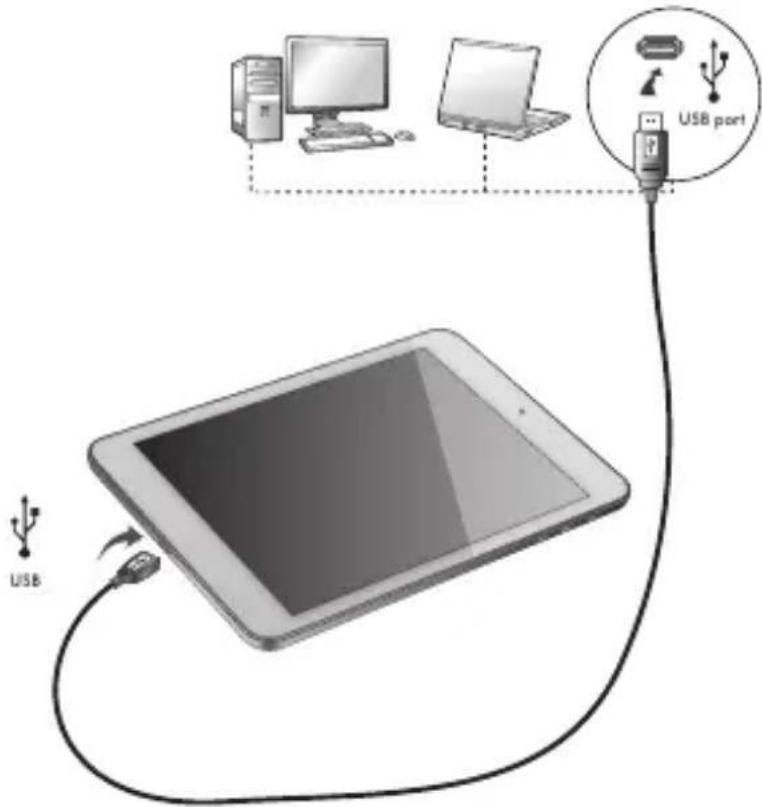
USB
- USB cable
-USB kabel
-USB Kabel - Cable USB
- USB cable
-Cabo USB
-USB kabel
-USB kabel
-USB kabel - USB-kabel
-USB-kabel
-Kaawo USB - Cavo USB
-USB-kα6enb
-USB-kabel
-KabelUSB
-USB-ka6enb
-USB
-USB kabel
-USB ka6en
- Cablu USB
-USB kabel
Android Home Screen
Android Home scherm / Android Startbildschirm / Page d'accueil Android / Pantalla de inicio de Android / Ecrā principal do Android / Ekran domowy systemu operacyjngo Android / Domovská obrazovka Android / Omáca obrazovka Android / Skaermen Android Home [Android Hjem] / Android Startskärm / H Apxikn Oθovn tou Android (Home) / Schermata Home di Android / Πаньи ḋран Android / Android startskjerm / Domaci zaslon Android / Πловий εран Android / Android kezdoképernyo / Habanen εран ha Android / Ecran de inceput Android / Android početni zaslon
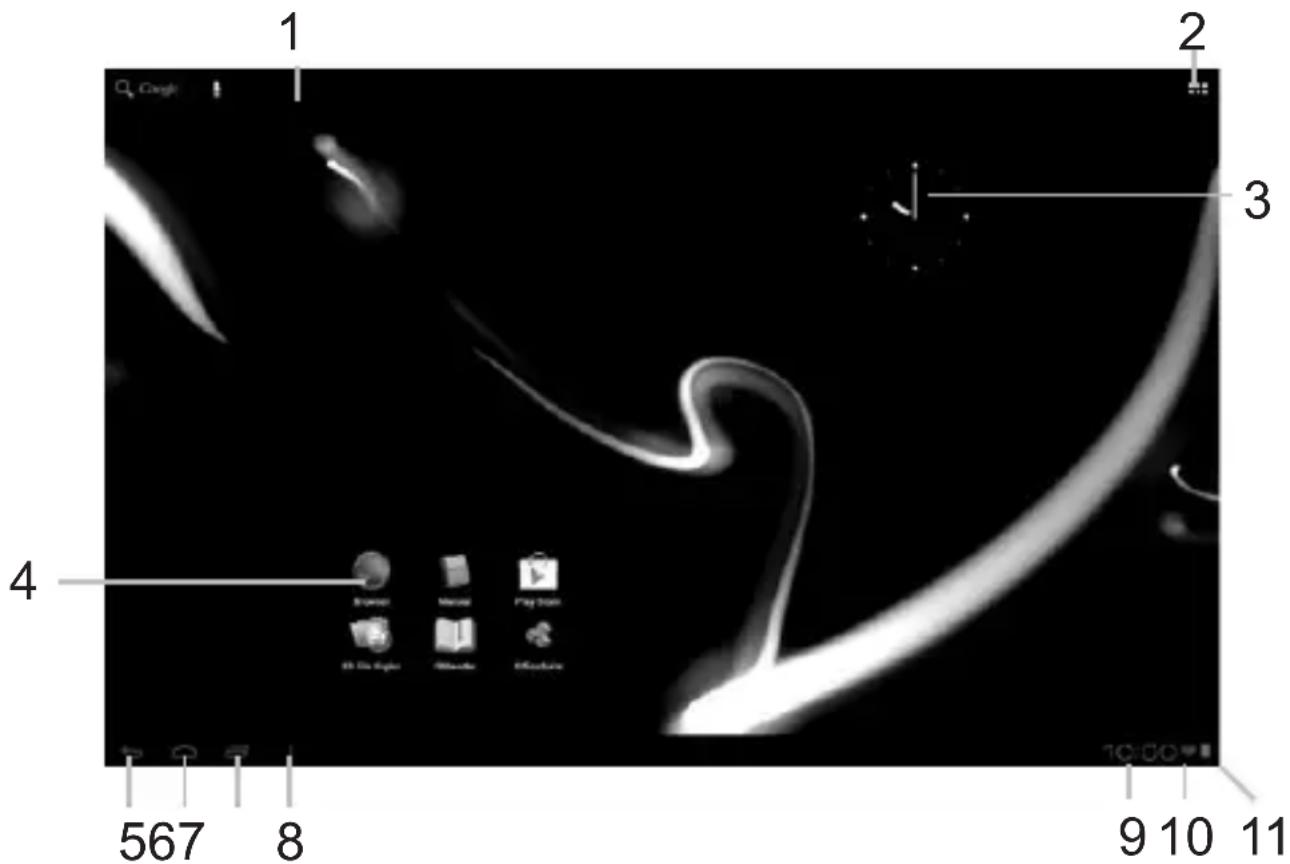

- On the bottom of the Xenta screen you can always find the status bar. The status bar contains both system information and function buttons.
- De statusbalk is.altijd te vinden onderin het Xenta scherm. In de statusbalk vindt u systeeminformatie en functieknuppen.
- Am unteren Rand des Xenta-Bildschirms wird die Statusleiste angezeigt. Die Statusleiste enthalt Systeminformationen und Funktionsschaltflächen.
- Vous trouvrez la barre d'etat en bas de l'écran Xenta. La barre d'etat contient les boutons Informations système et Fonction »
- En la pantalla inferior de la pantalla de Xenta siempre pourrait encontrar la barra de estado. La barra de estado contiene información del
PT
3 Getting on the Internet
Internet instellen / Zugriff auf das Internet / Acces à Internet / Como acceder a Internet / Aceder a internet / Laczenie z Internetem / Pripojeni k internetu / Pripojenie k internetu / At comme pà internetet / Ga ut pà Internet / Üvðeŋ
STO Internet / Collegamento a Internet / ΠoДКлочене КИнт repety / Koble til Internett / Kako se povezati na internet
Пдклочену до Intepety / JcJcJcJcJcJcJcJcJcJcJcJcJcJcJcJcJcJcJcJcJcJcJcJcJcJcJcJcJcJcJcJcJcJcJcJcJcJcJcJcJcJcJcJcJcJcJcJcJcJcJc
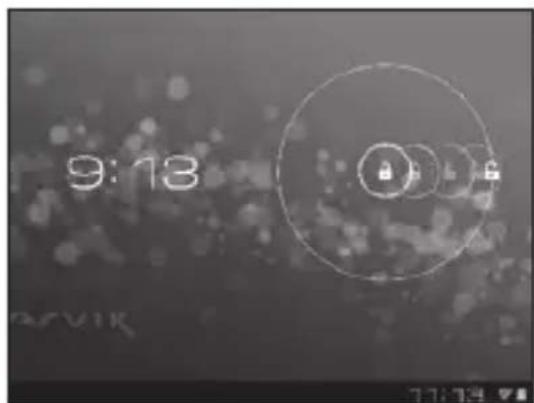
- Slide the lock bar (A) to the right (B) to unlock
Schuif de vergrendeling (A)aar rechts (B) voor ontgrendelen
Spersymbol (A) zum Entsperren nach rechts (B) schieben - Faites glisser la barre de verrouillage (A) vers la droite (B) pour déverrouiller.
- Deslice la barra de bloqueo (A) hacía la
3 Slide the On/Off button to "On"
Schuif de Aan/uit-knop op "Aan"
Ein/Aus-Schaltfläche auf „On“ (An") schieben.
- Faites glisser le bouton marche/arrêt pour l'allumer.
Deslice el boton On/Off (Activado/Desactivado) hasta la posicion "On" (Activado)
- Deslize o botão On/Off (Ligar/Desligar) para a posicao "On" ("Ligado")
- Przeciognij przyȩcznik do pozycji „On" ("Wl.")
- Přétáhněte tlacitko Zap./Vyp. na „On“ („Zap.“)
Posunte vypinač do polohy „On“ („Zap.”)
Glid knappen On/Off [Til/fra] til "On" [Til]
Skjut Pá/Av-knappen till “Pá”
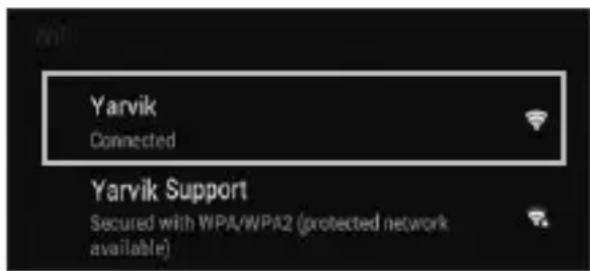
4.1. Non secured, Tap the network of your choice.
- Niet beveiligd, tik op het netwerk van uw keuze.
- Bei ungesichertem Netzwerk auf das gewünschte Netzwerk tippen.
- Non sécurisé, Sélectionnez le réseau de votrechoix.
No protegida, pulse la red a la que deseee connectarse. - Se não estiver protegida, toque numa rede à sua escolha.
- Niezabezpieczona; dotknij wybranjej sieci.
- Nezabezpečeno, klepněte na libovolnou sít'.
- Nezabezpečné,Poklepte na siet' podla vlastného vyberu.
- Ikke sikret. Tap på foretrukket netværk.
- Icke saker, Peka pa det natverk du vill valja.
XwpiocaaPaaEia,ayyIeTo eTtounto diktuo.
Non protetta, selezionare la rete che si desidera. - Ecnn cetb Non secured (he3aunueHa), BbIbepuTe ee.
- Usikret nett, trykk på ønsket nettverk.
- Non secured (Nezavarovano), Dotaknite se zeelenega omrežja.
- RaKIO MepeXa Non secured (He3axnueHa), Bn6epitb ii.
1 L 1 1 a5 1 y c r 1. aiof
Non secured (Nem biztonságos), érintse meg a kivant halózatot.
Ako e Non secured (He 3aunTeHa), HataChete Bbpxy Mpexna n36op.
- Reţea Non secured (Nesecurizata), inscrijeti reţeaua alesă.
Non secured (Neosigurane) mreze, dodirnite naziv mreze
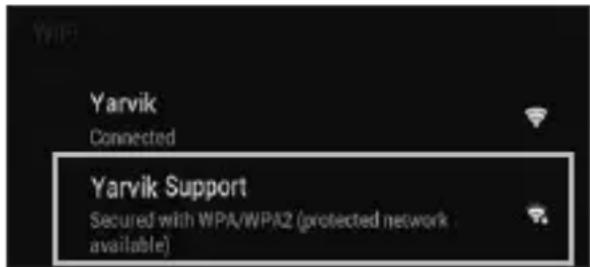
4.2. Secured Network, Type password then press Connect.
- Beveiligd network, vul wachtwoord in en klik op Connect (Verbinden).
- Bei gesichertem Netzwerk Kennwort eingeben und Connect (Verbinden) drücken.
Réseau sécurisé, tapez le mot de passer puis appuyezsur « Connect » (Connector). - Si la red está protegida,riba la contraseña y pulse Connect (Conectar).
Se foruma rede protegida, digite a palavrapasse e depuis prima Connect (Ligar). - Zabezpieczona siec; wpwadz Password (Haslo) i nacinij Connect (Polacz).
- Zabezpecená sít, napiste Password (Heslo), poté stisknéte Connect (Pripojit).
- Zabezpećená siet, napíste Password (Heslo) a potom stlačte Connect (Pripojit).
- Sikret netværk. Indtast adgangskode, og tryk derefter på Connect [Tilsnut].
Skyddat nätverk, ange lösenordet och tryck sedan på Connect (Anslut). - Δiktuo με ασφαλεια, πληκτρολογόπε Tov κωδικό προσβασης και πατήσε Connect (Σύνδεση).
- Rete protetta, digitare la password, quando premere Connect (Connetti).
- Ecni ceTb Secured (3aunueta), BBeiTe npoIb, a 3aTeM HaKMITE KHONKy Connect
(NODKIIOueHnI)
Sikret nett, skriv inn passord og trykk Connect.
Secured Network (Zavarovano omrežje), Vtipkajte geslo in pritisnite Connect (Poveži).
KuO MepeXa Secured (3axuEHa), BBeiTb napoIb Ta HATNCHITb KnaBiuy Connect (nIKNIOUeHHra).
1c b 1 a05 1 a0 Connect
Secured (Biztonságos) halózat, adja meg a jelszó tés érintse meg a Connect (csatlakozás) gombat.
Secured (3aunTeHa) Mpeka, HanuweTe npoIata n cnei TOBa HATnCHeTe Connect (Cbbp3BaHe).
Retea Secured (Securizata), inscrieti parola, apoi apasati pe Connect (Conectare).
Secured (Osigurane) mreze, upi site lozinku i pritisnite Connect (Spoji)
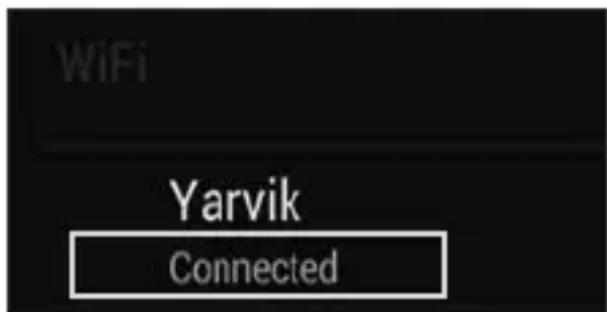
- Check Wi-Fi connection.
- Controller Wi-Fi verbinding.
WLAN-Verbindung überprüfen. - Vérifiez la ae la connexión Wi-Fi.
- Verifique a ligaçao Wi-Fi.
Sprawdz stan połaczenia Wi-Fi. - Kontrola Wi-Fi pripojeni.
- Skontrolujte pripojenie Wi-Fi.
- Kontroller Wi-Fi-tilslutning.
- Kontrollera Wi-Fi-anslutning.
EaeyTt n ouvdeon Wi-Fi. - Controllare la connessione Wi-Fi
- PpOBepeTe Wi-Fi-coeHHeHne.
- Sjekk den tradlose tilkoblingen.
Preverite Wi-Fi povezavo.
- IpebeipTe Wi-Fi-nikKluoyenHn.
Wi-Fi. JUaJ 100
Ellenorizze a Wi-Fi kapcsolatot. - PpOBePKa Ha Wi-Fi Bpb3ka.
Verificati conexiunea Wi-Fi. - Provjerite Wi-Fi vezu.

- With The Browser App you can now browse the internet.
-
Met de Browser App kurz u nu het internet op.
-
Mit dem Browser-App können Sie im Internet surfen.
- Avec l'application du navigateur, vous pouvez restantenant naviguer sur Internet.
- Con la aplicación Browser (Navigador) podrá navegar por Internet.
- Com a aplicação Browser (Navigador), podeOOTAO navegar na internet.
- Za pomocę aplikacje Browser (Przeglądarka)要去s surfowac po Internecie.
- Pomoci Browser (Prohlijece) aplikaci muzete brouzdat po internetu.
- Pomocou aplikácie Browser (prehliadača) si možete teraz prezerat internetové stranky.
- Med browser-app'en kan du navigere på internettet.
-
Med webbläsarappen kan du nu surfa på Internet.
-
Me tvv εφαρογή Browser μπορείτε πλέον vα εξερευνησετε to Internet.
- Con la app Browser ora è possible navigare su Internet.
- Tenepb c nomoosbBrowser (6pay3epa) moxho npnctyntb K 063opy IVHTepHeta.
- Med Browser-applikasjonen (nettleseren) kan du na surfe på Internett.
- Z aplikacimiento brskalnika lahko zdaj brskate po internetu
- Tenep MoXHa po3noaTn nepeRnJa Be6-caTIB IInTePHeTi 3a DonomoroIO Browser (6pay3epa). Browser
- A Browser (Böngészö) alkalmazásokkal nem böngészhet az Interneten.
- Cera mojete da cbpΦnpaTe B INHTepHET C Browser (bpay3bpa).
- Cu aplicataa Browser puteti acum sa navigati pe Internet.
- Pomocu aplikacje Browser (Preglednik) sada要去 pregledavati internetske sadržaje.
When a Problem Occurs
Problemen oplossen / Problembehandlung / Dépannage / Si se produce un problema / Quando ocorrre um problema / W razie problemów / Při vzniku problému / Ak sa vyväctne problem / Nár der opstár et problem / Nár éttr problem uppstár / Šтав Σύμβει Kámpio Ipoβλημα / Se si verifica un problema / Пп Вознковени побемы / Nár det oppstár problemer / Ko se pojav težava / Y paasi винкени побем / āl<āo > āc / Hiba eseten / Пп побему / In cazul in care apare o problema / Kad se pojav problem

Your Tablet acts much slower than normal, doesn't react well or freezes. Restart the tablet using the On/Off button. All data/settings will be saved, the tablet will only shutdown. Afterwards hold the On/ Off button until the tablet starts up again.

J 1 J 1 J 1 J 1 J 1 J 1 J 1 J 1 J 1 J 1 J 1 J 1 J 1 J 1 J 1 J 1 J 1 J 1 J 1 J 1 J 1 J 1 J 1 J 1 J 1 J 1 J 1 J 1 J 1 J 1 J 1 J 1 J 1 J 1 J
HU
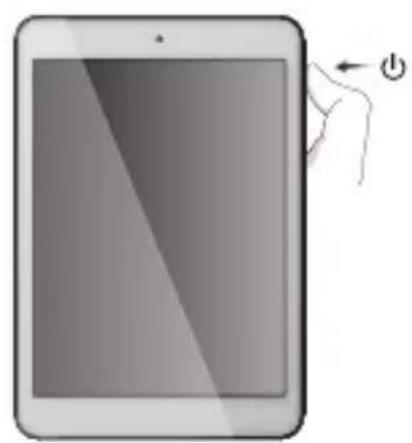
Start up after Soft Reset
- To Start up: Hold for 5 seconds, tablet will start up
- Tablet weeopstarten:5 secondindrukken,Tablet start op
- Einsatzen: 5 Sekunden gedrück halten; das Tablet startet
- Pour démarrer : appuyez pendant 5 s, la tablette se met en marche
- Para起初 el dispositivo: mantenga pulsado el botón durante 5segundos y la tableta se encenderá
- Para arrancar: Mantenha premido durante 5 segundose o tablet arranca
- Aby uruchomic: Nacisnj i przytrzymaj przyez 5 sekundy; tablet uruchomi sie
- Spusteni: Pridrzte po dobu 5 sekund, tablet se spusti
- Spustenie: Podrzejte 5 sekundy a tablet sa spusti
- Start: Hold i 5 sekunder, og tablet'en vil starte
- For att starta: Hall intryckt i 5 sekunder, och surfplattankommen att starta
- Iia Ekkivno: Kpatnote Tnatnevo yia 5 deutepeaenn ta kai n taumlaeta Ba Ekkivnoe
- Per l'avvio: tenere premuto 5 secondi, il tablet si avvia.
-HaHano pa6oTb: ydePmBaIe B TeueHne 5 cekyHd, YTO6bl BKIOHTb nHaHwET. - For à partir: Holdinne i 5 sekunder, tableten starter opp
- Držite gumb vklop/izklop 5 sekunde in tablčni računalnik se bo zagnal
- Po3no4aTn po6Oy: yTpmyIe npotraom 5 c dna yBIMKHeHHr nnaHweta.
1 5 5
-Az inditashoz: Tartsa 5 masodpercig, hogy a tabla elinduljon
-3a da cTapTpate: 3aDpBxTe 3a 5ceKyHn, Ta6neta ue cTapTwpa
- Pentru a demara:mentionand apasat timp de 5 secunde, tablea se va activa.
- ZaPokretanje:Drzite 5 sekunde,tablet ce se pokrenuti
EC Declaration of Conformity
We,
YARVIK
Ampereweg 3
2627BG Delft
The Netherlands
Declare under our sole responsibility that the product:
Brand name YARVIK
Model no. : TAB 07-485
Product description : Noble 7.85" Tablet
Compliance with the essential requirements
of the following Directives is declared:
-EMC DIRECTIVE : 2004/108/EC
-LVD DIRECTIVE : 2006/95/EC
-R&TDE DIRECTIVE 1999/5/EC
-ROHS DIRECTIVE 2011/65/EU
To which this declaration is based on with full conformance to the following European norms and standards:
Tablet
-EMC:EN55022:2006+A1:2007
EN 55024:1998 + A1:2001 + A2:2003
EN 61000-3-2:2006
EN 61000-3-3:2008
Signed, Delft, 25-07-2013
YARVIK
R. Ramaekers,
Purchase Director
Important information ①
Wireless LAN-Regulatory information
Depending on the model, the wireless LAN built-in into tablet devices can only be used in the following countries: Austria, Belgium, Bulgaria, Czech Republic, Denmark, Finland, France, Germany, Greece, Hungary, Iceland, Ireland, Italy, Luxembourg, the Netherlands, Norway, Poland, Portugal, Romania, Slovakia, Slovenia, Spain, Sweden, Switzerland, Turkey and the United Kingdom.
Conditions of use
When using the IEEE 802.11b/g/n Wireless LAN standard, channels 1 to 13
(2.4 GHz ... 2.4835 GHz) are selectable for both indoor and outdoor use, however with restrictive conditions applying in France, Italy and Norway, as follows:
- France: When using this product indoor, all channels can be used without restrictions. Outdoor only channels 1 to 6 are allowed. This means that in Peer-to-Peer, the WLAN feature can only be used outside if the peer sets up the communication on an authorized channel (i.e., between 1 & 6). In infrastructure mode, please make sure the access point is configured to a channel from 1 to 6 before setting up the connection.
- Italy: Use of the RLAN network is governed: Disposal of Old Electrical & Electronic
with respect to private use, by the Legislative Decree of 1.8.2003, no. 259 ("Code of Electronic Communications"). In particular Article 104 indicates when the prior obtainment of a general authorization is required and Art. 105 indicates when free use is permitted;
with respect to the supply to the public of the WLAN access to telecom networks and services, by the Ministerial Decree 28.5.2003, as amended, and Art. 25 (general authorization for electronic communications networks and services) of the Code of electronic communications. - Norway: Use of this radio equipment is not allowed in the geographical area within a radius of 20km from the centre of Ny-Alesund, Svalbard.
WEEE Symbol Information
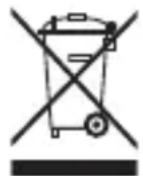
Correct Disposal of This product (Waste Electrical & Electronic Equipment).
(Applicable in the European Union and other European countries with separate collection systems).
This marking shown on the product or its literature indicates that it should not be disposed with other household wasted at the end of its working life. To prevent possible harm to the environment or human health from uncontrolled waste disposal, please separate this from other types of wastes and recycle it responsibly to promote the sustainable reuse of material resources. Household users should contact either the retailer where they purchased this product, or their
local government office, for details of where and how they can take this item for environmentally safe recycling.
Business users should contact their supplier and check the terms and conditions of the purchase contract. This product should not be mixed with other commercial wastes of disposal.
Disposal of waste batteries (applicable in the European Union and other European countries with separate collection systems)
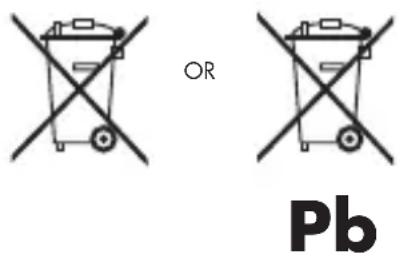
Either of the symbols shown next may appear on the battery or on the packaging to indicate that the battery provided with this product shall not be treated as household waste. On certain batteries this symbol might be used in combination with a chemical symbol. The chemical symbols for mercury (Hg) or lead (Pb) are added if the battery contains more than 0.0005% mercury or 0.004% lead. By ensuring these batteries are disposed of correctly, you will help prevent potentially negative consequences for the environment and human health which could otherwise be caused by inappropriate waste handling of the battery. The recycling of the materials will help to conserve natural resources. In case of products that for safety, performance or data integrity reasons require a permanent connection with an incorporated battery, this battery should be replaced by qualified service staff only. To ensure that the battery will be treated properly, hand over the product at end-of-life to the applicable collection point for the recycling of electrical and electronic equipment.
For all other batteries, please view the section on how to remove the battery from the product safely. Hand the battery over to the applicable collection point for the recycling of waste batteries. For more detailed information about recycling of this product or battery, please contact your local Local government Office, your household waste disposal service or the shop where you purchased the product.
When travelling to and within the United States of America, please be aware that the U.S.
Department of Transportation (DOT) recently published new regulations that apply to passengers travelling with lithium metal batteries and lithium-ion batteries.
For detailed information, visit http://safetravel.dot.gov/whats_new_batteries.html.
Safety Information
Yarvik Tablet device
- Yarvik is not responsible for any interference that you may experience or that may be caused when operating this device.
-
Warning: We strongly advise to connect this device to a earthed wall socket when charging.
-
Opening or dismantling the main unit or any of its accessories, for whatever reason, could lead to damages that are not covered by the guarantee.
- To avoid electrical shock, do not open the cabinet. Refer servicing to qualified personnel only.
- To prevent fire or shock hazard, do not expose your tablet device or any of its accessories to rain or moisture.
- Do not use or store your tablet device in a location subject to heat sources, such as radiators or air ducts; direct sunlight; excessive dust; moisture or rain; mechanical vibration or shock; strong magnets or speakers that are not magnetically shielded; excessively high and low temperatures; and high humidity.
- Turning off your tablet device with the power button does not disconnect the device completely from mains voltage. To disconnect it completely, unplug the AC adapter or the power cord from mains. The socket-outlet shall be installed near the equipment and shall be easily accessible.
- Audio and picture distortion may occur if this equipment is positioned in close proximity to any equipment emitting electromagnetic radiation.
- This apparatus is also designed for IT power system with phase to phase voltage 230V, for customers in Norway.
- Observe the following precautions to provide adequate air circulation and to ensure normal reliable operation:
- Do not use the tablet device and/or the AC adapter while covered or wrapped in cloth. Ensure the AC adapter operates in a clear environment.
- Turn off the tablet device before putting the device into a bag or a carrying case.
- Do not use your tablet device directly on your lap. The temperature of the base of the unit will rise during normal operation and over time could result in discomfort or burns.
- Do not use your tablet device while walking. Listening to music with headphones or watching the LCD screen while walking may lead to an unexpected accident and result in personal injuries.

- Using connected headphones on the tablet device for too long and/or setting the audio volume up too high when using headphones may cause serious hearing damage.
- Avoid strong beating of or to the product.
- Don't operate the touch screen of the tablet device with sharp objects, as this may result in scratching the screen surface.
- Only use permitted batteries, chargers and accessories with your tablet device. The use of any other products with the device can be dangerous and may violate the warranty regulations.
- Only use a slightly wet cotton cloth to clean the device, and only use water to wetten the cotton cloth. The tablet device should not be cleaned with any sort of (glass) cleaning aid.
Wireless functionality
- If radio interference with other devices occurs while using your tablet device, do not use the wireless functionality. Use of the wireless functionality may cause a malfunction of the devices,
resulting in an accident.
- In some situations or environments, the use of the wireless functionality might be restricted by the proprietor of the building or responsible representatives of the organization, for example on board airplanes, in hospitals or in any other environment where the risk of interference with other devices or services is perceived or identified as harmful. If you are uncertain about the policy applying to the use of wireless functionality in a specific organization or environment, you are encouraged to first ask for authorization prior to switching it on. Consult your physician or the manufacturer of personal medical devices (pacemakers, hearing aids, etc.) regarding any restrictions on the use of wireless functionality.
- If using wireless functionality near a pacemaker, make sure it is at least 19 inches / 50 cm away from the pacemaker.
- Due to the transmission and reception properties of wireless communications, data can occasionally be lost or delayed. This can be due to the variation in radio signal strength that results from changes in the characteristics of the radio transmission path. Yarvik will not be held responsible for damages of any kind resulting from the delays or errors in data transmitted or received via wireless functionality, or failure of wireless functionality to transmit or receive such data.
- If the equipment does cause harmful interference to radio/TV reception, which can be determined by turning the equipment off and on, the user is encouraged to try to correct the interference by one or more of the following measures: reorient or relocate the receiving antenna, increase the distance between the sender and the receiver, consult the dealer or an experienced radio/TV technician for help. Yarvik will not be responsible for any radio/TV interference nor for any other undesired effect.
Wireless LAN Security
Creating security settings for the Wireless LAN is extremely important. Yarvik assumes no responsibility for any security problems that may arise from the use of the Wireless LAN.
Battery pack
Do not charge the battery pack in any way other than as described in the Start guide or as designated by Yarvik in writing.
AC adapter
- It is highly recommended that you use a genuine Yarvik AC adapter supplied by Yarvik for your product.
- This AC adapter is intended for use with the tablet device IT products only.
- Do not place the AC adapter in contact with your skin. Remove the AC adapter away from your body if it becomes warm and causes discomfort.
RoHS
This products has been certified as RoHS Compliant.
Dimensions, specifications, images & illustrations
All dimensions, specifications, images and illustrations are subject to change without prior notice.
http://safetravel.dot.gov/whats_new_batteries.html.
Dimensions, specifications, images et illustrations
Please consult the legal information available on your Tablet under Settings - About device - Legal information or visit http://source.android.com/source/licenses.html for more information (internet connection required)
Please visit our website for CE declaration: www.yarvik.com

facebook.com/yarvik

twitter.com/yarvikce

youtube.com/yarvikce

forum.yarvik.com



- Getting on the Internet
- When a Problem Occurs
- Soft Reset via Reset Button
- Package Content
- Buttons & Connections
- Charging
- USB
- Android Home Screen
- PT
- When a Problem Occurs
- HU
- Start up after Soft Reset
- EC Declaration of Conformity
- Tablet
- Important information ①
- Wireless LAN-Regulatory information
- Conditions of use
- WEEE Symbol Information
- (Applicable in the European Union and other European countries with separate collection systems).
- Disposal of waste batteries (applicable in the European Union and other European countries with separate collection systems)
- Safety Information
- Yarvik Tablet device
- Wireless functionality
- Wireless LAN Security
- Battery pack
- AC adapter
- RoHS
- Dimensions, specifications, images & illustrations
- Dimensions, specifications, images et illustrations
Brand : Yarvik
Model : Noble 7
Category : Tablet