 ManualGo.com
 GSD4060DSS - Dishwasher GE - Free user manual and instructions
Find the device manual for free GSD4060DSS GE in PDF.


Download the instructions for your Dishwasher in PDF format for free! Find your manual GSD4060DSS - GE and take your electronic device back in hand. On this page are published all the documents necessary for the use of your device. GSD4060DSS by GE.
USER MANUAL GSD4060DSS GE
49-55091 09-14 GE Safety Instructions 2–5
Operating Instructions
Care and Cleaning 14
Control Settings 6–7
Consumer Support 18
Write the model and serial
Model # ___________________
Serial # ____________________ You can find them on a label on the tub wall just inside the door. Standard Tub
IMPORTANT SAFETY INFORMATION
5($'$//,16758&7,216%()25(86,1*³
SAVE THESE INSTRUCTIONS For your safety, the information in this manual must be followed to minimize the risk
of fire, explosion, electric shock, and to prevent property damage, personal injury, or
WATER HEATER SAFETY WARNING!
Under certain conditions, hydrogen gas may be produced in a water heater that has not been used for two or more weeks.
HYDROGEN GAS IS EXPLOSIVE.
If the hot water has not been used for two or more weeks, prevent the possibility of damage or injury by turning on all hot
water faucets and allowing them to run for several minutes. Do this before using any electrical appliance connected to
the hot water system. This simple procedure will allow any built-up hydrogen gas to escape. Since the gas is flammable,
do not smoke, use an open flame, or use the appliance during this process.
Use this appliance only for its intended purpose as
described in this Owner’s Manual.
Use only detergents or wetting agents
recommended for use in a dishwasher
and keep them out of reach of children.
Using a detergent that is not specifically
designed for dishwashers will cause the
dishwasher to fill with suds.
Locate sharp items so that they are not likely to damage the
Load sharp knives with the handles up to reduce the risk of
Do not wash plastic items unless marked dishwasher safe
or the equivalent. For plastic items not so marked, check the
manufacturer’s recommendations.
Do not touch the heating element during or immediately
Do not operate your dishwasher unless all enclosure
panels are properly in place.
Do not tamper with controls.
Do not abuse, sit on or stand on the door or dish rack of the
To reduce the risk of injury, do not allow children to play with,
on or inside this appliance at any time.
Do not store or use combustible materials including gasoline
or other flammable liquids or vapors in the vicinity of this or any
Small parts, such as rack clips and filter retaining posts, can
be a choke hazard to small children if removed from the
dishwasher. Keep out of reach of small children.
When using your dishwasher, follow basic precautions, including the following:
PROPER INSTALLATION AND MAINTENANCE This dishwasher must be properly installed and located in accordance with the Installation Instructions before it is used. If
you did not receive an Installation Instructions sheet with your dishwasher, you can receive one by visiting our Website at
GEAppliances.com. In Canada, visit www.GEAppliances.ca.
Connect the dishwasher/appliance to a grounded metal,
permanent wiring system; or run an equipment-grounding
conductor with the circuit conductors and connect to the
equipment-grounding terminal or lead of the appliance.
Improper connection of the equipment-grounding conductor
can result in a risk of electric shock. Check with a qualified
electrician or service representative if you are in doubt
whether the appliance is properly grounded.
Dispose of discarded appliances and shipping or packing
Do not attempt to repair or replace any part of your
dishwasher unless it is specifically recommended in this
manual. All other servicing should be referred to a qualified
Use only cord kit WX09X70910 or hard-wire to building
electrical. Failure to follow this instruction, could result in risk of
fire and personal injury.
To minimize the possibility of electric shock, disconnect this
appliance from the power supply before attempting any
NOTE: Turning the dishwasher off does not disconnect the
appliance from the power supply. We recommend having
a qualified technician service your appliance.
SAVE THESE INSTRUCTIONS GEAppliances.com
READ AND FOLLOW THIS SAFETY INFORMATION CAREFULLY.
SAVE THESE INSTRUCTIONS RISK OF CHILD ENTRAPMENT PROPER DISPOSAL OF THE DISHWASHER Junked or abandoned dishwashers are dangerous…even if they will sit for “just a few days.”
If you are getting rid of your dishwasher, please follow the instructions below to help prevent
Do not allow children to play with, on, or inside this or any discarded appliance.
'RQRWGLVFDUGDGLVKZDVKHUZLWKRXW¿UVWUHPRYLQJWKHGRRURIWKHZDVKLQJFRPSDUWPHQW
or remove the latch by removing the two screws from the door latch keeper (as shown).
To prevent minor injury and property damage
During or after wash cycle, contents may be hot to the
touch. Use care before handling.
Close supervision is necessary if this appliance is used by
or near children. Do not allow children to play around the
dishwasher when closing the door, closing the upper rack,
or while vertically adjusting the upper rack due to the
possibility of small fingers being pinched.
Non-Dishware Items: Do not wash items such as
electronic air cleaner filters, furnace filters and paint
brushes in your dishwasher. Damage to the dishwasher
and discoloration or staining of the dishwasher may
Load light-weight, plastic items so they do not become
GLVORGJHGDQGGURSWRWKHERWWRPRIWKHGLVKZDVKHU³
they might come into contact with the heating element
This appliance must be supplied with 120V, 60 Hz, and
connected to an individual, properly grounded branch
circuit, protected by a 15 or 20 amp circuit breaker or
If the electric supply provided does not meet the above
specifications, it is recommended that a licensed
electrician install an approved outlet.
Your dishwasher circuit should not be used for any other
appliance while the dishwasher is in operation as the
dishwasher requires the full capacity of the circuit.
ELECTRICAL REQUIREMENTS
If your dishwasher is connected to a wall switch,
ensure that the switch is on prior to use.
If you choose to turn the wall switch off between
wash cycles, allow 5-10 seconds after turning the
switch on before touching Start to allow the control
Use only powder, Cascade
All-in-1 ActionPacs™, liquid
detergents or rinse agents recommended for use in a
dishwasher and keep them out of the reach of children.
Detergent, and Cascade
Rinse Aid™ rinse agents have
been approved for use in all GE dishwashers.
NOTICE Door latch keeper4
INFORMACIÓN IMPORTANTE DE SEGURIDAD
About the dishwasher control panel
An indicator light above the selected pad will be ON to indicate which CYCLE has been selected, on some models. POTS & PANS/ For heavily soiled dishes or cookware with dried-on or baked-on soils. Everyday dishes may be included.
HEAVY WASH This cycle will not remove burned-on foods. (on some models) NORMAL/ This cycle is meant for daily, regular, or typical use to completely wash a full load of normally soiled
dishes and is designed to conserve both water and energy. SHORT WASH For quickly washing loads of everyday dishes with medium soils that have not dried on, such as loads
(on some models) consisting mostly of glasses. WATER SAVER For dishes with light soils. LIGHT WASH
(on some models) RINSE ONLY For rinsing partial loads that will be washed later. Do not use detergent.
DRYING For warming clean dishes and serving plates. This cycle will take approximately 30 minutes. PLATE WARMER HOT PREWASH Preheats wash water to the correct temperature. HOT START CHINA CRYSTAL For lightly soiled china and crystal. (on some models) Control Settings
An indicator light above the selected pad will be ON to indicate which OPTION has been selected, on some models.
HI TEMP Turns on the heater in all final rinse cycles to help prevent spotting on dishware. This option may be
RINSE turned ON or OFF during the wash cycle. (on some models) HI TEMP Energizes the heater to boost water temperature in prewash and main wash fill cycles. Recommended
WASH for use with heavily soiled dishes. Option may be turned ON or OFF during the wash cycle.
HEATED DRY Shuts off the drying heat option. Dishes air dry naturally and energy is saved. Open the dishwasher door
OFF to speed drying.
HEATED DRY Turns the heater on for fast drying. This cycle will extend the time to your wash cycle by 30 minutes.
ON DO NOT use with RINSE ONLY cycle. LOCK When the LOCK pad is touched twice within 3 seconds, all pads become inoperative. You can lock the controls to (electronic models prevent any selections from being made. Or you can lock the controls after you have started a cycle or selected
only) DELAY START so the cycle or DELAY START is not interrupted.
Children cannot accidentally start dishwasher by touching pads with this option selected. To unlock the dishwasher after it has been locked, touch the LOCK pad twice within 3 seconds. The light above the LOCK pad will turn off. DELAY HOURS Delays the start of a wash cycle for up to 8 hours.
(on some models) RESET Touch RESET to cancel options.
(timer models) START/RESET Touch START/RESET one time to start dishwasher cycle. Touch START/RESET a second time to pump out (electronic models) and then turn off the dishwasher. Do not touch START/RESET more than one time unless you intend to end the cycle. n
Hot Start Option adds water amount and cycle time shown when selected.
*Normal Wash button should be pushed to run this cycle.
NOTE: Not all models have every cycle listed.8
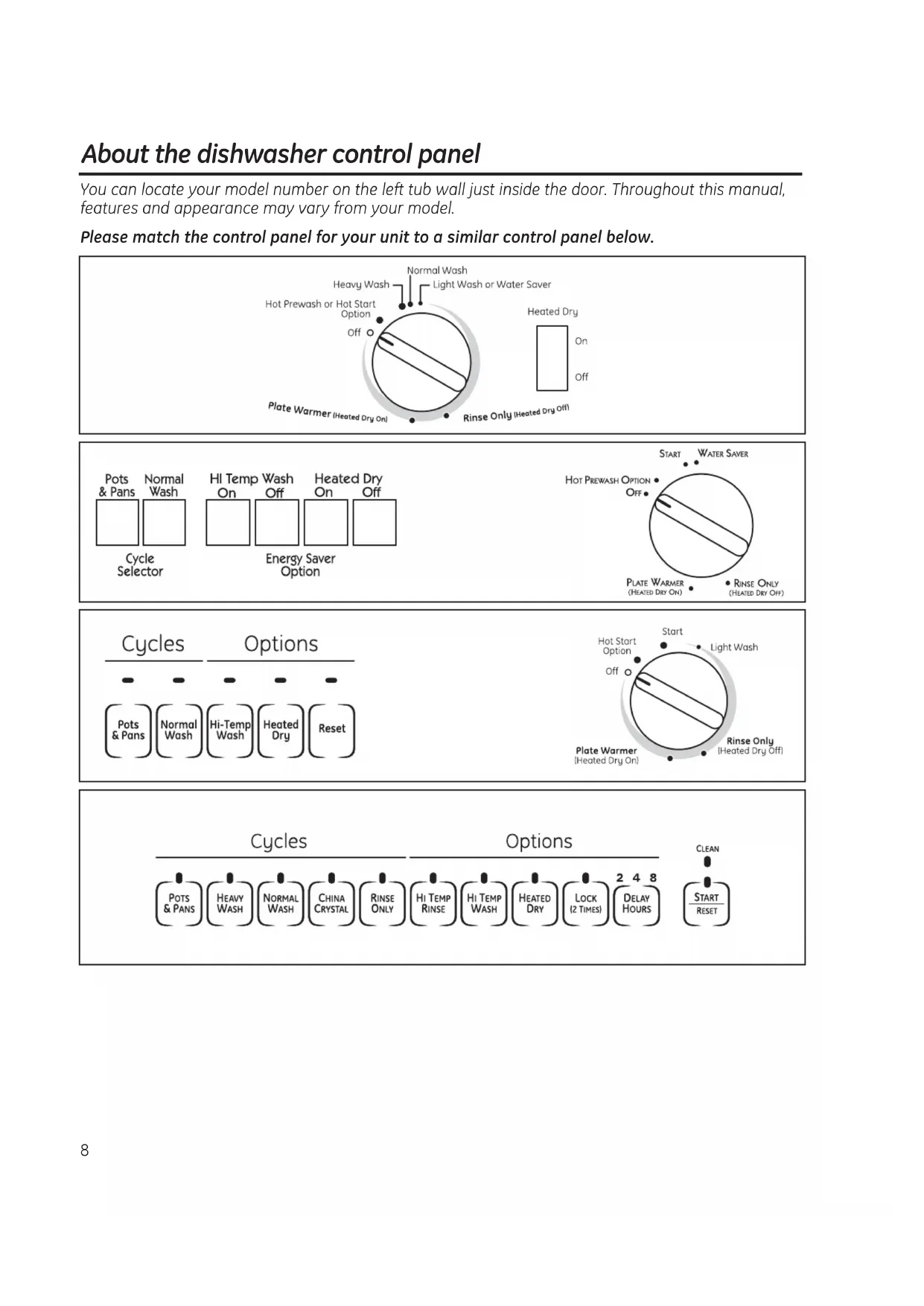
About the dishwasher control panel
You can locate your model number on the left tub wall just inside the door. Throughout this manual,
features and appearance may vary from your model.
Please match the control panel for your unit to a similar control panel below.Start (Models with a Dial)
Slowly turn the Dial to the START or ON position, or the selected cycle. Don’t turn it past the START,
ON or cycle position; you could accidentally miss a prewash.
There is a time delay between start-up and water fill so you will not hear any wash action right
away. Latch the door to begin the cycle. 9
Operation of models with cycle dial GEAppliances.com
For rinsing partial loads that will be washed later. Do not use detergent.
Make sure HEATED DRY is not selected.
Slowly turn the Dial to RINSE ONLY.
Be sure the door is unlatched.
Latch the door to start the cycle.
Be sure the door is unlatched.
Slowly turn the Dial to SHORT WASH,
LIGHT WASH or WATER SAVER.
Latch the door to start the cycle.
Plate Warmer or Drying
Load clean dishware to be warmed.
Select HEATED DRY ON.
Be sure the door is unlatched.
Slowly turn the Dial to PLATE WARMER or
Latch the door to start the cycle.
Hot Start or Hot Prestart Option
Preheats wash water.
Select the HOT START or HOT PRESTART
cycle and any other option on the push
Be sure the door is unlatched.
Slowly turn the Dial to HOT START or
Latch the door to start the cycle.
For warming clean dishes and serving plates. This cycle will take approximately 39 minutes.
Short Wash or Light Wash or Water Saver
For quickly washing loads of everyday dishes with light to medium soils that have not dried on.10
Operation of electronic models (model GSD4000 Only) Lights What It Means What To Do This is normal. Allow the dishwasher to drain and reset before you start a new The START/RESET pad wash cycle. has been pressed. Control Error Press the START/RESET pad to turn off the beeper. If the CLEAN light continues to flash, call for service. Control Error Press the START/RESET pad to turn off the beeper and the dishwasher will attempt to reset. Restart the wash cycle. If this error continues, turn off the power to the dishwasher at the circuit breaker for 30 seconds. Try the dishwasher again. If the error is still present, call for service.PLUS A BEEPING SOUNDRESETSTARTSTART CLEANCLEAN PLUS A BEEPING SOUND Using the Dishwasher Door
The door must be closed and locked into place to select a LOAD SELECTION or an OPTION.
If the door is opened during a cycle and left open, the dishwasher will beep once every 30 seconds until the door is closed and latched into place.Start Close and latch the door. Touch the START/RESET pad to begin the cycle. Water fill begins and approximately 60 seconds later the wash action begins. NOTE: The dishwasher remembers your last cycle so you don’t have to reprogram each time. When
the dishwasher is loaded and the door latch is in the locked position, the control panel lights will be ON and display the last settings you selected. If you don’t want to change any of the settings, simply touch the START/RESET pad to begin the cycle. Also, if a power failure occurs, NORMAL and HEATED DRY will automatically be programmed.
Make any new selections and touch the START/RESET pad to begin the cycle. Clean This light is illuminated when a wash cycle is complete. The light will stay ON until the door is opened.
Flashing Display LightsFilling the Dispenser
Fill the rinse agent dispenser until it reaches the bottom of
lip inside the opening. Replace cap.
To check if rinse agent is needed, remove the cap and
look into the dispenser.
A full dispenser should last about one month.
If the rinse agent spills, wipe up the excess.
Check the Water Temperature
The entering water must be at least 120°F and
not more than 150°F, for effective cleaning and to
prevent dish damage. Check the water temperature
with a candy or meat thermometer. Turn on the
hot water faucet nearest the dishwasher, place
the thermometer in a glass and let the water
run continuously into the glass until the temperature
Adjust the maximum/minimum temperature of the
water heater if necessary to deliver water at the
Use a Rinse Agent such as Cascade
Rinse agents, such as Cascade
are designed for great drying action and to protect against
spots and film build-up on your dishes, glasses, flatware, cookware, and plastic.
Use only detergent specifically made for use in
dishwashers. Cascade
Automatic Dishwashing
Detergents have been approved for use in all GE
dishwashers. Keep your detergent fresh and dry.
Don’t put powder detergent into the dispenser until
you’re ready to wash dishes.
The amount of detergent to use depends on whether
your water is hard or soft. With hard water, you
need extra detergent. With soft water, you need less
Protect your dishes and dishwasher by contacting
your water department and asking how hard your
water is. Twelve or more grains is extremely hard
water. A water softener is recommended. Without
it, lime can build up in the water valve, which could
stick while open and cause flooding. Too much
detergent with soft water can cause a permanent
cloudiness of glassware, called etching.
Use the information in the table below as a guideline
to determine the amount of automatic dishwasher
detergent to place in the dispenser.
You’ll find two detergent dispensers on the inside door
of your dishwasher. All wash cycles require detergent
detergent tabs, simply place one tab in the main cup
Be sure the Dial is OFF before adding detergent.
detergent cup will not close and latch
Add detergent then close the main cup.
NOTE: To open detergent cup after it has been
closed, simply turn the detergent cup handle
counterclockwise until it releases. A snapping
DO NOT USE HAND DISH DETERGENT NOTE: Using a detergent that is not specifically
designed for dishwashers will cause the dishwasher
to fill with suds. During operation, these suds will spill
out of the dishwasher vents, covering the kitchen floor
and making the floor wet.
Because so many detergent containers look alike,
store the dishwasher detergent in a separate space
from all other cleaners. Show anyone who may use
the dishwasher the correct detergent and where it
While there will be no lasting damage to the
dishwasher, your dishes will not get clean using
a dishwashing detergent that is not formulated
to work with dishwashers.
Using the dishwasher GEAppliances.com
Detergent Cups to Fill
Fill to 1/3 of main cup
Fill to 2/3 of main cup
main cup and open cup
Greater than 12 Open cupMain cup 11Loading the dishwasher racks
The upper rack is for glasses, cups and
saucers. Cups and glasses fit best along
the sides. This is also a secure place for
dishwasher-safe plastics. The upper rack is
good for all kinds of odd-shaped utensils.
Saucepans, mixing bowls and other items
should be placed face down.
Secure larger dishwasher-safe plastics over
two fingers when possible.
Make sure small plastic items are secure so
they can’t fall onto the heating element.
Keep the center area clear in the lower
The wash tower rises through the
center of the lower rack during the
wash and rinse portions of the cycle.
For best dishwashing results, follow these loading guidelines. Features and appearance of racks and silverware
baskets may vary from your model.
When loading the lower rack, do not load
large platters or trays in the front right
corner. They may prevent detergent from
circulating during the wash cycle.
The lower rack is best used for plates,
saucers and cookware. Large items such as
broiler pans and racks should go along the
sides. Load platters, pots and bowls along
the sides, in corners or in the back. The
soiled side of items should face the center
Don’t block the wash
tower or load tall things
Be sure items don’t fall
through rack and block
rotation of the spray arm.
Also, be careful not to
let a portion of an item
such as a pot or dish
handle extend through
the bottom rack. This
could block the wash
Put flatware in the removable basket
with fork and knife handles up to protect
your hands. Place spoons in the basket
with handles down. Mix knives, forks
and spoons so they don’t nest together.
Distribute evenly. Small plastic items, such
as measuring spoons and lids from small
containers, should go in the bottom of the
silverware basket with silverware on top.
DON’T LET ANY ITEM EXTEND THROUGH BOTTOM OF SILVERWARE BASKET AND RACK, TO ENSURE PROPER FUNCTION OF SPRAY ARM.
Do not cover upper rack tower
(not present on all models)
Don’t block the upper rack
wash tower.Follow these guidelines for loading 10 place settings. Features and appearance of racks and silverware baskets
may vary from your model.
Loading place settings… GEAppliances.com
8SSHU5DFN³SODFHVHWWLQJV 8SSHU5DFN³SODFHVHWWLQJV /RZHU5DFN³SODFHVHWWLQJV Forget to Add a Dish? A forgotten dish can be added any time before the main wash. 1 Push the door latch to the left. 2 Once the water calms, open the door. Steam may rise out of the dishwasher. 3 Add forgotten dish. 4 Close the door and push the latch to the far right. Tips for Loading and Good Wash Performance Don’t block the lower rack wash tower. Don’t let items fall through rack and block spray arms.
8SSHU5DFN³SODFHVHWWLQJV 8SSHU5DFN³SODFHVHWWLQJV /RZHU5DFN³SODFHVHWWLQJVCaring for the dishwasher
To clean the control panel, use a lightly dampened cloth, then dry thoroughly. To clean the exterior, use a good appliance
polish. Never use sharp objects, scouring pads or harsh cleaners on any part of the dishwasher.
If your dishwasher is left in an unheated place
during the winter, ask a service technician to:
Cut off electrical power to the dishwasher.
Remove fuses or trip circuit breaker.
Turn off the water supply and disconnect the
water inlet line from the water valve.
Drain water from the inlet line and water
valve. (Use a pan to catch the water.)
Reconnect the water inlet line to the
Remove the plastic sump cover in the tub
bottom and use a sponge to soak up water
An air gap protects your dishwasher against
water backing up into it if a drain clogs.
The air gap is not a part of the dishwasher.
It is not covered by your warranty. Not all
plumbing codes require air gaps, so you may not
The air gap is easy to clean.
Turn off the dishwasher and lift off the
Unscrew the plastic cap and clean with
a toothpick. Check the air gap any time your dishwasher isn’t draining well.Air gap Does Your Dishwasher Have an Air Gap?
Protect Against Freezing
For cleaning rust and tarnish, cleaners with
oxalic acid such as Bar Keepers Friend Soft
Cleanser™ will remove rust, tarnish and small
blemishes. Use only a liquid cleanser free
of grit and rub in the direction of the brush
lines with a damp soft sponge. Do not use
appliance wax or polish on the stainless steel.
For other blemishes and marks, use Stainless
Steel Magic or a similar product using a clean
soft cloth. Do not use appliance wax, polish,
bleach or products containing chlorine on
Stainless Steel. You can order Stainless Steel
Magic # WX10X29 through
877.959.8688. In Canada, call 1-800-661-1616.
Stainless Steel Panels
You can change the appearance of your
dishwasher by adding a custom panel trim kit.
1/4” Wood panel trim kit³This accessory
contains trim and instructions for you to supply
DQGLQVWDOODøµWKLFNGHFRUDWLYHZRRGGRRU
GPF25B (Black) GPF325B/GPF425B
GPF25W (White) GPF325W/GPF425W
GPF25C (Bisque) GPF325C/GPF425C
3/4” Trimless wood panel kit³This accessory
contains parts and instructions for you to supply
DQGLQVWDOOD øµWKLFNGHFRUDWLYHZRRGGRRU
NOTE: The GPF100 dishwasher door spring kit
must also be ordered and installed when the
door panel weighs four lbs. or more. This kit is
included with the 3/4” trim kits.
Non-wood countertop bracket kit³This is for
installations which have non-wood countertops
and includes side-mounting brackets and
instructions for securing the dishawasher:
Consult your GE Appliance dealer to get the correct
These accessories are available at extra cost
from GE. Call 800.626.2002 to order, or see your
authorized GE Appliance dealer. Visa, MasterCard
or Discover cards are accepted. Specify accessory
number when ordering. Sump cover screws
Optional accessoriesProblem Possible Causes What To Do
Dishwasher won’t run Fuse is blown, or the • Replace fuse or reset circuit breaker. Remove any other appliances
circuit breaker tripped from the circuit.
• Try pressing the START/RESET pad (Electronic models) two times.
Power is turned off • In some installations, power to the dishwasher is provided through a wall
switch, often located next to the disposer switch. Make sure it is on.
Noise Some of the sounds • Soft food disposal shredding action.
you’ll hear are normal
• Drain valve opening to pump water out.
• Timer control as cycle progresses.
• Detergent cup opening.
• The motor stopping during the drying period.
• Water draining out of tub immediately after touching the START/RESET pad.
Utensils are not secure • Make sure everything is secured in dishwasher.
in rack or something small
has dropped into rack
Rattling dishes when • Make sure dishes are properly loaded. See the Loading the
the spray arm rotates dishwasher racks section.
Motor hums • Dishwasher has not been used on a regular basis. If you do not use
your dishwasher often, set it to fill and pump out once every week.
This will help keep the seal moist.
Water standing in This is normal • A small amount of clean water around the outlet on the tub bottom
the bottom of the tub at the back of the tub keeps the water seal lubricated.
Water won’t pump Drain is clogged • If you have an air gap, clean it.
• Check to see if your kitchen sink is draining well. If not, you may need
• If the dishwasher drains into a disposer, run disposer clear.
Suds in the tub Wrong detergent • Use only automatic dishwasher detergents to avoid sudsing.
Automatic Dishwashing
Detergents have been approved for use in all GE dishwashers.
• To remove suds from the tub, open the dishwasher and let suds
dissipate. Add 1 gallon of cold water to the tub. On Models with a Dial:
Close and latch the dishwasher. Pump out water by slowly turning the
Dial until a drain period is reached. Repeat if necessary. On Models with
Electronic Control: Pump out water by pressing the START/RESET pad,
then 10 seconds later, press START/RESET pad again. Repeat if necessary.
Rinse agent was spilled • Always wipe up rinse agent spills immediately.
Stained tub interior Some tomato-based • Use of the RINSE ONLY cycle after adding the dish to the load
foods can cause reddish can decrease the level of staining. GE recommends Cascade
stains Plastic Booster to help remove these types of stains.
Tea or coffee stains • Remove the stain by hand, using a solution of 1/2 cup bleach
and 3 cups warm water.
WARNING Before cleaning interior, wait at least 20 minutes after a cycle for the
heating elements to cool down. Failure to do so can result in burns.
ADVERTENCIA Antes de limpiar el interior, espere por lo menos 20 minutos después de un ciclo
para que los elementos calentadores se enfríen. No hacerlo puede provocar
An overall yellow or • A special filter in the water supply line is the only way to correct
brown film can be this problem. Contact a water softener company.
caused by iron deposits
White film on inside • GE recommends Cascade Crystal Clear
to help prevent hard water
VXUIDFH³KDUGZDWHU mineral deposits from forming.
• Run dishwasher with citric acid to remove mineral deposits. Citric
acid (Part number: WD35X151) can be ordered through GE Parts.
See back cover for ordering information.
Before you call for service…
Troubleshooting Tips Save time and money! Review the charts on the following
pages, or visit GEAppliances.com. You may not need to call for service.Problem Possible Causes What To Do
Dishes don’t dry Low inlet water • Make sure inlet water temperature is at least 120°F.
• Select HEATED DRY.
• Use HOT START and ADDED HEAT options.
• Select a higher cycle, such as POTS & PANS or HEAVY WASH.
Rinse agent dispenser • Check the rinse agent dispenser and fill as required.
Dishes and flatware Inlet water temperature • Raise the water heater temperature to 120°F.
• Use HOT START, POTS & PANS or HEAVY WASH and HI TEMP WASH.
Too little detergent • See Using the dishwasher section, refer to Proper Use of Detergent for
detergent recommendations.
Old or damp powdered • See Using the dishwasher section, refer to Proper Use of Detergent for
detergent detergent recommendations.
Water pressure is • Turn on a faucet. Is water coming out more slowly than usual? If so,
temporarily low wait until pressure is normal before using your dishwasher.
Air gap is clogged • Clean the air gap.
Improper rack loading • Make sure large dishware does not block detergent dispenser or wash arm.
No air gap or high • Verify that you have an air gap or a high drain loop. Refer to
drain loop the Installation Instructions.
Spots and filming • Use Cascade
rinse agents to remove spots and prevent
on glasses and new film buildup.
flatware • To remove stubborn spots and pre-existing film from glassware:
1 Remove all metal utensils from the dishwasher.
Do not add detergent.
3 Select the longest cycle.
4 Start the dishwasher and allow to run for 18 to 22 minutes.
Dishwasher will now be in the main wash.
5 Open the door and pour 2 cups (500 ml) of white vinegar into the
bottom of the dishwasher.
6 Close the door and allow to complete the cycle. If vinegar rinse
doesn’t work: Repeat as above, except use 1/4 cup (60 ml) of citric
acid crystals instead of vinegar.
Cloudiness on Combination of soft • This is called etching and is permanent. To prevent this from
glassware water and too much happening, use less detergent if you have soft water. Wash glassware in
detergent the shortest cycle that will get it clean.
Water temperature • Lower the water heater temperature.
entering the dishwasher
Detergent cup lid Dial is not in the OFF • Turn the Timer Dial to OFF.
won’t latch position
Detergent left in Dishes are blocking the • Reposition the dishes.
dispenser cups detergent cups
Steam This is normal • Steam comes through the vent by the door latch during drying and
when water is being pumped out.
Black or gray Aluminum utensils have • Remove marks with a mild, abrasive cleaner.
marks on dishes rubbed against dishes
Control panel lights Time too long between • Each pad must be touched within 30 seconds of the others. To relight,
go off when you are touching or selecting touch any pad again or unlatch and relatch the door.
setting controls pads
Control panel Door latch may not • Call for service.
responded to inputs be properly seated
but dishwasher never
Extremely hard water
Too little detergent17
What Is Not Covered (for customers in Canada):
Service trips to your home to teach you how to use
Improper installation.
If you have an installation problem, contact your dealer
are responsible for providing adequate
electrical, exhausting and other connecting facilities.
Failure of the product if it is abused, misused, or used for
other than the intended purpose or used commercially.
Replacement of house fuses or resetting of circuit breakers.
Damage to the product caused by accident, fire, floods
Damage caused after delivery.
For The Period Of: GE Will Replace:
One Year Any part of the dishwasher which fails due to a defect in materials or workmanship. During
From the date of the this limited one-year warranty, GE will also provide, free of charge, all labor and in-home service
original purchase to replace the defective part.
What GE Will Not Cover (for customers in the United States):
Service trips to your home to teach you how to use
Improper installation, delivery or maintenance.
Failure of the product if it is abused, misused, or used for
other than the intended purpose or used commercially.
Replacement of house fuses or resetting of circuit breakers.
Product not accessible to provide required service.
Damage to the product caused by accident, fire, floods
Incidental or consequential damage caused by possible
defects with this appliance.
Cleaning or servicing of the air gap device in the drain line.
Damage caused after delivery, including damage from
items dropped on the door.
This warranty is extended to the original purchaser and any succeeding owner for products purchased for home use within the
USA. If the product is located in an area where service by a GE Authorized Servicer is not available, you may be responsible for a trip
charge or you may be required to bring the product to an Authorized GE Service location for service. Proof of original purchase date
is needed to obtain service under the warranty. In Alaska, the warranty excludes the cost of shipping or service calls to your home.
Some states do not allow the exclusion or limitation of incidental or consequential damages. This warranty gives you specific legal
rights, and you may also have other rights which vary from state to state. To know what your legal rights are, consult your local or
state consumer affairs office or your state’s Attorney General.
:DUUDQWRU*HQHUDO(OHFWULF&RPSDQ\/RXLVYLOOH.<
This warranty is extended to the original purchaser and any succeeding owner for products purchased in Canada for home use
within Canada. In home warranty service will be provided in areas where it is available and deemed reasonable by Mabe to provide.
Staple your receipt here.
Proof of the original purchase
date is needed to obtain service
GE Dishwasher Warranty.
All warranty service provided by our Factory Service Centers,
or an authorized Customer Care
technician. To schedule service
on-line, visit us at GEAppliances.com, or call 800.GE.CARES (800.432.2737)
in the United States. In Canada, call 1.800.561.3344. Please have serial
number and model number available when calling for service.
WARRANTOR IS NOT RESPONSIBLE FOR CONSE QUEN TIAL DAMAGES.
(;&/86,212),03/,(':$55$17,(6³<RXUVROHDQGH[FOXVLYHUHPHG\LVSURGXFWUHSDLUDVSURYLGHGLQWKLV/LPLWHG
Warranty. Any implied warranties, including the implied warranties of merchantability or fitness for a particular
purpose, are limited to one year or the shortest period allowed by law.
(;&/86,212),03/,(':$55$17,(6³<RXUVROHDQGH[FOXVLYHUHPHG\LVSURGXFWUHSDLUDVSURYLGHGLQWKLV/LPLWHG
Warranty. Any implied warranties, including the implied warranties of merchantability or fitness for a particular
purpose, are limited to one year or the shortest period allowed by law.
Warrantor: MC COMMERCIAL, Burlington, L7R 5B618
Register Your Appliance In the U.S.: GEAppliances.com
5HJLVWHU\RXUQHZDSSOLDQFHRQOLQH³DW\RXUFRQYHQLHQFH7LPHO\SURGXFWUHJLVWUDWLRQZLOODOORZIRUHQKDQFHG
communication and prompt service under the terms of your warranty, should the need arise. You may also mail
in the pre-printed registration card included in the packing material. In Canada, visit: www.GEAppliances.ca
GE Appliances Website
Have a question or need assistance with your appliance? Try the GE Appliances Website 24 hours a day,
DQ\GD\RIWKH\HDU)RUJUHDWHUFRQYHQLHQFHDQGIDVWHUVHUYLFH\RXFDQQRZGRZQORDG2ZQHU·V0DQXDOV
order parts or even schedule service on-line. In Canada, visit: www.GEAppliances.ca
Schedule Service In the U.S.: GEAppliances.com
Expert GE repair service is only one step away from your door. Get on-line and schedule your service at your
*(VXSSRUWVWKH8QLYHUVDO'HVLJQFRQFHSW³SURGXFWVVHUYLFHVDQGHQYLURQPHQWVWKDWFDQEHXVHGE\SHRSOHRI
all ages, sizes and capabilities. We recognize the need to design for a wide range of physical and mental abilities
and impairments. For details of GE’s Universal Design applications, including kitchen design ideas for people with
disabilities, check out our Website today. For the hearing impaired, please call 800.TDD.GEAC (800.833.4322).
In Canada, contact: Manager, Consumer Relations, MC Commercial
Suite 310, 1 Factory Lane
Moncton, N.B. E1C 9M3
Extended Warranties In the U.S.: GEAppliances.com
Purchase a GE extended warranty and learn about special discounts that are available while your warranty is still
in effect. You can purchase it on-line anytime, or call 800.626.2224 during normal business hours. GE Consumer
Home Services will still be there after your warranty expires. In Canada, consult your local listings for an
extended warranty provider.
Parts and Accessories In the U.S.: GEAppliances.com
Individuals qualified to service their own appliances can have parts or accessories sent directly to their homes
(VISA, MasterCard and Discover cards are accepted). Order on-line today, 24 hours every day or by phone at
800.626.2002 during normal business hours.
Instructions contained in this manual cover procedures to be performed by any user. Other servicing generally
should be referred to qualified service personnel. Caution must be exercised, since improper servicing may cause
In Canada, consult your local listings for your nearest GE parts distributor or call 800.661.1616.
Contact Us In the U.S.: GEAppliances.com
If you are not satisfied with the service you receive from GE, contact us on our Website with all the details including
your phone number, or write to: General Manager, Customer Relations
GE Appliances, Appliance Park
Louisville, KY 40225
In Canada, write to: Director, Consumer Relations, MC Commercial
Suite 310, 1 Factory Lane
Printed in the United States
RISQUE DE SUFFOCATION POUR UN ENFANT COINCÉ
LQWHUQHV³GpS{WVGH l‘eau dure.